8 sets of original skins, wallpapers, and theme packs for DeepSeek Harness. A dual-sided skin-changing plugin that retains settings across restarts.

- Language
- JavaScript
- License
- MIT
- Branch
- main
Install
$ dsh plugin --profile web add dsh-dream-skinRun the command above in your terminal to install this plugin via the dsh CLI. You can switch Profile in the top-right corner. New to dsh? Read the beginner tutorial
Install via your agent
Install the DeepSeek Harness plugin RevolutionLA/dsh-dream-skin for me: review the repository at https://github.com/RevolutionLA/dsh-dream-skin first, then run the install command and verify the plugin loads successfully.
Paste this instruction to the DSH Web GUI assistant — it will install and verify for you.
One-Line Positioning
Dress up DeepSeek Harness with 8 sets of iOS/Linear-style translucent cool-toned skins, wallpapers, and accent colors, and turn "skin changing" into a shareable, importable, and rollback-capable standard theme pack ecosystem.
Core Features
- Provides 8 built-in skins (Calm Blue, Aurora Cyan, Nebula Purple, Ember Orange, Midnight Black, iOS Flat, Liquid Glass, Material Pink), covering light and dark modes
- Supports three wallpaper sources: local image, image URL, and CSS gradient, with independent adjustment for opacity, blur, sidebar transparency, and auto-dimming
- Provides per-user Accent colors, allowing any brand color to overlay on the current skin without disrupting the skin itself
- Implements import, export, sharing links, and local theme library via
*.dsh-theme.jsontheme packs, with format validation and rollback - Registers a dedicated section under "Settings → Appearance / Theme", containing five functional rows: Skin, Wallpaper, Advanced Wallpaper, Accent, and Theme Pack
- Persists across DSH restarts: dual-write to localStorage and host
~/.dsh/dream-skin.json, with recovery from browser side if state file is lost
Technical Implementation
- Language: JavaScript (Node-side ESM + browser-side CJS via
__ModuleLoader__) - Key Dependencies:
@deepseek-ai/cordis(plugin host framework),@deepseek-ai/dsh-client-runtime/dsh-client-locale/dsh-client-ui-theme(DSH official client packages),react^18.2 - Architecture Pattern: Standard DSH dual-sided plugin — Host side inserts
dream-skinloader entry viacordis.patch.yml, mounts/dream-skin/apitrusted JSON persistence endpoint; Browser side declares itself viadsh.clientto be pulled bydsh-client-modules, registers themes, slots, and locale dictionaries - Entry Files:
lib/index.js(Host apply),lib/client.js(Browser apply, containing 8 skin tokens and 8 language dictionaries)
Use Cases
Ordinary users who want to tune DeepSeek Harness to a translucent cool-toned visual style that matches their aesthetic, without installing desktop client injection-type skin tools. Ideal for those who spend long hours daily writing/coding in DSH Web, needing softer contrast, more restrained accent colors, and better-looking light/dark combinations, while being able to switch or share a custom color scheme with colleagues at any time.
Prerequisites & Compatibility
| Dependency | Min Version | Description |
|---|---|---|
| DeepSeek Harness (DSH) | ^0.1.0-rc.6 | Locked by peerDependencies, host extension points ctx.theme / ctx.slots / ctx.locale required |
| Node.js | >=18 | Declared by engines.node, only used for local development and test runtime |
| Browser | Modern Chromium / WebKit | Settings panel relies on native CSS variables, backdrop-filter, matchMedia (documented in README) |
| OS | macOS / Windows / Linux | Cross-platform; Host file paths use process.env.DSH_HOME or fallback to ~/.dsh/, no platform-specific fields |
Installation
dsh plugin --profile web add github:RevolutionLA/dsh-dream-skin
Configuration Options
This plugin requires no additional configuration. All adjustable options are presented graphically in Settings → Appearance (Theme) panel. Common options include:
| Option | Type | Description | Default |
|---|---|---|---|
| Skin | Single Choice | Switch between 8 built-in skins and imported theme packs | Follow system appearance |
| Wallpaper | Single Choice / File / Slider | Select local image (auto-compressed to data URL), paste image URL, or choose built-in gradient | None |
| Wallpaper Opacity | 0–100 Slider | Visual intensity of semi-transparent background for main content area and sidebar | 80% |
| Wallpaper Blur | 0–60 Slider | Applies backdrop-filter blur to wallpaper | 0 px |
| Sidebar Opacity | 0–100 Slider | Sidebar's own semi-transparent background; can be independent from main canvas | Linked with main canvas |
| Accent | Color Picker / Random | Overlays a brand color on current skin without modifying the skin itself | Follow theme |
| Auto-dim | Toggle | Dims wallpaper when focusing on tasks to avoid distraction | Off |
| Recent Wallpapers | History | Keeps up to 5, click to revert | — |
All persistence keys carry the
dsh-dream-skin:prefix, stored in browserlocalStorage; after each change, they are debounced for 200ms and pushed to host file~/.dsh/dream-skin.json. Both official Web with fixed origin and DSH Desktop with random ports can persist across restarts.
FAQ
Q: After installation, I can't see the "Appearance / Theme" section in DSH. What should I do?
A: You must restart DSH Web (run dsh web) for the new plugin to be discovered and loaded by the plugin manager. After restart, go to Settings → Appearance (Theme) to see the five functional rows: Skin, Wallpaper, Accent, and Theme Pack.
Q: After restarting DSH, why does the skin/wallpaper I applied seem to revert to default?
A: Since version 0.4.0, the plugin uses three-layer persistence by default: memory cache → localStorage → host file ~/.dsh/dream-skin.json. On restart, the browser side pulls the saved skin/wallpaper/accent/theme pack from the host file and reapplies them. If it still gets lost, verify whether DSH_HOME points to the expected directory, or if the Web process was actually restarted.
Q: Is this plugin the same as Codex-Dream-Skin?
A: It's a tribute but with a different implementation path. Codex-Dream-Skin injects CSS into the desktop client via CDP, while this plugin uses DSH's official ctx.theme.register / ctx.slots.inject extension points—no injection, no binary modification—so it won't break due to DSH updates.
Q: How do I share my custom color scheme with colleagues?
A: Click "Theme Pack → Import" in settings to load a *.dsh-theme.json, or write your own (refer to docs/examples/sample-theme-pack.json), then click "Copy Share Link" to encode the entire pack into a URL hash and send it out; you can also export the file and distribute it through any channel. Import validates format and required fields, failing safely without disrupting existing settings.
Q: Will there be residual files after uninstallation?
A: Uninstalling only stops loading. Keys prefixed with dsh-dream-skin:* in localStorage and ~/.dsh/dream-skin.json remain; reinstalling automatically takes over, or you can manually delete them for complete cleanup.
Q: Why doesn't the background change when I switch skins?
A: The default logic is "if skin has no built-in background, automatically apply iOS diffuse light gradient for that skin." Once you manually select an image/URL/gradient, the plugin marks it as "custom wallpaper"—subsequent skin switches won't override it. To revert to "follow skin", you need to clear the custom wallpaper.
Q: Can I completely remove the wallpaper to restore the official appearance?
A: Click "Clear Wallpaper / Remove Image" in "Advanced Wallpaper" or the main wallpaper row. The main canvas and sidebar will revert to that skin's opaque colors.
Difficulty Level
Beginner — After installation, just click a few times in the settings panel, no commands, no config files, no extra restart steps required; to write your own theme pack, dive into docs/themes-spec.md.
Known Issues & Limitations
- Flash of Unstyled Content (FOUC): Before the plugin first mounts, the theme hasn't been applied yet, showing the default appearance. Current approach is "render with same-origin localStorage as fallback first, then overlay." Completely eliminating FOUC remains a Roadmap item (README.md:321).
- Request Body Limit 32 MB:
/dream-skin/apireturns 413 when a singlesetexceeds 32 MB. Wallpapers are stored as base64 data URLs in localStorage and auto-compressed to ≤2 MB, so it rarely hits the limit, but be mindful when batch-importing large theme packs. - Host channel only meaningful under random port deployment: Official Web has fixed origin, so localStorage is theoretically sufficient;
$DSH_HOME/dream-skin.jsonprimarily serves DSH Desktop where "port changes every launch," so behavior differs slightly between the two. - No user-level config schema exposed: All settings are in the UI, with no injectable config items in the form of
ctx.config.*; to change tokens, you need to add new built-in skins or write theme packs.
中文 · English · 日本語 · 한국어 · Español · Français · Deutsch · Русский
dsh-dream-skin 🔮
为 DeepSeek Harness 换上一张克制、清透、有质感的「脸」。
原生换肤 · 背景壁纸 · 主题包分享 —— 一条 --dsw-* token 生态内的优雅实现。装一次,用很久。
写代码的地方,可以很安静。
| 🎨 8 套原创主题 | 🖼️ 壁纸 + 弥散光 | 🎯 克制的强调色 | 📦 主题包可分享 |
|---|
1 行安装 · 纯原生(无注入/不改安装包)· 不因 DSH 更新失效
✨ Design Philosophy — 一份关于「什么算高级」的设计声明 · 以 iOS / Linear 的审美为基准,把「高级感」建立在材质的准确与配色的克制上。
English · 变更日志 · 项目说明 · 设计哲学 · 发布指引





-4f83f2)


⚡ 一句话安装
复制下面这句话给你的 DSH,它自己会装好一切:
请帮我安装 dsh-dream-skin 换肤插件(https://github.com/RevolutionLA/dsh-dream-skin 或 npm 的 dsh-dream-skin),装完告诉我如何重启 DSH Web。
不想麻烦 Agent?命令行一条:
dsh plugin --profile web add dsh-dream-skin && dsh web
🚀 现已发布到 npm! 装好 DSH 后,一条命令即可安装,无需 clone。
致敬 Codex-Dream-Skin。 但实现路径不同:Codex 是往桌面客户端渲染进程 注入 CSS(CDP),而 DSH 本身是 token 驱动的 Web GUI,官方就提供了「第三方插件注册主题」的能力——所以本插件是 纯原生接入,无注入、不改二进制、不因客户端更新失效。
不是官方产品。 仅供美化你的 DeepSeek Harness 工作区。
📸 实机截图
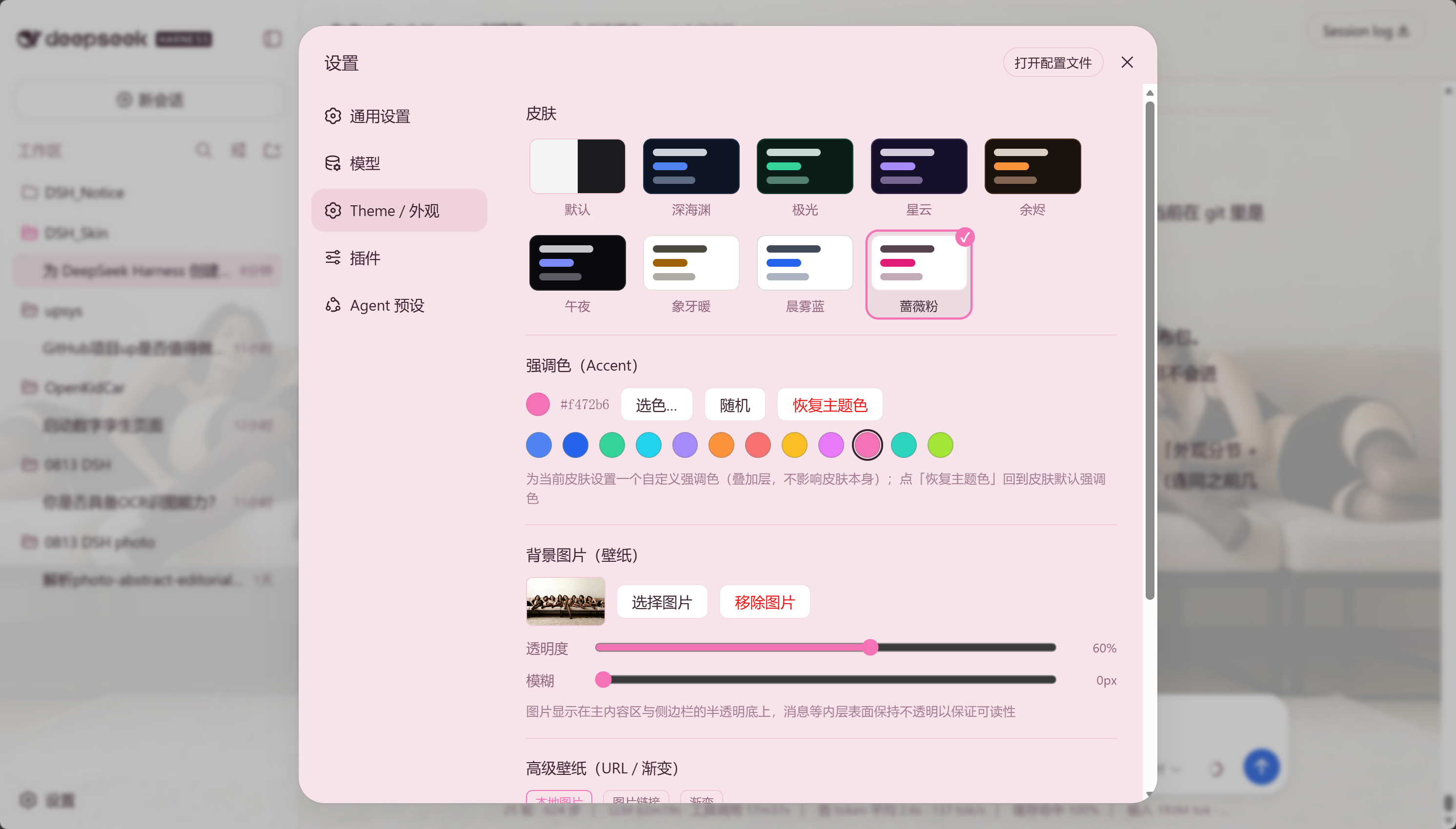
真机效果,非概念图。左:应用某套皮肤后的 DSH 界面;右:设置里的「外观 / Theme」分节。

🏆 为什么值得用(vs 同类)
换个赛道看:全家桶把换肤做成一堆二次元题材的「贴图墙」;我们把换肤做成材质与配色的精细化工艺—— 追求的不是「更花」,而是「更准、更克制、更耐看」,像一块反复推敲的玻璃。审美是我们的护城河。
| 能力 | 本插件 | 全家桶换肤方案 | Codex-Dream-Skin (桌面) |
|---|---|---|---|
| 原生 token 主题,不注入、不改安装包 | ✅ | ✅ | ❌ (CDP 注入) |
| iOS/Linear 式清透冷调材质与配色 | ✅ | ❌ (偏二次元题材) | ❌ |
| 每皮肤克制的高级感弥散光背景 | ✅ | 部分 | ❌ |
| 自定义壁纸 + 透明度/模糊 | ✅ | 部分 | ✅ |
| 主题包导入/导出 + 分享链接 | ✅ | ❌ | ✅ (zip 主题) |
| 每用户强调色 Accent | ✅ | ❌ | 部分 |
| 壁纸 2.0(URL / 渐变 / 每皮肤建议 / 自动弱化) | ✅ | ❌ | ✅ |
| 本地主题包库 + 收藏 + 随机 | ✅ | ❌ | 部分 |
| 校验 + 回滚 | ✅ | 部分 | ✅ |
| 浏览器 Web GUI,天然跨平台 | ✅ | ✅ | ❌ (需桌面 App) |
✨ 功能一览
| 能力 | 说明 |
|---|---|
| 🎨 8 套主题预设(Mirage 幻梦) | 在 设置 → 外观(Theme) 一键切换,浅色 / 深色兼顾 |
| 🖼️ 自定义壁纸 | 上传本地图(自动压缩 ≤2MB),调节透明度 / 模糊 |
| 🔤 内层不透明 | 卡片、输入框、消息气泡不被壁纸盖住,可读性优先 |
| ↩️ 默认还原 | 一键回到 DSH 内置外观(跟随系统) |
| 💾 本地持久化 | 皮肤与壁纸存 localStorage,刷新 / 重开浏览器不丢 |
🚀 进阶能力(P0)
吸取了同类先行项目之短,融入 Codex 换肤的 UX,做了一套差异化能力:
| 能力 | 说明 |
|---|---|
| 📦 主题包格式 + 导入/导出 | 一个 *.dsh-theme.json 主题包 = 格式标记 + 版本 + manifest(id/name/作者/色系/accent/tokens)。可导入文件、一键应用、复制分享链接(编码进 URL hash) |
| 🌈 每用户强调色 Accent | 为当前皮肤叠加一个自定义品牌强调色(overrideTokens 层,不动皮肤本身),12 个典型色块一键选色 + 选色盘 + 随机 + 恢复主题色 |
| 🖼️ 壁纸 2.0 | 本地图 / 图片 URL / 渐变预设,每套皮肤自动建议一张渐变,可自动弱化(聚焦任务时降低干扰);最近使用(最多 5 张)一键换回 |
| 🪟 弹窗不透明度 | 设置 → 外观 →「弹窗不透明度」滑块(0–100%),控制选项弹窗 / 选项卡卡片的底填充透明度——调高文字更清晰,调低可透出背后内容,跟随持久化保存 |
| 🧩 本地主题包库 | 你导入的自定义主题包集中展示,应用 / 收藏 / 移除 一键完成(内置 8 套皮肤在「皮肤」行选择) |
| ✅ 清晰选中反馈 | 切换皮肤时选中态(✓ + 边框)即时跟随,不再残留模糊的白色高亮框 |
| 🎲 换一个试试(surprise me) | 随机挑一个和你当前不同的主题 |
| ⭐ 收藏 | 收藏喜欢的皮肤,快速切换 |
| ✅ 校验 + 回滚 | 导入时会校验格式/必填 token/颜色合法性;失败或移除时安全回退,不做破坏性更改 |
🧩 它是什么形式的插件
它是 DeepSeek Harness 的标准「双面插件」(dsh-plugin)——加载和用法与官方 ui-theme 完全一致。
DeepSeek Harness 的口号是「一切皆插件」:模型、工具、沙箱、会话、UI,乃至 Agent Loop 本身都是插件。
dsh-dream-skin 的本质就是把「换肤」做成一个和官方 UI 包同构的 npm 包:
            ┌────────────── dsh-dream-skin(标准 dsh-plugin / 双面插件)──────────────┐
            │  dsh.bundle   → cordis.patch.yml 插入 dream-skin 入口   (host 半边)     │
            │  dsh.client   → lib/client.js(浏览器 bundle)          (浏览器半边)     │
            └─────────────────────────────────────────────────────────────────────────┘
- 安装命令 = 官方唯一安装命令:
dsh plugin --profile web add dsh-dream-skin - 调用的是官方扩展点:
ctx.theme(注册主题)、ctx.theme.overrideTokens(叠加层)、ctx.slots(把 UI 挂进独立的 设置 → 外观 / Theme 分节)。 - manifest 契约与官方一致:
dsh.bundle+dsh.client+exports["./client"]。
也就是说:你装的不是一个旁门左道的脚本,而是 DSH 官方插件体系里的标准皮肤插件。
🖼️ 预览 — Mirage 幻梦系列
以下色卡由各皮肤的真实 token 生成,所见即所得。点开可放大。
 abyss · 沉静蓝 |  aurora · 极光青 |  nebula · 星云紫 |  ember · 余烬橙 |
 midnight · 午夜黑 |  ivory · iOS 扁平 |  mist · 液态玻璃 |  rose · Material 粉 |
预设一览
| id | 风格 | 特质 |
|---|---|---|
abyss | 🕶️ 沉静蓝 | 冷静深沉的靛蓝,克制不喧哗 |
aurora | 🌌 极光青 | 清冽通透的冷青,自然冷调 |
nebula | 🪐 星云紫 | 深邃漫射的紫青,朦胧神秘 |
ember | 🔥 余烬橙 | 温暖克制的琥珀橙 |
midnight | 🌚 午夜黑 | 极简纯黑,OLED 沉浸 |
ivory | 📐 iOS 扁平 | 极简平白,iOS 系统灰 + 克制的蓝 |
mist | 🧊 液态玻璃 | 清透毛玻璃,半透明 + 模糊 |
rose | 🌸 Material 粉 | 明快彩粉,谷歌 Material 扁平彩色 |
⚡ 快速开始(3 步)
# 1. 安装
dsh plugin --profile web add dsh-dream-skin
# 2. 重启
dsh web
# 3. 打开 设置 → 外观(Theme)→ 皮肤,挑一套 → 完。
装的是 npm 已完成发布的正式包,无需 clone。若
dsh plugin add报 workspace 相关错误,补一个-w即可。
📦 安装
四种方式任选其一,装完重启 DSH Web 即生效(当前会话会中断,但 DSH 会话有磁盘持久化,重启后可以恢复)。
方式一:npm 正式包(推荐,最简单)
dsh plugin --profile web add dsh-dream-skin
方式二:从 GitHub 安装(固定到已验证的提交)
dsh plugin --profile web add 'github:RevolutionLA/dsh-dream-skin#<40位commit>'
固定到 release 对应的 commit,之后
main的新改动不会静默改变已安装代码。
方式三:从 Release tarball 安装(离线 / 不便走 git 的环境)
从本仓库 Releases 下载 dsh-dream-skin-<版本>.tgz(内含构建好的 lib/client.js,安装时无需执行任何 prepare 脚本),然后:
dsh plugin --profile web add ./dsh-dream-skin-<版本>.tgz
方式四:克隆后从本地路径安装(开发迭代)
git clone https://github.com/RevolutionLA/dsh-dream-skin.git
cd dsh-dream-skin
dsh plugin --profile web add .
dsh plugin会把相对路径锚定到你运行命令的目录,装的是指向克隆目录的 link 依赖:改完源码保存,重启 DSH 即生效,无需重新安装。
重启并验证:
dsh web
dsh --profile web --dump-config | grep -A2 dream-skin   # 应出现 dream-skin loader 条目
打开 设置 → 外观(Theme),即可看到「皮肤」「强调色」「背景图片 / 高级壁纸」与「主题包」等行。
-w标志在裸add时必需:每个 profile 自带pnpm-workspace.yaml,pnpm 会把它当作 workspace 根,裸加报错ERR_PNPM_ADDING_TO_ROOT。若已加过-w,后续用现有 workspace 即无需重复。
🔄 更新 / 卸载
更新到最新版(装的是 npm 正式包时):
dsh plugin --profile web update dsh-dream-skin
dsh web   # 重启生效
若更新后仍显示旧版本,可能是 pnpm 的最小发布年龄(supply-chain)策略挡住了刚发布的新版本: 在 profile 目录执行
pnpm add dsh-dream-skin@latest --config.minimumReleaseAge=0即可绕过。
卸载:
dsh plugin --profile web remove dsh-dream-skin
dsh web   # 重启后恢复官方外观
🧩 兼容性
| 项 | 值 |
|---|---|
DeepSeek Harness (dsh) | 0.1.0-rc.6(peerDependencies 以 ^0.1.0-rc.6 对齐) |
| Node.js | >=18 |
| 浏览器 | 现代 Chromium / WebKit(依赖原生 CSS 变量与 matchMedia) |
升级 DSH 到新版本时,请同步更新
package.json里的 peerDependencies。
⚙️ 工作原理
DSH 的主题系统是 token 化的:web 外壳内置 --dsw-* 设计令牌,ThemeRuntime 允许第三方插件注册主题去
覆盖别名层(--dsw-alias-*)。本插件是标准的「双面」插件:
                ┌─────────────────────────────────────────────┐
                │            dsh-dream-skin (双面插件)          │
                ├────────────────────────────┬────────────────┤
    Host 半边   │  lib/index.js              │  浏览器半边      │
                │  cordis.patch.yml 插入      │  lib/client.js │
                │  dream-skin loader 入口     │  __ModuleLoader__│
                └────────────────────────────┴────────────────┘
                             │                         │
                        profile 树加载              /plugins/dsh-dream-skin/client.js
                                                         │
        ┌────────────────────────────────┬────────────────┐
        │                                │                │
   ctx.theme.register(8套皮肤)      ctx.theme.overrideTokens(壁纸半透明)   ctx.slots.inject('settings.section' + 'settings.dreamSkin.item')
- Host 半边(
lib/index.js):dsh.bundlepatch 层,插入dream-skinloader 入口;apply为空操作, 与官方ui-*包同构。 - 浏览器半边(
lib/client.js):ctx.theme.register(...)注册 8 套皮肤;- 恢复上次保存的皮肤并
ctx.theme.setTheme(...)应用; - 壁纸渲染为
z-index:-1固定背景层,叠加ctx.theme.overrideTokens(...)让主画布 (--dsw-alias-bg-base)与侧边栏(--dsw-specific-sidebar-fill)半透明; - 监听
theme/change,切皮肤 / 深浅色时自动重新着色壁纸洗色层; - 注册独立的 设置 → 外观 / Theme 分节(
settings.section),5 个功能行挂在settings.dreamSkin.item插槽下。
每套皮肤携带自己的 colorScheme(light/dark),驱动 body[data-ds-dark-theme];别名 token 覆盖作为
<body> 内联自定义属性由 ui-layout 的 ThemePresenter 应用。
💼 持久化说明
- 皮肤与壁纸存于
localStorage(键前缀dsh-dream-skin:),只在当前浏览器生效。 - 为何不用 Host settings?DSH 的 Host settings 线路只向浏览器暴露一份白名单命名空间
(
dsh-host-apiproxy的WEB_SETTINGS_NAMESPACES),第三方命名空间会返回settings-not-exposed; 产品本身也把远程浏览器偏好进程化。localStorage恰好匹配这一边界,且跨刷新存活。
🛠️ 开发 / 扩展主题
客户端 bundle 直接以 __ModuleLoader__ 格式编写(即 tsdown 为官方 ui-* 包输出的形态),免构建。
lib/client.js 只能 require 模块表实体:平台种子词(react、react/jsx-runtime、…)与已注册客户端
bundle(@deepseek-ai/dsh-client-runtime/client、…)。
- 新增一套内置皮肤:在
lib/client.js的SKINS数组加一个对象(id+colorScheme+tokens), 它即自动出现在设置里;记得在全部 8 种语言词典(zh/en/ja/ko/es/fr/de/ru)补skin.<id>文案。 - 做一个主题包(推荐分发方式):参考
docs/examples/sample-theme-pack.json, 一个*.dsh-theme.json即可在设置里导入或通过分享链接分发给别人,无需改代码。 - 放你自己的壁纸:把图片丢进
wallpapers/(注意只在你有权限的前提下分发),再在 DSH 的「背景图片」里导入即可。 - 跑校验:
npm test(VM 冒烟测试,覆盖 factory 求值、apply挂载、主题包导入/持久化)。 - 换配色:参考
--dsw-alias-*令牌(完整契约见docs/themes-spec.md)。
📌 Roadmap
- 首版:8 套主题 + 自定义壁纸(透明度 / 模糊)+ 本地持久化
- 主题包格式 + 导入 / 导出 / 分享链接(JSON + manifest + 校验)
- 每用户强调色 Accent + 随机
- 壁纸 2.0(URL / 渐变 / 每皮肤建议 / 自动弱化)
- 本地主题包库 + 一键应用 / 收藏 /「换一个试试」
- 多语言文案与文档(中 / 英 / 日 / 韩 / 西 / 法 / 德 / 俄)
- 在线色板 / 主题预览 Studio(纯前端,浏览器内校验 + 对比度检查)
- 社区主题库(把主题包投稿到仓库 / 在线 Gallery)
- 首帧无闪烁(FOUC)改进
🤝 贡献
欢迎提交 Issue 与 PR!请先阅读 贡献指南,并遵循 Code of Conduct。
⭐ 支持这个项目
喜欢的话,给仓库点个 Star ⭐、在 npm 上点个 👍,或把它转发给你的 DSH 朋友——这会让更多人发现它, 也能激励持续维护。想一起做主题库 / 在线 Studio / 更多主题?欢迎来贡献。
🔒 安全
发现安全问题?请勿直接开公开 Issue——参见 安全策略。
📄 开源协议
🙏 致谢
- 架构与 API 参考:DeepSeek Harness 官方 ui-theme 客户端包。
- 概念致敬:Codex-Dream-Skin。
Read the usage guide →
Install steps, key points, FAQ and compatibility for this plugin — auto-derived from indexed fields.
Listing badge

[](https://deepseek-plugin.org/plugins/RevolutionLA/dsh-dream-skin)Paste this markdown into your GitHub README to link back to this listing. The badge only states the listing — not a security endorsement.