Move the awesome-dsh-plugin.com plugin directory into the dsh Web settings page: browse, search, and FIFO queue for one-click install/uninstall/update, with whitelist and trial installation verification, cross-profile sync support, and hot-mount without restart.

- Language
- JavaScript
- License
- MIT
- Branch
- master
Install
$ dsh plugin --profile web add @sanqi-normal/dsh-webui-market-pluginRun the command above in your terminal to install this plugin via the dsh CLI. You can switch Profile in the top-right corner. New to dsh? Read the beginner tutorial
Install via your agent
Install the DeepSeek Harness plugin Sanqi-normal/dsh-webui-market-plugin for me: review the repository at https://github.com/Sanqi-normal/dsh-webui-market-plugin first, then run the install command and verify the plugin loads successfully.
Paste this instruction to the DSH Web GUI assistant — it will install and verify for you.
One-Sentence Pitch
Brings the awesome-dsh-plugin.com plugin directory into a visual plugin market within the dsh Web settings page: Open "Settings → Plugins → Plugin Market" to browse, search, and install/uninstall/update community plugins with one click, and sync web-installed plugins to desktop and other profiles.
Core Features
- Browse and search the community plugin directory from awesome-dsh-plugin.com (including categories, star count, submission date, Chinese/English descriptions), sorted by "Most Popular / Latest"
- One-click install, update, uninstall, executed serially in FIFO queue; real-time display of "Queued / Validating / Running / Complete / Failed / Stopped / Timeout" status and pnpm logs
- Two-layer security gate before installation: source whitelist (only accepts github: sources from the curated directory) + trial installation verification (web profile actually starts once in a temporary environment)
- One-click cross-profile sync: copy-installed plugins from web to other initialized profiles like desktop, adding only without deleting
- Disable / Enable: keeps dependency files, only toggles activation status; disabled state persists after restart
- One-click update all + single plugin update: github source compares lockfile commit with HEAD, npm source compares dist-tag.latest
- Local plugin inventory: lists all dependency-managed plugins (including those installed outside the market), marks in-directory / out-of-directory, source type, disabled status
- After successful installation, simple plugins can hot-mount to the current running combination, usable without restarting the Web service
Technical Implementation
- Language: TypeScript (compiled output is ESM JS, source builds to
lib/host.js+lib/client.js) - Key Dependencies:
@deepseek-ai/cordis(host framework, peerDependency);@deepseek-ai/dsh-client-runtimeand@deepseek-ai/dsh-client-ui-slots(browser-side registration of settings page tab);react^18.2.0 (panel UI) - Architecture Pattern: Cordis dual-form plugin — host half registers
/api/dsh-marketHTTP route onwebServerservice viaapply(ctx), browser half is declared to be loaded by frontend ModuleLoader viaexports["./client"]+dsh.client.platform: "web", registers tosettings.plugins.tabslot; install/update/uninstall usesnode:child_processto invokedsh pluginsubprocess, write operations require same-origin POST - Entry Files: Host entry
lib/host.js(exportsname: 'dsh-market-plugin',inject: ['webServer'],apply); Client entrylib/client.js(exportsinject: ['slots','sessions','workspaces'],apply, registers tosettings.plugins.tabslot)
Use Cases
Users who use dsh web or desktop daily and want to browse and install community plugins through a GUI without manually typing dsh plugin add commands; people who need to sync plugins between web and desktop and other profiles; and operational users who want visual control over each plugin's status (disabled / enabled / installed / has update) and can one-click ask DSH to troubleshoot when failures occur.
Prerequisites and Compatibility
| Dependency | Minimum Version | Notes |
|---|---|---|
| Node.js | ^22.19.0 or >=24.0.0 | Required by package.json:37-39 engines.node; uses AbortSignal.timeout and other newer APIs |
| DSH Host | No specific version declared | peerDependencies only writes *; host must expose webServer service (host half inject: ['webServer']), slots / sessions / workspaces (browser half inject) and settings.plugins.tab slot |
| pnpm | ≥11 recommended | Installation uses host's built-in pnpm; pnpm 11 defaults to 24h minimumReleaseAge and ERR_PNPM_IGNORED_BUILDS interception, market can automatically add to whitelist and retry |
| Platform | macOS / Windows / Linux | Cross-platform; Windows separately handles .cmd/.bat shim, shell:true startup and taskkill /T /F to kill process tree (lib/host.js:101-112, 300-309) |
| Native Modules | None | Only uses Node.js built-in modules (node:fs / node:child_process / node:os / node:path / node:url / AbortSignal.timeout) |
Installation
dsh plugin --profile web add github:Sanqi-normal/dsh-webui-market-plugin
Configuration
This plugin does not require writing configuration in cordis patch; all user-facing toggles are in the panel "Install Settings" and "Cross Profile Sync".
| Configuration | Type | Description | Default |
|---|---|---|---|
| Auto-sync to other profiles (Install Settings) | Panel Toggle | When enabled, automatically syncs plugins to all initialized profiles on this machine during installation; when disabled, only installs to the profile selected during installation | Enabled |
| Skip security check (web profile installation) | Panel Checkbox | Skips source whitelist + trial installation verification simultaneously, may install non-curated sources or break web startup, at your own risk | Disabled |
| Skip source whitelist check (non-web profile installation) | Panel Checkbox | Only skips whitelist (still takes pre-install snapshot), may install non-curated sources | Disabled |
| Install to Profile | Panel Dropdown | Target profile selectable in installation confirmation dialog (default web); when auto-sync is enabled, selected target will be auto-installed to other profiles | web |
| dsh CLI path (fill when auto-detection fails) | Panel Input | When auto-detection fails, manually fill in apps/cli/lib/bin.js under dsh repository root, or set DSH_BIN environment variable and restart web; remembers last input | Empty |
Environment variables (set in host process environment):
| Environment Variable | Description | Default |
|---|---|---|
DSH_MARKET_OP_TIMEOUT_MS | Hard timeout for individual install/update/uninstall task (ms), automatically terminates pnpm subprocess after timeout | 120000 |
DSH_MARKET_FETCH_TIMEOUT_MS | Timeout for single pnpm network fetch (ms) | 30000 |
DSH_MARKET_FETCH_RETRIES | Retry count when pnpm fetch fails | 1 |
DSH_MARKET_FETCH_RETRY_MINTIMEOUT_MS / MAXTIMEOUT_MS | Lower / upper bound for pnpm retry interval (ms) | 1000 / 10000 |
DSH_BIN | Explicitly specify dsh CLI entry file path (for source startup scenario) | Not set |
DSH_HOME | DSH data root directory read by host / plugin | ~/.dsh |
FAQ
Q: What's the relationship between this plugin and awesome-dsh-plugin.com?
A: The list comes directly from awesome-dsh-plugin.com's plugins.json API (lib/host.js:973, 1069-1077), automatically returns Chinese/English descriptions based on system language; falls back to built-in offline snapshot data/catalog-snapshot.json when initial fetch fails. Local installation only accepts github: sources from the curated directory by default; sources outside the directory are rejected by the whitelist.
Q: Do I need to restart the Web service after installation?
A: Simple plugins (where cordis.patch.yml only has - id: / name: insertion lines) attempt hot-mount to the current running combination and auto-refresh the page to take effect (lib/host.js:1152-1176); if the patch is complex or the environment doesn't support it, the market falls back to "effective after next Web restart", won't auto-restart the host.
Q: How to resolve pnpm's "Blocked build scripts" during installation?
A: pnpm ≥11 intercepts build scripts not allowlisted in allowBuilds by default. The market automatically adds the intercepted package name to the profile's pnpm-workspace.yaml allowBuilds and retries once when the task fails (lib/host.js:442-468, 685-695); if that dependency truly doesn't need to execute build scripts, write the corresponding entry as false (explicitly reject) and it won't be automatically re-added.
Q: Will trial installation verification modify my real profile?
A: No. Trial installation verification reconstructs the combination in a temporary directory (mkdtempSync(tmpdir() + 'dsh-mkts-probe-')) using the web profile template, installs the candidate plugin with the same dsh CLI, then actually starts once with --port 0; it's only considered installable if the dsh web: ready line appears (lib/host.js:823-893). The real profile is never written to during the entire process; the temporary directory is cleaned up after verification regardless of success or failure.
Q: Why do some plugins fail to install (rejected)?
A: By default, only curated directory-listed github: sources can pass the whitelist; registry/link sources are not restricted by this but still go through whitelist + pre-install snapshot; trial installation startup failure also rejects and returns the real startup error (lib/host.js:601-617). If you确实需要安装目录外或试装失败的插件,可勾选「跳过安全检查」(风险自负)。
Q: How do I sync plugins installed on web to desktop?
A: The "Cross Profile Sync" section at the top of the panel lists all initialized profiles on this machine (e.g., desktop); clicking "Sync to xxx" will copy-installed plugins that are installed in web but missing in the target profile (lib/host.js:1492-1506). Sync only adds, does not delete or downgrade any existing content in the target profile. Restart the corresponding application after installation for changes to take effect. Sync carries syncFrom validation: only proceeds when the target source is indeed a dependency installed in the source profile, so plugins installed on web but not in the curated directory (like aegis) can also be synced.
Q: What's the difference between disabling a plugin and uninstalling?
A: Disabling keeps dependencies and disk files, only removes the plugin from dsh.profile.bundles and writes dsh.market.disabled; it stays disabled after restart (lib/host.js:1284-1318). Uninstalling deletes both dependencies and bundle. Note: manually executing dsh plugin add/remove/update on the command line triggers reconcile which briefly restores disabled items; the next market operation or restart will disable it again.
Q: How to handle install/update failures?
A: Failed entries have an "Ask DSH" button; clicking it opens a new conversation with the operation target, status, environment information (DSH_HOME / node / dsh detection results) and complete error log as the prompt, sent to AI for direct troubleshooting (lib/client.js:165, 740). Network errors (ETIMEDOUT / ECONNRESET, etc.) the market automatically retries once (lib/host.js:700-707); persistent failures prompt to check proxy or mirror.
Q: Will one-click update all update all plugins?
A: No. One-click update only reinstalls plugins with updateAvailable=true (lib/host.js:1820-1840): github source compares lockfile commit with GitHub HEAD, npm source compares dist-tags.latest with installed version, considering pnpm 11's 24h minimumReleaseAge; local link/file links don't participate in detection. Detection failure silently falls back to "no updates", won't block the list.
Difficulty Level
Beginner — No configuration needed after installation to use directly; only need to fill in apps/cli/lib/bin.js path in the panel or set DSH_BIN if auto-detection of dsh CLI fails, zero-config in the vast majority of cases.
Known Issues and Limitations
- Most plugins require restarting the Web service after installation to take effect; only simple plugins with patch being pure
- id:/name:insertion lines will hot-mount and auto-refresh the page (lib/host.js:1152-1176, 1201-1217) - Trial installation verification only executes for web profile: non-web profiles (like desktop) have their combinations defined by the corresponding desktop shell, which the market cannot replicate in a temporary environment; their installation is guarded by "source whitelist + pre-install snapshot", no startup validation (
README.md:66,lib/host.js:599-617) - Manually executing
dsh plugin add/remove/updateon the command line triggers reconcile which briefly restores disabled items; requires restart or next market operation to disable again (README.md:75) - Single task defaults to 120 second timeout, can be increased via
DSH_MARKET_OP_TIMEOUT_MSin host environment (e.g., 300000); pnpm subprocess runs in CI mode fixed to avoid silent hang without TTY (lib/host.js:32, 52-58, 656) - pnpm 11's 24h
minimumReleaseAgeandERR_PNPM_IGNORED_BUILDSinterception automatically fixes and retries once; if build scripts were temporarily approved in the trial installation environment, that approval only applies to the trial directory, not written to real profile (lib/host.js:676-695, 866-878) - Cross-profile sync adds only, never deletes or downgrades; if the target profile already has the same dependency installed (even a different version), sync skips it (
lib/host.js:1492-1506) - Write operations (install / uninstall / update / disable / enable / kill / clear) only accept same-origin POST (Origin header matches Host), cross-origin requests return 403 (
lib/host.js:221-230, 1822-1825, 1843-1845, 1878-1881, 1885-1887, 1900-1903, 1921-1924)
English | 中文
在 dsh web GUI 内部的社区插件市场:浏览 awesome-dsh-plugin.com 的插件目录,直接在 设置 → 插件 → 插件市场 里安装 / 卸载插件到 profile。界面风格与 harness 前端一致(跟随系统深浅色主题),支持中英文(按系统语言自动切换)。
推荐 awesome-dsh-plugin.com 网站的实现 dsh-market。
效果展示
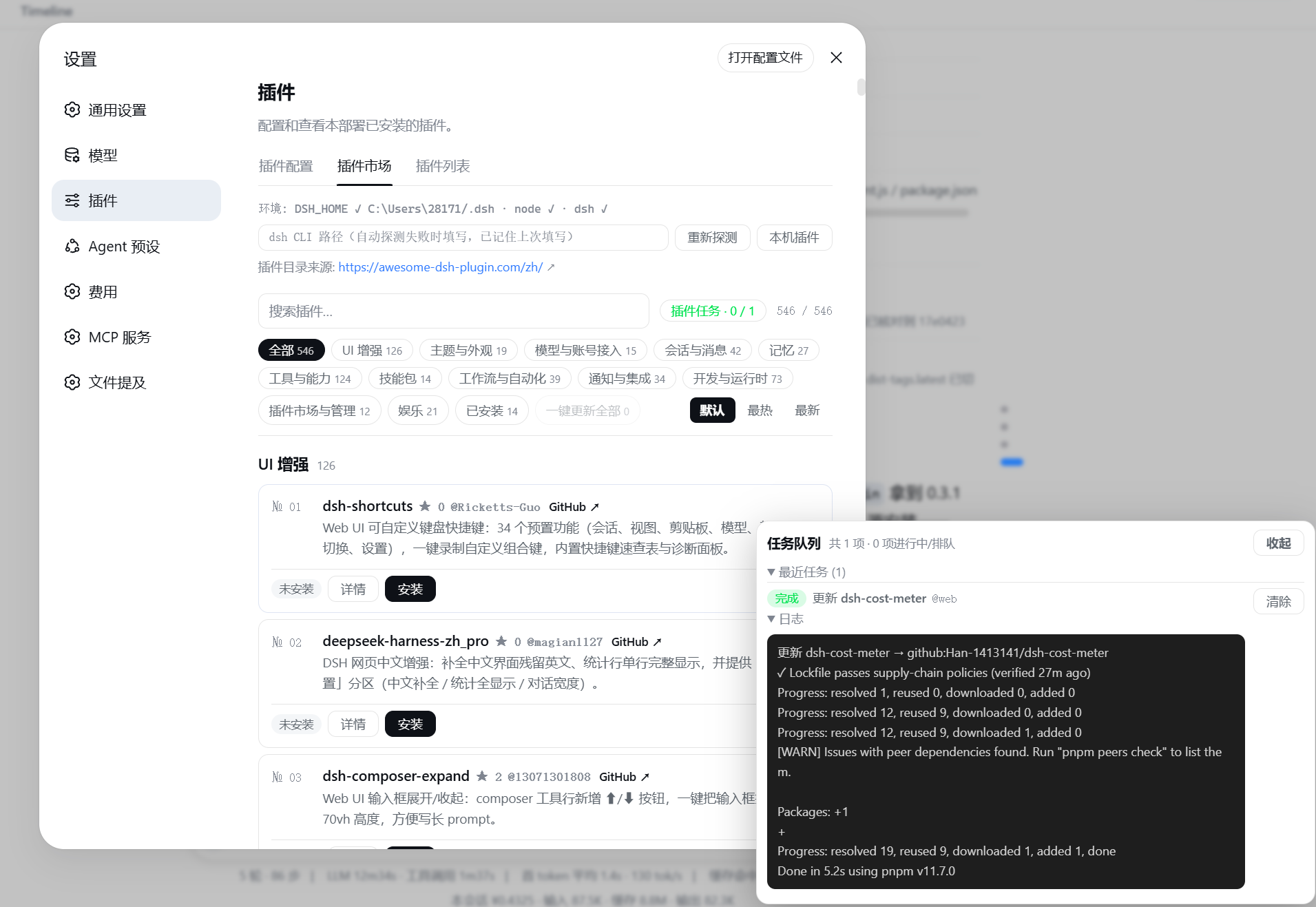
安装
方式一:从 npm registry 安装(推荐,无 git 克隆 / prepare 脚本步骤):
dsh plugin --profile web add @sanqi-normal/dsh-webui-market-plugin
方式二:从 GitHub 源码安装:
dsh plugin --profile web add github:Sanqi-normal/dsh-webui-market-plugin
安装后重启 web 服务生效:
pnpm dsh web
GitHub 源安装会执行包内 prepare 脚本,如被 pnpm 拦截,把提示的包名加入 profile 的 pnpm-workspace.yaml 的 allowBuilds 后重试。
pnpm 11 起,依赖树中"构建脚本未在 allowBuilds 中显式放行或拒绝"的包会直接导致 ERR_PNPM_IGNORED_BUILDS。若该包在当前 profile 不需要执行构建脚本,可把对应项写成 false(明确拒绝)而不是 true(放行执行);市场插件的试装验证会继承真实 web profile 的 pnpm-workspace.yaml,因此这里的 true/false 决策也会作用于试装环境。
宿主依赖说明
本插件是 DSH web profile 内运行的插件,不是独立 npm 应用。以下 peer 依赖由 DSH 宿主环境提供,用户无需手动安装:
@deepseek-ai/cordis@deepseek-ai/dsh-client-runtime@deepseek-ai/dsh-client-ui-slots
当前版本面向 DSH 0.0.1-rc.2+(不含已知解析问题的 0.0.1-rc.1)及 0.1.0-rc.2+ 环境。若使用纯 npm registry 工具解析本包,可能因为 DSH 上游部分 host 包未发布而提示依赖图不完整,这属于 DSH 宿主依赖的发布问题。
使用
打开 设置(Settings)→ 插件(Plugins)→ 插件市场(Plugin Market):
- 目录按分类分组,支持搜索与"已安装"过滤;每个卡片显示 GitHub Star 数(无数据不显示),可一键按 最热(Star 降序,无 Star 的排最后)/ 最新(收录日期) 排序,或恢复官网默认顺序;大目录分批渐进渲染,避免打开瞬间一次性插入数百卡片造成卡顿
- 点 详情 查看该插件的官方安装命令(含目标 profile)
- 跨 Profile 安装 / 一键同步(desktop 等):官网目录只发布
--profile web命令,而桌面端(desktop shell)启动的是自己独立的 profile(如desktop),市场装进 web 的插件桌面应用不会自动加载。面板顶部有 安装设置(含说明)与 跨 Profile 同步 区,自动列出本机已初始化的 profile:- 默认「有什么装什么」:
安装设置里的「自动同步到其它 profile」默认开启——安装插件时自动装到本机所有已初始化的 profile(有 web 装 web,有 desktop 也装 desktop;在确认框直接选了 desktop 的也会自动补装到 web);关闭后仅装到安装时选择的 profile - 安装确认框可选目标 profile(默认 web);跨 Profile 同步 区把 web 里已装的插件一键补装到目标 profile(只新增缺失项)
- 同步是本地复制:源已在源 profile 安装过(syncFrom 校验),所以不再受目录白名单限制——装在 web 但不在精选目录的插件(如 aegis)也能同步;每个补装任务照常做安装前快照 + FIFO 队列,装完后重启对应应用生效
- 默认「有什么装什么」:
- 安装 / 更新 / 卸载 组成 FIFO 任务队列:多个插件可以连续排队提交,任务面板固定在右下角、不随页面滚动隐藏,实时显示「排队中 / 校验中 / 执行中 / 完成 / 失败 / 已终止 / 超时」,可取消排队项、终止执行项、查看每个任务的 pnpm 日志;每个任务默认超过 120 秒自动超时(可用环境变量
DSH_MARKET_OP_TIMEOUT_MS调大,如300000);遇到 pnpm 的临时网络错误(GET ... error/ETIMEDOUT/ECONNRESET等)会自动重试一次,持续失败时给出代理/镜像排查提示;一键更新全部会把所有可更新插件依次加入队列;队列头部「清空」可一键清除全部已完成/失败记录(逐条清除也支持),清除会同步到服务端,刷新或重新打开面板后不会再次出现 - 失败后询问 DSH:安装 / 更新 / 卸载失败(含超时、已终止、已拒绝)后,失败弹窗和任务队列的失败行会出现 询问 DSH 按钮;点击后前端会新建一个对话,并把操作目标、状态、环境信息和完整错误日志作为 prompt 自动发送给 AI,方便直接排查或解释状况
- pnpm ≥11 默认开启 24 小时 minimumReleaseAge 供应链策略:依赖里刚发布(24 小时内)的包会让所有安装/更新/卸载被 pnpm 拦截。遇到 ERR_PNPM_MINIMUM_RELEASE_AGE_VIOLATION 时市场会自动把违规的 name@version 合并进 profile 的 pnpm-workspace.yaml 的 minimumReleaseAgeExclude(同名多版本写成 name@v1||v2 联合,避免 pnpm 只认首条同名规则)并自动重试一次,无需手动改配置
- 停用 / 启用:停用保留依赖与磁盘文件,只把插件移出激活的 bundle 层(重启后仍保持停用);启用按原顺序恢复,免删装;卡片操作区横向排列在卡片底部,避免右侧按钮拥挤
- 本机插件:列出所有由依赖管理的插件(含在市场之外安装的、以及未进 bundle 层的 client-only/普通依赖),标注目录内/目录外、已停用、来源类型,可直接停用、启用或卸载(内置 bundle 与本地 link/file 源不会提供删除)
- 每个插件卡片显示真实的已安装状态(与 profile 的
package.json同步):安装状态按「作者 + 仓库」(owner/repo)识别,目录里有同名插件(如两个作者的dsh-memory)时,装了哪个作者就只显示哪个已安装,不会误标另一位作者的卡片;「本机插件」列表也会显示解析出的owner/repo身份 - 顶部显示插件目录来源官网链接,可直接打开
工作原理
持久化 bundle(package.json 的 dsh.bundle.patch → cordis.patch.yml),由 dsh plugin add 的 reconcile 自动加入 profile 的 dsh.profile.bundles 层:
- Host 半(
lib/host.js):注册/api/dsh-market路由,提供list(读取官网 JSON APIplugins.json,失败回退内置离线快照,含 stars/added;与官方 dsh-market 一致:先试官网 JSON,再用过期缓存,最后落离线快照,不解析官网 HTML)、probe(环境探测,含本机已初始化 profile 列表)、installed/installedAll(读取 profile package.json 与已装包 manifest)、syncPlan(跨 profile 只读差异:web 已装、目标 profile 缺失的插件清单)、install/update/updateAll/uninstall(FIFO 队列 + 后台 spawndsh pluginCLI,白名单在队列头对所有 profile 执行、试装验证仅对 web 执行)、disable/enable(停用/启用并持久化到dsh.market.disabled)、op(队列快照)、kill(终止/取消任务) - Client 半(
lib/client.js):通过exports["./client"]+dsh.client声明被 web 前端加载,注册到settings.plugins.tab槽位
安全与限制
- 来源白名单:安装只接受精选目录(awesome-dsh-plugin.com curated registry)收录的
github:源,目录外的一律拒绝,与 dsh-market 的白名单策略一致(目录抓取失败或 registry/link 源不做此限制);该白名单对所有目标 profile(含 desktop 同步)生效,勾选"跳过安全检查"才可绕过 - npm 优先(官方同款镜像策略):目录条目带
npm映射时,优先用 npm 包名安装/更新(npm tarball 走 CDN/镜像,不依赖 GitHub 下载);只有未发布 npm 的 GitHub-only 插件才走 GitHub 源。用户可在 npm/pnpm 配置中设置国内 registry 镜像(如registry=https://registry.npmmirror.com),npm 源的安装/更新会自动走该镜像 - 试装验证(trial boot):白名单通过后,若插件未声明 web client 半端(
dsh.client.platform === 'web'),会先做试装验证:在临时 DSH_HOME 里按 web profile 模板重建组合,用同一套dsh plugin add装入候选插件,再以--port 0(系统空闲端口)实际启动一次,只有出现dsh web:就绪行(Loader 树成功结算后才打印)才判定可装。验证失败会给出真实的启动错误(如重复 api-gateway / webserver 等)并拒绝安装,此时真实 profile 从未被写入、试装目录自动清理,无需任何回退操作。试装验证仅对 web profile 执行:非 web profile(如 desktop)的组合由对应桌面壳定义、市场无法在临时环境复刻,其安装由「来源白名单 + 安装前快照」把关(同样无破坏性,只是没有启动判定)。试装环境会继承真实 web profile 的pnpm-workspace.yaml(allowBuilds/minimumReleaseAgeExclude),因此已在真实 profile 中显式拒绝(false)的构建脚本不会在试装时被重新放行或执行。 - 跨 profile 同步只增不删:
syncPlan只计算「web 已装、目标缺失」的插件,且要求目标 profile 已初始化(避免误建空 profile);同步仅补装、绝不删除或降级目标 profile 里已有的任何内容。同步安装携带syncFrom来源校验:仅当目标源确为源 profile 已装依赖时才放行(本地复制,不视为新的远端信任决策),未通过校验的仍走目录白名单;装到 desktop 等 profile 后需重启对应应用生效 - 同源校验:
install/uninstall/update/kill写操作只接受同源 POST(Origin 头与 Host 一致),跨源请求一律 403 - 热挂载(免重启):安装成功后,若新插件的
cordis.patch.yml是纯id/name插入行,会尝试挂入运行中的组合并自动刷新页面生效(无需手动操作);patch 复杂或环境不支持时回退"重启生效"。热挂载输入存于<profile>/.dsh-market/,每次启动自动清理;热挂载、热卸载与 Loader 停用/启用只作用于运行中的 web profile,desktop 等其它 profile 的操作不会触碰 web 的运行态 - 更新检测与更新:已安装插件卡片自动显示"更新"按钮(github 源对比 lockfile 锁定 commit 与 GitHub HEAD;registry 源对比 npm latest 与已装版本;本地 link/file 源不检测),点击即重新解析最新版本并作为后台任务执行,完成后下次重启生效;检测失败静默降级为"无更新",不会阻塞列表。github 源更新时会把检测到的 HEAD commit 写成
github:owner/repo#<sha>再执行,避免 pnpm 走git ls-remote(SSH)解析 HEAD 时因未配置 SSH key 报Permission denied (publickey) - 离线目录快照:
data/catalog-snapshot.json作为官网抓取失败时的离线兜底,可用pnpm run snapshot从官网 JSON API 直接抓取刷新(不走回退链,官网不可达时会失败而非复制旧数据) - 安装前自动快照:写入任一 profile 前会把
package.json备份为同目录.mkts-snapshot-<时间戳>.json(跨 profile 同步与"跳过安全检查"的安装同样备份),配合dsh plugin --profile <name> remove <包名>可手工回退 - CI=true:pnpm 子进程以 CI 模式运行,避免无 TTY 时静默卡在交互提示
- 网络超时控制:pnpm 子进程默认使用较短的
fetch-timeout(30s)和fetch-retries(1),避免弱网下"GET 链接 error 一直 retry"拖到任务超时;可用DSH_MARKET_FETCH_TIMEOUT_MS、DSH_MARKET_FETCH_RETRIES、DSH_MARKET_FETCH_RETRY_MINTIMEOUT_MS、DSH_MARKET_FETCH_RETRY_MAXTIMEOUT_MS覆盖;前端/api/dsh-market请求默认 30 秒超时,防止面板因外部网络卡死 - 停用持久化:停用状态写入 profile
package.json的dsh.market.disabled(保留依赖、移出dsh.profile.bundles);市场在启动时和每次 pnpm 操作后会重新应用该集合。注意:在命令行手工执行dsh plugin add/remove/update会触发 reconcile 短暂恢复停用项,重启或下一次市场操作会再次停用 - 安装 / 卸载后需重启 web 服务生效(热挂载成功的除外,本插件不做自动重启)
- 目录数据来自官网 JSON API(
plugins.json,与 dsh-market 同源,含 Star 数),抓取失败时按「过期缓存 → 内置离线快照」回退(与官方 dsh-market 策略一致,不再解析官网 HTML 静态页);插件数量与分类以官网为准
Read the usage guide →
Install steps, key points, FAQ and compatibility for this plugin — auto-derived from indexed fields.
Listing badge

[](https://deepseek-plugin.org/plugins/Sanqi-normal/dsh-webui-market-plugin)Paste this markdown into your GitHub README to link back to this listing. The badge only states the listing — not a security endorsement.