Self-contained DeepSeek Harness (DSH) plugin for Provider/Auth login, model switching, image fallback, token/cost analytics, and same-port Web restart. Useful? A star helps.

- Language
- JavaScript
- License
- MIT
- Branch
- main
Install
$ dsh plugin --profile web add github:Stormycry-cryp/dsh-AuthInOneRun the command above in your terminal to install this plugin via the dsh CLI. You can switch Profile in the top-right corner. New to dsh? Read the beginner tutorial
Install via your agent
Install the DeepSeek Harness plugin Stormycry-cryp/dsh-AuthInOne for me: review the repository at https://github.com/Stormycry-cryp/dsh-AuthInOne first, then run the install command and verify the plugin loads successfully.
Paste this instruction to the DSH Web GUI assistant — it will install and verify for you.
一句话定位
把 Provider 登录、模型管理、视觉回退、跨会话 Token 用量与成本分析合并进 DSH 的原生 Models 和 Usage 设置页,并附带一条同端口替换重启的安装引导。解决用户要装多套零碎插件、还要手动改 profile 才能生效的问题。
核心能力
- 在原生 Models 设置里增加 OAuth 登录入口与 Plan/API 预设,目前稳定支持 OpenAI Codex 浏览器 OAuth 与 Kimi Code 设备流,另提供 7 个实验性兼容 Provider
- 接管保存/编辑 OpenAI 兼容自定义路由、默认模型选择、连接测试与可视化 Provider 状态
- 为明确标注纯文本输入的主模型自动调用一个备用视觉模型生成图像描述,并把结果作为普通 DSH 消息持久化
- 在原生 Usage 设置里重建 KPI、Token 日历热力图、Provider/模型/工具排行与按价目表分桶的成本核算
- 暴露同一套 Token-bucket 价格目录,用户可在设置页为特定 Provider/模型追加价目覆盖
技术实现
- 语言: TypeScript
- 关键依赖:
@deepseek-ai/cordis、@deepseek-ai/dsh-typert-protocol、@deepseek-ai/dsh-credentials、@deepseek-ai/dsh-settings(运行时);构建期zod用于 schema 校验,@earendil-works/pi-ai0.82.1 作为 Provider 适配层 - 架构模式: 在 Cordis Context 上注册
AuthInOneService扩展 Typert Remote,同时通过dsh.bundle.patch禁用 DSH 原生ui-settings-general与ui-settings-models两个 Owner 并挂载包内同源兼容 Owner;客户端用dsh.client.inject注入 10 个官方 Web 包 - 入口文件:
src/host/index.ts(Host 服务)、src/install.ts(自带 CLI 与同端口重启监管)、cordis.patch.yml(Bundle 挂载入口)
适用场景
DSH 用户日常需要在多个 LLM Provider(官方 DeepSeek、OpenAI Codex、Kimi Code,以及 OpenAI/xAI/Gemini/Anthropic API 预设)之间切换,又不想离开原生设置页操作。当某些主模型不识图、但又希望对图片有可见反馈时,启用视觉回退即可获得自动图像描述。对用量与按价目表计费有审计需求时,Usage 页面会直接给出重建的 KPI、热力图与按价格区间分桶的成本数据。
前置依赖与兼容性
| 依赖 | 最低版本 | 说明 |
|---|---|---|
| DSH | 官方 DSH 47f9438(@deepseek-ai/dsh-client-ui-settings-general 与 @deepseek-ai/dsh-client-ui-settings-models 0.1.0-rc.5,SHA-256 校验) | Host 在 assertCompatibleHost() 中严格比对 owner 版本与 client.js 哈希,校验失败抛 AUTH_IN_ONE_COMPAT_UNSUPPORTED_DSH |
| Node | ^22.19.0 || >=24 | 见 package.json:engines.node |
| 平台 | macOS、Linux(自动重启需 lsof),其他平台仅 UI 部分可用 | src/install.ts:102-111 在 Windows 上抛 AUTH_IN_ONE_RESTART_UNSUPPORTED_PLATFORM |
| React | >=18.2.0 | 可选 peer 依赖,宿主已自带时无需安装 |
| 原生模块 | 无 | 依赖均为 JS;运行期只调用 node:child_process / node:fs / node:os |
安装方式
dsh plugin --profile web add github:Stormycry-cryp/dsh-AuthInOne
配置项
| 配置 | 类型 | 说明 | 默认值 |
|---|---|---|---|
catalogVersion | 字符串 | 当前价目表的版本标识,用于审计与回放 | deepseek-usd-2026-08-14 |
prices | 数组 | 目录内置价目行,每条含 Provider、模型、币种、来源 URL、生效日期与各 bucket 单价 | 内置 DeepSeek-V4-Flash / DeepSeek-V4-Pro 两条 USD 行 |
overrides | 数组 | 用户覆盖的价目行,合并时按 provider/model 替换目录行 | 空 |
visionFallback.enabled | 布尔 | 是否对纯文本主模型启用图像描述回退 | false |
visionFallback.provider | 字符串 | 回退使用的 Provider id | 空 |
visionFallback.model | 字符串 | 回退使用的模型 id | 空 |
visionFallback.maxOutputTokens | 数字 (64–4096) | 单次回退调用的最大输出 Token | 512 |
visionFallback.timeoutMs | 数字 (1000–300000) | 回退调用的超时时间(毫秒) | 60000 |
配置以 DSH 设置命名空间
auth-in-one存储,修改通过Settings → Models页面或 Typert Remote 的saveVisionFallback/savePriceOverride完成。
常见问题
Q: 安装命令和直接执行官方 dsh plugin add 有什么区别?
A: 包内自带 install 子命令会先校验 127.0.0.1:3080 上的监听进程是标准 DSH Host,再调用官方 dsh plugin add,最后通过 scheduleRestart 在原 URL 上拉起替换进程。它不会占用临时端口,也不会留下第二实例。
Q: 哪些 Provider 是真正稳定可用的?
A: 仅 OpenAI Codex(浏览器 OAuth + 状态/S256 PKCE/loopback)和 Kimi Code(完整授权链接 + RFC 8628 设备流)。其余 7 个(xAI Grok、Anthropic、GitHub Copilot、Command Code、Cursor、Google Antigravity、Kiro)均为实验性兼容,仅在用户授权边界验证通过,错误与刷新逻辑靠模拟测试覆盖。
Q: 视觉回退会不会把我截图或图片发送给非主 Provider?
A: 只有当你明确启用了 visionFallback 且主模型的 Adapter 显式声明 image 输入为否时才会触发。图片字节始终由 DSH Attachment Storage 持有,回退结果以普通消息形式写入会话,凭证通过 DSH Host 凭据解析,视觉设置 RPC 本身不接受任何凭证。
Q: Token 与成本数据存在哪里?会被插件上传吗?
A: 所有用量分析由插件从 DSH 实时会话与持久化日志重建,不存在插件自己的数据库;价目覆盖存放在插件设置命名空间;OAuth 与 API Key 全部交给 DSH Credentials;插件从不读取 ~/.codex/auth.json、浏览器存储、OTP 或其他产品的凭证文件。
Q: 在 Windows 上能跑吗?
A: UI 部分可以,但 install/uninstall/status 子命令的同端口自动重启会抛 AUTH_IN_ONE_RESTART_UNSUPPORTED_PLATFORM,因为 findListeners 依赖 lsof 而没有 Windows 实现。Windows 用户需要手动执行官方 dsh plugin 命令。
Q: 卸载之后我的设置和会话会被一起删掉吗?
A: 不会。卸载只会撤销页面、Models 贡献、Remote 命名空间、Host 服务与样式,DSH 会话、插件设置和凭证引用会被有意保留;如需彻底清除,请用 DSH 自带的会话/凭证删除流程单独处理。
Q: 我自己配的非官方 Provider,连接测试会泄露我的 API Key 吗?
A: 连接测试用 fetchNoRedirect 访问 /models 端点,遇到 3xx 重定向会立即中止避免把 Authorization 头带到别的来源;响应字节上限 256KB,失败原因只回传成功/失败、耗时、模型 id 数组或脱敏错误类别,Header、原始 body 和凭证都不会暴露给客户端。
上手难度
进阶 — 需要理解 DSH 的 Provider/会话/设置抽象,并且要会阅读 Settings → Models 与 Settings → Usage 页面才能用上全部功能;普通用户走包内 install 命令即可,零代码操作。
已知问题与限制
- 当前 DSH 日志不在每次 Tool 调用上记录权威所属插件,因此 Usage 排行只能以"插件 / 工具"标签展示稳定的工具名,不做插件归属推断(design-qa.md:31)
- OpenAI Codex 浏览器 OAuth 已验证到用户授权边界;最终同意仍需用户在 OpenAI 页面完成,截图不包含任何授权 URL 或账户信息(design-qa.md:32)
- 7 个兼容性 Provider 登录(xAI/Anthropic/GitHub Copilot/Command Code/Cursor/Google Antigravity/Kiro)均为 Experimental 标签,仅完成授权边界验证,刷新/注销/路由注册的复杂路径靠 mock 测试覆盖(README.md:65-67, 173)
- Qwen 账户 OAuth 在本版本显式标记为 discontinued 且不可用(src/host/auth.ts:71-73)
- 自动同端口重启依赖
lsof,且当前仅在 macOS 与 Linux 上实现,Windows 直接报错(src/install.ts:102-111) - 价目表来源 URL 与生效日期是审计证据,不会做币种换算,缺失价目保持 unknown 而不是被猜成 0 或别的 Provider 价格(README.md:138, 145)
- 若当前 DSH 的
ui-settings-general/ui-settings-modelsOwner 文件哈希与包内硬编码不符,Host 在构造时直接抛AUTH_IN_ONE_COMPAT_UNSUPPORTED_DSH,不会静默运行(src/host/compat-host.ts:27-37) visionFallback启用时必须选择显式声明image输入的 Provider/模型;能力未声明的模型不会被当作纯文本(README.md:126)
English | 简体中文
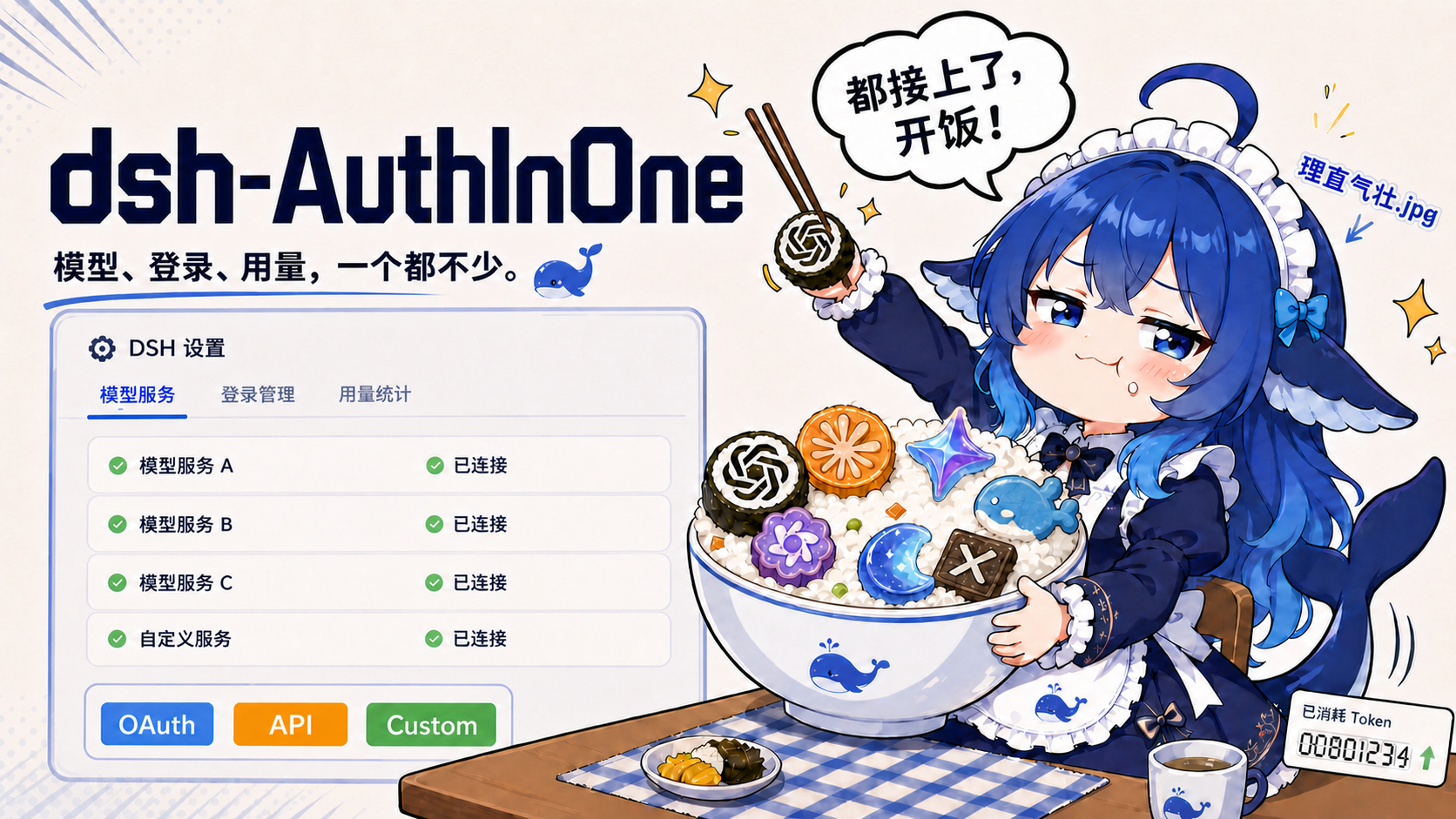
dsh-AuthInOne is a DeepSeek Harness plugin for Provider login, API and custom OpenAI-compatible Provider setup, model switching, optional vision fallback for text-only models, token usage analytics, and cost tracking inside DSH's native Models and Usage settings.
OpenAI Codex uses browser OAuth with state, S256 PKCE, and a loopback callback. Kimi Code opens the Provider's complete authorization link backed by an RFC 8628 device flow; the link carries the short code, so the user normally only signs in and confirms. xAI Grok, Anthropic, GitHub Copilot, Command Code, Cursor, Google Antigravity, and Kiro are explicitly marked Experimental compatibility. Installed-Host validation reached each Provider's authorization boundary and stopped before user consent; mock/fixture tests cover exchange or polling, refresh rotation, denial, timeout, cancellation, logout, route activation, and secret redaction.
Alpha
v0.2.0-alpha.4· exact compatibility target: official DSH47f9438· the self-contained bootstrap uses the official DSH plugin CLI and returns Web on its original port · release notes · MIT · community-maintained and not a DeepSeek or OpenAI product.
pnpm dlx github:Stormycry-cryp/dsh-AuthInOne#v0.2.0-alpha.4 install --profile web
The command is owned by this package. It validates the running standard DSH Host, calls the official dsh plugin add path, then replaces that Host on the same URL. It does not require a patched DSH core, a manual profile edit, a second Web instance, or a temporary port. See Install, upgrade, and remove for source-checkout and non-default-port forms.
If AuthInOne is useful to you, a Star on GitHub is a welcome way to support the project.
Open DSH, then go to Settings → Models or Settings → Usage. The browser receives aggregated usage, redacted status, an authorization URL, and where required a user code. OAuth verifier, authorization code, device code, access token, and refresh token stay on the Host; the plugin never imports ~/.codex/auth.json, OpenCodex state, cookies, browser storage, OTPs, or another product's credentials.
Agent instruction: Run the documented pnpm dlx … install --profile web command as one operation. Do not split it into a manual dsh plugin add plus an improvised restart. The AuthInOne bootstrap must verify the listener, install through the official DSH plugin CLI, return the original URL, and report ready before UI acceptance. Never start a second Web instance, choose a temporary port, patch DSH, edit profile YAML, or read credentials. If the bootstrap rejects an unknown launcher or DSH owner fingerprint, stop and show that error instead of guessing.
Use this plugin when
- you want OpenAI Codex or Kimi Code login inside DSH, or knowingly opt into a labeled compatibility flow;
- you manage API-key or custom OpenAI-compatible Providers in DSH's native Models page;
- you switch the future-session default model without replacing DSH's per-session selector;
- you want a separately configured vision model to describe images only when the selected main model explicitly declares text-only input;
- you need reconstructable Provider/model/tool token usage and auditable calculated cost.
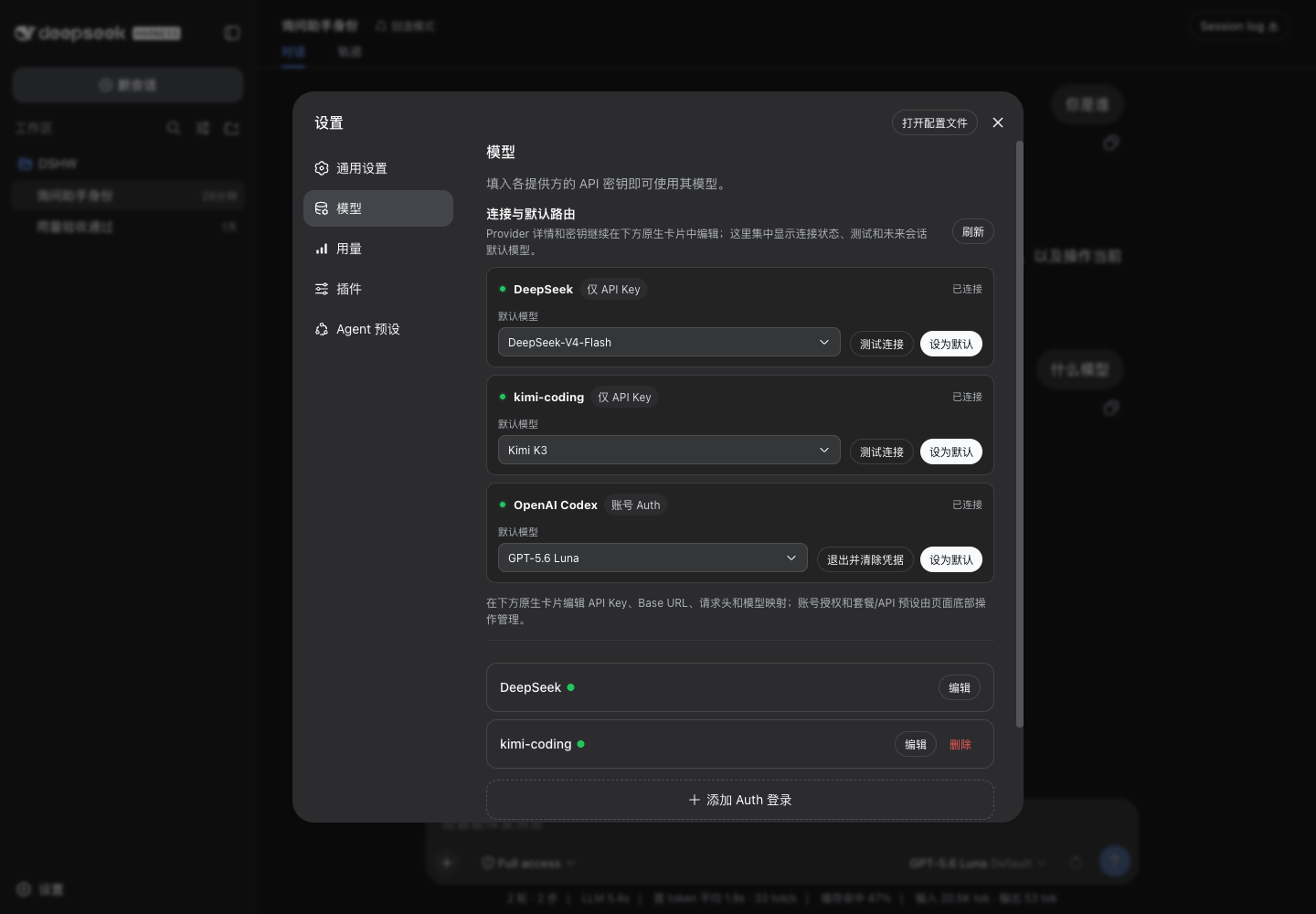
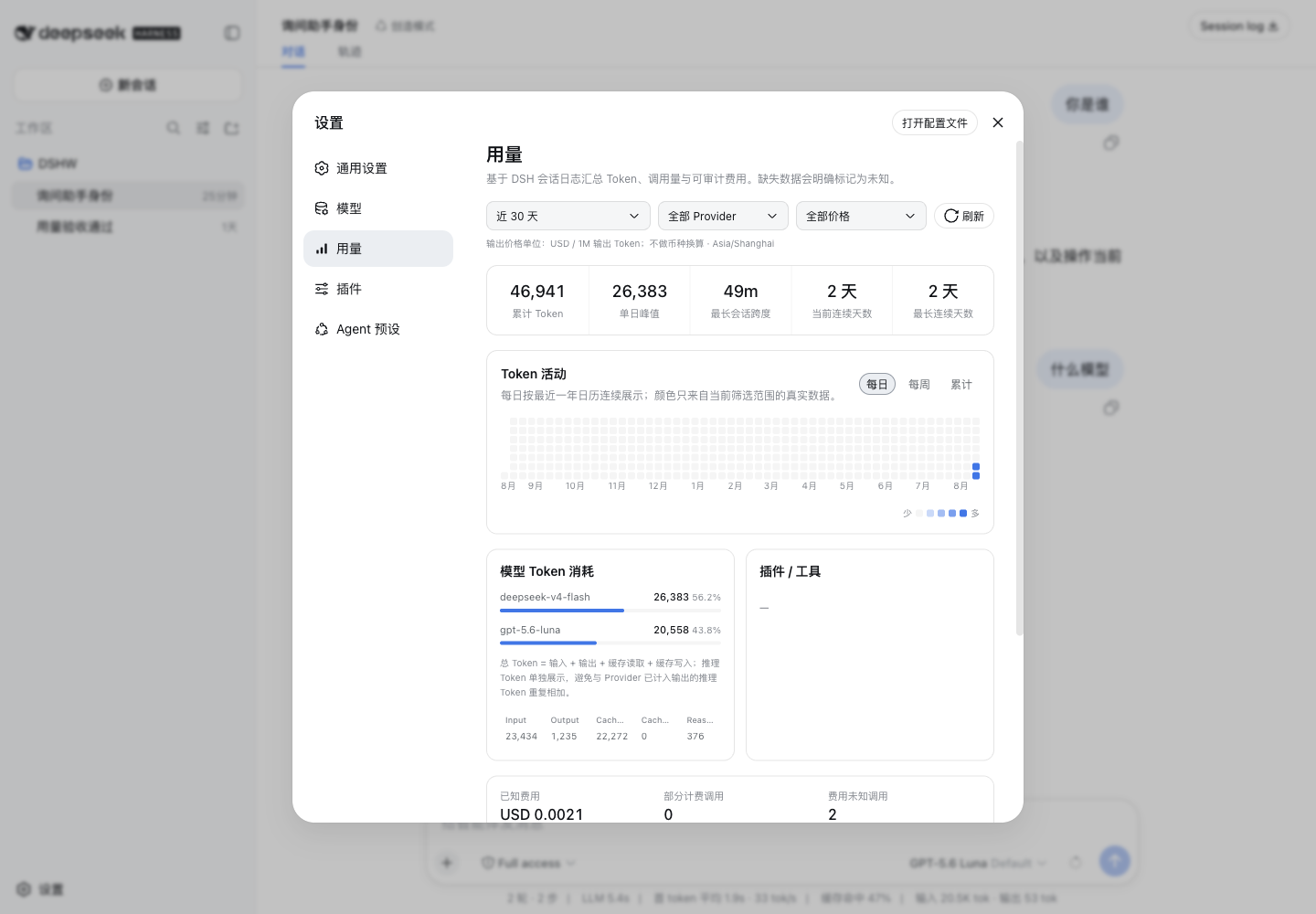
Additional real DSH captures: Auth login dialog, Models action area, dark Usage, light narrow Usage, dark narrow Usage, and second-precision time range.
Verified capabilities
| Capability | Status | Verification | Minimum DSH |
|---|---|---|---|
| OpenAI Codex browser account authorization | Verified to user-confirmation boundary | Real navigation reached auth.openai.com; mock issuer covers callback, state/PKCE, exchange, refresh, denial, expiry, cancellation, logout, revocation, and redaction | Official DSH 47f9438 with the bundled compat owner |
| Kimi Code authorization connection | Experimental; verified to user-confirmation boundary | Installed Host returned the complete Kimi authorization link without returning the Host-only device code; the UI does not ask users to re-enter a short code already embedded in that link | Official DSH 47f9438 with bundled compat owner |
| Seven compatibility account flows | Experimental; verified to user-confirmation boundary | xAI, Anthropic, GitHub Copilot, Command Code, Cursor, Antigravity, and Kiro each reached their expected authorization boundary; mocked completion registers and later disposes the corresponding model route | Official DSH 47f9438 with bundled compat owner |
| Provider subscription quota | Best effort where upstream data exists | Codex, Kimi, xAI, Anthropic, Cursor, and Antigravity have token-free Remote projections; the Models page omits the quota block when the upstream response is missing, incomplete, unsupported, or cannot yield a reliable percentage | Official DSH 47f9438 with bundled compat owner |
| Plan/API presets | Available with vendor limits shown | OpenAI, xAI, Gemini, Anthropic, Kimi Code, GLM Coding Plan, and ModelStudio/Qwen presets write credentials through DSH; GLM and Qwen usage restrictions remain visible | Official DSH 47f9438 with bundled compat owner |
| DeepSeek API-key Provider and live model call | API-key only | Native Provider remained connected; a real DeepSeek call populated Usage without exposing the key | DSH 0.1.0-rc.6 |
| Custom OpenAI-compatible Base URL, headers, model mapping | Native DSH capability | AuthInOne preserves the native Models cards and reads their public Provider projection | DSH 0.1.0-rc.6 |
| Future-session default model and connection test | Verified | Models contribution and Host/Remote route exercised in the installed Web profile | Official DSH 47f9438 with bundled compat owner |
| Vision fallback for text-only main models | Verified | PNG/JPEG/WebP/GIF use DSH ImageBlock references; multi-image, native multimodal pass-through, disabled fallback, failure, resume, and fork paths have keyless coverage | Official DSH 47f9438 with bundled compat owner |
| Cross-session Usage and cost analytics | Verified | Real DSH session logs rebuilt 26,383 Token into KPI, heatmap, model, Provider, bucket, and cost projections | DSH 0.1.0-rc.6 |
| Usage navigation icon | Verified | The bundled generic owner projects a keyed icon seat; AuthInOne contributes a 16 px three-bar currentColor icon and unknown sections retain the native fallback | Official DSH 47f9438 with the bundled compat owner |
Account-login support matrix
| Provider | Flow | Stability | Authorization boundary verified | Refresh/logout/model route | Quota |
|---|---|---|---|---|---|
| OpenAI Codex | Browser OAuth, state + S256 PKCE + loopback | Stable | auth.openai.com | Yes / Yes / Yes | Primary and secondary windows, best effort |
| Kimi Code | Complete authorization link backed by RFC 8628 | Experimental | www.kimi.com | Yes / local logout / Yes | Best effort |
| xAI Grok | Device login | Experimental | accounts.x.ai | Yes / Yes / Yes | Weekly or monthly, best effort |
| Anthropic | Browser/manual compatibility login | Experimental compatibility | claude.ai | Yes / local logout / Yes | Best effort |
| GitHub Copilot | Device login | Experimental compatibility | github.com | Yes / local logout / Yes | Not exposed |
| Command Code | Browser loopback compatibility login | Experimental compatibility | commandcode.ai | Refresh via returned account credential / local logout / Yes | Not exposed |
| Cursor | Browser PKCE compatibility login | Experimental compatibility | cursor.com | Yes / local logout / Yes | Best effort |
| Google Antigravity | Browser PKCE compatibility login | Experimental compatibility | accounts.google.com | Yes / local logout / Yes | Best effort |
| Kiro | Builder ID device login | Experimental compatibility | view.awsapps.com | Yes / local logout / Yes | Not exposed |
| Qwen account OAuth | Discontinued | Unsupported | No start action | No | No |
“Local logout” means the plugin deletes its DSH credential and unregisters the model route when the observed compatibility protocol exposes no reviewed revoke endpoint. The browser never receives the stored credential. Stability labels describe implementation risk; they do not imply Provider sponsorship or certification.
30-second install, upgrade, and remove
Install or upgrade the immutable tag with the package-owned bootstrap:
pnpm dlx github:Stormycry-cryp/dsh-AuthInOne#v0.2.0-alpha.4 install --profile web
The bootstrap discovers the single listener at http://127.0.0.1:3080/, verifies that it is a standard DSH Host, checks the exact supported DSH owner artifacts, invokes the official DSH plugin add command, and schedules a detached same-port replacement. The install command returns before the old Host stops; the browser may disconnect briefly, then the same URL must return.
For a non-default loopback port, provide the exact current URL:
pnpm dlx github:Stormycry-cryp/dsh-AuthInOne#v0.2.0-alpha.4 install --profile web --url http://127.0.0.1:3090/
When DSH runs from a source checkout, the bootstrap normally infers that checkout from the listener working directory. An operator may make it explicit:
pnpm dlx github:Stormycry-cryp/dsh-AuthInOne#v0.2.0-alpha.4 install --profile web --source-root /path/to/deepseek-harness
Inspect the detached handoff after the URL returns:
pnpm dlx github:Stormycry-cryp/dsh-AuthInOne#v0.2.0-alpha.4 status --profile web
Remove the plugin through the same self-contained path:
pnpm dlx github:Stormycry-cryp/dsh-AuthInOne#v0.2.0-alpha.4 uninstall --profile web
The bootstrap only supports a credential-free loopback HTTP origin and a standard DSH launcher: an installed dsh executable or an explicit/inferred DSH source root. Automatic listener verification currently supports macOS and Linux and requires lsof. Ambiguous ports, unrelated listener processes, unknown owner artifacts, and unsupported launch provenance fail before the Host is stopped. It never falls back to another port. Owner-only restart status is written under the selected profile without environment values or credentials.
The official DSH CLI still owns the profile dependency and Bundle row. Do not copy lib/, create a workspace link, edit profile YAML, or apply the patch by hand. Removal unloads the page, Models contributions, Remote namespace, Host service, styles, and listeners. It intentionally preserves DSH sessions, plugin settings, and credential references; data deletion is a separate explicit action. The exact lifecycle and failure behavior are documented in Self-contained installer and same-port restart.
Models and authentication
DSH's native Provider cards remain the only place to add, edit, or remove an API-key Provider. They own custom Base URLs, request headers, protocol choice, model mappings, and endpoint model discovery. AuthInOne adds a compact connection/default-route projection, a full-width Add Auth login action, and an Add Plan / API Key action above the two native add-Provider buttons. Per-session switching stays in DSH's conversation model selector.
The Models summary contains configured API/Plan/custom Providers and persisted Auth accounts only. The Auth catalog stays in the Add Auth login dialog; cancelled, failed, expired, and never-started entries do not create placeholder cards. A connected account refreshes the summary immediately, and Auth instances use their model adapter and logout flow instead of the generic Base URL probe.
Every Auth entry uses the same Host transaction surface: start, redacted status, cancel, optional one-time input, refresh, logout, and disposal. Browser/loopback flows keep state and PKCE verifier in the Host. Device flows keep the device code in the Host and expose only the verification URL and user code. A successful credential is written through DSH credentials before its model adapter is registered; terminal refresh failure or logout unregisters the route. Cancellation during a pending write compensates by deleting the credential. Remote revocation is bounded and best effort after local deletion.
OpenAI Codex protocol values were checked against OpenAI's public Codex sources for the login server, auth manager, and PKCE helper. Kimi device polling follows RFC 8628 pending and slow_down semantics. Compatibility entries use reviewed Provider/public-client behavior and remain labeled Experimental.
The Plan/API action includes OpenAI API, xAI API, Google Gemini API, Anthropic API, Kimi Code subscription keys, GLM Coding Plan, and ModelStudio/Qwen Coding Plan. GLM and Qwen presets retain the vendor's supported-tool or interactive-use restrictions. API keys are a separate connection method and never count as account Auth.
The connection test calls the configured OpenAI-compatible /models endpoint from the Host. It rejects redirects before a credential-bearing request can reach another origin and incrementally caps response bytes. The Client receives only success, latency, model ids, or a sanitized failure category; it never receives request headers, upstream response bodies, or credentials.
Vision fallback
Vision fallback is off by default under Settings → Models. Choose an active Provider and a model whose DSH adapter explicitly declares image input, then enable and save it. The fallback runs only when the main model explicitly omits image capability; a main model that declares image input receives the original request unchanged, and unknown capability is not silently treated as text-only.
For a text-only main model, the plugin records the exact DSH attachment references, fallback route, prompt version, result, and provider-reported usage as ordinary durable DSH messages with plugin provenance. It then replaces image blocks only in the provider-bound main request with the recorded textual description. Resume and fork reuse that recorded result; switching the fallback route affects new images, not already-described history.
Supported inputs are exactly DSH's version-one raster formats: PNG, JPEG, WebP, and GIF. The feature does not accept audio, video, PDF, image generation, browser object URLs, host paths, or plugin-owned base64 storage. DSH attachment storage owns the bytes and verifies them before an adapter reads them. Provider adapters resolve credentials through DSH Host credentials; AuthInOne never receives a credential in the vision settings RPC.
Successful auxiliary calls appear separately as Vision-assist calls and Vision-assist Token while retaining their actual Provider/model route. Missing provider usage remains unknown, and a missing price remains unpriced. A failed or credential-less fallback does not call the text-only main model with an unusable image request; it returns a recoverable VISION_FALLBACK_FAILED result and keeps upstream response details out of the session log.
Usage filters and accounting
- Time, Provider, and output-price filters share one query context and drive every KPI, heatmap point, ranking, Token bucket, and cost value.
- Time is an inclusive local
YYYY-MM-DD HH:mm:ssrange in the displayed IANA timezone. The Host converts it to a deterministic UTC[start, endExclusive)query. Shortcuts fill the last 7, 15, or 30 days without closing the editor. - Output-price bands use only
outputTokensPerMillionin USD per 1M output Token. The disjoint bands are[0,1),[1,5),[5,15),[15,+∞), and unpriced. Missing/non-USD rows are unpriced; there is no silent currency conversion. - Refresh keeps the active filters. Failed refreshes remain visible and do not replace the last good result.
- Daily Token activity always renders the latest 365 dates as a seven-row calendar. Dates without matching calls remain visible as empty cells; weekly and cumulative modes keep their existing aggregation semantics.
- Model calls use their actual logged event time. Tool calls are a separate dimension. DSH does not log an authoritative owner plugin for every tool call, so the UI reports durable tool names and does not invent plugin attribution.
- Total Token is uncached input + output + cache read + cache write. Reasoning is shown separately because some Providers already include it in output. Missing buckets remain unknown.
- Token values below 1M use locale grouping; 1M to below 1B use
M; 1B and above useB; exact values remain in title and accessible labels.
The built-in deepseek-usd-2026-08-14 catalog contains only DeepSeek-V4-Flash and DeepSeek-V4-Pro USD rows verified from the official DeepSeek pricing page on 2026-08-14. Every row carries a source URL, verification/update date, effective date, currency, and explicit token-bucket rates. Missing prices remain unknown or partial, never a forged zero or another Provider's price.
Security and data boundaries
AuthInOne creates no separate database. Analytics, including vision-assist provenance and provider-reported usage, rebuilds from DSH sessions; non-sensitive overrides use the plugin's DSH settings namespace; OAuth and API credentials stay in DSH credentials. Image bytes stay in DSH attachment storage and are never copied into plugin settings. The plugin does not scan user homes, browser stores, keychains, Codex/OpenCodex files, .env files, or unrelated databases.
Authorization URLs and device user codes are public instructions for the current login transaction. The Remote DTO has no verifier, authorization code, device code, access token, refresh token, raw identity, upstream body, or credential value. Tests assert those fields do not cross Remote or logs. Screenshots contain no authorization URL, account, token, user code, or API key.
Provider responses have both time limits and incremental byte limits. Credential-bearing connection tests refuse redirects. The alpha.2 security diff scan reviewed 74 changed/added artifacts, found two medium-severity network-boundary issues, and verified both fixes with Node 24 reproductions and focused tests before release.
Compatibility
| DSH environment | Host/Usage | Models status/default | Add Auth login | Usage icon |
|---|---|---|---|---|
Official DSH 47f9438, one standard AuthInOne add | Available | Available | Available | Three-bar plugin icon |
| Unknown/new DSH owner artifacts | Installation fails loud | Not mounted | Not mounted | Not mounted |
| Plugin removed | Absent | Native page only | Absent | Absent |
Official DSH 47f9438 does not expose the three generic composition seats needed inside Models and the Settings navigation. The package therefore carries exact-47f derivatives of the official Settings General and Models runtime owners. Its Bundle patch disables only those two official rows and mounts the compatible owners from the same AuthInOne package; their only additions are settings.models.insights, settings.models.actions, and a keyed settings.section.icon projection. Auth, Provider, Usage, and vision business code remains in separate AuthInOne registrations.
The Host checks the exact official owner versions and client SHA-256 fingerprints before creating plugin state, while the Client rejects already-declared seams. A changed or native-seam host fails with AUTH_IN_ONE_COMPAT_UNSUPPORTED_DSH instead of being silently replaced or double-registered. Removal drops both replacement rows with the Bundle layer and automatically restores the official owners. There is no DOM patch, --patch overlay, manual profile edit, or DSH checkout change. DeepSeek's MIT notice and the exact source provenance are recorded in THIRD_PARTY_NOTICES.md.
See Architecture and plugin boundary invariants for plugin-owned code, the exact core seam allowance, lifecycle disposal, safe degradation, and boundary gates.
What this plugin does not claim
- It is not an official DeepSeek, OpenAI, or model-provider product and does not imply endorsement.
- It does not claim every compatibility login is a stable or Provider-endorsed integration. Seven entries are explicitly Experimental, and Qwen account OAuth is discontinued and unavailable.
- It does not replace Models business behavior, the attachment pipeline, session log, or model selector; on exact DSH
47f9438it replaces the two Settings owner rows with source-derived compatible owners so the native page behavior plus generic seats can be delivered by one Bundle. - It does not infer that a model supports or lacks vision when its adapter publishes no modality metadata.
- It does not extend image understanding to audio, video, PDF, or image generation.
- It does not fabricate missing Token buckets, prices, currency conversion, tool ownership, or a successful login.
Local development
Use Node ^22.19 or >=24 and the locked pnpm project:
pnpm install --frozen-lockfile
pnpm typecheck
pnpm test
DSH_SOURCE_ROOT=/path/to/deepseek-harness pnpm verify:boundaries
pnpm build
pnpm pack --dry-run
lib/ is committed because GitHub installs do not run a build. The package has no prepare script and requires no install-time lifecycle permission.
Provenance and licenses
AuthInOne business logic, credential representation, settings fields, tests, README prose, and product interaction copy were independently written for this repository. The compatibility owner runtime is an explicitly attributed MIT derivative of the official DSH 47f9438 Settings General and Models sources; see THIRD_PARTY_NOTICES.md. The local OpenCodex source was read only for responsibility and failure-state comparison; details are in the clean-room comparison and alpha.2 provenance audit.
The following repositories were used only for capability collision and public seam research: usage-report, openai-codex-auth, codex-provider, polyglot, usage-meter, cost-ledger, and dsh-web-ui. No source, README text, CSS, component structure, schema, or tests were copied or vendored from them.
Runtime dependency: Zod (MIT). Build-time Provider transport dependency: @earendil-works/pi-ai 0.82.1 (MIT), bundled into the committed Host artifact and not installed into the DSH profile. Cursor compatibility uses @cursor/sdk 1.0.24 under the Cursor SDK license and Terms of Service; it is bundled into the Host artifact and remains Experimental. Development tools include React, tsdown, Vitest, and Testing Library (MIT), TypeScript (Apache-2.0), and Lightning CSS (MPL-2.0). This repository is licensed under MIT.
DeepSeek, OpenAI, Codex, and other Provider names and marks belong to their respective owners. Their appearance describes compatibility and does not imply sponsorship, certification, or endorsement.
Read the usage guide →
Install steps, key points, FAQ and compatibility for this plugin — auto-derived from indexed fields.
Listing badge

[](https://deepseek-plugin.org/plugins/Stormycry-cryp/dsh-AuthInOne)Paste this markdown into your GitHub README to link back to this listing. The badge only states the listing — not a security endorsement.