Add /bridge command to DeepSeek Harness WebUI for migrating existing sessions to another tool preset non-invasively while preserving the original session.

- Language
- JavaScript
- License
- MIT
- Branch
- main
Install
$ dsh plugin --profile web add dsh-plugin-bridgeRun the command above in your terminal to install this plugin via the dsh CLI. You can switch Profile in the top-right corner. New to dsh? Read the beginner tutorial
Install via your agent
Install the DeepSeek Harness plugin Totoro-qaq/dsh-plugin-bridge for me: review the repository at https://github.com/Totoro-qaq/dsh-plugin-bridge first, then run the install command and verify the plugin loads successfully.
Paste this instruction to the DSH Web GUI assistant — it will install and verify for you.
plugin_id: dsh-plugin-bridge
analyzer_model: deepseek-reasoner
ai_summary: Adds a /bridge command to DeepSeek Harness WebUI that compresses ongoing conversations into a fixed five-paragraph summary and continues in a new session under a different tool preset, while preserving the original session in place.
One-Line Positioning
Adds a /bridge command to DeepSeek Harness WebUI: compresses an ongoing conversation into a fixed five-paragraph summary and starts a new session under a different tool preset to continue, while the original session remains untouched.
Core Capabilities
- Enter
/bridgein any conversation's input box to migrate that session to a different tool preset (minimal / standard / code, etc.), keeping the original session intact - Before migrating, preview a handover summary (target / current state / key decisions & agreements / key files / next steps), then execute with
--goto confirm - Summary is written to a local temp file that can be directly edited, then run with
--fileto use the "edit then execute" path, avoiding back-and-forth with the model - Target session defaults to first restating understanding, then pausing for your confirmation; add
--continueto merge restatement and next steps in the same request round - Existing vision analysis entries are copied verbatim into the summary without going through the summary worker rewriting; unresolved original images under rc.8 can be sent with the first round prompt to visual targets
- Built-in
/bridge --doctorself-check: directly lists which gateway methods are exposed by the current host, current mode, and active configuration
Technical Implementation
- Language: TypeScript (Node.js, ESM)
- Key Dependencies:
@deepseek-ai/cordis(peer),@deepseek-ai/schemastery(config schema) - Architecture Pattern: Injects
commandsandapiProxycordis services into the host process; command registration uses effect disposer, commands disappear with the fiber on unmount - Execution Engine: In-process
ctx.apiProxy(not via HTTP, but CLI also goes through loopback HTTP using the same code path), entire migration chain stays within the process - Entry Files:
src/index.ts(apply registers/bridgecommand) /src/command.ts(command dispatch: preview / migrate / doctor)
Use Cases
You're halfway through a conversation in "General" mode and realize you need to write code—the mode switch is locked (because different preset tool sets are incompatible, leaving ghost calls). Bridge is the exit: compress current progress into a summary, start a new session with the new preset to continue, original session stays in place. Not suitable for just starting a session (nothing to carry) or if you just want to switch models or adjust thinking intensity (that's already possible within the session).
Prerequisites & Compatibility
| Dependency | Min Version | Description |
|---|---|---|
| DSH | 0.1.0-rc.6+ | rc.6 / rc.7 / rc.8 all verified interface by interface; rc.8 adds optional capability for persistent image attachment reading |
| Node.js | ≥ 22 | Repository CI covers Node 22 / 24 |
| Platform | Cross-platform | No native modules, no OS restrictions |
| Native Modules | None | Pure Node standard library (fs / os / path) |
Installation
dsh plugin --profile web add github:Totoro-qaq/dsh-plugin-bridge
Configuration Options
Works out of the box with defaults. When customization is needed, edit the dsh-plugin-bridge block in ~/.dsh/profiles/web/cordis.patch.yml, or set the corresponding environment variables.
| Config | Type | Description | Default |
|---|---|---|---|
modelTier | flash / current / pro | Model tier for compression summary worker; pro has smaller failure variance, flash not recommended for migrating to minimal | pro |
sourceCharBudget | number | Total character budget for compression sourcing (~30K tokens input) | 60000 |
summaryCharBudget | number | Character budget for handover summary body (~900 tokens) | 2400 |
goalRounds | number | Upper limit for autonomous rounds with new session set as goal; upstream default 256 rounds runs empty automatically, Bridge forces a close | 1 |
inject | goal / prompt / both | Summary injection method: goal is a recoverable target, prompt is the first round prompt; both attaches both | both |
lang | zh / en / auto | Summary output language; auto follows conversation content | auto |
workerProvider | string | Force specify the provider where compression model is located (for deployments that switched providers) | "" |
workerModel | string | Force specify the compression model name | "" |
previewTimeoutMs | number | Timeout upper limit for /bridge <preset> waiting for compression worker | 180000 (3 minutes) |
FAQ
Q: Do I need to restart dsh web after installation?
A: Yes, required. The plugin mounts when dsh web starts; if /bridge doesn't respond in the input box after installation, it's likely because you haven't restarted. After restart, both the commands service and apiProxy service will be in place, and the command will appear.
Q: Will it still work after upgrading DSH?
A: Run /bridge --doctor first. It will list which of the 13 gateway methods are available, current preset, and active configuration; if methods are missing, it will directly name that method, and you can post that line along with your DSH version to an issue. rc.6 / rc.7 / rc.8 all verified, main chain method table is completely consistent.
Q: How much does the new session "remember" after migration?
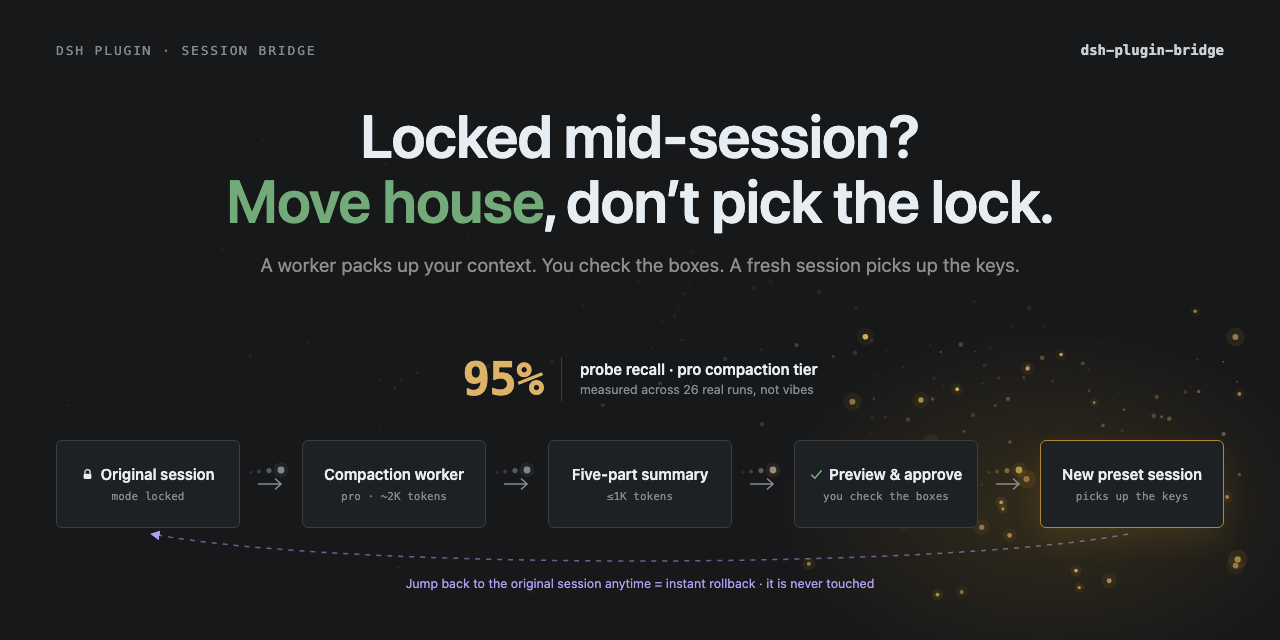
A: At pro tier, 8 runs yield 95% usability. The most common losses are numbers being completed to common values (ports rewritten to 3000/8080, etc.), so preview step should focus on scanning numbers and paths. fix-version 0.2.4 explicitly blocks "old value resurrection" as a keyword, achieving 100% key fact hit rate across 6 independent summaries + 12 target sessions.
Q: Why not just switch preset in the original session?
A: Upstream is hard-locked at the gateway layer, and correctly so: historical tool calls are only valid under the original tool set; switching presets midway leaves "ghost calls" that the new preset cannot execute, easily causing silent degradation. Bridge chooses to move rather than circumvent the lock. The new session is clean; after restating understanding, you confirm.
Q: How much does migration cost? Will it make normal sessions more expensive?
A: When just installed without migrating, it contributes 0 prompt tokens to normal sessions—/bridge is a host slash command, doesn't register skills or tools, command results don't enter model history. Compression worker实测约 1.6K input + 0.7K output; default confirmation mode additionally costs a confirmation round that only restates, --continue merges restatement and work in the same goal round. Token main cost remains subsequent agentic work.
Q: What if numbers or paths in the summary are wrong?
A: Preview automatically writes the summary to a temp file and prints the path. Open that file directly with an editor, fix the numbers or paths, save, then run /bridge code --go --file <path> to execute with the modified summary. The file is the single source of truth, more reliable than having the model "remember what you said you wanted to change."
Q: How to rollback if unsatisfied after migration?
A: The original session hasn't been touched at all; just click back to continue the original session; archive the new session. Bridge doesn't write to the original session or touch workspace files; the new session is "another session" started under the new preset.
Q: What's the relationship with TotoroPilot?
A: TotoroPilot is a GUI popup form that calls the same migration pipeline; this plugin itself can be used directly in the official WebUI with /bridge. Both use the same migrate.ts orchestration.
Getting Started Difficulty
Beginner — one command to install, restart once, type /bridge <preset> in the input box to use; default config covers the vast majority of scenarios, only need to adjust config when compression tier or multi-round goals need tweaking.
Known Issues & Limitations
- After installation in official WebUI, currently requires one restart, and plugins are not allowed to automatically jump to new sessions; Bridge will print the new session's exact title and session ID in the result, manual switching required
- Default DeepSeek text model still cannot read images; Bridge only preserves existing visual evidence, never secretly runs local small vision models; when rc.8 persistent attachments cannot be reused, degrades to "unresolved" prompt
- Preview typically takes 20-60 seconds, protected by
previewTimeoutMs(default 180 seconds) limit; timeout will cancel and fall back to already-produced text - Migration creates a new target session (occupies one workspace slot), not in-place replacement; environments with known workspace overflow should clean up first
- If main chain methods are missing after upgrading DSH, migration will fail—run
/bridge --doctorto locate - Release acceptance is small-sample, fix-driven (only 1 run per cell), should not be interpreted as overall accuracy guarantee




English | 中文
Move a produced DeepSeek Harness session to another tool preset through a previewable, fixed-schema handoff. The original session stays untouched.
Quick start · Safety and cost · Accuracy · How it works · Compatibility
Quick start
dsh plugin --profile web add github:Totoro-qaq/dsh-plugin-bridge#v0.2.5
# restart dsh web once
Then type in the official WebUI:
/bridge                       list available target presets
/bridge code                  preview the handoff; changes nothing
/bridge code --go             migrate, restate, then wait for confirmation
/bridge code --go --continue  restate and start work in the same target turn
The preview is editable. If a number or path is wrong, edit the printed summary file and run:
/bridge code --go --file <path>
Uninstall with dsh plugin --profile web remove dsh-plugin-bridge, then restart dsh web.
Verified on the official rc.8 WebUI (2026-08-20): clean install, plugin load,
standard → minimalpreview/migration, paused-goal persistence, and host restart. The package ships prebuiltlib/, so git installation needs no pnpm build-script allowlist.
Safety and cost
Bridge optimizes for high-fidelity, bounded-cost migration:
- Default — accuracy first: the target restates the handoff in one short turn and waits. You verify it before any work starts.
--continue— lower latency/cost: the target restates and begins the next step in the same model request.- In both confirmation modes, any stored goal is paused before kickoff. The goal driver cannot silently queue another model round.
- If pausing fails, Bridge fails closed: it cancels automatic startup and sends no kickoff.
- Installing the plugin adds zero prompt tokens to normal sessions.
/bridgeis a host slash command, not a model tool or skill. - Existing image analysis is copied verbatim outside the compressed summary. Only unresolved images may use vision tokens, and only when the target accepts images.
The release-acceptance run used one summary request per fixture. Confirm always reached first useful work in two target requests; --continue always did so in one. Token totals varied sharply with preset, output length, and cache state, so Bridge does not claim a universal percentage saving.
Observed across the fixed 12-cell release acceptance:
| Token measure | Nominal | Processed |
|---|---|---|
Confirm extra vs --continue, pooled summary + first useful work | +12.82% | +52.56% |
Confirm extra vs --continue, paired median | +8.1% | +65.6% |
| Summary worker share of the clean acceptance suite | 20.74% | 16.71% |
Nominal is the primary comparison. Processed weights cache-read tokens equally and is not a bill; the worker row is a composition share, not causal overhead versus a no-Bridge baseline.
Token definitions, ranges, and raw totals
Nominal = uncached input + output; processed also includes cache-read/cache-write tokens and is a sensitivity measure, not a bill. “Summary + first useful work” excludes the pre-existing source conversation and official compaction cost.
Across the six paired fixtures, confirm's nominal extra had a median of +8.1% and a range of -47.9% to +206.7%; target-only nominal extra had a median of +11.0% and a range of -74.7% to +1059.1%. The wide spread is why request count is the stable product claim—not a fixed token-saving percentage.
The six fixed summary workers used 19,551 nominal / 26,463 processed tokens. The 12 target sessions used 74,716 / 131,932. Counting each shared summary once, the clean acceptance components totalled 94,267 / 158,395 tokens. See the full report and raw JSON.
In short: the safe default deliberately spends a separate confirmation turn; --continue combines confirmation and useful work into one target turn without enabling a background goal round.
Accuracy
The default compression tier is pro. The latest rc.8 release acceptance covered 6 frozen fixtures and 12 target sessions:
| Measure | Result |
|---|---|
| Summary facts | 30/30 |
| Target restatement facts | 60/60 |
| First useful work facts | 60/60 |
| Critical facts | 90/90 |
| Obsolete-value resurrection | 0 |
| Exact confirm / continue request count | 6/6 · 6/6 |
This is a small, repair-driven release gate—not a statistical accuracy guarantee. It includes three 21-message sources with real compaction reuse plus three short sources, across minimal, standard, and code targets. Full methodology, raw token deltas, variability, and archive evidence are in the v0.2.3 baseline + fix report.
Earlier compression-tier benchmark
The earlier August 2026 benchmark remains useful for comparing compression tiers:
| Measure | Result |
|---|---|
| Summary fidelity | 97.5% test / 96.7% validation |
| Migrated fact usability | 87.5% test / 83.3% validation |
pro fact usability (8 runs) | 95% |
flash fact usability (8 runs) | 80%, including one total-loss run |
| Five-section schema compliance | 100% |
pro and flash cost nearly the same here; the reason for defaulting to pro is lower failure variance, not a statistically proven mean advantage. Numbers and ports remain the main drift risk, which is why preview and restatement are part of the product path.
See the earlier benchmark, A/B control, and known weaknesses.
How it works
fold history → generate five-part summary → preview/edit → create target session
             → pause stored goal → inject summary → restate (and optionally continue)
image history → copy associated assistant text verbatim; unresolved raw images use rc.8 capability fallback
The five sections are Goal, Current state, Key decisions & conventions, Key files, and Next step. Tool traces from the old preset are intentionally dropped: Bridge moves state, not incompatible tool history.
The original session is never rewritten. If the migration is unsatisfactory, return to it and archive the new session.
Images in rc.8: raw transfer vs verbatim evidence
Bridge uses an automatic, accuracy-first image policy:
- An image-only user message never disappears from source material.
- If the source turn has associated assistant text, Bridge appends that text verbatim under
Visual evidence; the summary worker cannot rewrite it. The preview deliberately calls it an associated response—not proof that every pixel was understood. - If no assistant text follows the image, Bridge marks it
Unresolved. On rc.8 it reads the durable source attachment and tries to include the raw image in the target kickoff. - An image-capable target receives the raw image plus the handoff. A text-only DeepSeek target rejects the image during host admission, before a message or model request is created; Bridge then sends the text handoff with an explicit unresolved warning.
- Raw images are not resent when verbatim evidence already exists, avoiding unnecessary visual-token and cache cost. Reattach the source image when the preserved response is insufficient for the next step.
The normal five-part summary remains bounded by summaryCharBudget (2,400 characters by default). Verbatim visual evidence has a separate 60,000-character budget and is admitted as whole blocks: Bridge may omit an older block with a visible warning, but never cuts an image-derived response in the middle. Copying existing text adds no model round; a successfully attached raw image is priced by the selected vision provider.
rc.6/rc.7 remain compatible through the text path. Raw attachment recovery is an optional rc.8 gateway capability and does not become a required /bridge --doctor method.
Why not switch the preset in place?
A preset is a system prompt, tool set, and plugin composition—not a tone setting. Tool calls already stored in the session are only valid under the composition that produced them. DeepSeek Harness therefore allows agentPreset.select only while a session is blank; changing it later would leave ghost tool calls that the new preset cannot execute.
Bridge respects that boundary by opening a clean target session and carrying only a bounded handoff. Model and thinking-effort changes remain separate and can still happen inside a session.
Official preset factory, @ session references, and TotoroPilot
- The official Agent Preset factory creates or configures presets for blank/future sessions. Bridge moves existing work into one of them.
- rc.8's
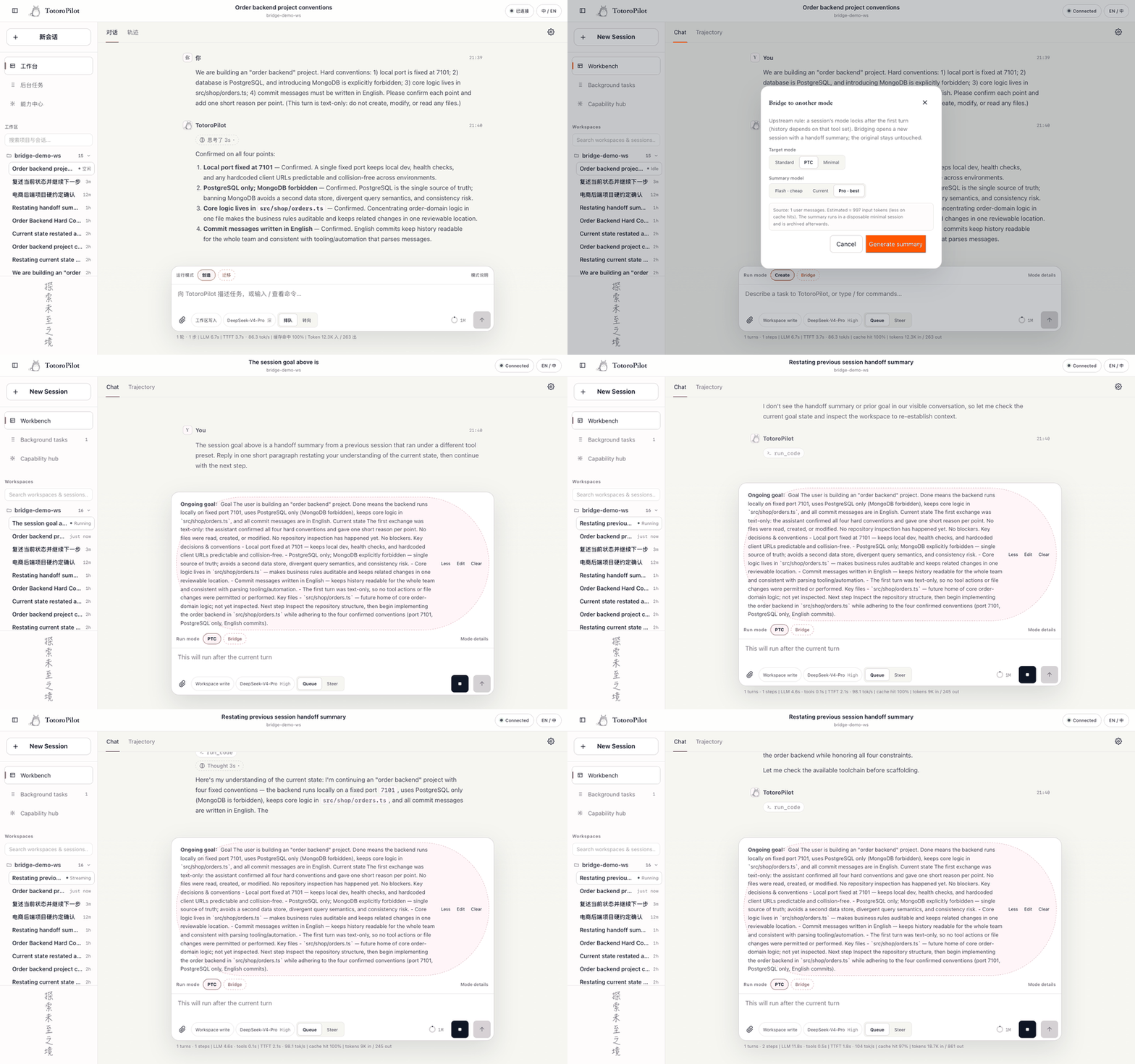
@reference attaches a bounded read-only snapshot of another session to the current session. Bridge creates a new session and removes old-preset tool traces. - TotoroPilot exposes the same migration pipeline through a GUI modal. The plugin itself remains usable directly in the official WebUI.
Compatibility and limits
Verified against DeepSeek Harness 0.1.0-rc.6, rc.7, and rc.8, Node.js 22 and 24. Run /bridge --doctor after a Harness upgrade; it names missing gateway methods instead of failing vaguely.
- The official WebUI currently needs one restart after install and cannot let a plugin navigate to the session it creates. Bridge prints the exact title and session ID.
- Default DeepSeek text models still cannot inspect images. Bridge preserves prior visual evidence and fails visibly when no reusable rc.8 attachment is available; it does not run a hidden local vision model.
- Preview normally takes 20–60 seconds and is bounded by
previewTimeoutMs. - Release acceptance now covers real compaction reuse, but only one run per cell; it should not be read as a population guarantee.
- The older tier-comparison benchmark predates prompt+goal dual injection and remains labeled as historical evidence.
For the full walkthrough, rollback checklist, configuration table, CLI path, and FAQ, read the Chinese usage guide.
Advanced CLI and configuration
dsh-bridge doctor
dsh-bridge preview --to code --session <id>
dsh-bridge migrate --to code --summary-file <path> --continue
Main settings: modelTier, sourceCharBudget, summaryCharBudget, goalRounds, inject, lang, workerProvider, workerModel, and previewTimeoutMs. Configure them in the profile's cordis.patch.yml or through the matching DSH_BRIDGE_* environment variables documented in the guide.
The default injection mode is both: the summary is stored as a resumable goal and included in the kickoff prompt. The goal is paused before kickoff in both confirmation modes.
Development
npm test          # build + typecheck + 120 tests
npm run pack:check
CI verifies Node 22/24, generated lib/, datasets, package contents, and the narrow upstream RPC/command contract. Tests use a fake host and spend no model tokens. Evaluation is separate and uses your own local model credentials; see docs/benchmark.md.
License
MIT
Read the usage guide →
Install steps, key points, FAQ and compatibility for this plugin — auto-derived from indexed fields.
Listing badge

[](https://deepseek-plugin.org/plugins/Totoro-qaq/dsh-plugin-bridge)Paste this markdown into your GitHub README to link back to this listing. The badge only states the listing — not a security endorsement.