The terminal coding interface of DeepSeek Harness, featuring Ink rendering, interactive TUI, persistent sessions, agent presets, model switching, and git workflow commands.

- Language
- TypeScript
- License
- MIT
- Branch
- main
Install
$ dsh plugin --profile web add dsh-codeRun the command above in your terminal to install this plugin via the dsh CLI. You can switch Profile in the top-right corner. New to dsh? Read the beginner tutorial
Install via your agent
Install the DeepSeek Harness plugin UNLINEARITY/dsh-code for me: review the repository at https://github.com/UNLINEARITY/dsh-code first, then run the install command and verify the plugin loads successfully.
Paste this instruction to the DSH Web GUI assistant — it will install and verify for you.
One-Line Description
dsh-code is the terminal coding interface for DeepSeek Harness (dsh), bringing Agent, sessions, models, and tools to the command line, enabling you to start new sessions, run code, edit files, and perform diff reviews directly in the terminal. It runs as an out-of-tree bundle on top of the official @deepseek-ai/dsh-base, sharing the same Cordis registry with the Web UI at runtime.
Core Features
- Launch interactive TUI with three entry commands:
dsh --profile cli,deepseek, anddsh-code(README.md:45-49 / bin/deepseek.mjs:197) - Create, resume, recover by ID prefix, and fork persistent sessions; session events can be replayed in the terminal (src/index.ts:255-285 / README.md:62-67)
- Combine tools, skills, plan mode, and subagent behavior through Agent Presets (standard / code / minimal / cordis / custom); preset selections persist with the session (src/presets.ts:33-46 / README.md:78-79)
- Switch models, reasoning effort, permission Presets, and subagent model routing within the terminal, writing each selection as a global default (src/index.ts:956-994 / src/index.ts:529-541)
- Provide
/diffand/reviewworkflows, combining git to check changes and perform read-only code review;/exportexports conversations as Markdown (README.md:104-108 / src/index.ts:1017-1040) - Persist status bar items, theme (dark/light/auto), and input history to JSON/JSONL files under
~/.dsh/dsh-code/(src/index.ts:555-628)
Technical Implementation
- Language: TypeScript
- Key Dependencies: ink (^5.2.1), react (^18.3.1), commander (^14.0.2), @deepseek-ai/dsh-agent (^0.1.0-rc.8)
- Architecture Pattern: Cordis plugin tree; mounted to host via bundle patch (
cordis.patch.yml); declarestui-startupservice at startup,tui-runnerlazily loads sessions underctx.tuiStartup.startupinjection - Entry Files: src/index.ts (runner), src/startup.ts (CLI parsing), bin/deepseek.mjs (launcher wrapper)
Use Cases
Ideal for developers who prefer completing coding work in the terminal: want to run AI programming sessions directly in the command line without switching to the Web UI; need to reuse persistent sessions for long tasks (resuming, forking, resuming across directories); want to invoke the same dsh capability stack in CI or SSH remote environments instead of opening a browser.
Prerequisites and Compatibility
| Dependency | Min Version | Description |
|---|---|---|
| DeepSeek Harness | 0.1.0-rc.8 | Requires global installation of @deepseek-ai/[email protected]; all peer dependencies aligned to ^0.1.0-rc.8 |
| Node.js | ^22.19 or >=24 | engines.node declared range (package.json:63) |
| pnpm | Any | pnpm used for profile plugin dependency installation; errors if not globally installed (docs/problems.md:127-142) |
| Platform | macOS / Windows / Linux | Wrapper and TUI cross-platform; Linux requires build-essential to compile node-pty |
| Native Module | node-pty (indirect) | Introduced by DSH main program; Linux missing prebuilt binaries requires manual node-gyp rebuild |
Installation
dsh plugin --profile web add github:UNLINEARITY/dsh-code
Configuration Options
| Config | Type | Description | Default |
|---|---|---|---|
DSH_TOOLS_MODE | Env Variable | Controls tool mode injection in cordis.patch.yml; read at runtime | Determined by process environment, defaults to host if unset |
DSH_SETTLED_ROWS | Env Variable | Max lines for history replay; 0 disables cap for infinite scroll (src/app.ts:94-99) | 3000 |
--theme <name> | CLI / Persistent | Terminal color scheme: dark, light, or auto; also writes to ~/.dsh/dsh-code/theme.json | dark (README.md:96) |
--mode <preset> | CLI | Lock Agent Preset for this session at startup; locked after first turn | standard |
| `--resume <id | prefix>` | CLI | Resume persistent session by id or unique prefix |
--continue / -c | CLI | Resume the most recently modified session in current directory | None |
--session <id> | CLI | Create new session with specified id (id must not exist) | None |
Status Bar Items (~/.dsh/dsh-code/statusline.json) | JSON File | User-level persistent status bar display items; degrades to default if missing or corrupted | Default |
Input History (~/.dsh/dsh-code/history.jsonl) | JSONL File | Submitted prompt history, max 500 entries retained | Empty |
FAQ
Q: After startup it reports the cli profile does not mount dsh-code yet, what should I do?
A: This means the alias exists but the profile hasn't mounted the plugin. Run dsh plugin --profile cli add dsh-code (or with version [email protected]) to mount it, then start with the same command (bin/deepseek.mjs:170-179).
Q: pnpm repeatedly prompts allowBuilds when installing from GitHub source?
A: Git packages don't include the release lib/, so they build during the prepare phase. You need to write the full entry from the pnpm prompt (including git URL and commit) to ~/.dsh/profiles/cli/pnpm-workspace.yaml, then rerun the installation command (docs/problems.md:60-99).
Q: Reports Cannot find module './prebuilds/linux-x64/pty.node' on Linux?
A: This is [email protected], a dependency of the DSH main program, missing prebuilt binaries. First run apt install build-essential python3 make g++, then under cd "$(npm root -g)/@deepseek-ai/dsh/node_modules/node-pty" execute npx node-gyp rebuild, confirming build/Release/pty.node has been generated (docs/problems.md:5-58).
Q: After switching models, the subagent is still using the old model?
A: This is normal. Subagents are created with fixed AgentOptions; runtime /model changes won't propagate to subtasks. You can use /subagent to separately specify a subagent model to override the default behavior (src/index.ts:529-541 / README.md:81).
Q: How to completely uninstall?
A: You need to do both: dsh plugin --profile cli remove dsh-code to unmount, and npm uninstall -g dsh-code to remove the global package and deepseek/dsh-code commands. If you only unmount, the alias still exists and shows an error prompt (README.md:255-260).
Q: Switching Preset reports mode is locked after the first turn?
A: This is by design: after the first turn, the Preset is written to session events and locked. To switch Presets, you can only /new <mode> to start a new session (src/presets.ts:60-72).
Q: TUI freezes or want to interrupt the current turn?
A: Esc interrupts the current turn; Ctrl+C is used sequentially to cancel tasks, clear input, and exit; Ctrl+D exits DSH-Code directly. On exit, TUI flushes sessions in order, disposes the agent, waits for the last composition, writes history, then requests exit (README.md:181-188 / src/index.ts:647-682).
Learning Curve
Advanced — requires familiarity with the Cordis plugin model, DSH persistent session event flow, and pnpm workspace mechanism to understand how the bundle patch mounts; regular users can just use dsh --profile cli.
Known Issues and Limitations
- DeepSeek Harness is still in developer preview (0.1.0-rc.8) and may have breaking changes in the future; dsh-code 1.0.x is built on the rc.8 plugin line and requires keeping global dsh and dsh-code versions in sync (README.md:54 / package.json:73-100)
- In environments without prebuilt binaries like Linux x64 + Node 24, [email protected] global installation may leave missing
pty.node, requiring manualnode-gyp rebuild(docs/problems.md:5-58) - When creating sessions with custom id via
--session <id>,/deletewill refuse to delete when falling back to persistent backend SQLite and similar without locatable artifacts (src/index.ts:1098-1125) - Resuming subagent sessions is rejected (subagent conversations are read-only); CLI cannot append root turns to persistent logs of subtasks (src/index.ts:276-279)
- pnpm ignores unpinned versions within 24 hours of package release; GitHub installations on the first day require exact version
[email protected]; npm installation is not affected (README.md:38-39)
English | 中文
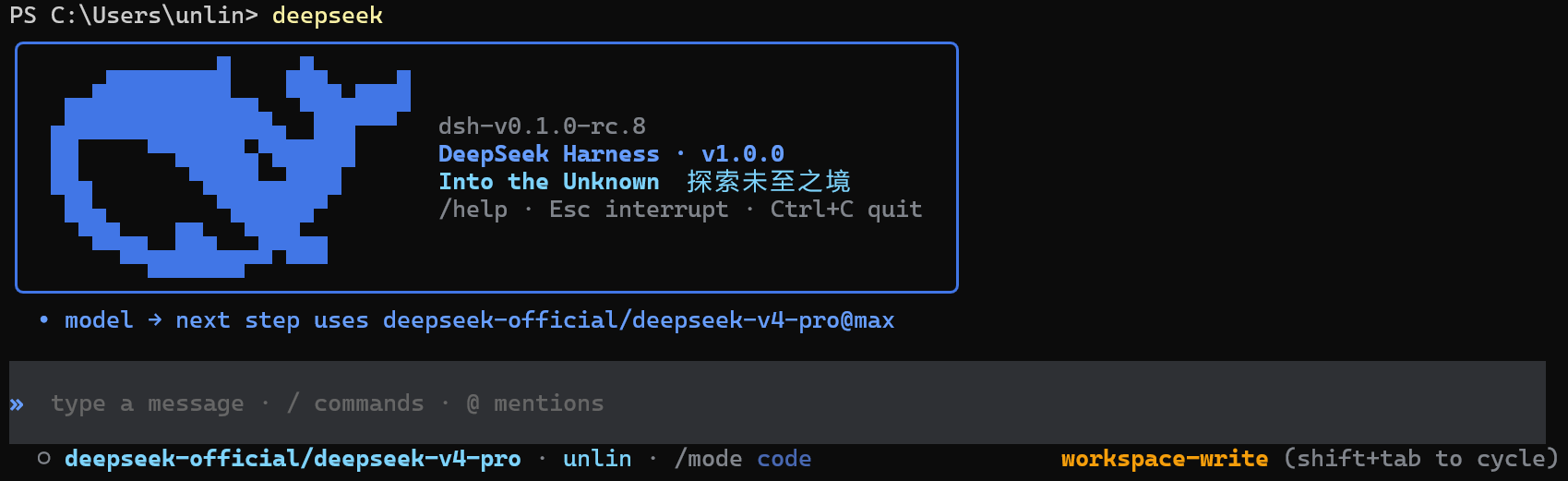


一、项目概览
DSH-Code 是 DeepSeek Harness(dsh)的终端编码界面。 它以树外 bundle 的形式组合在官方 @deepseek-ai/dsh-base 之上,与 Harness Web UI 使用同一套 Agent、Session、工具、命令、技能、权限、sandbox、上下文压缩与插件服务。
DeepSeek Harness 将模型、工具、存储、策略和界面作为插件,通过 Cordis 注册。持久化会话事件记录恢复对话与运行状态所需的信息。DSH-Code 保留这套结构,并补充适合编码任务的终端工作流。界面采用开发者熟悉的终端操作方式,运行行为仍由 DSH 服务和配置决定。
二、快速开始
需要 Node ^22.19 || >=24 和预览版 dsh CLI(当前版本线:@deepseek-ai/[email protected])。未配置模型时仍可进入 TUI、查看会话和使用非模型功能;在 /model 中按 a 可通过 Harness credentials 服务添加 API key。
1. 安装与更新
初次安装和更新使用同一组指令:
npm install -g @deepseek-ai/[email protected] [email protected]
npm install -g pnpm
dsh plugin --profile cli add [email protected]
提示:pnpm 会忽略发布不足 24 小时的包,因此发布首日请使用精确版本
[email protected];24 小时后可省略版本号。npm 安装不受此限制。版本对齐:dsh-code 1.0.x 基于 dsh
0.1.0-rc.8插件线构建(peer 依赖全部为^0.1.0-rc.8),请保持全局 dsh 与 dsh-code 在同一版本线,避免宿主与插件版本不一致。
2. 启动指令
可用的启动指令:
dsh --profile cli
deepseek
dsh-code
dsh --profile cli、deepseek 与 dsh-code 是并列的启动命令。deepseek 与 dsh-code 都是 dsh --profile cli 的全局别名,后续参数会原样转发,例如 deepseek --resume abc123。
DeepSeek Harness 目前仍处于 developer preview,可能出现破坏兼容性的变化;DSH-Code 会持续跟随其插件接口演进。
安装、原生模块和插件加载问题,请查看常见问题与排障。
三、核心功能与使用方式
DSH-Code 的重点是让 DSH 的 Agent、模型、工具和持久会话可以直接在终端中使用,并覆盖从编写代码到审查修改的完整工作流。
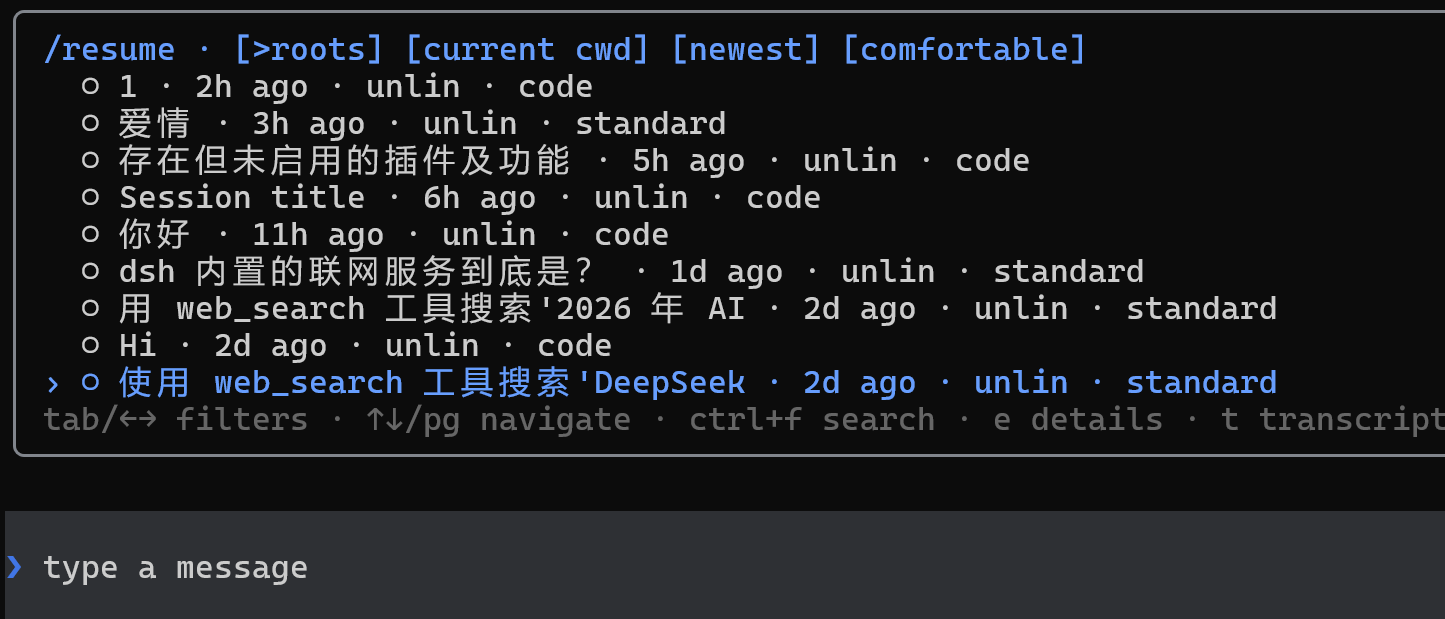
1. 会话管理
- 使用
/new新建会话,或通过/resume、--continue恢复已有会话 - 使用
/fork从历史节点创建新的工作分支,同时保留原会话 - 按当前目录、更新时间和会话范围搜索历史记录
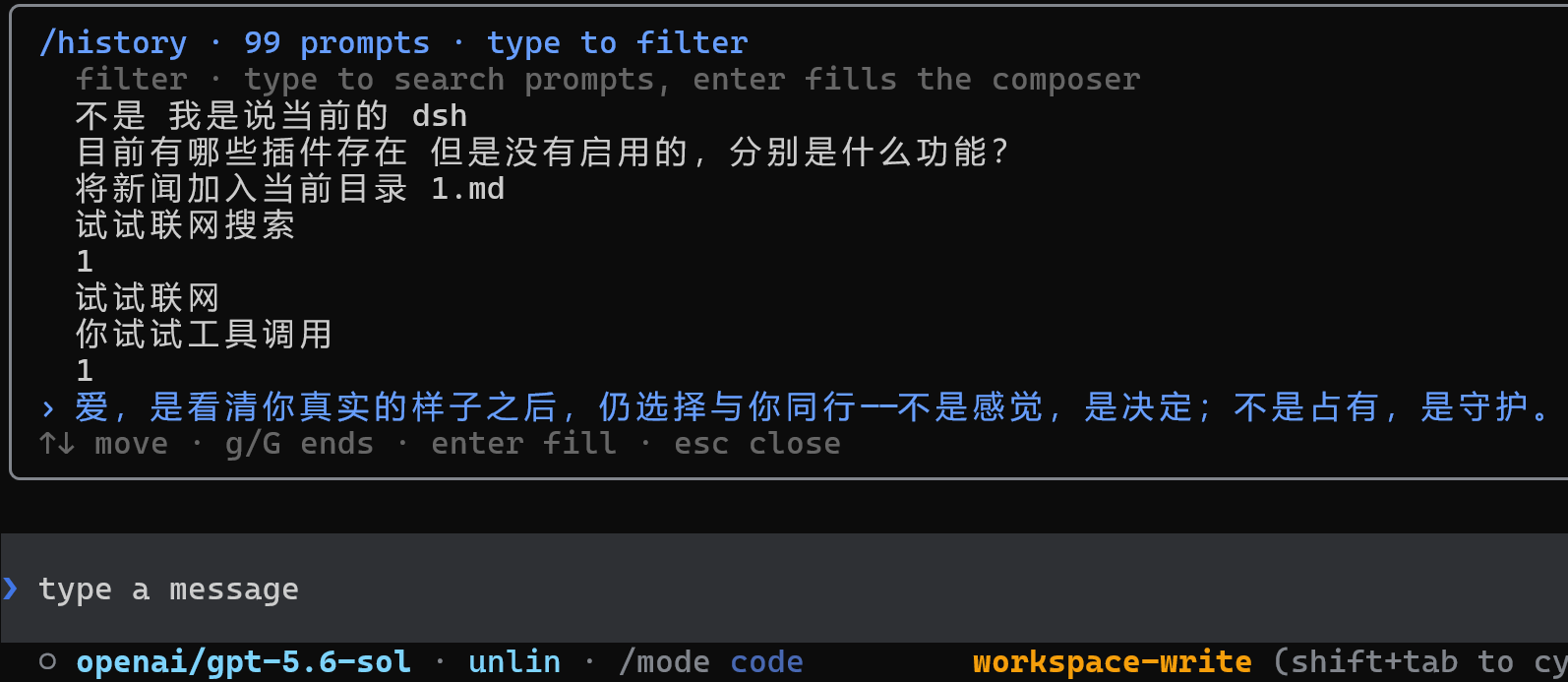
- 使用 Up/Down 召回输入历史,或通过
/history搜索过去的提示词 - 支持持久标题、Markdown 导出、上下文占用、token、缓存、TTFT 和耗时统计
- 恢复会话时同步恢复该会话使用的 Agent Preset 和模型选择
2. Agent、模型与扩展
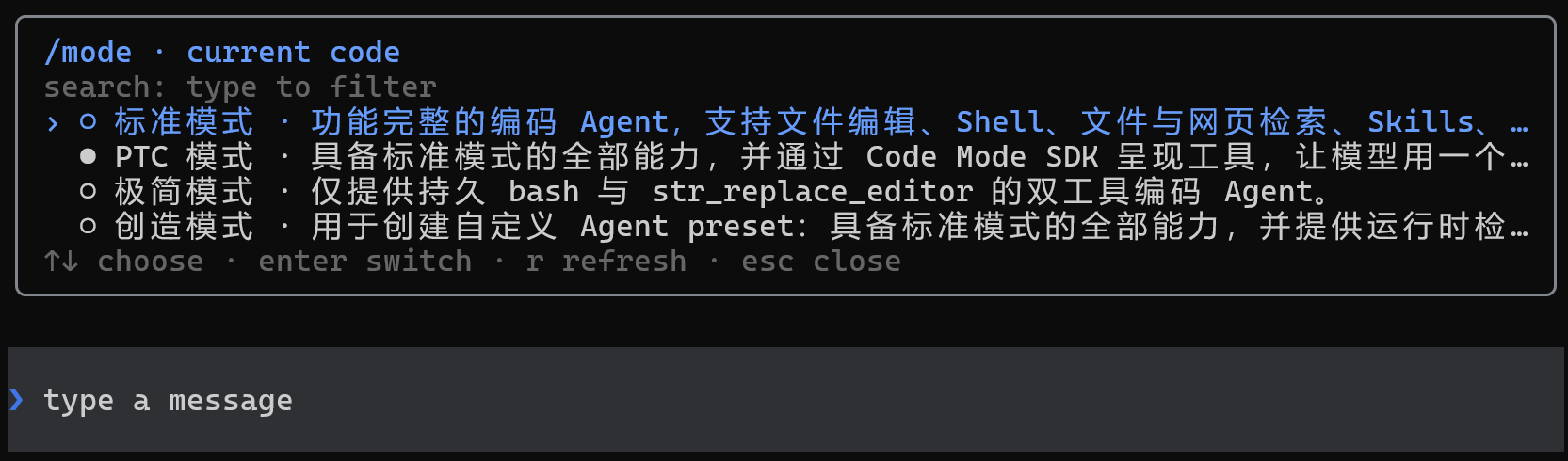
- 每个会话可以选择独立的 Agent Preset,用于组合工具、提示词、技能、上下文压缩、plan mode 和 subagent 能力
- 使用
/mode选择standard、code、minimal、cordis或用户自定义 Preset - 使用
/model切换模型,并管理 provider、API key、endpoint、可用模型和上下文窗口 - 自动加载 DSH 中可用的命令与技能;使用
/help查看入口,使用/plugin检查扩展状态 - 支持 plan、goal、todo、权限、sandbox、subagent 和运行中的补充指令
3. 模型切换动画
模型或 reasoning effort 发生以下变化时,输入框会播放 Wave、Aurora 或 Pulse:
| 使用场景 | 触发条件 | 动画文字 | 效果档位 |
|---|---|---|---|
| 官方 DeepSeek 模型 | 切换到该模型,或修改该模型的 reasoning effort | deepseek | Flash 使用单波段档位,其他 DeepSeek 模型使用多波段档位 |
| 其他模型 | 切换模型或 reasoning effort 后,实际生效的强度严格高于 high | Into the Unknown | 使用与非 Flash DeepSeek 模型相同的多波段档位 |
高于 high 的等级包括 xhigh、x-high、very-high、max、maximum 和 ultra;high、medium、low 与 off 不会为非 DeepSeek 模型触发动画。
| 样式 | Flash | 其他 DeepSeek / Into the Unknown |
|---|---|---|
| Wave | 一个蓝色波峰从左向右扫过,约 1.2 秒 | 两个错开的蓝色波峰依次扫过,并带有 · ✦ ✧ 尾部星光,约 1.5 秒 |
| Aurora | 两条蓝色光带交错漂移,约 1.5 秒 | 三条不同色调的光带交错漂移,约 1.8 秒 |
| Pulse | 一个圆环从输入框中心向外扩散,约 1.1 秒 | 两个圆环先后向外扩散,约 1.45 秒 |
4. 编码工作流
- 使用
@引用工作区文件或已有会话,为任务补充上下文 - 支持启动 prompt 和多个
--image图片输入 - 使用
/diff按文件检查改动,使用/review发起只读代码审查 - 使用
/copy复制最近一条完整回复,使用 Ctrl+O 查看完整历史和工具详情 - 支持工具审批、结构化提问、plan review、多选和自定义答案
- 使用权限 Preset 和 sandbox 控制 Agent 可以执行的操作;任务运行中仍可补充指令或中断
5. 命令与快捷键
启动 TUI:
dsh --profile cli                    # 新建 standard 会话
dsh --profile cli --mode code        # 使用指定 Agent Preset 启动
dsh --profile cli --continue         # 恢复当前目录最新会话
dsh --profile cli --resume abc123    # 按 id 或唯一前缀恢复会话
dsh --profile cli --session my-id    # 使用指定 id 新建会话
进入 TUI 后,可以使用以下内置命令。当前 profile 提供的其他 Harness 命令和用户技能会随安装内容变化,完整列表以 /help 显示为准。
会话与记录
| 命令 | 用途 |
|---|---|
/new [preset] | 创建新会话,可同时指定 Agent Preset |
/resume [id|前缀] | 搜索或恢复已有会话 |
/resume cancel | 取消正在等待的会话切换 |
/fork [event-seq] | 从最近完成的 turn 或指定事件位置创建分支会话 |
/delete [id|前缀] | 删除指定会话及其 subagent 会话 |
/title <text> | 修改当前会话标题 |
/export [path] | 将当前会话导出为 Markdown |
/history | 搜索并复用过去提交的提示词 |
/clear | 清空当前终端显示,不删除持久会话 |
Agent、模型与权限
| 命令 | 用途 |
|---|---|
/mode [preset] | 查看或选择当前会话的 Agent Preset |
/model | 切换模型,管理 provider、API key、endpoint 和可用模型 |
/effort | 调整当前模型的 reasoning effort |
/permission [preset] | 查看或切换权限 Preset |
/subagent | 选择 subagent 执行任务时使用的模型 |
编码、任务与后台工作
| 命令 | 用途 |
|---|---|
/diff [--staged|ref] | 按文件查看工作区、暂存区或指定 ref 的 Git diff |
/review [--staged|ref] | 使用只读权限审查 Git 改动 |
/todos | 查看当前会话的完整 todo 列表 |
/agents | 查看当前会话创建的 subagent 会话 |
/jobs | 查看后台任务及其运行状态 |
/copy | 复制最近一条完整助手回复 |
扩展、显示与退出
| 命令 | 用途 |
|---|---|
/plugin [query] | 查看已加载扩展及其状态 |
/statusline | 选择状态栏显示的项目 |
/theme | 切换终端配色主题 |
/help | 查看快捷键、内置命令、Harness 命令和用户技能 |
/quit | 退出 DSH-Code |
输入与快捷键
| 操作 | 用途 |
|---|---|
Enter | 提交当前输入 |
Up / Down | 召回上一条或下一条输入记录 |
Tab | 补全命令、技能或 @ 引用 |
@ | 引用工作区文件或已有会话 |
Ctrl+O | 查看完整历史与工具详情 |
Ctrl+R | 折叠或展开思考过程 |
Shift+Tab | 循环切换权限 Preset |
Delete | 输入框为空时,取消最新一条排队消息 |
Ctrl+K | 删除光标到行尾的内容 |
Ctrl+U | 清空当前输入行 |
Ctrl+A / Ctrl+E | 移动到当前行开头或结尾 |
Esc | 关闭当前菜单或中断正在运行的 turn |
Ctrl+C | 依次用于取消任务、清空输入或退出 |
Ctrl+D | 退出 DSH-Code |
四、DSH-Code 如何接入 DSH
1. 运行时组合
DSH-Code 读取 Harness 的实时注册表,不在本地维护另一套副本。模型适配器、工具 provider、技能来源、命令、权限策略、持久化后端、sandbox 和 subagent provider 都可以通过 DSH composition 添加或替换。
/plugin 提供当前 Cordis loader 状态的只读视图。
2. 会话级 Agent Preset
Host 持有共享基础设施——注册表、持久化、会话查询、权限和 sandbox 策略;每个会话则获得一个隔离的 Agent scope,并由 Agent Preset 进行组合:
standard——功能完整的通用编码 Agentcode——面向 Code Mode / PTC 的多操作工作流minimal——只保留持久 shell 和str_replace_editorcordis——完整 Agent,加上运行时检查与 Preset 编写指导- 用户预设——自行定义工具、提示词段落、技能、上下文压缩、plan mode 与 subagent 行为
在第一次 turn 之前使用 /mode,或通过 --mode <preset> 直接启动。选中的 preset 会写入会话,并在恢复时还原。
3. 会话记录与恢复
提示词、流式 chunk、工具调用与结果、模型选择、plan 状态、权限、标题和 preset 选择都由持久 Session 事件投影得到。会话恢复、导出、历史检查、上下文统计和终端重放使用同一份记录。
React state 只保存输入草稿、光标、当前面板、选中项和滚动位置等临时界面状态。
dsh profile
└─ Host plane:注册表 · 持久化 · 查询 · 权限 · sandbox
   ├─ Agent 会话 A + preset code
   ├─ Agent 会话 B + preset minimal
   └─ DSH-Code TUI
      持久事件 → 纯投影 → 只追加的历史转录
                         └→ 有界面板 → 输入框 → 状态栏
五、开发
pnpm install
pnpm test
pnpm typecheck
pnpm build
pnpm run gen:whale   # 从 vendored Logo 路径重新生成 src/whale-glyph.ts
鲸鱼字形由 scripts/fish-logo.ts 中 vendored 的 DeepSeek FishLogo 几何数据生成(来源:DeepSeek Harness,MIT)。
1. 源码开发安装
本地 checkout 可使用:
dsh plugin --profile cli add file:C:/path/to/dsh-code
GitHub 安装可用于源码开发:
dsh plugin --profile cli add github:unlinearity/dsh-code
Git 包会在安装阶段构建。若 pnpm 要求添加 allowBuilds,请把它输出的完整条目复制到 ~/.dsh/profiles/cli/pnpm-workspace.yaml,再重新执行命令。该键包含 Git URL 与 commit,不能只写 dsh-code。
2. 卸载
dsh plugin --profile cli remove dsh-code   # 移除 cli profile 中的插件挂载
npm uninstall -g dsh-code                  # 移除全局包与 deepseek / dsh-code 命令
两条都要执行才是全量卸载:第一条只解除 profile 挂载,此时 deepseek 命令仍存在并提示 "the cli profile does not mount dsh-code yet";第二条移除全局 npm 包与启动别名。卸载不影响 @deepseek-ai/dsh 本体与已持久化的会话数据。
3. 参考
- 运行时服务、事件、插件作用域和持久化模型遵循 DeepSeek Harness。
- 会话导航、浮层尺寸、scrollback、底部布局与缩放处理参考 Codex CLI。
- 斜杠发现、turn steering、思考折叠、审批和提问流程参考 Claude Code。
DSH-Code 是独立的 MIT 社区项目,与 OpenAI 或 Anthropic 无隶属关系。
社区:
- Linux DO:学 AI,上 L 站!
- Deepseek harness: DSH 官方网站
许可
MIT。vendored FishLogo 几何数据来自 DeepSeek Harness(MIT)。
Read the usage guide →
Install steps, key points, FAQ and compatibility for this plugin — auto-derived from indexed fields.
Listing badge

[](https://deepseek-plugin.org/plugins/UNLINEARITY/dsh-code)Paste this markdown into your GitHub README to link back to this listing. The badge only states the listing — not a security endorsement.