Text-first browser & background macOS control for DeepSeek Harness (DSH): target the right process and window without taking the user's pointer. 为 DSH 提供文本优先的电脑控制:后台操作 Chromium 与 macOS,不抢前台、不移动鼠标。

- Language
- Swift
- License
- Apache-2.0
- Branch
- main
Install
$ dsh plugin --profile web add dsh-computer-useRun the command above in your terminal to install this plugin via the dsh CLI. You can switch Profile in the top-right corner. New to dsh? Read the beginner tutorial
Install via your agent
Install the DeepSeek Harness plugin ZRui-C/dsh-computer-use for me: review the repository at https://github.com/ZRui-C/dsh-computer-use first, then run the install command and verify the plugin loads successfully.
Paste this instruction to the DSH Web GUI assistant — it will install and verify for you.
一句话定位
让 DSH Agent 通过文本快照观察 Chromium 页面或 macOS 应用,再以语义 ref 或定向窗口输入执行点击、键入、滚动等动作,全程不抢前台、不动用户鼠标。
核心能力
- 以文本快照观察 Chromium 页面与 macOS 应用,附带稳定元素 ref(每次观察返回带 budget 上限的语义文本,给只能读文本的模型使用)
- 通过语义 ref 或坐标对浏览器发起点击、双击、键入、按键、滚动、拖拽、表单选择、文件上传等动作
- 通过 macOS 辅助功能树控制其他 App 的窗口和控件,并能在可能时把指针和键盘事件定向投递到目标进程/窗口
- 使用软件小光标替代物理鼠标移动,定向动作不会改变前台或真实光标位置
- 把上传文件限定在当前 DSH Session workspace 内,避免越界访问
- 一次注册即被所有 DSH Agent preset 继承,无需手动改 profile YAML
技术实现
- 语言: TypeScript(宿主插件)+ Swift(原生 helper)
- 关键依赖: playwright-core、@deepseek-ai/cordis、@deepseek-ai/dsh-tools、@deepseek-ai/schemastery
- 架构模式: Cordis Service 注册两个插件(host runtime + model tool),由
cordis.patch.yml挂到 DSH 全局工具层;host 通过本地 Unix socket 与 Swift helper 通信,所有协议调用走 JSON-RPC 风格请求/响应 - 入口文件:
src/host.ts(ComputerUseRuntime)、src/tool.ts(apply)、cordis.patch.yml(DSH bundle 注册)、native/macos-helper/Sources/DSHComputerUse/main.swift(原生 helper 主进程)
适用场景
需要让 DSH Agent 自动化操作网页或 macOS 原生应用时使用,例如自动填一个只有桌面 App 才能打开的表单、在不同 App 之间搬运数据、或在 API/CLI 不可用时通过图形界面完成一段流程。Agent 每次只执行一个动作并立即收到一份新的文本快照,再据此判断下一步,避免一次性发出无法回滚的操作。
前置依赖与兼容性
| 依赖 | 最低版本 | 说明 |
|---|---|---|
| DeepSeek Harness | 0.1.0-rc.6 | peerDependencies 全部要求 ^0.1.0-rc.6(cordis / dsh-agent / dsh-subprocess / dsh-system-prompt / dsh-tools / schemastery) |
| Node.js | >=22 | engines.node 声明 >=22,仅从源码构建本仓库时需要;用预编译 App 安装则不强制 |
| macOS | 14.0+ | desktop surface 必须,Universal 2(arm64 + x86_64);browser surface 需系统装有 Google Chrome |
| Google Chrome | 系统安装 | playwright-core 启动系统 Chrome,默认路径 /Applications/Google Chrome.app/Contents/MacOS/Google Chrome |
| macOS 辅助功能 | 用户手动授权 | desktop 读取无障碍树和执行可控动作必需 |
| macOS 屏幕录制 | 用户手动授权 | 仅在请求截图时需要 |
| 原生 Helper App | 与插件一同安装 | DSH Computer Use.app(Developer ID 签名 + Apple 公证),通过设置中心或 pnpm run build:native 构建 |
安装方式
dsh plugin --profile web add github:ZRui-C/dsh-computer-use
推荐的实际安装方式是 Homebrew Cask
brew install --cask dsh-computer-use或下载 GitHub Releases 里的 DMG,把 App 拖进「应用程序」并打开随附的设置中心,按引导授权后点「安装」;DSH 会执行与上面命令等价的操作并自动重启 Host。
配置项
| 配置 | 类型 | 说明 | 默认值 |
|---|---|---|---|
chromeExecutablePath | 字符串 | browser surface 要启动的系统 Chrome 可执行文件路径 | /Applications/Google Chrome.app/Contents/MacOS/Google Chrome |
headless | 布尔 | 是否以无界面模式启动 Chromium | false |
stateDir | 字符串 | 存放 socket、storage state、截图等产物的目录 | ~/.dsh/computer-use |
helperAppPath | 字符串 | 原生 Helper App(DSH Computer Use.app)路径;留空按默认规则查找 | 未设置 |
helperSocketPath | 字符串 | 与原生 helper 通信的 Unix 套接字文件路径 | <stateDir>/native-agent.sock |
maxObservationChars | 2000~100000 | 单次观察返回文本的字符上限;超出后会自动截断并加 WARNING | 20000 |
maxNodes | 20~2000 | 单次观察最多返回的语义节点数 | 250 |
actionSettleMs | 0~10000 | 每次桌面动作后等待界面稳定的毫秒数 | 300 |
配置通过
cordis.patch.yml注册到 DSH 全局工具层,写在插件的 Bundle 配置里;普通用户基本不需要调整,只有在自定义 Chrome 安装路径或需要把数据目录放到加密磁盘时才需要改。
常见问题
Q: 安装后 DSH Agent 怎么看到这两个工具?
A: 插件通过 cordis.patch.yml 把 computer_observe 和 computer_action 注册到 DSH 全局工具层(agent → preset → global 解析链),所有 Agent preset 自动继承,无需手动加载 Skill;安装、修复或升级后必须重启正在运行的 DSH Host 才会出现在工具列表里。
Q: 这个插件支持 Windows 或 Linux 吗?
A: desktop surface 只在 macOS 上实现(依赖 Swift helper、Accessibility API、SkyLight);browser surface 虽然底层用 Playwright 驱动 Chromium,但 README 明确把 macOS 14+ 作为最低运行环境,Windows 和 Linux 不在支持范围。
Q: 操作时会不会抢前台、动我正在用的那个 App?
A: 默认不会。desktop 通过 PID 和 WindowServer window ID 把鼠标键盘事件定向投递到目标进程/窗口,并用一个软件小光标指示点击位置,不会移动物理鼠标;只有在没有明确目标时才会回退到全局 HID 输入。
Q: 装好后必须自己授权哪些权限?
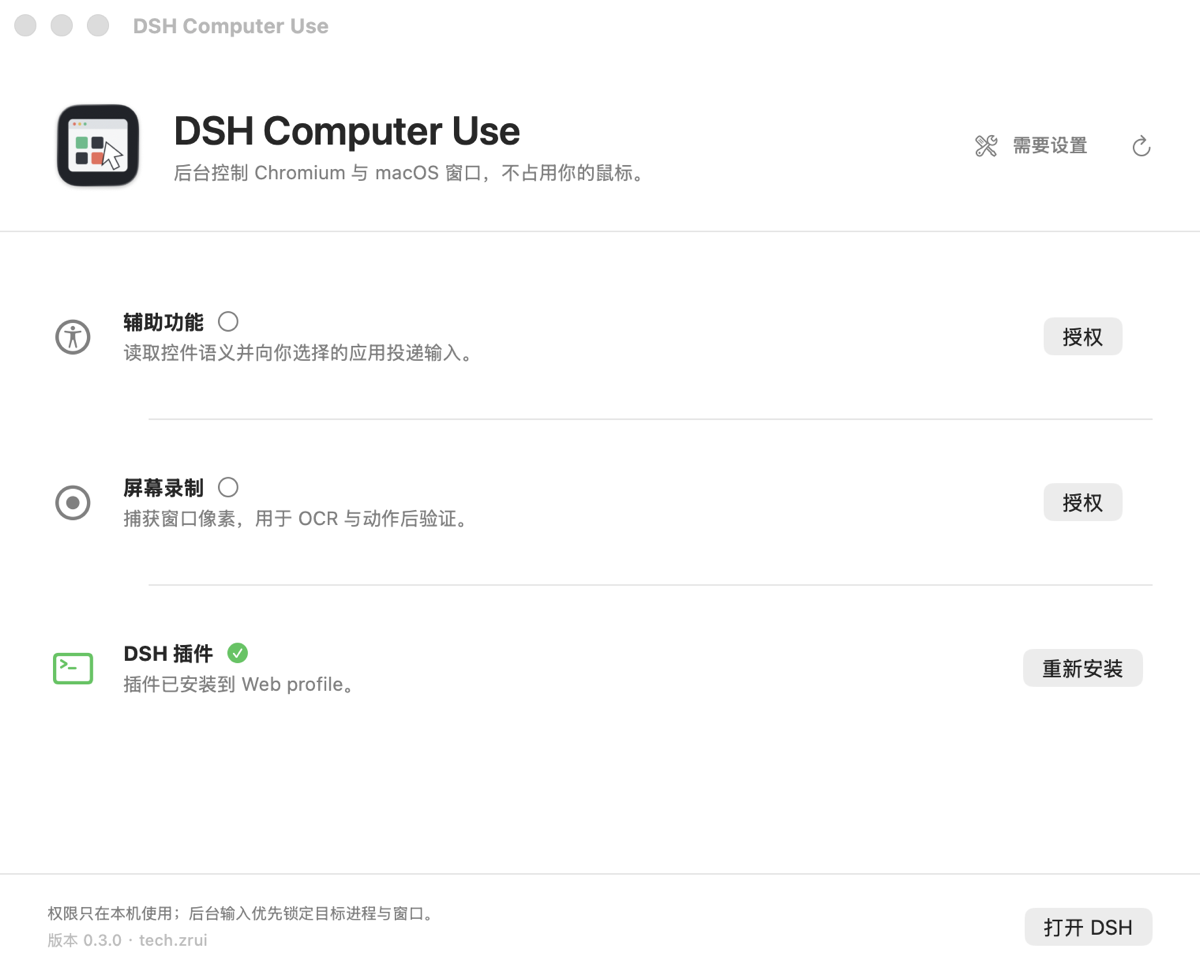
A: 第一次打开「DSH Computer Use」设置中心会引导用户在「系统设置 → 隐私与安全性」勾选「辅助功能」和「屏幕录制」,并在「DSH 插件」一行点击「安装」;之后必须重启正在运行的 DSH Host 才生效。
Q: upload_files 能上传任意路径的文件吗?
A: 不能。所有 paths 都会被解析到当前 DSH Session 的 workspace 根目录下,路径逃出 workspace 时直接抛 UPLOAD_OUT_OF_WORKSPACE 错误,避免 Agent 任意读取你本机其他位置的文件。
Q: 浏览器里能打开任意 URL 吗?
A: open_url 只接受 http://、https://、about: 三种协议,其他协议会被直接拒绝。
Q: 报错 "native helper app not found" 怎么办?
A: 错误码 NATIVE_HELPER_MISSING 来自 src/native/client.ts:240,意思是 Swift helper App 没找到。可以通过 Homebrew Cask brew install --cask dsh-computer-use 或从 GitHub Releases 下载 DMG 重新安装;从源码安装则需要执行 pnpm run build:native。
Q: 怎么彻底卸载?
A: 执行 dsh plugin --profile web remove github:ZRui-C/dsh-computer-use;设置中心也能识别旧版「只装依赖、未启用 bundle」的 profile 并提供一键修复,无需手改 profile YAML。
上手难度
进阶 — 需要理解「先 computer_observe → 拿 snapshot_id → 按 ref 或坐标执行一个 computer_action → 再观察」的协议,且 macOS 桌面场景必须先在系统设置授权辅助功能/屏幕录制;同时要把工具装到全局工具层、让所有 preset 继承,对刚接触 Cordis bundle 机制的用户来说也有一段适应期。
已知问题与限制
- 私有 SkyLight 符号在运行时动态加载,用于后台定向指针和键盘输入;该私有 API 不受 Apple 支持,macOS 升级后可能变化(README.md:71、SECURITY.md:20)
- macOS 26 的 Stage Manager 可能只把架上窗口暴露成 WindowServer 缩略图;为这种表示构造 capture filter 会在 SkyLight 内 abort;插件会先比较 AX 与 WindowServer 几何、保留 AX 观察并返回明确 warning,不会把缩略图拉伸成伪造的全窗口截图(README.md:73、CHANGELOG.md:26)
- 不通过 Mac App Store 分发,仅以 Developer ID 签名 + Apple 公证形式提供(README.md:71)
- 从源码构建需要 macOS 14+、Xcode/Swift 5.9+、Node.js 22+、pnpm 11+,普通用户走 Homebrew Cask 或 DMG 即可(README.md:87)
- browser surface 的
open_url仅支持http(s)和about协议(src/actions.ts:46) - desktop 观察必须在 macOS「辅助功能」授权后才会有节点返回;未授权时观察会返回空 nodes 与
permissions.accessibility=false(src/native/driver.ts:157)
DSH Computer Use
Text-first browser and background macOS control for DSH.
Target the right process and window without taking over the user's pointer.
简体中文 · Architecture · Distribution · Security





Install
Homebrew
brew tap zrui-c/tap
brew trust zrui-c/tap
brew install --cask dsh-computer-use
open -a "DSH Computer Use"
DMG
- Download the latest
DSH-Computer-Use-*-universal.dmgfrom Releases. - Drag DSH Computer Use into Applications and open it.
With either method, authorize Accessibility and Screen Recording, select Install under DSH Plugin, then restart the running DSH Host.
The Homebrew Cask and official DMG install the same Universal 2, Developer ID signed, Apple-notarized app. Users do not need Xcode, Swift, or this source checkout. DSH and Google Chrome must already be installed.
What it does
| Surface | Perception | Input |
|---|---|---|
| Chromium | Playwright, CDP accessibility/DOM, frames, tabs, optional OCR | Ref-pinned navigation, pointer, keyboard, forms, scroll, drag, upload |
| macOS | Accessibility tree first, Vision OCR for semantic gaps, independent window capture | AX actions, targeted SkyLight/CoreGraphics, global HID only without a target |
Every action returns a fresh bounded text observation. The model works with roles, names, values, state, geometry, and stable snapshot refs instead of assuming it can inspect screenshots. UI and OCR strings are explicitly untrusted data.
Background macOS control
- Carries PID, WindowServer window ID, AX window frame, and element identity through every action.
- Prefers semantic AX actions before coordinate input.
- Routes supported pointer and keyboard events directly to the target process/window.
- Uses a click-through software cursor; targeted actions do not move the physical pointer.
- Keeps post-action observation pinned to the previous target, even while another app stays active.
- Falls back to public CoreGraphics or fails closed when a private capability is unavailable.
Platform boundary
ScreenCaptureKit is public API. The optional background input path dynamically loads private SkyLight symbols and is intended for Developer ID distribution, not the Mac App Store. Private APIs are unsupported by Apple and can change between macOS releases.
On macOS 26, Stage Manager may expose a shelved window only as a small WindowServer thumbnail. Constructing a capture filter for that representation can abort inside SkyLight. DSH Computer Use detects the geometry mismatch first, preserves AX observation, returns an explicit warning, and never stretches a thumbnail into a fake full-window screenshot.
DSH integration
The embedded package declares a DSH bundle in package.json. The setup center runs the official equivalent of:
dsh plugin --profile web add --save-exact file:/path/to/DSH\ Computer\ Use.app/Contents/Resources/Plugin
cordis.patch.yml installs the Host runtime and registers computer_observe / computer_action in DSH's global tool layer, inherited by every agent preset. No manual edits to user profile YAML or preset copies are required. The setup center detects an older dependency-only installation and repairs the missing bundle registration. A running DSH Host must be restarted after install, repair, or upgrade.
Build from source
Requirements: macOS 14+, Xcode/Swift 5.9+, Node.js 22+, pnpm 11+, DSH, and Google Chrome.
pnpm install
pnpm run typecheck
pnpm run test
pnpm run test:native
pnpm run build
pnpm run build creates:
native/macos-helper/dist/DSH Computer Use.app
The default build is Universal 2. For faster local iteration:
COMPUTER_USE_ARCHS=arm64 pnpm run build
Create a local drag-to-Applications DMG:
pnpm run package:dmg
Public releases require a Developer ID Application identity and notarization. See documentation/distribution.md for the exact local and GitHub Actions flows.
Tool contract
computer_observe returns interactive, full, or changes snapshots for browser and desktop, with optional query filtering and auto | always | never OCR.
computer_action performs exactly one browser or desktop action and returns the post-action semantic state. Ref and coordinate actions require the latest snapshot_id; stale targets fail closed and require another observation. File uploads are fenced to the DSH session workspace.
Project
- Architecture
- Distribution and notarization
- Security policy
- Contributing
- Changelog
- Third-party notices
Community
- GitHub Discussions — ask questions, share usage, report ideas
- DeepSeek Harness Discord — the wider DSH ecosystem
- Star the repo if DSH Computer Use saves your pointer 🖱️
Licensed under Apache-2.0. This independent project is not endorsed by Apple. “DeepSeek” and related marks belong to their respective owners; the name is used only to describe compatibility with DeepSeek Harness/DSH.
Read the usage guide →
Install steps, key points, FAQ and compatibility for this plugin — auto-derived from indexed fields.
Listing badge

[](https://deepseek-plugin.org/plugins/ZRui-C/dsh-computer-use)Paste this markdown into your GitHub README to link back to this listing. The badge only states the listing — not a security endorsement.