Provides auditable long-term memory for DSH Agent based on Noema: cross-session fact storage and retrieval, settings page management, and memory import from 9 other AI tools.

- Language
- TypeScript
- License
- MIT
- Branch
- main
Install
$ dsh plugin --profile web add @zseven-w/dsh-noemaRun the command above in your terminal to install this plugin via the dsh CLI. You can switch Profile in the top-right corner. New to dsh? Read the beginner tutorial
Install via your agent
Install the DeepSeek Harness plugin ZSeven-W/dsh-noema for me: review the repository at https://github.com/ZSeven-W/dsh-noema first, then run the install command and verify the plugin loads successfully.
Paste this instruction to the DSH Web GUI assistant — it will install and verify for you.
At a Glance
Provides Noema-based local long-term memory for DeepSeek Harness (DSH) Agent: enables the Agent to remember user facts, decisions, and preferences across sessions. Also allows importing old memories from other AI tools like Codex, Claude Code, Cursor for unified management.
Core Features
- Automatically recall relevant historical memories at session start or before new tasks (noema_recall)
- Persist long-term facts, decisions, constraints, or preferences stated by users as auditable local memories (noema_remember)
- Find memories through full-text search, PageIndex browsing, and multi-hop graph association三种方式查找记忆 (noema_search / noema_browse / noema_recall_graph + noema_neighbors)
- Support both "软删除(墓碑)" and "硬删除"两种方式移除记忆 (noema_forget)
- Import memories from Codex, Claude Code, opencode, Cursor, Grok, WorkBuddy, Antigravity, Trae, Qoder 共 9 个 AI 工具的 AGENTS.md/CLAUDE.md/rules files with deduplication by content (noema_import)
- Provide settings page and local status route for hot-restarting service, configuring import sources, browsing/adding/reviewing/deleting memory entries
Technical Implementation
- Language: TypeScript(宿主插件)+ Rust(noema-mcp 子进程)
- Key Dependencies: @deepseek-ai/cordis(插件运行时)、@deepseek-ai/dsh-tools(工具注册)、@deepseek-ai/schemastery(设置 schema)、react ^18.2.0(客户端 UI)
- Architecture Pattern: Plugin entry with id
dsh-noemainjected via cordis.patch.yml; host side mounts 15noema_*tools, registers system prompt "记忆使用指南" section, and registers/_dsh/dsh-noema/statusstatus route on webServer; memory engine runs as independent subprocess communicating via MCP stdio (JSON-RPC + Content-Length framing), managed by NoemaServerManager for start/stop, Keep-alive and idle recycling - Entry Files: src/index.ts(宿主 apply), src/client/index.tsx(设置页 UI)
Use Cases
When you want DSH Agent to remember user identity, project conventions, long-term decisions and constraints instead of starting from scratch each time. Especially suitable for those who switch between multiple AI tools and want to consolidate old tool memories into a unified local knowledge base. The import feature enables seamless migration from existing tools like Codex, Claude Code, Cursor.
Prerequisites & Compatibility
| Dependency | Minimum Version | Description |
|---|---|---|
| DeepSeek Harness (DSH) | ^0.1.0-rc.6 | From package.json peerDependencies |
| Node.js | >=24.11.0 | From package.json engines.node |
| React | ^18.2.0 | From package.json peerDependencies |
| Platform packages | Matching platform | One optionalDependencies sub-package each for darwin-arm64/x64, linux-arm64/x64 (glibc), win32-arm64/x64; optional installation must be enabled |
| Native module | Rust precompiled binary noema-mcp | Auto-distributed by platform via optionalDependencies; source dev可用 cargo build --release -p noema-mcp |
Installation
dsh plugin --profile web add github:ZSeven-W/dsh-noema
Note: After first adding to profile, DSH server needs one restart. After that, builds work with Cordis HMR and client SSE hot reload—no further restart needed.
Configuration Options
| Configuration | Type | Description | Default |
|---|---|---|---|
| Enable memory | Toggle | Master switch; all noema_* tools fail immediately when disabled | Enabled |
| Server command | Text | Command to start noema-mcp; use bundled for precompiled binary, or custom command/path | bundled |
| Working directory | Text | Server process cwd (usually needs to point to noema repo for cargo run) | Empty |
| Memory storage root (NOEMA_ROOT) | Text | Where memory files are saved; defaults to ~/.agent-memory if empty | Empty |
| Start server on mount | Toggle | Server starts on plugin mount if enabled, otherwise starts on first tool call | Enabled |
| Idle timeout (ms) | Number | How long server runs before stopping when idle; 0 means never stop | 0 |
| Keep-alive | Toggle | Whether to automatically restart server in background after exit/crash | Enabled |
| Keep-alive interval (ms) | Number (>=1000) | Minimum interval for health checks | 5000 |
| Call timeout (ms) | Number | Max wait time for a single tool call | 30000 |
| Restart delay (ms) | Number | Minimum wait between exit and restart | 1000 |
| Recall token budget | Integer (>=1) | Default token limit when noema_recall has no specification | 1200 |
| Auto-accept new memories | Toggle | Whether noema_remember persists directly (otherwise enters review queue) | Enabled |
| Show memory usage guide | Toggle | Whether to include memory tool instructions in system prompt | Enabled |
| Enable external tool import | Toggle | Master switch for importing external tool memories | Enabled |
| Import on startup | Toggle | Run import once automatically when DSH starts | Disabled |
| Import workspace files | Toggle | Whether to also read current workspace AGENTS.md / CLAUDE.md etc. | Enabled |
| Import file size limit (bytes) | Integer (>=1024) | Max bytes to read from a single external file | 65536 |
| Enabled import sources | String array | Choose which of 9 external tool IDs to scan | All 9 |
FAQ
Q: Is data uploaded to the cloud?
A: No. Memories are stored as auditable Markdown files locally in NOEMA_ROOT (default ~/.agent-memory/), with the entire engine running independently on your machine (local-first). The import feature only reads data from local config files of other tools.
Q: Do I need to restart DSH after installation?
A: One server restart is required when adding the plugin to profile for cordis to detect it. After that, both pnpm run build and pnpm run build:client support hot reloading through Cordis HMR and client SSE—restarting again is unnecessary.
Q: What if the server process crashes?
A: Keep-alive is enabled by default. The keep-alive loop checks every second (minimum interval adjustable in settings), and after detecting subprocess exit, waits for Restart delay before launching in the background. Failed restarts log warnings and surface errors on the next tool call. Intentional idle stop and manual stop are not overridden by keep-alive.
Q: I want to migrate memories from other AI tools (Codex / Claude Code / Cursor), how do I do it?
A: Three ways: ① Check desired sources in settings and click "Import now"; ② Have the model invoke noema_import; ③ Enable "Import on startup" when launching DSH. Each snippet deduplicates via SHA-256(path + heading + body), so repeated runs won't create duplicates. Use force: true to force re-import.
Q: Does the noema-mcp subprocess start by default? What's the resource usage?
A: "Start server on mount" is enabled by default, so noema-mcp persists after DSH launches (unless idle timeout is set to a positive value). The subprocess communicates with the host via Rust stdio on a single connection and consumes no additional resources when idle.
Q: Which settings take effect immediately?
A: Fields modified through the Settings page (/_dsh/dsh-noema/status) write and apply hot instantly, including server command, keep-alive, budget, sources, etc. After changing Server command, manually clicking "Restart" is recommended for the new command to take effect.
Q: What operating systems are supported?
A: Six npm optional packages cover macOS (arm64/x64), Linux (arm64/x64, requires glibc), and Windows (arm64/x64). Other ABIs like Linux musl lack precompiled binaries and require compiling noema-mcp manually, then specifying its path in the Server command.
Q: Are memory files deleted after uninstall?
A: No. The uninstall command dsh plugin --profile web remove @zseven-w/dsh-noema only removes the plugin itself. Memory files stay in NOEMA_ROOT and the import deduplication ledger remains in $DSH_HOME/storages/dsh-noema-imports.json—manual cleanup is needed if desired.
Learning Curve
Intermediate — The plugin runs out of the box, but effective use requires understanding long-term memory mechanics (recall vs search vs browse), the review queue, write strategies (manual/review/auto-safe/auto), and concepts like keep-alive and import ledgers. After first installation, spend a few minutes reviewing the status cards and import sources in settings, then have the model explain a few stored memories.
Known Issues & Limitations
- First load requires DSH restart: Cordis HMR only hot-swaps already-loaded plugins. After first adding
dsh-noemato profile, one server restart is required for the plugin inventory to recognize it (README.md:188) - Limited platform coverage: Only 6 optionalDependencies packages cover macOS arm64/x64, Linux arm64/x64 (glibc), Windows arm64/x64. Other platforms (Linux musl, FreeBSD, Linux x86 musl) need to compile noema-mcp binary themselves and specify the path in Server command (package.json:87-94, platforms.json:1-58)
- Linux links glibc: Both linux-arm64 and linux-x64 optional packages explicitly require
libc: glibc; musl distributions (Alpine, etc.) cannot use precompiled binaries directly (platforms.json:24, 34) - Startup fails when optional dependencies stripped: If the package manager skips optional dependencies (npm installs them by default, but some CI tools omit them), first noema-mcp launch throws "bundled package ... is not installed" with a fix hint: reinstall with optional enabled or run
npm run build:noema:devin source (src/bundled-binary.ts:101-120, src/server-manager.ts:266-273) - Import ledger cap at 2000 entries: To prevent unbounded ledger growth, saveLedger trims to 2000 entries by most recent timestamp; in extreme re-import scenarios, old entries get discarded (src/import-service.ts:124, 144-151)
- Import recursion depth cap at 3: When scanning directories like Cursor rules, Trae memory, Qoder rules/memory/projects, directory recursion is hard-limited to 3 levels; files in deeper directories won't import (src/import-service.ts:170-205)
- Status route only listens on localhost: Status route IP check restricts access to 127.0.0.1 / ::1, with Origin validation requiring same-origin; direct settings API calls are unavailable when accessing DSH web port remotely (src/status-route.ts:34-94)
- Status route request body cap at 16 KB: POST requests to
/statusreadBody limited to 16384 bytes; oversized write requests return 413 (src/status-route.ts:121-137) - Startup failure doesn't block DSH startup: If noema-mcp fails to start, the host continues without interruption, only logging a warning and erroring on tool calls; if keep-alive is enabled, confirm successful startup in logs (src/index.ts:124-127)

DSH Noema
Long-term memory for DeepSeek Harness — durable, inspectable agent memory backed by Noema.
Recall Before Work • Import From 9 Agent Tools • Settings-Page Memory Management • Crash Keep-Alive • Hot Reload
npm: @zseven-w/dsh-noema · Current plugin release: 0.1.0-rc.1 · Tested with DSH 0.1.0-rc.6
English · 简体中文 · 繁體中文 · 日本語 · 한국어 · Français · Español · Deutsch · Português · Русский · हिन्दी · Türkçe · ไทย · Tiếng Việt · Bahasa Indonesia


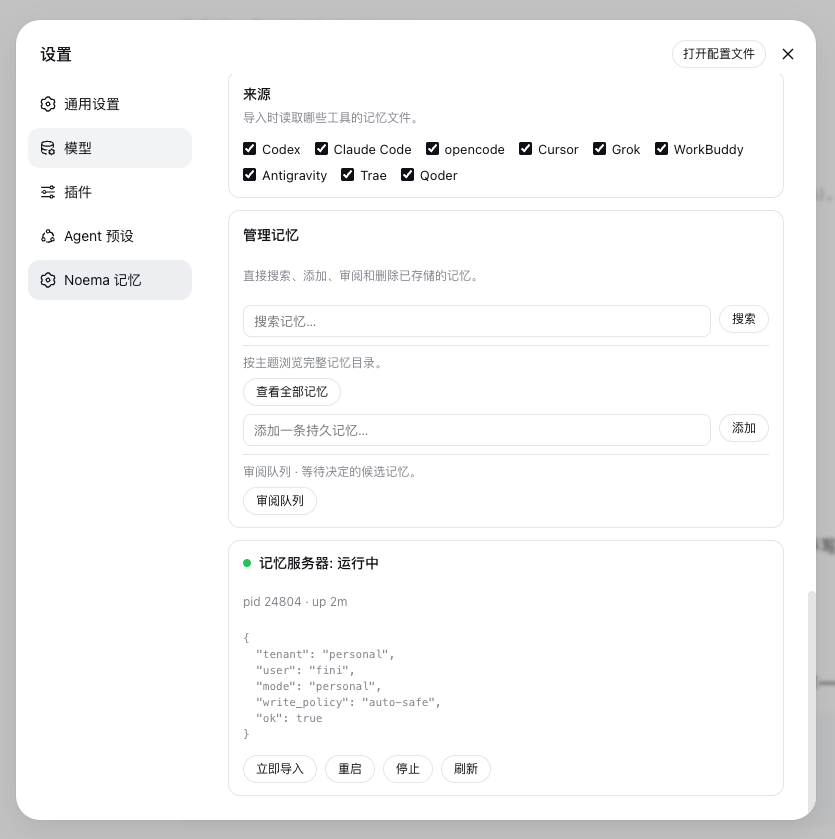
The Noema Memory settings page — import sources, memory management, and live server status
Why DSH Noema
DSH Noema connects DeepSeek Harness with Noema — a local-first, non-vector memory system for coding agents — so an Agent keeps durable knowledge across sessions instead of starting every conversation from zero.
🧠 Durable RecallMemories persist as inspectable Markdown files under |
📥 Import From Other Tools
|
🛠️ Settings-Page ManagementThe Noema Memory settings page configures the server command, memory root, budgets, idle/call timeouts, and the guidance section — and a Manage memories card searches, browses, adds, reviews, and deletes stored memories directly. |
🩺 Keep-AliveThe memory server stays up: idle timeout defaults to never, and a keep-alive loop restarts the |
🔍 Smart Entity ExtractionNoema's extraction engine combines jieba word segmentation with high-precision signals — English proper nouns, CJK names and technical terms, quoted topics, and repetition — with stopword and path filters, so the PageIndex topic catalog stays clean. |
⚡ Hot ReloadAfter the first boot, the plugin never needs a restart again: |
Install into DSH
dsh plugin --profile web add @zseven-w/dsh-noema@latest
dsh web
Or, for local development straight from the source tree:
dsh plugin --profile web add link:/path/to/dsh-noema
dsh web
The link: protocol symlinks the profile dependency to this repository, so rebuilds are visible immediately and Cordis HMR can watch the compiled output.
The plugin bundles the noema-mcp binary through per-platform optional npm packages. To build it yourself instead, run cargo build --release -p noema-mcp inside the bundled noema submodule, or point the Server command setting at any noema-mcp build.
Memory Tools
The model-facing tools mirror the Noema MCP surface:
| Tool | What it does |
|---|---|
noema_recall | Recall relevant memories for a query, with a token budget. |
noema_search | Full-text search over stored memories. |
noema_browse | Browse the PageIndex catalog for a topic or entity. |
noema_catalog | Render the full memory catalog as markdown. |
noema_recall_graph | Multi-hop recall through links and shared entities. |
noema_neighbors | One graph hop from a memory. |
noema_explain | Explain why a memory was or was not recalled. |
noema_remember | Save a durable fact, decision, constraint, or preference. |
noema_review_list | List pending review candidates. |
noema_review_decide | Accept, reject, edit, or merge a candidate. |
noema_forget | Tombstone or hard-delete a memory. |
noema_policy_get / noema_policy_set | Read or update the write policy. |
noema_status | Server and tenant status: counts, index health, storage root. |
noema_import | Import memories from other AI coding tools. |
Each tool returns a uniform envelope { ok, tool, text } where text carries the full server output.
Import memories from other tools
| Source id | Global files | Workspace files |
|---|---|---|
codex | ~/.codex/AGENTS.md + the Codex memory pipeline: ~/.codex/memories/MEMORY.md, memory_summary.md, rollout_summaries/*.md, extensions/ad_hoc/notes/*.md (raw_memories.md skipped — it is the uncurated feed) | AGENTS.md, AGENTS.local.md |
claude-code | ~/.claude/CLAUDE.md, ~/.claude/CLAUDE.local.md, ~/.claude/MEMORY.md | CLAUDE.md, CLAUDE.local.md, MEMORY.md |
opencode | ~/.config/opencode/AGENTS.md | AGENTS.md |
cursor | ~/.cursor/rules/*.mdc, ~/.cursorrules | .cursor/rules/*.mdc, .cursorrules |
grok | ~/.grok/AGENTS.md + the Grok cross-session memory: ~/.grok/memory/MEMORY.md, per-project MEMORY.md, and sessions/*.md summaries | AGENTS.md |
workbuddy | ~/.codebuddy/CODEBUDDY.md (WorkBuddy memory file), ~/.workbuddy/AGENTS.md, ~/.workbuddy/memory.md, ~/.config/workbuddy/AGENTS.md, ~/Library/Application Support/WorkBuddy/AGENTS.md | AGENTS.md, CODEBUDDY.md |
antigravity | ~/.antigravity/AGENTS.md, ~/.config/antigravity/AGENTS.md, ~/Library/Application Support/Antigravity/AGENTS.md (best-effort; no documented global memory store yet) | AGENTS.md, AGENTS.local.md |
trae | ~/.trae/AGENTS.md, ~/.trae/memory/, ~/.trae/rules/ (plus the ~/.trae-cn variants) | AGENTS.md, .trae/rules/ |
qoder | ~/.qoder-cn/AGENTS.md, ~/.qoder-cn/rules/, the auto-memory roots ~/.qoder-cn/memory/ and ~/.qoder-cn/projects/*/memory/ (plus ~/.qoder variants) | AGENTS.md, AGENTS.local.md, .qoder/rules/ |
- The
sourceargument selects one tool, or omit it to run every source enabled in settings. - The
pathargument selects the workspace root for project-scoped files (defaults to the session workspace; workspace files only load when the Import workspace files setting is on). - Imports are deduplicated through a ledger at
$DSH_HOME/storages/dsh-noema-imports.json, keyed by file path + section content — when several tools share one projectAGENTS.md, each section is imported exactly once.force: truere-imports everything. - The settings page exposes per-source checkboxes, an import-on-startup toggle, a file-size cap, and an Import now button with a last-run summary.
Settings
Open Settings → Noema Memory:
| Setting | Default | Meaning |
|---|---|---|
| Enable memory | on | Master switch for the noema_* tools. |
| Memory guidance | on | System-prompt section teaching memory usage. |
| Start server at boot | on | Spawn at DSH start instead of first use. |
| Auto-accept new memories | on | noema_remember persists immediately. |
| Server command | bundled | Bundled noema-mcp binary or a custom executable path/command. |
| Working directory | — | cwd for the server (needed for cargo run). |
| Memory root (NOEMA_ROOT) | — | Where memories are stored; empty = ~/.agent-memory. |
| Recall token budget | 1200 | Default budget_tokens for noema_recall. |
| Idle timeout (ms) | 0 | Stop the server after idle; 0 = never. |
| Keep alive | on | Restart the server in the background when it crashes or exits. |
| Keep-alive interval (ms) | 5000 | Minimum delay between background health checks. |
| Call timeout (ms) | 30000 | Per-tool-call deadline. |
| Restart delay (ms) | 1000 | Backoff between a stop/crash and the next start. |
The status card shows server health with restart/stop actions, and the import section manages the nine memory sources.
Hot reload
DSH's HMR machinery is fully usable once the plugin has been loaded once:
-
Host plugin — enable the Cordis HMR entry in the profile patch with its watch root pointed at this package's
lib/output, and keep thelink:dependency. Runpnpm run buildand the running DSH reloads the plugin entry automatically (the Noema server child is restarted by the reload) — no server restart.# ~/.dsh/profiles/<profile>/cordis.patch.yml - id: hmr disabled: false config: root: - /path/to/dsh-noema/lib -
Client bundle —
ppnpm run build:clientrewriteslib/client.js; the client-hmr node half stat-polls every graph bundle (default 500ms) and broadcasts arebuiltframe over the/plugins/eventsSSE channel, and the browser hot-swaps the module without a page refresh. -
Settings — every change made on the Noema Memory settings page applies live through the settings service.
The one thing hot-reload cannot do is load a plugin that was never in the booted tree: the running composition neither watches the profile patch layer (the web app does not wire watchUserPatches) nor exposes a loader mutation API (the plugin inventory RPC is read-only). A fresh plugin therefore needs exactly one server restart, after which the loop above is fully hot.
Develop
pnpm install
pnpm run build     # host tsc + client tsdown bundle
pnpm test          # build + node --test tests/
The e2e test runs against noema/target/debug/noema-mcp when present (it is skipped otherwise).
License
MIT
Read the usage guide →
Install steps, key points, FAQ and compatibility for this plugin — auto-derived from indexed fields.
Listing badge

[](https://deepseek-plugin.org/plugins/ZSeven-W/dsh-noema)Paste this markdown into your GitHub README to link back to this listing. The badge only states the listing — not a security endorsement.