A plugin for previewing, inspecting, and editing OpenPencil `.op` design files in DSH conversations: provides headless precise PNG rendering, read-only interactive canvas, and

- Language
- TypeScript
- License
- MIT
- Branch
- main
Install
$ dsh plugin --profile web add @zseven-w/dsh-openpencilRun the command above in your terminal to install this plugin via the dsh CLI. You can switch Profile in the top-right corner. New to dsh? Read the beginner tutorial
Install via your agent
Install the DeepSeek Harness plugin ZSeven-W/dsh-openpencil for me: review the repository at https://github.com/ZSeven-W/dsh-openpencil first, then run the install command and verify the plugin loads successfully.
Paste this instruction to the DSH Web GUI assistant — it will install and verify for you.
One-Line Pitch
dsh-openpencil turns the DSH conversation window into a workspace for previewing, inspecting, and real-time editing of OpenPencil .op design files: Agents can call five tools to render and send transactional design instructions to the canvas, while you directly see PNG thumbnails in chat, a pannable/zoomable read-only canvas, and a sidebar editor with save semantics.
Core Capabilities
- Headless Precise Rendering: Through
openpencil_render, calls OpenPencil's built-in headless exporter to generate fidelity-preserving PNGs for every top-level frame on the active page, outputting SHA-256 and dimension validation results - Read-Only Interactive Canvas: Click "Open Interactive Canvas" to on-demand mount the OpenPencil Web SDK, supporting pan, zoom, fit-to-view, allowing inspection of any page or nested nodes without leaving the conversation
- Hosted Editor: When
editable: true, the sidebar workspace launches a standalone op-host-web-server process, providing selection, layers, properties, drawing tools, undo/redo, and explicit save semantics - Agent-Native Design Tools: Exposes five tools total —
openpencil_new/openpencil_create/openpencil_edit/openpencil_render/openpencil_selection— enabling Agents to create and modify canvases using transactionalbatch_designprograms - Signed Capability Credentials: Both render outputs and editor entry points are delivered via HMAC-signed, content-addressed (filename + byte count + SHA-256) capability credentials, keeping host paths from leaking to browser or model context
- Offline Draft Recovery: When the plugin is uninstalled or the browser disconnects, unsaved canvases are left as opaque records locally for 7 days; reopening the same
.opfile asks whether to restore, never auto-overwriting source files
Technical Implementation
- Language: TypeScript (Node-side + browser-side React)
- Key Dependencies:
@deepseek-ai/cordis^4.0.1,@deepseek-ai/dsh-tools^0.1.0-rc.6,@deepseek-ai/dsh-fs^0.1.0-rc.6,react^18.2.0 - Architecture Pattern: Cordis plugin + Host/Client dual-end;
apply()registers five tools and three same-origin HTTP routes (render, viewer assets, hosted editor) in the Host process; browser-side React components consumepresentationMeta.$dshOpenPencilto render PNG cards, galleries, read-only canvas, and sidebar editor - Entry Files:
src/index.ts(Host-side Cordis service entry) +src/client/index.tsx(browser-side React entry)
Use Cases
Designers, PMs, or frontend developers can directly use natural language in DSH to have an Agent generate an .op design file and verify the preview, modify nodes one by one in the same conversation window; OpenPencil users who want to have their .op files interpreted, modified, or cross-page inspected by an Agent; and any scenario requiring "real-time editable design mockups" embedded in AI conversation flows rather than relying on screenshot roundtrips.
Prerequisites & Compatibility
| Dependency | Min Version | Description |
|---|---|---|
| DeepSeek Harness | >= 0.1.0-rc.6 | All @deepseek-ai/dsh-* packages in peerDependencies are ^0.1.0-rc.6, also depends on @deepseek-ai/cordis ^4.0.1 |
| Node.js | >= 24.11.0 | Explicitly declared in package.json#engines.node |
| Operating System | macOS | Precise rendering defaults to searching /Applications/OpenPencil.app and ~/Applications/OpenPencil.app (renderer.ts:520-521); Linux/Windows users need to provide OpenPencil binary via DSH_OPENPENCIL_BINARY / PATH |
| OpenPencil Binary | Undeclared (Optional) | Used for "precise" rendering; defaults to automatic fallback to Jian and marks fidelity=runtime-preview when missing |
| Jian Binary | Undeclared (Optional) | Only used as fallback renderer when OpenPencil binary is absent |
| op-host-web-server | Undeclared (Optional) | Launches hosted editor when editable: true; can be specified via DSH_OPENPENCIL_EDITOR_BINARY |
| Native Node Modules | None | Plugin only uses Node built-in modules and child processes, no node-gyp bindings |
Installation
dsh plugin --profile web add github:ZSeven-W/dsh-openpencil
Configuration
All runtime parameters of this plugin are overridden via environment variables as needed, not written to DSH configuration files:
| Environment Variable | Purpose | Default Behavior |
|---|---|---|
DSH_OPENPENCIL_BINARY / DSH_OPENPENCIL_DESKTOP | Specifies OpenPencil binary path for precise rendering (mostly for Linux/Windows) | Auto-searches /Applications/OpenPencil.app and ~/Applications/OpenPencil.app, then falls back to openpencil-desktop in PATH |
DSH_OPENPENCIL_JIAN | Specifies Jian binary path for fallback rendering | Searches ~/workspace/jian/target/release/jian and PATH |
DSH_OPENPENCIL_EDITOR_BINARY | Specifies op-host-web-server path for hosted editor | Searches target/{release,debug}/op-host-web-server in OpenPencil source root, then PATH and macOS App in order |
DSH_OPENPENCIL_SOURCE_ROOT / OPENPENCIL_SOURCE_ROOT | Specifies OpenPencil source root for resolving Web SDK and CanvasKit assets | Defaults to ~/workspace/openpencil |
DSH_OPENPENCIL_VIEWER_ASSET_DIR | Points to pre-built read-only canvas asset directory (manifest.json + sdk.js + WASM + CanvasKit) | Defaults to reading from built artifact lib/viewer-assets; canvas button won't show when missing |
DSH_HOME | DSH user home directory, storage root for render outputs, signing keys, and recovery drafts | Defaults to ~/.dsh |
FAQ
Q: What happens when I say "help me make an App homepage" in the conversation?
A: The Agent will first call openpencil_new to atomically create a new .op file in the workspace; then use openpencil_render to render it as a PNG card displayed in the conversation, and finally attach editable: true + autoOpen: true to automatically expand the sidebar editor once. The entire process doesn't require you to manually select a filename or open the canvas first.
Q: What to do if rendering fails or gets stuck?
A: Precise rendering has a 60-second hard timeout (renderer.ts:49); the timeout will SIGKILL the child process and throw "OpenPencil render timed out"; PNG header, IHDR, dimensions and byte count are all validated (renderer.ts:863-877), and products exceeding 32 MB are rejected. Fallback rendering (runtime-preview) is only enabled when the OpenPencil binary is completely missing, and it doesn't take the blame for precise rendering failures.
Q: Can I directly modify elements on the canvas in the conversation, or do I need to open the editor?
A: The "read-only canvas" in the browser is read-only for inspection only; to actually modify the design, you must first use openpencil_render with editable: true to open the sidebar editor. The Agent applies changes to the real-time canvas via openpencil_create / openpencil_edit, but saving back to the .op file requires you to click Save in the editor.
Q: Will uninstalling the plugin delete my design files?
A: No. .op files in the workspace are managed by the DSH file system and are independent of the plugin lifecycle; if there are unsaved changes in the editor when uninstalling, the plugin will leave a 7-day local recovery draft on "plugin-dispose", which can be manually restored when reinstalling and opening the same .op file.
Q: How are multi-frame document previews presented?
A: Precise rendering outputs PNGs for all top-level frames on the active page; the frames field in results is ordered by node id/name/index; the browser card displays the first frame as a large image by default with a horizontal thumbnail bar below, supporting click-to-switch. Code Mode results with more than 128 frames only restore nested display metadata for the first 128 frames, with full data falling back to JSON.
Q: Will switching light/dark mode or English/Chinese language interrupt editing?
A: No. When host runtime changes (locale + light/dark theme), the tool cards and sidebar editor will refresh with the theme/language, but editing sessions and unsaved drafts are not lost (editor-panel.tsx listens to editorLocaleFromDsh / EditorColorScheme).
Getting Started Difficulty
Intermediate — The plugin runs with default configuration, but to truly leverage its value, you need write access to the DSH workspace, the OpenPencil (or fallback Jian) binary on your machine, and a basic understanding of the .op document model; regular users only need to know how to trigger the Agent, while developers integrating custom design flows need to understand batch_design syntax and environment variable overrides.
Known Issues & Limitations
- Precise rendering doesn't support manual width/height specification: passing
width/heightwill directly error; only acceptsscale(0 < scale ≤ 8, default 1), please use fallback rendering path for dimension-specific rendering (renderer.ts:687, tool.ts:166-168) - Precise rendering has a hard 60-second timeout limit, and the child process will be killed via SIGKILL; oversized
.opfiles (> 64 MB) or output PNGs (> 32 MB / total pixels > 128 million) will be rejected (renderer.ts:39-46, 863-877) - The browser read-only canvas is lazily loaded on-demand as a lightweight Web SDK; the rendering-required SDK + WASM + CanvasKit assets must first be synced to
lib/viewer-assetsviapnpm run sync:viewer-assets; when assets are missing, the canvas button won't appear, but PNG preview still works normally (README.md:159-169, viewer-assets.ts:1-15) - The sidebar editor depends on the op-host-web-server standalone process, which needs to be findable in
PATHor the source root directory pointed to by environment variables; when not found, the edit button will be in an unavailable state - Currently there's no product-level retention policy for render cache and document snapshots, still managed by the system (README.md:205)
- DSH 0.1.0-rc.6 doesn't persist nested browser display metadata under PTC / Code Mode; the plugin restores via same-origin session-bound endpoints; nested results > 128 frames only display metadata for the first 128 frames, with the rest falling back to JSON (README.md:196-198, presentation-hydration.ts:48)
- Editor capability credentials have TTL: launch credentials 2 hours, refresh credentials 24 hours; after timeout or external changes to the
.opfile, you must callopenpencil_renderagain to get new credentials (editor-host.ts:34-36, 858-962)

DSH OpenPencil
The DeepSeek Harness plugin for OpenPencil — preview, inspect, and edit real .op documents inside a conversation.
Exact Multi-Frame Previews • Interactive Canvas • Managed Editor • Agent-Native Design Tools
npm: @zseven-w/dsh-openpencil · Current plugin release: 0.1.0-rc.1 · Tested with DSH 0.1.0-rc.6
English · 简体中文 · 繁體中文 · 日本語 · 한국어 · Français · Español · Deutsch · Português · Русский · हिन्दी · Türkçe · ไทย · Tiếng Việt · Bahasa Indonesia



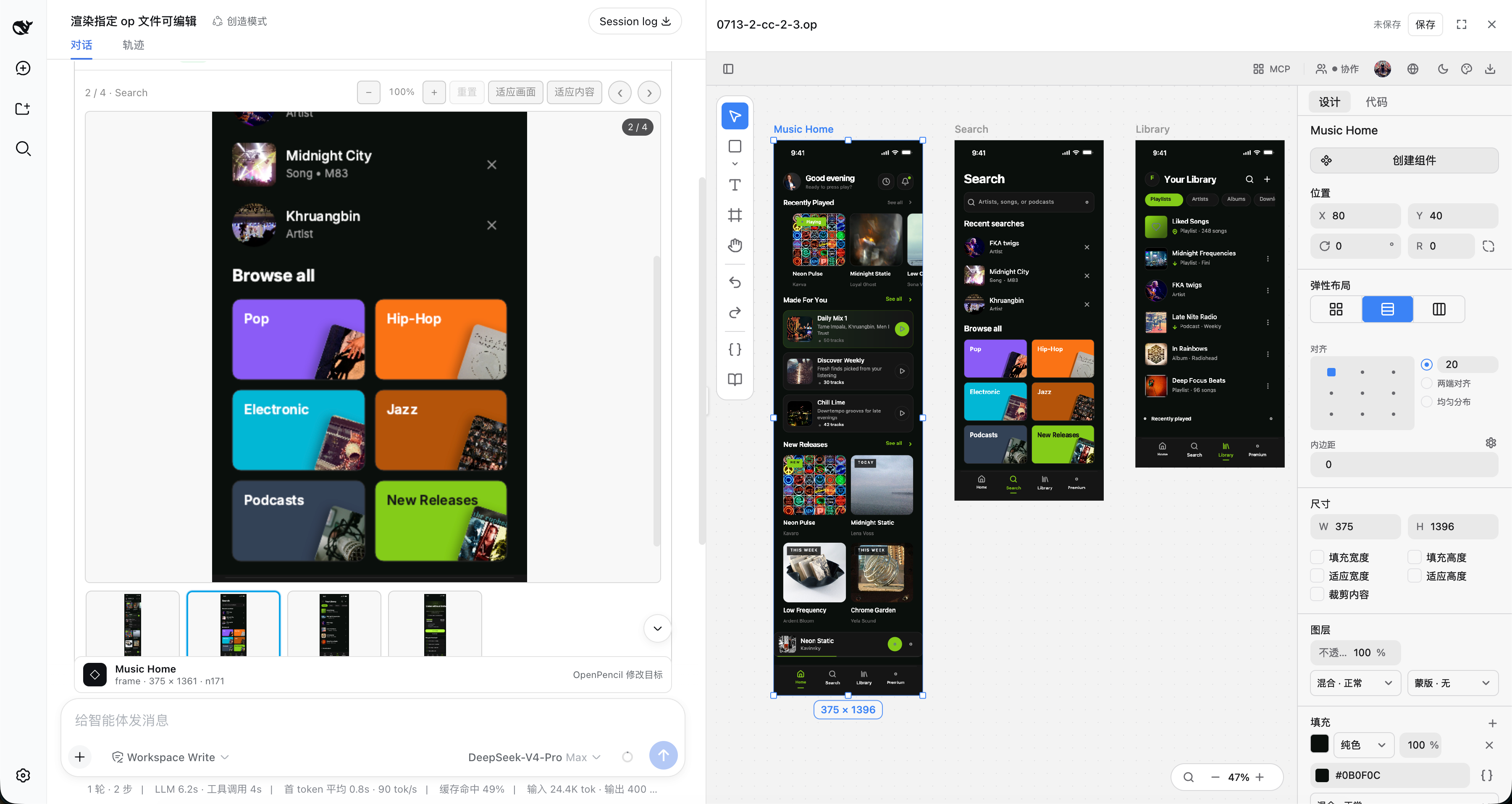
Exact multi-frame .op previews with an interactive canvas and the managed editor workbench
Why DSH OpenPencil
DSH OpenPencil connects DeepSeek Harness with OpenPencil so an Agent drives a real, editable, interactive design canvas instead of returning a generated image.
🖼️ Exact Multi-Frame PreviewsThe installed OpenPencil headless exporter renders design-faithful previews: the first top-level frame as a large replay-safe PNG, plus a horizontally scrollable thumbnail rail, click-to-select, and previous/next navigation for multi-frame documents. |
🗺️ Interactive Canvas"Open interactive canvas" lazily mounts the read-only OpenPencil Web SDK with pan, zoom, and fit — inspect any page, nested node, or inactive page without leaving the conversation. |
✏️ Managed EditorWith |
🤖 Agent-Native Design ToolsFive tools — |
🔐 Capability-Gated GrantsImage and document grants are signed, hash-bound capabilities. Browser metadata never exposes an arbitrary host path, and signed preview/editor capabilities never enter the canonical tool result or model context. |
⚡ Transactional SafetyA new document is published only after the whole |
🌍 Follows DSH Look & FeelThe tool card and managed editor follow DSH's Chinese/English locale and light/dark theme without reloading the editing session. |
🎯 One Complete Workflow"Requirement in conversation → Agent edits the real canvas → live preview and interaction validation → keep iterating" — one loop, no screenshot round-trips. |
Install into DSH
DSH is a separate package. Install it once if you do not already have it:
npm install -g @deepseek-ai/[email protected]
Then add the plugin to a profile and start the web app:
dsh plugin --profile web add @zseven-w/dsh-openpencil@latest
dsh web
Prefer not to install DSH globally? Run the same two steps through pnpm dlx:
pnpm dlx --package=@deepseek-ai/[email protected] dsh plugin --profile web add @zseven-w/dsh-openpencil@latest
pnpm dlx --package=@deepseek-ai/[email protected] dsh web
The OpenPencil plugin is public and requires no npm token. If the DSH prerelease itself requires registry authentication, keep that credential in a user-level or temporary npm config outside the checkout. This repository intentionally contains no registry credentials.
Design Tools
| Tool | What it does |
|---|---|
openpencil_new | Creates a brand-new .op from one transactional batch_design program, saves it atomically through DSH's sandboxed filesystem, and requires no pre-opened editor. |
openpencil_create | Applies a transactional batch_design program to generate or restructure nodes on an existing live canvas. |
openpencil_edit | Modifies an explicit node or the single node selected by the user. |
openpencil_render | Creates an immutable, content-addressed .op snapshot and renders every top-level frame on the active page — optional scale and editable. |
openpencil_selection | Reads the exact nodes selected in the live editor canvas. |
Agent Design Workflow
For a natural-language request with no existing document, the Agent should call openpencil_new with a new workspace-relative .op path and the first complete batch_design program. The tool runs that program in a private managed OpenPencil daemon and publishes the authoritative document only after the whole batch succeeds. It never overwrites an existing path and a failed batch leaves no empty file behind. The Agent should then call openpencil_render with the returned path, editable: true, and autoOpen: true to present the gallery and expand the editor once. Replayed or initially-settled historical cards never auto-open.
Use openpencil_create and openpencil_edit only for an existing live canvas. Their edits remain unsaved until the editor Save action.
Rendering Contract
openpencil_render accepts a .op path, an optional scale (0 < scale <= 8, default 1), and optional editable (false by default). Leave width and height unset for the exact OpenPencil path: they describe a runtime viewport, not design export dimensions, and are accepted only by the lower-fidelity Jian fallback.
OpenPencil binary discovery checks, in order:
DSH_OPENPENCIL_BINARYorDSH_OPENPENCIL_DESKTOP/Applications/OpenPencil.app/Contents/MacOS/openpencil-desktop~/Applications/OpenPencil.app/Contents/MacOS/openpencil-desktopopenpencil-desktoponPATH
Jian fallback discovery uses DSH_OPENPENCIL_JIAN, a known local release build, then PATH. If the exact OpenPencil binary is genuinely unavailable, Jian may produce a clearly labelled runtime-preview fallback. Exact renderer failures, timeouts, and invalid PNGs do not silently fall back.
Web Viewer Assets
DSH serves only client.js for a client plugin, so the OpenPencil ESM SDK, its WASM, and CanvasKit are staged as explicit same-origin assets:
pnpm run sync:viewer-assets
The sync command prefers a sibling ../openpencil checkout (local development), falling back to the vendored vendor/openpencil submodule (CI and fresh clones). Override it with OPENPENCIL_ROOT or --openpencil-root. A complete prebuilt asset directory can be selected with DSH_OPENPENCIL_VIEWER_SOURCE. Runtime lookup can be overridden with DSH_OPENPENCIL_VIEWER_ASSET_DIR.
Viewer assets are lazy-loaded only after the user opens the canvas. If they are absent or invalid, PNG preview remains available and no canvas button is advertised.
Managed Editor
Editable sessions use OpenPencil's managed web host — the same architecture used by op-vscode. The plugin starts the host only after an authorized user action, keeps the daemon token in memory, validates iframe source and origin, and closes the process when the editor session ends. The editor surface is selected progressively: native Tool details when the host declares that seam, otherwise the plugin's right-hand workbench with resize and full-screen controls.
If DSH reloads or unloads the plugin while the canvas is dirty, the host keeps an opaque local recovery draft for up to seven days. Reopening the same source asks before restoring it into the live canvas; recovery never overwrites the .op file until the user explicitly saves.
Binary and source discovery can be overridden with:
DSH_OPENPENCIL_EDITOR_BINARYforop-host-web-server;DSH_OPENPENCIL_SOURCE_ROOT(orOPENPENCIL_SOURCE_ROOT) for the web bundle and CanvasKit assets.
Saves use an optimistic source hash, an atomic replace, and a successor capability. If the source changes outside the editor, the plugin reports a conflict instead of overwriting it.
Result Metadata
The model-visible result stays plain JSON. Browser-only presentationMeta.$dshOpenPencil carries additive grants for:
image: PNG path, preview/download URLs, and real width/height;frames: every exact-rendered top-level frame in active-page order, including its node id/name/index and signed PNG URLs;document: source action path plus immutable snapshot URL, bytes, and SHA-256;viewer: revisioned SDK/WASM/CanvasKit URLs when the asset route is attached;editor: scoped launch/refresh capabilities wheneditable: trueis authorized.
The result also records renderer, rendererBinary, fidelity, and any warnings. Existing PNG-only schema-v1 messages remain renderable.
DSH 0.1.0-rc.6 does not persist browser presentation metadata for tools nested under PTC/Code Mode. The plugin recovers that UI-only projection through a same-origin, session-bound endpoint: the browser sends only the session id, call id, and immutable document SHA-256, while the host resolves the authoritative result from the durable DSH session log and uses a short-lived in-process marker only to authorize recent live editing. Signed preview/editor capabilities never enter the canonical tool result or model context. Durable history can restore read-only previews; editor grants are issued only for recent, trusted live results.
For bounded replay, nested metadata recovery accepts up to 128 top-level frames; larger Code Mode results remain available through their canonical JSON fallback.
Current Limits
- Follow-up edits to an existing canvas require an already-open managed editor. Changes remain unsaved until the user invokes its Save action.
- The lightweight Web SDK canvas is read-only; full editing uses the separate managed editor surface. On DSH
0.1.0-rc.6, the plugin uses the resizable right workbench with a full-screen option. - The exact gallery covers top-level frames on the active page; the interactive canvas remains the way to inspect inactive pages and nested nodes.
- Render and snapshot caches still need a product-level retention policy.
Project Structure
dsh-openpencil/
├── src/                       Plugin sources (TypeScript)
│   ├── index.ts               Host plugin entry — Cordis service, tools, assets
│   ├── tool.ts / design-tools.ts / new-tool.ts   Host-side design tools
│   ├── renderer.ts            Exact OpenPencil renderer + Jian fallback
│   ├── editor-host.ts / editor-recovery.ts       Managed editor lifecycle + drafts
│   ├── viewer-assets.ts       Web SDK / WASM / CanvasKit asset staging
│   ├── mcp-client.ts          OpenPencil MCP connection
│   └── client/                Browser client — React workbench, gallery, selection dock
├── lib/                       Compiled output (published to npm)
├── scripts/                   Build helpers — viewer asset sync, client build, host tests
├── tests/                     Node test suites (client, host API, MCP, viewer assets)
├── docs/images/               Documentation screenshots
├── vendor/openpencil/         OpenPencil checkout (git submodule — viewer asset source)
├── cordis.patch.yml           DSH bundle patch that mounts the plugin
├── tsconfig.json              Host / Node TypeScript config
└── tsconfig.client.json       Browser client TypeScript config
Build and Verify
pnpm run sync:viewer-assets
pnpm run build
pnpm run test:viewer-assets
pnpm run test:client
pnpm run test:host -- /absolute/path/to/design.op 375 1091
Builds require Node 24.11 or newer and pnpm. DSH host/client packages are peer dependencies supplied by the target DSH profile. Build tools are resolved from local dev dependencies, the active linked DSH checkout, or an installed DSH source bundle; DSH_SOURCE_ROOT can select a source checkout explicitly. The lockfile pins standalone public build tooling when that environment is provisioned separately.
For a private DSH prerelease, keep the issued npm credential outside this repository (for example in a user-level or temporary .npmrc) and run the requested version directly:
pnpm dlx --package=@deepseek-ai/[email protected] dsh web
Never commit .npmrc, NPM_TOKEN, or copied registry credentials. This repository ignores local npm configuration by default.
test:host performs a real exact render, validates PNG IHDR geometry and SHA-256, exercises immutable image/document capabilities over HTTP, and checks that viewer assets are grantable. The expected dimensions are fixture-specific.
Ecosystem
DSH OpenPencil is the DeepSeek Harness plugin for OpenPencil — the world's first open-source AI-native vector design tool — and part of the ZSeven-W family of pure-Rust, AI-native tools.
| Project | What it is |
|---|---|
| OpenPencil | The design tool this plugin drives — prompt-to-canvas generation, concurrent agent teams, design-as-code .op files, and a built-in MCP server. The exact previews, interactive canvas, and managed editor here are powered by OpenPencil itself. |
| agent-rs | A pure-Rust async runtime for shipping LLM agents — multi-provider, tool-capable end-to-end, structured permissions, real MCP, zero unsafe. Powers OpenPencil's built-in agent runtime. |
| jian | Pure-Rust, GPU-Skia UI framework — widgets, layout, events, and hot reload in one stack. OpenPencil's UI framework, and the source of this plugin's fallback renderer. |
| Zode | Open-source, AI-native coding assistant for your terminal — reads your code, runs commands, and drives OpenPencil over MCP. |
| noema | Local-first, non-vector memory system for coding agents — durable memory as inspectable files, works across runtimes. |
| openpencil-skill | The LLM skill plugin that teaches AI agents how to design with op — a companion to this DSH plugin. |
Contributing
Contributions are welcome! Fork and clone, create a branch, run pnpm run build and the test suites, commit with Conventional Commits, and open a PR against main.
Community
 Join our Discord
— Ask questions, share designs, suggest features.
Recognized community: LINUX DO
License
MIT — Copyright (c) 2026 ZSeven-W
Third-party components are listed in THIRD_PARTY_NOTICES.md.
Read the usage guide →
Install steps, key points, FAQ and compatibility for this plugin — auto-derived from indexed fields.
Listing badge

[](https://deepseek-plugin.org/plugins/ZSeven-W/dsh-openpencil)Paste this markdown into your GitHub README to link back to this listing. The badge only states the listing — not a security endorsement.