Collapse tool cards and Think reasoning blocks in the DSH Web chat interface into single-line summaries, and rename "Deep diving" to "Deep sleeping".

- Language
- JavaScript
- License
- MIT
- Branch
- main
Install
$ dsh plugin --profile web add dsh-auto-collapseRun the command above in your terminal to install this plugin via the dsh CLI. You can switch Profile in the top-right corner. New to dsh? Read the beginner tutorial
Install via your agent
Install the DeepSeek Harness plugin a179-sanae/dsh-auto-collapse for me: review the repository at https://github.com/a179-sanae/dsh-auto-collapse first, then run the install command and verify the plugin loads successfully.
Paste this instruction to the DSH Web GUI assistant — it will install and verify for you.
One-line Summary
A pure frontend DOM plugin that mounts on the DSH Web chat interface. It automatically collapses tool invocation cards and Think reasoning blocks within each turn into a single-line summary, while replacing the official "Deep diving..." status text with "Deep sleeping...", keeping only what the model says in the chat view.
Core Features
- Turn auto-collapse (level 1): After a turn completes, the entire working process collapses into one line showing
Processed Xs. Click to expand and see full context injection → thinking → tool invocation → process body → final response - Tool blocks and thinking blocks collapse into chips (level 2): After expanding level 1, tool groups and thinking blocks each collapse into a single chip line (displaying
Running {command}while running, orRan command/Thoughtafter completion) - Continuous thinking merged into level 3 rows: Multiple adjacent thinking blocks merge into a single row titled "Think · First sentence", click to expand and see merged content, original level 4 rows won't appear
- Real-time display of current work in collapsed state: Running chips display tool name + current command/path/query being executed, or the latest line of thinking
- Replace "Deep diving" status text: Change the official ChatView running status line
Deep diving...toDeep sleeping..., keep the streaming effect unchanged - Fully reversible: When the plugin is uninstalled (HMR stop), it restores all collapsed rows, hidden display properties, and rewritten status text; the host page DOM remains identical to before uninstallation
Technical Implementation
- Language: TypeScript (target es2020)
- Key Dependency: Only devDependency
esbuild(for building), zero runtime dependencies - Architecture: Pure DOM layer with MutationObserver + requestAnimationFrame coordinator; host half is empty
apply()for placement in cordis plugin tree; client half registers collapse controller viactx.effect, cleaned up automatically by cordis on uninstall - Entry Files:
src/client.ts(browser-side bundle entry, build outputlib/client.js),src/index.ts(host half, no behavior)
Applicable Scenarios
When running multi-step tasks with the model on DSH Web (searching, writing files, running commands, complex reasoning), each round of tool invocations and thinking processes clutters the screen, making it difficult for those who only want the final conclusions. This plugin collapses intermediate processes into a single line, allowing users to expand and view details when needed. It's suitable for regular users who want the interface to "only show what the model says," as well as users engaged in lengthy discussions with the model who want to quickly scan what work was accomplished.
Prerequisites & Compatibility
| Dependency | Minimum Version | Description |
|---|---|---|
| DSH Web client | Not declared | Only runs as a dsh.client.platform="web" client plugin, requires mounting on DeepSeek Harness Web |
| Node.js | Not declared | Repository has no engines field; build/deploy scripts run in Node environment |
| Browser | Modern browser (supports ES2020, MutationObserver, requestAnimationFrame) | Plugin runs in browser DOM, no Node-only API dependencies |
| Platform | Cross-platform | Used via DSH Web client, operating system independent |
| Native modules | None | Zero native dependencies, pure frontend implementation |
Installation
dsh plugin --profile web add github:a179-sanae/dsh-auto-collapse
After installation, restart the DSH Web service (or trigger plugin HMR), then hard refresh the page with Ctrl+Shift+R to take effect. No additional configuration required.
Configuration
This plugin requires no additional configuration.
| Configuration | Type | Description | Default Value |
|---|
All behaviors (collapse timing, animation duration, text replacement rules) are hardcoded in the source code. No configuration options are exposed to users, no environment variables are read, and no slot keys are injected.
FAQ
Q: Does it require any configuration after installation?
A: No. The plugin is a pure DOM-layer UI enhancement. It reads no environment variables, exposes no configuration options, and registers no slot keys. After installation, simply restart the DSH Web service and hard refresh the page (Ctrl+Shift+R) to take effect.
Q: Will it modify my message content?
A: No. The plugin only controls the display and hiding of working processes (tool cards, thinking blocks, running status text). It does not modify the model's generated message content, nor does it modify any official slot registrations or data structures.
Q: Will the page return to normal after uninstalling the plugin?
A: Yes, it will be fully restored. The stop() function restores all rewritten display properties, deletes inserted collapsed rows, changes "Deep sleeping..." back to "Deep diving...", and cleans up all MutationObserver and rAF timers. The host page DOM remains identical to before uninstallation.
Q: Does it conflict with official React rendering?
A: No conflict. The plugin doesn't modify any React slots. It only uses MutationObserver to observe DOM changes and merges and replays them within requestAnimationFrame. React re-renders, node replacements, and out-of-order mounting of historical messages are all automatically tracked.
Q: Will it affect animations and accessibility experience?
A: The breathing animation during execution automatically stops when the user's system setting prefers-reduced-motion is enabled; collapsed row colors use DSH native label tokens, automatically adapting to light/dark themes.
Q: Which working node types are supported?
A: Top-level tool-call, command, manual-compaction, context (context injection), thinking (reasoning blocks), and pure image final are all handled with the same turn semantics; adjacent tools are merged, and the body is a hard boundary (won't merge across bodies).
Getting Started Difficulty
Beginner — Install with a single command, restart the service, refresh the page, and it's ready to use. No concepts or configurations need to be understood.
Known Issues & Limitations
- Status text replacement is forced:
Deep diving...is unconditionally changed toDeep sleeping...and cannot be disabled (even if users want to keep the original text); the plugin restores the original text by node when uninstalled - Only supports DSH Web client: Does not support other hosts like DSH CLI, desktop, or mobile clients (
dsh.client.platformis declared asweb) - Depends on host DOM contract: Recognition is based on stable
data-*attributes hardcoded when ChatView renders (data-chat-flow/data-tool/data-state, etc.). If the official Web client DOM structure changes, the collapse feature may need adaptation
DeepSeek Harness Web 客户端插件:把会话里的工具卡片与 Think 推理块自动折叠成一行摘要,让界面只保留模型说的话。
English: README.en.md
这是什么
dsh-auto-collapse 是一个纯前端 DOM 插件,挂在 DeepSeek Harness Web 聊天界面上,把工作流程折叠成一行行摘要——工具调用、推理过程不再占据整屏,呈现接近 VSCode Codex 桌面端的折叠体验,同时将“Deep diving” 修改为 “Deep sleeping”。它不改动消息内容,只控制工作流程的显示状态。
效果预览
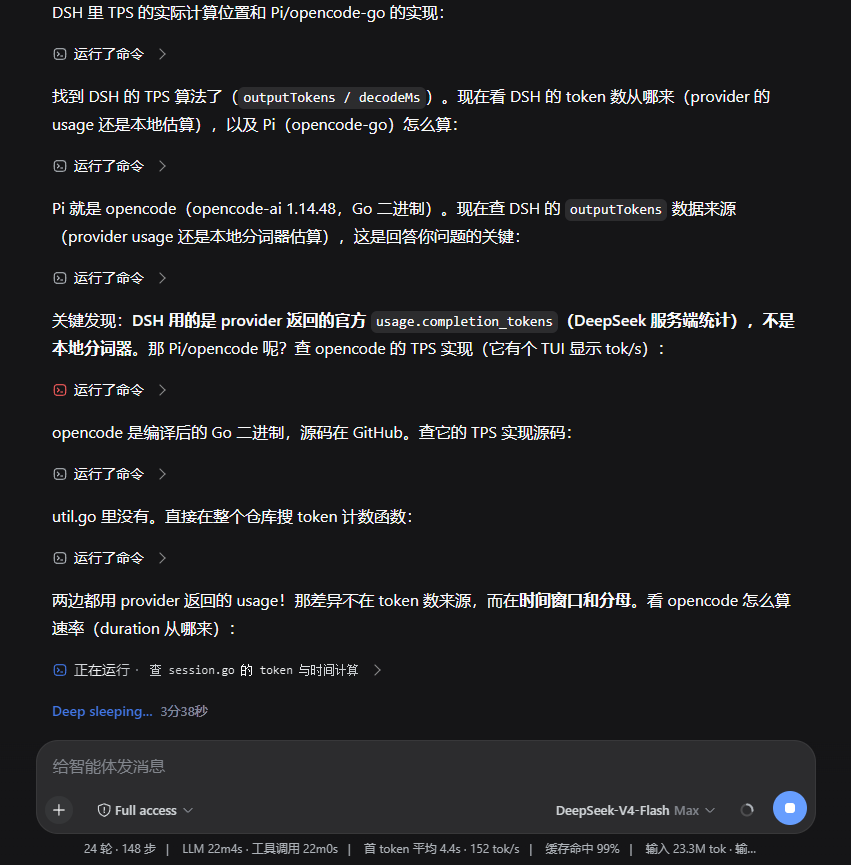
特性
- 回合完成自动收起(一级):每个回合完成后,工作过程收成一行
已处理 X秒,只留模型最终正文;点击展开完整工作流程(上下文注入 → 思考 → 工具调用 → 过程正文 → 最终正文)。 - 二级折叠行:展开一级后,工具调用组与思考块各自折叠成一行 chip(
正在运行 {命令}/运行了命令/已思考),点击展开/收起;相邻工具组合并,正文输出是硬边界(不会跨正文合并)。 - 三级思考合并:展开
已思考后,连续思考合并为一个三级思考行(标题Think · 第一句),点击展开合并内容块;原始四级行不出现。 - 原生视觉对齐:图标盒 16px / glyph 14px / 行高 24px / 行距 16px,颜色使用 DSH 原生 token(
--dsw-alias-label-*),思考与命令图标取自 DSH 原生图标(IconThinkOutline14/IconApiOutline14)。 - 流式友好:同一个
assistant-step原地补正文、React 换节点和历史乱序挂载都会重新协调;running 状态带文字平滑呼吸动画,prefers-reduced-motion下停止动画。 - 完整工作类型:除 tool-call 外,顶层
command/manual-compaction、context 和纯图片 final 都按同一回合语义处理。 - 可逆:卸载(HMR stop)时完整还原所有折叠/隐藏/改写。
安装
已发布 npm 包(推荐,使用构建好的版本):
dsh plugin --profile web add "dsh-auto-collapse"
从 GitHub 安装(开发版或需要跟随 main 分支时):
dsh plugin --profile web add "github:a179-sanae/dsh-auto-collapse#main"
安装后重启 DSH web 服务(或触发插件 HMR),页面 Ctrl+Shift+R 硬刷新即可生效。无需任何配置。
开发
项目结构
src/fold.ts       核心:FoldController(状态机)+ findBlocks(块识别)+ 折叠/展开逻辑
src/client.ts     浏览器端入口(注册插件)
src/index.ts      host half
build.mjs         esbuild 构建(lib/client.js 的注册 id 在 banner 里)
deploy.mjs        安全部署:校验 → 备份 → 替换 → 身份核验重启 → 哈希验证/回滚
cordis.patch.yml  profile 树挂载
test/             fake DOM 契约、竞态、会话切换与 40 组乱序排列回归
检查
npm run check
依次执行 TypeScript 检查、构建和全部回归测试。
快速部署(本机开发)
npm run deploy
脚本先核验插件/DSH 包名和 3080 监听进程身份,再做时间戳备份、替换、重启与服务端哈希验证;失败自动恢复旧 bundle。可用 DSH_AUTO_COLLAPSE_LIB、DSH_DIR、DSH_WEB_PORT、DSH_LOG_DIR 覆盖默认路径。
发布新版本
更新 package.json 中的 version 后,发布到 npm(prepack 钩子会自动构建):
npm publish --access public
本机开发也可以只打包为 tgz:
npm pack --pack-destination <本地插件目录>
将 profile 的 package.json 中插件依赖更新为新 tgz 路径后重新安装插件。
关键机制
- 块识别(
findBlocks):顶层节点按 tool-call、command/manual-compaction、context、thinking 和正文分类;user/steering/turn-tail 是不可跨越的硬边界。 - segment 协调:每轮根据当前 DOM 顺序重建 segment;最后一个含文本或媒体的
assistant-step是 final,其余正文是中间过程。稳定 flow/key 复用展开状态,不依赖一次性 mutation 事件。 - 时长:流式回合按 segment 分别记录 running 起点;历史回合从官方时长或
timeStart/turn-tail 解析。格式X秒/X分Y秒,整分省略秒位。 - React 共存与可逆性:节点替换后按稳定 key 重新绑定;一级行被移除会按原展开状态重建;所有 inline
display在首次改写前保存并精确恢复。
许可
MIT
Read the usage guide →
Install steps, key points, FAQ and compatibility for this plugin — auto-derived from indexed fields.
Listing badge

[](https://deepseek-plugin.org/plugins/a179-sanae/dsh-auto-collapse)Paste this markdown into your GitHub README to link back to this listing. The badge only states the listing — not a security endorsement.