Place a blue-haired whale girl desktop pet on the DSH desktop. It switches expressions and voice based on conversation state, and includes a balance badge and recharge option in the conversation header.

- Language
- HTML
- License
- NOASSERTION
- Branch
- master
Install
$ dsh plugin --profile web add dsh-whale-petRun the command above in your terminal to install this plugin via the dsh CLI. You can switch Profile in the top-right corner. New to dsh? Read the beginner tutorial
Install via your agent
Install the DeepSeek Harness plugin aceice01/dsh-whale-pet for me: review the repository at https://github.com/aceice01/dsh-whale-pet first, then run the install command and verify the plugin loads successfully.
Paste this instruction to the DSH Web GUI assistant — it will install and verify for you.
One-Line Description
Place a blue-haired whale girl (fan-made desktop companion) on the edge of DSH desktop/web, automatically switching expressions, animations, and voice based on session state, while also displaying DeepSeek account balance and one-click recharge entry at the session header.
Core Features
- Display the whale girl companion on DSH desktop (Electron transparent always-on-top window) and Web (bottom-right floating iframe), switching between idle/running/happy/coquetry/sad states following DSH session events (
turn/start,turn/end,tool/call,todo/write,goal/change,approval/*,command/*) - Play jump + confetti + arpeggio + voice celebration on task completion; play "error comfort" voice on tool call failure; show bubble notification when waiting for approval
- Poke (65% coquettry / 20% bouncing / 15% grievance random), long-press hat for 0.7s to trigger head pat, double-click hat to mute, right-click menu, Esc to close menu
- Persist balance badge in Web session header, auto-refresh every minute, click to refresh immediately, with "Recharge" link next to it pointing to DeepSeek Open Platform recharge page
- Balance goes through server-side
/api/balancereverse proxying official interface (https://api.deepseek.com/user/balance), server caches for 30 seconds, browser will NOT get API Key - Network failure preserves last balance and marks it as
staleto avoid UI flickering; main volume + separate voice/effects/celebration volume persisted via localStorage
Technical Implementation
- Language: JavaScript (ESM) + minimal Python (build/composition tools)
- Key Dependencies:
@deepseek-ai/dsh-credentials(credentialRef), React (injected viawindow.__ModuleLoader__in browser),node:fs(readingpet.html),@deepseek-ai/dsh-client-runtime(manifest declared injection) - Architecture: Cordis dual-end plugin, server-side
plugin/dsh-balance-widget/lib/index.jslistens to firehose viactx.on("session/event"), registers three routes/api/balance//api/status//pet.htmlviactx.webServer.register; client-sidelib/client.jsloads React component viawindow.__ModuleLoader__.loadand injects balance badge intoconversation.session.header.actionsviactx.slots.inject, injects Web companion intoshell.overlay; companion body is a 1.5 MB single-filepet.html(animated webp + 49 pre-composed mp3 all base64 inlined) - Entry Files:
plugin/dsh-balance-widget/lib/index.js(server-side) +plugin/dsh-balance-widget/lib/client.js(browser-side) +plugin/dsh-balance-widget/lib/pet.html(companion page)
Use Cases
Users who want a cute companion that interacts with tasks while using DSH, and also want to glance at DeepSeek account balance and one-click recharge in the session. The companion cheers on task completion, comforts on errors, and reminds when waiting for approval, making the wait between dialogues less dull. This project is a non-commercial fan work, please do not use for commercial purposes.
Prerequisites and Compatibility
| Dependency | Minimum Version | Notes |
|---|---|---|
| DSH | Not specified | No dsh version constraint in package.json, auto-mounted to web profile via dsh.bundle.patch |
| Node.js | >=22 | Declared in package.json engines.node field |
| Desktop Platform | Windows | README explicitly states dsh-desktop only verified on Windows, main process patch scripts apply-main-patch.ps1 / install.ps1 are also PowerShell |
| Web Platform | Cross-platform | Browser version works as long as dsh web service can run, no OS restrictions |
| Native Modules | None | — |
Installation
dsh plugin --profile web add dsh-whale-pet
Configuration
No additional configuration required. All adjustable parameters (main volume, mute state, separate voice/effects/celebration volumes) are adjusted via sliders in the companion's right-click menu at runtime, with state saved in browser localStorage. No external files, environment variables, or DSH configuration items involved.
FAQ
Q: Companion doesn't appear after installation?
A: Confirm all install.ps1 steps output [OK], then restart DSH desktop app or dsh web service (companion window is only created when plugin loads); also check if profile's cordis.patch.yml contains balance-widget line (official dsh plugin add one-click install writes this automatically).
Q: Balance badge shows "Balance Unavailable" or keeps spinning?
A: Need to configure DEEPSEEK_API_KEY locally. Server reads it via @deepseek-ai/dsh-credentials and proxies official interface, browser will NOT receive API Key. Click badge to force refresh; on network failure, badge preserves last balance and marks it stale, no flickering.
Q: Companion has no sound?
A: Browser autoplay policy requires clicking the companion once first (hat hotspot) to unlock AudioContext; right-click hat to open menu with master volume slider and separate voice/effects/celebration volumes, confirm they are non-zero. Web version also needs to confirm ad blocker isn't blocking the companion iframe.
Q: Companion stays on screen after closing DSH Desktop main window?
A: This is known behavior of DSH original main.js. Optional to run apply-main-patch.ps1 to patch main process (automatically backs up original file, can restore with -Revert if needed), which closes companion with main window. If desktop is installed at C:\Program Files, run as administrator.
Q: Is this an officially licensed project? Can it be used commercially?
A: No. This is a non-official fan project, not affiliated with or endorsed by DeepSeek official, using "Non-Commercial Use License" (commercial use prohibited). Character materials copyright belongs to original author (see README acknowledgments).
Q: Web version companion doesn't display?
A: Confirm visiting restarted dsh web service, not old connection lingering in browser; force refresh browser (Ctrl+F5); also check if ad blocker is blocking /pet.html iframe.
Q: How to uninstall?
A: Simply run install.ps1 -Uninstall, script automatically restores cordis.patch.yml and profile config; if manually installed, can also delete balance-widget line from cordis.patch.yml, then restart dsh web.
Difficulty
Beginner — install with one command; all adjustable parameters are in companion's right-click menu, no config file changes needed.
Known Issues and Limitations
- Closing DSH Desktop main window doesn't close companion window synchronously, need to manually run
apply-main-patch.ps1to patch main.js (CHANGELOG.md:14) - Browser (Web version) autoplay policy requires user to click companion once first before playing sound (
pet.html:531-549) - Only registered in DSH Web client (
dsh-client-runtime+client.platform = "web"), pure CLI/IDE形态 DSH client won't mount companion - pet.html is 1.5 MB build artifact (animation + audio base64 inlined), takes several seconds to load first time; right-click menu "Refresh" item carries
?timestampto force reload - Long-press head pat may be overwritten by poke if click event fires at moment of mouse release,
longPressFiredflag added in pet.html to skip; moving more than 5 px also cancels long press (pet.html:968-1000) - Occasional
exists and is not a symlinkerror during pnpm install,fix-fallback-layer.ps1provided to move out fallback layer (CHANGELOG.md:27-30) - Desktop install.ps1 / apply-main-patch.ps1 are PowerShell scripts, Windows only; macOS / Linux desktop users need to manually edit
cordis.patch.ymlto addbalance-widgetline
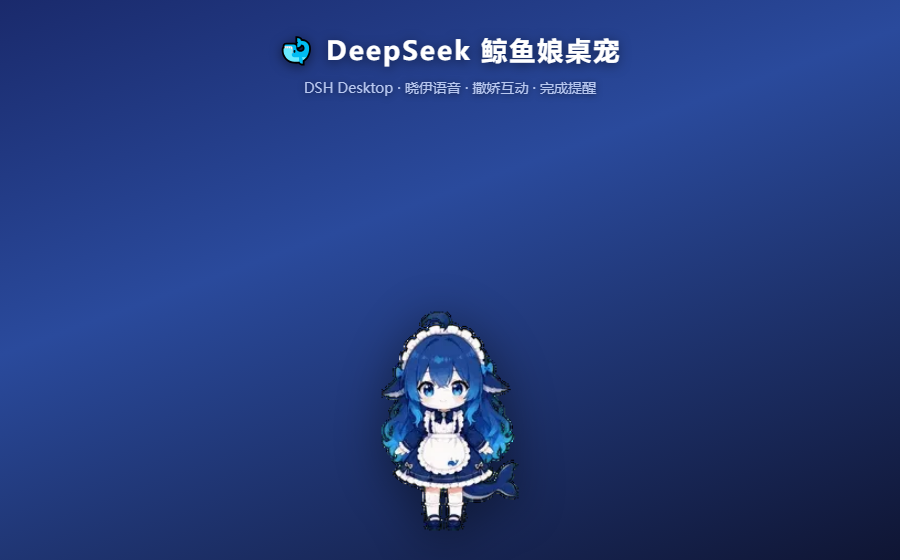
🐋 DeepSeek 鲸鱼娘桌宠
DeepSeek Harness 桌面宠物 — 蓝发女仆 + 鲸鱼尾动画 · 晓伊神经网络语音 · 撒娇互动 · 任务完成提醒




⚠️ 免责声明
这是一个非官方同人项目,与 DeepSeek 官方(深度求索)无隶属或背书关系。 本项目不用于商业用途。角色素材版权归原作者所有(见文末致谢), 使用 DeepSeek 品牌名称仅为指明所适配的工具,不构成任何官方授权或关联。
✨ 功能
| 功能 | 说明 |
|---|---|
| 🐋 同人形象 | DeepSeek 鲸鱼娘同人动画(透明背景,已去绿幕/品红残留) |
| 🎞️ 状态动画 | 待机 / 工作 / 完成 / 出错 / 撒娇 / 跳跃,待机变体轮换 |
| 🗣️ 晓伊语音 | 神经网络人声,49 条台词预合成,完全离线播放 |
| 🥰 互动 | 戳一戳随机反应 · 长按摸头 · 双击静音 · 右键菜单 · 三击诊断 |
| 📢 提醒 | 任务完成(跳跃+纸屑+琶音+语音)· 出错安慰 · 审批提示 · 进度播报 |
| 🎛️ 音量 | 总音量 + 语音/音效/庆祝分动作音量(持久保存) |
| 🖱️ 拖动 | 桌面版全身拖动 · Web 版按住鲸鱼娘拖动 |
支持 两种形态:
- 🖥️ 桌面版:DSH Desktop(Electron)右下角独立透明置顶小窗
- 🌐 Web 版:浏览器访问
dsh --profile web时,页面右下角悬浮层
💰 附带功能:余额徽章 + 充值入口
插件还包含一个会话头部余额徽章(/api/balance 代理官方接口):
| 功能 | 说明 |
|---|---|
| 💰 余额显示 | 会话头部显示 DeepSeek 账户余额(如 余额 ¥12.34),每分钟自动刷新 |
| 🔄 点击刷新 | 点击徽章立即刷新余额 |
| ⚡ 充值入口 | 徽章旁的 "充值" 链接,一键跳转 DeepSeek 开放平台充值页 |
| 🔒 安全 | API Key 只在服务端使用,不会传到浏览器(通过 credentialRef 解析) |
| 🛡️ 容错 | 网络失败时保留上次余额并标记 stale,不闪断 |
余额徽章默认随插件一起启用;不需要的话可在
cordis.patch.yml中移除client.js的注入,或保持插件但忽略徽章(不影响桌宠功能)。
📦 安装
要求
- Windows
- 已安装 DeepSeek Harness 桌面客户端 和/或 npx 版 dsh
方式一:DSH 插件命令(推荐,自动激活)
dsh plugin --profile web add github:aceice01/dsh-whale-pet
无 dsh 命令时用:
npx @deepseek-ai/dsh plugin --profile web add github:aceice01/dsh-whale-pet
插件自带 dsh.bundle 声明,安装后自动挂载(余额徽章 + Web 悬浮桌宠),无需手动编辑 cordis.patch.yml。
安装后重启 DSH 桌面应用 / dsh web 服务生效。
方式二:一键安装脚本
powershell -ExecutionPolicy Bypass -File install.ps1
脚本自动安装到两个 profile 并启用插件(自动备份原文件):
| 版本 | Profile 路径 |
|---|---|
| 桌面版 | %APPDATA%\dsh-desktop-client\dsh\profiles\web |
| Web 版 | %USERPROFILE%\.dsh\profiles\web |
安装后重启 DSH 桌面应用 / dsh web 服务生效。
其他选项
install.ps1 -Target desktop   # 只装桌面版
install.ps1 -Target web       # 只装 Web 版
install.ps1 -Uninstall        # 卸载
install.ps1 -DryRun           # 预览,不实际改动
(可选)应用 main.js 补丁 —— 修复"关闭客户端桌宠不消失"
DSH Desktop 原版 main.js 有一个小问题:关闭主窗口时桌宠窗口不会同步关闭,
桌宠会残留在屏幕上。apply-main-patch.ps1 提供修复(让桌宠随主窗口一起关闭):
powershell -ExecutionPolicy Bypass -File apply-main-patch.ps1          # 应用补丁
powershell -ExecutionPolicy Bypass -File apply-main-patch.ps1 -Revert # 还原
powershell -ExecutionPolicy Bypass -File apply-main-patch.ps1 -DryRun # 预览
如果 DSH Desktop 装在
C:\Program Files,需要以管理员身份运行 PowerShell。 补丁会备份原 main.js(patch/main.js.original),可随时还原。 应用后重启 DSH Desktop 生效。
🎮 使用
桌面版
| 操作 | 效果 |
|---|---|
| 按住角色任意位置 | 拖动窗口 |
| 单击帽子 | 戳一戳(65% 撒娇 / 20% 蹦跳 / 15% 委屈) |
| 长按帽子 0.7s | 摸头(开心蹦跳 + "被主人摸头啦") |
| 双击帽子 | 静音 / 恢复 |
| 右键帽子 | 功能菜单(总音量 / 语音 / 音效 / 庆祝音量 · 测试语音 · 诊断 · 版本 · 刷新) |
| 三击帽子 | TTS 诊断面板 |
Web 版
| 操作 | 效果 |
|---|---|
| 按住鲸鱼娘 | 拖动悬浮面板 |
| 右上角 ✕ | 隐藏(变 🐋 按钮) |
| 点击 🐋 | 恢复 |
🏗️ 架构
dsh-balance-widget/          # Cordis 插件(服务端 + 客户端)
└── lib/
    ├── index.js             # 服务端:/pet.html /api/status /api/balance
    │                        #   - 从 session firehose 监听 turn/tool/todo/goal/approval
    │                        #   - /api/status 输出工作状态供桌宠轮询
    ├── client.js            # 客户端:会话头部余额徽章 + Web 版悬浮桌宠
    └── pet.html             # 桌宠页面(动画 + 语音 + 交互,1.5MB 内嵌资源)
工作流:
DSH server (session/event firehose)
        │  turn/start · turn/end · tool/call · todo/write ...
        ▼
index.js  ── /api/status ──►  pet.html (轮询 1.5s)
                                ├─ 状态机:idle/running/happy/coquetry/sad
                                ├─ 动画:webp 内嵌(帧延迟×3,节奏舒缓)
                                ├─ 语音:AudioContext 播放预合成晓伊 mp3
                                └─ 交互:拖动/戳/摸头/右键菜单/音量
桌面版:Electron 主进程创建透明置顶小窗 → 加载 /pet.html
Web 版:client.js 注入 shell.overlay 悬浮层 → iframe 加载 /pet.html(postMessage 桥接拖动)
🔧 自定义
换语音 / 加台词
需要 Python 3.9+:
pip install edge-tts pillow
# 1. 编辑 tools/synth_all.py 里的 LINES 台词表
# 2. 重新合成语音(晓伊音色,可换 PET_VOICE 环境变量)
python tools/synth_all.py
# 3. 构建 pet.html(注入动画 + 语音)
node tools/build-pet.mjs
# 4. 安装
powershell -ExecutionPolicy Bypass -File install.ps1
修图工具(仅当替换素材时需要)
python tools/despill.py    # 去绿幕残留(素材是绿幕抠图时)
python tools/defringe.py   # 去品红残留(白背景下边缘干净)
📁 目录结构
dsh-whale-pet/
├── install.ps1              # 一键安装/卸载(支持 -Target / -DryRun)
├── apply-main-patch.ps1     # (可选)main.js 补丁:修复关闭客户端桌宠不消失
├── docs/preview.png         # 项目预览图
├── patch/
│   ├── main.js              # 补丁后的 main.js
│   └── main.js.original     # 原版 main.js(用于还原)
├── plugin/
│   └── dsh-balance-widget/  # 桌宠插件
│       ├── package.json
│       └── lib/
│           ├── index.js     # 服务端路由 + 事件监听
│           ├── client.js    # 客户端(余额徽章 + Web 桌宠)
│           └── pet.html     # 桌宠页面
└── tools/
    ├── synth_all.py       # 语音合成(edge-tts → lib/audio.json)
    ├── build-pet.mjs      # 构建 pet.html(动画+语音注入)
    ├── despill.py         # 去绿幕残留
    └── defringe.py        # 去品红残留
📄 License
非商业性使用许可(Non-Commercial Use License)
- ✅ 允许:个人使用、学习、非商业性分享
- ❌ 禁止:商业用途、未经原作者许可的二次分发
- 角色素材版权归原作者所有(见致谢);DeepSeek 名称仅用于指明所适配的工具, 与 DeepSeek 官方无隶属或背书关系
❓ FAQ
桌宠没出现?
- 确认安装脚本输出均为
[OK] - 重启 DSH 桌面应用 / dsh web 服务(插件在启动时加载)
- 检查
cordis.patch.yml是否包含balance-widget
Web 版桌宠不显示?
- 确认访问的是重启后的 dsh web 服务,浏览器强制刷新(Ctrl+F5)
语音没声音?
- 确认已在首次使用时点击过桌宠(解锁 AudioContext,浏览器自动播放策略)
- 检查右键菜单里的音量滑块 > 0
- Web 版需确认 iframe 未被广告拦截器屏蔽
如何参与贡献? 见 CONTRIBUTING.md
🙏 致谢
- 角色动画素材:codex-pet-DeepSeek-girl
- 行为系统参考:DeskPet
- 语音合成:edge-tts
Read the usage guide →
Install steps, key points, FAQ and compatibility for this plugin — auto-derived from indexed fields.
Listing badge

[](https://deepseek-plugin.org/plugins/aceice01/dsh-whale-pet)Paste this markdown into your GitHub README to link back to this listing. The badge only states the listing — not a security endorsement.