Provides a local SQLite knowledge

- Language
- TypeScript
- License
- MIT
- Branch
- main
Install
$ dsh plugin --profile web add github:adoresever/graph-memoryRun the command above in your terminal to install this plugin via the dsh CLI. You can switch Profile in the top-right corner. New to dsh? Read the beginner tutorial
Install via your agent
Install the DeepSeek Harness plugin adoresever/graph-memory for me: review the repository at https://github.com/adoresever/graph-memory first, then run the install command and verify the plugin loads successfully.
Paste this instruction to the DSH Web GUI assistant — it will install and verify for you.
One-Sentence Positioning
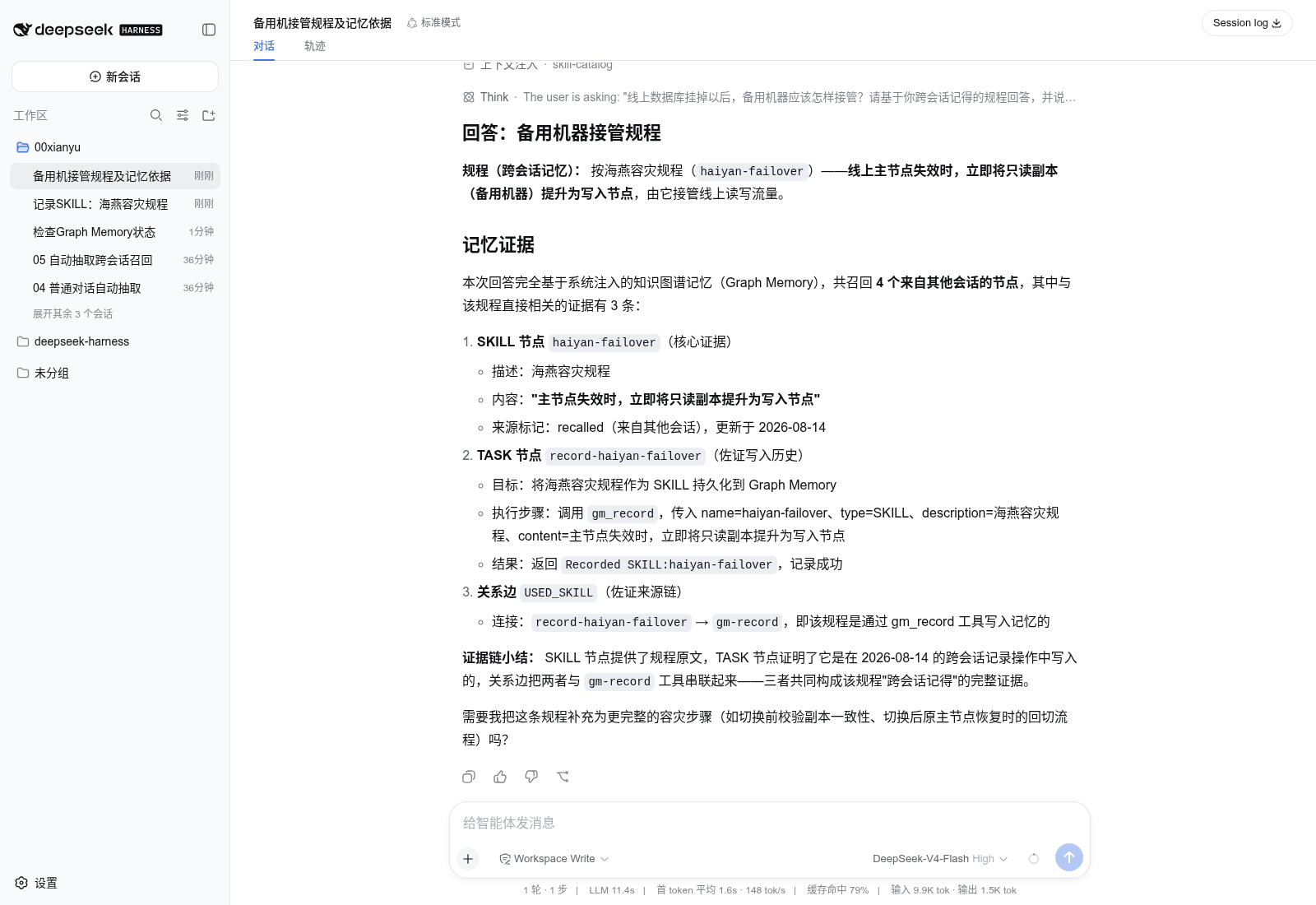
graph-memory沉淀AI对话中产生的任务、技能、事件及其关系成本地知识图谱,并在新问题出现时只召回相关的局部子图注入上下文,从而让DeepSeek Harness拥有可追溯、可搜索、跨会话共享的长期记忆。
Core Capabilities
- 自动把对话消息抽取成TASK / SKILL / EVENT三类节点,带USED_SKILL、SOLVED_BY、REQUIRES、PATCHES、CONFLICTS_WITH几类因果关系
- 每个节点都关联原始user / assistant片段,召回时能告诉用户这条记忆来自哪个会话、因为什么被想起
- 在Prompt Assembly阶段自动检索相关子图注入system prompt,不需要模型主动调用工具
- 提供gm_status、gm_search、gm_record、gm_stats四个原生工具,支持主动搜索、确定性记录和统计查看
- 支持语义向量检索(可选)与SQLite FTS5全文检索双通道:未配向量时自动降级到FTS5,永远不阻断对话
- 跨DSH重启保留数据,事件ID稳定使HMR和恢复期间不会重复入库
Technical Implementation
- Language: TypeScript
- Key Dependencies:
@photostructure/sqlite(本地SQLite存储 + FTS5)、@sinclair/typebox(Schema)、可选的OpenAI兼容Embedding HTTP服务 - Architecture Pattern: 宿主无关内核 + 双宿主适配器 ——
dsh.ts作为DeepSeek Harness / Cordis适配器走bundle.patch自动注入;index.ts保留对OpenClaw的兼容入口;src/{extractor,recaller,graph,store,format,engine}六个子目录共享一套算法层 - Entry Files:
dsh.ts(DSH入口,apply函数挂载tools / llm / systemPrompt / agentLoop / sessions / credentials六个接缝),cordis.patch.yml(DSH bundle声明)
Use Cases
日常用DSH跟AI协作开发时,经常出现几周前讨论过某个库的用法、某次bug修复方案、某个API设计决策,但新会话里模型完全不知道 —— 用户不得不反复贴历史。Graph Memory让模型在每次新会话启动前自动看到这些沉淀下来的知识,无需手动复制粘贴。它也适合长流程项目(持续数天的开发任务、多分支并行迭代),因为它能区分不同来源节点并保持召回路径可解释。
Prerequisites and Compatibility
| Dependency | Minimum Version | Description |
|---|---|---|
| DeepSeek Harness | 0.1.0-rc.5实测验证(DSH仍为Developer Preview) | 插件走Cordis bundle.patch注入;当前DSH未公开最低版本约束 |
| Node.js | >=20(package.json声明);DSH实际使用建议22.19+或24+ | |
| Platform | macOS / Windows / Linux | 跨平台,无额外系统库要求 |
| Native Module | @photostructure/sqlite(native) | @photostructure/sqlite跨平台预编译;@sinclair/typebox纯JS |
Installation
dsh plugin --profile web add github:adoresever/graph-memory
Configuration Options
| Config | Type | Description | Default |
|---|---|---|---|
dbPath | string | SQLite图谱数据库存放路径,留空则使用$DSH_HOME/graph-memory/graph-memory.db | ~/.dsh/graph-memory/graph-memory.db |
extractionEnabled | boolean | 是否启用自动从对话里抽取任务/技能/事件 | true |
recallEnabled | boolean | 是否在Prompt Assembly阶段自动注入相关记忆 | true |
recallMaxNodes | integer | 跨会话召回时最多向当前prompt注入的节点数 | 6 |
recallMaxDepth | integer | 图遍历深度(从召回种子节点出发走几跳) | 2 |
maintenanceInterval | integer | 每隔多少轮检查一次信号,触发PageRank + 社区检测 | 6 |
embedding.apiKeyEnv | string | Embedding服务的key在启动环境里的变量名(如GRAPH_MEMORY_EMBEDDING_API_KEY),由DSH Credentials解析真实值 | 未设置 |
embedding.baseURL | string | Embedding服务的接口地址,OpenAI兼容,DashScope / OpenAI / 本地服务都能接 | OpenAI默认 |
embedding.model | string | 向量模型名,默认text-embedding-3-small | text-embedding-3-small |
embedding.dimensions | integer | 向量维度(如DashScope text-embedding-v4为1024),仅在服务支持时设置 | 由服务决定 |
未列出的env变量名对照:
GRAPH_MEMORY_EMBEDDING_API_KEY/GRAPH_MEMORY_EMBEDDING_BASE_URL/GRAPH_MEMORY_EMBEDDING_MODEL/GRAPH_MEMORY_EMBEDDING_DIMENSIONS,由cordis.patch.yml读取并注入到上面这套字段里。
FAQ
Q: 这个插件需要联网吗?API key会泄露吗?
A: 默认完全离线运行,只有当用户主动配置向量服务(Embedding)时才会发请求。key只以环境变量名形式写在Cordis patch里,真实密钥由DSH Credentials解析,数据库里不会持久化任何secret。
Q: 卸载插件会丢失我之前的记忆吗?
A: 不会丢失。SQLite数据库独立于插件存在,禁用或卸载插件都只是不再读取/写入,原graph-memory.db随时可重新挂载复用。
Q: 想清空记忆怎么操作?
A: 关闭插件后手动删除$DSH_HOME/graph-memory/graph-memory.db文件即可。Community版未提供一键清空工具,删除前建议备份。
Q: 跟DSH自带的会话压缩有冲突吗?
A: 不冲突。压缩决定当前窗口还能装多少原始历史,图谱记忆决定哪些"已经被消化过的知识"值得在下一轮唤醒 —— 两者目标正交,可同时启用。
Q: 自动抽取偶尔漏掉重要内容怎么办?
A: 用gm_record工具主动写入,给出name / type(TASK/SKILL/EVENT)/ description / content四个字段,会跳过LLM抽取链路直接落库,可作为beta阶段的兜底手段。
Q: DSH模式下找不到gm_update / gm_maintain?
A: 这是预期行为。DSH/Cordis适配器只暴露gm_status、gm_search、gm_record、gm_stats四个工具,gm_update和gm_maintain暂时保留在OpenClaw入口,DSH端未实现。
Q: 是否支持中文和长内容?
A: FTS5检索对中文按unicode分词匹配;向量检索走Embedding模型,与语种无关。长内容会被分块抽取,不要求完整塞进单条节点。
Difficulty Level
进阶 — 需要懂DSH的Cordis bundle安装机制、能配置Embedding服务的环境变量,并理解SQLite与FTS5的基本概念才能调优召回;但装好即用的默认配置也能正常工作,普通用户也能跑起来。
Known Issues and Limitations
- DSH版暂未暴露
gm_update和gm_maintain工具,这两个能力目前只在OpenClaw入口可见 - 自动抽取依赖辅助模型输出的稳定性,关键知识建议使用
gm_record工具手动写库 - 当前beta 1.6.0-beta.1还未发布到npm registry,必须通过
git clone+npm run build+npm pack走本地tarball安装 - DSH端Pro版(Neo4j适配器 + 可视化工作台 + Client Plugin)尚未实现,Community版只走SQLite
- 配置项
freshTailCount在openclaw.plugin.json中已被标记deprecated(旧方案按"新鲜尾部"切分,现已改为按用户轮次切分,不再生效) - DSH仍处于Developer Preview阶段,后续版本可能引入破坏性变更,插件在
0.1.0-rc.5上验证过

Traceable, searchable, cross-session memory for AI agents.
One memory core, native to DeepSeek Harness, with the OpenClaw plugin entry retained.
中文 · Advantages · Architecture · DSH Install · Pro Plugin · Technical Report (Chinese)
Compaction answers “how much of this conversation still fits?” Graph Memory answers “which past knowledge is worth recalling now?”
Reusable conversation knowledge becomes typed nodes:
TASK: goals, execution, and outcomes;SKILL: validated reusable methods;EVENT: errors, fixes, decisions, changes, and facts.
Typed edges such as USED_SKILL, SOLVED_BY, REQUIRES, PATCHES, and CONFLICTS_WITH preserve relationships. A new question retrieves a relevant local subgraph instead of replaying the complete history.
Core advantages
Native host integration
- Loaded by the DSH/Cordis plugin lifecycle, not simulated through an MCP side channel.
- Integrates Session, Tool, Agent Loop, Prompt Assembly, LLM, and Credentials seams.
- Disposes database, cache, and event listeners with its plugin fiber.
- Does not fork or modify DeepSeek Harness core.
Durable cross-session memory
- Knowledge from Session A can be recalled automatically in Session B.
- Memory survives DSH restarts.
- Stable event IDs make resume and HMR ingestion idempotent.
- Source sessions and graph edges explain why a memory was recalled.
Smaller, cleaner context
- Semantic vector retrieval with FTS5 lexical fallback.
- Community detection, PageRank, personalized PageRank, and bounded graph traversal.
- Only a relevant local subgraph enters the current prompt.
- Recalled history is marked as untrusted reference material and cannot override current user instructions.
Local-first and lightweight
- Community uses SQLite by default; no graph database deployment is required.
- Embeddings are optional. Without them, recall falls back to FTS5.
- Data remains in the user's local profile by default.
- OpenAI-compatible embeddings support DashScope, OpenAI, and local providers.
Observable and verifiable
gm_statusreports store path, graph counts, vector coverage, mode, and dimensions.- Model or dimension changes trigger re-embedding.
- Vectors with different dimensions are never silently compared.
- Critical knowledge can be recorded deterministically with
gm_record.
Scoped token benchmark
The original OpenClaw adapter was measured in a seven-turn workflow that installed, authenticated, and queried bilibili-mcp:
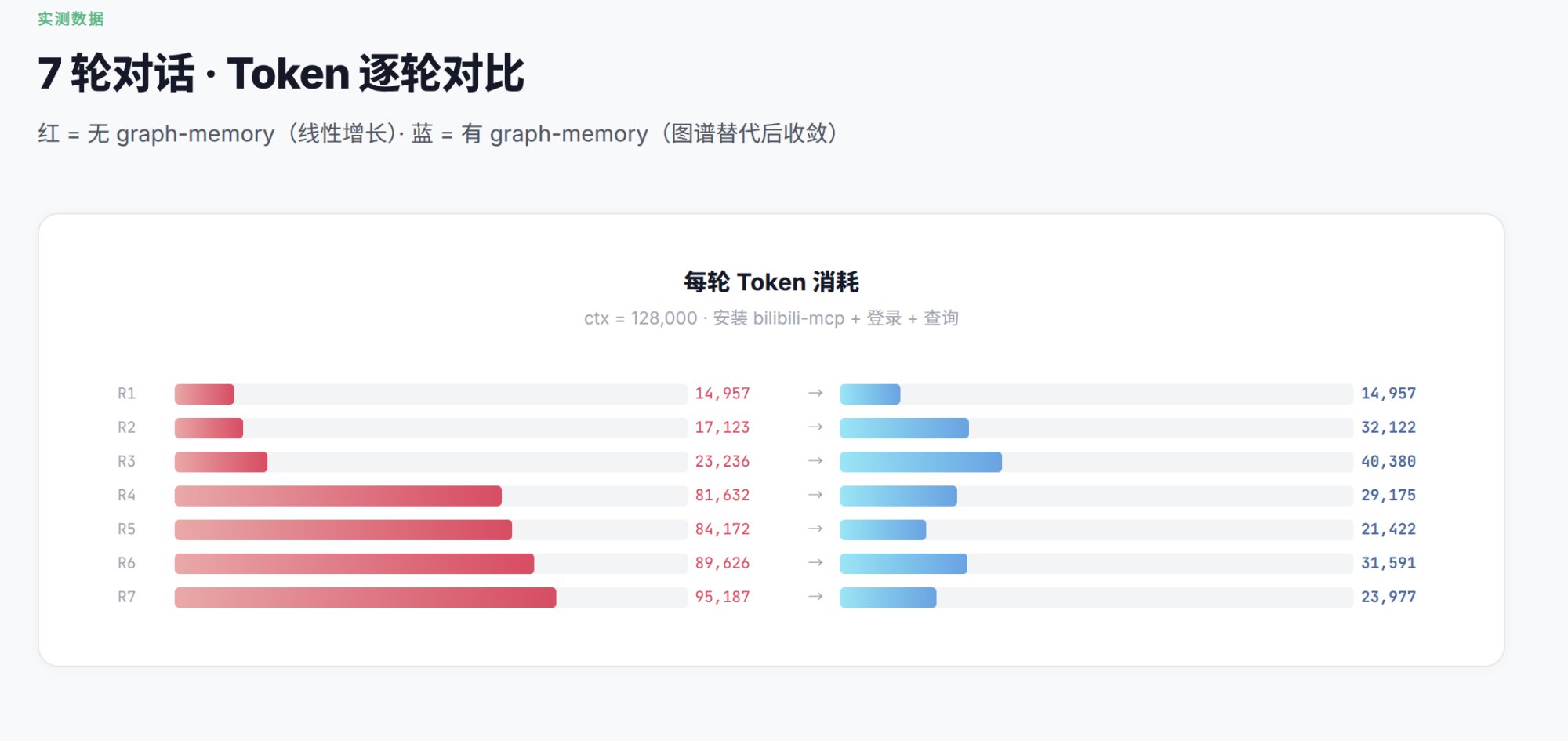
| Turn | Without Graph Memory | With Graph Memory |
|---|---|---|
| R1 | 14,957 | 14,957 |
| R4 | 81,632 | 29,175 |
| R7 | 95,187 | 23,977 |
The measured reduction at R7 was approximately 75% in that specific workflow. This is a scenario-level comparison, not a universal savings guarantee; the mechanism is replacing indiscriminate history replay with a relevant knowledge subgraph.
Project evolution
The DSH integration does not discard the original project. Graph Memory is evolving from an OpenClaw memory plugin into a graph-memory core that different agent harnesses can load natively.
| Stage | Deliverable | Status |
|---|---|---|
| OpenClaw origin | Context Engine, cross-session graph memory, dual-path recall | Maintained |
| Community graph engine | SQLite, FTS5, vectors, graph ranking, provenance | Available |
| DeepSeek Harness | Cordis adapter, native tools, auto-recall, Credentials | Implemented and tested |
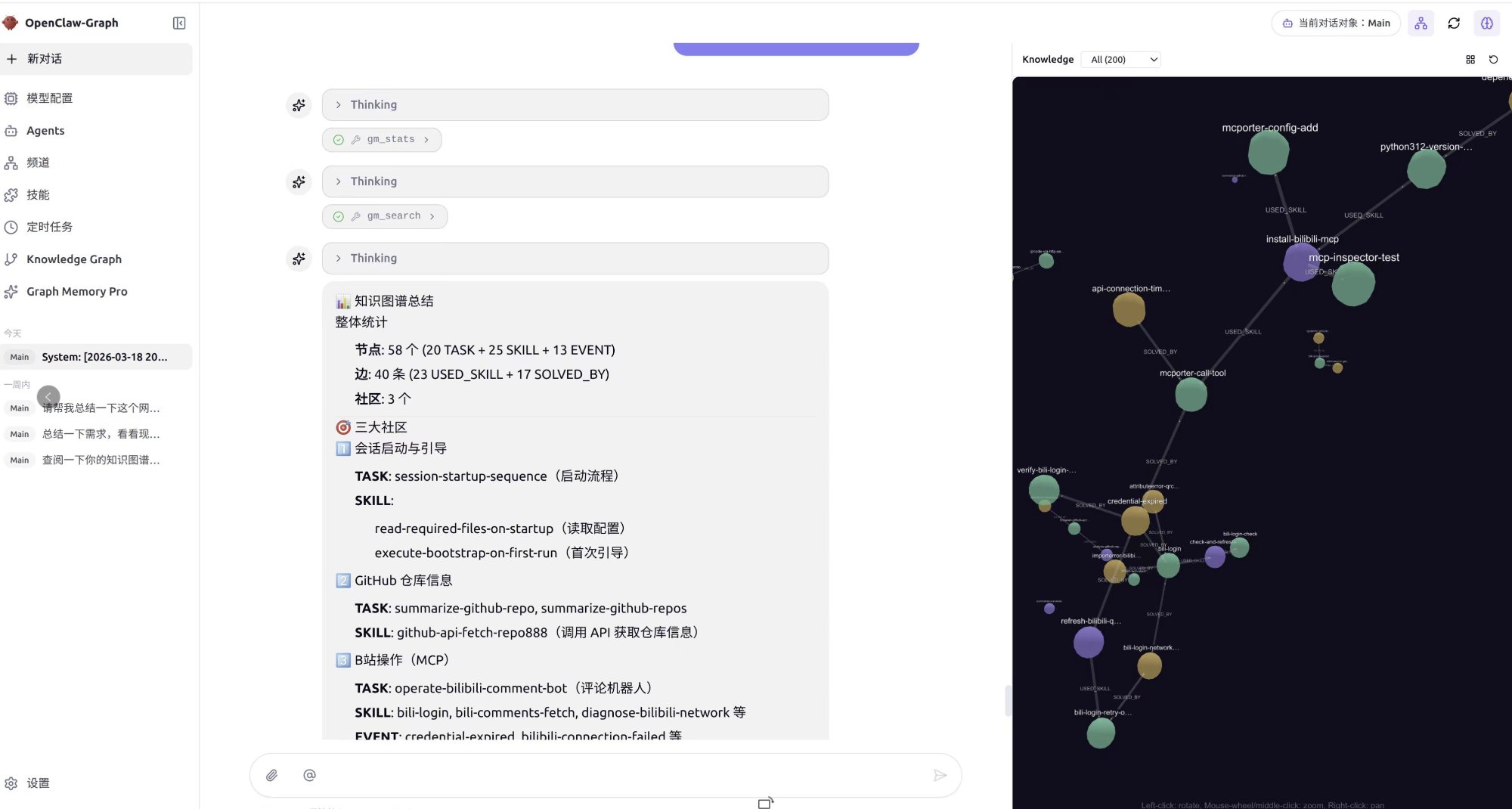
| Graph Memory Pro | Visual graph workbench, controlled drag-and-drop, optional Neo4j | Architecture reviewed; DSH Host and Client Plugins not yet implemented |
On March 15, 2026, the project owner presented Graph Memory's architecture at the CLAW program event held in Tsinghua Science Park. The following owner-supplied materials and the Sina Finance event report document that development.
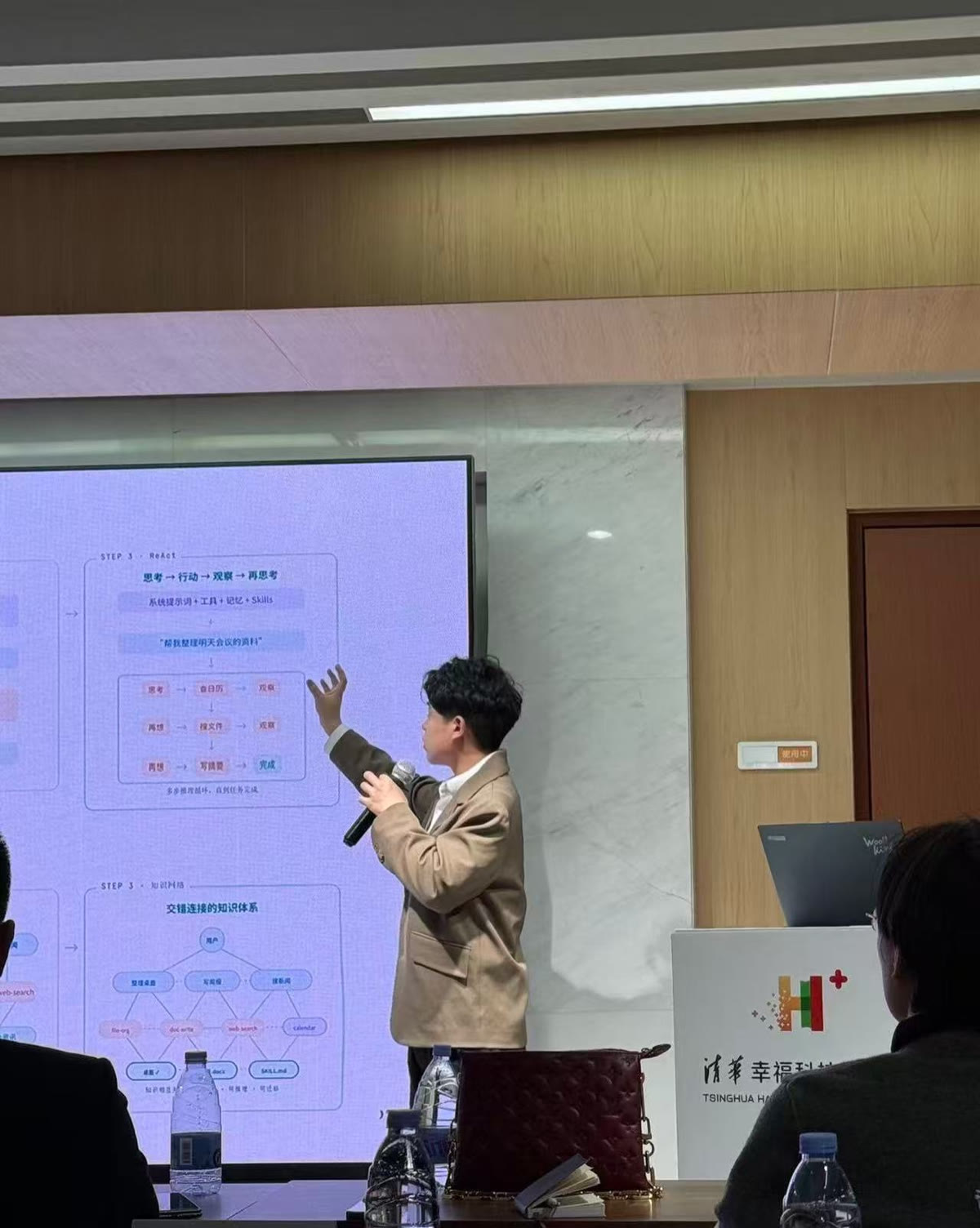
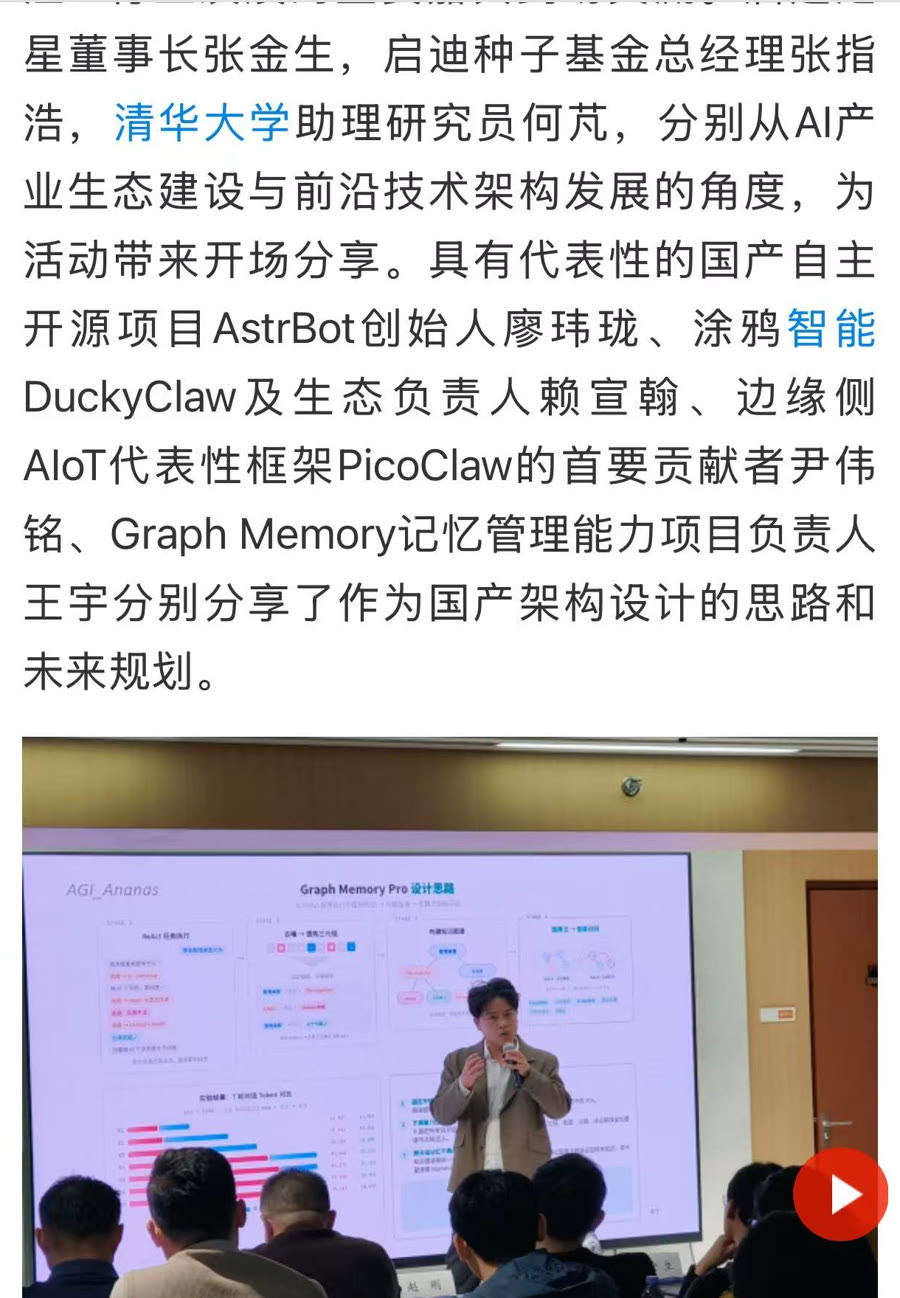
The image below is the existing OpenClaw / ClawX-era Pro graph prototype. It demonstrates a previously explored interaction direction; it is not a shipped DSH frontend.
Names and venue information document project history only and do not imply endorsement by Tsinghua University, Sina Finance, DeepSeek, or OpenClaw.
Graph Memory architecture
Typed knowledge graph
TASK   ──USED_SKILL──▶ SKILL
TASK   ──SOLVED_BY───▶ EVENT
SKILL  ──REQUIRES────▶ SKILL
EVENT  ──PATCHES─────▶ SKILL
SKILL  ──CONFLICTS_WITH──▶ SKILL
Nodes retain episodic user/assistant provenance. This preserves the context in which knowledge was created, not only a lossy summary.
Dual-path recall
flowchart LR
  Q[Current query] --> EXACT[Exact path]
  Q --> GENERAL[Generalized path]
  EXACT --> SEARCH[Vector / FTS5]
  SEARCH --> EXPAND[Community expansion + traversal]
  GENERAL --> SUMMARY[Community-summary match]
  SUMMARY --> MEMBERS[Community members]
  EXPAND --> PPR[Personalized PageRank]
  MEMBERS --> PPR
  PPR --> CONTEXT[Deduplicated local context]
Host data flow
flowchart LR
  USER[User message] --> SESSION[DSH Session Events]
  SESSION --> ADAPTER[Graph Memory Cordis Adapter]
  ADAPTER --> EXTRACT[Structured Extraction]
  EXTRACT --> GRAPH[(SQLite / FTS5 / Vectors)]

  USER --> RECALL[Semantic + Lexical Recall]
  GRAPH --> RECALL
  RECALL --> RANK[Community Expansion + PPR]
  RANK --> PROMPT[Prompt Assembly]
  PROMPT --> LOOP[DSH Agent Loop]

  CREDS[DSH Credentials] --> ADAPTER
  TOOLS[gm_* Tools] --> ADAPTER
The code follows a host-neutral core plus host adapters:
graph-memory/
├── dsh.ts                 # DeepSeek Harness / Cordis adapter
├── index.ts               # OpenClaw adapter
├── cordis.patch.yml       # DSH bundle entry
└── src/
    ├── extractor/         # conversation → TASK / SKILL / EVENT
    ├── recaller/          # vector, FTS5, graph expansion and recall
    ├── graph/             # PageRank, communities and deduplication
    ├── store/             # SQLite schema and queries
    ├── format/            # safe context assembly
    └── engine/            # LLM and embedding providers
Native DeepSeek Harness status
| Capability | Status | Notes |
|---|---|---|
| Native Cordis loading | Done | No DSH fork required |
| Cross-session auto-recall | Done | Injected during Prompt Assembly |
| Explicit record and search | Done | gm_record, gm_search |
| Vector backfill and migration | Done | Model, dimension, and fingerprint tracked |
| Visible plugin state | Done | Active in Plugin Inventory |
| Pro visual workbench | Not shipped | Requires a DSH Client Plugin |
Current beta: 1.6.0-beta.1. Local acceptance used DeepSeek Harness 0.1.0-rc.5. DSH remains in Developer Preview and may introduce compatibility-breaking changes. Testing covered tarball installation, active plugin state, 1024-dimensional vector backfill, semantic recall across Sessions, persistence across restarts, and FTS5 fallback. All 107 automated tests passed.
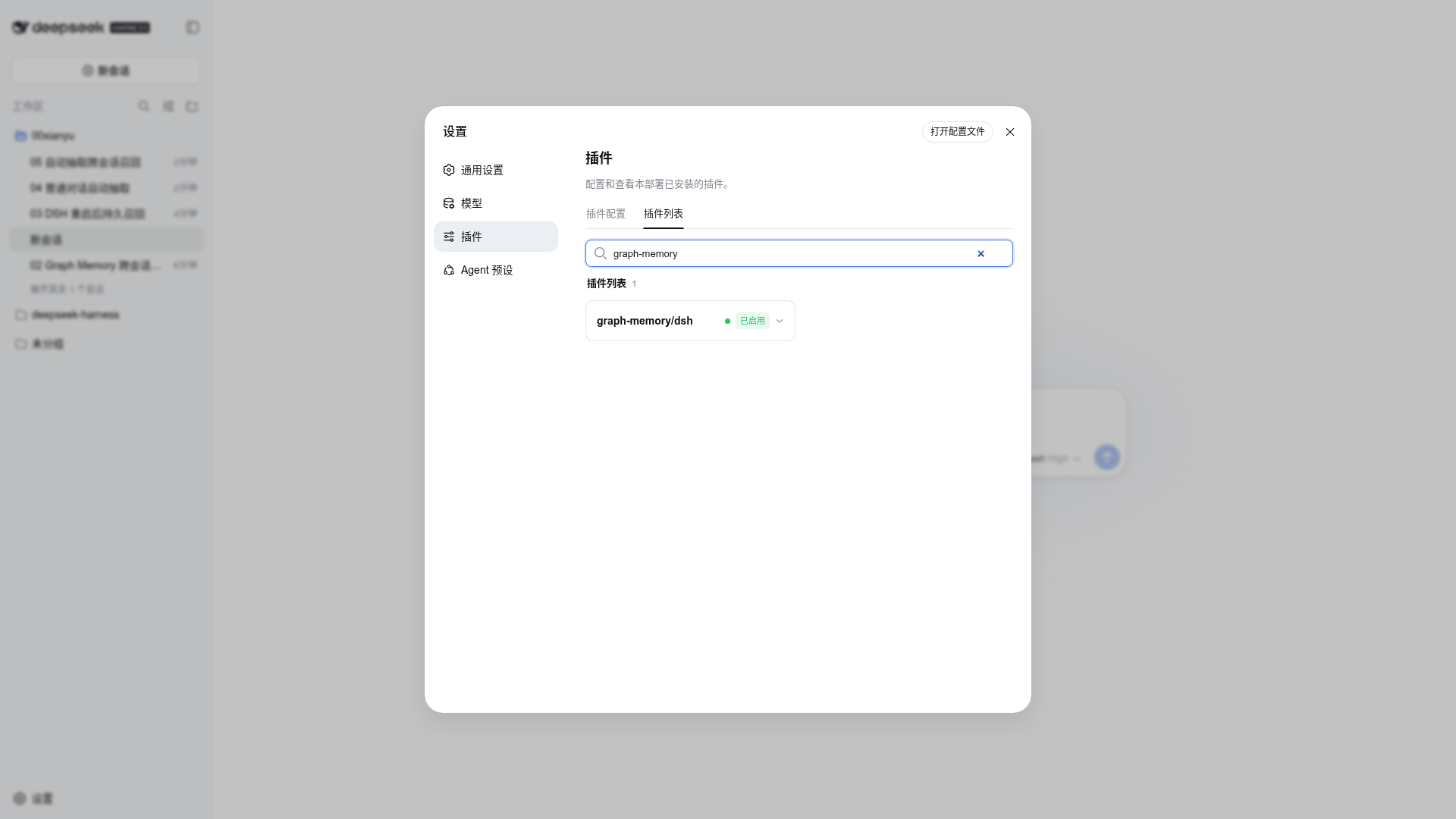
Plugin enabled: graph-memory/dsh is active in the DSH plugin list
Cross-session semantic recall in a fresh Session
Install on DeepSeek Harness
Prerequisites: Node.js 22.19+ or 24+. The current beta is not yet published to npm, so build the tarball from source:
git clone https://github.com/adoresever/graph-memory.git
cd graph-memory
npm ci
npm test
npm run build
npm pack
Install the generated tarball into the DSH Web profile:
npx @deepseek-ai/dsh plugin --profile web add /absolute/path/to/graph-memory-1.6.0-beta.1.tgz
npx @deepseek-ai/dsh --profile web --dump-config
npx @deepseek-ai/dsh web

# From a deepseek-harness source checkout:
pnpm dsh plugin --profile web add /absolute/path/to/graph-memory-1.6.0-beta.1.tgz
pnpm dsh web
After installation, verify that graph-memory/dsh is enabled under Settings → Plugins → Plugin list.
Default store:
$DSH_HOME/graph-memory/graph-memory.db
Without DSH_HOME, this is normally ~/.dsh/graph-memory/graph-memory.db.
Optional vector retrieval
Do not send secrets in chat. Cordis stores only a credential reference; DSH credentials resolves the real value for each embedding operation.
DashScope example:
export GRAPH_MEMORY_EMBEDDING_API_KEY='replace-with-your-key'
export GRAPH_MEMORY_EMBEDDING_BASE_URL='https://dashscope.aliyuncs.com/compatible-mode/v1'
export GRAPH_MEMORY_EMBEDDING_MODEL='text-embedding-v4'
export GRAPH_MEMORY_EMBEDDING_DIMENSIONS='1024'
dsh web
Without embeddings, Graph Memory continues with FTS5 and does not block conversation.
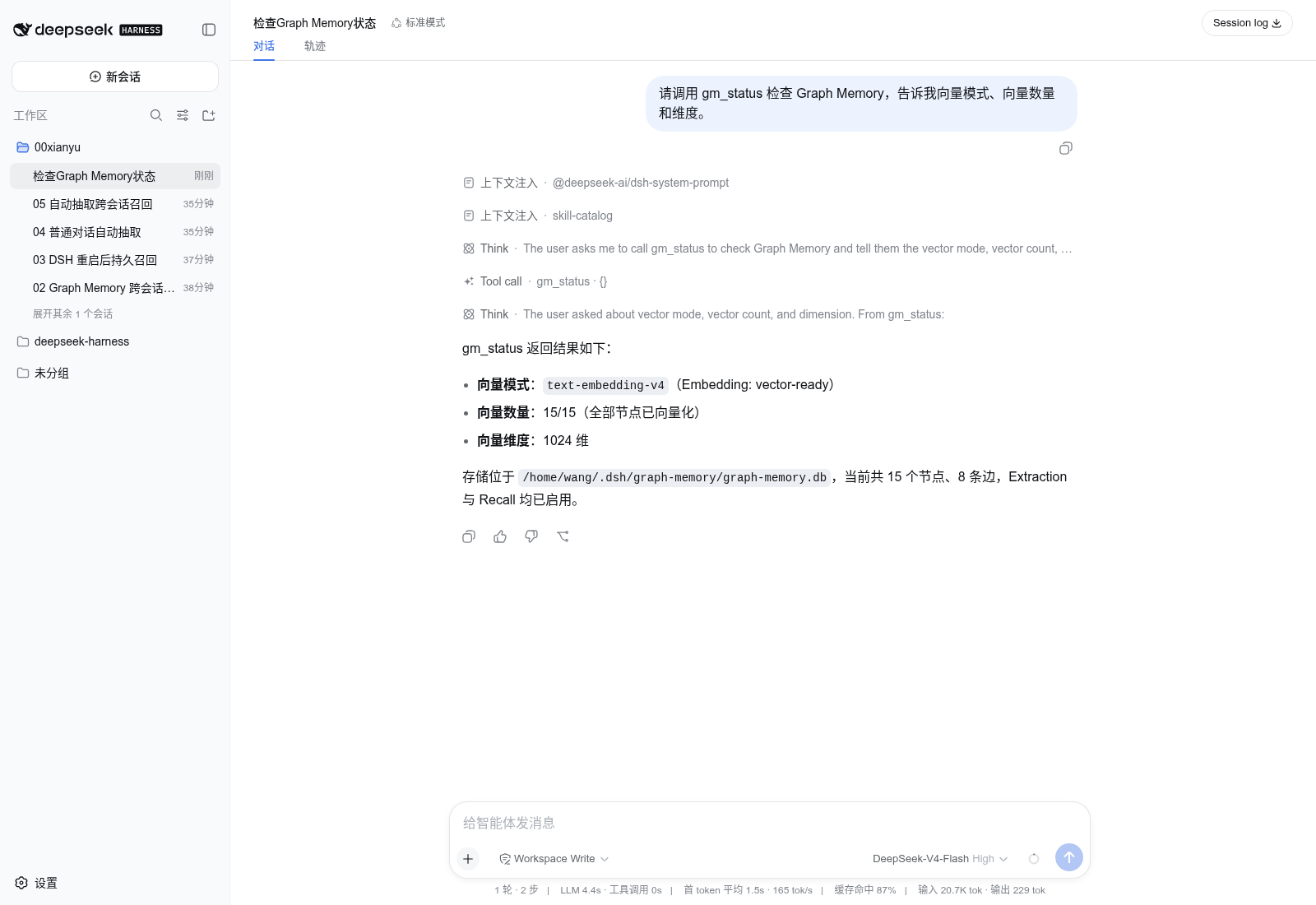
DSH tools
| Tool | Purpose |
|---|---|
gm_status | Plugin, store, extraction, recall, and vector state |
gm_search | Explicit long-term graph search |
gm_record | Persist a TASK, SKILL, or EVENT |
gm_stats | Node, edge, type, and community statistics |
Automatic recall does not require an explicit gm_search tool call. The plugin retrieves relevant memory during Prompt Assembly.
Graph Memory Pro as a DSH plugin
The accurate conclusion is not “Pro can already be installed into DSH.” It is: Pro's graph database, retrieval, PageRank, community, and CRUD backend can be migrated; its OpenClaw host code and old ClawX integration must be replaced by a DSH Host + Client Plugin. The current desktop-2.0 implementation is OpenClaw + Neo4j and contains no installable DSH Client renderer.
The reviewed desktop-2.0 code includes Neo4j Driver, GDS, APOC, vector indexes, graph maintenance tools, and CRUD routes. Today it also:
- imports
openclaw/plugin-sdkat the entry; - registers OpenClaw Gateway HTTP routes;
- writes OpenClaw configuration and restarts its Gateway during installation;
- exposes Neo4j connection details through
/graph-memory-pro/neo4j-config; - contains no installable DSH Client Plugin.
The correct plugin architecture is:
flowchart LR
  CORE[Graph Memory Core] --> STORE[SQLite default / Neo4j optional]
  STORE --> HOST[DSH Host Plugin]
  HOST --> REMOTE[Typed Remote API]
  REMOTE --> CLIENT[DSH Client Plugin]
  CLIENT --> SPLIT[Conversation + Graph split view]
  CLIENT --> DROP[Controlled drag-to-context]
The first Pro plugin does not need mandatory Neo4j:
- Pro Lite: SQLite plus a 2D/3D DSH graph client;
- Neo4j adapter: optional storage plugin for large graphs, GDS, and advanced analytics;
- the browser receives bounded
GraphSnapshotdata, never database passwords or arbitrary Cypher access; - drag operations submit node IDs and intent; the Host validates them and writes visible, reversible Session context.
Pro should therefore be an optional Graph Memory DSH plugin module, not a separate standalone product.
Recommended package split
graph-memory                          # Community: current native Host Plugin
@adoresever/graph-memory-pro-dsh     # Pro: Host + Client Plugin, to be built
@adoresever/graph-memory-store-neo4j # Optional large-graph adapter, to be built
The first milestone should be Pro Lite: reuse the existing SQLite graph and add the DSH graph workbench, so users do not need Neo4j. Neo4j stays optional for larger graphs, GDS, and advanced analysis. This is a planned architecture; the existing desktop-2.0 Pro is still Neo4j-only and does not yet implement a switchable SQLite / Neo4j GraphStore.
Target installation experience
This illustrates the target experience only. The npm package [email protected] is still the OpenClaw release, and @adoresever/graph-memory-pro-dsh has not been published. These commands do not work today:
# PLANNED — NOT AVAILABLE YET
dsh plugin --profile web add graph-memory
dsh plugin --profile web add @adoresever/graph-memory-pro-dsh
dsh web
During development, install a local tarball:
npm run build
npm pack
dsh plugin --profile web add /absolute/path/to/graph-memory-pro-dsh-*.tgz
Four required integration layers
- Core contracts: extract
GraphStore,GraphSnapshot, andRecallResultso SQLite and Neo4j implement the same API. - Host Plugin: integrate DSH Sessions, Tools, LLM, System Prompt, and Credentials. Database secrets are resolved only on the Host.
- Client Plugin: register a DSH sidebar, workbench, and tool card for 2D/3D graphs, search, filters, and split-view conversations.
- Controlled context actions: drag-and-drop sends only a node ID and an intent; the Host validates it and writes visible, reversible Session Context.
The old Pro /graph-memory-pro/neo4j-config route returns connection details to the browser; this is a security flaw that must be removed. In the future DSH Pro design, the Host resolves Credentials and the browser receives only a bounded GraphSnapshot, never a Bolt password or unrestricted Cypher access.
OpenClaw compatibility
Existing OpenClaw users retain the original entry:
openclaw plugins install graph-memory
openclaw plugins enable graph-memory
openclaw gateway restart
The Context Engine slot must also be activated in ~/.openclaw/openclaw.json; otherwise the package may appear installed without running the full ingestion and extraction pipeline:
{
  "plugins": {
    "slots": {
      "contextEngine": "graph-memory"
    },
    "entries": {
      "graph-memory": {
        "enabled": true
      }
    }
  }
}
The Community memory core is host-neutral. DSH development does not require OpenClaw users to abandon their entry or data.
Development
npm ci
npm test
npm run build
npm pack
Release checks:
- tests and TypeScript build pass;
- tarball contains
dist/dsh.jsandcordis.patch.yml; - no API keys, local databases, or environment files enter the repository;
- planned Pro features are never presented as shipped Community behavior.
Current limitations
- Automatic extraction depends on auxiliary-model output stability. Use
gm_recordfor critical beta knowledge. - DSH does not yet expose
gm_updateandgm_maintain; those remain OpenClaw-entry tools. - The Pro DSH visualization client plugin is not implemented.
- npm registry publication is pending; install the current beta from a GitHub-built tarball.
Privacy and security
- Memory remains in local SQLite by default.
- API keys come from host credentials or environment variables, not the database or Cordis patch.
- Recalled history is reference material; current user instructions always take precedence.
- Rotate any secret that has appeared in chat, logs, or screenshots.
License
MIT © 2026 adoresever
See docs/ATTRIBUTIONS.md for asset, logo, and trademark notes.
Read the usage guide →
Install steps, key points, FAQ and compatibility for this plugin — auto-derived from indexed fields.
Listing badge

[](https://deepseek-plugin.org/plugins/adoresever/graph-memory)Paste this markdown into your GitHub README to link back to this listing. The badge only states the listing — not a security endorsement.