Search the DSH plugin ecosystem within the agent: real-time GitHub topic search with curated bilingual lists, sorted by stars, returns executable installation commands.

- Language
- TypeScript
- License
- MIT
- Branch
- main
Install
$ dsh plugin --profile web add dsh-find-pluginRun the command above in your terminal to install this plugin via the dsh CLI. You can switch Profile in the top-right corner. New to dsh? Read the beginner tutorial
Install via your agent
Install the DeepSeek Harness plugin awesome-dsh-plugin/dsh-find-plugin for me: review the repository at https://github.com/awesome-dsh-plugin/dsh-find-plugin first, then run the install command and verify the plugin loads successfully.
Paste this instruction to the DSH Web GUI assistant — it will install and verify for you.
One-Sentence Description
A "plugin for finding plugins" — enables agents to directly search the entire DSH plugin ecosystem within a conversation, returning candidate lists sorted by star count along with ready-to-use installation commands, eliminating the need to manually browse GitHub and documentation sites.
Core Capabilities
- Trigger plugin search in agent conversations: Call the
find_dsh_plugintool with keywords to get a list of relevant plugins - Real-time GitHub search: Search public repositories tagged with
dsh-plugintopic, sorted by star count in descending order - Awesome list priority: When a repository matches the awesome-dsh-plugin curated list, display the human-written bilingual descriptions first (without changing the ranking)
- Ready-to-use installation commands: Each result includes a ready-made
dsh plugin addcommand that the agent can execute directly - Built-in memory caching: GitHub search results cached for 5 minutes per keyword, curated list cached for 1 hour; falls back to bundled offline snapshots on offline/failure
- Tool timeout: 10 seconds overall timeout, 4 seconds per GitHub request to avoid slowing down the agent
Technical Implementation
- Language: TypeScript (
target: ES2022, ESM) - Key dependencies:
@deepseek-ai/cordis^4.0.1,@deepseek-ai/dsh-tools^0.1.0-rc.6,node:fetch(built-in) - Architecture pattern: Inserts itself into the profile's layer stack via
cordis.patch.yml; declaresinject = ['tools']inapply(ctx)and registers thefind_dsh_plugintool toctx.tools - Entry files:
src/index.ts(coordinates tool registration),src/github.ts(GitHub search + caching),src/registry.ts(curated list fetching + snapshot fallback)
Use Cases
When users encounter questions like "I want a plugin that can do X but DSH doesn't have it" or "What TUI tools are available in DSH now?", the agent can proactively call this tool to provide candidates. A common pain point is users manually searching on GitHub, comparing repositories, and constructing installation commands — this plugin compresses this entire workflow into a single conversation and brings back trusted descriptions from the curated list to reduce the chance of hitting pitfalls.
Prerequisites & Compatibility
| Dependency | Minimum Version | Description |
|---|---|---|
| DeepSeek Harness (cordis) | ^4.0.1 | peerDependency, plugin mounts via cordis service |
| @deepseek-ai/dsh-tools | ^0.1.0-rc.6 | peerDependency, provides defineTool |
| Node | Not declared | Uses Node built-in APIs like AbortSignal.timeout, no engines field |
| Platform | Cross-platform | No os/cpu restrictions; pure network calls, no native modules |
| Native modules | None | No dependencies on node-pty, node:sqlite, or any native bindings |
Installation
dsh plugin --profile web add github:awesome-dsh-plugin/dsh-find-plugin
Configuration
This plugin requires no additional configuration — no Schema, no environment variables, no config files. All tunable parameters are passed when calling the find_dsh_plugin tool:
| Parameter | Type | Description | Default |
|---|---|---|---|
query | string (required) | Keywords describing the capability to find, e.g., wechat notifications, TUI, cross-session memory | — |
limit | number | Maximum number of results (clamped internally to 1–20) | 8 |
lang | string | Preferred description language for curated entries (en / zh, etc.) | en |
FAQ
Q: What specific functionality does this plugin add after installation?
A: It adds a single agent tool called find_dsh_plugin. Regular users won't notice any difference, but when they tell the agent "I want to find a plugin that can do X," it will automatically invoke this tool.
Q: Will search results prioritize official recommended plugins?
A: Sorting is based solely on star count, with no distinction between official/community. However, plugins in the curated list will have their GitHub default descriptions replaced with human-written ones to help quickly assess capabilities.
Q: Do I need a GitHub token or API key?
A: No. The plugin uses the anonymous GitHub Search API (10 req/min rate limit) and relies on 5-minute local caching to keep actual request volume very low.
Q: Can it still be used when offline or GitHub rate-limited?
A: GitHub search failures will throw an error directly (letting the agent know to try different keywords); curated list fetch failures will fall back to the built-in data/registry-snapshot.json offline snapshot, ensuring curated descriptions remain available.
Q: Will the returned commands be executed automatically?
A: No. The tool only returns the command string; execution is left to the agent's decision. The installed code is third-party — please review the source code yourself and lock to a specific commit.
Q: How long is the search cache? Will the same keyword hit GitHub repeatedly?
A: Results are reused within 5 minutes for the same keyword (using lowercased, trimmed query as key); curated list has 1-hour caching.
Q: Do I need to restart after installation?
A: Yes, restart dsh web. Tools are registered to the tools service via cordis at startup; runtime hot-plugging won't take effect automatically.
Q: How do I uninstall it?
A: Use dsh's standard plugin removal command (dsh plugin remove); this plugin writes no user files and has no background processes — uninstallation is complete cleanup.
Difficulty
Beginner — just install and restart to use; zero configuration. The only thing to remember is the trigger keyword (describe the capability), and the agent will automatically decide whether to call the tool.
Known Issues & Limitations
- Empty search results only suggest trying different keywords or browsing the curated site — no fallback recommendations
- Anonymous GitHub Search API has a 10 req/min rate limit; high-frequency same-query requests may still be throttled
- Sorting relies entirely on star count, not considering factors like activity, maintenance status, or security audits
- Single GitHub request has a 4-second timeout; occasional slow responses from GitHub will cause that request to fail
- Overall tool invocation has a 10-second timeout, including curated list fetching; may fail entirely under weak network conditions
English | 中文
A plugin that finds plugins — think /find-skills from skills.sh, for DSH.
Tell your agent what you want ("notify me on WeChat when a task finishes"), and it searches the DSH plugin ecosystem on GitHub for you — top results by stars, each with a one-line description and an install command.
Install
# from npm (prebuilt, recommended)
dsh plugin --profile web add dsh-find-plugin

# or from GitHub
dsh plugin --profile web add github:awesome-dsh-plugin/dsh-find-plugin
Usage
Restart dsh web after installing, then just talk to the agent — it calls
find_dsh_plugin on its own whenever plugin discovery helps:
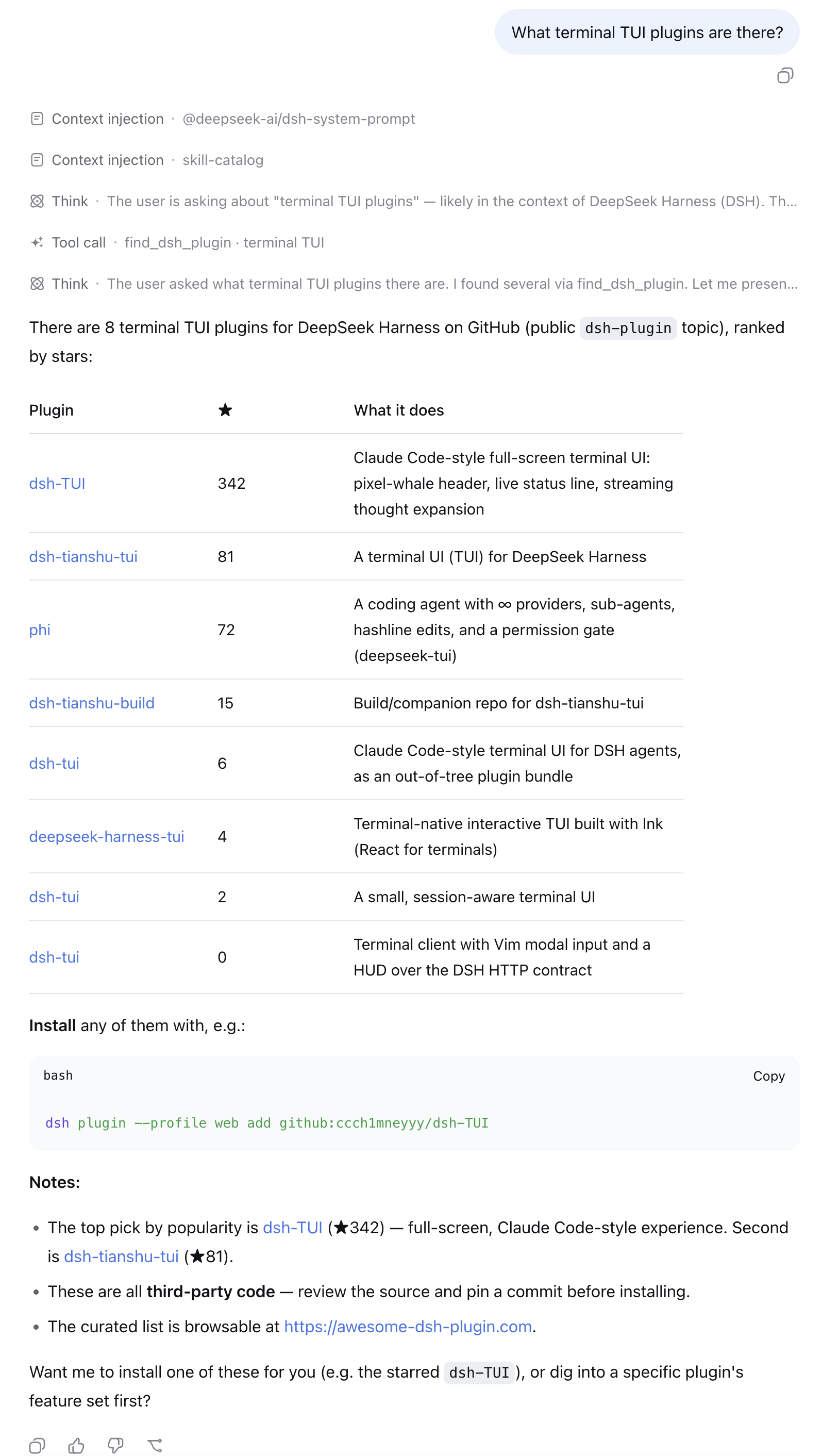
- "What terminal TUI plugins are there?"
- "I want to get a WeChat notification when a task finishes — any plugin for that?"
- "Find me something for reviewing git diffs inside DSH."
Each result comes back with stars, a description, the repo link, and a
ready-to-run dsh plugin add command — ask the agent to install one and
it can run the command for you.
How it works
- Live GitHub repository search scoped to the official
dsh-plugintopic, re-ranked by stars (5-minute per-query cache, anonymous API). - When a result is also listed on
awesome-dsh-plugin, its hand-written
bilingual description from
plugins.jsonreplaces the GitHub one (thelangparameter picks the language) — ranking is untouched. - Every result comes with a ready-to-run
dsh plugin addcommand. Plugins are third-party code — review the source and pin a commit.
License
MIT © awesome-dsh-plugin
Read the usage guide →
Install steps, key points, FAQ and compatibility for this plugin — auto-derived from indexed fields.
Listing badge

[](https://deepseek-plugin.org/plugins/awesome-dsh-plugin/dsh-find-plugin)Paste this markdown into your GitHub README to link back to this listing. The badge only states the listing — not a security endorsement.