为 DSH 智能体提供 LLM 模型自动降级链:请求触发鉴权、配额或限流码时自动切换到下一个备用模型,任务不中断。

- 语言
- TypeScript
- License
- MIT
- 分支
- main
安装
$ dsh plugin --profile web add github:btspoony/dsh-llm-fallbacks在终端中运行以上命令,通过 dsh CLI 安装此插件。可在右上角切换 Profile。 第一次用 dsh?看这篇新手教程
对话式安装
帮我安装 DeepSeek Harness 插件 btspoony/dsh-llm-fallbacks:先查看仓库 https://github.com/btspoony/dsh-llm-fallbacks 确认安全性,然后执行安装命令并验证插件加载成功。
把这段指令粘贴给 DSH Web GUI 里的助手,由它代你完成安装与验证。
一句话定位
为 DSH(DeepSeek Harness)智能体的 LLM 请求增加自动降级链:当鉴权失败、配额耗尽或限流(429)触发时,插件会沿着预设的 provider/model 顺序自动切换到下一个可用模型,当前步骤继续运行而不被打断。
核心能力
- 主代理和子代理的请求失败后,自动沿降级链切到下一个 provider/model,任务不中断
- 通过模型选择器新增的「FallbacksChain / Auto」虚拟条目,可以把整条链作为主选使用,而不是仅在失败时介入
- 提供 7 个内置子代理角色(
task/sonic/scout/designer/librarian/reviewer/security-reviewer),可直接被规则引用 - 支持按时段切换有效根链(peak/valley 窗口):4 个固化 UTC+8 预设 + 自定义窗口,第一条命中的行的链替换全天链
- 派发时为子代理智能体按三段式解析(显式 → 规则 → LLM 自动匹配)锁定角色,并把该角色链的第一个具体模型注入到首次请求
- 单步切换次数与 always-mode 重试上限两个安全阀,避免链循环把延迟放大
技术实现
- 语言: TypeScript(host 端 + client 端 React 组件),输出 ESM
- 关键依赖:
@deepseek-ai/cordis^4.0.1(host 服务注入)、@deepseek-ai/dsh-settings(设置命名空间注册)、@deepseek-ai/dsh-typert-protocol+dsh-typert-registry(自建/api/fallbacks/*网关通道)、@deepseek-ai/schemastery^3.18.1(设置 schema) - 架构模式: mount-only cordis 插件——
bundle/cordis.patch.yml只插入一行id: llm-fallbacks,host 侧通过agent/request-error与agent/request两个 cordis 钩子拦截请求,client 侧通过settings.plugin.item插槽注册设置卡片 + 通过llm.registerAdapter注册虚拟 provider;自带的 typert 网关(/api/fallbacks/get|set|reset|revert-seed)是唯一写入路径,不修改 dsh 源码 - 入口文件:
src/index.ts(host 端apply())、src/client/index.ts(client 端apply()),分别被 bundle patch 与dsh.client.inject列表装载
适用场景
DSH 用户用 DeepSeek / Anthropic / OpenAI 等多模型时,单个 provider 出现 429、配额用尽或鉴权失败就会让整个任务卡住。装上本插件后,配一条「首选 Anthropic,备用 DeepSeek V4 Flash,最后兜底 DeepSeek V4 Pro」这样的链,单点失败就不再阻断任务。多模型用户、有自建/三方多 provider 配置习惯的用户,以及想为 peak/valley 时段切换不同模型池的用户最适合使用。
前置依赖与兼容性
| 依赖 | 最低版本 | 说明 |
|---|---|---|
| DSH | ^0.1.1-rc.1 | 所有 @deepseek-ai/dsh-* peer 依赖均为 ^0.1.1-rc.1;dsh-tui 设置面板需要 ≥ v0.8.5(README.md:145) |
| Node.js | >=22 | package.json:56-58 声明 engines.node: ">=22";构建时使用 pnpm ≥ 10 / 项目栈 pnpm 11.21+ |
| 平台 | 跨平台 | package.json 未声明 os / cpu,无原生模块依赖 |
| 原生模块 | 无 | 不引入 node-pty、node:sqlite 等原生绑定 |
安装方式
dsh plugin --profile web add github:btspoony/dsh-llm-fallbacks
配置项
本插件的所有配置都落在 dsh 设置文档的 fallbacks: 命名空间下,可在 Settings → Plugins → Fallbacks 卡片、$DSH_HOME/settings.yaml 文件、或 dsh-tui 的 /settings 区域编辑。说明列写人话,完整字段约束见 docs/configuration.md。
| 配置 | 类型 | 说明 | 默认值 |
|---|---|---|---|
enabled | boolean | 功能总开关;关闭时插件完全 no-op | false |
triggerCodes | 字符串数组 | 进入降级决策的失败码列表(5xx 由 llm-retry 先重试) | ['AUTH', 'QUOTA', 'RATE_LIMIT'] |
rootChain | 字符串数组 | 全天降级链:前面是降级链,最后一项必须是官方 V4 模型(Flash 或 Pro)作为兜底 | [] |
cooldownMs | 数字 | 被切离/失败的模型在多少毫秒内不再被选中 | 300000(5 分钟) |
revertPolicy | 枚举 | 冷却到期后是否自动回到主模型 | cooldown-expiry |
maxSwitchesPerStep | 数字 | 单步最大切换次数;超过则停止切换 | 8 |
alwaysModeRetryCap | 数字 | always 模式重试达到多少次后触发切换;0 表示禁用 | 5 |
presets | 枚举 | 是否在 apply 时自动声明 7 个内置子代理角色 | bundled |
roleAutoMatch | 布尔 | 是否允许在子代理首次请求时用 LLM 自动匹配角色 | true |
timeSlots | 数组 | 时段切换行(4 个固化预设 + 自定义窗口);第一条命中的行的链会替换全天链 | [] |
tz | 字符串 | 时段匹配使用的时区(标准 Intl 规则,DST-safe) | Asia/Shanghai |
roles.list | 数组 | 自定义子代理角色列表,每条至少要有一条链条目 | [] |
roles.rules | 数组 | 把子代理映射到角色的规则(按 provider/model 模式匹配) | [] |
常见问题
Q: 这个插件装上之后会立刻改变我的模型行为吗?
A: 不会。enabled 默认是 false,且没有配置任何链时空配置是 no-op,跟没装一样。需要先在 Fallbacks 卡片里把开关打开,并填好 rootChain,重启会话后才生效。
Q: 5xx 类的临时错误会被降级链接管吗?
A: 5xx 默认由宿主的 llm-retry 插件先退避重试,等它的预算用完以后才会走到本插件的决策路径;不需要把 5xx 加进 triggerCodes(docs/configuration.md:25)。
Q: 主选想直接用降级链的「头」,应该怎么设置?
A: 在 web 端或 dsh-tui 的模型选择器里选 FallbacksChain / Auto 这一虚拟条目即可——它会把当天有效链的第一个具体模型当作主选;选任何真实模型则保留 fallback-only 行为。
Q: 升级到 0.2.2+ 之后历史会话打不开了,怎么办?
A: 0.2.2 之前的版本会在会话里写入 fallbacks/switch durable 事件,新版 dsh 会拒绝加载这种会话。先停 dsh,clone 本仓库,然后跑 pnpm repair:fallbacks-switch-logs -- --apply --backup,脚本会把旧事件标记为 ignorable 让会话恢复加载。
Q: 我直接编辑 settings.yaml,能实时生效吗?
A: YAML 是共享的真值源,web 卡片和 TUI 都从这里读。改完需要重启当前 dsh 会话,配置变更才会被插件拾起(README.md:70-74)。
Q: 终端 profile 里没有设置面板怎么办?
A: 需要 dsh-tui ≥ v0.8.5。低于这个版本的 dsh-tui 在 /settings 里看不到 Fallbacks 编辑区,只能改文件;功能仍然可以跑,只是没有 GUI。
Q: 卸载时需要做什么额外操作吗?
A: 跑 dsh plugin --profile web remove dsh-llm-fallbacks 然后重启会话即可。本插件没有任何 postinstall 钩子,也没有改过 dsh 源码。
上手难度
入门 — 默认配置下插件完全 no-op;最少只需在设置卡片里打开 enabled 并填一行 rootChain 就能让降级引擎运转,复杂的时段切换和角色规则可以按需慢慢加。
已知问题与限制
- 不会自动改写旧版(两段式时代)的
chains/roles.default配置,只在启动时打印 warning 并在面板顶部显示迁移横幅,需要手工按docs/configuration.md迁移表改写(src/index.ts:436-439、README.md:133)。 - 0.2.2 之前的版本曾经写过 durable
fallbacks/switch会话事件,issue #52(apply() 时事件类型注册在不同模块实例下失效)已确认;自 0.2.2 起插件停止写入新事件,但旧会话需要用仓库里的scripts/repair-fallbacks-switch-logs.ts脚本标记为 ignorable 才能重新加载(src/index.ts:672-678、README.md:46-58)。 - 时段切换的预设(
liang-peak/liang-valley/glm-peak/glm-valley)窗口是固化的 UTC+8 代码常量,配置中预设行不可携带start/end/days/name字段;保存时被网关拒绝,加载时若带会被警告并跳过(src/time-slots.ts:106-152、src/config.ts:236-241)。 - 当
rootChain不以官方 V4 模型(Flash 或 Pro)结尾时,启动会有一次 warning;时段行此时保持无效,模型选择器里的FallbacksChain / Auto也会拒绝覆写(src/config.ts:236-241、src/virtual-adapter.ts:287-298)。 agent/request-error钩子必须排在宿主llm-retry之后;插件的 bundle 行通过dsh plugin add自动追加到层栈末尾,满足顺序;手动改dsh.profile.bundles时需要保证@deepseek-ai/dsh-base在本插件之前(docs/install.md:31-37)。




Automatic provider/model fallback chains for dsh (DeepSeek Harness): when an agent's LLM requests keep failing — retries exhausted, auth errors, quota exceeded, rate limiting (429) — the plugin switches provider/model along the fallback chain for the current role, and the current step/turn continues on the target model: tasks are not interrupted by model problems.
Works in both dsh front ends: the web profile (Settings → Plugins → Fallbacks card) and the dsh-tui terminal profile (/fallbacks session diagnostics, /fallbacks config readback, and the /settings fallbacks section for editing).
Time slots
Time slots rotate the effective root chain by wall-clock windows: each slot row carries its own fallback chain, and the first row whose window contains the current moment replaces the all-day chain for the next root request — the all-day chain stays as the last resort when no slot matches. Peak and valley windows can therefore use different chains while the failure walk (fallback switch) remains untouched.
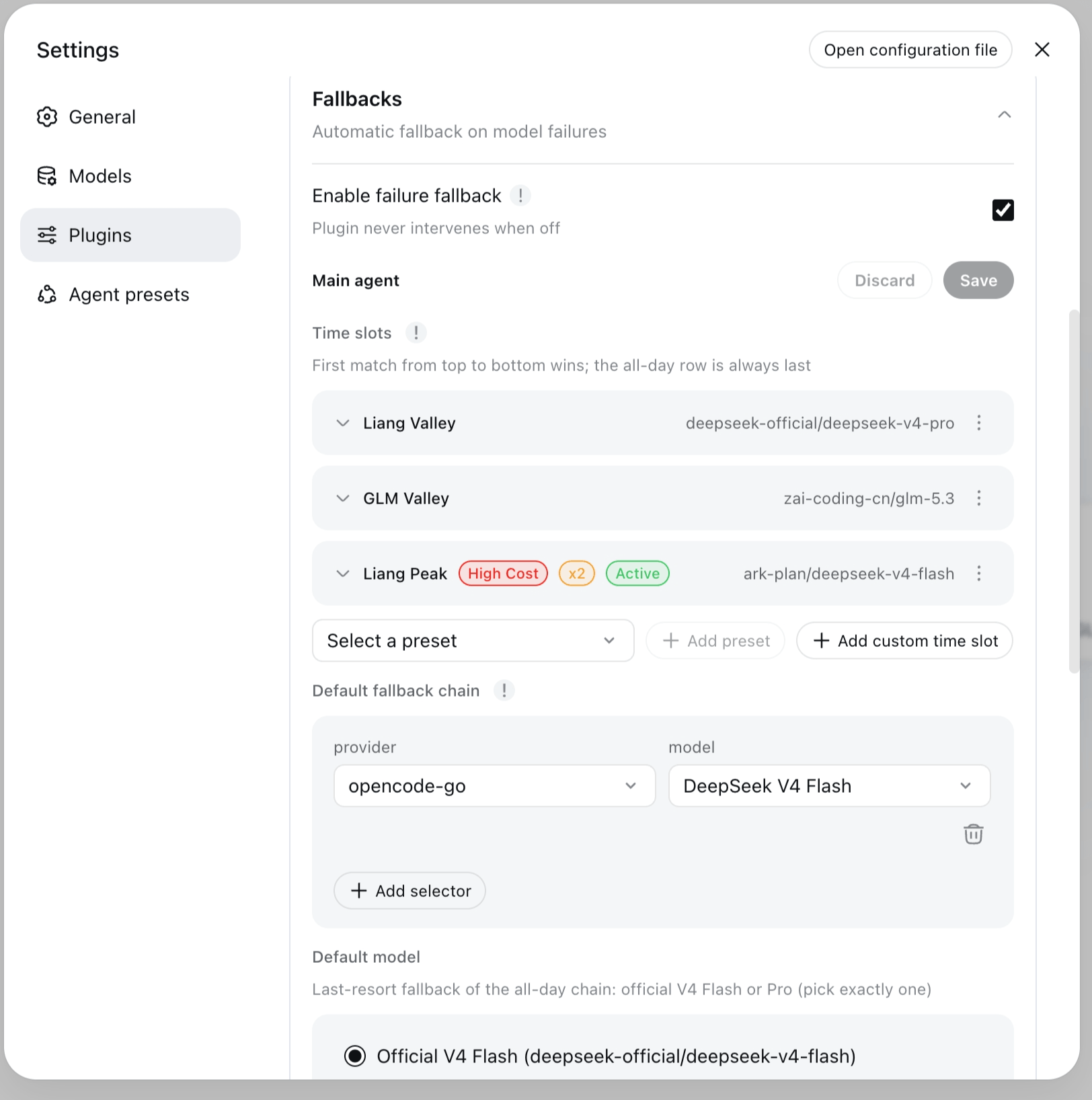
Four frozen UTC+8 presets (windows are code constants; preset rows lock tz to Asia/Shanghai):
| Preset | Window |
|---|---|
liang-peak | 09:00–12:00 and 14:00–18:00, every day |
liang-valley | every other UTC+8 time (complement of Liang Peak) |
glm-peak | Monday–Friday 14:00–18:00 |
glm-valley | every other time (complement of GLM Peak) |
GLM Peak and GLM Valley are offered in the card picker only when zai-coding-cn is configured.
The first extra row whose window contains the current moment (in fallbacks.tz, default Asia/Shanghai) wins; no match → the all-day rootChain, whose tail (Default model) must be exactly one official V4 model — deepseek-official/deepseek-v4-flash XOR deepseek-official/deepseek-v4-pro. Slot rotation is a routing seed, not a failure decision: it applies on the next root request, consumes no cooldown, and is logged as a time-slot switch — failure walks keep fallback switch. Full semantics → Time-slot presets and docs/configuration.md.
Quick start
Install
dsh plugin --profile web add dsh-llm-fallbacks      # web profile (Settings → Fallbacks card)
dsh plugin --profile dsh-tui add dsh-llm-fallbacks  # dsh-tui terminal profile
Same plugin, either front end — the only difference is the --profile flag. Pin a version with @<version>. A registry install fetches the built package (dist/), nothing builds on the target machine. Registry / git / local-directory variants, uninstall, and --dump-config verification → docs/install.md.
Repair existing sessions (versions before 0.2.2)
Versions before 0.2.2 wrote durable fallbacks/switch session events that newer dsh releases refuse to load (issue #52 — the apply()-time event-type registration is ineffective because plugin and host resolve different module instances). If existing sessions fail to open after an upgrade, clone this repository and repair the logs (stop dsh first):
git clone https://github.com/omdsh-dev/dsh-llm-fallbacks.git
cd dsh-llm-fallbacks
pnpm install
pnpm repair:fallbacks-switch-logs -- --dry-run            # preview which sessions would change
pnpm repair:fallbacks-switch-logs -- --apply --backup     # mark legacy events ignorable
The script scans ~/.dsh/sessions by default (override with --root <dir>), marks legacy fallbacks/switch events ignorable: true so the host read path accepts the session again, and keeps a <file>.bak per repaired log. --apply requires --backup and must run with dsh stopped. From 0.2.2 on, the plugin stops writing durable switch events, so no new sessions need repair.
Configuration surfaces
The plugin's settings live in a shared fallbacks: namespace, editable from three surfaces:
| Surface | What it is | Notes |
|---|---|---|
| Web settings card | Settings → Plugins → Fallbacks | Full GUI editor for the fallbacks: namespace; writes the shared settings document |
$DSH_HOME/settings.yaml | fallbacks: section in the dsh settings document | The shared source of truth — the same file the web card writes; readable and editable everywhere, including scripted setups |
TUI /settings | fallbacks section in the dsh-tui settings screen | dsh-tui ≥ v0.8.5; native fields for simple keys, JSON text fields for complex structures (see dsh-tui profile (terminal)) |
Pick the surface that matches your front end: web users get the card, terminal users get /settings, and the YAML file works everywhere. (/fallbacks and /fallbacks config are diagnostics — read-only views, not edit surfaces.)
Minimal configuration
Add a fallbacks: section to the shared settings document ($DSH_HOME/settings.yaml — see Configuration surfaces):
fallbacks:
  enabled: true            # feature switch — defaults to off (plugin is a no-op otherwise)
  rootChain:               # all-day chain: leading entries = fallback walk, last = Default model (official V4)
    - anthropic/claude-3-5-sonnet          # walked first
    - deepseek-official/deepseek-v4-flash  # last resort (Flash or Pro)
  timeSlots:               # optional: rotate the effective root chain by wall-clock windows
    - kind: preset         # frozen UTC+8 window; only the chain is editable
      preset: liang-peak   # 09:00–12:00 and 14:00–18:00, every day
      chain:
        - anthropic/claude-3-5-sonnet
    - kind: custom         # custom window (may wrap midnight)
      name: evening        # optional display name
      start: '22:00'
      end: '02:00'
      days: [1, 5]         # optional; omitted/empty = every day (0=Sunday…6=Saturday)
      chain:
        - openai/gpt-4o
  roles:                   # optional: declare role entities, then reference them from rules
    list:
      - id: reviewer       # unique id; "inherit" is reserved
        persona: Code-review subagents
        chain:
          - openai/gpt-4o-mini
        fallback: inherit-root   # role chain first, then the inherited rootChain
    rules:                 # subagent-only: rules never match root requests
      - role: reviewer     # all subagents → the reviewer role
Build the section up in four steps:
1. Enable the plugin. enabled: true turns the fallback engine on. It defaults to off — with no chains configured the plugin is a complete no-op.
2. Set the all-day rootChain. Leading entries are the fallback chain, walked first when a request fails; the last entry is the Default model.
Conformance: the last entry must be exactly one official V4 model —
deepseek-official/deepseek-v4-flashXORdeepseek-official/deepseek-v4-pro. The settings card and gateway reject any other tail on save; a legacy non-official tail warns at startup and keeps working as a fallback-only walk, but cannot be saved as-is.
3. Add timeSlots (optional). Rows rotate the effective root chain by wall-clock windows. Preset rows use frozen UTC+8 windows (only their chain is editable; while a preset row exists, tz locks to Asia/Shanghai); custom rows take start/end (may wrap midnight) and an optional days list. The first row whose window contains the current moment wins; no match → the all-day rootChain. Rotation is a routing seed — it applies on the next root request and consumes no cooldown (see Time slots).
4. Add roles (optional). Declare role entities in roles.list (id, persona, chain, optional fallback policy), then map subagents to them with roles.rules. Rules never match root requests — with no rule match (or on a root request) the built-in inherit role applies and appends the rootChain.
Full reference (role entities, fallback strategies, rules, selectors, preset roles, time-slot presets) → docs/configuration.md.
Upgrade note (behavior change): an existing
fallbacks:section without an explicitenabledkey resolves tofalseafter upgrading — addenabled: trueto keep the plugin active.
Verify
Save the config and restart the session, then type /fallbacks — the read-only in-session diagnostics (origin, resolved role, chain, recent fallback switches, cooldown status). In a dsh-tui profile, /fallbacks config reads back the composed configuration; see dsh-tui profile (terminal).
Features
- Automatic fallback for root and subagents: any agent switches down the chain to the next available provider/model on model failure — no manual model switching.
- Two-block config:
rootChainfor the root agent; declared role entities (roles.list) referenced byroles.rules(or the built-ininherit). - Chain as root primary from the picker: when
enabledis on, the host model picker (web and TUI alike) shows a virtualFallbacksChain/Autorow — selecting it uses the configured chain as the root primary (a conforming all-day head is required for the override to succeed); selecting a real model keeps fallback-only (see FallbacksChain in the model picker). - Time slots: optional
fallbacks.timeSlotsrows rotate the effective root chain by wall-clock windows in the config-leveltztimezone (defaultAsia/Shanghai) — four frozen UTC+8 presets (liang-peak/liang-valley/glm-peak/glm-valley, windows are code constants, models-only edits) or customstart/end/dayswindows. The first matching row wins; the all-day row is always last. A slot change applies on the next root request and is logged as a time-slot switch — a routing seed, never a failure decision: it consumes no cooldown and does not count againstmaxSwitchesPerStep. Failure walks keep the fallback switch copy (see Time-slot presets). - Dispatch-time role resolution: on a subagent's first request its role is resolved in three stages — explicit (
agentPresetmatches a declared role id) → deterministic rules (unchanged) → LLM auto-match from the declared role taxonomy (fallbacks.roleAutoMatch, defaulttrue). The resolved role's chain-head model is injected into the first request and recorded via an explicitrole → modellog line (no durablefallbacks/switchevent is written — issue #52 stop-write); setroleAutoMatch: falseto disable the LLM auto-match stage (the explicitagentPresetstage still applies — with no explicit role this reproduces the previous rules-only behavior). The settings card always renders an Enable role auto-match switch (defaulttrue) to toggle it — the schema default applies even to legacy configs that never declared the key. - Cooldown and revert: failed / switched-away models are not re-selected during cooldown;
revertPolicy: cooldown-expiryreturns to the primary model automatically. - Visible behavior: every switch is recorded in an info-level log line (from/to/role/reason) — no silent model switching. The plugin deliberately writes no durable
fallbacks/switchsession events (issue #52: the apply()-time event-type registration was proven ineffective, and a session containing the event refused to load after a dsh restart). Sessions written by older plugin versions that contain such events are repaired byscripts/repair-fallbacks-switch-logs.ts, which marks legacy events ignorable so affected sessions load again. - Safety valves:
maxSwitchesPerStepcaps switches per step andalwaysModeRetryCapcaps always-mode retries — chain loops cannot amplify latency. - No-config no-op: with no chains configured the plugin behaves exactly like not being installed (
enabledis off by default — see Minimal configuration).
dsh-tui profile (terminal)
In a dsh-tui profile the plugin has three operator surfaces, with a strict duty split:
/fallbacks— what happened this session: origin, resolved role, effective chain, recent fallback switches, cooldown status. Read-only./fallbacks config— what is configured: composed-config readback (trigger codes, root chain, time slots, timezone, roles, role rules, cooldown, revert policy, safety valves, presets, role auto-match). Read-only apart from the one action command/fallbacks config revert-seed <role-id>, which restores a seeded role's persona to its declared seed default (a web-card action the settings seam cannot express)./settings— the edit surface. The plugin registers a fallbacks section with full parity to the web settings card: booleans (enabled,roleAutoMatch) render as toggles, selects (presets,revertPolicy) as pickers, and numbers (cooldownMs,maxSwitchesPerStep,alwaysModeRetryCap) as numeric inputs; complex structures (rootChain,timeSlots,roles.list,roles.rules) are JSON text fields andtriggerCodesa comma-separated text field. Invalid drafts (bad JSON, non-conforming chains, malformed time-slot rows) block the save — the section never corrupts the config.
Requirements: the /settings fallbacks section needs dsh-tui ≥ v0.8.5 (commit c51661f or later on main; the settings seam shipped in v0.8.0, the groups shape + validation in v0.8.5). On an older dsh-tui the section is absent, and file editing remains the only TUI edit surface.
File editing still works everywhere: the shared $DSH_HOME/settings.yaml (fallbacks: section — the same file the web card writes) for global settings, or the profile patch ~/.dsh/profiles/dsh-tui/cordis.patch.yml (config: overrides on the plugin row) for dsh-tui-specific values. A patch row replaces the targeted row's whole config — restate every field you want to keep (schema defaults fill the rest).
FallbacksChain in the model picker
When enabled: true, the plugin registers a virtual provider, FallbacksChain, with a single catalog row: Auto. The web profile and dsh-tui both see the row: they share the same adapter catalog, so the row needs no settings-page wiring or host patch (it is independent of the /settings fallbacks section, which edits configuration rather than the picker catalog). The row is visible whenever the plugin is enabled — a legacy or empty all-day chain does NOT hide it (the override just refuses to fire).
Selecting FallbacksChain / Auto uses the configured chain as the root primary: root requests route to the effective chain's first exact provider/model at request time, and the fallback engine degrades from that head as usual. Selecting any real catalog model keeps the v0.2.2 fallback-only behavior — the session model is primary and the chain engages only after it fails.
There is no rootMode switch — no config key, YAML field, settings toggle, or gateway flag. The mode is the session's {provider, model} selection itself: FallbacksChain = chain primary; any real model = fallback-only.
Notes:
- Picker label: the row's catalog
name(what the composer trigger shows) is live —Auto: DeepSeek V4 Flash[Liang Peak]/Auto: DeepSeek V4 Flash[all-day](catalog display name, not the model id); the id staysAuto. BareAutoif the all-day tail is not conforming. Refresh by reopening the picker. - Root only: the row is about the root agent. Subagent role resolution and injection are unchanged; a subagent session that inherits the selection still routes through the chain head — the virtual row is a thin delegate, never a second routing engine.
- Conformance gate on the tail: a successful override/delegate requires the all-day chain to be tail-conforming — its last entry must be exactly one official V4 model (
deepseek-official/deepseek-v4-flashordeepseek-official/deepseek-v4-pro, the card's Default model panel); leading entries (Default fallback chain) are walked first. Disabling the plugin hides the row again (slot-row/chain edits never churn registration). - Stale selection: if the row disappears (plugin disabled) while
FallbacksChain / Autois selected, the session keeps showing it as the current model withroutable: false— pick a real model from the catalog to continue (host-native catalog semantics). - Capabilities follow the head: the row's model metadata (context window, modalities, reasoning) mirrors the current effective head; retry attribution follows the permissive default — retries/failures are accounted to the real head pair, not to the
FallbacksChainprovider. Full semantics → docs/configuration.md.
Time-slot presets
Time slots are introduced in the featured overview above; this section is the reference. Time-slot rows rotate the effective root chain by wall-clock windows — useful for peak/valley pricing without confusing wall-clock rotation with failure fallback. The copy split is strict: slot rotation logs and UI say time-slot switch; the failure walk keeps fallback switch; the conversation notice Model downgraded stays on the failure path only.
- Match order: at every root request, the first extra row whose window contains the current moment (in
fallbacks.tz, defaultAsia/Shanghai/ UTC+8) wins — that row's chain replaces the all-day chain. No row matches → the all-dayrootChainis used. The all-day row is always last and required: its last entry must be exactly one official V4 model (Flash XOR Pro; leading Default fallback chain entries are walked first). - Presets (frozen, not user-editable):
liang-peak= 09:00–12:00 and 14:00–18:00 every day;liang-valley= every other UTC+8 time;glm-peak= Monday–Friday 14:00–18:00;glm-valley= every other time. One preset id = one row; the card picker never offers a duplicate. - Custom rows:
start/end(HH:mm, may wrap midnight) + optionaldays(0=Sunday…6=Saturday; omitted/empty = every day) + models. - Next-request apply: a slot boundary crossing never preempts an in-flight step — the new row takes effect on the next root request. Rotation is mount-only: info log + card/
/fallbacksstatus line, no durable switch event. - Settings card: the Main agent section groups Time slots (extra rows — add preset / add custom / remove / reorder by buttons or drag; preset rows show a read-only window summary and edit models only; custom rows carry an editable name; the timezone picker lives here and locks to Asia/Shanghai while any preset row exists, since preset windows are frozen UTC+8 constants), Default fallback chain (walked first when no slot matches) and Default model (the official V4 Flash | Pro last-resort fallback). Rows are collapsible to name + first model. There is no
timeSlots.enabledmaster switch (adding a row is the opt-in) and norootModecontrol.
Preset roles
The plugin ships 7 bundled generic subagent roles out of the box — designer / librarian / reviewer / scout / security-reviewer / sonic / task — declared automatically on apply as seeded roles.list rows ({ id, persona }): idempotent, and never overwriting an operator persona. They appear in the Settings card (seed badge, id immutable) and in the /fallbacks config role summary, ready for roles.rules to reference.
- Switch:
fallbacks.presets—'bundled'(default) declares the preset roles on apply;'none'disables the automatic declaration (already-materialized rows stay). - Full semantics (upgrade behavior, conflict handling, library reuse of
presetRoles) → docs/configuration.md.
Mount-only (no dsh modification)
The plugin installs as a pure mount: bundle insert + client inject + its own gateway channel (/api/fallbacks/get|set|reset) — no dsh patches, no postinstall step, and dsh upgrades never require re-patching. Stale leftover patches from an older patched install are harmless.
Documentation
| Doc | Content |
|---|---|
| docs/install.md | profile install (web + dsh-tui) / registry / git / local variants / uninstall / --dump-config verification |
| docs/configuration.md | full fallbacks namespace reference, selector syntax, example YAML, plugin-config card usage, TUI readback, behavior notes, preset roles |
| docs/consumer-api.md | developer consumption contract: library API + named llm-fallbacks service + role seeds, export inventory, lifecycle, typing |
| docs/release.md | release process: Trusted Publishing setup, Release prep SOP, fragment format, rollback |
| docs/verification.md | verification records (test matrix, bundle layer order, runtime contracts, QA gate script) |
License
Released under the MIT License — see LICENSE. The LICENSE file is authoritative for copyright and license terms.
查看使用指南 →
该插件的安装步骤、关键要点、FAQ 与兼容性说明(基于已收录字段派生)。
收录徽章

[](https://deepseek-plugin.org/plugins/btspoony/dsh-llm-fallbacks)把这段 markdown 粘贴到你的 GitHub README,链接回本插件详情页。徽章只声明已被本站收录,不代表安全认证。