DeepSeek Harness is a Claude

- Language
- TypeScript
- License
- MIT
- Branch
- main
Install
$ dsh plugin --profile web add @deepseek-harness-tui/dsh-tuiRun the command above in your terminal to install this plugin via the dsh CLI. You can switch Profile in the top-right corner. New to dsh? Read the beginner tutorial
Install via your agent
Install the DeepSeek Harness plugin ccch1mneyyy/dsh-TUI for me: review the repository at https://github.com/ccch1mneyyy/dsh-TUI first, then run the install command and verify the plugin loads successfully.
Paste this instruction to the DSH Web GUI assistant — it will install and verify for you.
One-Line Pitch
dsh-TUI is a Claude Code-style terminal interaction frontend for DeepSeek Harness. As a Cordis bundle plugin mounted on dsh-base, it reuses official Agent, model, session, and tool services to provide users with streaming Markdown conversations, /resume//new/model switching, double-click Esc for history traversal, and fullscreen alt-screen rendering.
Core Features
- Provides streaming Markdown, structured tool cards, command and file completion,
@file references (anywhere completion, images sent as persistent attachments), history search, message selection, and supports both inline and alt-screen rendering modes - Displays real-time work progress, segmented context usage, TPS, cache hit rate, inference level, input/output tokens, and Git/session information in the status bar
- Complete session workflow:
/resumesession browser,/newnew session,/compactcompact,/exportMarkdown export,/btwside question, model switching, and double-click empty inputEscfor time travel via session fork - Integrates DSH official capabilities: Agent preset roster (
/preset), Skills (/audit/bug/reviewetc.), MCP (/mcp), Goals, Todos, sub-agents, andask_user_questionquestionnaires - Event-driven projection, differential terminal output, message virtualization, replay merging, and bounded缓存 for long sessions to prevent rendering and memory from growing infinitely with the session
/themebuilt-inauto/light/dark/dark-ansifour themes and supports~/.dsh-tui/themes/<name>.jsoncustomization,/langChinese/English interface switching, all through Cordis configuration + persistence + env three-level override
Technical Implementation
- Language: TypeScript (ESM,
"type": "module",tsccompiled tolib/types/) - Key Dependencies:
react@^19.2.0,react-reconciler@^0.33.0,@deepseek-ai/cordis@^4.0.1,@deepseek-ai/dsh-agent@^0.1.0-rc.6 - Architecture Pattern: Single Cordis plugin
name: 'dsh-tui', viadsh.bundle.patch → ./cordis.patch.ymloverridingdsh-basedefault lines (disabling host layer tools/planning/compaction/skills, etc., taken over by Agent preset roster), official@deepseek-ai/*imports concentrated withinsrc/dsh-adapter/boundary, rendering based on ported Ink+Yoga (differential output, terminal capability detection, ConPTY compatible path) - Entry Files:
src/index.ts(re-export shim) →src/dsh-adapter/index.ts(ConfigSchema +apply) →src/dsh-adapter/plugin.tsx(runtime implementation), bin entry isbin/dsh-tui.js(one-click detection of dsh/pnpm and self-bootstrapping profile)
Use Cases
When you want to use DSH as a "daily development conversation partner"—continuous multi-round dialogue in the terminal, need to see visualization of thinking and tool calls, can随时回查或回溯历史会话, don't want to be interrupted by web pages—dsh-TUI provides the Claude Code familiar interaction experience. At the same time, it shares session/event true source with the official web client, so sessions opened in TUI can also be viewed on the web.
Prerequisites & Compatibility
| Dependency | Minimum Version | Description |
|---|---|---|
| DeepSeek Harness | 0.1.0-rc.6+ | Determined by @deepseek-ai/dsh-* locked in package.json#peerDependencies |
| Node.js | ^22.19.0 || >=24.0.0 | package.json#engines.node; CI uses 24 |
| pnpm | 10+ (recommended 11+) | Package installation within profile handled by pnpm; pnpm 9 transitive dependencies not promoted will exit immediately (issue #60) |
| Platform | macOS / Windows / Linux | Cross-platform; Windows uses dsh-tui.cmd, clipboard reads PowerShell, sandbox unavailable on Windows so falls back to danger-full-access |
| Native Modules | None | All JS/TS dependencies, no node-gyp build required |
| Peer Dependencies | @deepseek-ai/cordis ^4.0.1 and full set of @deepseek-ai/dsh-* ^0.1.0-rc.6 | Provided by host DSH; uninstalling please ensure host version alignment |
| Required Credentials | DEEPSEEK_API_KEY (add DEEPSEEK_BASE_URL for custom endpoint) | See cordis.patch.yml:28-30 |
Installation
dsh plugin --profile web add github:ccch1mneyyy/dsh-TUI
Configuration Options
All tunable parameters of dsh-TUI are concentrated in the Config Schema (src/dsh-adapter/index.ts:87). In $DSH_HOME/profiles/dsh-tui/cordis.patch.yml, replace the entire config block of the dsh-tui line; one-line change for overall modification; common items are as follows:
| Config | Type | Description | Default |
|---|---|---|---|
sessionId | string | Existing session ID to restore on startup; empty creates new session | Not set |
provider | string | LLM routing name; only considered explicit routing when configured with model | Harness agentDefaultModel |
model | string | Startup model; /model switches via session fork and writes back to persistence | Harness agentDefaultModel |
cwd | string | Session-side working directory (Agent meta, @ completion, /resume filtering, status bar); explicit absolute path recommended | Git worktree root of startup directory |
workspace | string | Workspace target resolved at startup: local absolute path, file:// URI, or plugin-registered URI | Not set |
effort | string | Inference level actually effective per request (deepseek only off/high/max, illegal silently falls back) | max |
activity | boolean | Whether to show real-time work status line | true |
activityFrames | string | Work status animation presets (claude/moon/comet/dots/random) | claude |
contextBar | boolean | Whether to show segmented context progress bar below input box | true |
fullscreen | boolean | true uses alternate screen + mouse selection; false uses inline | false |
lang | en | zh | Interface language (overridden by DSH_TUI_LANG) | zh |
preset | string | New session Agent preset (standard/code/minimal/cordis/liangshen) | Persisted or standard |
diffLayout | auto | split | unified | File editing diff display method (auto selects by terminal width) | auto |
modes | array | Atomic combinations for Shift+Tab session mode cycling (plan/sandbox/approval) | Built-in three defaults → plan → full |
Theme/language/debug switches not directly exposed by Config go through environment variables (priority: env > config > persistence > default):
| Environment Variable | Description |
|---|---|
DSH_TUI_LANG | Lock interface language en/zh |
DSH_TUI_THEME | Lock built-in or custom theme, takes priority over persisted choice |
DSH_TUI_PERSONA | Override Agent persona (defaults to You are a coding agent. if not set) |
DSH_TUI_PRESET | Override new session default Agent preset |
DSH_TUI_DISABLE_MOUSE | Temporarily disable mouse capture in fullscreen mode |
DSH_TUI_SESSION_ROOT | Override JSONL session root directory |
DSH_TUI_RESUME_SESSION | Resume specified session on startup (launcher usually sets this for you) |
DSH_TUI_WORKSPACE_TARGET | Startup workspace triggered by dsh-tui <target> |
DSH_TUI_WORKSPACE | Working directory used by Windows dsh-tui.cmd |
DSH_TUI_DEBUG | Enable stderr debug logging (don't log to stdout, it breaks the UI) |
DSH_TUI_RENDER_LOG | Specify file path for raw ANSI frames for forensics (includes visible content, use with caution) |
DEEPSEEK_API_KEY / DEEPSEEK_BASE_URL | Model credentials and custom endpoint |
DSH_PERMISSION_MODE | Override sandbox policy on non-Windows platforms (workspace-write/danger-full-access) |
Legacy names CC_TUI_* and DSH_CC_* are no longer effective from this version (launcher will warn each time), the only exception is resume writing dual paths (both DSH_TUI_RESUME_SESSION and DSH_CC_RESUME_SESSION set at the same time).
FAQ
Q: I'm using pnpm 9, it exits back to shell immediately after startup with almost no error message.
A: This is typical manifestation of issue #60: pnpm 9 when installing profile does not promote transitive dependency dsh-working-activity to a location the loader can resolve, module resolution failure causes the entire plugin tree to be reclaimed, TUI after resume exits directly after showing the prompt. Upgrade pnpm to 10 or 11: npm install -g pnpm@latest && dsh plugin --profile dsh-tui add @deepseek-harness-tui/dsh-tui@latest.
Q: Launcher reports "Cannot start: profile runs v..., but launcher is v...".
A: This is reverse mismatch protection for issue #183: when global launcher is one minor version newer than packages in profile, CLI will apply launcher's bundle patch to older packages, subpath exports may not resolve, module resolution will crash. Align both: dsh plugin --profile dsh-tui add @deepseek-harness-tui/dsh-tui@<launcher version> (or both upgrade to @latest).
Q: After /model selects another model, I want to go back to the original conversation line.
A: Model switching in TUI continues via session fork, does not modify history. Old session stays fully in /resume list; selection itself persists in ~/.dsh-tui/model.json, used by next /new and restart.
Q: Installed but version seems unchanged?
A: Without @latest, pnpm resolves according to version range already recorded in profile package.json (like ^0.1.4), will stay on old mainline. Explicitly specify: dsh plugin --profile dsh-tui add @deepseek-harness-tui/dsh-tui@latest, then check top-right corner of header for vX.Y.Z to verify.
Q: Status bar work status line shows two / doesn't show.
A: Duplication is mostly due to another dsh-working-activity added in profile (both README and docs/getting-started.md warn against duplicate add). Remove duplicate bundle configuration in profile, keep only the working-activity line auto-inserted by this package patch. If not showing, check if dsh-tui activity: true in cordis.yml was overwritten, /activity choice accidentally turned off, or use DSH_TUI_DEBUG=1 dsh --profile dsh-tui to check stderr.
Q: Will uninstalling the plugin lose session data / change DSH core?
A: No. dsh-TUI is pure plugin mount (README.md:21), does not modify DSH core; uninstall is restore. Theme/language/preset preferences remain in ~/.dsh-tui/, can be manually deleted if needed. Session logs still in $DSH_HOME/sessions/ (profile) or ~/.dsh-tui/sessions/ (bare cordis.yml) original paths.
Q: Why doesn't pasting images on Windows send as image blocks like the documentation says?
A: Windows uses PowerShell Get-Clipboard to read clipboard. When clipboard is locked by other programs, it retries first, and if still locked eventually silently degrades to temp file path insertion (not embedded base64); Finder multi-file copy on macOS has no stable AppleScript reading method, falls back to text/image. These are all "known limitations" listed in README and architecture docs.
Q: Terminal doesn't support alt-screen or want to disable mouse?
A: Set dsh-tui fullscreen: false in cordis.patch.yml, or one-time startup use DSH_TUI_DISABLE_MOUSE=1 dsh --profile dsh-tui to temporarily disable mouse. Terminal.app (macOS built-in) consumes ⌘ combinations, please continue using Ctrl+<key> in it (iterm2/kitty/WezTerm/ghostty etc. support ⌘).
Learning Curve
Beginner — default config can start directly; enter configuration reference when you want to tune themes, Agent presets, MCP, approval policies.
Known Issues & Limitations
- No usable sandbox backend on Windows: profile defaults to
danger-full-accesson Windows with approval policynever; before running in untrusted repo please check actual patch andDSH_PERMISSION_MODEsettings (docs/architecture.md:110-111 / cordis.patch.yml:134). /modelcontinues via session fork: not in-place replacement; old session stays in/resumelist (docs/architecture.md:122-123 / README.md:225-228).Ctrl+Vclipboard dispatches by platform: Windows uses PowerShellGet-Clipboard(falls back silently after retry if locked), macOS usesosascript/pbpaste(Finder multi-file copy has no stable AppleScript method), Linux probeswl-paste/xclip/xselin order (all unavailable errors); clipboard bitmaps inserted as temp file paths not embedded as image blocks (README.md:229-234).- Plugin context injected into system prompt not shown independently: merged into context progress bar statistics (docs/architecture.md:121-122 / README.md:225).
- Exit path doesn't wait for Agent async persistence: process exit concludes, persistence plugin as fallback (README.md:235 / docs/architecture.md:129).
/vim,/connect,/hooksare placeholder commands: When no equivalent mechanism on DSH side, gives clear explanation instead of silent (README.md:240-241 / docs/architecture.md:133).- Bare
cordis.ymlstartup has no/permissionpreset switching: Only profile combinations have (defaultpermission-presetsline ofdsh-basemounted) (README.md:236-239 / docs/architecture.md:131-132). - Legacy name environment variable compatibility: Old
CC_TUI_*andDSH_CC_*no longer effective (launcher warns each time when set), the only exception is resume writes dual paths (bothDSH_TUI_RESUME_SESSIONandDSH_CC_RESUME_SESSIONset ensures old launcher works) (docs/getting-started.md:79-92 / src/utils/paths.ts:58-68). - Data directory migration only copies not moves: On first startup if
~/.dsh-ccexists but~/.dsh-tuidoesn't, copies entire to new directory and prompts one line; old directory left for you to manually delete after confirming new directory works (docs/getting-started.md:88-90 / docs/architecture.md:96-98). sessionHistorystill compatible with old path~/.dsh-cc/resume.txt: MarkedTODO: drop the legacy path once pre-rename users migrateatsrc/sessionHistory.ts:14, current version needs to keep dual-write fallback.- Ink rendering layer has open TODOs: Ported Ink submodule has TODOs at
src/ink/screen.ts:805(SpacerHead cell handling when soft wrap not implemented) andsrc/ink/render-to-screen.ts:172(cell conversion pending extraction to common helper), will follow up after code stabilizes.

简体中文 | English






dsh-TUI
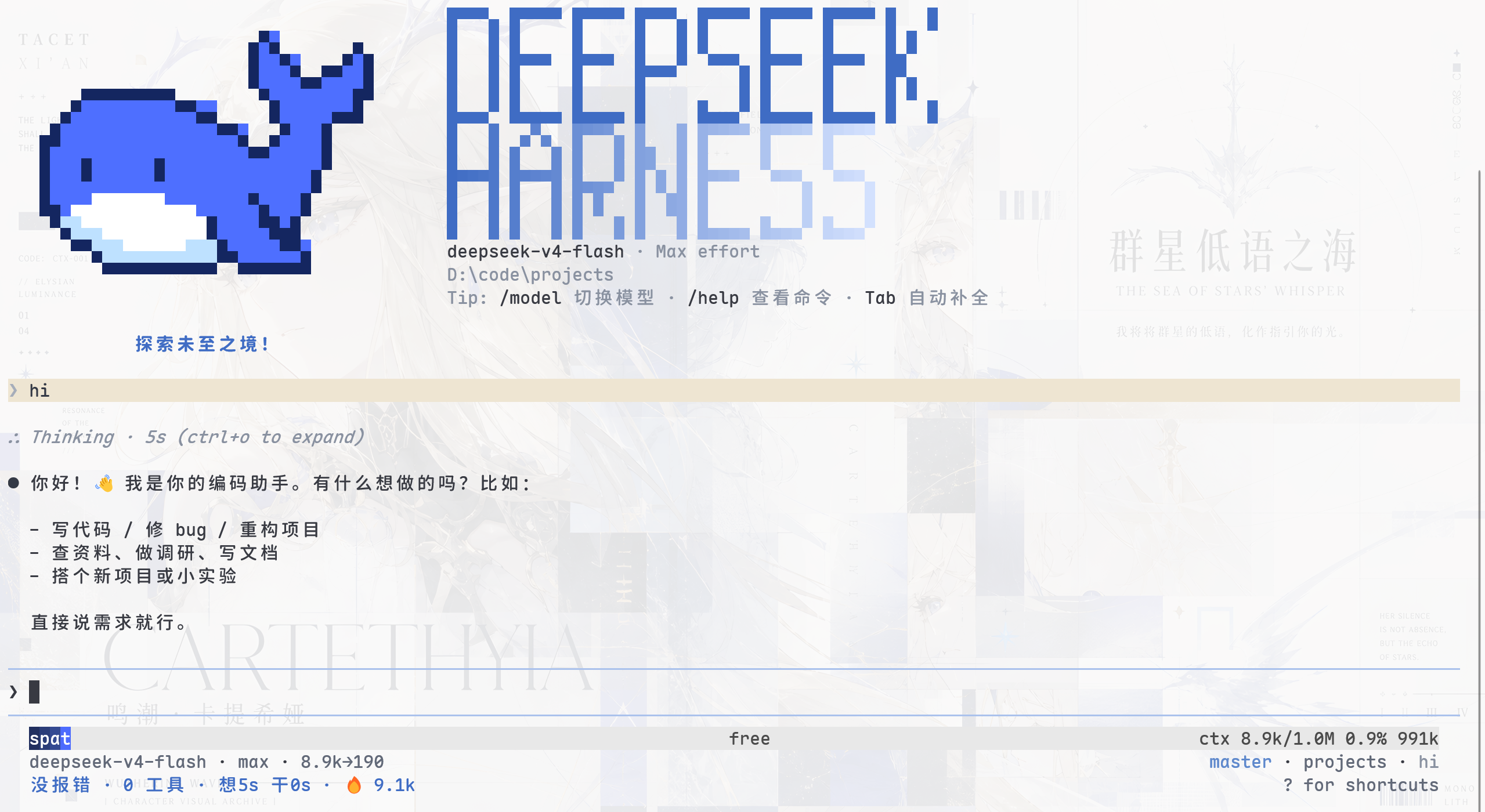
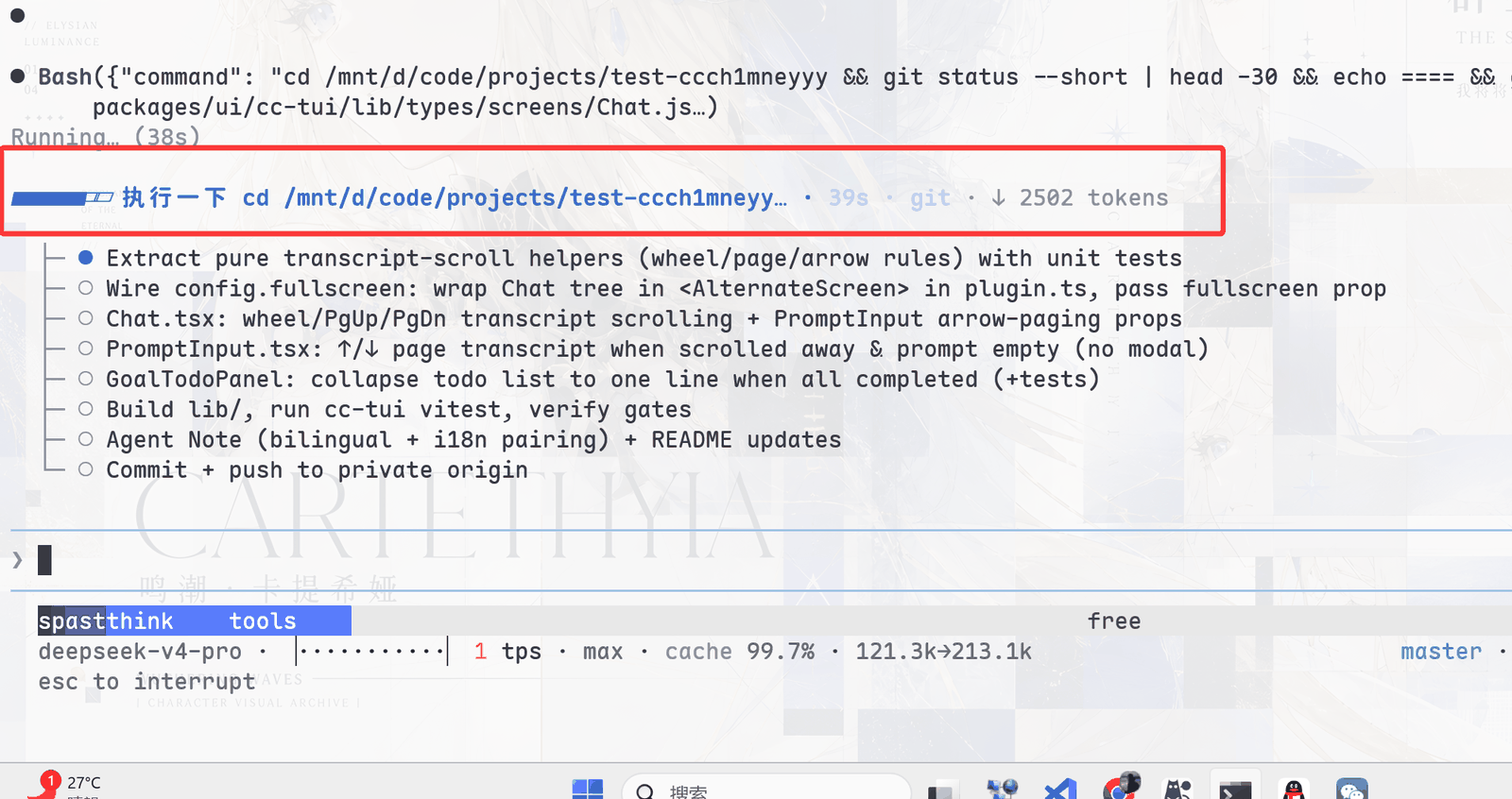
一个美观且实用的 Claude Code 风格 TUI 插件:像素鲸鱼顶栏、双流光大字、实时工作状态行、思考流式展开、双击 Esc 时间回溯、蓝白上下文进度条 + TPS 仪表。 零核心改动,纯插件挂载。安装插件即可启用,卸载后不会留下核心补丁。 献给钟爱tui的各位极客们~
A beautiful, practical Claude Code-style TUI plugin: pixel whale top bar, dual flowing-glow title, real-time status line, streaming thought expansion, double-Esc time rewind, blue-white context progress bar + TPS gauge. Zero core changes, pure plugin mounting. Install to enable; uninstall leaves no core patches. For all TUI-loving geeks~
🎉 官方收录
本插件被 DeepSeek Harness 官方公众号 推文收录,作为"内测用户精选插件"展示:
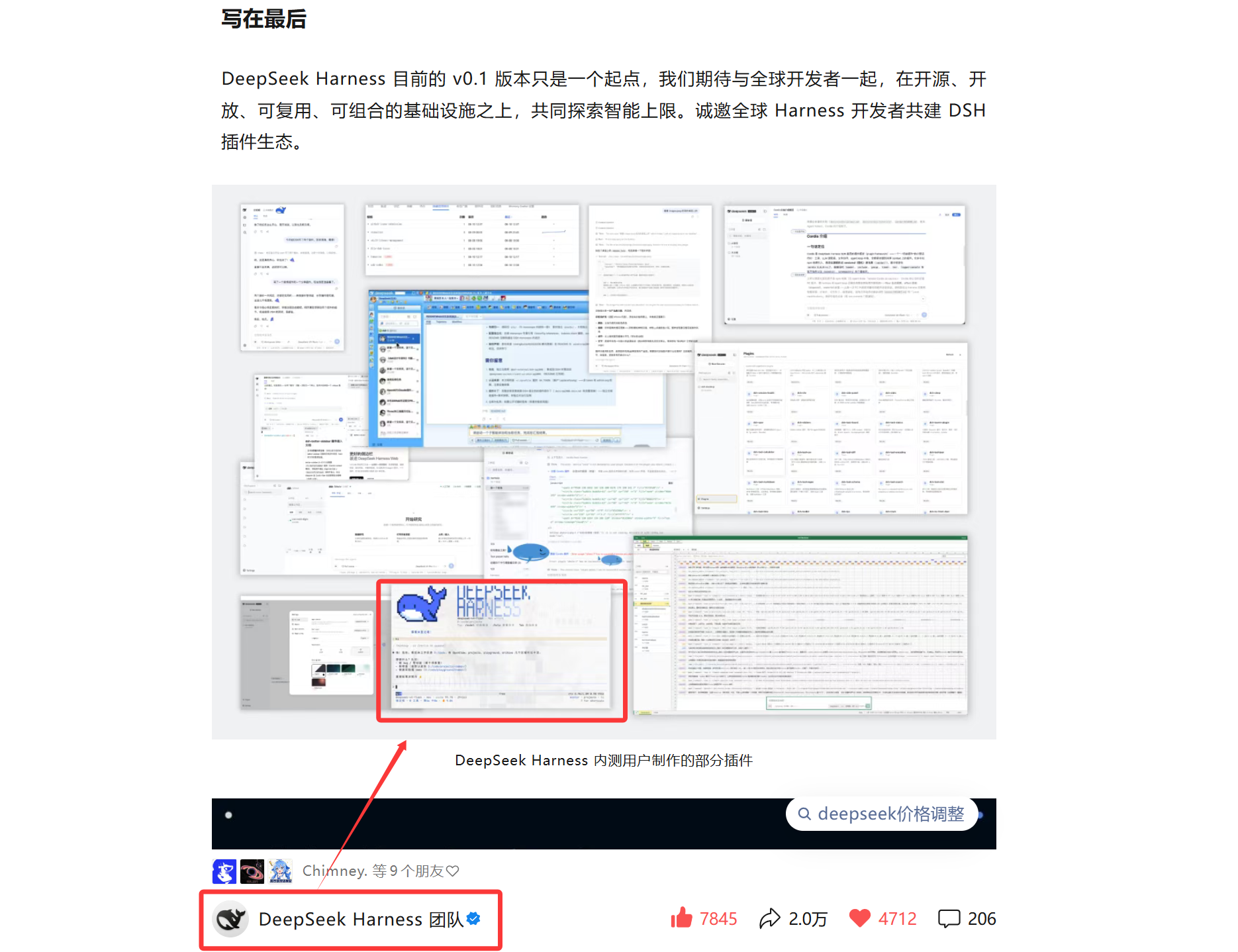
同时也被 dshfind 插件目录收录:
核心能力
- 终端原生交互:流式 Markdown、结构化工具卡、命令与文件补全、
@文件引用 (消息任意位置补全,文本附加内容,PNG/JPEG/WebP/GIF 作为持久图片块发送)、历史搜索、消息选择、 inline/alternate-screen 两种渲染模式,以及/lang中英界面语言切换。 - 可观察的 Agent 状态:实时工作状态、上下文分段进度、TPS、缓存命中率、 推理等级、输入/输出 token 与 Git/会话信息。
- 完整会话工作流:
/resume、/new、/compact、/export、/btw侧问、 模型切换,以及双击Esc发起的会话 rewind/fork。 - DSH 官方能力接入:Agent preset、Skills、MCP、Goals、Todos、子代理、
ask_user_question问卷都通过现有服务或注册表连接。 - 为长会话设计:事件驱动投影、差分终端输出、消息虚拟化、回放合并与有界缓存, 避免渲染成本和内存随会话无限增长。
界面预览
快速开始
前置条件:可用的终端 TTY、官方 dsh CLI,以及 pnpm 10+。运行模型还需要
DEEPSEEK_API_KEY。
# 1. 全局安装 CLI + 本插件(本插件自带 dsh-tui 直达命令)
npm install -g @deepseek-ai/dsh @deepseek-harness-tui/dsh-tui

# 2. 启动(首次运行会自动初始化 dsh-tui profile,需 pnpm)
dsh-tui
备选——手工安装 profile(仓库根目录 install.sh 已封装,含 pnpm 预检):
sh install.sh
# 或:dsh plugin --profile dsh-tui add @deepseek-harness-tui/dsh-tui
# 之后 dsh-tui 与 dsh --profile dsh-tui 等价
dsh-tui --resume 恢复上次会话;Windows 也可用仓库里的 dsh-tui.cmd(等价)。
Herdr
在 Herdr pane 中直接运行 dsh-tui 即可,无需额外配置。
dsh-TUI 会通过 Herdr 提供的本地接口上报 idle、working、blocked 状态;
问卷或工具审批出现时标记为 blocked。离开 Herdr 运行时该集成完全不启用。
Herdr 的 agent start --kind dsh-tui、session 身份与服务重启后自动恢复仍需 Herdr
上游加入原生 agent kind;当前可正常保活、重连和观察手工启动的 pane。
在 VS Code 中运行的完整指南(内置终端直接使用 + companion 扩展
dsh-tui-vscode——真实集成终端承载、体验与 Claude Code 官方扩展几乎一致、
已上架 VS Code Marketplace)见
在 VS Code 中运行 dsh-TUI。
TUI 启动后会在后台检查 npm 是否有新版本;发现更新时可输入 /update。
/update 更新当前 dsh-tui profile 中的 runtime 并重启会话,它不会静默修改
npm/pnpm 的全局安装。若通过全局 dsh-tui 命令启动且 Launcher 版本落后,
0.8.3 起会给出精确的全局对齐命令,例如:
npm install -g @deepseek-harness-tui/dsh-tui@<profile-version>
旧版 dsh-cc-tui / cc-tui profile 的迁移命令与兼容数据说明见
安装与快速开始。
安装流程、profile 叠加机制、源码构建与常见问题见 安装与快速开始。
快捷键
| 键 | 功能 |
|---|---|
Enter | 空闲=发送(Shift+Enter 换行,无法上报修饰键时可用 Ctrl+J,mac Terminal.app 可用 Option+Enter 兜底,issue #110);模型工作时=steer(注入下一步边界,不中断);命令菜单打开时执行选中项 |
Ctrl+Enter(⌘Enter) | 打断当前回合并立即发送(interrupt) |
Alt+Up | 把最后一条未处理消息取回输入框编辑(不中断回合) |
Tab | 补全 / 命令或 @ 文件(目录可继续深入);模型工作时=follow-up(排入当前回合之后) |
Ctrl+C | 中断当前回合;空闲时连按两次退出 |
Esc | 关闭命令/文件菜单;空闲双击清空输入;空输入双击 = 时间回溯 |
Ctrl+O | 展开/收起详情(思考全文、工具参数与输出) |
Ctrl+R | 历史消息搜索 |
/ | 会话内全文搜索(n/N 跳转) |
Ctrl+V | 粘贴文本或文件管理器中的文件;图片显示为 [Image #N] 并作为持久附件发送 |
Ctrl+G | 用 $VISUAL/$EDITOR(如 nvim)打开当前输入编辑,保存退出后回填 |
? | 快捷键菜单(仅输入框为空时响应) |
Shift+↑ | 消息选择模式(Enter 展开单条) |
Ctrl+P | 切换启动时 loaded-context 面板(面板在屏时有效) |
Home / End、Ctrl+A / Ctrl+E | 逻辑行首 / 行尾;Ctrl+E 双义:输入框=行尾,转录中=展开/折叠隐藏的旧消息 |
Ctrl+← / Ctrl+→(⌘←/→) | 按词跳转 |
Ctrl+U / Ctrl+K | 删除光标前(至行首)/ 光标后(至行尾) |
Ctrl+W | 删除前一个单词 |
模型工作中的三态投递:Enter=steer(注入下一步边界,不中断)· Tab=follow-up(排入当前回合之后)· Ctrl+Enter=interrupt(打断并立即发送)。
macOS 修饰键:上表中 Windows/Linux 的 Ctrl+<键> 在 macOS 上同时可用 ⌘<键>
(如 ⌘V 粘贴、⌘O 展开详情、⌘Enter 立即发送);仅 Ctrl+C / Ctrl+D
(中断/退出)保持 Ctrl 不变,避免与 macOS 系统级 ⌘C 复制等肌肉记忆冲突。
⌘ 需终端支持扩展键盘协议(iTerm2 / kitty / WezTerm / ghostty / tmux);
macOS 自带 Terminal.app 会自行消费 ⌘ 快捷键,请继续使用 Ctrl。
鼠标(fullscreen: true 全屏模式;默认关,profile 补丁层覆盖开启)
| 操作 | 功能 |
|---|---|
| 拖拽选择 | 应用内文本选区,松开即复制(OSC 52 + wl-copy/xclip/xsel 原生兜底;tmux 内走 load-buffer -w),复制后自动取消选区并弹出「已复制 N 个字符」提示 |
| 双击 / 三击 | 选词 / 选行,同样即选即复制 |
| 滚轮 | 仅在 fullscreen 且鼠标跟踪启用时:Help 打开时滚动帮助,否则滚动消息列表(±3 行/格);默认 inline 模式不会把滚轮事件交给 TUI |
Esc | 拖拽进行中取消选区(不复制) |
| 单击消息行 | 展开/收起该行 |
| 单击「加载更早消息」/「ctrl+e 显示前 N 条」 | 加载更早消息 / 展开全部 |
| 单击 StickyHeader / 「↓ N new messages」 | 跳回固定消息处 / 滚动到底部 |
| 单击超链接 | 打开浏览器 |
| 键盘扩展选区 | 有选区时 Shift+←/→/↑/↓/Home/End 扩展/收缩(跨行环绕) |
问卷(模型发起 ask_user_question 时)
| 键 | 功能 |
|---|---|
↑/↓ | 选择选项 |
Space | 多选题勾选/取消 |
Tab | 切到自定义回答(不选选项直接打字) |
Enter | 提交当前选择 |
Esc / Ctrl+C | 取消整批提问(模型收到 ASK_CANCELLED,可继续对话) |
本地命令(CC 指令全集复刻,均走 DSH 官方链路)
| 分组 | 命令 |
|---|---|
| 会话 | /new 新会话 · /resume 会话浏览器(搜索、预览、跨项目、折叠子 agent 运行) · /rename 重命名会话 · `/workspace resume |
| 状态 | /context 已加载上下文明细 · /status 会话信息 · /cost token 用量 · /doctor 环境自检 · /config 配置来源 · /init 创建 AGENTS.md · /settings 设置面板(命名空间读取/编辑) |
| 模型 | /model 选择器(切换 = fork 会话续聊,历史保留) · /effort 推理强度(滑杆 / status / <id>) · /preset Agent 预设(已开始会话不可切换,blank-only) · /thinking 思考显示 · /tokens token 明细 · /activity 工作状态行动画(frames <名> / status) · /theme 主题选择器 · /lang 中英界面切换(/settings 中亦可选择) |
| 账号/策略 | /provider 添加模型提供方 · /login 凭证状态 · /logout 登出说明 · /permissions 权限说明 · /add-dir 文件策略范围 · /hooks · /mcp |
| 技能 | /audit 代码审计 · /bug bug 报告 · /review 代码评审 · /practice 编程练习 · /pr_comments PR 评论 · /release-notes 发布说明 · /vuln-check 漏洞检查 |
| 其它 | /agents 子代理列表 · /skills 技能目录 · /plugins check <路径> 插件诊断 · /update 自动更新并重启 · /vim · /terminal-setup · /connect · /help · /exit(别名 /quit /q) |
| 注册表 | /plan /goal /feedback /permission(DSH 命令注册表插件,随插件自动并入 / 菜单) |
未知命令会作为普通消息发给模型(如
/permission未挂载的组合里)。
插件生态
想为 dsh-TUI 做插件/扩展?欢迎加入生态!
- 接口与兼容性协定:终端交互生态插件准入规范与实施标准
- 插件开发指南:
docs/plugins.md(接缝、契约、规范与验证清单) - 生态组织:dsh-tui-ecosystem(社区插件与模板的家)
- 模板仓库:plugin-template(从模板起步,5 分钟出一个插件)
- 参考实现:
dsh-working-activity(实时工作状态行:TUI 槽位 +activity/status会话事件双出口)
核心仓库不迁移、社区插件独立成仓。组织只维护收录列表与准入规范,不对社区插件 的功能、质量或安全作背书或担保;插件作者对自己的仓库保持完全所有权,并自行承担 维护与安全责任。
文档
| 主题 | 内容 |
|---|---|
| 安装与快速开始 | 前置条件、安装、启动、profile 生命周期、源码开发 |
| 配置参考 | Cordis 覆盖、配置字段、Agent preset、MCP、环境变量 |
| 主题系统 | 内置主题、自动检测、自定义 JSON 主题与校验规则 |
| 交互与命令 | 快捷键、鼠标、问卷、slash command 与会话工作流 |
| 架构与限制 | 运行链路、渲染与持久化设计、安全边界、已知限制 |
| VS Code 使用指南 | 在 VS Code 集成终端运行 dsh-tui;companion 扩展 dsh-tui-vscode 提供与 Claude Code 官方扩展几乎一致的体验(已上架 Marketplace) |
| 贡献与开发约定 | 贡献流程、仓库地图、构建产物、验证矩阵与修改规则 |
| 插件开发指南 | 插件接缝(会话事件 / 槽位 / 技能 / 主题 / prompt 段)、契约、规范与收录 |
完整的中英文索引见 docs/README.md。
配置与扩展
- Agent preset:四种官方 Agent 模式(
standard/code/minimal/cordis)和 TUI 随包提供的“梁神模式”(liangshen),/preset切换;已产生对话的会话不可切换,空白会话立即生效。默认 preset 持久化 在~/.dsh-tui/agent-preset.json;/model的选择持久化在~/.dsh-tui/model.json。 详见配置参考。 - 自定义主题:
/theme选择器(auto跟随系统/终端背景,内置light/dark/dark-ansi),也支持~/.dsh-tui/themes/<名字>.json自定义主题,选中即热切换 并持久化;DSH_TUI_THEME环境变量 > 持久化选择 > OSC 11 终端背景自动检测。 详见主题系统。 - MCP:通过
@deepseek-ai/dsh-mcp-client挂载服务器,工具以mcp__<服务器>__<工具>注册;/mcp查看连接状态。 详见配置参考。
工作方式
dsh profile
  -> dsh-base
  -> dsh-TUI Cordis patch
  -> Agent preset + DSH services
  -> session/event
  -> Channel projection
  -> React components
  -> ported Ink/Yoga renderer
  -> terminal
TUI 只负责交互与呈现。会话日志是对话真源,模型调用、工具执行、fork/resume、 compaction 和持久化继续由 DSH 服务拥有。更详细的模块边界与性能设计见 架构文档。
聊天 / 工具基础事件 ──> 持久 Session 日志 ──> TUI / Web
        └──────────────> ActivityTracker(内存)──> 仅 TUI 状态栏
技术要点
- Gentle Mist Blue 配色:雾蓝只承担品牌、焦点、交互与高亮,正文保持中性灰; 启动时查询终端背景色(OSC 11)自动选浅色/深色调色板,终端不响应时回退深色。
- 事件驱动渲染:
session/event事件流 → 增量差分渲染,滚动状态独立维护。 - 布局级虚拟化:长会话的每帧成本从 O(全会话) 降到 O(可视窗口)——屏幕外的 消息行渲染为"量高占位符",其子树完全不参与布局。
- 上下文进度条:参考 pi-nano-context 算法(最大余数法分段着色 + 多级缩略读数)。
- TPS 仪表:参考 pi-tps-meter——流式 1/8 格 gauge、历史 min-max sparkline、 速度语义色(≥50 绿 / ≥20 黄 / <20 红)。
- working-activity 生态:工作状态行复用 dsh-working-activity 的纯状态机,在进程内从基础会话事件派生,不向共享日志写入 UI 状态。
- 终端粘贴:raw 模式下 Ctrl+V 由应用接管,按平台读取系统剪贴板——Windows
走 PowerShell
Get-Clipboard,macOS 走osascript/pbpaste,Linux 自动探测wl-paste/xclip/xsel;普通文件插入路径,图片文件生成@引用,剪贴板位图 写入附件库并在输入框显示[Image #N],纯文本原样插入光标处。
已知限制
- 注入上下文(plugin source 内容)未做独立展示,随系统提示词并入进度条统计。
/model实时切换走"会话 fork 续聊"(DSH 无原位换模型 API):历史原样保留, 新会话路由到新模型,旧会话仍留在/resume列表里;选择写入~/.dsh-tui/model.json,重启与/new均沿用。Ctrl+V读剪贴板按平台依赖外部工具:Windows 用 PowerShellGet-Clipboard(剪贴板被其他进程短暂锁定时自动重试,持续锁定时静默放弃);macOS 用osascript/pbpaste(Finder 多文件复制没有稳定的 AppleScript 读法,按 文本/图片回退);Linux 需要wl-paste/xclip/xsel之一且会话可连接 (工具缺失或会话不可连接时提示无可用剪贴板工具)。不受支持的图片格式或附件 服务不可用时会保留临时文件引用作为降级路径。- 退出时以进程退出收尾,不等待 agent 异步落盘(持久化由 persistence 插件兜底)。
- 工具级审批已实现:approval 服务 + TUI answerer(CC 式审批面板)消费审批流,
权限提升命令会弹出审批条。
/permission预设切换由 dsh-base 的permission-presets插件提供,profile 组合默认可用;裸组合cordis.yml未挂载该插件(无/permission命令)。 /vim/connect/hooks为 CC 同名占位:对应能力在 DSH 侧无等价 机制,命令会给出明确说明而非静默。/thinking思考显示开关不持久化,重启或新会话回到默认。- minimal preset 下
/compact不可用(minimal 不组合 compaction)。 /update仅dsh --profile启动方式可用,回合运行中会拒绝。
完整已知限制与安全边界见架构与限制。
开发
CI 使用 Node 24 与 pnpm 11;包声明支持 Node ^22.19 || >=24。
pnpm install --frozen-lockfile
pnpm build
pnpm smoke
lib/types/ 是忽略入库的生成目录;pnpm build 会从干净输出目录重新编译并运行
构建门禁。Git URL 安装不受支持(源 manifest 的 @dsh-std/* 为 workspace 依赖、
vendor/dsh-std 为子模块、且 pnpm ≥11 默认拒绝 git 依赖的 prepare 脚本);请安装
registry 包:dsh plugin --profile dsh-tui add @deepseek-harness-tui/dsh-tui。渲染、问卷和工具卡
改动还需运行对应回归脚本。
社区
- 生态组织:dsh-tui-ecosystem —— 社区插件、模板与收录列表的家。欢迎来发插件、提创意、互相取暖 🐋
- 社区交流群:使用问题、插件创意、功能许愿,都欢迎进来聊。
| 微信群 | QQ 群(群号 572549239) | 微信三群 |
|---|---|---|
 |  |  |
微信群二维码约 7 天过期一次,如遇失效请走 QQ 群(572549239),或开个 issue 提醒我们更新。
权限与安全边界
dsh-TUI 不实现独立沙箱,而是使用当前 DSH profile 的文件、Shell、sandbox 与
approval 策略。仓库提供的 profile 在非 Windows 平台默认采用工作区约束与审批;
Windows 当前没有对应的沙箱后端,组合会退回到 danger-full-access 且不弹审批。
在包含敏感凭证或不可信仓库的环境中启动前,请先检查 profile 配置。
详见权限边界与已知限制。
友情链接
朋友们开发的社区、相关项目与周边工具
趋势

License
Read the usage guide →
Install steps, key points, FAQ and compatibility for this plugin — auto-derived from indexed fields.
Listing badge

[](https://deepseek-plugin.org/plugins/ccch1mneyyy/dsh-TUI)Paste this markdown into your GitHub README to link back to this listing. The badge only states the listing — not a security endorsement.