Checks installed plugins for stability and security, detecting potential crashes or embedded malware.

- Language
- JavaScript
- License
- MIT
- Branch
- main
Install
$ dsh plugin --profile web add --allow-build=dsh-plugin-healthcheck github:chenw2759-wq/dsh-plugin-healthcheckRun the command above in your terminal to install this plugin via the dsh CLI. You can switch Profile in the top-right corner. New to dsh? Read the beginner tutorial
Install via your agent
Install the DeepSeek Harness plugin chenw2759-wq/dsh-plugin-healthcheck for me: review the repository at https://github.com/chenw2759-wq/dsh-plugin-healthcheck first, then run the install command and verify the plugin loads successfully.
Paste this instruction to the DSH Web GUI assistant — it will install and verify for you.
一句话定位
DSH 插件装好之后还没重启后端之前的体检:扫 files 白名单/依赖副本/lockfile/Windows 命令/恶意代码、组合配置层、在隔离子进程里完整 boot 整个 profile tree。发现即给出修复——自动改代码、删危险副本、写禁用行热回滚,或把修复提示词打包交给 agent。
核心能力
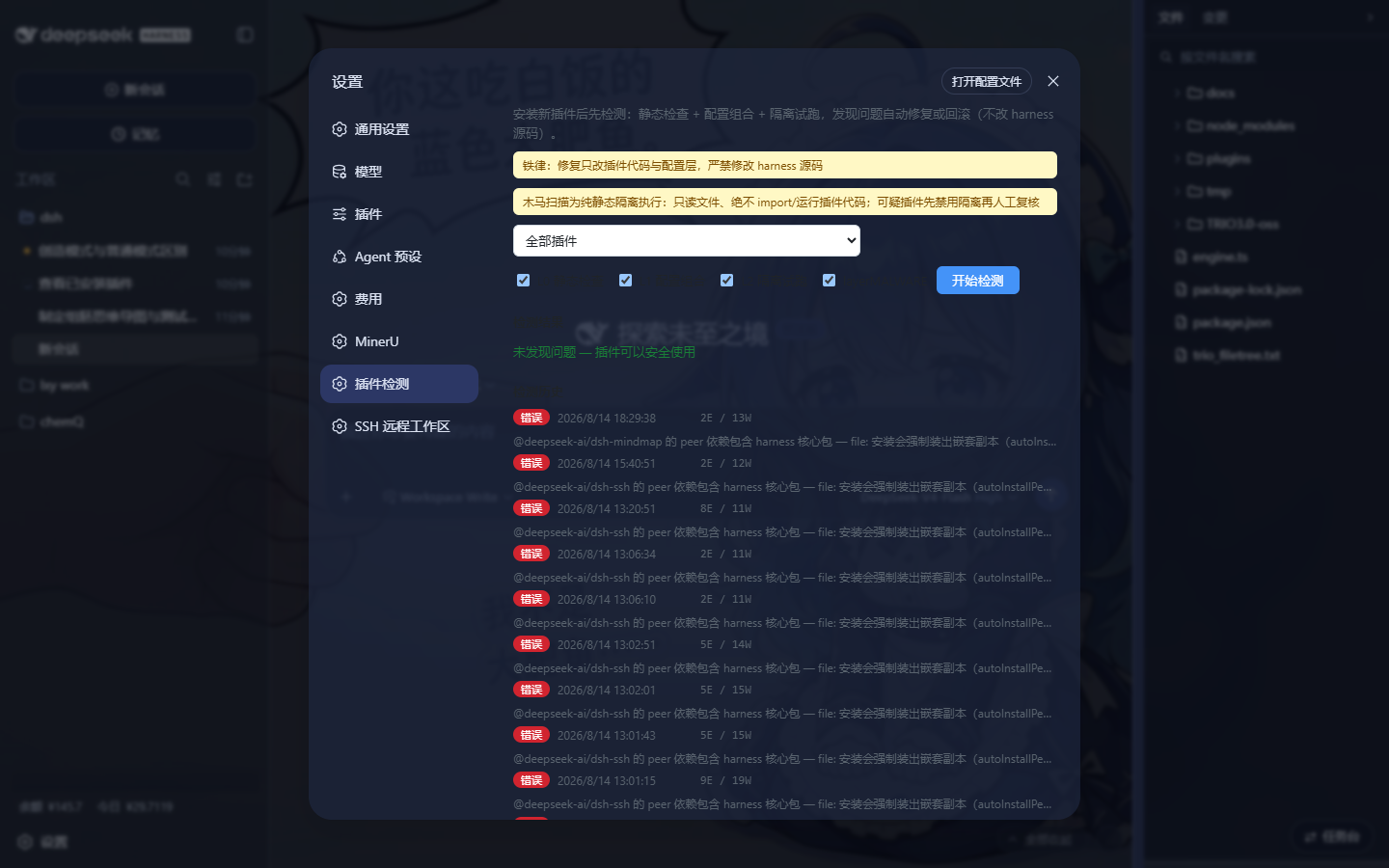
- 提供「插件检测」面板入口(设置左下角的 settings 插槽),可视化选作用域和层级、跑检测、看结果、回滚、看历史
- L0 静态检查 7 项:C1 files 白名单 / C2 依赖声明 / C3 高危副本(cordis 等 6 个 harness 核心包)/ C4 依赖可解析 / C5 Windows 命令(在注册表 PATH 找 .exe)/ C6 lockfile 一致性 / C7 禁用插件
- L0 静态检查 C9:扫描 cordis 用法错误(异步 plugin 后同步取服务、new Service 缺 config、inject 缺服务声明),毫秒级预先抓
cannot get property X without inject类崩溃 - L1 配置组合:用基座自己的 composeEntries 算法组合 bundle+profile+home 补丁层,找补丁语法错、id 冲突、补丁跳失
- L2 隔离试跑:在子进程里 boot() 整个 profile tree(端口覆写到 0),90s 超时抓 hang;失败自动回滚(HMR 热生效)
- C8 木马扫描:纯静态(只 readFile,绝不 import/require/spawn),覆盖 7 类恶意模式(下载执行/凭据窃取/外联回传/混淆后门/持久化/破坏性/环境劫持),强组合命中升级为 error,密钥/令牌自动脱敏
技术实现
- 语言: TypeScript(host 半 + client 半双程序,tsconfig.host.json + 浏览器构建走 tsdown)
- 关键依赖: @deepseek-ai/cordis(patch 注入)/ @deepseek-ai/dsh-host-webserver(路由宿主)/ @deepseek-ai/dsh-app-boot(L1/L2 调用基座 boot 算法)/ js-yaml + @deepseek-ai/cordis-plugin-include(patch 文件读写与校验)
- 架构模式: 双面插件——通过 cordis.patch.yml 在 web profile 注入一行
dsh-plugin-healthcheck,host 半注册/healthcheck/*HTTP 路由(inject:webServer,systemPrompt),client 半通过 package.json 的dsh.client字段在 Web GUI 注册settings.section插槽(inject:slots,locale) - 入口文件: src/index.ts(host 半 apply)/ src/client/index.ts(client 半 apply)/ src/host/runner.ts(L2 子进程 lib/runner.js 入口)
适用场景
装完新插件但还不想立刻重启后端的窗口期里跑一次验证,或线上排查“装了某个插件之后端就起不来”的事故根因。也适合在自定义插件发版前自检,CI 里抓“hash chunk 漏发”“file: 装出核心包副本”“lockfile 没重解析”这类常见坑。
前置依赖与兼容性
| 依赖 | 最低版本 | 说明 |
|---|---|---|
| DSH(@deepseek-ai/cordis) | ^4.0.1 | 由宿主提供,plugin 通过 cordis.patch.yml 注入 |
| @deepseek-ai/dsh-host-webserver | ^0.1.0-rc.6 | 提供 webServer 路由宿主 |
| @deepseek-ai/dsh-system-prompt | ^0.1.0-rc.6 | 用于给模型发“插件检测”面板通告 |
| @deepseek-ai/dsh-app-boot | ^0.1.0-rc.6 | L1 配置组合复用基座 composeEntries,L2 子进程 boot() 复用其 boot 与 assertEntriesActivated |
| @deepseek-ai/dsh-client-runtime | ^0.1.0-rc.6 | browser 半需要的 client 上下文(type-only import) |
| @deepseek-ai/dsh-client-ui-settings | ^0.1.0-rc.6 | 拉 settings.section 插槽的 SlotMap 合并类型 |
| @deepseek-ai/dsh-client-locale | ^0.1.0-rc.6 | 中英文案注册依赖 |
| react | ^18.2.0 | client 半 UI 渲染依赖 |
| Node.js | 未声明 | package.json 未声明 engines |
| 平台 | macOS / Windows / Linux | 跨平台;C5 Windows 命令检查仅在 win32 平台生效 |
| 原生模块 | 无 | 仅依赖 Node 内置 API(fs/path/http/child_process) |
安装方式
dsh plugin --profile web add github:chenw2759-wq/dsh-plugin-healthcheck
配置项
本插件无需额外配置。运行参数全部通过 /healthcheck/* HTTP 路由的请求体传入(无需写到 DSH profile 设置里):
| 配置(请求体字段) | 类型 | 说明 | 默认值 |
|---|---|---|---|
layers | string[] | 选跑的层级,必须是 l0 / l1 / l2 / malware 的子集;空数组或省略则跑全部 4 层 | 全部 4 层 |
profile | string | 被检测的 profile 名(home/profiles/ | web |
plugin | string | 只测一个插件:填它的包名(含未安装的内置包会从安装 scope 自动兜底) | 全部插件 |
confirmed | boolean(必填) | 走 /healthcheck/repair 或 /healthcheck/rollback 时必须为 true;panel 二次确认后才会带这个字段提交 | 无,缺这个字段直接 400 |
repair | object | 一键修复的具体动作(kind: 'files-whitelist' | 'remove-copies' | 'none'),由 L0 finding 自带 | 无 |
常见问题
Q: 它会修改装好的插件或宿主后端吗?
A: 只在三类路径下写:插件源码目录、profile 配置层、home 补丁文件。修复执行器对每个目标做 realpath 后比对安装根和 home 边界,落在安装根的直接抛 forbidden-harness;回滚由后端 HMR 热生效,不需要重启。
Q: 跑一次检测要多久?
A: L0 静态检查秒级、L1 配置组合数百毫秒、L2 隔离试跑要看 profile 规模(默认上限 90 秒,超时会被强制 kill 子进程并标 smoke-failed),木马扫描视插件源码大小在数秒到十余秒。
Q: 回滚怎么撤销?
A: 调用 DELETE /healthcheck/rollback?pluginId=<id>,会按 # healthcheck auto-rollback <时间戳> 注释标记整段删掉并用热重载还原。
Q: 木马扫描会不会误报?
A: 会。签名匹配是单类命中就 warn,组合命中(下载执行 + 凭据 + 外联等强组合)才升 error;明显的合法用法(构建产物里的 eval 块、new Function("return ...") 的 schemastery 惯用法、回环 IP、普通 https API、自身插件代码)已经按规则排除,命中后建议人工按证据复核。
Q: 能不能批量给所有内置插件也做检查?
A: inventory 接口同时列出用户插件和安装 scope 下的内置 bundle(按 settings 插件页面那个清单扫描约 190 个),面板下拉里“全部插件”模式会把它们一起扫。
上手难度
入门 — 装上之后直接在设置面板里点“开始检测”,无需任何额外配置;进阶用户可以理解修复门禁和回滚机制以便在 CI 中跑 RUN_HEALTHCHECK_E2E=1 的 e2e 测试。
已知问题与限制
- L2 smoke boot 子进程从
lib/runner.js起,会在 home/profiles// 目录下写一个临时的 .healthcheck-overlay-<pid>.yml端口覆写文件,跑完尝试删掉但不保证成功;profile 目录需要可写 - C9 cordis 用法检测是纯静态启发式,可能误报——所有命中都标 warn,最终是否真有 bug 由 L2 隔离试跑做权威确认(src/host/cordis.ts:13-15)
- 木马扫描不会扫自己,service.ts 第 117 行显式跳过
dsh-plugin-healthcheck;同样不扫node_modules、tests、构建产物目录(malware.ts:130) - C5 Windows 命令检查只在
process.platform === 'win32'时生效,其他平台不跑(checkers.ts:257) - e2e 测试(
tests/live.e2e.spec.ts、tests/smoke.e2e.spec.ts)默认describe.skip,需要RUN_HEALTHCHECK_E2E=1环境变量才会真正连接真实 profile - 历史记录只保留最近 20 条(repair.ts:210-223),超出后最旧的会被裁掉
- L2 smoke boot 默认 90s 超时(
SMOKE_TIMEOUT_MS,verify.ts:84),冷启动插件多的 profile 可能偏紧——这个值会出现在超时 finding 的stage字段里
DSH 插件健康检查 —— 装完新插件后不重启后端即可验证插件是否会导致事故。 纯静态检查 + 配置组合 + 隔离试跑 + 木马扫描,发现即修复(自动修复 / 自动回滚 / 预制提示词)。
#dsh-plugin · DeepSeek Harness (DSH) · TypeScript · turtle-ui
截图
设置面板 →「插件检测」:
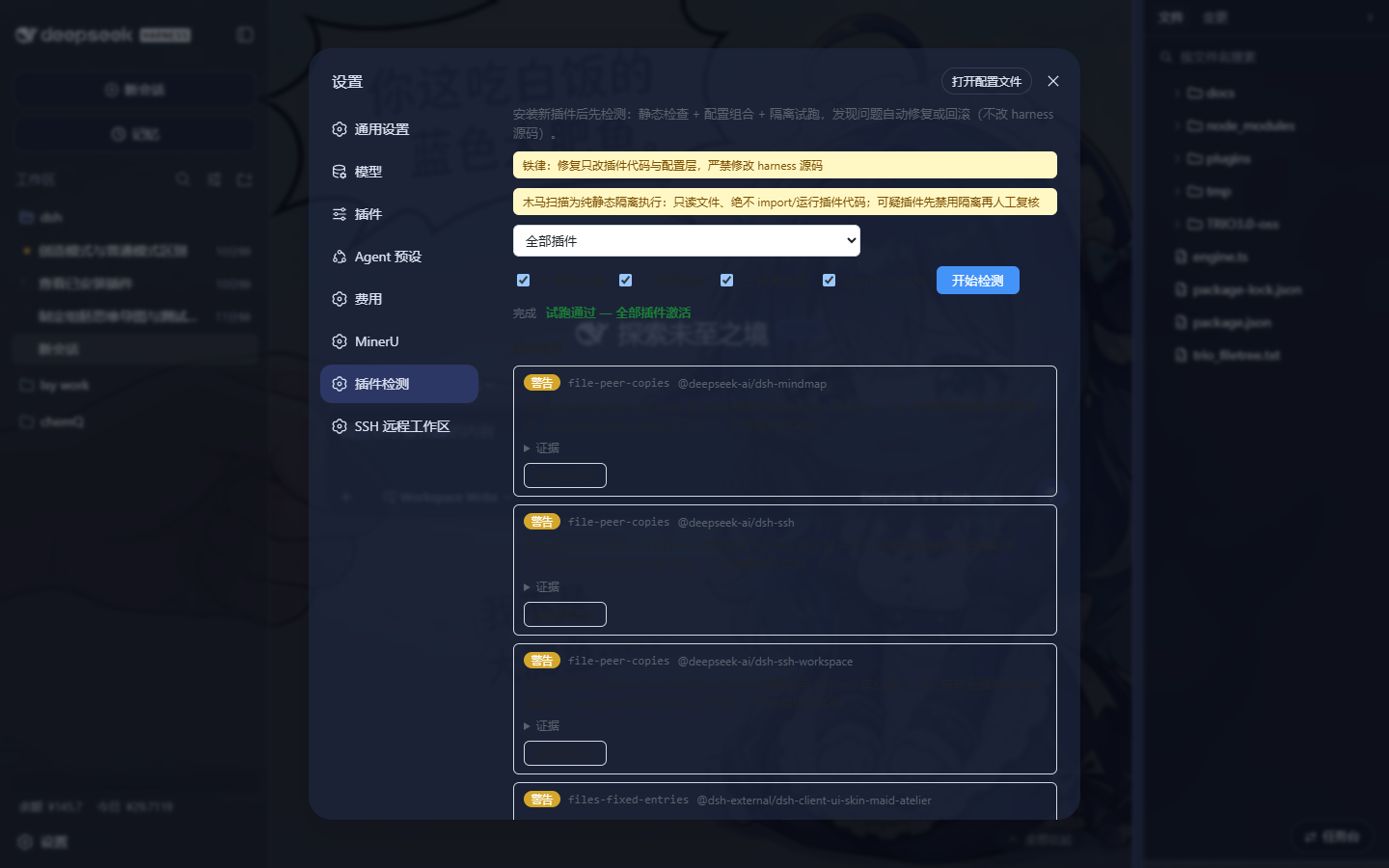
运行一次检测(L0 静态 + L1 配置组合 + L2 隔离试跑 + 木马扫描):
它解决什么问题
DSH 的 dsh plugin add 只负责把插件装进 profile(薄 pnpm 转发器),装完不做任何验证——
问题要等下次后端启动才暴露。常见事故:
| 事故 | 根因 | 本插件拦截方式 |
|---|---|---|
启动报 ERR_MODULE_NOT_FOUND(缺哈希 chunk) | files 白名单漏掉代码分割产物 | C1 files 完整性 |
后端启动报缺 zod / schemastery | 插件登记成 link: 依赖,绕过了 profile 的 node_modules | C2 依赖声明审计 |
agent 报 Cannot read properties of undefined (reading 'prepare') | file: 依赖装出 harness 核心包副本 → 模块双实例 → Symbol 身份错位 | C3 高危副本检测 |
dsh-skin CLI not found(Windows) | 命令不在注册表 PATH / execFile 只认 .exe | C5 Windows 命令 |
改了 link:→file: 不生效 | pnpm 不重解析 lockfile | C6 lockfile 一致性 |
| 被禁用的插件长期残留在依赖里 | 禁用是压制症状而非修复 | C7 禁用插件识别 |
| 供应链投毒 / 恶意代码 | 发布包内注入恶意逻辑 | C8 木马扫描(纯静态隔离) |
启动报 loader fibers failed(cannot get property "fs" without inject) | 插件未构建(lib 缺失)或 cordis 用法错误(ctx.plugin() 后同步取服务) | C9 cordis 用法检测(毫秒级) + L2 隔离试跑(重启前确认) |
实战案例(真实事故)
案例 A:未构建的插件导致后端启动崩溃
dsh-ssh-workspace(SSH 远程工作区)登记进了 profile(file: 依赖 + bundle),但它的
lib/ 从未构建 —— 源码在、构建产物缺。重启后端时报:
Error: dsh: plugin tree failed to load: loader fibers failed
  Error: failed to apply loader entry ssh-workspace-fs (@deepseek-ai/dsh-ssh-workspace/fs):
    cannot get property "fs" without inject
根因链:ctx.plugin(SandboxedFileSystem) 是异步的,随后立即同步取 localCtx.fs 拿不到
服务(隔离作用域的 key 对不上)→ cannot get property "fs" without inject。
L2 隔离试跑如何救场:装完插件后不重启,直接跑一遍子进程完整 boot——它在后端真正 重启之前就把这条链断掉了(报同样的错),而不是等用户重启才发现。
修复(插件侧,不涉及 harness):
- 改用同步
new SandboxedFileSystem(localCtx, config)并持有实例引用,不再ctx.plugin()后同步取服务; - 直接
new不走 cordis config 默认值填充,需显式传入{ cwd, diffBasisMaxBytes: 10 * 1024 * 1024 }; inject补上sandboxPolicy。
这个案例说明:C8 木马扫描 + L2 隔离试跑在 CI 化的安装流程里互为补充—— 静态检查看"有什么",隔离试跑看"装完能不能起来"。
检查能力
L0 静态检查(不加载、不启动)
| 检查器 | 内容 |
|---|---|
| C1 files 完整性 | files 白名单 vs 实际 lib 产物,缺 chunk → error |
| C2 依赖声明 | link: 带运行时依赖 / file: 带 harness peer |
| C3 高危副本 | 6 个核心包(cordis/cosmokit/dsh-tools/schemastery/dsh-credentials/dsh-home-paths)是否被装成真实目录副本 |
| C4 依赖可解析 | 逐个依赖从插件锚点试解析 |
| C5 Windows 命令 | execFile/spawn 引用的命令在注册表 PATH 是否有真 .exe |
| C6 lockfile 一致性 | specifier 与 lockfile version: 前缀是否一致 |
| C7 禁用插件 | 被 disabled 但仍登记的插件(皮肤互斥正常机制不误报) |
| C9 cordis 用法 | 静态检测三类 cordis 错误:E1 ctx.plugin() 后同步取服务、E2 直接 new 需 config 的 Service 缺 config、E3 访问的服务不在 inject 声明里 → 提前捕获 cannot get property "X" without inject 类崩溃 |
L1 配置组合
复用基座 composeEntries 组合 bundle + profile + home 补丁层,与真实启动用同一算法;
检测补丁语法错误、行 id 冲突、补丁跳失。
L2 隔离试跑("不重启试跑"的核心)
子进程完整 boot() 全树(webserver 端口偏置为 0,与运行中后端零冲突),
基座 assertEntriesActivated 断言每个启用插件都激活,超时 90s 抓 hang。
失败 → 自动回滚(写 home patch 禁用行,HMR 热生效,无需重启)。
C8 木马扫描(纯静态、隔离)
- 隔离铁律:只
readFile,绝不 import / require / 执行插件代码。 - 7 类恶意模式:M1 下载执行、M2 凭据窃取、M3 外联回传、M4 混淆后门、M5 持久化、M6 破坏性、M7 环境劫持。
- 两级校准:强组合(下载执行 / 破坏性 / 凭据+外联)→ error;单一命中 → warn(提示人工复核)。
- 证据脱敏:密钥/令牌/私钥一律
[REDACTED]。 - 误报控制:跳过 tests/node_modules/构建产物;
new Function("return …")(schemastery 惯用法)、atob(dataUrl)数据解码、downloadFile(方法名、回环 IP、普通 https API 均不命中。
铁律(HARD RULE)
修复执行器严禁修改 harness 源码/安装本体,只允许修改:
- 插件代码(
~/.dsh/plugins/**) - 配置层(
~/.dsh/profiles/**、~/.dsh/cordis.patch.yml)
所有写路径经 assertSafeTarget 门禁(realpath 后必须落在 home 内且不在安装根内),
界面弹确认后路由仍要求 confirmed: true。修复执行器自身不跑 LLM——需要判断力的修复
打包成预制提示词交给 agent。
安装
# 1. 克隆到插件目录
mkdir -p ~/.dsh/plugins
cd ~/.dsh/plugins
git clone https://github.com/chenw2759-wq/dsh-plugin-healthcheck.git

# 2. 装进 web profile
npx @deepseek-ai/dsh plugin --profile web add "file:$HOME/.dsh/plugins/dsh-plugin-healthcheck"

# 3. 重启后端,打开左下角设置 → 「插件检测」
Windows 下
file:路径用正斜杠绝对路径,如file:C:/Users/<你>/.dsh/plugins/dsh-plugin-healthcheck。
使用
- 打开 Web GUI 左下角设置,导航里点「插件检测」;
- 选作用域(全部插件 / 指定插件)与层级(L0/L1/L2/木马扫描);
- 点「开始检测」;
- 结果按 severity 徽标列出,每条含证据 + 修复动作:
- 一键修复(确定性,弹确认)
- 自动回滚(L2 失败写 disabled 行,弹确认,HMR 热生效)
- 复制提示词(复杂问题交给 agent)
也可直接调 HTTP 路由:/healthcheck/inventory、/healthcheck/run、/healthcheck/status、
/healthcheck/repair、/healthcheck/rollback、/healthcheck/history。
开发
pnpm install          # devDeps(SDK 类型 + 构建工具)
pnpm run typecheck    # host/client 双 program
pnpm run build        # lib/index.js + lib/runner.js + lib/client.js
pnpm test             # vitest(fixtures 复刻历史事故)
需要环境变量 RUN_HEALTHCHECK_E2E=1 才会跑真实 profile 的 e2e(smoke boot / live 路由)。
测试
| 文件 | 覆盖 |
|---|---|
tests/checkers.spec.ts | L0 检查器对 fixture 的断言(missing-chunk 复刻 dsh-pet、link-dep 复刻 zod 事故、peer-copy 复刻双实例事故) |
tests/repair.spec.ts | 铁律门禁(harness 路径必须拒绝)+ files 修复 + 回滚/撤销幂等 |
tests/malware.spec.ts | 恶意 fixture 拦截、零执行证明、干净插件不误报、密钥脱敏、禁用识别、patch 解析 |
tests/cordis.spec.ts | C9 cordis 用法检测:E1 异步 plugin 后同步取服务、E2 new Service 缺 config、E3 inject 缺服务(复刻 dsh-ssh-workspace 事故) |
tests/smoke.e2e.spec.ts | 真实 profile 子进程完整 boot(L2) |
tests/live.e2e.spec.ts | 真实 profile HTTP 路由全链路(inventory/run/status/history) |
目录结构
src/
├── index.ts              # host 入口:/healthcheck 路由 + systemPrompt 通告
├── core/types.ts         # 共享类型(Envelope / Finding / 严重度)
├── host/
│   ├── env.ts            # home/profile/插件清单/禁用行解析
│   ├── checkers.ts       # L0 检查器(C1~C7)
│   ├── malware.ts        # C8 木马扫描(纯静态隔离)
│   ├── cordis.ts         # C9 cordis 用法检测(E1~E3,纯静态)
│   ├── verify.ts         # L1 配置组合 + L2 子进程试跑调度
│   ├── runner.ts         # L2 子进程入口(lib/runner.js)
│   ├── repair.ts         # 修复执行器 + 回滚(含铁律门禁)
│   ├── service.ts        # 检测编排(分层 + 历史)
│   └── routes.ts         # HTTP 路由
└── client/
    ├── index.ts          # settings.section 插槽注册
    ├── HealthcheckSection.tsx  # 检测面板
    ├── api.ts            # 浏览器客户端
    └── locales.ts        # 中英文案
License
MIT
Read the usage guide →
Install steps, key points, FAQ and compatibility for this plugin — auto-derived from indexed fields.
Listing badge

[](https://deepseek-plugin.org/plugins/chenw2759-wq/dsh-plugin-healthcheck)Paste this markdown into your GitHub README to link back to this listing. The badge only states the listing — not a security endorsement.