官方 DeepSeek Harness 的自包含桌面壳,自带 Node 运行时,支持 macOS 与 Windows,提供用量统计、插件管理和故障回滚。

- Language
- JavaScript
- License
- MIT
- Branch
- main
Install
$ dsh plugin --profile web add github:chokwinlee/deepseek-harness-desktopRun the command above in your terminal to install this plugin via the dsh CLI. You can switch Profile in the top-right corner. New to dsh? Read the beginner tutorial
Install via your agent
Install the DeepSeek Harness plugin chokwinlee/deepseek-harness-desktop for me: review the repository at https://github.com/chokwinlee/deepseek-harness-desktop.git first, then run the install command and verify the plugin loads successfully.
Paste this instruction to the DSH Web GUI assistant — it will install and verify for you.
一句话定位
DSH Desktop 是一个把官方 DeepSeek Harness 体验装进桌面窗口的轻量壳程序,自带 Node.js 运行时,让用户在 macOS 或 Windows 上无需安装 Node 也无需手动敲命令就能启动 Harness。
核心能力
- 一键启动并托管官方
dsh web,进程崩溃或重启时自动收敛 - 在 macOS 标题栏展示今日 / 近 7 天的 Token、估算费用、活跃任务数与运行吞吐率
- 在 Settings 里粘贴
github:owner/repo或完整dsh plugin命令安装社区插件,启动失败自动回滚到上一份可用配置 - 跟随系统侧栏显示"桌面版 + Harness 内置版本"(例如
DSH Desktop v0.3.0 · Harness rc.8),并内置 GitHub Releases 更新检查 - 在 Settings 中按需下载并启用 Codex、Claude Code 子代理运行时,自动创建对应的 Agent 预设
- 提供可选的"平滑流式输出"开关,新内容以更柔和的方式逐字出现,不延迟模型返回
技术实现
- 语言: TypeScript(Electron 主进程、客户端模块)+ Rust(Tauri macOS 壳)+ JavaScript(注入到 WebView 的桥接脚本)
- 关键依赖:
@deepseek-ai/dsh@0.1.0-rc.8(被托管的官方 Harness 运行时)、@deepseek-ai/dsh-host-apiproxy(用于调用 Harness 设置 API)、tauri@2(macOS 壳)、electron@43(Windows 壳)、react@18(设置面板 UI) - 架构模式: 桌面壳仅负责窗口与进程生命周期。它把内置 Node 作为子进程 spawn
dsh web --host 127.0.0.1 --port 0 --no-open,等待dsh web: http://127.0.0.1:PORT就绪行,再把 URL 装载进系统 WebView;WebView 中再注入更新检查、平滑流、用法计量、选择保护、插件管理桥等脚本。插件改动通过 profile 快照和 last-known-good 回滚机制保证启动安全。 - 入口文件:
src/main.ts(Electron 主进程,Windows)、src-tauri/src/main.rs(Tauri 主入口,macOS)、src/dsh-desktop-settings-plugin/desktop.patch.yml(DSH Host 在加载时插入 UI 注入项)
适用场景
已经在 macOS 或 Windows 上使用 DSH CLI 但希望免去终端步骤的普通用户;希望官方 Harness 在系统 WebView(macOS 的 WKWebView)中运行而不是 Chromium 的用户;希望桌面版附带用量监控、插件可视化管理、原生更新提示等附加能力,而不直接修改官方 Harness 源码的用户。
前置依赖与兼容性
| 依赖 | 最低版本 | 说明 |
|---|---|---|
| DeepSeek Harness | 0.1.0-rc.8 | 桌面壳在内部固定使用此版本(侧栏会展示),与外部 dsh CLI 共享 DSH_HOME |
| Node.js | 22.19.0 及以上 | macOS Tauri 包内置 Node sidecar,无需用户安装;开发与 Windows Electron 构建由宿主运行时提供 |
| macOS | 11.0 (Big Sur) 及以上 | 仅 Tauri 包可用;同时提供 Apple Silicon 与 Intel 安装包,macOS 安装包控制在 90 MB 以内 |
| Windows | Windows 10 / 11 x64 | 仅 Electron 包可用,提供 NSIS 安装版与便携 ZIP |
| Linux | 未发布二进制 | target_triple() 源码层支持 x86_64 与 aarch64,但官方未提供打包产物 |
| 原生模块 | 无 | package.json 未声明 node-gyp 原生依赖;Tauri/Electron 各自处理原生侧 |
安装方式
dsh plugin --profile web add github:chokwinlee/deepseek-harness-desktop
桌面壳本身以安装包形式分发(macOS
.dmg、Windows.exe/.zip)。dsh plugin add命令安装的是这个仓库内置的dsh-desktop-settings-plugin客户端插件,用于在桌面 UI 中暴露插件管理与子代理安装入口。
配置项
| 配置 | 类型 | 说明 | 默认值 |
|---|---|---|---|
DSH_HOME | 环境变量 | 覆盖 DSH 配置目录;桌面壳与官方 CLI 共享此目录,缺省时为 ~/.dsh | ~/.dsh |
SPIKE_HOME | 环境变量 | 仅 Tauri 内部使用;未设置时回退到 $HOME 并在其下使用 .dsh 子目录 | 未设置 |
DSH_DESKTOP_ACTION_TOKEN | 环境变量 | 内部动作协议 dsh-desktop://action/... 的鉴权 token;缺省时随机生成 | 随机生成 |
desktop-preferences.json → smoothStreamEnabled | 布尔值 | 是否启用"平滑流式输出"(柔化模型文本出现方式) | true |
桌面壳本身不要求用户手工编辑任何文件;以上变量仅在排查或迁移数据目录时需要调整。
常见问题
Q: 桌面壳和我本机装的 dsh CLI 是同一份代码吗?
A: 不是。桌面壳内置的 DSH 固定为 0.1.0-rc.8,由壳独立升级;本机的 dsh CLI 仍然是你自己 npm i -g 的版本。两边通过 $DSH_HOME(默认 ~/.dsh)共享配置、工作区和会话记录。
Q: 安装第三方插件会不会破坏现有配置?
A: 安装过程中壳会先做一份 profile 快照(last-known-good),并在新 Harness 启动失败 5 秒内自动回滚。如果启动正常,会保留新配置。手动安装前请检查插件的发布者和源码,第三方插件会在本机执行代码。
Q: macOS 包为什么这么小?
A: 因为采用 Tauri 并复用系统的 WKWebView,不打包 Chromium。完整的 Harness rc.8 运行时随应用一起分发,所以不需要本机 Node.js,安装后双击即可运行。
Q: 标题栏里的费用估算准确吗?
A: 这是按本地会话日志统计的估算,仅供参考。能匹配到公开价格的模型会换算费用,无法匹配价格表(如未公开或自定义模型)的会明确标记为"未定价",不会被算成免费。
Q: Codex / Claude Code 子代理是什么?要不要装?
A: 它们是 DSH 内置 Agent 预设里的可选子代理。Codex 让 Agent 把编码任务交给 OpenAI Codex CLI,Claude Code 同理(交给 Claude Code CLI)。它们各自有独立的登录态与配置;桌面壳提供下载运行时、创建预设、设为新会话默认三个按钮,仅在你确实需要这类编码子代理时才需要装。
Q: 桌面壳支持 Linux 吗?
A: 源码层面 Rust 的 target_triple() 同时支持 x86_64-unknown-linux-gnu 与 aarch64-unknown-linux-gnu,但官方 GitHub Release 只提供 macOS 与 Windows 安装包,Linux 用户需自行构建。
Q: 如何卸载?
A: 直接删除应用并删除 $DSH_HOME(默认 ~/.dsh)即可;如有勾选"在终端启用 dsh 命令",先在 Settings → Plugins → Install & manage → Command-line integration 里点击"移除命令"再卸载应用。
Q: 启动时提示"Harness did not become ready within …ms"怎么办?
A: 这意味着内置 Harness 在 90 秒内没有打印就绪 URL(Electron 路径)或 120 秒内未就绪(Tauri 路径)。常见原因是端口被占用或 DSH_HOME 目录权限异常,错误信息会附带最近 40 行 Harness 输出,按提示定位即可。
上手难度
入门 — 仅需下载安装包、配置模型 API Key 即可使用;普通用户无需了解内部端口、profile 快照、动作协议等技术细节。
已知问题与限制
- DeepSeek Harness 仍处开发者预览阶段,未来版本可能引入不兼容改动;桌面壳目前固定捆绑
0.1.0-rc.8,新 Harness 升级随壳版本同步发布 - macOS 包采用 ad-hoc 签名,发行版需要 Apple Developer ID 才能公证;本地或带 tag 的构建未公证,首次打开可能需要在"系统设置 → 隐私与安全性"中放行
- macOS 安装包最低系统要求为 macOS 11.0(Big Sur),不支持更早版本
- 官方仅分发 macOS 与 Windows x64 安装包;Linux 没有打包产物,需要自行用
scripts/build-tauri.sh或npm run dist构建 - Windows 路径下使用 Electron,体积大于 macOS 的 Tauri 包;两者体积、签名流程与文件位置均不同
DSH Desktop
A compact, self-contained desktop host for the official DeepSeek Harness experience.
Download · Highlights · Development · Contributing
English · 简体中文


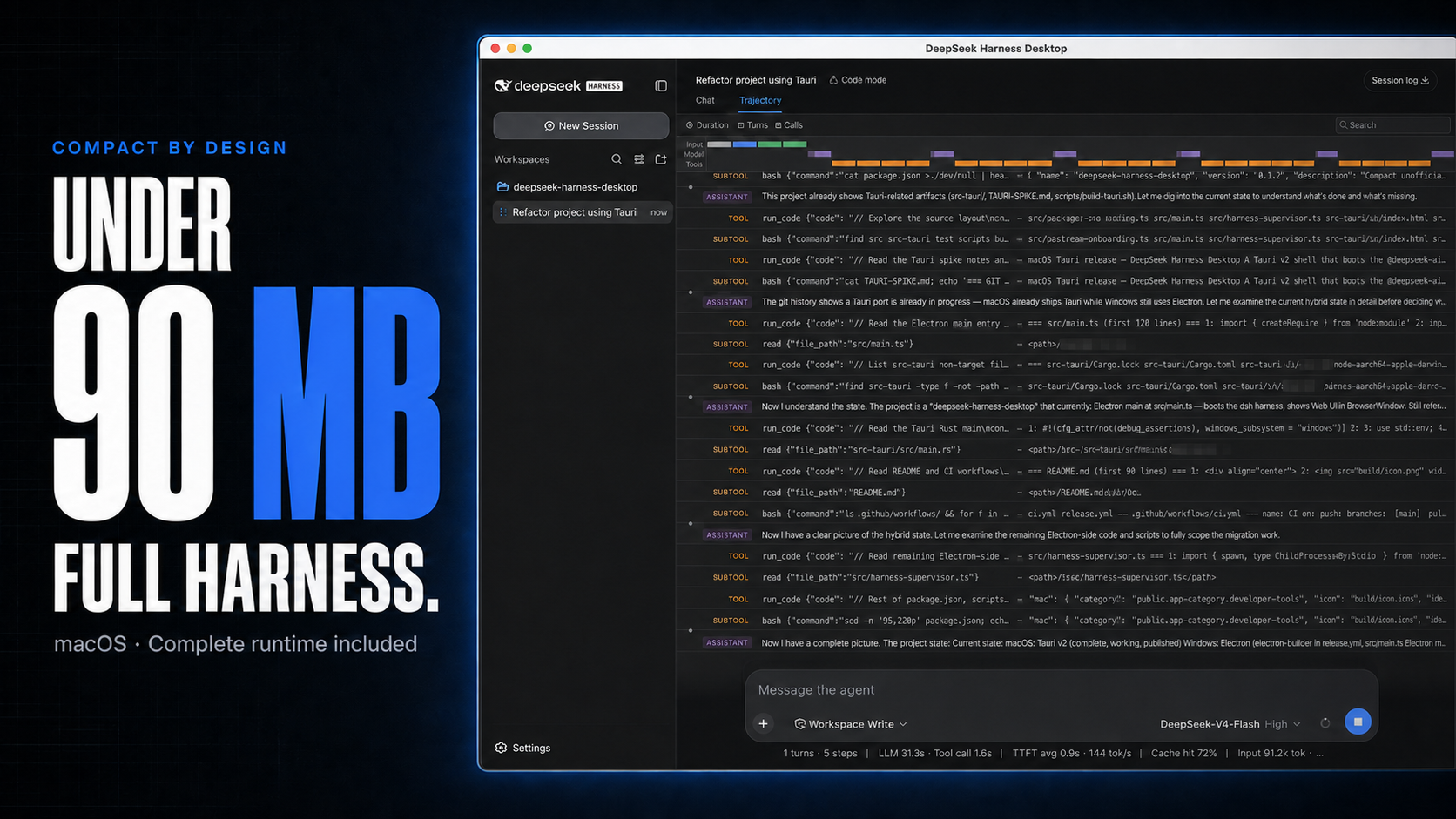
macOS downloads under 90 MB, with the complete Harness rc.8 runtime included.
DSH Desktop runs the official DeepSeek Harness Web UI and runtime in a desktop window. This build is aligned with @deepseek-ai/dsh@0.1.0-rc.8 and shows that bundled Harness version in the sidebar. The app manages the local Harness process automatically, so users do not need to install Node.js or start dsh web themselves.
[!IMPORTANT] This is an independent community project, not an official DeepSeek AI product. DeepSeek Harness is a developer preview and may introduce breaking changes.
Highlights
- Multimodal sessions — paste or attach images and send them through the normal Harness conversation flow when the selected provider and model declare image input support. Image messages remain visible in session history.
- Usage at a glance on macOS — see today and seven-day token totals, estimated cost, active task count, and aggregate running throughput without leaving the current session.
- Compact macOS package — stays under 90 MB while bundling the complete Harness runtime, using Tauri and the system WKWebView instead of shipping Chromium.
- Visible runtime alignment — the sidebar identifies both the Desktop release and its bundled Harness version, such as
DSH Desktop v0.3.0 · Harness rc.8. - Ready to run — includes everything needed to start Harness, with no separate Node.js installation or terminal command. The app starts and stops the local runtime automatically.
Cost figures are estimates derived from local token logs and available public model prices. Unmatched models stay visibly unpriced rather than being counted as free.
Multimodal and usage insights
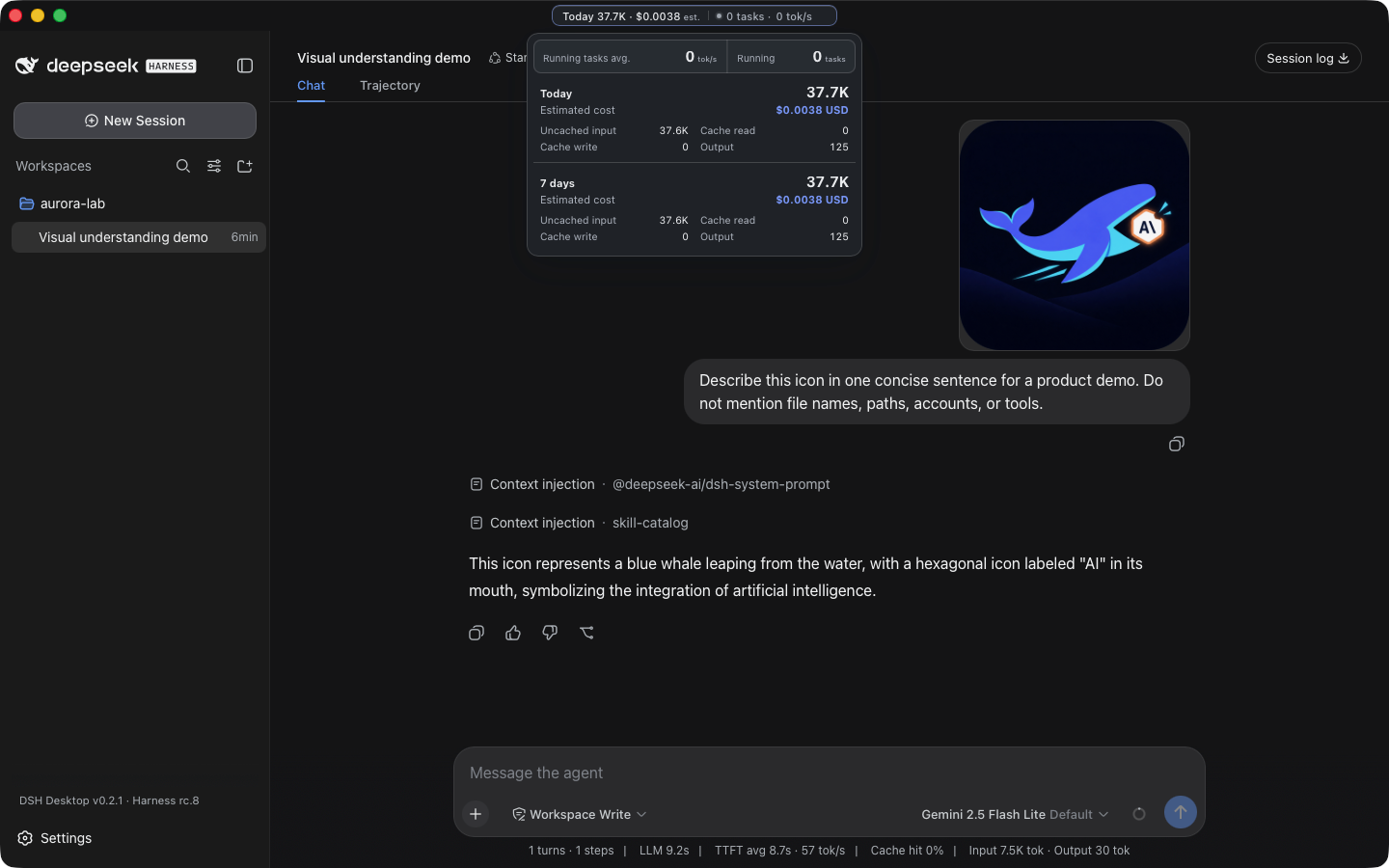
A real Harness rc.8 image-input session with live token and cost insights, using google/gemini-2.5-flash-lite through OpenRouter.
The compact title-bar summary stays visible while you work. Open it for input, output, cache, cost, and live-throughput details. Usage is calculated locally from Harness session history, with estimated costs based on available public model prices.
Download
Installers are published on the latest GitHub Release.
| Platform | Architecture | File |
|---|---|---|
| macOS | Apple Silicon | mac-arm64.dmg |
| macOS | Intel | mac-x64.dmg |
| Windows 10/11 | x64 installer | win-x64.exe |
| Windows 10/11 | x64 portable | win-x64.zip |
Releases also include ZIP archives and SHA256SUMS.txt for integrity verification. Download installers from this repository's GitHub Releases page.
Quick start
- Install and open DSH Desktop.
- Open Settings → Models and configure a provider and API key.
- Add or select a workspace.
- Start a Harness session.
- Paste or attach an image when the selected model supports image input.
Configuration, workspaces, and sessions live in the same DSH_HOME used by the official CLI (~/.dsh by default).
Plugins and recovery
On macOS, open Settings → Plugins → Install & manage. The installer accepts an npm package, github:owner/repo, a public GitHub HTTPS URL, or a full command such as:
dsh plugin --profile web add github:owner/repo
Desktop parses supported install commands without running pasted text through a shell, then checks that Harness restarts successfully. If startup fails, it restores the previous plugin configuration. Third-party plugins run code on the local machine, so review their source and publisher before installation.
Architecture
Desktop shell → loopback-only dsh web → official Harness UI/runtime
       └────── shared DSH_HOME for settings, sessions, and plugins
The project does not fork or reimplement the Harness agent runtime. The shell owns desktop packaging, process lifecycle, navigation boundaries, recovery, native integration, and release verification.
Development
Node.js 22.19 or newer is required.
git clone https://github.com/chokwinlee/deepseek-harness-desktop.git
cd deepseek-harness-desktop
npm ci
npm test
npm start
Build the macOS Tauri release with npm run build:mac; build the Windows Electron release with npm run dist. Packaging changes should also pass the real packaged-runtime checks in the release workflow.
Project
- Read CONTRIBUTING.md before opening a pull request.
- Report vulnerabilities through the process in SECURITY.md.
- Product and UI decisions follow PRODUCT.md.
- The desktop host is MIT licensed. Harness and bundled dependencies retain their own licenses; see THIRD_PARTY_NOTICES.md.
Listing badge

[](https://deepseek-plugin.org/plugins/chokwinlee/deepseek-harness-desktop)Paste this markdown into your GitHub README to link back to this listing. The badge only states the listing — not a security endorsement.