DSH Task Board plugin: five-column Kanban collaboration + 10 taskboard_* agent tools, supports task-project linking, scheduled execution, worktree code isolation, and structured acceptance.

- Language
- TypeScript
- License
- Apache-2.0
- Branch
- main
Install
$ dsh plugin --profile web add dsh-taskboardRun the command above in your terminal to install this plugin via the dsh CLI. You can switch Profile in the top-right corner. New to dsh? Read the beginner tutorial
Install via your agent
Install the DeepSeek Harness plugin cloader/dsh-taskboard for me: review the repository at https://github.com/cloader/dsh-taskboard first, then run the install command and verify the plugin loads successfully.
Paste this instruction to the DSH Web GUI assistant — it will install and verify for you.
At a Glance
Add a five-column task board to the DeepSeek Harness (DSH) Web GUI: humans create and accept cards in the browser, AI agents claim, execute, and fill in results through 10 taskboard_* tools in terminal sessions, with bidirectional sync throughout and support for scheduled execution and Git Worktree code isolation.
Core Features
- Five-column board + SSE real-time refresh: Planned / To Do / In Progress / Pending Acceptance / Completed five columns (plus blocked marker and deleted/archived sub-columns), any write from either side pushes to the other via SSE, board updates without manual refresh (src/shared/protocol.ts:31-44 / src/host/routes.ts:908-909)
- Tasks bound to project (workspace) boundaries: Each task is bound to a DSH workspace, agents can only claim/execute others' tasks within their own project, cross-project grabbing is prohibited; after claiming, that session holds the lock, others cannot move it (src/host/protocol.ts:71-77 / src/host/tools.ts:208-216 / 552-578)
- 10 taskboard_ agent tools*: Query board / read card / create card / modify card / move card / comment / list comments / soft delete / acceptance checklist / execution report — any agent session can call, all write operations use ifVersion optimistic concurrency (src/host/tools.ts:280-866)
- Manual or scheduled execution: Each execution creates a brand new clean session in the task's project, with fixed model and preset; tasks can set cron expressions scanned and triggered by the host process every minute, runs normally even with browser closed (src/host/execution.ts:262-426 / src/host/scheduler.ts:46-98)
- Git Worktree code isolation: By default each execution runs in a separate worktree at
.dsh-worktrees/<taskID>/+ branchtask/<title>+<taskID>, settlement collects commits / uncommitted changes / diff stat; non-git projects automatically degrade to original directory (execution record notes reason), one-click--no-ffmerge during acceptance (src/host/execution.ts:480-526 / src/host/git.ts:107-298) - Acceptance checklist DoD and structured reports: When creating a card, set ≤30 acceptance items, agent uses
taskboard_checklistto check off while working (with evidence notes), user sees "☑ n/m" on card with unchecked items highlighted in red; agent usestaskboard_execution_reportto submit summary/changed files/self-verification/artifacts/remaining risks (src/shared/protocol.ts:615-656 / src/host/tools.ts:697-866 / README.md:24-26) - Task templates + JSON import/export: Built-in three templates — Bug Fix / Release Check / Routine Inspection, any task can "save as template"; top bar "⬇ JSON" for full backup, "⬆ Import" supports dry-run preview (new / override / invalid categorization), auto-backup before full replacement (src/host/templates.ts:15-56 / README.md:26-27)
Technical Implementation
- Language: TypeScript (ESM, dual-build: host + browser), browser side uses React 18 + JSX (src/client/styles.ts / src/client/board-mount.tsx)
- Key dependencies:
@deepseek-ai/cordis(^4.0.1, host framework),@deepseek-ai/dsh-agent/-workspace/-tools/-system-prompt/-host-webserver(^0.1.0-rc.6, type-only import, not in build output),react^18.3.1 (src/client browser side) - Architecture pattern: cordis dual-sided plugin — Node half (
src/index.ts) injectstools+workspaceRegistry+agents+webServer, registers 10 taskboard_* tools,/dsh-taskboard/*JSON API, SSE event stream, execution service, scheduler; Browser half (src/client/index.ts) injects sidebar entry and board view afterconnectionservice is ready; bundle is injected viacordis.patch.ymlwith a plugin row,package.json#dsh.bundle.patchdeclares patch path - Entry files:
src/index.ts(host half, exportsname = 'dsh-taskboard',inject = ['tools','systemPrompt']) /src/client/index.ts(client half, exportsname = 'dsh-taskboard/client',inject = ['connection']) /cordis.patch.yml(bundle layer declaration)
Use Cases
You want agents in DSH to handle a series of structured work — like "weekly routine inspection", "batch bug fixes", "pre-release checklist" — instead of users manually starting new sessions one by one in chat boxes. It's suitable for: teams using DSH but struggling with "which session is running what, how much has been done, how to accept" without a unified view; need to give agents project boundaries and concurrency control; and want to merge session records, commits, checklists, and reports into an acceptance-ready card. Worktree isolation is especially suitable for multiple people/agents modifying the same repository in parallel without conflicts. Regular ad-hoc conversations don't need this.
Prerequisites & Compatibility
| Dependency | Min Version | Notes |
|---|---|---|
| DeepSeek Harness (DSH) | >= 0.1.0-rc.6 | devDependencies locks a set of @deepseek-ai/dsh-{agent,workspace,tools,system-prompt,host-webserver} ^0.1.0-rc.6 (package.json:57-61); type-only import, host must upgrade to corresponding version |
| Node | Not declared | Source uses node:fs/promises, node:child_process.execFile, node:os.homedir, node:path.join and other built-in APIs (src/host/store.ts:9, src/host/git.ts:171-179, src/host/sdk.ts:22-23) |
| Platform | macOS / Windows / Linux | Only cross-platform system command calls; child_process calls git with windowsHide: true (src/host/git.ts:176) |
| Native modules | None | Only Node built-ins node:fs/promises / node:child_process / node:os / node:path; no native bindings |
External command git | Any version | worktree isolation requires git; non-git projects or git not in PATH automatically degrade to original directory (src/host/git.ts:107-111, 213 / src/host/execution.ts:480-526) |
@deepseek-ai/cordis | ^4.0.1 | peer framework, provided by host DSH |
Installation
dsh plugin --profile web add dsh-taskboard
Tip: Official
@deepseek-ai/dsh-*packages only go into profile'sbundleslist, don'tplugin addinto dependencies, otherwise SDK dual instance shadowing occurs (README.md:50).
Configuration
| Config | Type | Description | Default |
|---|---|---|---|
| DSH_TASKBOARD_MAX_CONCURRENT | Integer env var | Max concurrent tasks; when full, manual triggers error directly, scheduled tasks retry next window | 3 |
| DSH_HOME | Path env var | Override ledger and template file root ($DSH_HOME/dsh-taskboard.json and dsh-taskboard-templates.json) | ~/.dsh |
| ATB_TRACE | String env var | Set to 1 to log all taskboard_* tool input/output to stderr for debugging; doesn't affect normal behavior | Not enabled |
| Task title length | Input limit | Title 1..200 chars when creating/modifying card, reject if too long | Max 200 chars |
| Execution prompt length | Input limit | Task prompt max 8000 chars | Max 8000 chars |
| Checklist items | Input limit | Max 30 acceptance items per card; each max 200 chars; single checklist add ≤10 items | 30 / 200 / 10 |
| Execution records retention | Internal policy | Keep last 20 execution records per task in ledger, prune excess on each write | 20 |
Local file locations: Ledger
$DSH_HOME/dsh-taskboard.json, templates$DSH_HOME/dsh-taskboard-templates.json. Full replacement import auto-writesledger.backup-<timestamp>.jsonbefore writing (src/host/store.ts:112-117 / src/host/templates.ts:11).
FAQ
Q: Can tasks be dragged to any column?
A: No arbitrary dragging. The board has a built-in state machine: Planned → To Do / Cancelled, To Do → In Progress / Planned / Cancelled, In Progress → Pending Acceptance / To Do / Cancelled, Pending Acceptance → In Progress / To Do / Completed / Cancelled, Completed → Archived. Tasks being executed (held by session) have drag blocked, popup shows which session is running (src/shared/protocol.ts:50-68 / src/client/controller.ts).
Q: Why does the board card automatically collapse when I click another conversation while agent is executing?
A: This is the "yield" semantics of the sidebar entry: clicking a real session row or new session button in the sidebar temporarily closes the task board; clicking the board entry itself or a card restores it. Fixed a race condition in 0.4.1 where entry was nested inside newSession container causing click event to toggle repeatedly (README.md:70-71).
Q: The "✓ Done" button one-clicks through acceptance, why sometimes it asks for二次确认?
A: When a task has an acceptance checklist but not all items are checked, the button shows二次确认 and displays unchecked item count. Code level prohibits agents from moving tasks to "Completed" — even with full checklist checked doesn't equal done, must be clicked by user in UI (src/host/protocol-text.ts:28 / README.md:23-24).
Q: What's the difference between resume (↻) and immediate execution?
A: Immediate execution always starts a fresh worktree from main branch HEAD; resume keeps the previous worktree and branch (including uncommitted changes and commits), baseline takes current HEAD, evidence only counts this round's additions. Failure/cancellation also leaves evidence (commits and uncommitted as usual). Whether to degrade to original directory on resume failure depends on current isolation setting (src/host/execution.ts:138-146, 320-335 / src/shared/api.ts:100 / README.md:96-105).
Q: I installed DSH Desktop but can't see the board, what to do?
A: 0.4.2 fixed DSH Desktop Web shell removing data-pane attribute causing mount point failure — now using dual selector '[data-pane="conversation"], [class*="centerCol"]' as fallback. Theoretically 0.4.2+ works after restart; if you're on an earlier version, please upgrade to latest (README.md:65-66).
Q: How to move data to another machine?
A: Top bar "⬇ JSON" exports full set (custom format, includes ids/version), on new machine "⬆ Import" selects file for dry-run preview (new / override / invalid categorization), then choose "Merge" or "Full Replace". Full replace auto-backs up before writing to avoid mistakes; exported JSON is backup format and can be directly restored (README.md:26 / src/host/routes.ts:774-844).
Learning Curve
Advanced — the five-column board and manual trigger work out of the box, but to get worktree isolation, scheduled execution, templates, and agent tool system running smoothly requires understanding DSH's "project (workspace)" concept, cron five-field syntax, and Git Worktree basics; normal use just follows popup prompts, deep configuration follows README.
Known Issues & Limitations
- Worktree isolation is a collaboration convention, not a sandbox: Execution session has full tool permissions, isolation relies on branch conventions, not suitable for running untrusted code (README.md:38). Non-git projects or unavailable git automatically degrade to original directory, execution record notes degradation reason (src/host/execution.ts:480-526)
- Execution records and diff capped: Each task keeps last 20 executions, ledger won't be inflated by scheduled tasks; commit evidence max 50 items, uncommitted changes max 100 lines; diff capped at 128KB / 2000 lines, beyond that marked truncated (src/host/protocol.ts:401-412 / src/host/git.ts:37-66)
- Preset parsing failure results in no-op execution: Execution sessions are created based on task's
presetIdcombination, if preset doesn't exist or is corrupted, this execution fails directly, reason written to execution record, task returns to To Do — won't produce half-combined session (src/host/execution.ts:350-358 / README.md:88-89) - DSH Desktop shell compatibility: Early DSH Desktop's web shell removed
data-pane, from 0.4.2 mount selector compatible withclass*="centerCol"fallback; if you installed before 0.4.2 and can't see board, please upgrade (README.md:65-66) - Scheduled tasks "squeeze" when concurrent limit is full: After full, scheduled task's due window is preserved, retried next minute, no catch-up; if your tasks are heavy and intervals short, consider lowering frequency (src/host/scheduler.ts:77-86 / README.md:135)
- Git operations for same repository are serial within process: Create/delete worktree / merge / delete branch for same repository execute serially to avoid git index.lock contention (src/host/git.ts:195-205 / README.md:97)
- Agent tool call tracing not enabled by default: To debug agent protocol issues, set
ATB_TRACE=1, otherwise tool calls don't log except errors (src/host/tools.ts:261-275)


dsh-taskboard
DeepSeek Harness 的任务看板插件:人建卡、agent 认领执行、人验收。任务挂项目(workspace)、可指定模型、支持手动与定时执行,全流程双向协作。
界面
核心功能
看板协作
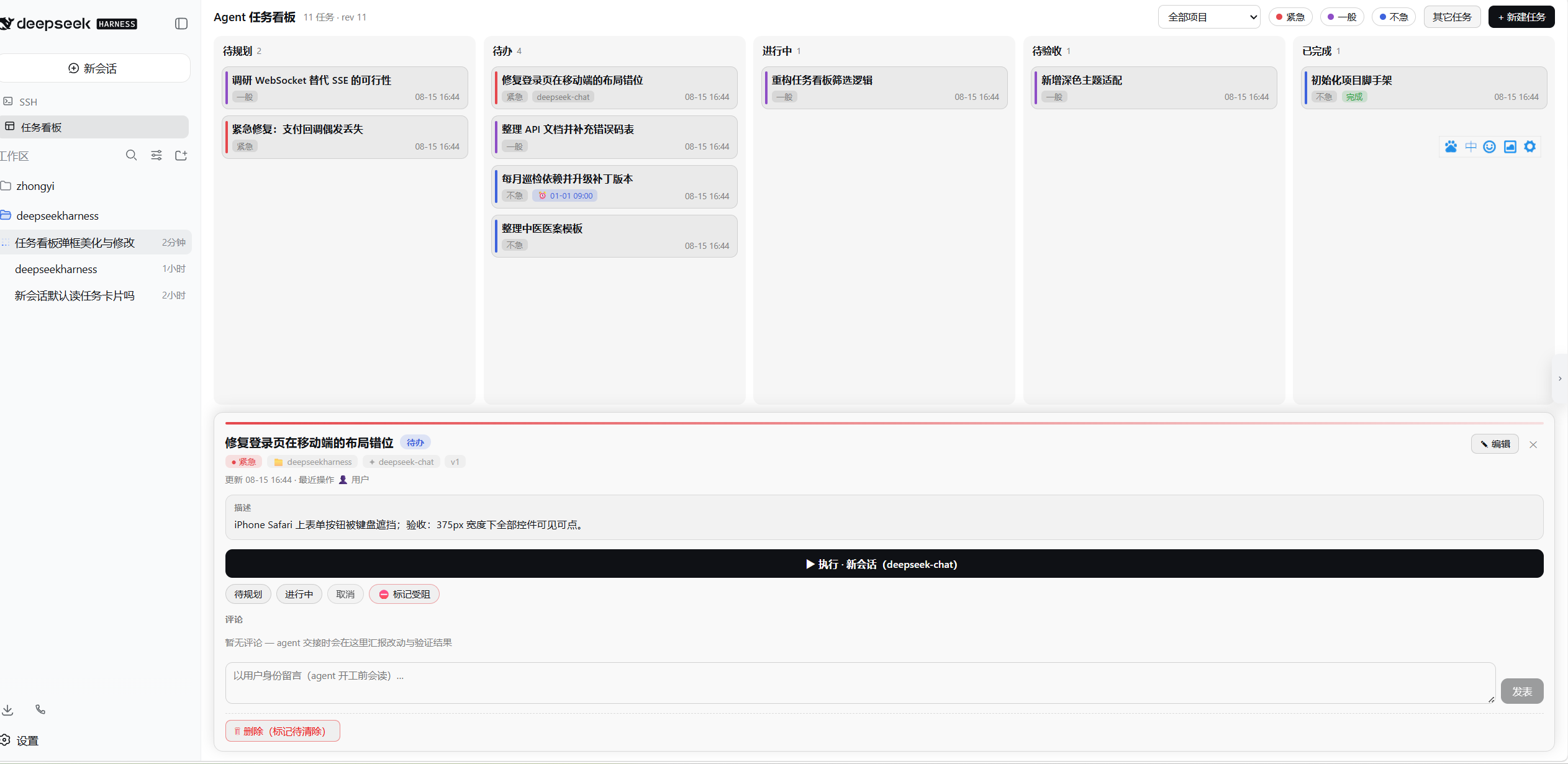
- 五列看板(待规划 / 待办 / 进行中 / 待验收 / 已完成)+ 受阻标记,SSE 实时刷新
- 任务挂项目:认领校验会话归属,跨项目不可抢
- 紧急度三色(紧急/一般/不急)筛选与色条;搜索(标题/ID)与列内排序,筛选排序持久化
- 列头状态色圆点:待规划灰 / 待办蓝 / 进行中橙 / 待验收紫 / 已完成绿 / 已删除红
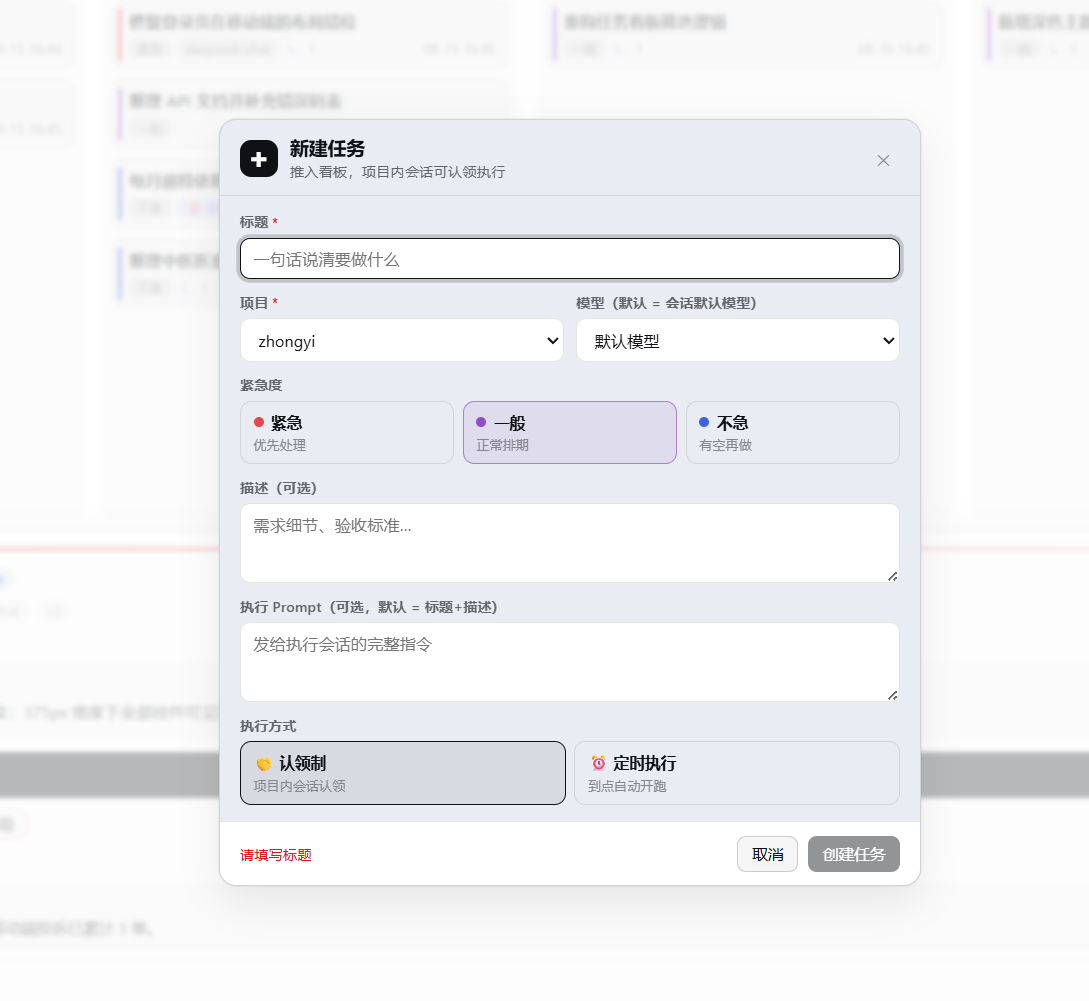
- 新建/编辑弹窗:项目、模型、紧急度、执行方式、cron 实时校验与下次运行预览、执行隔离开关、验收清单编辑
- 详情面板:状态流转(done 仅限人工;清单未全勾时完成需二次确认并显示未勾数)、agent/用户评论流、执行记录(倒序,最新在最上;会话 ID 点击跳转打开该执行会话;已删除/已归档分开提示)、停止执行、Worktree 隔离块(分支 / 提交 / 改动统计 / 合并与清理)、执行报告块、验收清单块
- 待验收列卡片快捷操作:「✓ 完成」一键验收、「✗ 退回」退回待办并可附退回原因(agent 开工前会读)
- 验收清单 DoD(0.4.0):建卡时定验收条件(≤30 项);agent 用
taskboard_checklist增补/勾选(附证据 note);用户在详情页直接勾选;待验收时未完成项红色高亮 + 卡片「☑ n/m」角标(未全勾显红);清单编辑在表单中整组管理(勾选状态与证据保留) - 结构化执行报告(0.4.0):agent 收尾用
taskboard_execution_report提交(摘要 / 改动文件 / 自验 / 产物 / 剩余风险),自动挂到当前执行记录;待验收详情页分栏渲染;开场框架行明示提交时序(报告 → 评论 → 移待验收) - JSON 导入(0.4.0):顶栏「⬆ 导入」选择备份文件 → 干跑预览(新增 / 覆盖 / 无效分类明细)→ 合并(按 id upsert)或整册替换(自动先备份当前台账 + 二次确认);⬇ JSON 导出的文件即同格式可直接恢复
- 任务模板(0.4.0):「+ 新建任务 ▼」下拉(空白 / 内置 Bug 修复·发布检查·例行巡检 / 管理模板)一键预填表单(标题/描述/Prompt/紧急度/定时/隔离/preset/清单);任务详情「⌗ 存为模板」沉淀常用配置;模板存 DSH 主目录 side file,改名/删除在管理弹窗
- Diff 查看器(0.4.0):隔离块提交行、未提交修改文件行点击即在看板内展开 diff(提交
git show/ 文件git diff,128KB·2000 行封顶标注截断);worktree 已删时回落主仓(仅限提交与带基线的范围 diff)
Agent 工具(taskboard_*)
- 10 个工具:查板 / 建卡 / 改卡 / 移卡 / 评论 / 软删除 / 验收清单 / 执行报告,任何会话可用
- 代码级协议闸:agent 永远移不到 done(清单全勾也不行);任务被持有时不可抢占;model/execution 对 agent 只读
执行
- 手动执行或 cron 定时:每次执行在任务项目内新建全新会话(干净上下文、可指定模型、可指定 preset);开场两条消息同一回合送达——插件上下文行携带任务框架与交接协议(含失败回退路径),卡片内容(提示词或标题+描述)以正常用户消息呈现
- 任务级 preset(0.3.3):新建/编辑表单「执行模式(preset)」下拉——执行会话按该 preset 组合(工具集与人设由此而来,对齐 GUI 新会话的组合方式);默认预选部署默认 preset(本部署即标准模式),也可选「跟随部署默认」;preset 损坏时执行直接失败并把原因写进执行记录(不产出半组合会话);随时可改,下轮执行生效
- Git Worktree 隔离执行(0.3.0):任务级开关(默认开、记住上次选择),每次执行在
<项目>/.dsh-worktrees/<任务ID>独立 worktree 上进行,分支task/<标题>+<任务ID>(首次创建后定死,改名不改);执行会话归属项目根目录(分组、工具与文件沙箱完整可用——DSH 要求会话 cwd 即工作区根,0.3.2 修正),worktree 路径与边界纪律在开场指令中明确下达;结算自动采集提交列表 / 未提交修改警告 / 改动统计;非 git 项目或 git 不可用时自动降级原目录执行(执行记录注明降级原因,台账与执行主流程永不因 git 失败而失败);验收时详情页一键--no-ff合并到主工作区(主区脏或冲突原样报告,不自动解决)、删除 worktree(有未提交修改时拒绝)、可选删分支;支持「↻ 续跑」在现有 worktree/分支上继续执行(保留上次改动与提交)Worktree 隔离是协作约定而非沙箱:执行会话拥有完整工具权限,隔离依赖分支约定,不适用于运行不可信代码的场景。
- host 侧调度:关掉浏览器照常触发;错过窗口跳过不补跑
- 乐观并发(ifVersion)+ 完整归因(谁改的、哪个会话执行的)
- ⚙ 健康诊断:台账基本项 + 遗留 worktree(台账无主但目录存在)一键清理
安装
dsh plugin --profile <name> add dsh-taskboard          # npm(推荐,预构建免授权)
dsh plugin --profile <name> add github:cloader/dsh-taskboard   # GitHub 源
官方
@deepseek-ai/dsh-*包只写进 profile 的bundles列表,不要plugin add进 dependencies(避免 SDK 双实例遮蔽)。
开发
npm install && npm run build    # host ESM + client CJS 双构建
npm test                        # vitest 全量
node tests/manual-git-e2e.mjs   # 真 git 端到端手测(worktree 全链路 + 续跑 + diff 查看器)
node scripts/screenshot.mjs     # 重新生成 img/ 截图(需本机 Edge)
升级日志
0.4.2
- 修复 DSH Desktop 上看板不出现(用户反馈:入口能点、后端正常,但中间看板无变化):当前 DSH Desktop 的 Web shell(
dsh-client-ui-layout)已完全移除data-pane属性,中间列改用 CSS Module 哈希类名(pI_x6G_centerCol)——而看板挂载选择器写死[data-pane="conversation"],querySelector永远落空,看板容器从未创建(侧栏入口正常,是因为它一直有[class*="sidebarCol"]兜底)。修复:挂载选择器与隐藏规则双兼容'[data-pane="conversation"], [class*="centerCol"]'(新旧 shell 通吃,与侧栏入口同款兜底策略);.dsh-atb-view以height:100%撑满列容器,不依赖列内部结构 - 回归测试:构造无
data-pane、哈希类名centerCol的 Desktop shell DOM——看板容器正确创建于列内、隐藏规则双选择器齐备
0.4.1
- 修复侧栏入口点击竞态(用户反馈):部分 shell 的 DOM 里,任务看板侧栏入口被插在 class 含
newSession的容器内部——点击入口时,看板的全局捕获监听器(「点侧栏会话/新会话让位」语义)先closeBoard,入口自身的toggleBoard再翻回来,表现为看板一开就闪关、或入口按钮关不掉。修复:捕获监听器先按closest('[data-dsh-atb-entry]')整体豁免入口子树(比给选择器加:not()更稳——:not()只排除元素自身匹配,挡不住入口嵌在带类祖先容器内的形态);真会话行/新会话按钮的让位语义不变。顺带加固newSessionButton()锚点扫描排除自身入口,杜绝自愈重插时锚点自引用 - 回归测试:构造「入口位于 newSession 容器内」的竞态形态 DOM——点击入口开/关 toggle 正常;点真新会话按钮仍让位
0.4.0
验收效率包——把「人验收」环节在看板内闭环:
- 验收清单 DoD:任务模型新增
checklist(≤30 项 × 200 字,勾选人/时间/证据 note 全程留痕)。建卡表单整组编辑(编辑保留勾选状态与证据);agent 侧新工具taskboard_checklist(add 增补 / check 勾选附证据 / uncheck 重开,代码闸:勾选永远不等于完成);执行开场框架行注入清单并下达「完成一项勾一项」纪律;待验收卡片与详情未完成项红色高亮,「✓ 完成」在有未勾项时二次确认并显示数量 - 结构化执行报告:执行记录新增
report { summary, changedFiles, checks, artifacts, risk };agent 收尾用新工具taskboard_execution_report提交——按「调用会话 + 运行中执行」定位挂载(agent 无需知道执行 id,重复提交覆盖);待验收详情页分栏渲染(摘要 / 改动文件 / 自验 / 产物 / 风险);开场交接协议更新为「报告 → 评论 → 移待验收」三步 - JSON 导入:
validateLedgerImport纯函数逐卡校验分类(新增 / 覆盖 / 无效+原因,文件内重复 id 拒绝;schemaVersion 不符明确报错;导入时残留running执行标记为失败——其结算守望已随源主机消亡);POST /import/preview干跑 +POST /import提交(merge 按 id upsert;replace 整册替换前自动写ledger.backup-<ts>.json);GUI「⬆ 导入」弹窗全流程可视化,整册替换双重确认 - 任务模板:host 侧
templates.jsonside file(首启播种内置 Bug 修复 / 发布检查 / 例行巡检);「+ 新建任务 ▼」下拉选模板预填全部配置(含清单与 preset);任务详情「⌗ 存为模板」;管理弹窗改名 / 删除 / 直接使用 - Diff 查看器:git face 新增
showCommit/showPathDiff(fail-soft,128KB / 2000 行封顶标注截断);详情页隔离块的提交行与未提交修改文件行点击即懒加载展开 diff;worktree 已删时自动回落主仓 - 测试 116 → 145;
taskboard_get详情渲染清单与报告标记;复制任务携带清单
0.3.3
- 修复执行会话拿不到工具(非标准模式):0.3.0 起部署引入 preset 体系后,工具不再是全局注册,而是各 preset 组合在会话创建时挂载(GUI 建会话走 apiproxy 的 composeAgent → presets.mount)。我们的执行服务此前直接 agents.create,不挂任何组合 → 会话无工具。现对齐该链路:执行会话按 preset 组合创建,
agentPreset记入会话头 - 任务级 preset 字段:创建任务时可选「执行模式(preset)」,默认预选部署默认 preset(本部署即标准模式)——即按你的决定「默认标准模式」;可切任意 preset(如梁神模式)或选「跟随部署默认」(不落字段,随部署默认变);编辑随时可改(每轮执行现组合,无锁定);复制任务携带;
taskboard_create增presetId参数;详情页显示 preset chip - 坏 preset 防护:preset 解析失败(不存在/损坏)→ 执行直接失败、原因写入执行记录、任务退回待办——不产出半组合会话(与 apiproxy 回滚语义一致)
- preset 目录用来自
agentPreset.list连接 RPC(无 roster 或离线时下拉隐藏,行为回落到裸组合);测试 111 → 116 项
0.3.2
- 修复 worktree 执行会话脱离项目组、工具不可用:0.3.0–0.3.1 把执行会话 cwd 指向 worktree 子目录,而 DSH 的会话模型要求 cwd === 工作区根目录(全等)——子目录导致会话无法挂入项目组(显示「未分组」),且文件沙箱边界与相对路径解析全部失效(agent 无法创建文件)。现改回:会话 cwd = 项目根(分组、工具、沙箱完整可用),worktree 绝对路径与边界纪律(命令 workdir 指向 worktree、文件读写用绝对路径、禁改主工作区其它文件、提交到任务分支)在开场框架行中明确下达。git 隔离与证据采集不受影响
0.3.1
- ↻ 续跑:详情页新增「续跑」——保留现有 worktree 与分支原状(上次的提交和未提交修改都在),在其上继续执行;基线取 worktree 当前 HEAD,证据只统计本轮新增提交。默认「立即执行」仍为全新基线(重置分支到主区 HEAD)
- 同仓库 git 操作互斥:同一仓库的建/删 worktree、合并、删分支在进程内串行执行,消除并发隔离执行之间的 index.lock 竞争
- 失败/取消也留证据:turn 出错或用户停止时,已产生的提交与未提交修改照样采集进执行记录(原先只在成功结算时采集)——中断的半成品可凭记录判断是否续跑
- 执行记录证据封顶:提交最多保留 50 条、未提交修改最多 100 行(均记录总数),超大改动不再撑爆每次全量重写的台账
- 合并空跑检测:分支没有领先主工作区的新提交时直接提示「无需合并」,不再产生假的「已合并」系统评论
- 物理清除连带清理:purge 任务前先检查 worktree——有未提交修改拒绝并列出文件;通过后连带删除 worktree 与任务分支
- 降级语义细化:降级原因区分「git 不可用(未安装/不在 PATH)」与「当前项目不是 git 仓库」;降级运行的开场提示明确警告会话正在主项目目录工作(先 git status、改动集中、结束说明改动文件)
- 全新检出提示:全新 worktree 的开场提示告知不含 node_modules/构建产物,构建测试前可能需重装依赖
- 诊断面板增强:新增 gitignore 建议列表(git 项目未忽略
.dsh-worktrees/一目了然,仍不自动修改);「悬挂执行中」更名为「执行中」 - README 注明 Worktree 隔离是协作约定而非沙箱;测试 97 → 111 项
0.3.0
- Git Worktree 隔离执行(旗舰):并发执行互不污染代码,验收即审分支
- 任务级隔离开关:新建表单「执行隔离」(默认 Worktree、记住上次选择;非 git 项目自动禁用并提示);
taskboard_create增isolation参数;复制任务携带;首次执行前可改、开始后锁定 - 执行链路:每次全新 worktree(
git worktree add --force到固定路径.dsh-worktrees/<任务ID>,固定分支task/<标题>+<任务ID>,标题清洗+截断、空标题回退纯 ID、改名不改分支);执行会话 cwd 指向 worktree;开场框架行引导 agent 把改动提交到该分支 - 结算采集:提交列表(hash+主题)、未提交修改警告、改动统计与文件数——「执行记录 ↔ commits 关联」并入本轮
- 验收操作(详情页):⇥ 合并(
--no-ff,主区脏/冲突原样报告且自动merge --abort复原)、🗑 删除 worktree(有未提交修改拒绝,可选连分支删除)、保留分支退回继续修改 - 安全规则:显式关闭 = 全程零 git 调用;非 git 项目 / git 不可用 / 超时全部自动降级原目录(isolationNote 注明原因,fail-soft:台账与执行永不因 git 失败而失败);合并的干净检查豁免插件自有的
.dsh-worktrees/目录;所有 git 操作带超时(查询 2s / 结构操作 15s) - host 新模块
src/host/git.ts:窄接口 GitFace(detect/prepare/collect/merge/remove/deleteBranch),exec 层可注入(测试零真 git);workspaces 路由下发 git 检测结果(60s 缓存);启动时对未忽略.dsh-worktrees/的项目提示 gitignore 建议(不自动改)
- 任务级隔离开关:新建表单「执行隔离」(默认 Worktree、记住上次选择;非 git 项目自动禁用并提示);
- ⚙ 健康诊断:台账基本项(修订号/任务数/悬挂执行中)+ 遗留 worktree 列表(台账无主但目录存在)一键清理(未注册目录 fs 兜底,有未提交修改仍拒绝)
taskboard_get详情输出隔离与分支信息;测试 67 → 97 项
0.2.2
- 待验收快捷操作:待验收列卡片上直接「✓ 完成 / ✗ 退回」,退回可附原因(可留空),退回与评语一次原子提交(移卡失败不会产生孤儿评论)
- 非法状态流转的 HTTP 状态码由 500 修正为 400
0.2.1
- 调整任务发起时的提示词
0.2.0
- 看板效率:顶栏新增搜索(标题/ID,大小写不敏感)、列内排序(默认/最近更新/紧急度/创建时间);筛选与排序按 localStorage 持久化(搜索不持久)
- 侧边栏状态条:「任务看板」入口同行右侧显示
待办|进行中|待验收计数(如0|1|2),三个数字分别着蓝/橙/紫状态色,悬停提示含义与实时数字,数字变化时上下滚动动画(增长上滚、减少下滚,尊重 prefers-reduced-motion) - 执行结算闭环:执行会话结束但未按协议交接(没评论/没移待验收)时,系统自动补评论并移入待验收——任务不再静默挂在进行中;执行失败也留系统评论
- 认领租约:认领超 30 分钟未动的任务,卡片与详情显示「⏱ 认领超时」;详情页新增「🔓 释放认领」一键退回待办
- 执行记录保留上限:每任务保留最近 20 条执行记录(详情页显示「+N 已清理」),定时任务的台账不再无限膨胀
- 全局并发上限:同时执行的会话数默认上限 3(
DSH_TASKBOARD_MAX_CONCURRENT可调);调度器满载时保留到期窗口不烧掉,下个 tick 重试 - 执行 Prompt 模板变量:
{{lastExecution}}(上次执行结果)、{{lastComments}}(最近 3 条评论)——巡检类定时任务能看到上次跑出了什么 - 复制任务:详情页「⧉ 复制」一键克隆全部配置为新卡
- 导出:顶栏「⬇ JSON」全量台账备份、「⬇ CSV」任务清单(带 BOM,Excel 直接打开)
- 状态色点:五列列头与「其它任务」三列的分类文字前显示状态色圆点(待规划灰/待办蓝/进行中橙/待验收紫/已完成绿/已删除红),与详情页状态 pill 同色系
- 执行会话跳转:详情页执行记录(倒序,最新在最上)点击会话短 ID 直接打开该执行会话,看板自动收起;已删除与已归档分开提示并带短 ID;运行时服务惰性解析、会话列表镜像滞后时自动刷新重查一次;短 ID 剥离
taskboard-中缀,各记录可区分
0.1.3
- 执行竞态与持锁修复:
- 「立即执行」原子闸:in-progress 检查移入串行写队列,重复点击 / 调度重叠最多开一个执行会话
- 认领改为显式
claimedBy/claimedAt字段(原先从 updatedBy 推断,用户编辑会误清持锁);执行期间任务由执行会话持有,其他会话不可移动;旧台账加载时自动迁移 - 执行失败自动回退 todo(原先永久卡在 in_progress);host 重启后残留的 running 执行标记为 failed 并归还任务;成功结算后释放持锁
- 执行可取消:详情页「■ 停止执行」——停止执行会话、执行记录标记 cancelled、任务回到待办
- 模型校验:建卡/改卡的固定模型做结构校验 + provider 路由存在性校验(host llm 运行时不可达时只做前者)
- 台账安全:
store.snapshot()/get()返回冻结副本,外部修改直接抛错,杜绝绕过版本号的原地改数据 - 调度器:tick 前先加载台账(修复 host 重启后首个 tick 读到空表导致定时任务不触发);启动补偿定时器随 dispose 清理
- 其它:执行记录会话 ID 点击复制;详情页显示持锁会话;删除死代码(
store.flush/ routestaskPath)
0.1.2
- 看板拖拽:所有列的卡片可互相拖动(按状态机校验合法流转,非法拖放弹窗提示);正在执行的任务拖动会被拦截,提示「该任务正在由【任务名】会话执行,不能拖动」
- 执行会话体验:执行会话标题固定为任务名(经
sessionTitle.rename写入,不会被自动重命名覆盖);首条消息以正常用户消息呈现(不再是插件上下文行) - 交互优化:
- 新建/编辑弹框新增「⚡ 立即执行」按钮(保存后直接发起执行)
- 详情页「立即执行」移至「编辑」按钮旁
- 「+ 新建任务」移至看板标题统计旁
- 状态流转按钮文案统一为「移至→{状态}」
- 弹窗:原生
alert()全部替换为主题化模态弹窗(Esc/遮罩可关)
0.1.1
- 初始 npm 发布:看板协作、8 个 agent 工具、手动/cron 执行、SSE 实时视图
License: Apache-2.0
Read the usage guide →
Install steps, key points, FAQ and compatibility for this plugin — auto-derived from indexed fields.
Listing badge

[](https://deepseek-plugin.org/plugins/cloader/dsh-taskboard)Paste this markdown into your GitHub README to link back to this listing. The badge only states the listing — not a security endorsement.