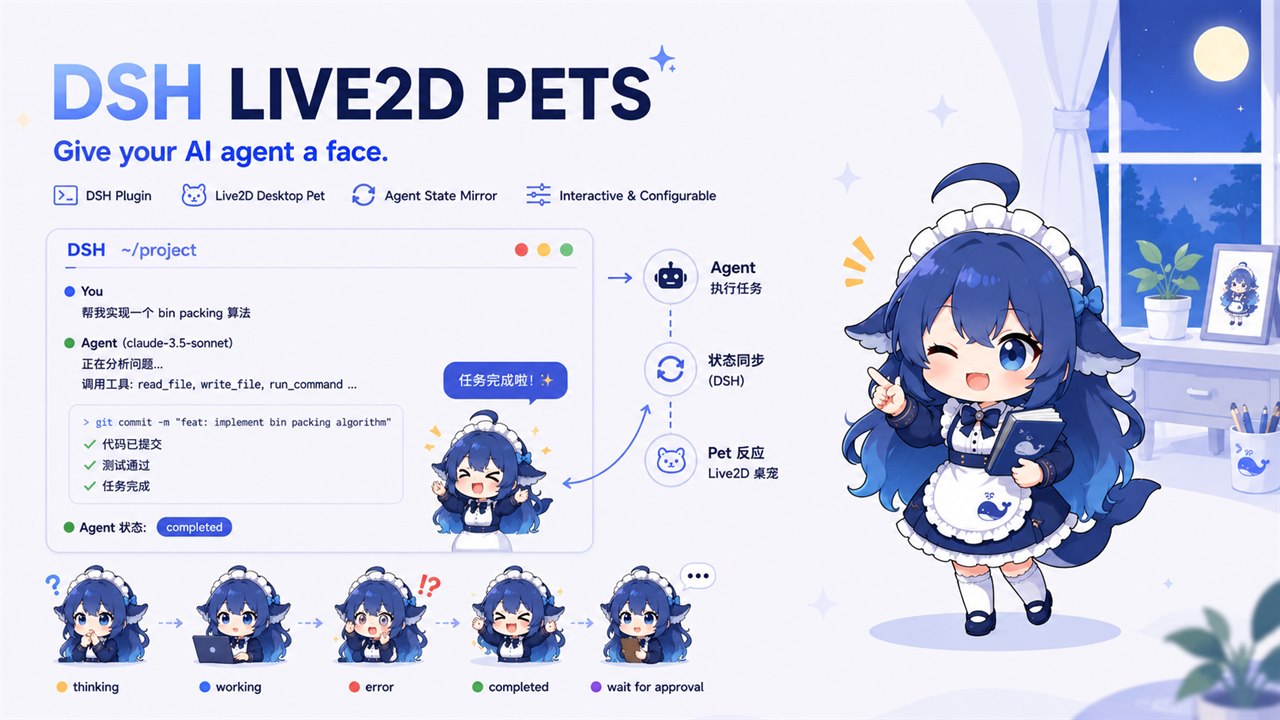
Adds a Live2D desktop pet to DSH Web GUI: mirrors agent's thinking, idle, error, and completed states; supports touch-responsive body parts, mouse following, and multiple character dialogue sets.

- Language
- TypeScript
- Branch
- main
Install
$ dsh plugin --profile web add dsh-live2d-petsRun the command above in your terminal to install this plugin via the dsh CLI. You can switch Profile in the top-right corner. New to dsh? Read the beginner tutorial
Install via your agent
Install the DeepSeek Harness plugin cyanfish-x/dsh-live2d-pets for me: review the repository at https://github.com/cyanfish-x/dsh-live2d-pets first, then run the install command and verify the plugin loads successfully.
Paste this instruction to the DSH Web GUI assistant — it will install and verify for you.
One-Line Pitch
Add a Live2D desktop pet to DeepSeek Harness Web GUI that mirrors the agent's thinking/idle/error/completed state in real-time and supports head/body petting interactions, making the wait time for agent execution more engaging.
Core Features
- State Mirroring: When the agent is thinking/idle/error/completed/waiting for approval, the pet automatically switches animations and speech bubbles (thinking and waiting for approval show long-state bubbles with text that progresses through stages over time)
- Part-Based Touch Interaction: Petting head/legs/hands/body each has exclusive dialogue and animations; when model hit zones are insufficient, falls back to five-rectangle spatial fallback
- Mouse Following: Pet's head, eyes, and body smoothly look toward the mouse; resets when mouse leaves the page; pauses following during drag and actions
- Free Dragging: Grab the pet and drag to any position; releases to dock; position is persisted
- Built-in Persona System: Six anime personalities (tsundere/energetic/airhead/kuudere/gentle healer/yandere) covering all dialogue; supports JSONC file custom personas (includes commented maid Easter egg)
- Custom Models: Fill in any .model3.json HTTP(S) URL or local absolute path; plugin host loads via same-origin routing; no need to bundle model files into npm package
Technical Implementation
- Language: TypeScript (Node.js host + React 18 browser half)
- Key Dependencies: @deepseek-ai/schemastery (config schema), @deepseek-ai/cordis (plugin fiber), @deepseek-ai/dsh-settings (config namespace), @deepseek-ai/dsh-host-webserver (same-origin HTTP routing)
- Architecture Pattern: Host half subscribes to agent events + registers settings namespace + registers same-origin routes; client half receives state pushes via SSE (
/api/live2d-pet/events), renders viashell.overlayPopover top layer (pixi-live2d-display 0.4.0 + PixiJS 6.5.10 + Cubism Core 4) - Entry Files:
src/index.ts(Host entry, registers services & routes),src/client/index.ts(Browser entry, mounts Layer + settings page)
Use Cases
DSH power users running long tasks want to see a small character in the corner that real-time reflects "still thinking / finished" and conveniently pet the head/legs; potential users who want to add "mascot" vibes to DSH videos/lives/tutorials with anime characters. License is commercially safe: default model Hiyori is a Live2D official sample model, free for commercial use.
Prerequisites & Compatibility
| Dependency | Min Version | Description |
|---|---|---|
| Node.js | ^22.19.0 | |
| @deepseek-ai/cordis | ^4.0.1 | Plugin fiber, see package.json#peerDependencies |
| @deepseek-ai/dsh-client-runtime | ^0.1.0-rc.6 | Client runtime |
| @deepseek-ai/dsh-host-webserver | ^0.1.0-rc.6 | Host same-origin HTTP routing |
| @deepseek-ai/dsh-client-ui-slots | ^0.1.0-rc.6 | Used to mount shell.overlay and settings.section |
| @deepseek-ai/dsh-settings | ^0.1.0-rc.6 | Settings namespace registration |
| Platform | macOS / Windows / Linux | Host-side Node cross-platform; browser-side depends on host's running Web GUI |
| Native Modules | None | Pure Node fs + browser WebGL |
Installation
dsh plugin --profile web add dsh-live2d-pets
Configuration Options
| Config | Type | Description | Default |
|---|---|---|---|
| enabled | Boolean | Master switch for pet; completely disables rendering when off (zero overhead) | true |
| size | Number | Pet size in pixels (slider 40–400) | 160 |
| maxFps | Number | Render frame rate limit, three-level radio selection | 30 |
| model | String | Selected model: built-in ID or custom model ID (also directly accepts URL) | hiyori |
| persona | String | Selected persona: built-in (tsundere/energetic/airhead/kuudere/gentle healer/yandere) or custom persona ID | tsundere |
| developerMode | Boolean | Developer options master switch; shows debug panel entry and click partition color blocks when enabled | false |
| debug | Boolean | Debug panel: real-time state/animation/FPS/demo state switching | false |
| showTapZones | Boolean | Overlay spatial fallback color blocks on model (shares same threshold with click partition) | false |
FAQ
Q: Pet not visible on first launch?
A: Default model Hiyori loads from jsDelivr CDN, requires internet; if loading fails, pet shows static avatar placeholder. Go to "Desktop Pet Config" to switch to built-in Haru/Mao/Mark/Natori or use a custom model.
Q: How to customize persona dialogue?
A: Open Settings → Desktop Pet Config → Persona section click "Custom Persona ↗" to edit $DSH_HOME/live2d-pet/personas.jsonc. After saving, click "↻ Reload" in settings page to take effect immediately, no restart needed. File will automatically drop a template on first launch (includes commented maid Easter egg).
Q: How to add my own Live2D model?
A: Settings → Desktop Pet Config → My Models: fill in name + .model3.json HTTP(S) URL, or fill in local absolute path (e.g., C:/models/foo/foo.model3.json). Plugin host will load via same-origin virtual route /pet-local-models/<id>/....
Q: Will pet slow down the page?
A: Automatically pauses rendering when tab is hidden or window loses focus; render frame rate defaults to 30fps, can be changed to 60 or unlimited in settings panel; falls back to static avatar when WebGL is unavailable or fails to load, doesn't affect other GUI functions.
Q: Will dragged position be saved?
A: Yes. After dragging pet to any position and releasing, the docked position is persisted to $DSH_HOME/live2d-pet.json and will be at the same position on next launch.
Q: Only supports Web GUI?
A: Yes. The plugin's dsh.client.platform=web + inject=slots restriction means it only works in DSH Web GUI; not applicable to headless/CLI mode.
Q: How to uninstall?
A: Run dsh plugin --profile web remove dsh-live2d-pets in terminal; after uninstall, you can manually clean up personalized files under $DSH_HOME/live2d-pet/ and $DSH_HOME/live2d-pet.json.
Q: What are the license risks for third-party models in this plugin?
A: Plugin default Hiyori is a Live2D official sample model, free for commercial use with copyright attribution required; custom models are user-provided, please comply with model author's license. Non-commercial models will be labeled as "non-commercial only".
Getting Started Difficulty
Beginner — Install and default pet appears in bottom-right corner; mouse hover enables gaze following; dig deeper into click partitions, animation mapping, JSONC persona file editing when needed; refer to docs/ then; regular users can use with zero configuration.
Known Issues & Limitations
- Only supports Web GUI (
dsh.client.platform=web,inject=slots), not available for headless/CLI - v0.1 does not include sound effects (resource and license cost, v0.2 to reconsider, see docs/spec/live2d-pet-v01.md:78)
- v0.1 explicitly does NOT include: persona mixing/random switching, in-settings text editor, file watching hot reload (custom personas need to click "↻ Reload" after editing), configurable dock corner (fixed bottom-right), position reset button, hide shortcut key
- Custom model loading failure falls back to static avatar + error bubble, other GUI functions unaffected
- Default model Hiyori requires network on first load (jsDelivr CDN); prepare local model or pre-configured custom model in offline environment
- Custom models only store name + URL;
customModelsfield in oldCordis.patch.ymlis deprecated, changed to$DSH_HOME/live2d-pet/custom-models.jsonc; old field is migrated to new file once on first launch then cleared - Custom persona files are read-only after plugin drops template on first launch — comments are preserved; after user edits directly, click "↻ Reload" or refresh page to take effect
English | 简体中文





给 DeepSeek Harness 请了个看板娘:你思考它歪头,你完成它撒花,还能摸头!
特性
- 模型加载:内置 5 条策展模型(Hiyori / Haru / Mao / Mark / Natori)+ 自定义条目;可用任意
.model3.json的 https / http URL,或填写本机绝对路径(如C:/models/foo/foo.model3.json,由插件 Host 转成同源 HTTP 加载);自定义模型可配置动画映射,把模型原生动作组挂到状态/互动部位 - 状态镜像:宠物实时反映 agent 思考 / 空闲 / 出错 / 完成 / 等审批(动画 + 气泡,SSE 推送)
- 人设台词:内置六种人设(傲娇 / 元气 / 天然呆 / 三无 / 温柔治愈 / 病娇),可在插件独有 JSONC 中自定义并热切换
- 互动陪伴:分部位触摸反应 / 鼠标跟随(头、眼、身体看向鼠标)/ 拖动停靠,任务完成庆祝;HitArea 不足时按包围盒五矩形空间回退分档
- 桌宠配置设置面板:DSH 设置 →「桌宠配置」,开关 / 尺寸 / 渲染帧率 / 人设 / 模型列表 / 开发者选项;标量设置写入
~/.dsh/settings.yaml,自定义人设与自定义模型存于~/.dsh/live2d-pet/插件私有 JSONC 文件,即时生效 - 不打扰:默认右下角、小尺寸、可拖动、可隐藏、标签页隐藏暂停渲染、限帧渲染、低配降级静态头像
快速开始
方式一:复制提示词让 agent 安装(推荐)
把下面这段提示词复制给你的 DSH agent(在 Web GUI 对话中直接粘贴即可),它会自己安装并验证:
请帮我安装 dsh-live2d-pets 插件(DSH 的 Live2D 桌宠插件):
1. 执行 dsh plugin --profile web add dsh-live2d-pets 安装
2. 执行 dsh plugin --profile web list,确认 dsh-live2d-pets 出现在已安装列表中
3. 告诉我安装结果;如果失败,请附上错误信息
方式二:手动安装
在终端执行(web profile 首次使用时自动初始化):
dsh plugin --profile web add dsh-live2d-pets
安装后插件默认启用。启动 DSH:
dsh web
浏览器打开后,右下角会出现默认宠物(尺寸 160px)。当前默认模型为 Hiyori(Live2D 官方示例模型),首次加载需联网。
互动
- 鼠标跟随:默认开启。鼠标在页面任意位置移动时,宠物的头、眼睛、身体会平滑看向鼠标;鼠标移出页面后复位正视前方。拖拽中不跟随,隐藏或页面失焦时自动暂停。
- 触摸互动:摸头 / 摸腿 / 摸手 / 摸身体各有专属台词与动作;模型 HitArea 不足时按包围盒空间分区回退。
- 拖动:按住宠物拖动到任意位置,松手后停靠并持久化。
自定义模型:打开设置 →「桌宠配置」→「我的模型」,填写名称与 .model3.json 地址(外网 CDN、自建静态站、本机 HTTP 服务,或本机绝对路径如 C:/models/foo/foo.model3.json 均可;本地路径由插件 Host 通过 /pet-local-models/... 同源路由加载)。可展开 「空间分区覆盖」 按字段微调五矩形(头/身/腿居中列 + 左右臂;0–1,留空用默认),或展开 「动画映射」 实时解析模型动作组,为状态/互动部位选择动作组;建议配合开发者选项「显示点击分区」对照色块。内置 Hiyori 已带居中分区预设。
配置设置
打开 DSH 设置 →「桌宠配置」,改完立刻生效,无需重启。
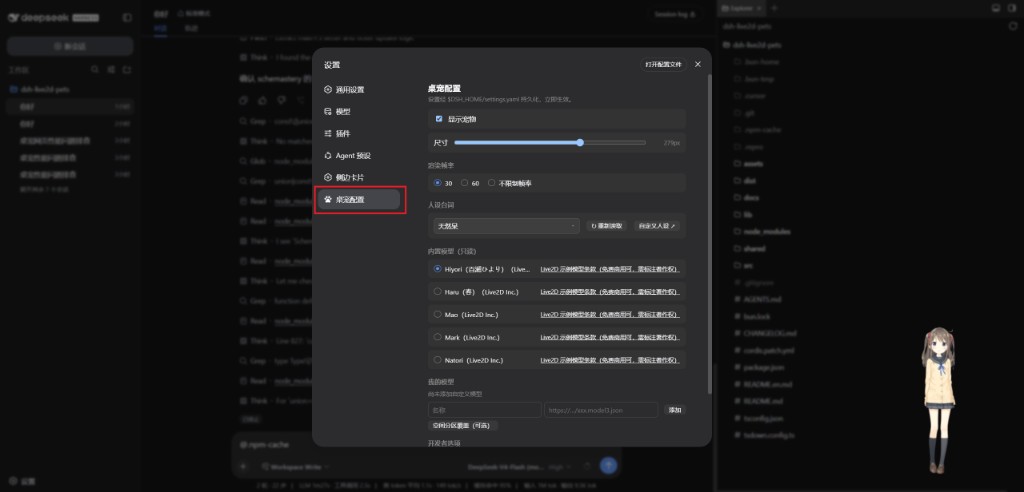
- 显示:开关宠物
- 尺寸:40–400px(默认 160)
- 渲染帧率:30 / 60 / 不限制(默认 30)
- 人设台词:切换内置或自定义人设;「自定义人设 ↗」编辑
$DSH_HOME/live2d-pet/personas.jsonc,改完点「↻ 重新读取」 - 模型:选内置策展模型,或在「我的模型」添加名称 +
.model3.jsonURL(可选空间分区覆盖 / 动画映射);自定义模型存于$DSH_HOME/live2d-pet/custom-models.jsonc - 开发者选项:总开关(默认关);开启后可显示调试面板(含模型原生动画列表预览)、显示点击分区色块
卸载
dsh plugin --profile web remove dsh-live2d-pets
文档
| 需求 | 文档 |
|---|---|
| 英文 README | [README.en.md](README.en.md) |
| 产品意图 | [docs/intent/live2d-pet-plugin.md](docs/intent/live2d-pet-plugin.md) |
| 行为规格 | [docs/spec/live2d-pet-v01.md](docs/spec/live2d-pet-v01.md) |
| 架构决策 | [docs/adr/](docs/adr/)(渲染栈见 ADR-003) |
| 调研记录 | [docs/research/](docs/research/)(设置面板接入机制见 settings-tab.md) |
技术栈
- pixi-live2d-display 0.4.0 + PixiJS 6.5.10 + Cubism Core 4(ADR-003)
- 客户端渲染于 DSH Web GUI 的
shell.overlay悬浮层(视觉层 Popover 顶层,ADR-005),设置页注册于settings.section(ADR-002) - 状态推送:Host 订阅
agent/*事件 → 同源 SSE/api/live2d-pet/events(ADR-006);标签页隐藏 / 失焦暂停渲染 - 设置持久化:标量设置走 Host
ctx.settings(~/.dsh/settings.yaml用户层覆盖 base);自定义人设~/.dsh/live2d-pet/personas.jsonc、自定义模型~/.dsh/live2d-pet/custom-models.jsonc由插件直接读写;传输走插件自身 API/api/live2d-pet/settings(settingsScope wire 白名单限制,见 research 3.4/3.5)
许可
- 插件代码:MIT
- 模型清单:模型一律 URL 直载、不随包分发;清单门槛为「许可可标注」——每条记录许可类型与链接,NC(禁止商用)模型标注"仅限非商用"(清单见
[src/presets/presets.jsonc](src/presets/presets.jsonc)) - 内置模型 Hiyori / Haru / Mao / Mark / Natori:Live2D 官方示例模型,按示例模型条款使用(免费商用可,需标注著作权)
- Live2D SDK:按 Live2D 官方条款(免费商用,需遵守版权声明等)
Read the usage guide →
Install steps, key points, FAQ and compatibility for this plugin — auto-derived from indexed fields.
Listing badge

[](https://deepseek-plugin.org/plugins/cyanfish-x/dsh-live2d-pets)Paste this markdown into your GitHub README to link back to this listing. The badge only states the listing — not a security endorsement.