Provides a real-time WebGPU ocean skin and translucent glass interface for DeepSeek Harness, with adjustable wave size, day/night cycle, and glass transparency. All resources run locally with no data upload.

- Language
- JavaScript
- License
- MIT
- Branch
- main
Install
$ dsh plugin --profile web add github:d-dev0101/open-sea-skinRun the command above in your terminal to install this plugin via the dsh CLI. You can switch Profile in the top-right corner. New to dsh? Read the beginner tutorial
Install via your agent
Install the DeepSeek Harness plugin d-dev0101/open-sea-skin for me: review the repository at https://github.com/d-dev0101/open-sea-skin first, then run the install command and verify the plugin loads successfully.
Paste this instruction to the DSH Web GUI assistant — it will install and verify for you.
One-Line Pitch
Equips DeepSeek Harness with a real-time WebGPU ocean background and translucent glass interface, with wave size, sunlight, and glass brightness adjustable via a quick-control panel in the bottom-left corner.
Core Features
- Mounts a real-time WebGPU ocean surface (5 Gerstner wave groups, FBM detail, Fresnel sky reflection, sun glints, and white foam) behind Harness's three main interface panels, while applying a translucent glass theme to the entire Harness
- Directly adjusts wave size, day/dusk, auto day-night cycle, and glass opacity (40%–90%) via the bottom-left button; drag to apply instantly with auto-save
- 12-minute auto day-night cycle; manually dragging "sunlight" pauses the cycle at the current time, and re-enabling auto cycle resumes it
- One DSH plugin command completes installation, with local resources for the skin served via host route
/open-sea-skin - Provides three alternative installation methods: Chrome/Edge browser extension, static frontend injection script, and Harness source integration, all sharing the same UI and renderer
- Shares a single iframe identifier across paths to avoid duplicate rendering when DSH plugin, extension, and static installer coexist
Technical Implementation
- Language: JavaScript (native ECMAScript modules, minimal TypeScript only in
harness-plugin/source integration path) - Key Dependencies: three.js 0.178.0 (full modules + WebGPU backend + TSL, vendored), DeepSeek Harness Host
webServer, Cordis injection point (cordis.patch.yml) - Architecture Pattern: DSH plugin registers
/open-sea-skinprefix route on hostwebServerto servenative-dist/static resources; client then injects an iframe loadingskin.html+ocean.js, passing preference parameters to the renderer viapostMessage - Entry Files:
plugin/index.js(Host route registration),plugin/client.js(Browser client controller, optionally injected viacordis.patch.yml)
Use Cases
Users who want DeepSeek Harness to look less like a generic admin dashboard and add some life. After installation, the chat interface has a continuously rolling ocean behind it, with golden light slowly transitioning from noon to afternoon to dusk; users who want to preserve Harness's native visual style can also lower the glass opacity to let the background serve as an accent.
Prerequisites & Compatibility
| Dependency | Minimum Version | Notes |
|---|---|---|
| DeepSeek Harness | 0.1.0-rc.6 | Plugin tested on this version; older versions may have interface layering conflicts with the skin |
| Node.js (local dev/build) | >=20 | Repository engines field declaration, only needed for build scripts |
| Browser (DSH plugin, extension) | Chrome 113+ / Edge 113+ | Rendering depends on WebGPU; extension manifest.json declares minimum_chrome_version: 113 |
| Platform | Cross-platform | Works as long as browser supports WebGPU; no restrictions on macOS / Windows / Linux |
| Native Modules | None | All pure frontend JavaScript, three.js, and fonts; no node-pty / node:sqlite or other native dependencies |
Installation
dsh plugin --profile web add github:d-dev0101/open-sea-skin
Configuration Options
| Config | Type | Range | Description | Default |
|---|---|---|---|---|
| Enable Skin | Toggle | On / Off | When off, neither ocean nor glass interface displays | On |
| Wave Size | Number Slider | 0–100 | Larger value = higher waves, denser spacing | 45 |
| Sunlight Position | Number Slider | 0–100 | 0 = dusk, 100 = noon; dragging stops auto cycle | 55 |
| Glass Opacity | Number Slider | 40%–90% | Adjusts translucency of Harness cards and sidebar | 72% |
| Auto Day-Night Cycle | Toggle | On / Off | When on, slowly advances sunlight on a 12-minute rhythm | On |
| Render Quality (Harness source integration only) | Option | auto / low / high | Auto-detects low-performance devices and downgrades mesh and framerate | auto |
Preferences stored in browser local: DSH plugin and static installer use
localStoragekeysossEnabled,ossSea,ossTime,ossGlass,ossAutoCycle; browser extension useschrome.storage.sync; native source integration uses Harness's own settings service.
FAQ
Q: Does this plugin require WebGPU? Can older computers use it?
A: Yes, required. The ocean runs entirely on WebGPU; without WebGPU, the background won't display, leaving only the glass color scheme. The system automatically identifies low-performance devices and reduces mesh precision and framerate without manual adjustment.
Q: Does the plugin collect or upload my conversation content?
A: No. three.js, fonts, and all rendering resources are bundled locally with no CDN, telemetry, or analytics endpoints. Preferences are only stored in browser local storage or host settings service.
Q: What if the bottom-left button doesn't appear after installing the DSH plugin?
A: First confirm dsh web and dsh plugin add point to the same profile, then restart dsh web process and do a browser hard refresh. Don't enable all three methods (DSH plugin, browser extension, static installer) simultaneously—duplicate rendering protection will trigger.
Q: How to fully uninstall?
A: DSH plugin: dsh plugin --profile web remove open-sea-skin; browser extension: remove in chrome://extensions (Edge: edge://extensions); static installer: --uninstall. Local preferences are isolated data and won't affect other functions when deleted.
Q: Is DSH plugin required? Are there other installation methods?
A: Not required. The repository also provides Chrome/Edge browser extension (only works on 127.0.0.1 / localhost for Harness) and a one-time curl injection script (directly modifies Harness's built frontend), plus a native integration method that plugs the skin into Harness source code.
Q: Can I turn off auto day-night cycle?
A: Yes. Manually dragging the "sunlight" slider pauses at the current time and auto-disables the cycle; to resume, simply toggle the auto cycle switch back on.
Q: Will the browser extension affect other local development sites?
A: No. The extension only matches 127.0.0.1 and localhost, and validates page title, root node, and server startup marker before injecting to confirm it's DeepSeek Harness—other local projects remain unchanged.
Q: How low can glass opacity go?
A: Fixed range 40%–90%, default 72%. This ensures sufficient text contrast under both dark and light themes, avoiding readability issues from fully transparent glass.
Difficulty Level
Beginner — Single DSH plugin command enables it, bottom-left button provides graphical control, no environment configuration or source code reading required.
Known Issues & Limitations
- Browser extension minimum supported Chrome 113 / Edge 113; earlier versions cannot load the extension at all (source:
extension/manifest.json:7) - After DSH plugin installation, must restart
dsh webprocess and refresh browser once, otherwise bottom-left button won't appear (source:docs/dsh-plugin.md:30-32) - Static installer must run while Harness is stopped, and
dsh webmust be restarted after execution; if browser shows "Failed to load plugins" after running, first confirm Harness process is still running (source:README.md:115-118) - Three installation methods (DSH plugin, browser extension, static installer) share the same iframe identifier, but only one should be enabled to avoid confusing state during troubleshooting (source:
docs/dsh-plugin.md:46-52) - Auto day-night cycle has no independent master switch UI; must recover by manually dragging "sunlight" then re-enabling the reverse action (source:
shared/skin-core.js:333-339) - Renderer only accepts
postMessagefromwindow.parentand expected parent domain; commands from other sources are ignored (source:docs/architecture.md:84-90)
Interactive website · 中文 · Architecture · Release guide
A self-contained WebGPU ocean skin for DeepSeek Harness. It keeps the original five-wave Gerstner/TSL look, adds a translucent Harness theme, and is available as a one-line DSH plugin, Harness-only Chrome/Edge extension, one-command static installer, or native Harness source integration.

Recommended — install as a DSH plugin
Install the complete local-only ocean runtime and lower-left quick controls directly from GitHub:
dsh plugin --profile web add 'github:d-dev0101/open-sea-skin#v1.2.1'
Restart dsh web, then use Skin settings at the lower left to adjust wave
size, daylight, 40% glass opacity, and the automatic day/night cycle. Remove it
with:
dsh plugin --profile web remove open-sea-skin
This package is tested with DeepSeek Harness 0.1.0-rc.6. Use the source
integration below only when you also want the controls embedded inside the
native General settings page. See the DSH installation and troubleshooting
guide for verification and recovery details.
Gallery
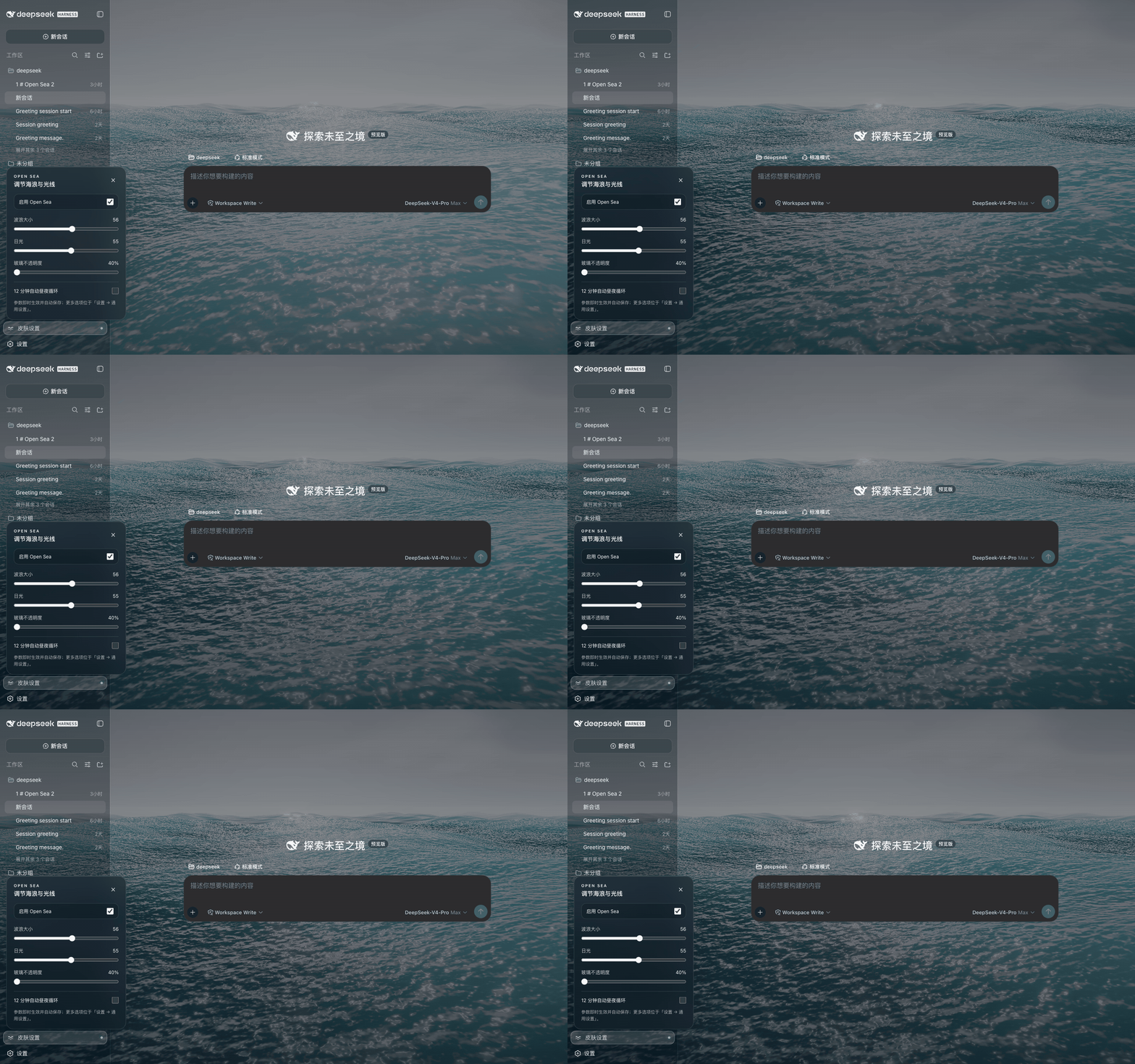
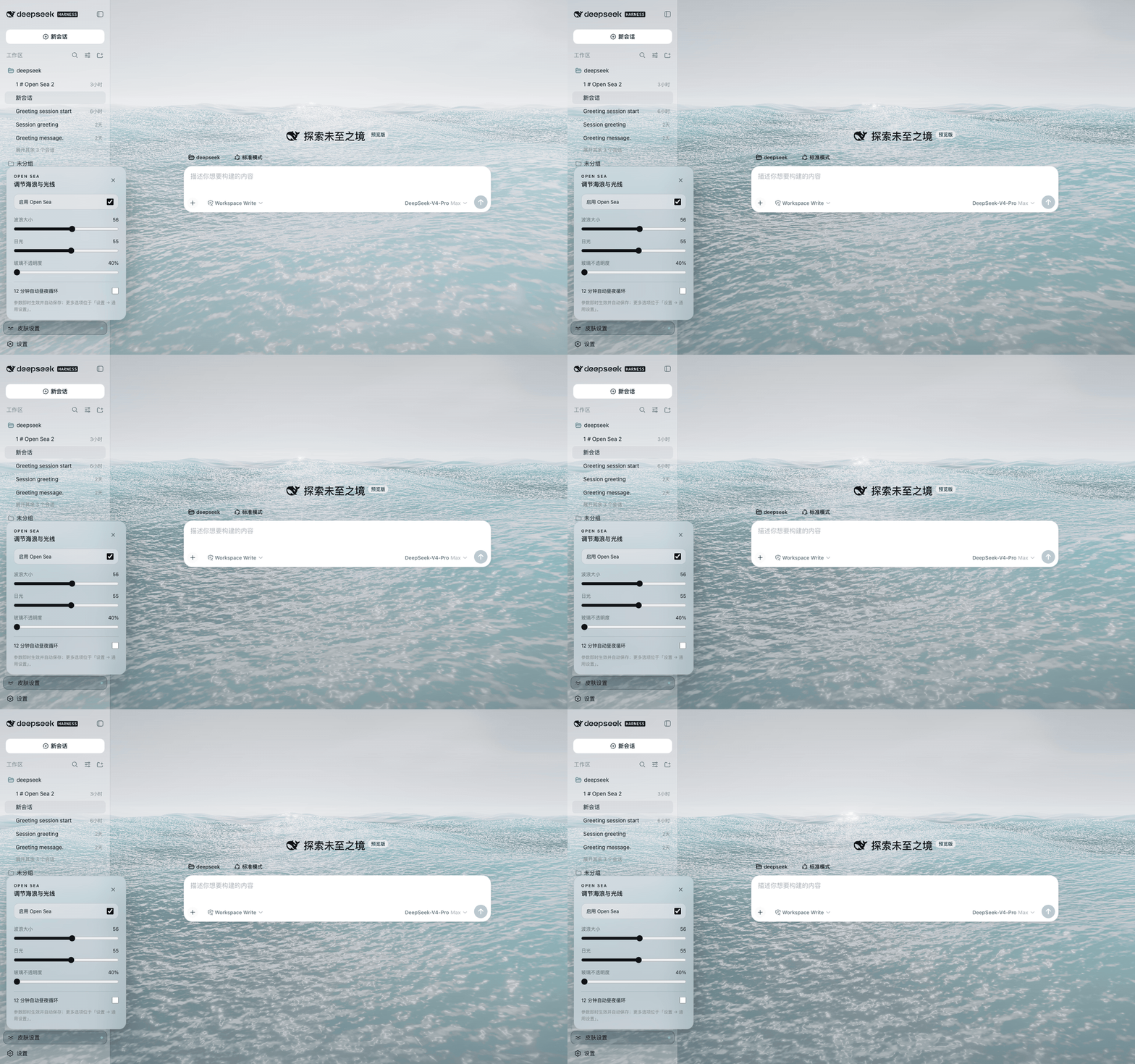
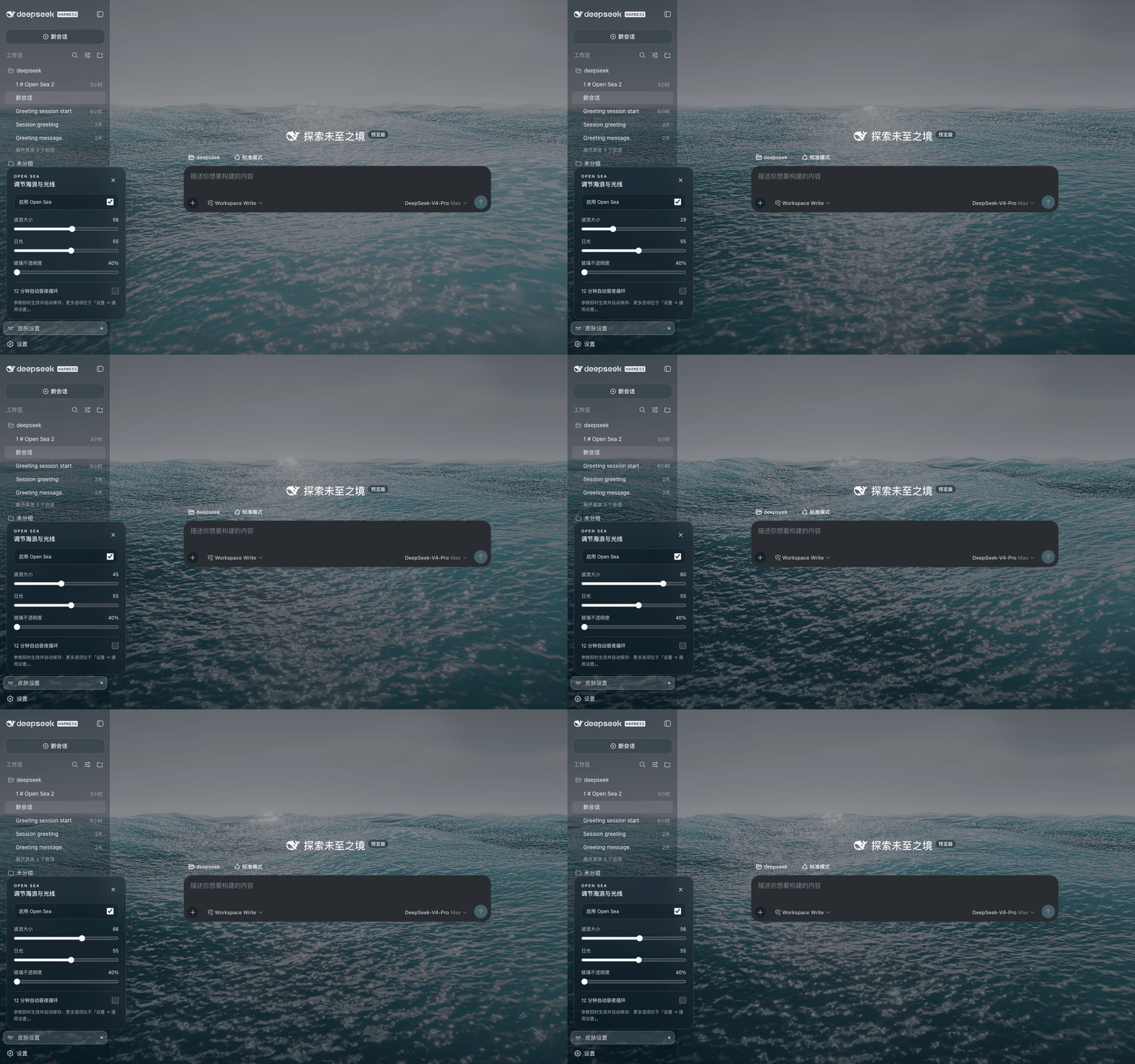
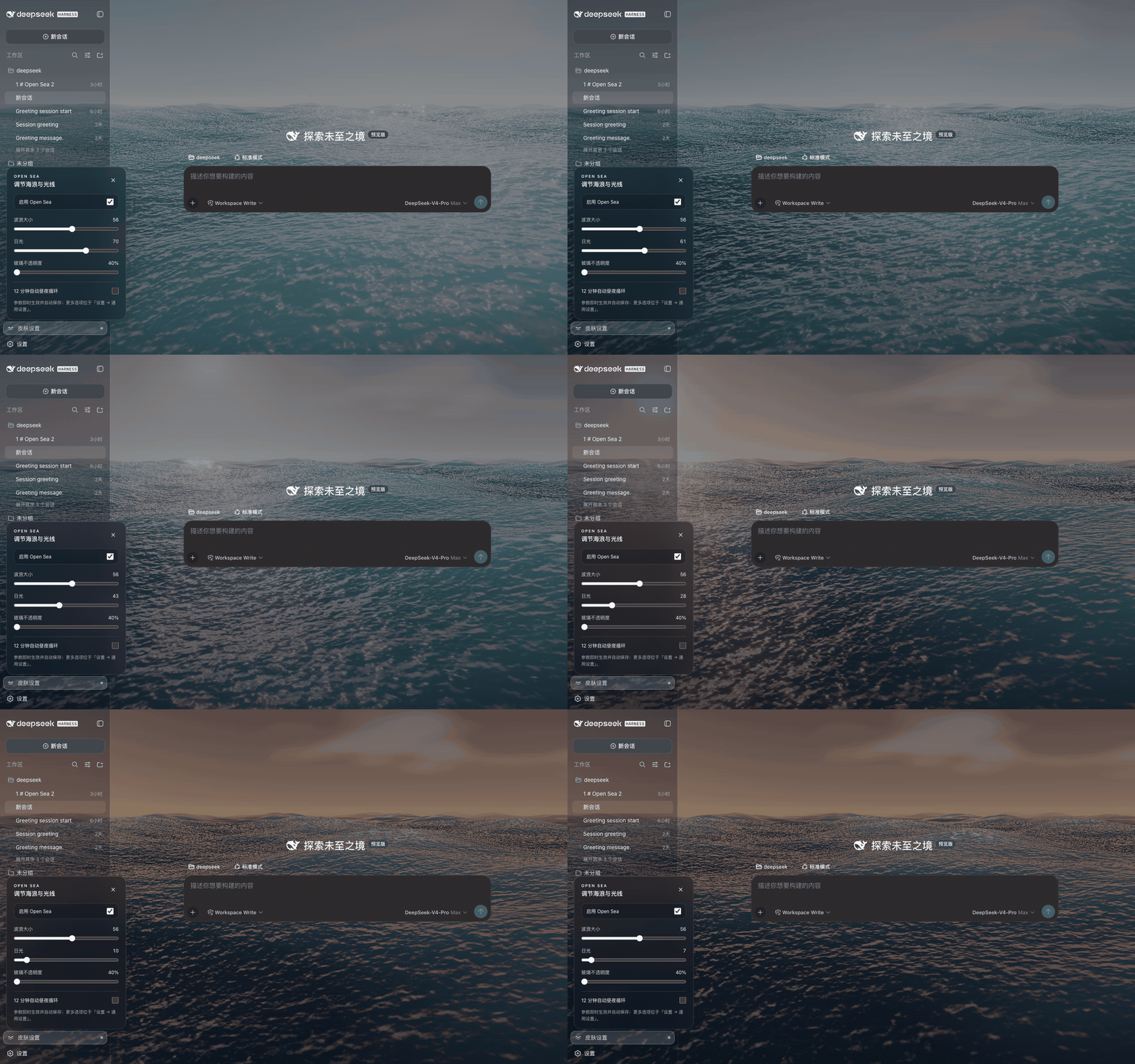
Every animation below is recorded from the native DeepSeek Harness integration at 40% glass opacity. The overview baseline is wave size 56 and daylight Afternoon (55).
1 — Dark Harness overview
2 — Light Harness overview
3 — Adjusting wave size
Daylight stays at Afternoon (55) while the wave control moves from moderate to calm, through high sea, and back to the baseline of 56.
4 — Daylight to sunset
Wave size stays at 56 while daylight moves smoothly from Midday to Dusk.
Install option 1 — Chrome or Edge extension
- Download and unzip the latest
open-sea-skin-extension-*.ziprelease, or clone this repository. - Open
chrome://extensions(Edge:edge://extensions) and enable Developer mode. - Select Load unpacked and choose this repository's
extension/folder. - Open DeepSeek Harness on
127.0.0.1orlocalhost, then reload it once.
The extension does not replace Chrome or Edge's new-tab page, change the
browser homepage, or interfere with an existing new-tab extension. It verifies
the Harness title, root, and server-injected boot marker before changing a page,
so other local development sites also remain untouched. Use the toolbar popup
to disable the Harness skin. The lower-left wave button opens sea-state,
daylight, and glass-opacity controls. Values are saved with
chrome.storage.sync.
Install option 2 — Harness static build (no source compilation)
Run this from any directory. It downloads the pinned v1.2.1 source archive
to a temporary directory, runs the installer, and removes the download when it
finishes. Stop Harness before running it, then start dsh web again, keep
that terminal process running, and reload the browser:
curl -fsSL https://raw.githubusercontent.com/d-dev0101/open-sea-skin/main/install.sh | bash
The script finds a built/installed Harness frontend, makes a local backup, copies the self-contained assets, and injects one marked loader block. If automatic detection cannot find the frontend, pass it explicitly:
curl -fsSL https://raw.githubusercontent.com/d-dev0101/open-sea-skin/main/install.sh | bash -s -- --dist /absolute/path/to/apps/web/dist
Re-run the bootstrap with --update after every Harness upgrade:
curl -fsSL https://raw.githubusercontent.com/d-dev0101/open-sea-skin/main/install.sh | bash -s -- --update
Remove only Open Sea's marker and assets with:
curl -fsSL https://raw.githubusercontent.com/d-dev0101/open-sea-skin/main/install.sh | bash -s -- --uninstall
The command is safe to copy while your terminal is in ~; it does not assume
that this repository already exists locally. You can inspect the bootstrap
script before running it. See
native-dist/README.md for clone-based installation,
detection, and recovery details.
If the browser says Failed to load plugins immediately after installation
or removal, first confirm that dsh web is still running. The static installer
changes files only; it does not start or keep the Harness server alive.
Native Harness source plugin
For a first-class General-settings row and layout slot, integrate the package into a Harness source checkout:
git clone https://github.com/deepseek-ai/deepseek-harness.git
bash harness-plugin/install-into-harness.sh /absolute/path/to/deepseek-harness
cd /absolute/path/to/deepseek-harness
corepack pnpm install
corepack pnpm run build
corepack pnpm dsh web
Use the native Skin settings action at the lower left for fast adjustments,
or open Settings → General → Open Sea Skin for every option. Both surfaces
use Harness settings, locale, slots, and reversible theme-token APIs; neither
depends on CSS-module hashes. The integration is tested against Harness commit
47f943859bef (2026-08-13) and deliberately stops if upstream anchors have
changed. More details are in harness-plugin/README.md.
What is included
- WebGPU + three.js 0.178.0 + TSL, five Gerstner waves, analytic normals, FBM detail, Fresnel sky reflection, sun glitter, foam, fog, sky/cloud band, bloom, and ACES tone mapping.
- A local-only runtime: three.js and Geist are vendored; the extension and installers make no CDN or analytics requests.
- 256×256 mesh (160×160 in low/reduced-motion mode), DPR cap 1.5, adaptive render scale 0.5–1.0, 60/30/20 FPS caps, hidden-tab pause, distance-based shader work skips, reduced skin bloom, and automatic low-end detection.
- Twelve-minute daylight cycle; manual daylight adjustment pins the selected time until automatic cycling is re-enabled.
- Shared host controller for the extension and static installer, with only the
persistence adapter changing (
chrome.storageversuslocalStorage). - Duplicate-render prevention across all installation methods, bilingual UI,
keyboard focus trapping, Escape close, ARIA labels, and
prefers-reduced-motionsupport. - A corrected layout stacking model: Settings stays above the conversation composer at wide aspect ratios, while the ocean remains behind every column.
site/ preserves the original CDN-backed showcase byte-for-byte. The optimized
self-contained runtime has its canonical source in shared/; npm run build
produces the three installable copies.
Development and verification
Node.js 20+ is required for repository checks:
npm run build
npm run check
npm run package:extension
The full browser acceptance run requires Chrome for Testing and Playwright:
npm ci
npx playwright install chromium
npm run test:browser
The launcher uses a persistent profile, --load-extension, and
ignoreDefaultArgs: ['--disable-extensions'], which is required because branded
Chrome 137+ removed the old extension-loading path. The four full-width README
GIFs are regenerated from a running native Harness with npm run capture;
FFmpeg is required for palette-optimized output.
Privacy and permissions
Open Sea Skin collects, transmits, sells, or shares no data. The extension
requests only storage plus access to http://127.0.0.1/* and
http://localhost/* so it can skin a local Harness page. It has no remote host
permission. See docs/privacy.md.
License
Project code is MIT licensed. three.js 0.178.0 remains under MIT; the self-hosted Geist fonts remain under SIL OFL 1.1. See THIRD_PARTY_NOTICES.md and the vendored license copies.
Read the usage guide →
Install steps, key points, FAQ and compatibility for this plugin — auto-derived from indexed fields.
Listing badge

[](https://deepseek-plugin.org/plugins/d-dev0101/open-sea-skin)Paste this markdown into your GitHub README to link back to this listing. The badge only states the listing — not a security endorsement.