Provides persistent memory for DSH Web GUI using a local Markdown knowledge base, enabling AI to read, write, and search vault files with sidebar directory browsing.

- Language
- TypeScript
- License
- MIT
- Branch
- main
Install
$ dsh plugin --profile web add dsh-client-ui-obsidian-memoryRun the command above in your terminal to install this plugin via the dsh CLI. You can switch Profile in the top-right corner. New to dsh? Read the beginner tutorial
Install via your agent
Install the DeepSeek Harness plugin detongz/dsh-client-ui-obsidian-memory for me: review the repository at https://github.com/detongz/dsh-client-ui-obsidian-memory first, then run the install command and verify the plugin loads successfully.
Paste this instruction to the DSH Web GUI assistant — it will install and verify for you.
One-Sentence Description
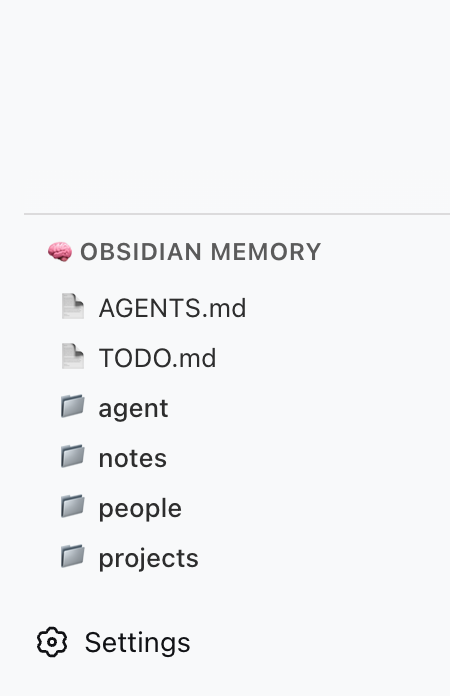
Adds a local Markdown knowledge base (Obsidian vault) as persistent memory for the DeepSeek Harness (DSH) Web GUI, enabling the AI to read, list, search, write, and append vault files, with vault structure displayed as a directory browser in the sidebar.
Core Features
- 5 vault file system tools: AI can read Markdown/text files, list directories and files, perform full-text search, write/overwrite files, and append content to file ends
- Sidebar directory browser: Renders the vault directory tree in the DSH left sidebar
sidebar.obsidian-memoryslot, supporting breadcrumb navigation, refresh, vault selection via host directory picker, and "open with system" buttons for files/folders - Quick open shortcuts: Provides quick-open buttons for two commonly used files (
AGENTS.md,TODO.md) in the vault root - Path sandbox protection: All file paths are resolved and validated for relative position; out-of-bounds access (
.., empty relative paths) is rejected - Local Markdown persistence: Memory content is entirely carried by your own Markdown files; content written by AI is plain text that can be directly opened by note-taking software like Obsidian
Technical Implementation
- Language: TypeScript (
tsconfig.jsontarget=ES2024, jsx=react-jsx, build tool rolldown) - Key dependencies: Zero runtime third-party dependencies; only uses Node built-in
node:fs/promises,node:pathfor file I/O; browser side uses React 18 (peerDependency) - Architecture pattern: Dual-sided cordis plugin — host side (
lib/index.jsentrysrc/index.ts) registers 5 tools and system prompts in the Node host; client side (lib/client.jsentrysrc/client/index.ts) registers a React panel in the browser sidebar viaslots.inject('sidebar.obsidian-memory', ...); also auto-insertsui-obsidian-memorynode viapackage.json#dsh.bundle.patch+cordis.patch.yml - Entry files: Host side
src/index.ts(exportsname = 'ui-obsidian-memory',inject = ['tools', 'systemPrompt']); client sidesrc/client/index.ts(inject = ['slots', 'workspaces', 'locale'])
Use Cases
Suitable for developers who want DSH's AI to remember "who, what project, unfinished tasks, daily notes" across sessions: use the Codex/ directory in your Obsidian (or any Markdown) knowledge base as AI's external memory, and AI will proactively write沉淀的内容 back to notes during conversations, which can be referenced in the next session. Also suitable for those who already use Obsidian as their primary note-taking tool and want AI to directly read/write these notes — no need to switch tools; the note software sees the same Markdown files.
Prerequisites and Compatibility
| Dependency | Minimum Version | Description |
|---|---|---|
| DeepSeek Harness (DSH) | >=0.1.0-rc.5 | All 4 peerDependencies (locale / runtime / sidebar / slots) require this version; the sidebar.obsidian-memory slot also depends on this version or newer builds |
| Node.js | Not declared | package.json has no engines field; source code only depends on Node built-in modules; tsconfig target is ES2024, recommend Node 22 or higher |
| DSH Web GUI | Required | Plugin runs on platform web (package.json#dsh.client.platform = "web"), must install DSH Web and have it running first |
| React | ^18.2.0 (peerDependency) | Only used on client side; provided by DSH client runtime |
@deepseek-ai/dsh-client-locale / -runtime / -ui-sidebar / -ui-slots | >=0.1.0-rc.5 (peerDependency) | All optional (peerDependenciesMeta.optional = true), provided by host DSH |
Installation
dsh plugin --profile web add dsh-client-ui-obsidian-memory
Configuration Options
| Config | Type | Description | Default |
|---|---|---|---|
vaultPath (profile config / cordis.patch.yml ui-obsidian-memory.config) | String (absolute path) | Points to your local Codex/ (or any vault) root directory; all tool paths are resolved relative to this directory and sandboxed | - |
OBSIDIAN_VAULT_PATH (environment variable) | String (absolute path) | Fallback for plugin when vaultPath is not set in config; if neither is set, tool registration is skipped and a warning is logged | - |
localStorage['obsidian-memory:vaultPath'] (browser side) | String | After you select a directory once via "Select Vault" in the sidebar, the panel remembers this path and auto-navigates on next open | - |
FAQ
Q: After installation, I can't see this plugin in Settings → Plugins. What should I do?
A: Most likely installed a version before 0.3.2 — dsh plugin add treated it as a regular dependency without activating it. Reinstall with @latest: dsh plugin --profile web add dsh-client-ui-obsidian-memory@latest.
Q: After installation, AI still can't see obsidian_memory_ tools. What should I do?*
A: Tools are only registered when vaultPath is configured. Add config.vaultPath to ui-obsidian-memory in your profile's cordis.patch.yml, or export the environment variable OBSIDIAN_VAULT_PATH; when neither is set, the plugin only logs a warning and skips registration.
Q: The sidebar doesn't show the "🧠 Obsidian Memory" panel. What should I do?
A: Requires DSH version with sidebar.obsidian-memory slot (≥ 0.1.0-rc.5); older DSH clients don't have this slot, so the panel has nowhere to live.
Q: Where is data stored? Will it be lost during migration/reinstall of DSH?
A: All data is your own local Markdown files, with paths determined by vaultPath; the plugin doesn't write any extra indexes or caches (only localStorage remembers the last selected path), reinstalling or migrating the host only requires pointing the new config to the original folder.
Q: Is writing safe? Can AI read files outside the vault?
A: All paths are resolved via relative validation after resolveVaultPath; out-of-bounds (.. or empty relative paths) throws Path traversal detected, forcing AI's read/write sandbox within vaultPath.
Q: What files can search cover?
A: Full-text search only looks at .md and .txt, skipping .git, .obsidian, node_modules three directories; other extensions (like .json, .csv) and files in ignored directories won't be indexed.
Q: What's the relationship with DSH's official memory feature?
A: This is a third-party plugin, neither dependent on nor replacing DSH's built-in memory capability; it exposes vault files as independent tools to the model, which can choose to read/write these Markdown notes within the prompt context.
Q: How to uninstall?
A: Remove the ui-obsidian-memory entry from your profile directory (delete OBSIDIAN_VAULT_PATH environment variable if needed), then dsh plugin --profile web remove dsh-client-ui-obsidian-memory, restart DSH — vault files won't be deleted.
Difficulty Level
Beginner — just fill in an absolute path in config (or export an environment variable), restart DSH to take effect; no code writing or internal template adjustment needed.
Known Issues and Limitations
- Only
.mdand.txtfiles are indexed byobsidian_memory_search; JSON, CSV and other formats are not searchable;.git,.obsidian,node_modulesdirectories are always skipped - Tool's
output.renderonly converts results to text fragments for model output (e.g., search results include 200-character context window), no highlighting or navigation; to view full content, let AI useobsidian_memory_read - If
vaultPathis not configured, the plugin only logs a warning and returns directly, not registering any tools; verify configuration is correct before enabling - 0.3.0 / 0.3.1 installation regression (missing
dsh.bundle.patch, client loader id error) fixed in 0.3.2; if plugin still not recognized, confirm installation of0.3.2+ - Sidebar panel depends on DSH host providing
workspaces.listDirectory / openPath / pickDirectorythree capabilities; early or lite DSH may not have these host RPCs, making "Select Vault / Open Folder" buttons unavailable in the panel
🧠 Obsidian Memory for DeepSeek Harness — persistent memory via local Markdown vault
A DSH plugin that gives your AI agent persistent memory backed by a local Obsidian (or plain Markdown) vault. It registers 5 file-system tools (obsidian_memory_*) and renders a sidebar panel showing vault status and tool reference.
Inspired by @Saccc_c's Codex memory techniques.
What it does
- 5 memory tools — AI can read, list, search, write, and append to your local vault
- Sidebar panel — renders inside the
sidebar.obsidian-memoryslot in DSH's left column - No external server — talks directly to the file system via DSH's host runtime
- Codex-compatible — works with the
Codex/directory structure recommended by the community
Available Tools
| Tool | Action |
|---|---|
obsidian_memory_read | Read a Markdown or text file |
obsidian_memory_list | List files and directories |
obsidian_memory_search | Full-text search across .md and .txt files |
obsidian_memory_write | Write or overwrite a file |
obsidian_memory_append | Append content to the end of a file |
Quick Start
1. Prepare your vault
Create a Codex/ folder anywhere on your machine (e.g. inside an Obsidian vault):
~/Documents/Obsidian Vault/
└── Codex/
    ├── AGENTS.md      ← AI operating instructions
    ├── TODO.md        ← pending tasks / open loops
    ├── people/
    ├── projects/
    ├── notes/
    └── daily/
2. Install the plugin
One command, from anywhere:
dsh plugin add dsh-client-ui-obsidian-memory        # npm release (recommended)
# or install straight from source:
dsh plugin add detongz/dsh-client-ui-obsidian-memory
The plugin ships a
dsh.bundlemanifest, sodsh plugin addboth installs the package and activates it as a profile layer (the bundledcordis.patch.ymlinserts theui-obsidian-memoryentry). No manualcordis.patch.ymledit is needed to load the plugin.
3. Configure your vault path
Point the plugin at your Codex/ folder. In your profile's cordis.patch.yml:
- id: ui-obsidian-memory
  config:
    vaultPath: /Users/YOURNAME/Documents/Obsidian Vault/Codex
Replace vaultPath with the absolute path to your Codex/ folder.
Alternatively set the environment variable OBSIDIAN_VAULT_PATH.
4. Restart DSH
dsh web # or however you launch DSH
After restart:
- The sidebar panel appears in the left column (🧠 Obsidian Memory)
- The 5 tools are available to the AI when
vaultPathis configured
Configuration
| Option | Type | Default | Description |
|---|---|---|---|
vaultPath | string | — | Absolute path to your Codex/ vault directory |
Environment variable fallback (optional):
export OBSIDIAN_VAULT_PATH=/Users/YOURNAME/Documents/Obsidian Vault/Codex
If neither vaultPath in config nor the env var is set, the plugin logs a warning and skips tool registration.
Architecture
┌─────────────────────────────────────────┐
│ DSH Web (browser)                       │
│  ┌─────────────────────────────────┐    │
│  │ sidebar.obsidian-memory          │    │
│  │  ┌─────────────────────────┐    │    │
│  │  │ 🧠 Obsidian Memory      │    │    │
│  │  │  — tool reference       │    │    │
│  │  │  — vault structure      │    │    │
│  │  └─────────────────────────┘    │    │
│  └─────────────────────────────────┘    │
└─────────────────────────────────────────┘
                    │
┌───────────────────▼─────────────────────┐
│ DSH Host (Node.js)                      │
│  • reads / writes local files           │
│  • registers 5 obsidian_memory_* tools  │
└─────────────────────────────────────────┘
                    │
┌───────────────────▼─────────────────────┐
│ Local File System                       │
│  ~/Documents/Obsidian Vault/Codex/      │
└─────────────────────────────────────────┘
| Component | Role |
|---|---|
Host (lib/index.js) | Node side: registers tools, reads/writes vault files |
Client (lib/client.js) | Browser side: sidebar panel with static tool reference |
| Vault | Data source: local Markdown files |
Troubleshooting
| Symptom | Cause | Fix |
|---|---|---|
| Plugin not in Settings → Plugins | dsh plugin add installed an older version (pre-0.3.2) as a plain dependency | Reinstall: dsh plugin add dsh-client-ui-obsidian-memory@latest |
| Tools not available to AI | vaultPath not configured | Set vaultPath in cordis.patch.yml or env var |
| Sidebar panel not visible | DSH version lacks sidebar.obsidian-memory slot | Upgrade DSH to ≥ 0.1.0-rc.5 (or a build that declares the slot) |
| "Path traversal detected" error | AI tried to access files outside vault | All paths are sandboxed to vaultPath |
Development
git clone https://github.com/detongz/dsh-client-ui-obsidian-memory.git
cd dsh-client-ui-obsidian-memory
npm install
npm run build        # outputs lib/index.js + lib/client.js
npm run watch        # dev mode with auto-rebuild
Build artifacts:
lib/index.js— host entry (tool registration + file I/O)lib/client.js— browser bundle (DSH closure-factory format, CSS inlined)
License
MIT
Read the usage guide →
Install steps, key points, FAQ and compatibility for this plugin — auto-derived from indexed fields.
Listing badge

[](https://deepseek-plugin.org/plugins/detongz/dsh-client-ui-obsidian-memory)Paste this markdown into your GitHub README to link back to this listing. The badge only states the listing — not a security endorsement.