DSH Web sidebar usage and cost panel: line-by-line expense estimation using official pricing, automatic Beijing peak-valley price switching, 10 tier ranks and 9 achievement badges, fully local statistics with zero data transmission.

- Language
- TypeScript
- License
- MIT
- Branch
- main
Install
$ dsh plugin --profile web add dsh-boardRun the command above in your terminal to install this plugin via the dsh CLI. You can switch Profile in the top-right corner. New to dsh? Read the beginner tutorial
Install via your agent
Install the DeepSeek Harness plugin dfkai/dsh-board for me: review the repository at https://github.com/dfkai/dsh-board first, then run the install command and verify the plugin loads successfully.
Paste this instruction to the DSH Web GUI assistant — it will install and verify for you.
One-line Summary
Adds a usage and cost panel at the bottom of the sidebar for DeepSeek Harness (DSH) Web: estimates costs per transaction according to official pricing, automatically switches between peak/off-peak rates based on Beijing time starting 2026-08-17, and packs total usage, cache hits, current session cost, ten-tier "Word勋" ranks, and 9 achievement badges into one collapsible sidebar.
Core Features
- Cost Estimation: Prices each transaction according to official rate cards (v4-pro / v4-flash / legacy models) at the time of usage, factoring in peak/off-peak tiers; reasoning tokens are billed at output rates, matching the platform's per-request billing methodology
- Automatic Peak/Off-Peak Switching: Starting 2026-08-17, determines peak hours (09:00–12:00, 14:00–18:00 Beijing time) or off-peak hours (half price) based on Beijing time; badge corner badge displays current tier and output unit price in real-time
- 1M Context Usage: Current round context usage percentage, remaining budget, three-segment stacked bars for system/tools/messages, cumulative sub-agent time consumption
- Trends & Cumulative: Input/output bar charts per round, cumulative output curve, 12-week daily heatmap, per-model usage statistics, cross-session leaderboard
- Ten-tier "Word勋" Ranks: Membership-style阶梯 based on cumulative token volume (🌱 Unborn Word Sprout → ⚡ Trillion-word God), displaying progress, unlock ETA, and perks per level
- Achievements & Check-ins: 9 data-driven badges (consecutive check-ins 3/7/30 days, cumulative active days, single-day token peak, cumulative session count, etc.), all triggered by real usage
Technical Implementation
- Language: TypeScript + React (host half is Node ESM, client half is browser CJS)
- Key Dependencies: Only runtime dependency is
zod(for session projection schema validation); client-side dependencies like React, Cordis, and dsh-client-* packages are provided by the host module map, declared as externals at build time - Architecture Pattern: Dual-ended Cordis plugin. Host half registers
id: boardline viacordis.patch.yml, source code side registers three read-only projections (dominantModel/sessionCost/tokenDays) on thesessionProjectionsservice with zero writes; browser half injects intosidebar.footer.actionslot at sidebar bottom viawindow.__ModuleLoader__closure factory - Entry Files:
src/index.ts(host apply) +src/client/index.ts(client apply) +cordis.patch.yml(bundle patch) +tsdown.config.ts(dual output build configuration)
Use Cases
For users who want intuitive answers to "How much DeepSeek did I use this month, how much did it cost, is it worth starting another round before tonight's peak": DSH Web users want to see usage statistics like DeepSeek's backend without filling out extra configurations or managing another set of API keys for this panel. The plugin calculates entirely locally and sends no requests to any third-party endpoints.
Prerequisites and Compatibility
| Dependency | Minimum Version | Notes |
|---|---|---|
| DeepSeek Harness (DSH) | Not declared | Plugin has no version constraint; enabling "reasoning tokens billed at output rates" in cumulative cost requires the host to apply the token-meter fix (upstream discussion at deepseek-harness discussions/2338) |
| Node.js | Not declared | Source code does not declare engines; build uses tsdown (depends on TypeScript 7 and newer Node), any DSH host Node works |
| Platform | Cross-platform | Only depends on host-exposed web profile and browser sessions, no native module calls; works on macOS / Windows / Linux DSH Web |
| Native Modules | None | Pure JS implementation, only uses module map entries provided by host like React, Cordis, dsh-client-* at runtime |
Installation
dsh plugin --profile web add dsh-board
Configuration
This plugin requires no additional configuration.
The only adjustable switch: find and append disabled: true by plugin id (board) in the profile's cordis.patch.yml to disable this panel; disabled supports !!js expressions for conditional toggling. The price list is source-level constants (see MODEL_PRICES / PEAK_PRICES / OFF_PEAK_PRICES in src/pricing.ts), modifying prices requires changing source code and rebuilding; fold state uses browser localStorage (key dsh-board.collapsed), users can also manually clear it.
FAQ
Q: Why doesn't the badge appear at the sidebar bottom after installation?
A: You must restart the corresponding profile (or start a new dsh --profile <profile>) and hard-refresh the browser; cold-started profiles that haven't been restarted won't automatically load new plugins. Run dsh --profile <profile> --dump-config to verify, you should see a # == dsh-board layer in the output.
Q: Is the cost shown on the panel the actual bill?
A: No. It estimates each transaction according to official rate cards at the time of usage, with reasoning tokens billed at output rates, matching the platform's per-request billing methodology, but it's still an estimate. The final bill is subject to DeepSeek platform's statement.
Q: Why does cumulative token show billions or higher?
A: Consistent with DeepSeek backend methodology: each conversation round bills context prefixes at "cache hit" prices. Under a 1M window with dozens of rounds, cumulative hit tokens can reach hundreds of millions—they have extremely low unit prices (¥0.025/M), the "cache hit N%" sub-line on the panel helps distinguish cheap bills from actual consumption.
Q: Does data get sent to third parties? Does it write to the host?
A: No. All statistics are computed locally on this machine, data comes from host-exposed seams (session.list projection + session.history RPC), no external network requests are made. Host half only registers read-only session projections (dominantModel, sessionCost, tokenDays), zero writes; browser side only records panel fold state once in localStorage.
Q: How to completely close or uninstall this panel?
A: Close: append - id: board line in the profile's cordis.patch.yml and set disabled: true (supports !!js expressions), restart profile to take effect. Uninstall: dsh plugin --profile web remove dsh-board and restart; the browser side fold state key still exists in localStorage and can be manually cleared.
Q: Do ranks and achievements upgrade by consuming more tokens? Do they affect model calls?
A: Ranks are just a display layer segmented by cumulative token volume (10-tier membership card), achievements are data-driven badges (consecutive check-ins, single-day peak, cumulative session count, etc.). Neither affects any model calls, quotas, or billing—they're purely motivational displays.
Q: Does it depend on a specific DSH version?
A: The plugin itself doesn't declare a minimum DSH version. However, "reasoning tokens billed at output rates in cumulative cost" requires the host's token-meter fix (upstream discussion at deepseek-harness discussions/2338). On older hosts, per-model/round charts still count reasoning tokens as separate fields, but cumulative totals and costs will undercount this portion.
Q: Does it conflict with balance plugins like dsh-balance-stats?
A: No conflict. dsh-board uses host local projections and history RPC with zero external calls and zero keys; balance plugins typically need to send requests to api.deepseek.com with API keys configured. They serve complementary purposes and can be installed simultaneously.
Difficulty Level
Beginner — immediately usable after installation and restart, no configuration needed; turning off the panel is just one line of disabled: true, price list changes don't affect the vast majority of users.
Known Issues and Limitations
- Reasoning token billing methodology depends on host token-meter fix: on unpatched older DSH, per-model/round charts still treat reasoning tokens as separate fields, but cumulative totals and costs will undercount this portion (see
README.md:40) - Price list is source-level constants (
src/pricing.ts): after DeepSeek official rate changes, source code needs modification and rebuilding; plugin doesn't declare minimum DSH version, older hosts may have missing projection fields - Browser side only registers in web profile: DSH instances without web profile enabled or only using headless/CLI won't see the panel
- Peak/off-peak periods use Beijing time:
isPeakHourdirectly usesgetUTCHours() + 8offset judgment, doesn't account for users in different time zones switching local time zones; overseas users still see "peak" tiers based on Beijing time - Cumulative cost prices at "last active moment's peak/off-peak tier" for each session: plugin uses session projection accumulation, old sessions may fall into outdated rate tiers; costs for long-inactive sessions won't be retroactively recalculated
- Closing the panel requires finding by plugin id (
board) in profile'scordis.patch.yml, no visible toggle exposed in DSH settings page
给 DeepSeek Harness(DSH) 的 侧栏用量与成本面板:把 DeepSeek 后台风格的用量统计装进 Web GUI 左下角。
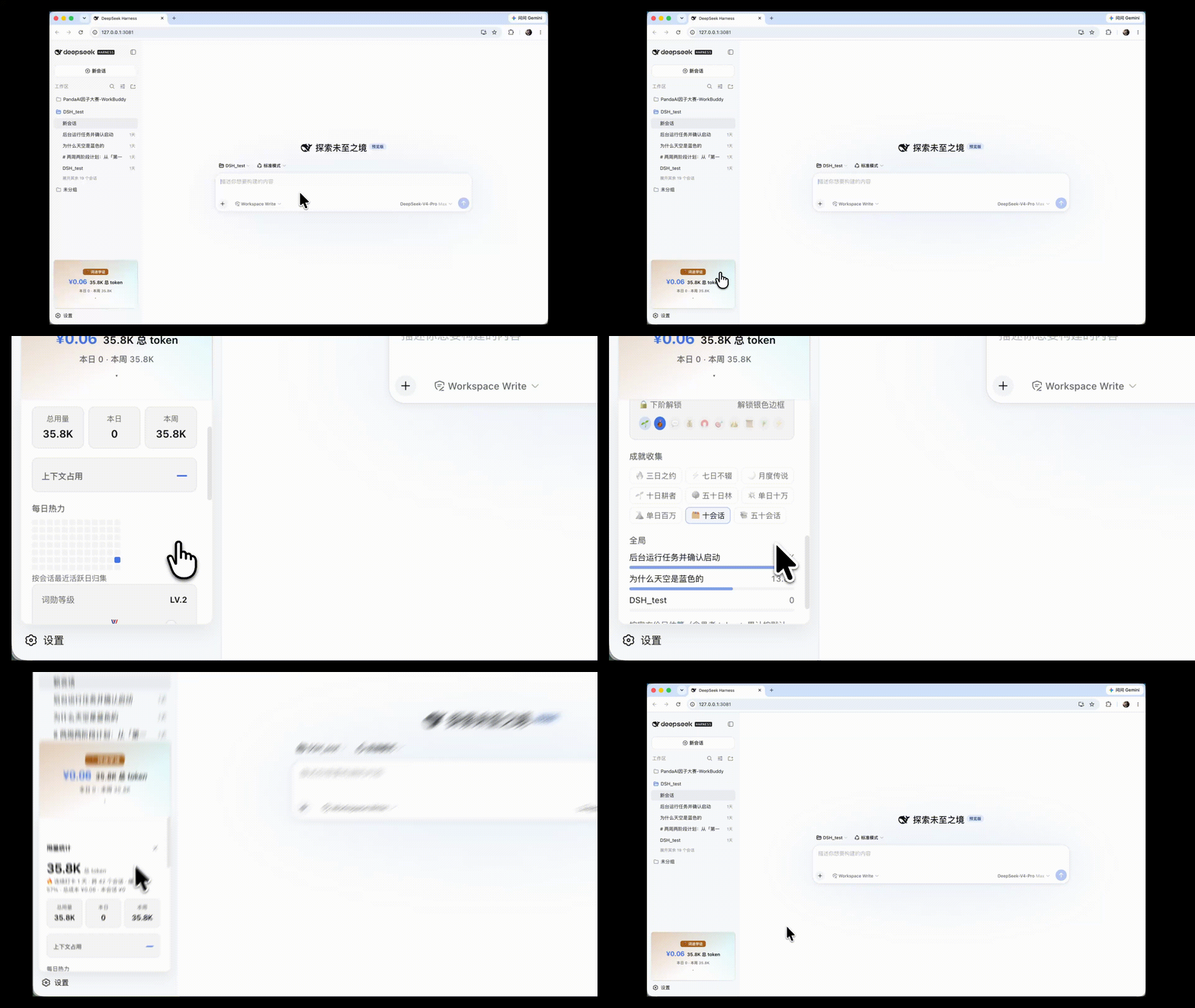




特性
- 💰 计费估算:官方价目 + 2026-08-17 起北京时间峰谷自动切价(高峰 09:00–12:00、14:00–18:00,闲时半价);推理 token 按输出价计入;口径详见下文
- 🧠 1M 上下文:占用 %、剩余预算、系统/工具/消息构成堆叠条、子代理耗时
- 📈 可视化:每轮输入/输出走势、累计输出曲线、12 周日热力图、分模型统计、全局会话榜
- 🏆 「词勋」段位:十级谐音梗阶梯(🌱 未醒词芽 → 🧲 万词王 → ⚡ 万亿词神),会员卡式展示:进度条、解锁 ETA、每级权益
- 🔥 成就:连续打卡天数 + 9 枚数据驱动徽章
- 🎨 视觉:Geist 克制风、明暗主题适配、中英双语、零装饰动画
- 🖼 横版徽章:收起为菜单宽瓷砖(段位标签 + ¥ 花费 + 总 token + 今日本周);点击后徽章升到面板顶部展开,再点收起
安装
# npm(推荐)
dsh plugin --profile <profile> add [email protected]
# 或从 GitHub 直装
dsh plugin --profile <profile> add github:dfkai/[email protected]
装完重启该 profile(或新起 dsh --profile <profile>),左侧栏底部即可看到徽章。验证:
dsh --profile <profile> --dump-config # 应出现 # == dsh-board 层
harness 版本要求:推理 token 按输出价计入用量需要 harness 的 token-meter 修复。补丁已提交官方社区(discussions/2338,可合并分支
dfkai/deepseek-harness@fix/token-meter-reasoning-output)。旧 harness 上分模型/每轮图表仍会计入推理 token,但累计总量与成本会少算推理部分。
禁用与配置
插件层按 id: board 寻址,可用 patch 关闭或改配置。在你的 profile 的 cordis.patch.yml 里追加:
- id: board
  disabled: true   # 关闭本面板
disabled 支持 !!js 表达式,也可以按条件开关。价格表等常量为源码级配置(见下方计费口径),改价后重新构建。
计费口径
面板显示的是估算值,不是计费凭证,以 DeepSeek 平台账单为准。
标准价(¥ / 1M tokens,2026-08-15 抓取自官方价目):
| 模型 | 缓存命中 | 缓存未命中 | 输出 |
|---|---|---|---|
| deepseek-v4-pro | 0.025 | 3 | 6 |
| deepseek-v4-flash | 0.02 | 1 | 2 |
| deepseek-chat(旧) | 0.5 | 2 | 8 |
| deepseek-reasoner(旧) | 1 | 4 | 16 |
峰谷价(2026-08-17 00:00 北京时间生效,高峰 09:00–12:00、14:00–18:00,闲时为高峰一半):
| 模型 | 时段 | 缓存命中 | 缓存未命中 | 输出 |
|---|---|---|---|---|
| deepseek-v4-pro | 高峰 | 0.30 | 9.0 | 27 |
| 闲时 | 0.15 | 4.5 | 13.5 | |
| deepseek-v4-flash | 高峰 | 0.10 | 3.0 | 9 |
| 闲时 | 0.05 | 1.5 | 4.5 |
口径说明:
- 推理 token 按输出价计入(DeepSeek 官方计费口径),
reasoningTokens已并入输出 - 成本由宿主侧投影按每笔用量发生时刻的价目逐笔累加(与平台逐请求计费同口径);未取得投影的历史会话回落为按主导模型估算
- 未知模型回落当前时刻价表中默认模型的费率
数据与隐私
全部数据来自本机 DSH 的公开接口(session.list 投影 + session.history RPC)。插件不发起任何第三方网络请求,唯一持久化是浏览器 localStorage 里的面板折叠状态;宿主半仅注册一个只读会话投影(dominantModel),不写入任何数据。
FAQ
为什么总 token 是亿级?
账单口径与 DeepSeek 后台一致:每轮对话都会对上下文前缀按「缓存命中」价计费。1M 窗口的会话聊几十轮就会累计到亿级命中 token——它们单价极低(¥0.025/M),面板副行显示「缓存命中 N%」帮你区分便宜账与真实消耗。
成本准吗?
按官方价目逐笔估算(每笔用量按发生时刻的峰谷档计价、推理 token 已计入),与平台逐请求计费同口径,但仍非计费凭证,以 DeepSeek 平台账单为准。宿主半仅注册只读投影(dominantModel、sessionCost),无任何写入。
数据会外发吗?
不会。全部统计在本机完成,无任何网络外发请求。
开发
pnpm install
pnpm build                  # 构建 lib/
pnpm sync -- <profile 目录>  # 同步到已安装副本,HMR 自动热刷
- 改
src/→ build → sync → 浏览器热更;只有改 manifest(package.json / cordis.patch.yml)才需要重装重启 - 无头验证(可选):
python3 -m playwright install chromium
python3 test/e2e.py                 # 徽章/面板挂载 + 控制台错误检查
python3 test/drive-turn.py '...'    # 驱动真实对话读面板数值
架构
只依赖 DSH 公开 seam:
| 面 | 内容 |
|---|---|
宿主半 src/index.ts | 注册一个只读的 dominantModel 会话投影(让累计成本按真实模型计价);零写入、零外发 |
浏览器半 src/client/* | ctx.slots.inject('sidebar.footer.action', …) 注册横版徽章;数据 = session-list store 的 projectionValues + session.history RPC 折叠 |
构建 tsdown.config.ts | CJS 闭包工厂(window.__ModuleLoader__.load)+ 平台白名单 externals |
License
Read the usage guide →
Install steps, key points, FAQ and compatibility for this plugin — auto-derived from indexed fields.
Listing badge

[](https://deepseek-plugin.org/plugins/dfkai/dsh-board)Paste this markdown into your GitHub README to link back to this listing. The badge only states the listing — not a security endorsement.