Add AI image generation sidebar to DSH Web GUI, with OpenAI-compatible API proxy, supporting text-to-image, image-to-image, and a history/prompt template library.

- Language
- TypeScript
- License
- Apache-2.0
- Branch
- main
Install
$ dsh plugin --profile web add @dickpy/dsh-imagegenRun the command above in your terminal to install this plugin via the dsh CLI. You can switch Profile in the top-right corner. New to dsh? Read the beginner tutorial
Install via your agent
Install the DeepSeek Harness plugin dickpy/dsh-imagegen for me: review the repository at https://github.com/dickpy/dsh-imagegen first, then run the install command and verify the plugin loads successfully.
Paste this instruction to the DSH Web GUI assistant — it will install and verify for you.
One-Line Description
Adds an AI image generation sidebar to DSH Web GUI, calling OpenAI-compatible image generation interfaces via local host proxy, providing text-to-image, image-to-image, generation history, and prompt template library—all requests and keys stay local and are not exposed to the browser.
Core Capabilities
- Provides "AI Image Generation" entry in DSH Web GUI sidebar, presenting a three-panel workspace (parameters, generation results, history)
- Supports text-to-image (prompt input) and image-to-image (upload reference image for modification), interfacing with
/images/generationsand/images/editsendpoints - Adjustable size, quality (low/medium/high), generation count (1-4 images), and passthrough detail parameter
- Auto-saves generation results to local history (max 50 entries), supports viewing, restoring parameters, deleting individual entries, or clearing all
- Built-in 441
gpt-image-2prompt template cases, supports searching, category filtering, copying prompts, one-click fill to image generation input - Provides online update check: shows update button at workspace top when GitHub new version is detected
Technical Implementation
- Language: TypeScript + React 18
- Key Dependencies: @deepseek-ai/dsh-client-ui-primitives (system UI components), @deepseek-ai/dsh-settings (settings panel host), @deepseek-ai/dsh-host-webserver (route registration), @deepseek-ai/dsh-system-prompt (system prompt broadcast)
- Architecture Pattern: Dual-end architecture—host side (
src/index.ts) registers cordis plugin, mounts API routes, registers system prompt sections; client side (src/client/) mounts sidebar panel and settings card via dynamically attached React node, communicates with host via same-origin routes/api/dsh-imagegen/* - Entry Files: src/index.ts (host side), src/client/index.ts (client side)
Use Cases
Suitable for Agent users who already work daily in DSH Web GUI, wanting to directly feed model generations or reference images to gpt-image-2 in the IDE sidebar, saving the step of switching to the web console; also suitable for developers needing to provide Agents with "image generation" capability—after enabling "Broadcast to Agent", the Agent can call this panel in its system prompt.
Prerequisites & Compatibility
| Dependency | Min Version | Description |
|---|---|---|
| DSH | 0.1.0-rc.7+ | Plugin depends on host services like @deepseek-ai/dsh-settings, dsh-host-webserver, dsh-system-prompt |
| Node.js | >=20 | Supported version marked in README |
| Platform | Cross-platform | Route layer uses Node built-in node:fs / node:http / node:crypto, no native bindings |
| Native Modules | None | Only third-party dependency is schemastery |
Installation
dsh plugin --profile web add @dickpy/dsh-imagegen
Configuration Options
| Config | Type | Description | Default |
|---|---|---|---|
| api_url | text | OpenAI-compatible API root address, e.g., https://api.openai.com/v1, plugin auto-appends /images/generations or /images/edits | empty |
| api_key | secret | Bearer API key, only saved in host-side settings file, UI shows "Set/Unset" status only | empty |
| Enable Plugin | toggle | After disabling, image generation workspace and model calls are all disabled, routes remain for re-enabling | enabled |
| Broadcast to Agent | toggle | After enabling, writes plugin capability into Agent's system prompt, letting Agent know it can call image generation | enabled |
FAQ
Q: Where do I access the image generation feature after installation?
A: After installation, restart dsh web, and an "AI Image Generation" entry will appear in the left sidebar. Before first use, open "Settings → Plugins → Configurable", expand the "AI Image Generation" card, fill in the API address and key, then save.
Q: Must I use the OpenAI official API?
A: Not required. The plugin connects to all OpenAI-compatible /images/generations (text-to-image) and /images/edits (image-to-image) endpoints; as long as your service provides these two interfaces and returns data[].b64_json or data[].url in the response, it works.
Q: Do generation requests need image upload or text only?
A: Both are supported. Text-to-image only needs a prompt; image-to-image requires dragging or selecting a reference image in the panel (PNG/JPG/WEBP/GIF), single image limit 10MB, exceeding will be blocked by frontend.
Q: Where is history stored?
A: All stored locally. Images go to ~/.dsh/dsh-imagegen/images/, index file is ~/.dsh/dsh-imagegen/index.json, keeps max 50 entries, earliest are auto-eliminated. Different browsers/devices connecting to the same DSH instance share the same history.
Q: Does the prompt template library need internet?
A: Template case list (~441 entries) is bundled with the plugin, no internet needed to view; reference images for each case are pulled on-demand from vibeui.top mirror and cached to ~/.dsh/dsh-imagegen/template-images/, second browse doesn't need internet, first load requires accessing that site.
Q: Will the plugin auto-update?
A: No auto-update. Every time entering the workspace calls GitHub Releases API to check latest stable version (result cached 15 minutes), when new version found, an update button appears at panel top; after clicking, host process executes dsh plugin ... add @dickpy/dsh-imagegen@<version>, after installation must restart dsh web to take effect.
Q: Will history and cache be cleaned together after uninstall?
A: No. After uninstalling plugin, history images and template image cache under ~/.dsh/dsh-imagegen/ remain on disk, need manual deletion.
Q: Error "Upstream API response timeout (240 seconds)" what to do?
A: Image generation is a slow operation, upstream returning over 240 seconds will be judged as timeout by plugin (this is the 240 second limit). Suggest first confirming network is smooth, then try again; if upstream has rate limiting or serious queuing, wait a few minutes and retry.
Difficulty Level
Beginner — interfaces are standard OpenAI-compatible protocol, configuration only needs two items (API address, key), regular workspace UI follows DSH's own UI specs, no extra learning cost.
Known Issues & Limitations
- Generation single image request timeout is 240 seconds, downloading result URL timeout is 60 seconds; if upstream responds extremely slowly, it will be directly judged as failure
- Upstream single interface can only return 1 image at a time; if 4 images are needed, plugin will send 4 parallel requests, if upstream has rate limiting, some may fail
detailfield is a passthrough parameter, supported by somegpt-image-2gateways; if official OpenAI endpoint rejects unknown fields, keep interface default "auto" (don't send)- History keeps max 50 entries, exceeding that, earliest entries (including image files) are auto-deleted
- Template reference image single image limit 20MB; exceeding is ignored
- Online update check triggers only once each time entering workspace, result cached 15 minutes; when GitHub has issues, plugin silently ignores, won't block usage
- Route layer forces requests from local loopback, same-origin Origin, cross-site requests get 403 rejected



DeepSeek Harness (DSH) Web GUI 的 AI 生图插件。它通过宿主进程安全地代理 OpenAI 兼容的图像生成接口,为 DSH 提供文生图、图生图编辑、生成历史、提示词模板库和一体化设置页。
默认模型为
gpt-image-2,也兼容提供/images/generations和/images/edits的 OpenAI 兼容端点。
效果预览
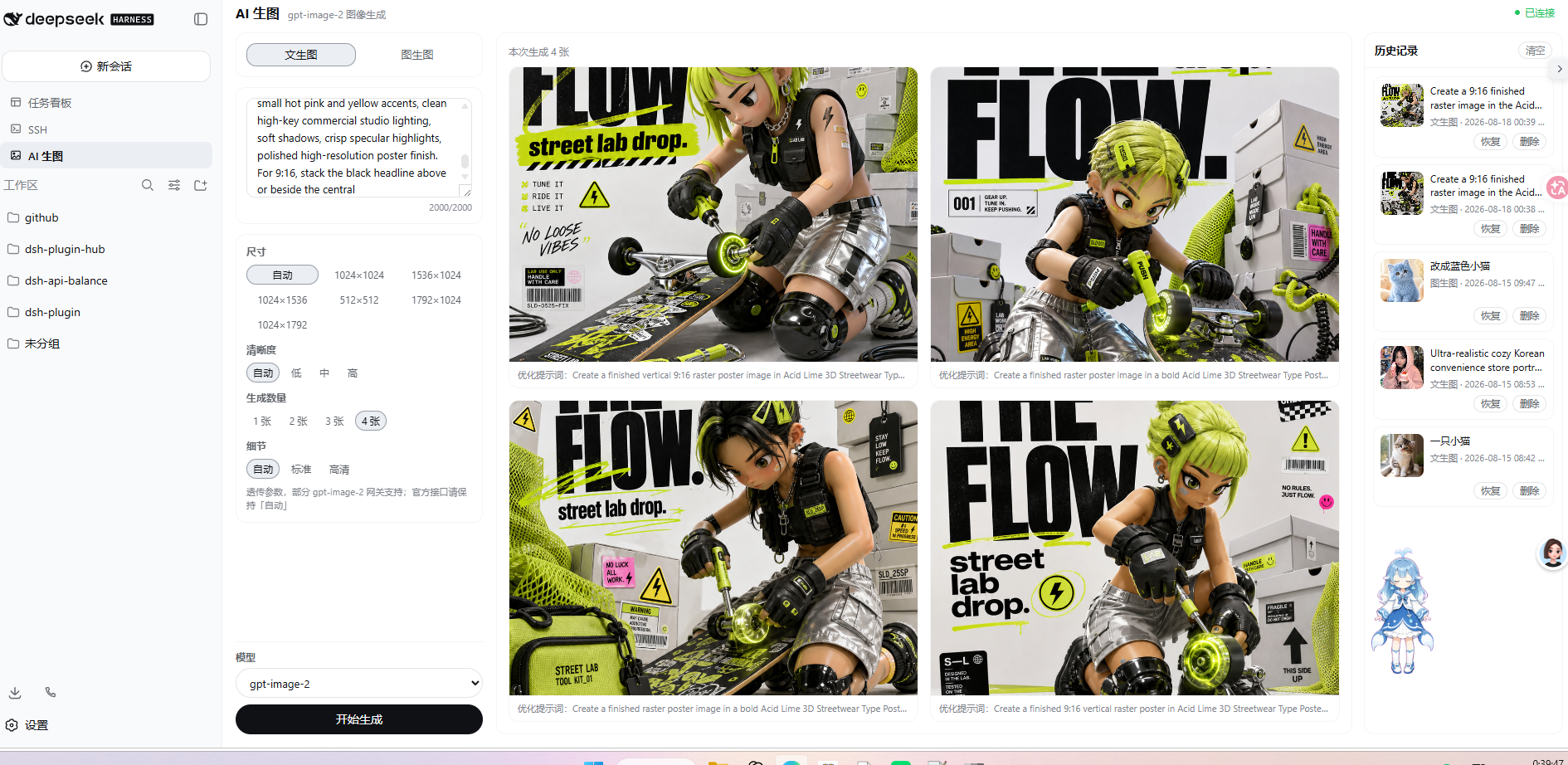
AI 生图工作台
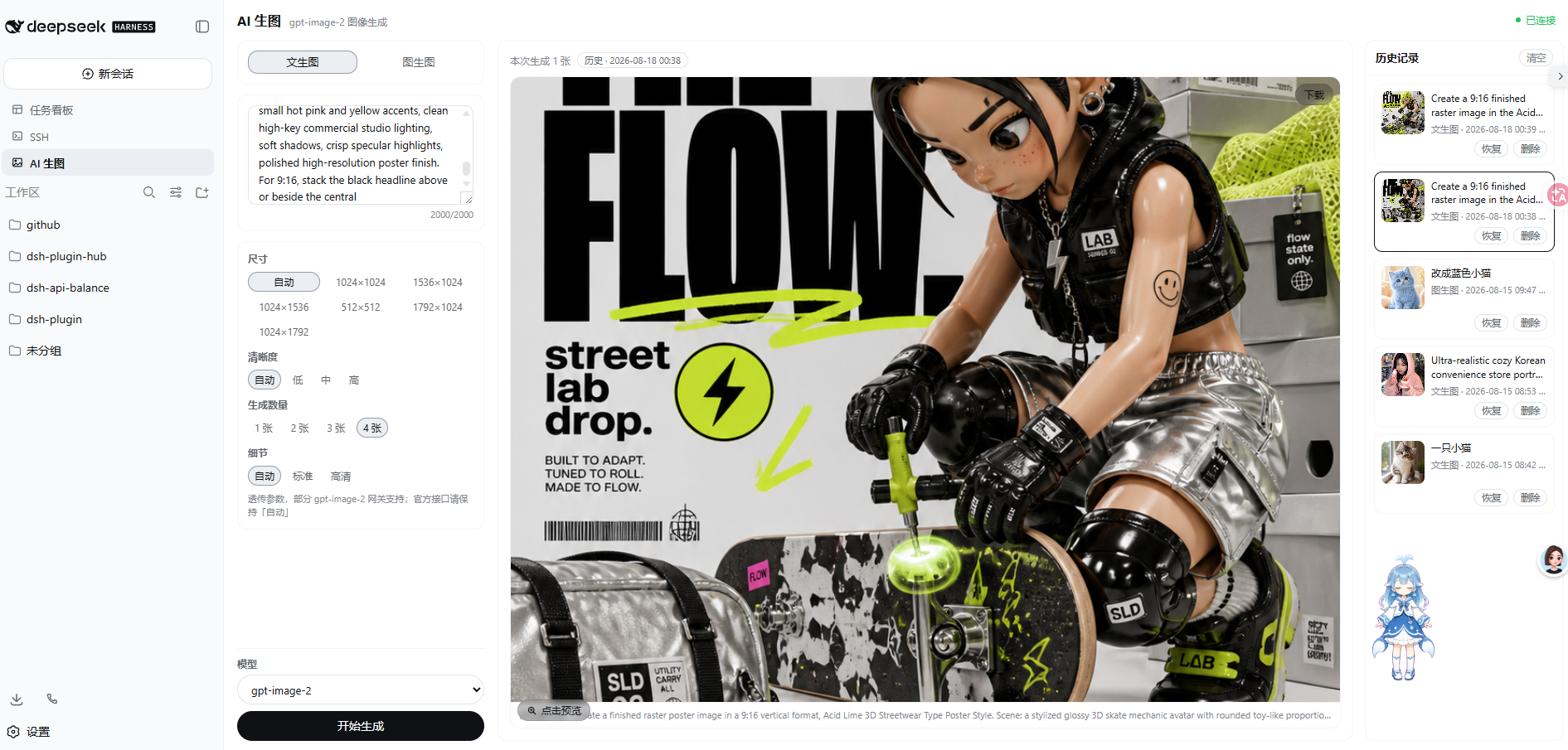
三栏工作台将参数、生成结果和历史记录放在同一视图中;生成的图片可预览、下载,并从历史记录恢复参数。
四图结果布局
单图结果布局
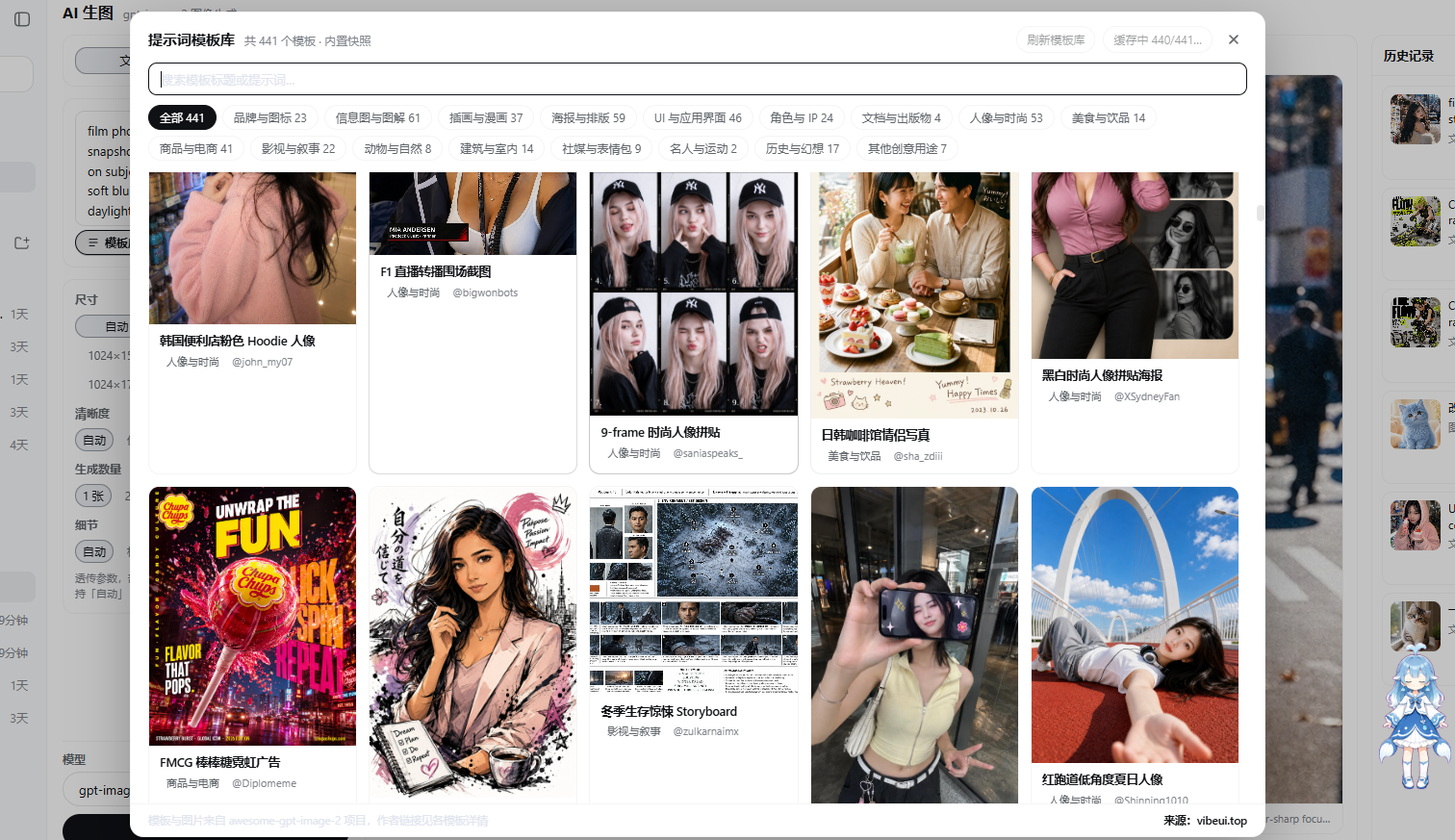
提示词模板库
模板库提供 441 个 gpt-image-2 案例的展示图、分类筛选和完整提示词;打开详情后可以复制提示词,或一键回填到生图输入框。
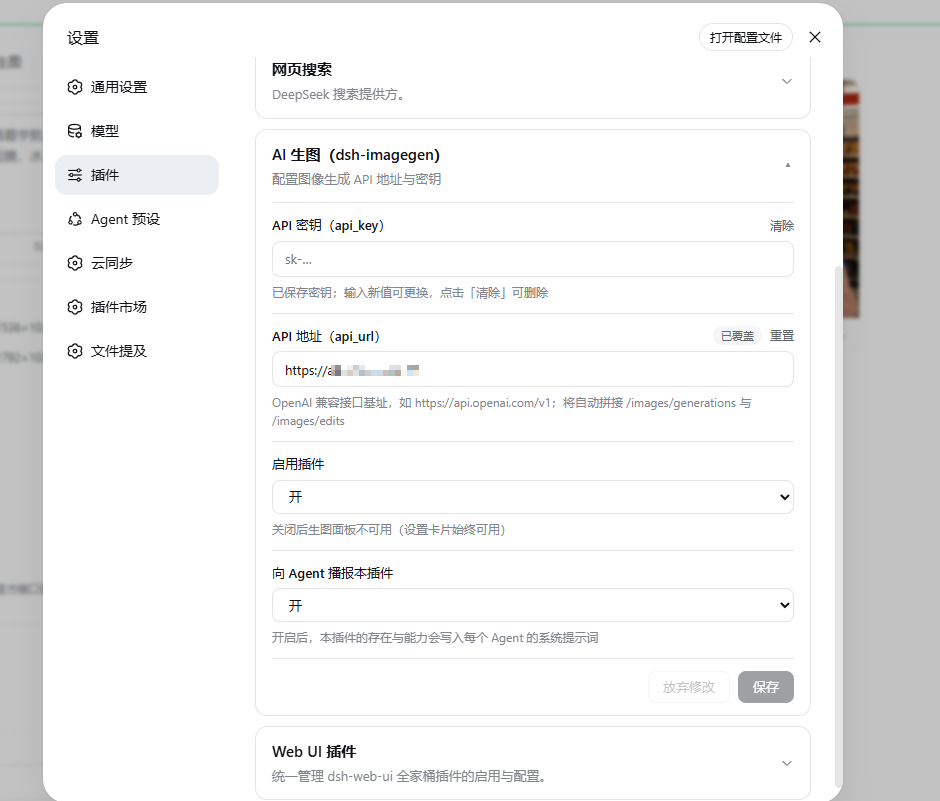
独立配置卡片
在 DSH 的“设置 -> 插件 -> 可配置”中填写 API 地址和密钥。密钥只保存在宿主侧设置文件,浏览器端不会获取明文。
功能
- 文生图与图生图:输入提示词生成图片,或上传 PNG、JPG、WEBP 参考图进行编辑。
- 可调生成参数:尺寸、清晰度、生成数量和细节等级均可在界面中选择;未指定的参数保持自动。
- 结果操作:结果区固定为四分格:单图铺满,双图占上排,三图占三格,四图为 2×2;支持下载、全屏预览、可滚动缩放、前后切换、复制优化提示词,以及一键将当前图片添加到图生图。
- 持久化历史:保存提示词、参数和图片;支持查看、恢复、单条删除和清空,最多保留 50 条。
- 跨设备查看:历史保存在 DSH 宿主侧,连接同一 DSH 的浏览器或设备共享同一份记录。
- 提示词模板库:提示词框左下角可打开模板库,浏览 441 个
gpt-image-2案例的展示图;支持搜索、分类筛选、查看完整提示词、复制,以及一键将模板回填到生图输入框。参考图通过宿主同源代理按需加载并缓存,也可手动缓存全部图片供离线浏览。 - 原生 DSH 体验:侧栏入口、主题适配和设置卡片均遵循 DSH Web GUI 的 UI 规范。
- 在线更新:插件会检查 GitHub Releases,发现新版本时在工作台显示在线更新按钮;安装完成后重启 DSH 即可加载新版本。
快速开始
前置条件:已安装 DSH(
npm i -g @deepseek-ai/dsh)与 pnpm。 装完统一重启 dsh web,侧边栏即出现「AI 生图」入口,再到「设置 → 插件 → 可配置」填写 API 地址与密钥。
方式一:让 AI 帮你安装(最省事)
把下面提示词直接粘贴给 DSH(或 Codex / 其他 coding agent)执行即可:
用 dsh plugin --profile web add @dickpy/dsh-imagegen 安装 AI 生图插件(profile 名按实际修改),完成后重启 dsh web。
方式二:npm 安装(推荐)
dsh plugin --profile web add @dickpy/dsh-imagegen
dsh 会自动把插件注册进 profile 的 bundle 清单(无需手动改 cordis.patch.yml),重启 dsh web 即可。
方式三:聚合包(tarball)安装
从 GitHub Releases 下载发布产物
(如 dickpy-dsh-imagegen-1.0.9.tgz),然后:
dsh plugin --profile web add <下载路径>/dickpy-dsh-imagegen-1.0.9.tgz
重启 dsh web。
方式四:源码开发启动(最后的选择)
需要改插件源码时才用这种方式:
git clone https://github.com/dickpy/dsh-imagegen.git
cd dsh-imagegen
pnpm install
pnpm run build
dsh plugin --profile web add link:/绝对路径/dsh-imagegen
重启 dsh web;开发时可运行 pnpm run watch 持续构建,bundle 变更由 client-hmr 自动热更。
配置 API
打开 DSH 的“设置 -> 插件 -> 可配置”,展开 AI 生图 (dsh-imagegen):
| 配置项 | 说明 |
|---|---|
api_url | OpenAI 兼容接口根地址,例如 https://api.openai.com/v1。插件会自动追加接口路径。 |
api_key | Bearer API 密钥。界面仅显示是否已配置;输入新值可覆盖,清空后保存可删除。 |
| 启用插件 | 关闭后生图工作台不可用,设置卡片仍可用于重新启用。 |
| 向 Agent 播报 | 开启后,将插件能力写入 Agent 系统提示词。 |
配置完成后,从 DSH 侧栏打开“AI 生图”即可开始使用。
接口兼容性
| 场景 | 请求 |
|---|---|
| 文生图 | POST {api_url}/images/generations,JSON 请求体 |
| 图生图 | POST {api_url}/images/edits,multipart/form-data,包含 image、prompt、model 与参数 |
| 响应 | 支持 OpenAI 兼容的 `{ data: [{ b64_json |
detail 是透传参数,部分 gpt-image-2 网关支持。官方 OpenAI 端点若不接受该字段,请保持界面中的“自动”。
数据与安全
- API 请求由 DSH 宿主进程代理,浏览器不直接连接上游 API,因此不暴露 API 密钥,也没有浏览器 CORS 问题。
- API 密钥保存在宿主侧
~/.dsh/settings.yaml;设置桥会对密钥进行脱敏。 - 历史数据存放在
~/.dsh/dsh-imagegen/:图片独立落盘,index.json保存索引。 - 模板库的提示词快照随插件发布;展示图从
vibeui.top通过本机宿主按需拉取,并缓存到~/.dsh/dsh-imagegen/template-images/。模板库仅在手动刷新或首次加载展示图时访问该站点。 - 插件通过专用 loopback 路由
/api/dsh-imagegen/settings/{describe,mutate}访问设置,不需要修改 DSH 源码或依赖第三方命名空间白名单。
项目结构
| 位置 | 职责 |
|---|---|
src/index.ts | 插件入口、设置注册、路由挂载和 Agent 提示词播报 |
src/routes.ts | /api/dsh-imagegen/* 宿主路由 |
src/engine.ts | 上游图像生成代理与响应归一化 |
src/history-store.ts | 历史记录和图片持久化 |
src/templates-store.ts | 模板快照、在线刷新和展示图本地缓存 |
src/client/ImageGenPanel.tsx | 生图工作台、结果、历史与大图预览 |
src/client/TemplateLibrary.tsx | 模板图库、搜索筛选、详情和一键回填 |
src/client/SettingsCard.tsx | 插件配置卡片 |
开发
pnpm run typecheck  # TypeScript 类型检查
pnpm run build      # 构建宿主与 Web bundle
pnpm run watch      # 持续构建
📬 反馈与提问
- 遇到 Bug:请使用 Bug 报告模板 提交, 并附带插件版本、DSH 版本、安装方式与复现步骤(请勿在 issue 中粘贴 API 密钥)。
- 功能建议:请使用 功能建议模板 提交, 描述使用场景与期望效果。
- 安装 / 使用问题:先查阅本文档「快速开始」与「配置 API」章节。
许可证
Read the usage guide →
Install steps, key points, FAQ and compatibility for this plugin — auto-derived from indexed fields.
Listing badge

[](https://deepseek-plugin.org/plugins/dickpy/dsh-imagegen)Paste this markdown into your GitHub README to link back to this listing. The badge only states the listing — not a security endorsement.