Adds complete session management for the DSH Web interface: trash deletion, archive recovery, continue/pause, unread marking, fork, workspace management, and context compression threshold.

- Language
- TypeScript
- License
- MIT
- Branch
- main
Install
$ dsh plugin --profile web add dsh-session-managerRun the command above in your terminal to install this plugin via the dsh CLI. You can switch Profile in the top-right corner. New to dsh? Read the beginner tutorial
Install via your agent
Install the DeepSeek Harness plugin dream12347/dsh-session-manager for me: review the repository at https://github.com/dream12347/dsh-session-manager first, then run the install command and verify the plugin loads successfully.
Paste this instruction to the DSH Web GUI assistant — it will install and verify for you.
One-Line Description
Adds complete session management capabilities to the DSH Web interface: accessible from both the Settings page and conversation top. Supports deletion (with recoverable trash or permanent purge), restoring archived sessions, resuming/pausing sessions, viewing recent activity stats, opening log directories, unread/read marking, forking to new chats, workspace grouping and sorting management, and a global context compaction threshold that applies uniformly to all Agent presets.
Core Features
- Delete sessions to trash (keeps most recent 10, earliest automatically purged permanently), supports restore or permanent deletion
- Restore "archived" sessions from the Settings page back to the main list
- One-click resume idle sessions or pause running sessions
- View session recent activity stats in a centered popup (turns, user messages, assistant messages, all tool calls, activity window)
- Open session's log directory in system file manager
- Display four-state dots next to session row titles (manual unread blue, official waiting-for-input amber, official completion-notice green, running spinner), also inject blue unread dot into official sidebar
- One-click fork current session to new chat (calls official sessions.fork)
- Workspace grouping displays sessions, sorted by last usage time within groups, supports drag-to-reorder, pin to top, rename, delete workspace
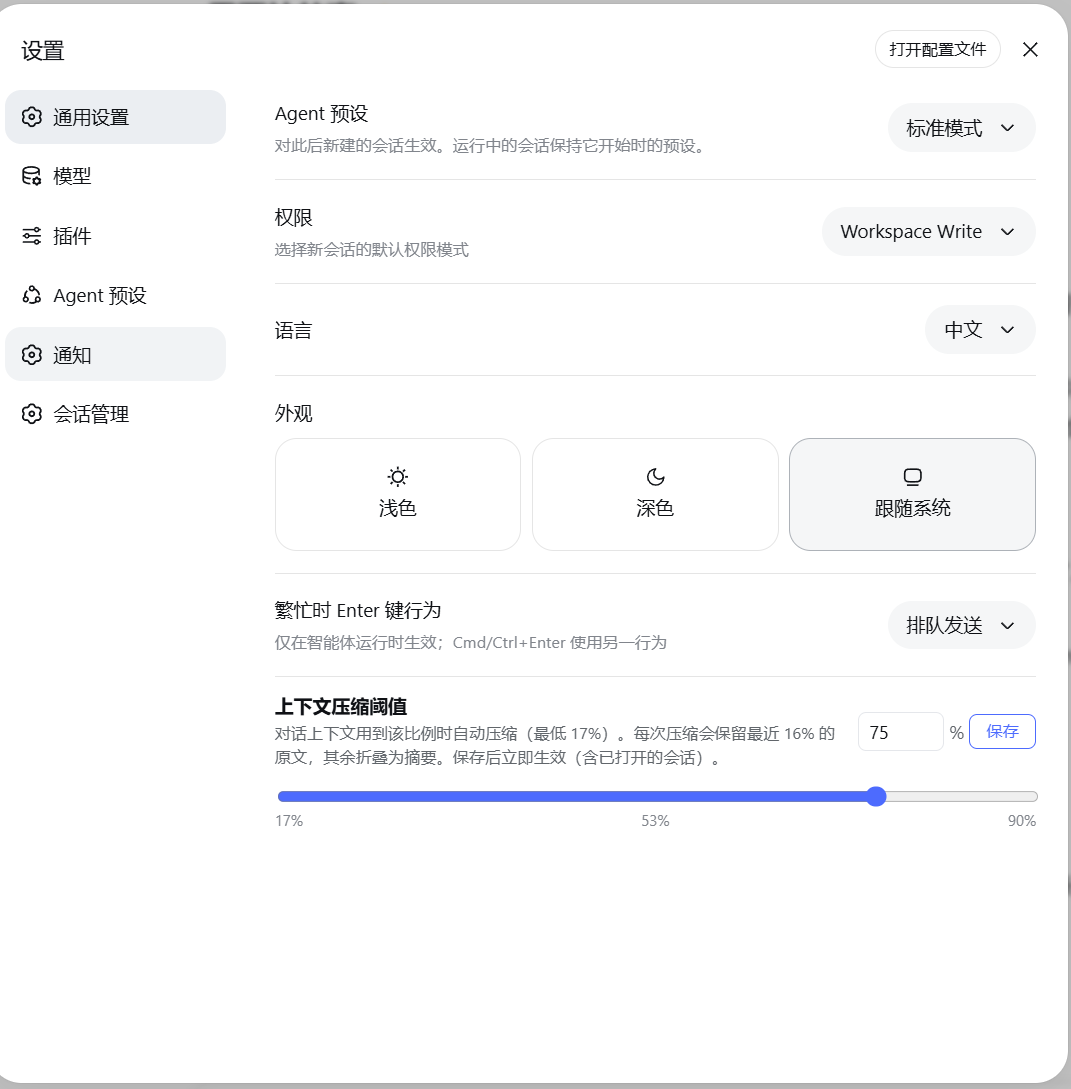
- Adjust context compaction threshold (17%–90%) in "General Settings", applies uniformly to all Agent presets and persists
Technical Implementation
- Language: TypeScript
- Key Dependencies: @deepseek-ai/cordis (plugin runtime), @deepseek-ai/dsh-host-webserver (HTTP routing), zod (request/storage domain schema), @deepseek-ai/dsh-storage-domain (persistence), react 18 (client UI)
- Architecture Pattern: Standard DSH plugin dual-end structure.
src/index.tsis the host side, exposes 7 HTTP routes viactx.webServer.register(/delete/restore/purge/trash/open-folder/pause/compaction-threshold), and applies threshold on every step viactx.on('agent/pre-step', ...)hook.src/client/index.tsis the client side, registers to three official slots viactx.slots.inject:settings.section(independent "Session Management" section),settings.general.item(compaction threshold slider),conversation.session.header.utilities("Conversation Management" and "Delete This Conversation" buttons at conversation top) - Entry Files:
src/index.ts(host) +src/client/index.ts(client, exportsdsh-session-manager/client)
Use Cases
When you run many sessions daily in DSH Web and the sidebar list keeps growing without native "delete session" entry, this plugin lets you reclaim space, recover accidentally deleted sessions, mark sessions unread for later continuation, and open log directories anytime to troubleshoot. If you also care about token usage and context compaction strategy, it provides a global threshold without needing to modify each Agent preset individually.
Prerequisites & Compatibility
| Dependency | Minimum Version | Notes |
|---|---|---|
| DSH | >= 0.1.0-rc.6 | Depends on settings.section / settings.general.item / conversation.session.header.utilities slots, plus ctx.sessionPersistence / ctx.workspaceRegistry / ctx.agents / ctx.storageDomain / ctx.agentPresets services |
| Node | ^22.19.0 或 >=24.0.0 | package.json#engines declaration |
| Platform | macOS / Windows / Linux | Opens log directory in system file manager via open/explorer/xdg-open |
| Native Modules | None | Host side only uses Node built-in modules (fs/path/child_process), client side has no native dependencies |
Installation
dsh plugin --profile web add github:dream12347/dsh-session-manager
Configuration Options
| Config | Type | Description | Default |
|---|---|---|---|
| Context Compaction Threshold | Number (17–90) | Auto-compact when session context usage reaches the set proportion of model window (1M tokens); retain recent 16% of original text; applies uniformly to all Agent presets | 80 (i.e., 0.8) |
| Trash Capacity | Number | Keep most recent N deleted sessions, earliest entries auto-purge permanently (unrecoverable) when limit exceeded | 10 |
The two settings' visible UI entries are "Settings → General Settings → Context Compaction Threshold" (slider 17%–90%) and "Settings → Session Management → Trash" collapsible section. This plugin has no traditional external config file.
FAQ
Q: What needs to be done after installation?
A: You must restart dsh web after installation. Host plugin and client bundle both load at DSH startup; without restart, new features won't appear.
Q: Can I delete a running session?
A: No. Delete button is disabled on running sessions, and host side will reject the request and return session-live. Currently open but idle sessions (not thinking) can be deleted normally. For multi-tab scenarios, first confirm the session has stopped in all tabs.
Q: How many items can the trash hold? What happens when it's full?
A: Maximum 10 items. When deleting a new session, the earliest item in trash gets auto-purged permanently (including session directory on disk), making it unrecoverable. Important sessions should be restored promptly from trash.
Q: What if a subagent session gets deleted?
A: Even if the main session is deleted, orphaned subagent sessions can be directly cleaned up in the session management panel, provided they're not running. This prevents accumulation of un-cleanable residual sessions.
Q: Where is the "Context Compaction Threshold" config stored? Does it persist after restart?
A: The value persists in DSH storage domain dsh_delete_session (~/.dsh/storages/dsh_delete_session.json). If the default Agent preset is a user preset, it syncs to the corresponding agent.cordis.yml's compaction-basic config; system preset files are read-only and won't be modified. Every agent/pre-step hook applies the threshold to all preset compaction engines, so saving takes effect immediately and persists after restart.
Q: What's the difference between unread marking and official unread?
A: Official unread is amber (waiting for input) and green (completion notice) dots; clicking them "reads in place"—no page navigation, just clears the official reminder. This plugin's blue unread is manual marking, stored in browser localStorage's dsh.session-unread.v1 (shared with other session management plugins). Click empty space to mark unread, click blue dot to clear unread, opening the session auto-marks as read.
Q: Will the sidebar's blue unread dot always be accurate?
A: Official sidebar row elements don't carry session ID attributes; this plugin matches by title text and injects blue dots via MutationObserver. Inside the session management drawer, marking is precise by real session ID, unaffected. Sessions with duplicate titles share the same blue dot in the sidebar—this is a known corner case.
Difficulty Level
Beginner — One command to install, restart DSH, then ready to use. No documentation reading or config file modifications needed. The only "configuration" is the compaction threshold slider in General Settings.
Known Issues & Limitations
- Cannot delete sessions that are thinking; in multi-tab scenarios, if another tab has the same session open, stop it there first (src/index.ts:414-417)
- Sidebar unread dots match by title text; sessions with duplicate titles share the same blue dot in sidebar, session management drawer unaffected (README.md:121)
- After deleting live sessions (opened in current process), memory state is completely cleared by DSH on restart; this is DSH's own behavior, not handled by this plugin (README.md:120)
- Host side directly writes to
registry.stateprivate field to keep WorkspaceRegistry cache in sync with storage domain; both README and source comments mark this as fragile to DSH upgrades, requiring sync adaptation after DSH upgrades (src/index.ts:276-289) - Permanently deleted session IDs remain in browser localStorage (preventing "resurrection" on refresh after live session deletion) and in archive collection (harmless residual, not displayed) (README.md:120)
- Must restart
dsh webafter installation, otherwise host plugin and client bundle won't take effect (README.md:50) - Compaction threshold minimum of 17% is determined by the hard constraint "threshold must be greater than engine's retention ratio of 16%" (src/index.ts:697-699 / src/client/index.ts:2235-2236)
English | 中文
这可能是目前功能最全的 DSH 会话管理插件:在 DeepSeek Harness Web 界面中全面管理会话,设置页与对话顶部均提供入口——删除(回收站可恢复或彻底清除)、恢复已归档会话、近期活动统计、继续/暂停会话、打开日志目录、未读/已读标记、新聊天中继续(fork)、工作区分组与排序管理、上下文压缩阈值设置,不修改 DSH 核心代码。
本项目由 dsh + Deepseek-V4-Flash0731 独立完成
如果觉得有用,欢迎点个 ⭐ Star,谢谢支持!
功能
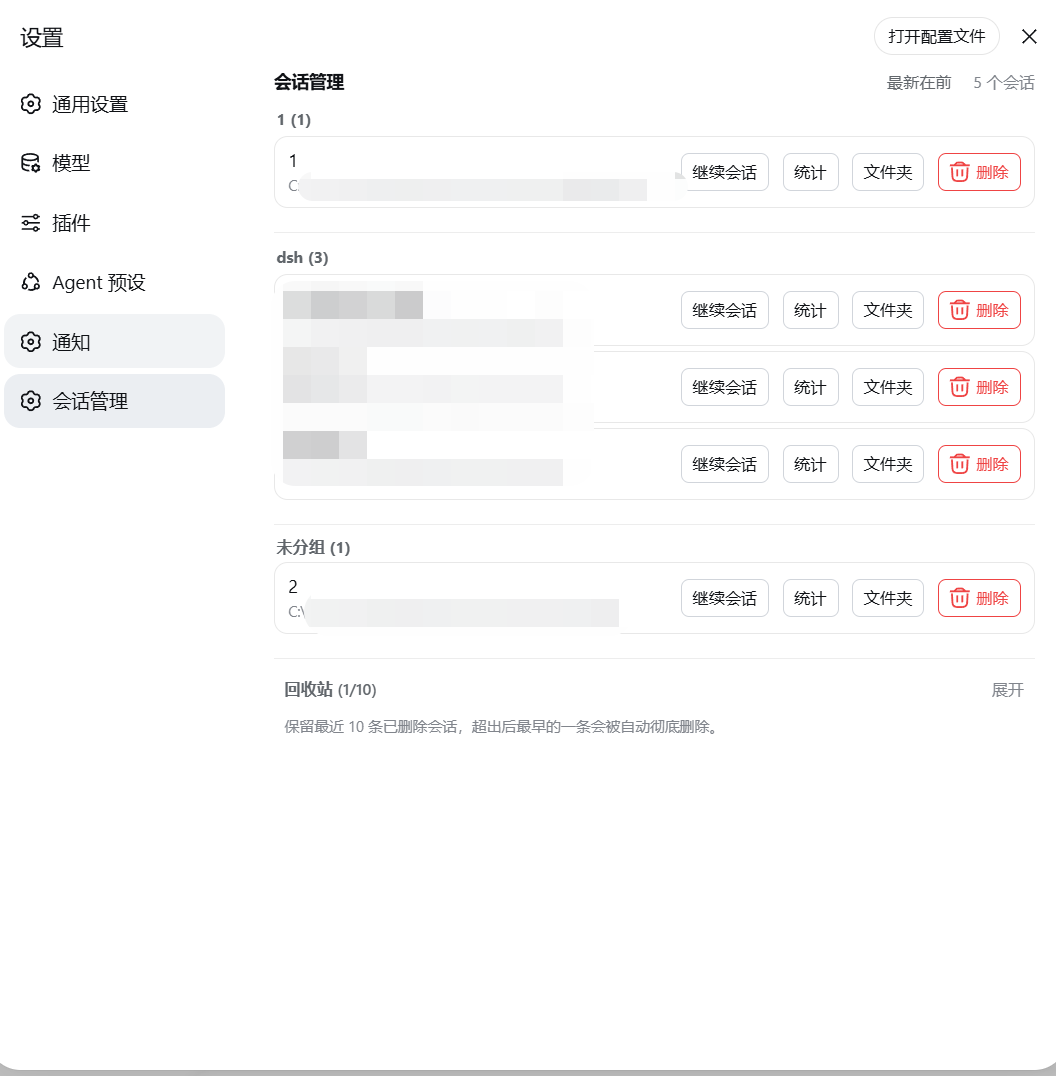
- 设置页新增独立的「会话管理」分栏(与 Notifications 同级的设置分区)
- 面板列出全部会话(标题 / 工作目录),底部折叠区单独展示已归档会话,支持一键恢复回到会话列表
- 回收站:删除的会话移入回收站(保留最近 10 条,超出自动清除最早一条),可恢复或彻底删除
- 统计:每个会话可在居中弹窗中查看完整近期活动统计(轮次 / 用户消息 / 助手消息 / 全部工具调用 / 活动窗口)
- 继续会话:一键打开会话并关闭面板;暂停:停止正在运行会话的当前回合
- 未读 / 已读:会话行标题旁显示状态点——手动未读为蓝色、官方等待输入为琥珀、官方完成提醒为绿色、运行中为转圈;点击官方状态点就地已读(不跳转),点击蓝色点清除未读,打开会话自动已读;官方侧边栏的对应会话行旁同步显示蓝色未读点
- 新聊天中继续:每个会话一键 fork 子会话(官方
sessions.fork)并打开 - 文件夹:在系统文件管理器中打开会话日志目录
- 删除本对话:对话顶部右侧红色按钮,一键删除当前对话(Session log 左侧)
- 对话管理 / 回收站:对话顶部入口,打开自绘右侧抽屉(图钉固定常驻、点击外部自动收起),行内「更多」悬浮菜单收纳统计 / 文件夹 / 新聊天中继续
- 工作区管理:会话按工作区分组展示,组内按最后使用时间排序(可切换最新/最旧);拖拽工作区标题即可调整顺序(插入 / 交换 / 拖到末尾);悬停标题出现置于顶部 / 重命名 / 删除按钮(删除按官方定义:仅移出列表,文件夹与会话记录保留,会话归入「未分组」)
- 上下文压缩阈值(通用设置):设置对话上下文用到模型窗口(100 万 token)的多少比例时自动压缩(17%–90%),每次压缩保留最近 16% 原文;对所有 Agent 预设的会话统一生效(保存即时 + 持久化 + 重启自动应用)
- 删除限制:仅禁止删除「正在思考」的会话;当前打开的会话(空闲)可删除
- 子代理(subagent)会话支持删除(非运行中):即使主会话已删除、子代理成为「孤儿」,也能在会话管理中直接清理
- 中英文界面自适应(跟随页面语言)
安装
从 GitHub
dsh plugin --profile web add 'github:dream12347/dsh-session-manager#v0.2.2'
从本地目录
dsh plugin --profile web add /absolute/path/to/dsh-session-manager
从 tarball
pnpm pack
dsh plugin --profile web add /absolute/path/to/dsh-session-manager-0.2.2.tgz
安装完成后重启 dsh web(host 插件与客户端 bundle 需要重启加载)。
截图
设置页「会话管理」分栏(工作区分组、行操作与回收站):
对话顶部快捷入口(对话管理 / 回收站 / 删除本对话):

会话管理抽屉(工作区分组、图钉固定、点击外部收起):

通用设置「上下文压缩阈值」(17%–90%,滑块刻度):
使用
设置页会话管理
- 打开侧边栏底部 设置(齿轮图标)
- 设置页面左侧导航出现独立的 会话管理 分栏,点击进入
- 主列表为未归档会话;底部「已归档会话」折叠区可展开查看、恢复或删除归档会话
- 删除会话 → 进入底部「回收站」折叠区(保留最近 10 条)
- 回收站内可 恢复(回到会话列表)或 彻底删除(永久清除,不可恢复)
- 每行操作:继续会话(打开并进入对话)、暂停(停止正在运行的回合)、统计(展开近期活动)、文件夹(打开日志目录)、删除
- 工作区标题右侧(悬停显示):置于顶部(挪到最前)、重命名、删除(红色,二次确认)
- 拖拽工作区标题可调整顺序:放到某个工作区上方/下方插入,放到标题上交换位置,拖到最下方即移到末尾
- 排序按钮(最新在前 / 最旧在前)切换组内会话的排列顺序
通用设置:上下文压缩阈值
- 打开 设置 → 通用设置(General)
- 找到「上下文压缩阈值」:滑块 / 输入框设置 17%–90%
- 保存后立即生效(含已打开的会话);配置对所有 Agent 预设统一生效,重启后依然有效
对话顶部快捷入口
任意对话页右上角(Session log 左侧):
- 对话管理:打开会话管理抽屉(完整列表 + 已归档 + 回收站),图钉可固定常驻,点击外部自动收起
- 回收站:打开抽屉并直接展开回收站
- 删除本对话(红色):确认后删除当前对话(移入回收站)
未读 / 已读状态点
会话行标题旁的圆点表示四种状态:蓝色=手动标记未读、琥珀=官方等待输入、绿色=官方完成提醒、转圈=运行中。点击琥珀 / 绿色点就地标记已读(不跳转,仅清除官方提醒);点击蓝色点清除未读;点击空白位置标记未读;打开会话自动已读。官方侧边栏的会话行旁同步显示蓝色未读点(按标题文本匹配,重复标题会话会共享该点)。
工作原理
| 层 | 实现 |
|---|---|
| Host | src/index.ts 注册 7 条路由:POST /delete(归档 + 非 live 会话文件移入回收站 + 记录条目)、POST /restore(文件移回 + 取消归档 + 删除条目)、POST /purge(清除回收站与原位置文件 + 删除条目)、GET /trash(回收站列表)、POST /open-folder(打开日志目录)、POST /pause(暂停运行中会话)、`GET |
| Client | src/client/index.ts 通过官方 settings.section 插槽注册独立分栏,用 useSessions / useWorkspaces 标准数据源列出会话(含归档/回收站分组),删除/恢复/彻底删除调用 host 路由;抽屉通过 sessions.list(ObservableSnapshot)订阅实时列表;彻底删除的会话 id 记录在浏览器 localStorage,避免 live 会话删除后刷新「复活」 |
- 未读机制:手动未读集保存在浏览器 localStorage 的共享 key
dsh.session-unread.v1({version:1, ids:[]}格式,与其他会话管理插件互通);官方状态点(琥珀/绿色/转圈)由官方SessionSummary的pendingInteraction/completed/running字段驱动,点击就地已读通过清除官方提醒标记实现,无需打开会话;侧边栏的蓝色未读点由 MutationObserver 装饰官方树节点(官方行元素没有会话 id 属性,故按标题文本匹配) - 压缩阈值全局生效:保存在存储域(
dsh_delete_session的thresholdRatio);如果默认 Agent 预设是用户预设,则同时写入 agent-presets 服务解析出的agent.cordis.yml,系统预设文件保持只读。host 在每个agent/pre-step钩子里把阈值写入所有预设的压缩引擎配置,因此对所有 Agent 预设的会话统一生效,重启后依然有效 - 删除时先走官方归档通道:侧边栏立即隐藏该会话
- 回收站条目持久化在 DSH 存储域(
~/.dsh/storages/dsh_delete_session.json),文件在~/.dsh/dsh-delete-session-trash/ - 工作区记账(
sessionIds槽位)在下次启动时由 registry 重建索引自动对账,无需手动编辑文件 - 无系统提示词改动、无模型工具新增,对 token 与模型行为零影响
限制
- 不能删除正在运行的会话(按钮禁用并拒绝删除),多标签页场景请先在别处确认该会话已停止
- 子代理会话可删除(非运行中),包括主会话已删除的「孤儿子代理」——不会再有无法清理的残留会话
- live 会话(当前进程内打开的会话)删除后,其内存状态由 DSH 在重启时彻底清理
- 已彻底删除的会话 id 会保留在浏览器 localStorage(防止刷新后重新出现)与归档集合中(无害残留,不显示)
- 侧边栏未读点按标题文本匹配,存在重复标题的会话时两者会共享同一个点(会话管理抽屉内不受影响,按真实会话 id 精确标记)
兼容性
当前版本适配 DSH 0.1.0-rc.6(依赖 settings.section / settings.general.item / conversation.session.header.utilities 插槽与 ctx.sessionPersistence / ctx.workspaceRegistry / ctx.agents / ctx.storageDomain / ctx.agentPresets 服务)。DSH 版本升级后如插槽或服务 API 变化,需要同步适配。
开发
pnpm install        # 安装依赖(@deepseek-ai 系列为 link 本地开发依赖)
pnpm run check      # typecheck + test + build
lib/ 为提交的构建产物,修改源码后必须重新构建并提交 lib/。
Read the usage guide →
Install steps, key points, FAQ and compatibility for this plugin — auto-derived from indexed fields.
Listing badge

[](https://deepseek-plugin.org/plugins/dream12347/dsh-session-manager)Paste this markdown into your GitHub README to link back to this listing. The badge only states the listing — not a security endorsement.