Renders video/web wallpapers and scene still frames from local Wallpaper Engine to the DSH web interface background, with support for liquid glass effect, custom wallpaper uploads, and slideshow lists.

- Language
- JavaScript
- Branch
- main
Install
$ dsh plugin --profile web add dsh-plugin-wallpaper-engineRun the command above in your terminal to install this plugin via the dsh CLI. You can switch Profile in the top-right corner. New to dsh? Read the beginner tutorial
Install via your agent
Install the DeepSeek Harness plugin elysia395/dsh-wallpaper-engine for me: review the repository at https://github.com/elysia395/dsh-wallpaper-engine first, then run the install command and verify the plugin loads successfully.
Paste this instruction to the DSH Web GUI assistant — it will install and verify for you.
At a Glance
Transform Wallpaper Engine wallpapers installed via Steam on your machine into backgrounds for the DSH web chat interface (dsh web): automatically scan your wallpaper library, render video and web wallpapers natively behind the interface, overlaid with an iOS-style liquid glass effect.
Key Features
- Automatically scan local Wallpaper Engine installation directory and Steam Workshop (locates non-default drive Steam libraries by reading
libraryfolders.vdf) - Render portable Video (
.mp4) and Web (HTML) wallpapers natively to the DSH interface background layer, with video supporting mute autoplay and seek dragging - Extract main textures from Scene wallpaper
.pkgcontainers as static frame backgrounds (supports JPEG passthrough, PNG decoding, and DXT series compressed textures) - Add a top-level "Wallpaper Engine" settings page in DSH settings, with liquid glass appearance (6 color presets + custom color picker), glass transparency and color adjustment
- Support custom uploads of JPG / PNG / MP4 as wallpapers, with customizable storage directory; support video playback speed (0.5x–2x), horizontal flip, hide/restore (soft delete)
- Support user-created slideshow lists (any number, each with independent interval and order), first startup automatically imports a copy from Wallpaper Engine's own playlist
Technical Implementation
- Language: JavaScript (Node ESM) + React client module
- Key Dependencies:
@deepseek-ai/cordis ^4.0.1(host-side Cordis plugin framework),@deepseek-ai/dsh-client-runtime >=0.1.0-rc.6,@deepseek-ai/dsh-client-ui-slots >=0.1.0-rc.6,@deepseek-ai/dsh-host-webserver >=0.1.0-rc.6 - Architecture Pattern: Dual-end separation—the host side is a Cordis plugin (
lib/index.js), registering same-origin HTTP routes on DSH WebServer; the client side is a browser module (lib/client.js, compiled fromsrc/client.jsviascripts/build-client.mjs), injecting settings top-level page viactx.slots. Settings migrated from browser localStorage to host-side file (~/.dsh-wallpaper-engine/config.json), independent of port - Entry Files:
lib/index.js(host),lib/client.js(client, build artifact, canonical source issrc/client.js)
Use Cases
For users who want their DSH chat interface to stand out from the generic solid color backgrounds, and want to use their existing Wallpaper Engine wallpaper library from Steam as decoration—particularly users who like the liquid glass style, need video/web wallpaper dynamic backgrounds, and don't want settings to be lost when changing ports or browsers. This plugin is designed specifically for Windows (macOS has a community-maintained derivative package).
Prerequisites and Compatibility
| Dependency | Minimum Version | Description |
|---|---|---|
| DSH | >= 0.1.0-rc.6 | Inferred from peerDependencies (cordis ^4.0.1, dsh-client-runtime/ui-slots/host-webserver all rc.6+) |
| Node | Not declared | No engines field in package.json |
| Platform | Windows | Host locates Wallpaper Engine by reading Steam libraryfolders.vdf and Windows registry, only applicable to Windows; macOS maintained separately by community as dsh-plugin-wallpaper-engine-mac |
| Native Modules | None | Only uses built-in modules like node:fs node:path node:os node:crypto node:child_process |
Installation
dsh plugin --profile web add github:elysia395/dsh-wallpaper-engine
Configuration Options
| Setting | Type | Description | Default |
|---|---|---|---|
| Selected Wallpaper | Selector | Current active wallpaper from your library (WE + custom uploads) | None selected |
| Wallpaper Blur | Slider 0–60px | Blur applied to the wallpaper itself | 0 |
| Darken (Mask) | Slider 0–90% | Dark mask depth between text and wallpaper | 25% |
| Border | Slider 0–90% | Border and divider contrast | 35% |
| Glass | Slider 0–60px | Glass blur radius for chat bars/bubbles/sidebar | 24px |
| Video Speed | Selector 0.5x–2x | Video wallpaper native playbackRate | 1x |
| Horizontal Flip | Toggle | CSS mirror (video/web/uploaded images) | Off |
| Content Rating | Dropdown | Wallpaper Engine's G/PG13/R rating filter | Everyone |
| Type Filter | Dropdown | Video/Web/Image/All | All |
| Card Style | Toggle | Compact CD rack style vs regular pagination | Regular pagination |
| Settings Window Liquid Glass | Toggle | Replace entire DSH native settings window with glass style | On |
| Theme Color | Color (6 presets + picker) | Unified theme color for buttons/toggles/links/navigation选中/sliders | #4f8cff Classic Blue |
| Glass Color | Color (6 presets + picker) | Base tint for settings window glass | Light White / Dark Night Blue |
| Glass Transparency | Slider 0–60% | Glass panel opacity (settings window/input bar/bubbles/sidebar) | 12% |
| Upload Directory | Path input | Custom storage location for wallpaper files | ~/.dsh-wallpaper-engine/uploads |
FAQ
Q: Can macOS users use this?
A: This plugin is primarily for Windows because the Wallpaper Engine client itself is a Windows application on Steam, and the host side directly reads the Windows registry and libraryfolders.vdf. macOS is separately published by community maintainer Jerry as the npm package dsh-plugin-wallpaper-engine-mac, using a different mechanism.
Q: Why do I only see a static image when I select a Scene wallpaper, with no animation?
A: Scene wallpapers in Wallpaper Engine are driven by its built-in 3D engine, which browsers cannot replay (shaders/particles/geometry animations). The plugin extracts the main texture from the scene.pkg container, selected by "artistic likelihood" score (JPEG passthrough or DXT decoding), as a static background—photo/illustration scenes look close to the original, but pure shader/BC7/video texture-driven scenes automatically fall back to the workshop preview image (preview.jpg), which is expected behavior.
Q: My settings are all gone after DSH Desktop restarts?
A: Since v0.4.0, all settings (selected wallpaper, color scheme, transparency, layout, slideshow, hidden, speed, flip, etc.) are stored in the host-side file ~/.dsh-wallpaper-engine/config.json, independent of port, browser, or browser data—restarting/changing ports/clearing cache/switching browsers won't lose settings. Old browser localStorage configs are automatically migrated on first startup.
Q: Will uploaded custom wallpapers fill up my C drive?
A: By default they write to ~/.dsh-wallpaper-engine/uploads (usually in the C: drive user directory on Windows). You can change the "Upload Directory" in settings to any drive's absolute path, and existing files will be automatically migrated; if you don't want to migrate old files, you can choose "Don't Migrate" to leave them in their original location.
Q: Text is hard to read on some wallpapers—what should I do?
A: Increase the "Darken" and "Border" sliders in "Wallpaper Effects", and add some "Wallpaper Blur" if needed. Colorful or complex patterned wallpapers may also require switching between DSH's "Light/Dark" themes to find the most comfortable one for the current wallpaper. All sliders take effect immediately without refreshing the page.
Q: How to completely uninstall?
A: First clear uploaded custom wallpapers in plugin settings, then delete the entire ~/.dsh-wallpaper-engine directory (including config.json, uploads, cache subdirectories), finally use dsh plugin --profile web remove to uninstall the plugin. Deleting this directory won't affect your Steam Wallpaper Engine installation.
Difficulty Level
Beginner — After one-time installation, all adjustments are done in the visual "Settings → Wallpaper Engine" page with no manual configuration items needed; regular users can follow the on-page prompts.
Known Issues and Limitations
- Scene (native 3D) and Application (external window) wallpapers cannot be embedded in web: Scene only displays as extracted static frames, Application doesn't appear in selector or slideshow candidates at all
- Scene main textures don't support BC7, RGB565, 16-bit float, etc.; on decode failure it automatically falls back to
preview.jpg, pure shader/pure particle scenes typically have no extractable main texture, resulting in a grayish white mask effect - Browsers need to allow muted
<video>autoplay: DSH runs on loopback so modern browsers allow this by default, but if your browser has strict policies you'll need to manually adjust - Host side only exposes Wallpaper Engine files it has enumerated, not providing arbitrary file system access; custom uploaded files only exist locally, never uploaded to any remote server
- Selector text is mixed Chinese/English (this bundle hasn't yet integrated with DSH's locale namespace)
一个 DSH bundle,把你电脑上的 Wallpaper Engine 壁纸变成 DSH 网页界面(dsh web)的背景。
它会自动发现你本机的 Wallpaper Engine 安装,列出你的壁纸,并把可移植的类型渲染到 DSH 对话界面的后方,配以 iOS 风格液态玻璃效果:Video(.mp4)动态播放、Web/HTML 以 iframe 加载,Scene(场景)提取主纹理作为静态帧。v0.2 起还支持:
- 壁纸选择弹窗:缩略图网格收纳进独立弹窗,设置页不再被长列表占满;
- 隐藏 / 恢复:不想看的壁纸一键隐藏(软删除),随时恢复,不碰源文件;
- 视频倍速:0.5x – 2x 六档原生调速,即时生效、不重载;
- 水平翻转:镜像画面(视频 / 网页 / 上传图片均适用);
- 自定义壁纸:直接上传本地 JPG / PNG / MP4 当壁纸,可选存储位置与画面适配模式;
- 场景壁纸静态帧(v0.3):Scene 壁纸提取主纹理作为静态背景,不再只是"不可播放"的占位。
- 液态玻璃设置页(v0.3.1):设置页升级为一级设置页(参照 dsh-web-ui-all 皮肤中心的设计),整页是可自定义的液态玻璃卡片 —— 配色(6 种预设 + 自定义取色)与玻璃透明度(0–60%)即时生效、持久保存。
- 整个设置窗口液态玻璃化(v0.3.2):一键把 DSH 原生设置窗口整体(对话框 + 左侧导航 + General / 模型 / 插件等全部原生分区)换成液态玻璃 + 自定义配色 —— 开启「设置窗口液态玻璃」开关后,窗口背景、导航选中/悬停、按钮、开关、链接等全部跟随 配色 与 玻璃透明度,关闭则恢复原生样式。
- 玻璃调节统一(v0.3.3–v0.3.5):设置窗口的玻璃模糊与对话栏共用同一套调节参数(「玻璃」滑动条 0–60 px 同时控制设置窗口与输入栏/气泡的模糊半径,饱和度/亮度/对比度配方一致);新增「玻璃颜色」—— 设置窗口玻璃的底色色调可自定义(6 预设 + 自定义取色,默认浅色白 / 深色深夜蓝,选定后两种主题统一使用该色),与「配色」(交互元素)分工:配色管控件、玻璃颜色管玻璃本身。
- 设置持久化到宿主端文件(v0.4.0):全部设置(已选壁纸、配色、透明度、布局、轮播、隐藏、倍速/翻转等)改存
~/.dsh-wallpaper-engine/config.json,不再依赖浏览器 localStorage —— 重启、换端口(含 DSH Desktop 的随机端口)、清浏览器数据、换浏览器都不再丢失;旧版 localStorage 配置首次启动自动迁移。

壁纸 + 磨砂遮罩 + iOS 液态玻璃,渲染在 DSH 界面后方。
支持哪些壁纸类型?
Wallpaper Engine 的壁纸分四种类型:
| 类型 | 由谁渲染 | 能否搬到 DSH |
|---|---|---|
| Scene(场景) | Wallpaper Engine 自带的 3D 引擎 | ✅ 静态帧 — 提取主纹理(.pkg/.json 内的 .tex/JPEG),见下文 |
| Video(视频) | 就是一个 .mp4 文件 | ✅ 能 — 在 <video> 标签里播放 |
| Web(网页) | WE 内置的 Chromium 壳(webwallpaper64.exe)承载 HTML | ✅ 能 — 在 <iframe> 里加载 |
| Application(应用) | 注入的外部窗口 | ❌ 不能 |
Scene 壁纸的 3D 场景(shader/粒子/几何)本身无法在浏览器里重放,但它的主纹理(通常是背景艺术图)可以提取出来作为静态帧背景——对摄影类、插画类场景壁纸效果接近原图。选择器里场景卡片带有「静态帧」徽标,可与动态壁纸区分。
展现效果:大部分场景壁纸都能有较好的静态帧展现(本机实测约 80%+ 的 Scene 壁纸能提取出接近原图的彩色主图,尤其摄影、插画、动画截图类);少部分无法正常展示,包括纯 shader 粒子/程序生成类场景(没有可提取的主纹理)、使用特殊纹理格式(如 BC7)的场景、以及以视频纹理驱动的动画场景——这类会自动回退显示工坊预览图(
preview.jpg),属预期行为,不视为缺陷。
场景静态帧:怎么工作的
- 读取:解析
scene.pkg(PKGV 容器 + LZ4 条目链)或松散scene.json目录,从scene.json的第一个 image 对象出发定位主纹理(material / instance 引用的 .tex),其余 .tex 按"艺术图可能性"评分兜底(内嵌 JPEG/PNG 最高分,mask/effect/depth/workshop 辅助纹理降权,R8/RG88 灰度格式几乎排除)。 - 解码:TEX 容器(TEXV0005/TEXI0001、TEXB0001-4 mipmap、LZ4 或原始数据)解码为静态图,支持 RGBA8888 / R8 / RG88 / DXT1 / DXT3 / DXT5,以及 WE 内嵌 JPEG / PNG 纹理(摄影类壁纸常见,原样直出、零解码、保真度最高)。
- 质量门:解码后抽样质检——灰度 >88% 或纯色(方差 <3)的帧会被拒绝并尝试下一候选;全部不通过时自动回退到项目
preview.jpg(灰度遮罩、深度图、纯色占位不会冒充壁纸)。 - 视频纹理识别:WE 的动画同步纹理(内嵌 MP4,如
*_sync纹理)无法出静态帧,识别后直接回退预览图,不再输出乱码画面。 - 缓存:提取结果按
<版本>_<路径>_<mtime>缓存到~/.dsh-wallpaper-engine/cache/frames/(可用DSH_WE_CACHE_DIR覆盖),工坊更新后自动失效重建;提取管线升级会更换版本前缀使旧缓存失效重提。 - 限制:BC7 / RGB565 / 16 位浮点等纹理格式无法解码(回退到 preview.jpg);静态帧≠3D 渲染,动画粒子/水波等动态效果不会出现。
工作原理
- Host 端(
lib/index.js):一个 Cordis 插件,负责- 通过读取 Steam 的
libraryfolders.vdf定位 Wallpaper Engine 安装位置(所以 Steam 装在非默认盘也能用); - 从
projects/defaultprojects、projects/myprojects以及steamapps/workshop/content/431960/*枚举壁纸; - 在 DSH webserver 上注册同源 HTTP 路由,让浏览器端直接获取数据和流式加载媒体:
GET /wallpaper-engine/inventory→ 壁纸 JSON 列表GET /wallpaper-engine/media/<token>→ 视频 / HTML(支持 Range)GET /wallpaper-engine/preview/<token>→ 预览图GET /wallpaper-engine/scene-frame/<token>→ 场景壁纸静态帧(提取主纹理,JPEG 直出或 PNG,磁盘缓存)POST /wallpaper-engine/upload→ 上传自定义壁纸(JPG / PNG / MP4,原始字节流)POST /wallpaper-engine/remove→ 移除已上传的壁纸POST /wallpaper-engine/upload-dir→ 更改上传目录(持久化到~/.dsh-wallpaper-engine/config.json,自动迁移已有文件)GET /wallpaper-engine/settings→ 读取插件设置(v0.4.0)PUT /wallpaper-engine/settings→ 保存插件设置(v0.4.0,写入~/.dsh-wallpaper-engine/config.json)
- 通过读取 Steam 的
- Client 端(
lib/client.js):一个浏览器模块,拉取壁纸列表,把选中壁纸渲染到应用三列后方的固定图层,并在「设置」里注册一个一级设置页「Wallpaper Engine」(含液态玻璃卡片、选择弹窗、隐藏/恢复、倍速/翻转、配色/透明度与自定义壁纸管理)。 - 自定义壁纸存储:上传的文件写入插件管理的本地目录(默认
~/.dsh-wallpaper-engine/uploads,可在设置里改到任意盘符),经同一套/media、/preview路由服务——与 WE 媒体走完全相同的管道,天然跨重启持久、无浏览器配额限制。
设置持久化(v0.4.0)
你的全部设置(已选壁纸、配色、透明度、布局、轮播、隐藏、倍速/翻转等)从 v0.4.0 起保存在宿主端文件里,不再依赖浏览器 localStorage。
- 存在哪里:
~/.dsh-wallpaper-engine/config.json(与「上传目录」的配置是同一个文件)。具体位置:- Windows:
C:\Users\<你的用户名>\.dsh-wallpaper-engine\config.json - WSL / Linux / macOS:
~/.dsh-wallpaper-engine/config.json
- Windows:
- 为什么改:此前设置存在浏览器 localStorage,而 localStorage 按「地址 + 端口」隔离——DSH Desktop 每次启动用随机端口,等于每次进入一个全新的存储空间,配置全部恢复默认(Web 端固定端口则无此问题)。改存宿主端文件后与端口无关。
- 带来的好处:重启 / 换端口 / 清浏览器数据 / 换浏览器 / 无痕模式都不再丢失配置。
- 旧数据迁移:老版本存在 localStorage 里的配置会在首次启动时自动迁移到该文件,无需任何手动操作。
- 需要知道的行为变化:同一台电脑上,多个浏览器(如 Chrome 和 Edge)或手机等设备访问同一个 dsh 时,共享同一份配置(此前各存各的);如果你回滚到旧版本,它仍会读取 localStorage 里的缓存副本,配置不会丢。
- 配置文件的读写:每次修改设置会自动写入(200ms 防抖合并);文件损坏时插件回退默认值且不会覆盖你的文件。
安装
普通用户(安装已发布版本,推荐)
如果你只是想用这个插件,直接装 npm 上已发布的包即可:
dsh plugin --profile web add dsh-plugin-wallpaper-engine
装完重启 dsh web,打开 设置 → Wallpaper Engine 就能用。
macOS 用户:macOS 没有 Wallpaper Engine 客户端,本插件的 macOS 版(WaifuX + 散装媒体支持)由社区维护者 Jerry 维护,发布为独立 npm 包:
dsh plugin --profile web add dsh-plugin-wallpaper-engine-mac
开发者(运行你本地的一份代码)
大多数读者可以跳过本节。 只有当你打算自己改这个插件的代码时才需要。下面的步骤假定你已了解命令行、以及「仓库 / repository」是什么(一份用 Git 做版本管理的代码文件夹)。
第 1 步:取得源码(checkout)
这里 checkout 的意思很简单:就是「把源代码下载/复制一份到你电脑的某个文件夹里」。通常在这个 GitHub 页面点 Code → Download ZIP 下载并解压,或用 Git 克隆:
git clone https://github.com/elysia395/dsh-wallpaper-engine.git完成后你会得到一个包含
package.json、lib/、src/、cordis.patch.yml的文件夹。下文把这个文件夹称作插件文件夹。
第 2 步:用文件夹路径安装(link:)
这里的
link:表示:告诉dsh(它会把命令转发给 pnpm)去连接你本地那个插件文件夹,而不是从网上下载一个包。好处是:你改完代码并重新构建后,改动能直接生效,不用反复重装。
把下面命令里的 <插件文件夹绝对路径> 替换成你插件文件夹的完整路径(就是你在资源管理器/文件管理器里打开那个文件夹时,地址栏显示的那串路径):
dsh plugin --profile web add link:<插件文件夹绝对路径>
具体示例——假设你的插件文件夹路径像 D:\dev\dsh-wallpaper-engine 这样:
dsh plugin --profile web add link:D:\dev\dsh-wallpaper-engine
如果你已经用命令行 cd 到了插件文件夹的上一级,也可以用相对路径:
dsh plugin --profile web add link:./dsh-wallpaper-engine
该填哪个确切的路径? 必须是包含
package.json的那个文件夹——不是package.json文件本身的路径,也不是它里面任何单个文件的路径。它就是你在资源管理器地址栏里打开那个文件夹时显示的那串路径。
为什么推荐
link:而不用file:?link:是和你的源码文件夹建立实时连接,改完src/client.js并npm run build后直接生效,无需重装;file:则是打包成一份静态快照,每次改动都要重新 add。首次安装两者都可以。
然后重启 dsh web。host 端会成为 bundle 层,client 端会自动加载(dsh.client.immediately: true)。
如果 Steam 装在非标准位置,host 会通过 libraryfolders.vdf 自动探测,无需额外配置。
使用
- 打开
dsh web,进入 DSH 界面。 - 打开 设置,左侧导航里找到 Wallpaper Engine(一级设置页,侧边栏独立入口)。
- 点击 选择壁纸 打开选择弹窗,在缩略图网格里点选一张 Video/Web 壁纸(或上传的图片/视频),它会出现在界面后方;点遮罩、按 ESC 或点「关闭」收起弹窗。Scene/Application 无法内嵌网页,不显示在网格中。
- 用 暂停/播放 暂停视频壁纸,用 关闭 清除壁纸。
选择会保存在浏览器的
localStorage(键dsh-wallpaper-engine:selection)中。

设置界面:液态玻璃卡片(「外观」配色/透明度)、当前壁纸卡片、「自定义壁纸」「轮播列表」「壁纸效果」分区。

选择弹窗:浏览全部壁纸缩略图,支持批量隐藏与已隐藏恢复。
隐藏与恢复(软删除)
每张壁纸卡片右上角有「隐藏」按钮——只是从列表移除,不删除任何源文件。需要时在弹窗的「已隐藏」标签里单张恢复或全部恢复;弹窗工具栏的「批量」进入多选模式,可一次隐藏多张。隐藏状态保存在浏览器 localStorage,刷新 / 重启不丢;隐藏当前正在播放的壁纸不会打断播放,自动轮转也会跳过被隐藏的壁纸。
内容分级与类型过滤
选择壁纸弹窗的网格上方有两个下拉框,复刻 Wallpaper Engine 自己的分类方式:
- 内容分级 —— 读取每张壁纸
project.json的contentrating字段(即 WE workshop 的 G / PG13 / R 三档标签):全部 / Everyone(G,默认) / PG13(家长指导级) / Mature(R) / 未分级(没有该字段的壁纸,通常是本地项目或自上传内容)。 - 类型 —— 按可内嵌类型筛选:全部 / 视频 / 网页 / 图片(自上传)。
每个选项都带当前可播放壁纸数量;被过滤的壁纸会从网格、轮播编辑器和轮播候选中整体剔除,也不会被自动选中或轮换。选择保存在浏览器 localStorage;默认 Everyone 对应 WE 保守的首启立场。
说明:分级读取自壁纸文件里的
contentrating字段,与 WE 客户端界面显示的分级一致,但不会跟随 WE 客户端里成人内容开关的状态(插件直接扫描磁盘,不读 WE 的配置)。
卡片样式与黑胶唱片
- 紧凑布局:设置页顶部有一个滑动开关。开启后为 CD 架效果 —— 卡片像 CD 盒一样纵向层叠(下排上沿盖住上排下沿、左右不遮挡),鼠标悬停放大置顶;网格更紧凑(每行约 7 个)且一页到底不翻页。关闭则为常规网格(固定高度防重叠 + 分页,默认)。选择保存在浏览器
localStorage。 - 黑胶唱片:选择壁纸界面旁边有一个旋转的黑胶唱片,把当前选中壁纸的封面当作唱片标签展示 —— 播放时旋转、暂停即停(系统开启「减少动态效果」时停用动画)。弹窗头部也保留小号黑胶。该效果在经典与新版两种卡片样式下都显示。
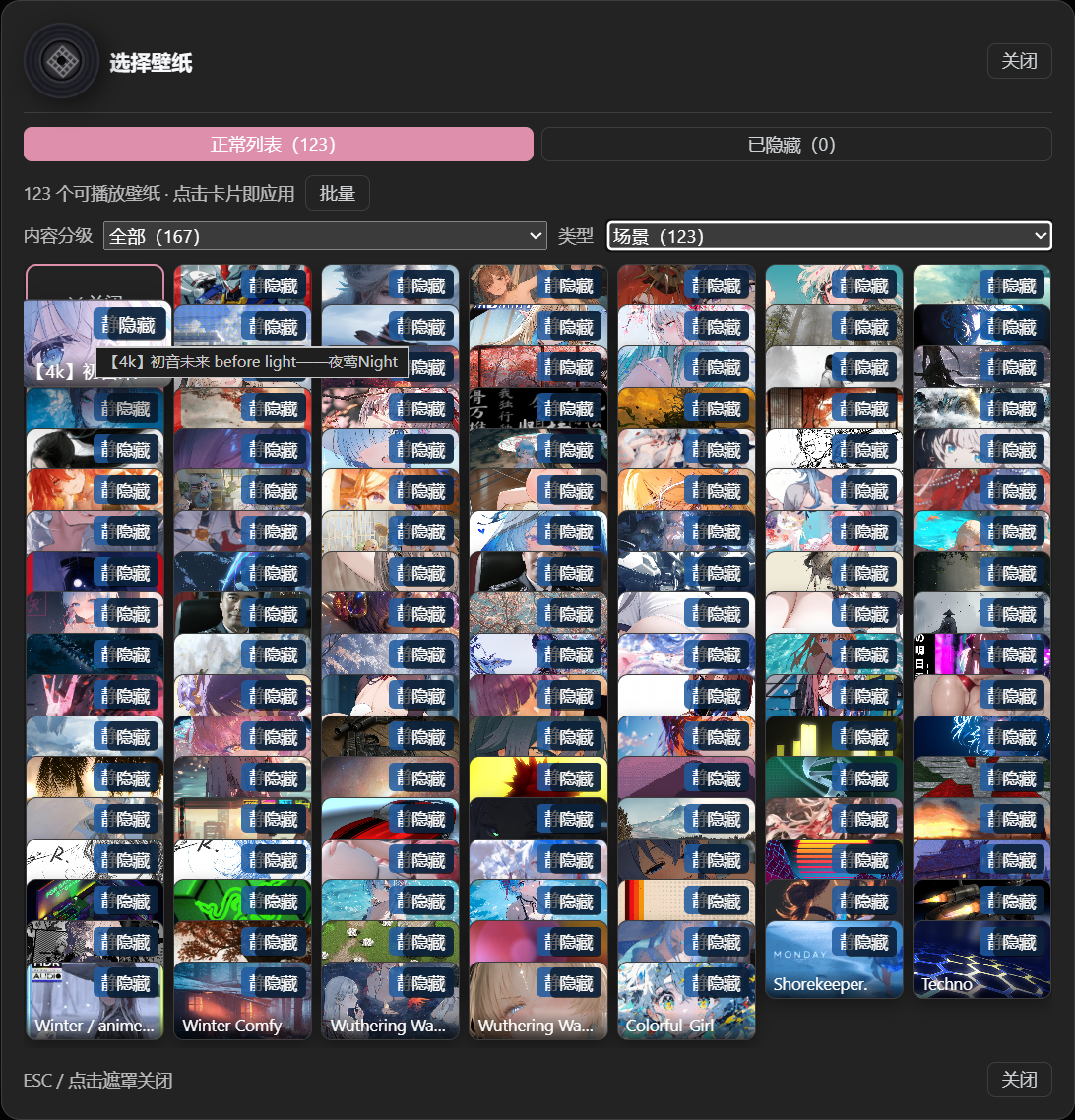
紧凑布局:CD 架式层叠网格,悬停放大置顶,一页到底不翻页。
黑胶唱片:当前选中壁纸的封面作为唱片标签,播放时旋转、暂停即停。
视频倍速与水平翻转
选中视频壁纸后,「壁纸效果」区出现 倍速 档位(0.5x / 0.75x / 1x / 1.25x / 1.5x / 2x)——基于浏览器原生 playbackRate,即时生效、不重载不黑屏(壁纸视频本就静音,无需担心音画同步)。水平翻转 开关对视频、网页与上传的图片/视频都生效,镜像通过 CSS scaleX(-1) 完成,零主线程开销。
自定义壁纸
在「自定义壁纸」区可以上传本地图片(JPG / PNG)或视频(MP4)作为壁纸:
- 存储位置:上传文件默认保存在
~/.dsh-wallpaper-engine/uploads(用户主目录,通常是 C 盘)。点「更改」可把存储位置改到任意盘符(绝对路径,支持~),已有文件会自动迁移过去,选择会持久化、重启不丢——不想让壁纸数据占 C 盘的用户建议改到其他盘。 - 格式限制:仅 JPG / PNG / MP4;浏览器与宿主端双重校验,格式不符会给出明确提示。
- 适配模式:覆盖 / 填充 / 居中 / 拉伸 四种画面适配(仅对自定义壁纸生效,WE 壁纸保持原设计构图)。
- 管理:已上传列表可单独移除(二次确认后删除本地文件);上传的壁纸同样支持隐藏 / 恢复、倍速与翻转。
- 重复去重:重复上传同一文件会自动识别(按内容校验),直接选择已有的那张,不会在仓库里堆积副本。
自动轮转(轮播列表)
轮转基于自定义轮播列表(轮播列表)。用 新建 可以创建任意多个列表,从库存里勾选 Video/Web 壁纸加入每个列表,并为每个列表单独设置切换间隔(1、5、10、30、60 或 120 分钟)和播放顺序(顺序/随机),勾选 自动轮转 后只在该列表内循环。列表保存在浏览器 localStorage,完全在客户端维护——轮转不再依赖 Wallpaper Engine 自己的 config.json 播放列表路径。
每个列表至少需要 2 个可播放壁纸;手动切换壁纸会重新计算下一次轮转时间;不同列表可以有不同的间隔(比如一个每 5 分钟、一个每 30 分钟)。首次使用时,插件会自动把第一个可播放的 WE 播放列表导入成一个轮播列表,开箱即用;编辑列表时也可以用 从 WE 播放列表导入 把其它播放列表导入当前编辑的列表。Scene 和 Application 壁纸不能嵌入网页,会自动从轮转候选和选择器中剔除。
液态玻璃外观(整个设置窗口 + 配色 + 透明度)
设置页顶部「外观」区控制整个 DSH 原生设置窗口的观感(参照 dsh-web-ui-all 皮肤中心的设计):
| 控件 | 作用 | 范围 | 默认 |
|---|---|---|---|
| 设置窗口液态玻璃 | 总开关:把设置窗口整体(对话框 + 左导航 + 全部原生分区)换成液态玻璃 | 开 / 关 | 开 |
| 配色 | 主题色:窗口内的按钮、开关、链接、导航选中、滑块与玻璃高光统一跟随 | 6 预设 + 自定义取色 | #4f8cff 经典蓝 |
| 玻璃颜色 | 设置窗口玻璃的底色色调:玻璃本身的颜色(不只是透明度) | 6 预设 + 自定义取色 | 浅色白 / 深色深夜蓝 |
| 玻璃透明度 | 玻璃面板(设置窗口、输入栏、气泡、侧边栏)的透明度 | 0–60 % | 12 % |
开启「设置窗口液态玻璃」后,General、模型、插件等所有原生分区和左侧导航都会变成同一套液态玻璃 + 配色(通过覆盖设置对话框作用域内的 shell token 实现,不侵入其他界面)。设置窗口的玻璃模糊与对话栏使用同一套调节参数:「玻璃」滑动条(0–60 px)同时控制设置窗口与输入栏/气泡的模糊半径,饱和度/亮度/对比度配方完全一致;玻璃颜色决定玻璃底色本身的色调(默认浅色白/深色深夜蓝,选定后两种主题统一使用该色),玻璃透明度决定浓淡,越高越"透"(壁纸颜色更清晰地透过面板),越低越接近实色。不支持
backdrop-filter的浏览器自动回退到高不透明实色,保证文字可读。所有控件即时生效并保存在浏览器localStorage,刷新不丢。
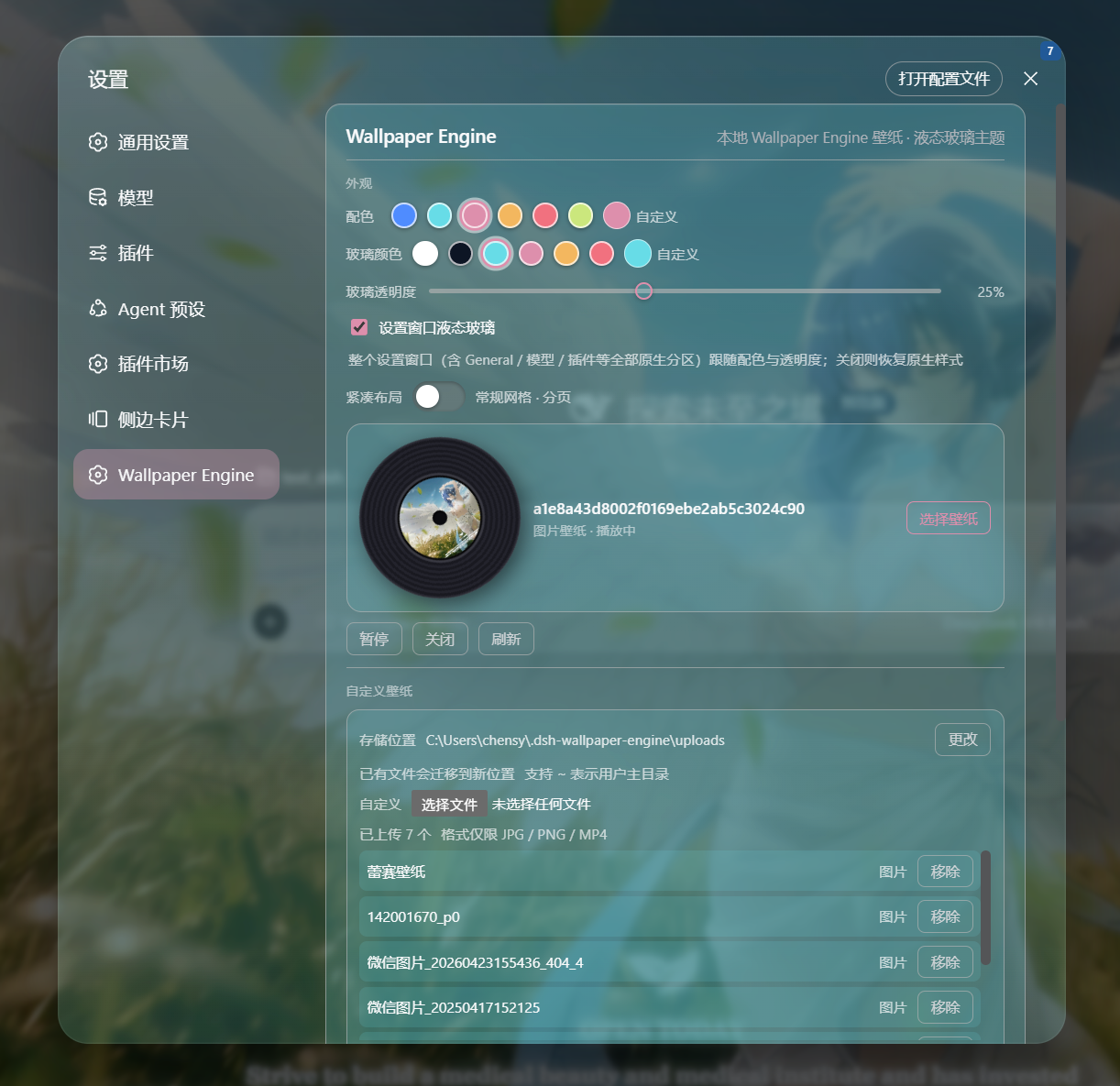
液态玻璃:整个设置窗口统一玻璃质感,跟随「配色」「玻璃颜色」与「玻璃透明度」。
四个滑动条
壁纸激活后,四个滑动条可以微调它与界面的融合效果:
| 滑动条 | 作用 | 范围 | 默认 |
|---|---|---|---|
| 壁纸模糊 | 模糊壁纸本身 | 0–60 px | 0 |
| 暗化 | 加深壁纸与文字之间的遮罩 | 0–90 % | 25 % |
| 边框 | 提高边框 / 分割线的对比度 | 0–90 % | 35 % |
| 玻璃 | 玻璃面板(输入栏、气泡)的模糊半径 | 0–60 px | 24 |
浅色 / 深色模式的适配提醒 — 每张壁纸的色系和明暗差异很大,没有哪一种模式能适配所有壁纸。请在 DSH 的「浅色 / 深色」主题之间来回切换,找到适合当前壁纸的那一种。如果在偏亮或花纹复杂的壁纸上 文字或分割线看不清,就把 暗化、边框 两个滑动条调高(必要时再稍微加一点 壁纸模糊),直到看着舒服为止。四个滑动条都是即时生效的,无需刷新页面。
配置
本插件不会向模型暴露任何工具或提示文本,对 agent 零 token 开销。选择、隐藏、轮播列表等状态都保存在浏览器 localStorage,不写入任何持久化 DSH 设置。唯一的本地落盘数据是自定义壁纸文件(存于你设置的上传目录)与记录该目录位置的 ~/.dsh-wallpaper-engine/config.json(约百字节)。
与 dsh-better-sidebar 的兼容适配
本插件的液态玻璃效果对 dsh-better-sidebar 的侧边栏面板做了专门适配(毛玻璃、高光与层级统一),让侧边栏与对话区共享同一套「壁纸 + 遮罩」背景,三列视觉一致、不再割裂。

已知限制
- Scene(原生 3D)和 Application 壁纸无法内嵌,不会显示在缩略图选择器和轮播候选中;它们的动态渲染仍是 Wallpaper Engine 在桌面上的工作。
- 浏览器需能自动播放静音
<video>(DSH 跑在 loopback,现代浏览器允许静音自动播放)。 - 媒体从你本机的 Wallpaper Engine 安装路径提供;host 只提供它已枚举过的文件,不会暴露任意文件系统。自定义上传的文件同样只存在于本机,不上传任何服务器。
- 选择器文案为中英混合(本 bundle 尚未接入 DSH 的 locale 命名空间)。
开发 / 重建
host 端(lib/index.js)是纯 ESM,无需构建。client 端(lib/client.js)是编译产物,由规范源文件 src/client.js 经 scripts/build-client.mjs 生成,输出 DSH 模块加载器要求的 window.__ModuleLoader__.load({ id, factory }) 外壳(与盒内 client 包 tsdown 产出的形态一致)。
npm run build      # 从 src/client.js 重新生成 lib/client.js
npm run verify     # 物化生成的 bundle 并断言其导出
编辑 src/client.js 后运行 npm run build,不要手改 lib/client.js。npm install/pnpm install 会自动触发 prepare → build,因此全新 checkout 总是带最新的 lib/client.js。
host↔browser 的契约是同源 HTTP,两端可独立开发:改 host 后重启 dsh web 生效,改 client 则先 npm run build 再重启 dsh web。
Read the usage guide →
Install steps, key points, FAQ and compatibility for this plugin — auto-derived from indexed fields.
Listing badge

[](https://deepseek-plugin.org/plugins/elysia395/dsh-wallpaper-engine)Paste this markdown into your GitHub README to link back to this listing. The badge only states the listing — not a security endorsement.