Use OpenAI Codex models in DSH via ChatGPT OAuth, with optional independent search, image understanding, and image generation capabilities.

- Language
- TypeScript
- License
- Apache-2.0
- Branch
- main
Install
$ dsh plugin --profile web add dsh-codex-connectRun the command above in your terminal to install this plugin via the dsh CLI. You can switch Profile in the top-right corner. New to dsh? Read the beginner tutorial
Install via your agent
Install the DeepSeek Harness plugin franksong2702/dsh-codex-connect for me: review the repository at https://github.com/franksong2702/dsh-codex-connect first, then run the install command and verify the plugin loads successfully.
Paste this instruction to the DSH Web GUI assistant — it will install and verify for you.
One-Line Pitch
Enables users in DeepSeek Harness to log in with ChatGPT subscription and use OpenAI Codex models (including independent search, image reading, and image generation) as an LLM option without replacing the default model or global search routing.
Core Features
- Log in with a ChatGPT OAuth account in Settings → Plugins → Plugin configuration → Codex Connect card; credentials are stored separately in
$DSH_HOME/.openai-codex-auth.json, not shared with Codex CLI/Desktop - Use Codex models under the OpenAI Codex category in the model selector, while preserving Harness native streaming output, tool calls, reasoning replay, conversation compression, and permission approvals
- Enable optional independent web search to register Codex as a search provider, but it will not automatically take over the profile's global search routing
- Enable optional
view_imagetool to allow vision-enabled Codex models to read local files and public web images (DNS resolution and jump targets are fully verified and locked to public addresses) - Enable optional
codex_connect_image_generatetool to invoke GPT Image generation, with images directly saved as DSH attachments and displayed in the conversation - Provide a standalone
dsh-codex-connectCLI for login/logout, status, doctor, history migration, and on-demand browser origin allowance
Technical Implementation
- Language: TypeScript (ESM, bundled with tsdown)
- Key Dependencies:
@deepseek-ai/cordis(plugin registration and fiber injection),@earendil-works/[email protected](OpenAI Codex provider and OAuth flow),@deepseek-ai/dsh-llm-pi-ai(reusing common Adapter),@deepseek-ai/dsh-settings(settings-section editing) - Architecture Pattern: Inject
llm-openai-codexline viacordis.patch.yml(all 3 capabilities default to false); Host-sideapply()registers OAuth store, Transport, Adapter, and configurable Provider in one go; capabilities are dynamically mounted/unmounted viactx.effect+reconcileXxx()inonChangeofinstallSettingsSectionfor the three fiber groups:search/view_image/image_generate; Browser-side injects card viaslotsatsettings.plugin.itemand Fast Mode toggle with quota indicator atconversation.input.right - Entry Files:
src/index.ts(Host plugin main,name = "llm-openai-codex",inject = ["llm"]),src/client/index.tsx(Browser-side,name = "dsh-codex-connect-client"),src/bin.ts(standalone CLI:doctor | login | logout | status | migrate-history | trust-origin, etc.)
Use Cases
Users who already pay for ChatGPT Plus/Pro and want to use Codex as an optional LLM in DSH; those who want Codex models but don't want to give up Harness's conversation persistence, compression, sub-agents, tool approvals, attachments, MCP, and skills. Codex Connect also serves as a smooth migration path from the old dsh-codex while preserving the three optional capability groups: search/image reading/image generation.
Prerequisites & Compatibility
| Dependency | Minimum Version | Description |
|---|---|---|
| DeepSeek Harness Plugin API | 0.1.0-rc.7 | A group of @deepseek-ai/dsh-* packages must be upgraded together, see compatibility.json |
@earendil-works/pi-ai | 0.82.1 | OpenAI Codex provider upstream, must be upgraded in sync with DSH packages |
| Node.js | ^22.19.0 || >=24.0.0 | Declared in package.json#engines |
| Platform | macOS / Windows / Linux | macOS and Linux enforce owner-only permissions on OAuth files (chmod 600), Windows automatically skips this check |
| Native Modules | — | None (only depends on built-in modules like node:http / node:https / node:net.BlockList) |
Installation
dsh plugin --profile web add github:franksong2702/dsh-codex-connect
Configuration Options
| Config | Type | Description | Default |
|---|---|---|---|
enableSearch | boolean | Register Codex as an independent web search provider; not auto-selected as global search | false |
enableImageTool | boolean | Enable view_image tool: allow vision models to read local files and public web images | false |
enableImageGeneration | boolean | Enable codex_connect_image_generate tool: generate images via GPT Image, results saved as DSH attachments | false |
searchModel | string | Codex model ID for independent search | gpt-5.6-sol |
searchMode | cached / indexed / live | Search mode: use OpenAI cache / index / live fetch | cached |
searchContextSize | low / medium / high | Context size returned by search API | medium |
searchMaxOutputTokens | positive integer | Max output tokens for search API | 10000 |
FAQ
Q: After installing Codex Connect, will the previously configured default model and search be changed?
A: No. cordis.patch.yml only inserts one line llm-openai-codex, and all 3 capabilities default to false. Profile's agent-default-model and web.searchProvider only take effect when you explicitly write them.
Q: Where are OAuth credentials stored? Are they the same as Codex CLI/Desktop?
A: Credentials are stored in $DSH_HOME/.openai-codex-auth.json (default ~/.dsh). This is a separate file and will not read or modify ~/.codex/auth.json; to migrate accounts to another machine, simply go through ChatGPT authorization again on the target machine.
Q: Is an OpenAI Platform API key required?
A: No. Codex Connect only uses the ChatGPT subscription's OAuth bearer token. Private OpenAI Platform credentials are neither read nor proxied—pricing, rate limits, and quotas are all based on the ChatGPT subscription.
Q: What information should not be pasted into issues, logs, or config files?
A: Do not paste any OAuth authorization URLs, device codes, refresh/access tokens, or account IDs; when encountering issues, just paste the sanitized output from dsh-codex-connect doctor --json.
Q: After upgrading DSH to 0.1.0-rc.7, the Codex search history from Alpha 4.10 can't be read. What to do?
A: First run dsh plugin --profile web exec dsh-codex-connect migrate-history --json to scan; after seeing hit events, stop all DSH processes that might write to that session root, then run with --apply --confirm-stopped --json to actually fix; a backup named .pre-codex-search-history-migration will be created in the same directory before fixing.
Q: Will doctor/status commands output secrets?
A: No. doctor only reads lstat metadata and outputs sanitized JSON with schema v1 (includes credential file status, capability switches, compatibility state, provider conflicts, prompts), no absolute paths or OAuth fields are printed; status --json only reports signed-in / signed-out.
Q: If I also have the old dsh-codex package installed, what happens?
A: Startup will be rejected due to provider ID conflict (Harness doesn't allow two adapters to register openai-codex), and you'll be prompted to either uninstall the conflicting party or remove the extra llm-openai-codex line from the profile before installing Codex Connect.
Getting Started Difficulty
Beginner — After installation, simply go to the settings card and click Sign in with ChatGPT once, then pick an openai-codex model in the model selector to use it; capabilities are disabled by default, so existing configuration is hardly affected.
Known Issues & Limitations
- Codex endpoint doesn't enforce Responses API's
max_output_tokens, so the server-side token limit for Harness compression summaries cannot be applied on this route (README.md:186) - POSIX platforms enforce strict owner-only validation on OAuth files; modes readable by group/others will be rejected on startup, need to run
chmod 600first (src/store.ts:32-50) - History fix command only supports dry-run on Windows;
--applymode is actively rejected at code level (src/history-migration.ts:295-297) view_imageremote URLs enforce public network verification: each redirect target must be re-resolved and the socket pinned to the verified address, otherwise rejected; local loopback, private networks, link-local, and cloud metadata endpoints are all unreachable (src/public-http.ts:59-103 / src/public-http.ts:167-173)- Uninstalling this package won't automatically delete OAuth credentials; must explicitly run
dsh-codex-connect logout, otherwise$DSH_HOME/.openai-codex-auth.jsonwill be retained (README.md:179) - After enabling independent search tool, it won't write plugin private required events in Session, so telemetry cannot be preserved across independent
@deepseek-ai/dsh-sessioninstances; but Harness's own web Tool records still normally fall into history (docs/design.md:19)

English | 中文
Connect your ChatGPT subscription to DeepSeek Harness with OAuth, optional GPT Image generation, user-controlled defaults, Harness-native approvals, diagnostics, and reliable session recovery.
dsh-codex-connect adds the openai-codex model catalog and a separate ChatGPT OAuth login. Models run through Harness's normal LLM service, so streaming, tool calls, reasoning replay, compaction, filesystem controls, permission gates, and approval prompts remain Harness-owned. It does not turn a ChatGPT subscription into an OpenAI Platform API credential. When an eligible GPT Codex model is selected, the Composer also shows a conversation-scoped Fast Mode toggle and a compact weekly-quota indicator.
Installation is additive. The bundle does not replace the current default model or search route. Standalone search, view_image, and image generation remain disabled until explicitly enabled.
The setup and image-result screenshots in this English guide are captured from the English-localized Harness UI. The shared Composer crop is a language-neutral feature strip; the Chinese guide uses the same strip and Chinese captures for the other screens. Model and provider identifiers keep their canonical spelling in both languages.
Quick start (about five minutes)
This guide uses the web profile. Replace web with the name of the Harness profile you already use. You need a working dsh installation; from a DeepSeek Harness source checkout, prefix the commands with pnpm.
1. Install the plugin into one profile
dsh plugin --profile web add dsh-codex-connect@alpha
Expected result: the package is added to that profile. This does not change the profile's default model or global search route.
To reproduce this release exactly, use dsh plugin --profile web add [email protected]. If npm is unavailable after the matching GitHub prerelease exists, use dsh plugin --profile web add 'github:franksong2702/dsh-codex-connect#v0.1.0-alpha.4.14'. A local checkout can be installed as link:/absolute/path/to/dsh-codex-connect.
2. Start Harness
dsh web
Expected result: the Harness web UI opens for the selected profile.
3. Find the Codex Connect card
Open Settings → Plugins → Plugin configuration → Codex Connect.
Expected result: a fresh installation shows Not signed in and a Sign in with ChatGPT button. The card is where you later manage optional capabilities too.

4. Sign in with ChatGPT
Click Sign in with ChatGPT and complete the browser approval yourself. If an embedded WebView blocks the sign-in window, use the displayed Open ChatGPT sign-in page link to continue in your system browser. Do not copy an authorization URL, code, token, or account identifier into an issue, log, or configuration file.
Expected result: the account area changes to Signed in. The screenshot below is the successful end state after this step; it is not the initial sign-in screen.

5. Choose a model and make one safe check
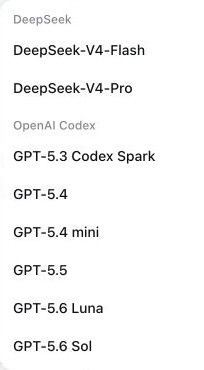
Open Harness's normal model picker and select an openai-codex model for the agent or session you are using. This selection is separate from writing the profile's default model or global search route.
The picker groups the available entries under OpenAI Codex. Model identifiers such as GPT-5.6 Luna are canonical names, so they intentionally remain un-translated.
To confirm the configured plugin row locally, run:
dsh --profile web --dump-config
Expected result: the configuration has exactly one llm-openai-codex row. Keep this configuration dump local; it may include unrelated profile settings.
For secret-free status and diagnostics that do not start OAuth, run:
dsh plugin --profile web exec dsh-codex-connect status --json
dsh plugin --profile web exec dsh-codex-connect doctor --json
Expected result: status --json reports signed-in and exits 0, while doctor --json prints one secret-free JSON document. A signed-out status --json exits 1; return to step 4 instead of treating that as a plugin failure.
Composer controls for GPT Codex conversations
The two small controls are shown only when the current conversation is using a GPT model from the openai-codex provider. They are session controls, not profile-wide settings:
- Fast Mode (lightning icon) is off by default for each conversation. Click it to request the faster
1.5×mode; click it again to return to Standard speed. The control is bound to that conversation and does not change the selected model or other conversations. Hover or focus the icon to see the current state and its quota-consumption warning. - Weekly quota bar is the short horizontal bar beside the model selector. Its color moves from green through yellow/orange to red as the remaining amount falls. Hover or focus it to see the exact remaining percentage and the server-provided reset time. It is hidden for non-GPT models or when usage data is unavailable.
- For the exact
gpt-5.3-codex-sparkmodel, the Composer reads the Spark weekly bucket. Other GPT Codex models read the standard Codex weekly bucket; these are separate limits.

Optional capabilities (off by default)
The installed bundle is intentionally inert beyond model-provider registration:
- id: llm-openai-codex
  config:
    enableSearch: false
    enableImageTool: false
    enableImageGeneration: false
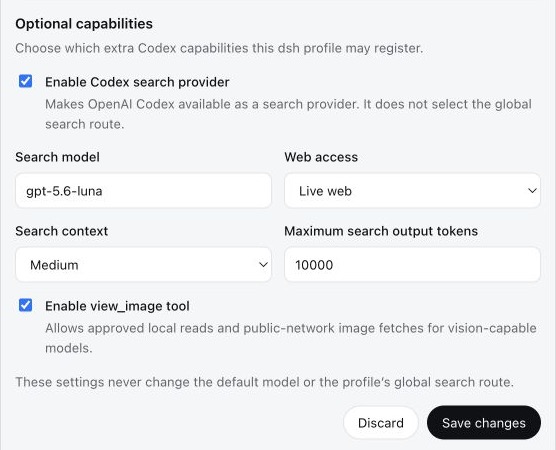
Open Settings → Plugins → Plugin configuration → Codex Connect to manage the account and these options in one card. Save changes affects only this plugin's capability section and applies live. It never selects a default model or a global search route.
Enable only the capability you intend to use
enableSearch: trueregisters Codex as an available search provider. It does not select the profile's global search route.enableImageTool: trueenablesview_imagefor approved local reads and public-network image fetches on vision-capable models.enableImageGeneration: trueenables the prompt-only image generation tool. Use the image generation capability included with your current GPT subscription. Generated images are saved as DSH attachments and shown in the conversation with the native image gallery.
The screenshot below is an example after someone has explicitly enabled capabilities. It does not show the fresh-install default. This English guide uses the English-localized capture; the Chinese guide shows the matching Chinese-localized state.
Generate images with GPT Image
- Turn on Enable GPT Image generation in the Codex Connect card and select Save changes.
- Choose an
openai-codexGPT model for the conversation. - Describe the image you want in ordinary language. The agent can expand that request into the prompt sent to GPT Image.
- The completed image is stored as a DSH attachment and rendered directly in the conversation. The result card lets you review and copy the full prompt, download the image, and inspect image details.
This capability uses the image generation access included with your current GPT subscription; it does not require an OpenAI Platform API key. Availability remains subject to the GPT plan and model selected for the conversation.
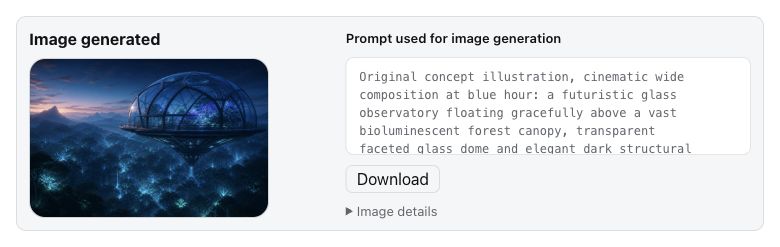
The detailed image prompt is authored by the selected GPT model. Codex Connect does not silently add image parameters: it validates the prompt-only request, forwards it through the ChatGPT subscription capability, and stores the returned image as a DSH attachment. On the result card you can scroll through and copy the complete prompt. Try again and Generate another send that card's own prompt again, so an older card is not accidentally regenerated from a newer conversation message. Modify this image first asks what you want to change, then continues from that card's prompt.
Usage limits in Plugin configuration
After sign-in, the Codex Connect settings card can show several server-reported windows. They are separate buckets, not three views of one number:
- Codex · Weekly is the standard Codex weekly bucket used by ordinary GPT Codex models.
- GPT-5.3-Codex-Spark · 5-hour and GPT-5.3-Codex-Spark · Weekly are the two Spark windows returned for the Spark model.
Each bar shows the remaining percentage and its local reset time. OpenAI controls the returned windows, eligibility, and reset values; missing usage data is treated as unavailable rather than guessed.
Change a default model or global search route separately
To make a Codex model the default for new agents, add or update the separate Harness row yourself:
- id: agent-default-model
  config:
    provider: openai-codex
    model: gpt-5.6-sol
Selecting Codex as the profile's global search route is another explicit change:
- id: llm-openai-codex
  config:
    enableSearch: true
    searchMode: live
    searchContextSize: medium

- id: web
  config:
    searchProvider: openai-codex
| Field | Default | Values |
|---|---|---|
enableSearch | false | boolean |
enableImageTool | false | boolean |
enableImageGeneration | false | boolean |
searchModel | gpt-5.6-sol | Codex model id |
searchMode | cached | cached, indexed, live |
searchContextSize | medium | low, medium, high |
searchMaxOutputTokens | 10000 | positive integer |
Reauthentication, diagnostics, and conflicts
-
If the card says Sign in again or the server asks for reauthentication, click that action and complete the same safe browser flow. It preserves this plugin's capability settings and does not silently change your default model or global search route. Do not run
logoutjust to renew a session. -
doctorreads process and filesystem metadata only.doctor --jsonemits exactly one secret-free JSON document with schema version 1, package/version/Node metadata, credential-file state and safe mode, capabilities, conflict status, and hints. It omits the absolute credential path and OAuth, account, and expiry data. -
status --jsonemits only signed-in or signed-out state with package metadata.status --jsonreads the credential only to determine sign-in state, but never prints credential contents or starts OAuth. -
Alpha 4.10 users whose search histories fail with an unknown
web/openai-codex-search-llm-requestevent can rundsh-codex-connect migrate-history --json, stop DSH, then apply the reported repair withmigrate-history --apply --confirm-stopped --json. The command is dry-run by default, backs up every changed compressed JSONL artifact, and is dry-run only on Windows; see MIGRATION.md. -
OAuth is stored separately at
$DSH_HOME/.openai-codex-auth.json(~/.dshby default).~/.codex/auth.jsonis never copied or modified. The parent directory and file use owner-only permissions where supported, writes are atomic, and refresh writes use a cross-process file lock. -
By default, the OAuth routes accept loopback browser requests only. When DSH runs on one device and you open it from another device on a trusted network, approve the browser address-bar origin explicitly on the device that runs DSH:
dsh plugin --profile web exec dsh-codex-connect trust-origin http://192.168.1.20:3080
dsh plugin --profile web exec dsh-codex-connect trusted-origins
dsh plugin --profile web exec dsh-codex-connect untrust-origin http://192.168.1.20:3080
Replace the example with the exact origin from the browser address bar, including scheme and port; do not enter the accessing device's IP, a bare host, a path, a query, or a fragment. Trust only a network you control, never expose this route to the public Internet, and use an SSH tunnel as the fallback when explicit network trust is not appropriate. The browser page only displays and copies this command; it never changes the allowlist itself.
-
If startup reports an
openai-codexcollision, an olddsh-codexbundle or manual provider row may already own the adapter. Inspect the effective configuration and remove only the confirmed conflicting owner. Do not delete auth files or unrelated providers. -
Removing the package does not delete OAuth state. Run
logoutonly when credential removal is intended.
Compatibility and security boundary
- The only verified compatibility combination is DSH plugin API packages
0.1.0-rc.7,@earendil-works/pi-ai0.82.1, and Node.js^22.19.0 || >=24.0.0; see compatibility.json. Alpha 4.10 uses the rc.7 keyed Plugin configuration slot; DSH rc.6 users should remain on Alpha 4.9. - Upgrade the DSH plugin API packages and
@earendil-works/pi-aias one group, then rundsh-codex-connect doctor --jsonand the compatibility check again. This contract does not make claims about future versions. - ChatGPT plan eligibility, model access, quotas, and backend behavior are controlled by OpenAI and may change.
- The Codex endpoint does not enforce the ordinary Responses
max_output_tokensfield. Harness compaction still works, but that summary cap cannot be imposed server-side on this route. - Shell, filesystem, skills, MCP, subagents, approvals, permissions, attachments, session persistence, compaction, and recovery continue to come from the active Harness profile.
- Remote
view_imageURLs are limited to public HTTP(S) destinations. Every DNS result and redirect is checked, and the connection is pinned to the validated address so localhost, private networks, link-local services, and cloud metadata endpoints remain unreachable. - No real OAuth operation is required for installation, build, tests, doctor, or package validation.
See INSTALL.md for the idempotent agent runbook, RELEASING.md for the Alpha release checklist, MIGRATION.md for migration from dsh-codex, and docs/design.md for architecture details.
Development
pnpm install --frozen-lockfile
pnpm run check
Releases
Maintainers publish alpha versions through the manual OIDC release workflow; see the alpha release runbook for the separate, short-lived latest promotion step.
Legal / Acknowledgements
Copyright 2026 Frank Song for the modifications and additional work in Codex Connect. This project includes software derived from Yan-Zero/dsh-codex; Copyright 2026 Yan-Zero is retained for the upstream material. Both are distributed under Apache-2.0, with details in NOTICE. This project is not affiliated with or endorsed by OpenAI, ChatGPT, Codex, DeepSeek, or DeepSeek Harness.
License
Apache-2.0
Read the usage guide →
Install steps, key points, FAQ and compatibility for this plugin — auto-derived from indexed fields.
Listing badge

[](https://deepseek-plugin.org/plugins/franksong2702/dsh-codex-connect)Paste this markdown into your GitHub README to link back to this listing. The badge only states the listing — not a security endorsement.