Deterministic test package for DSH Desktop Plugin Center's trusted installation feature, also hosting host-side entries and browser-side workspace tool pages for F003 real installation transaction verification.
ⓘ This plugin is a sub-package of the fufankeji/deepseek-harness-studio monorepo — stars and activity count the whole repository.

- Language
- TypeScript
- License
- MIT
- Branch
- main
Install
$ dsh plugin --profile web add github:fufankeji/deepseek-harness-studio#path:packages/examples/plugin-center-fixtureRun the command above in your terminal to install this plugin via the dsh CLI. You can switch Profile in the top-right corner. New to dsh? Read the beginner tutorial
Install via your agent
Install the DeepSeek Harness plugin fufankeji/deepseek-harness-studio/packages/examples/plugin-center-fixture for me: review the repository at https://github.com/fufankeji/deepseek-harness-studio first, then run the install command and verify the plugin loads successfully.
Paste this instruction to the DSH Web GUI assistant — it will install and verify for you.
One-line Positioning
This is the deterministic development test package for DSH Desktop Plugin Center (F003 Trusted Installation), which injects the fixture.workspace-tools entry on the Host side and contributes a "Workspace Tools" page on the browser side to verify whether installed artifacts are persisted after a real installation/restart process. It is not a production plugin for regular users.
Core Capabilities
- Inject Host entry
fixture.workspace-toolsso that the desktop host can be correctly identified by the plugin manifest after restart - Provide a read-only service
pluginCenterFixturein the Host context, which always returns{status:'running', capability:'workspace-tools'} - Register a primary navigation button "Workspace Tools" in the desktop sidebar
- Render a bilingual (Chinese/English) workspace page upon opening, serving as visible evidence of client activation
- Register an empty installer through
dsh-invariantsto provide the package with an invariant registration slot without introducing runtime assertions - Provide a real Profile-guided e2e test that chains together multi-source activation evidence from boot/compose/plugin manifest/client modules
Technical Implementation
- Language: TypeScript (Host half in
.ts, Client half in.tsx) - Key Dependencies:
@deepseek-ai/cordis,@deepseek-ai/dsh-client-runtime,@deepseek-ai/dsh-client-ui-slots,@deepseek-ai/dsh-invariants,react@^18.2.0 - Architecture Pattern: Dual-face plugin - the same npm package provides both Host entry (default export
apply) and Client entry (/clientsubpath exportsapply/inject), using package'scordis.patch.ymlto insert thefixture.workspace-toolsentry into the host startup layer - Entry Files:
src/index.ts(Host),src/client/index.ts(Client),src/invariant.ts(invariant registration)
Applicable Scenarios
Only for DSH desktop team to run real environment regression test cases on the two main lines of F003 Trusted Installation and F004 Installed Composition Management; typical usage is to install it alongside plugin-center-skill-fixture into the test Profile of the web profile, then verify through startup/restart/uninstall paths whether plugin manifest entries, client modules, and Skills can remain consistent across processes. Regular users and business developers should not proactively install it.
Prerequisites and Compatibility
| Dependency | Min Version | Description |
|---|---|---|
| DSH | Not declared | This package does not declare dsh version requirements, needs to be built together with the repository; fixture itself is 0.1.0-rc.5 |
| Node | Not declared | This package does not declare engines field, subject to root engines |
| React | ^18.2.0 | Explicitly declared in peerDependencies |
| Platform | Cross-platform | This package does not declare os/cpu; test coverage includes darwin-arm64, source code itself has no platform branches |
| Native modules | None | All dependencies are workspace internal packages, no C++ plugins or N-API bindings |
Installation
dsh plugin --profile web add github:fufankeji/deepseek-harness-studio/packages/examples/plugin-center-fixture
Configuration
This plugin requires no additional configuration.
FAQ
Q: Can this plugin be directly installed in production DSH?
A: No. The README explicitly labels it as "development evidence only", it's a reviewed test package for the F003 Trusted Installation feature, not provided as a production plugin or user-facing workspace tool.
Q: What visible functionality does it provide?
A: After installing to the web profile, a "Workspace Tools" button will appear in the desktop sidebar. Clicking it opens a fixed bilingual page, used to verify whether the Host entry was correctly activated after a real Electron restart.
Q: What configuration items and environment variables are available?
A: The source code and package.json do not declare any Config/Schema/process.env reading logic, nor any os/cpu/engines fields. No additional parameters can be configured at runtime.
Q: Does it write to disk or make network requests?
A: No. The Host side only returns a frozen constant {status:'running', capability:'workspace-tools'}, the Client side only renders static text, does not persist data, and does not make remote calls.
Q: What should I do when errors occur?
A: Since this is a test fixture, if Host/Client inconsistency or service missing occurs, it should be reported as a harness F003 test defect to the repository issue, and should not be used in production environment.
Difficulty Level
Expert — This package is not a user-facing tool, must be run together with DSH desktop source code building and real Profile-guided flows, and can only serve the F003/F004 regression test scenarios.
Known Issues and Limitations
- Development evidence only: The repository README explicitly states this package is only for deterministic F003 testing, not provided as a production plugin or user-facing workspace tool
- Page text is a fixed bilingual constant, does not accept external input, and does not expose any runtime switches
- Strongly coupled with
plugin-center-skill-fixture: The test suite installs both together and cross-validates activation evidence; installing separately will miss some assertions

DeepSeek Harness Studio









赋范空间出品 · DeepSeek Harness 的零代码桌面增强
视觉增强 + 插件市场 + Preset 广场 · 0 代码一键部署和使用
自动发现并推送生态新插件,AI 智能推荐值得安装的能力;无需命令行即可完成搜索、校验、安装、启停与卸载。
下载 macOS arm64 开发预览版 · 下载 Windows x64 开发预览版
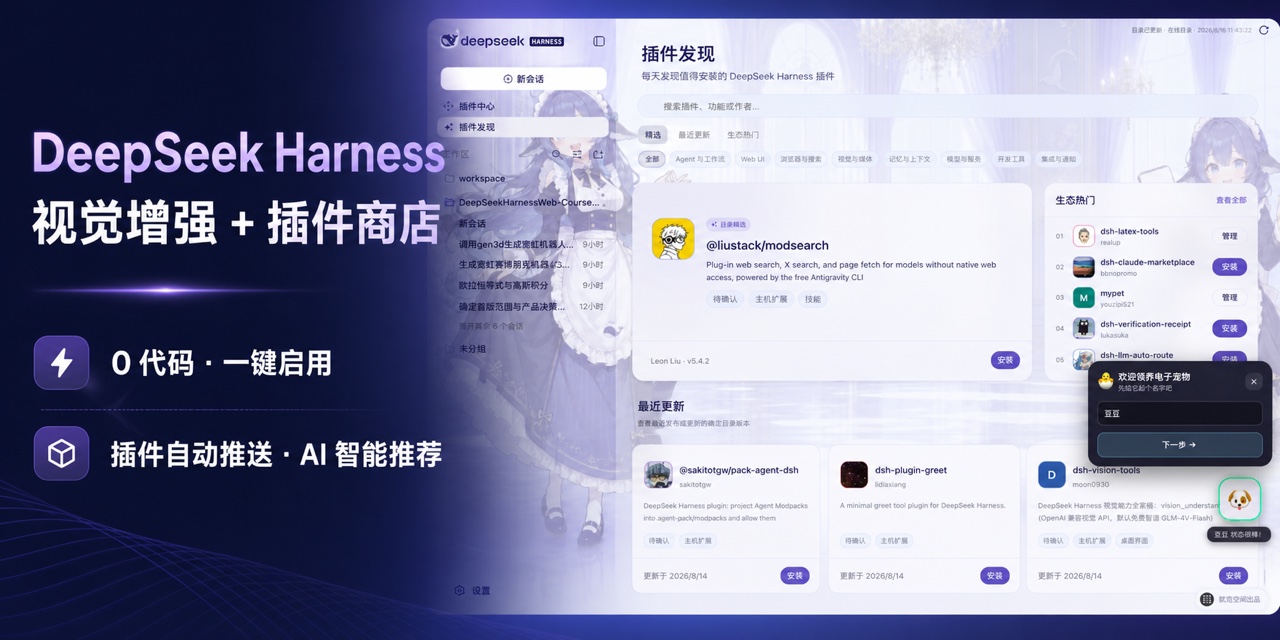
点击快速查看功能演示
https://github.com/user-attachments/assets/0717f7c7-a872-4d2b-acc2-3a1c4874c732
先看功能:当前能力与近期路线图
状态说明:✅ 已支持;🗓️ 规划中。桌面开发工作区、公开插件中心、Preset 广场、应用中心和中文 DeepSeek 控制已经可用;规划能力会在真实功能可运行后更新状态。
| 能力 | 状态 | 可以做什么 |
|---|---|---|
| 插件发现与热门推荐 | ✅ | 自动读取公开目录,按精选、最近更新、生态热门和使用场景呈现值得关注的插件,并支持按名称、功能或作者搜索。 |
| 公开插件中心 | ✅ | 查看确定版本、能力、权限、兼容性与风险,一键在线安装,并集中管理插件的启用、停用、更新和卸载。 |
| Preset 广场与内置工作流 | ✅ | 浏览赋范官方与社区 Agent Preset,查看能力组成后完成一键安装,并从“已安装”直接用于新会话;当前内置七套真实场景工作流。 |
| 应用中心与内置 AI 应用 | ✅ | 从独立一级入口启动拥有专属界面、数据和运行流程的完整 AI 应用;首个内置应用 FF–LLM Wiki 提供企业文档、Wiki、知识图谱、溯源问答与质量评估。 |
| 桌面开发工作区 | ✅ | 在本地打开项目、管理会话与工作区,调用 Harness 的模型、工具、Skills 和插件能力,并直接修改完整源码。 |
| 视觉增强 | ✅ | 一个开关自动选择原生图片输入,或已验证的百炼/OpenRouter 兼容视觉,并显示当前实际路径。 |
| 中文 DeepSeek 控制 | ✅ | 使用中文权限选项和适配 DeepSeek 的思考模式,在输入区直接完成会话级选择。 |
| 内置皮肤与自由换肤 | ✅ | 默认使用“大肥鱼拟人”皮肤,可切换“官方原版”或“云端猫咪”,也可选择本地图片并自动适配界面配色。 |
| 独立 MCP、Skills 与工具管理 | 🗓️ | 后续提供不依赖 Bundle 包装的 MCP Server、Skills 与工具发现和连接管理,按项目自由组合 Agent 能力。 |
| 自定义 Agent 与多 Agent 协作 | 🗓️ | 在现有 Preset 安装和使用能力之上,自定义 Agent 与子 Agent,把编码、测试、调研和审查任务交给不同角色协同完成。 |
| 任务规划、后台运行与会话恢复 | 🗓️ | 管理计划和待办,让长任务在后台继续运行,并随时查看进度或接续历史会话。 |
| 项目规则、Hooks 与长期记忆 | 🗓️ | 集中管理项目指令、自动化 Hooks 和可持续复用的上下文,让 Agent 按仓库规则稳定工作。 |
| Git、Worktree 与代码审查 | 🗓️ | 在隔离工作区并行开发,查看 Diff、提交和审查结果,减少多人或多任务互相干扰。 |
| 浏览器与桌面自动化 | 🗓️ | 让 Agent 操作网页和本地应用,并通过真实交互结果验证任务是否完成。 |
| 手机远程与消息通道 | 🗓️ | 从移动端查看和接续任务,并通过常用消息渠道接收通知或触发 Agent。 |
项目简介
DeepSeek Harness Studio 使用 Electron 承载 DeepSeek Harness 的 Web 工作区,并由桌面主进程启动和管理本地 dsh web 服务。这个仓库提供完整源码开发环境,使用者可以从 GitHub 克隆或下载代码,在本地安装依赖、编辑源码、启动桌面应用并继续开发。
桌面安装包只通过本仓库的 GitHub Releases 发布,不使用第三方下载站。目前已经提供经过真实 Electron 验收的 macOS arm64 预览 ZIP 和 Windows x64 预览安装程序;需要继续开发时,仍可获取完整源码并在本地启动。
核心功能
- Electron 桌面端:提供应用窗口、系统托盘、单实例运行、外部链接处理和安全的 preload 通信接口。
- 本地 Harness Host:桌面主进程启动
dsh web,等待本地服务就绪,并在应用退出时关闭 Host 进程。 - Web 工作区:保留 DeepSeek Harness 的会话、工作区、模型、工具、Skills 和插件运行能力。
- 插件发现与推荐:自动读取在线目录,通过精选、最近更新、生态热门、场景分类和搜索,帮助用户快速找到值得尝试的插件。
- Agent 智能找插件:用一句自然语言描述需求,Agent 自动检索公开
dsh-plugin目录、筛选相关候选并说明推荐理由。 - 公开插件中心:通过短包名、完整 npm 包名或明确 GitHub 仓库定位已经发布的 DSH Bundle,在安装前校验确定版本、产物完整性、Bundle 声明和本机兼容性;聚合 Bundle 可以复用当前 Desktop Host 实际打包的 DSH 模块,真正缺失的第三方依赖仍会被阻断。
- Preset 广场:从独立一级页面浏览赋范官方与社区 Agent Preset,查看 Skill、工具和环境要求后安全安装,并从已安装列表直接用于新会话。
- 应用中心:集中启动由赋范桌面端内置维护的完整 AI 应用;应用拥有独立界面、数据目录和运行流程,并可按需显示在左侧导航。
- 对话区视觉增强:保留一个开关;确切模型声明支持图片时发送原图,否则使用已验证的百炼或 OpenRouter 兼容视觉,同一张图片只进入一条链路。
- 桌面外观设置:内置“官方原版”“大肥鱼拟人”和“云端猫咪”三套外观,也支持本地背景图片、主体焦点和界面玻璃层调节。
- 完整开发源码:仓库同时包含桌面应用、Web 界面、CLI、功能包、原生辅助模块、Python SDK、示例和构建脚本。
DeepSeek Harness rc.8 兼容能力
Studio 0.1.0-rc.14 整合 DeepSeek Harness 0.1.0-rc.8 的核心与 Web 能力,同时保留赋范的插件中心、插件发现、Preset 广场、应用中心、主题皮肤和桌面恢复链路。Studio 版本号与 Harness 上游版本号分别管理。
- 模型与视觉:支持 DeepSeek
low推理强度、确切模型的原生图片能力声明,以及原生视觉与兼容视觉的单开关自动路由。 - 附件与引用:接入可持久化图片附件、
@文件/会话引用,以及可携带图片的/goal与/plan输入。 - 插件与设置:接入插件动态设置卡片,并沿用插件中心的安装、配置、启停和卸载链路。
- 任务与运行时:接入子 Agent Job、并发 Web Search、历史分叉性能改进和 Windows 持久 PowerShell PTY。
- 桌面兼容:Desktop Host 使用
--no-open避免额外打开浏览器,并继续使用原生目录选择、插件事务恢复和现有用户数据目录。
插件生态:先发现值得装的,再完成安装与管理
插件发现:不知道装什么,就从这里开始
不知道插件去哪里找、哪些最近刚更新、哪些正在受到生态关注?从左侧进入 插件发现,应用会自动读取在线目录,把分散的插件整理成可以直接浏览和行动的推荐页面。
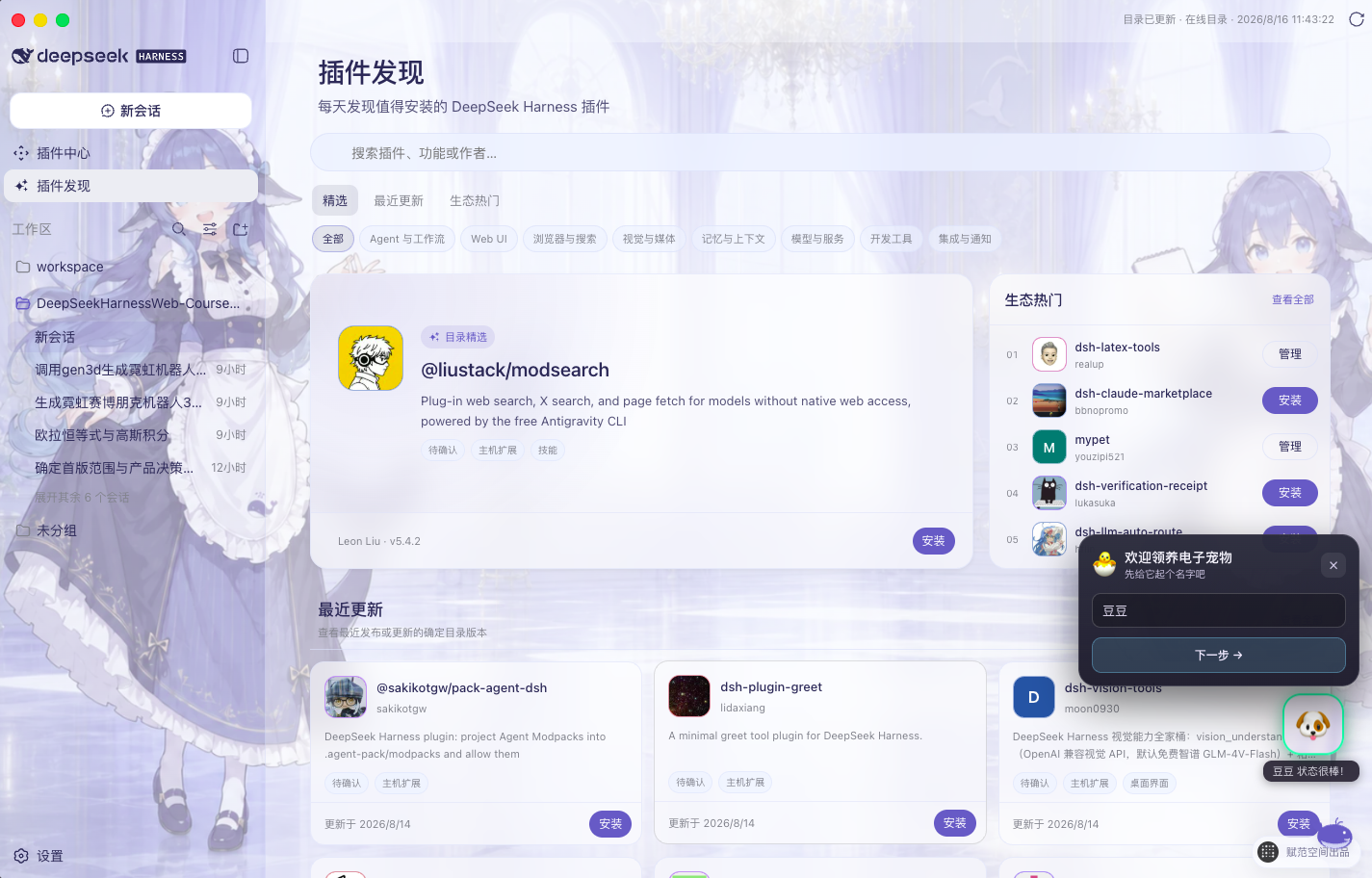
真实 Desktop 界面:目录精选、最近更新、生态热门、场景分类、搜索以及安装与管理入口。
- 每天都有新发现:打开页面即可看到目录精选、最近更新和生态热门,不必逐个仓库搜索。
- 按场景快速筛选:覆盖 Agent 与工作流、Web UI、浏览器与搜索、视觉与媒体、记忆与上下文、模型与服务、开发工具、集成与通知。
- 直接搜索答案:按插件名称、功能关键词或作者检索,并查看头像、简介、版本和更新时间。
- 发现后立即使用:未安装插件可直接进入安全安装流程;已安装插件可一键转到插件中心继续管理。
不知道准确包名?让 Agent 先替你筛选
只知道“想要一个桌面宠物”这类需求时,不必先猜 npm 包名。在 插件发现 中输入自然语言描述,应用会把它作为 /find-plugins 请求交给当前 Agent;Agent 加载内置技能、只读查询公开 dsh-plugin 目录,并把最相关的候选、版本、作者、更新时间和匹配理由返回当前对话。
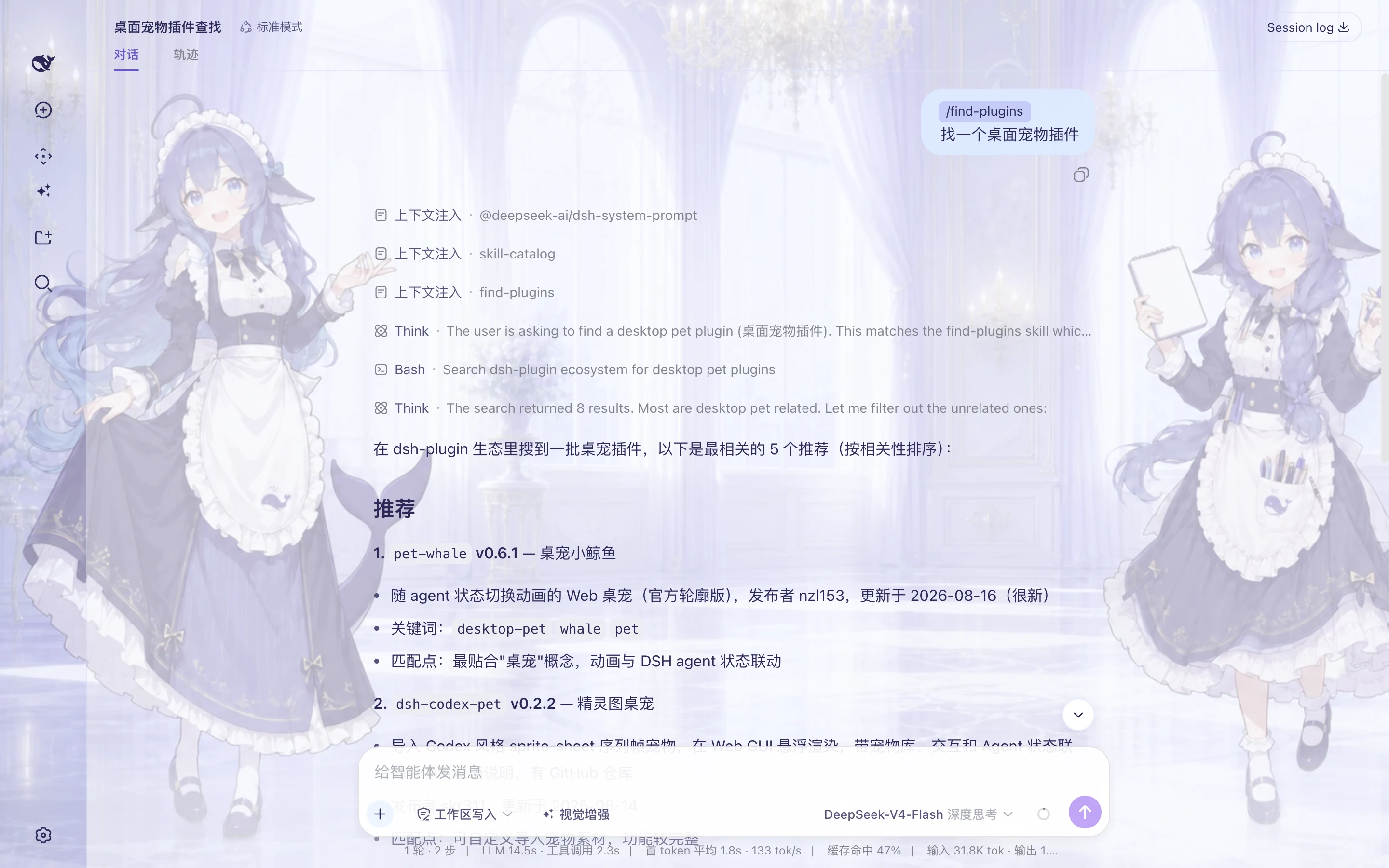
真实 Desktop 验收:对话发出“找一个桌面宠物插件”,Agent 加载 find-plugins、执行公开目录搜索,并从 8 个结果中列出 5 个相关候选。
- 不要求记住关键词:直接说明目标、使用场景或希望解决的问题。
- 推荐依据可核对:结果包含精确包名、版本、发布者、更新时间和逐项匹配理由。
- 搜索与安装分开确认:推荐结果只代表公开目录元数据;选定包名后仍通过 插件中心 完成兼容性检查和确认安装。
插件中心:在线安装、启停与移除
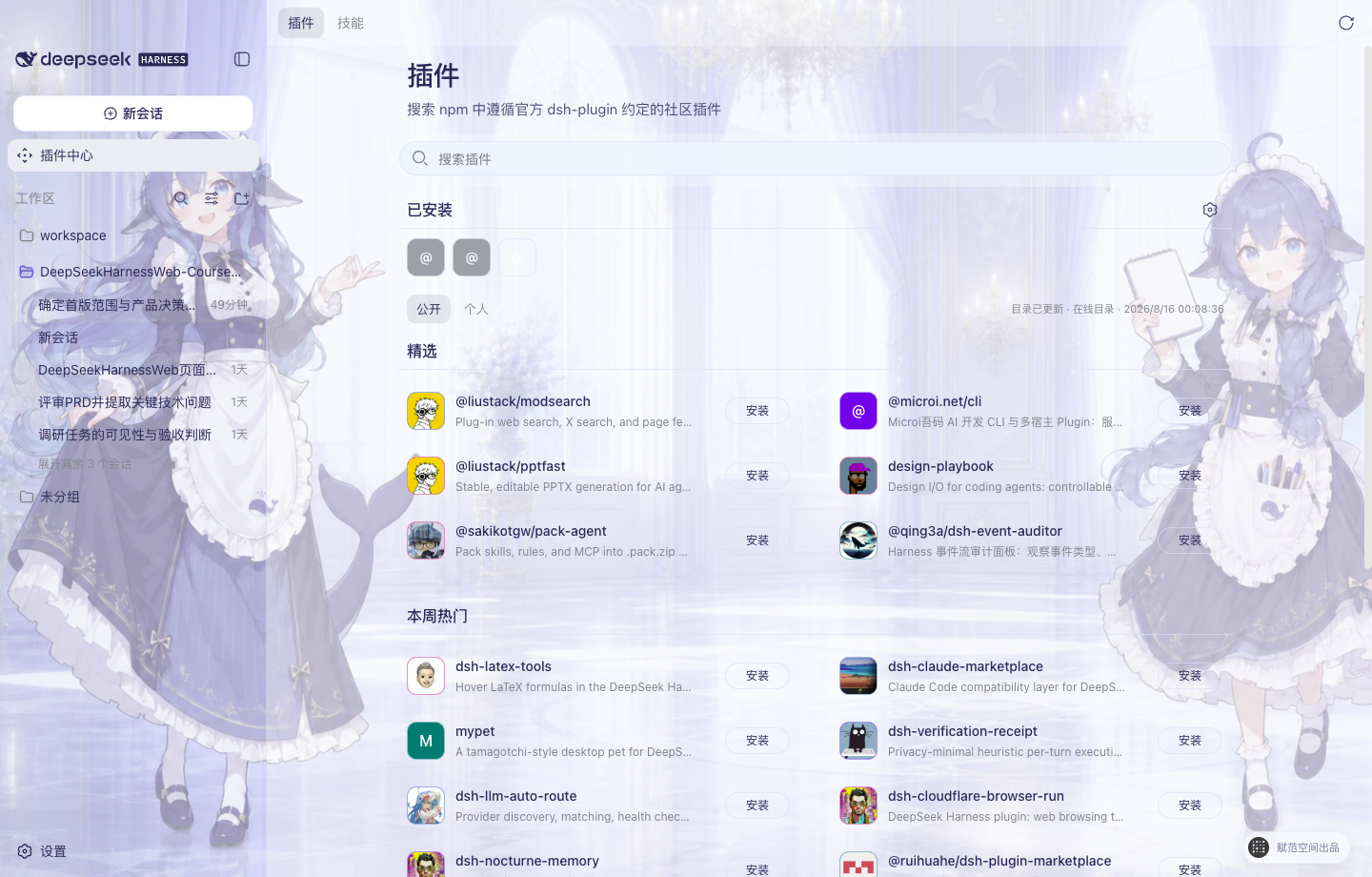
真实 Desktop 界面:插件头像、公开目录、已安装区域、“安装”按钮与三点管理入口。
选定插件后进入 插件中心,可以用短包名、完整 npm 包名或明确 GitHub 仓库查找发布到 npm 公共 Registry 的插件与 Skill Pack。dsh-plugin 只是发现信号;GitHub 也只用于映射已发布 npm 包,Studio 不会直接安装仓库源码。确定版本仍须通过 Bundle、完整性和运行兼容校验。
- 在线发现:搜索公开插件,查看版本、能力、权限、兼容性和风险说明。
- 一键安装:下载确定版本并校验包身份、完整性和 Bundle 声明;确认后自动安装并重启 Harness Host 验证运行状态。
- 已安装管理:集中查看系统、公开目录和本地来源,通过三点菜单启用、停用、更新或卸载插件。
- 安全移除:卸载默认保留配置与插件数据;需要清理数据时,再由用户单独确认。
Preset 广场已上线:一键安装完整工作方式
插件通常解决“让 Agent 多一个工具”,Skill 解决“教 Agent 按什么方法做”,而 Agent Preset 解决的是更完整的问题:把角色、工作规则、Skills、Plugin/MCP 与 Harness 标准工具组合成一套可以反复使用的工作方式。用户不需要逐项理解和手工配置,安装一个 Preset 后,就能直接用对应角色创建新会话。
| 能力层 | 它是什么 | 主要解决什么 |
|---|---|---|
| Skill | 可复用的方法、步骤与约束 | 告诉 Agent 一类任务应该“怎么做” |
| Plugin / MCP | 可执行工具或外部服务连接 | 让 Agent 能真实读写系统、调用服务并完成动作 |
| Agent Preset | 角色、Skill、工具与运行规则的组合 | 把零散能力装配成一套开箱即用的数字员工或工作流 |
当前源码已经提供与“插件中心”“插件发现”平级的 Preset 广场,并完成发现、详情、安全安装、已安装管理、用于新会话、删除与重新安装的桌面端闭环。
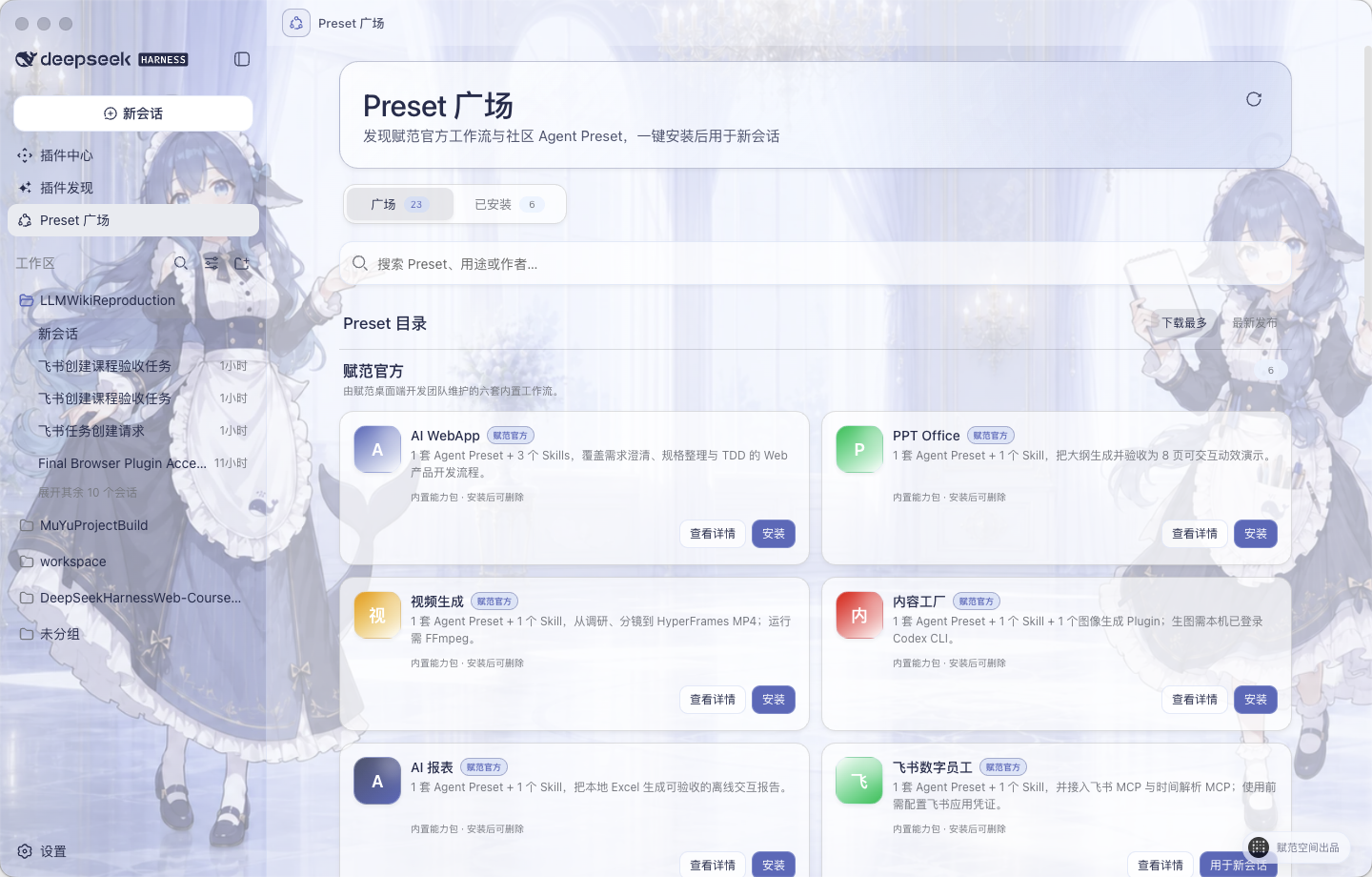
真实 Desktop 界面:Preset 广场、赋范官方内置目录、搜索与排序,以及安装、查看详情和用于新会话入口。
使用路径: 发现 Preset → 查看能力组成与前置条件 → 一键安装 → 在“已安装”中选择“用于新会话” → 按工作流完成任务 → 随时删除或重新安装。
- 从左侧导航进入 Preset 广场,可搜索用途、名称或作者,并按下载量或更新时间排序。
- 打开详情查看它包含的角色、Skill、工具、外部依赖和来源说明。
- 点击安装后,Desktop 会校验来源、大小、摘要和归档路径,再写入本地用户 Preset 目录。
- 安装完成后无需重启 Host;在 已安装 中点击“用于新会话”,即可带着对应 Preset 开始任务。
- 用户 Preset 可删除并重新安装;系统 Preset 继续受保护。安装或删除后仍停留在当前页面,不打断浏览过程。
安装、删除和用于新会话涉及本机文件与 Host,只在 Desktop 中执行;浏览器开发模式用于快速查看和验收界面,不会修改本机 Preset。
赋范官方内置 Preset:七套真实场景工作流
内置内容不是“插件合集”,而是七套围绕真实交付结果组织的 Agent Preset + Skills + 工具集成。合计包含 7 套 Agent Preset、9 个 Skills、1 个图像生成 Plugin;飞书数字员工另外接入飞书 MCP 与时间解析 MCP,PPT Office 使用内置动效运行适配器。
命名说明: “赋范官方”表示由赋范桌面端开发团队内置和维护,不代表 DeepSeek Harness 官方。它们安装后仍是普通用户 Preset,可以删除并重新安装。
| 分类 | 内置 Preset | 能力组成 | 直接交付 |
|---|---|---|---|
| 产品与应用开发 | AI WebApp | 1 Preset + 3 Skills | 从需求澄清、规格整理到 TDD 验收的可运行 Web 产品 |
| 办公与演示 | PPT Office | 1 Preset + 1 Skill + 动效运行适配器 | 8 页、四主题、可交互的单文件 HTML 演示文稿 |
| 视觉与媒体 | 视频生成 | 1 Preset + 1 Skill | 从一句话调研、分镜到渲染完成的 16:9 MP4 |
| 内容生产 | 内容工厂 | 1 Preset + 1 Skill + 1 图像生成 Plugin | 从长文分析到 1–10 张风格一致的图文卡片 |
| 数据分析 | AI 报表 | 1 Preset + 1 Skill | 从本地 Excel 生成可核验的离线交互报告 |
| 企业协同 | 飞书数字员工 | 1 Preset + 1 Skill + 飞书 MCP + 时间解析 MCP | 从自然语言指令到真实飞书任务与双端回执 |
| 知识库研发 | LLM Wiki Producer | 1 Preset + 1 Skill | 使用「LLM Wiki 全栈工程师」按阶段开发、验证并交付企业知识库项目 |
下方六个案例统一使用
16:10预览图,避免横幅和长图破坏版面;点击任意图片可查看完整原图。
产品与演示:把想法变成可交付成果
 |  |
|
01 · AI WebApp 解决什么:需求讨论结束后,仍不知道如何稳定落成一个可运行、可测试的 Web 产品。 功能逻辑:需求澄清 → 规格整理 → TDD 纵向开发 → 类型检查、构建与浏览器验收。 能力组成: grill-me、to-spec、tdd 3 个 Skills + 专属产品开发 Preset。示例结果:可启动、可拖拽、可更新数据的“创作指挥舱”WebApp。 |
02 · PPT Office 解决什么:只有主题和内容大纲时,快速形成结构完整、视觉统一、可离线播放的演示成果。 功能逻辑:保存原始内容 → 组织 8 页叙事大纲 → 选择主题并生成 → 确定性检查页数、动画与离线性。 能力组成:1 个动效演示 Skill + 专属导演 Preset + 内置动效运行适配器。 示例结果:四套主题、逐页语义动画的单文件 HTML;当前明确不生成 .pptx。
|
内容与媒体:把一句话或一篇长文变成成品
 |  |
|
03 · 视频生成 解决什么:只有一句产品想法时,仍能建立从事实调研到正式成片的完整生产链。 功能逻辑:四维 Web 检索 → 研究与简报 → 设计规范、分镜和视频源码 → HyperFrames 检查 → FFmpeg 渲染与媒体验收。 能力组成:1 个产品发布片 Skill + 专属视频导演 Preset。 示例结果:可编辑视频工程、联系表和 16:9 MP4;运行环境需要 FFmpeg 与 ffprobe。 |
04 · 内容工厂 解决什么:把一篇长文稳定拆解成风格统一、可以连续发布的系列视觉内容。 功能逻辑:分析受众与观点 → 确认风格、布局和配色 → 编写系列大纲与逐图提示 → 生成 1–10 张图片 → 校验尺寸、页数与一致性。 能力组成:1 个图文 Skill + 专属内容视觉 Preset + Codex ImageGen Bridge Plugin。 示例结果:9 张连续图文卡片;真实生图前需要本机 Codex CLI 已登录并具备 ImageGen 能力。 |
数据与企业协同:从本地数据到真实业务动作
 |  |
|
05 · AI 报表 解决什么:把本地 Excel 从“原始表格”转成结构清晰、可追溯、可直接交付的数据叙事。 功能逻辑:只读核对工作簿与数据基线 → 清洗聚合 → 选择图表叙事 → 内联 ECharts 生成 → 桌面与移动双端验收。 能力组成:1 个 Excel 报表 Skill + 专属数据分析 Preset。 示例结果:不依赖 CDN 的单文件交互 HTML,原始 Excel 保持只读,报告只嵌入聚合数据。 |
06 · 飞书数字员工 解决什么:让对话不止返回文字,而是把一句自然语言真正变成企业协作系统中的任务。 功能逻辑:Harness Desktop 或飞书接收指令 → Skill 判断动作 → 时间 MCP 解析“明天下午 6 点” → 飞书官方 MCP 创建任务 → Harness 与飞书双端返回回执。 能力组成:1 个飞书 Skill + 专属数字员工 Preset + 飞书 MCP + 时间解析 MCP。 示例结果:真实飞书任务、负责人和截止时间均可查看;首次使用需要配置飞书应用凭据与默认负责人。 |
以上图片均来自六套工作流的真实案例成果。Desktop 随安装包交付的是运行所需的精简 Preset、Skills 与工具适配,不会把案例源码、输入数据、截图或生成成品塞进用户环境。
应用中心已上线:从能力扩展进入完整 AI 应用
插件为 Harness 增加工具或界面能力,Preset 把角色、Skills 与工具组合成一套工作方式,而 应用 面向更完整的产品场景:它拥有独立界面、专属数据和自己的运行流程。应用中心因此与插件中心、插件发现和 Preset 广场平级,用户不需要在插件列表中辨认技术包,直接从一个稳定入口发现并启动完整产品。
| 形态 | 主要作用 | 典型使用方式 |
|---|---|---|
| Plugin / MCP | 增加可调用工具、服务连接或局部界面能力 | 安装后由 Agent 或 Harness 功能触发 |
| Agent Preset | 组合角色、Skills、工具与工作规则 | 用 Preset 创建新会话并按既定流程完成任务 |
| AI 应用 | 提供专属界面、数据和端到端业务流程 | 从应用中心直接打开并持续管理自己的业务数据 |
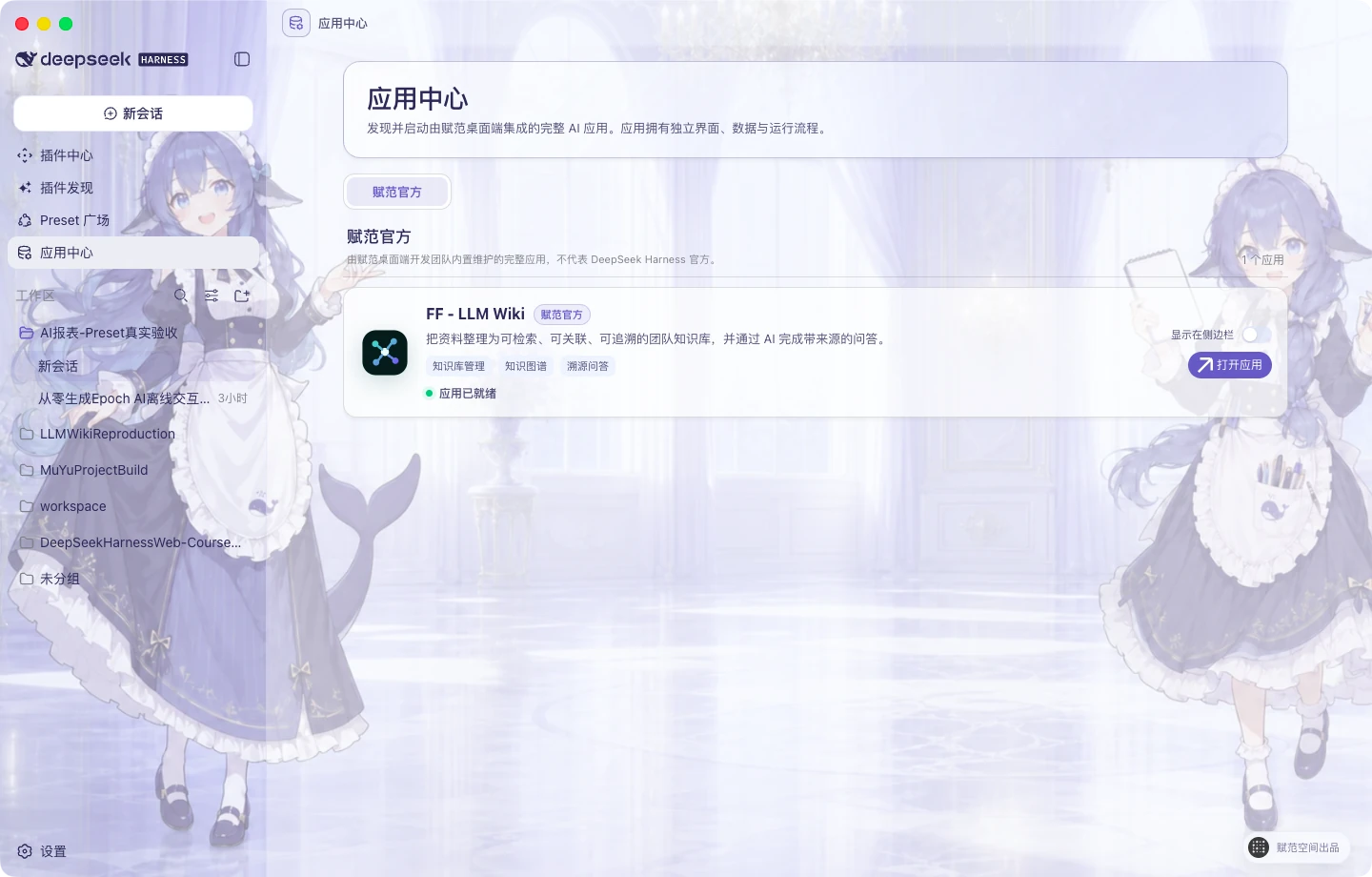
真实 Desktop 界面:应用中心作为一级入口展示赋范官方应用;可直接打开应用,也可选择是否把快捷入口显示在左侧导航。
首个内置应用:FF–LLM Wiki 企业知识库
FF–LLM Wiki 面向企业文档分散、知识关系难整理、问答结果无法追溯的问题,把原始资料逐步转换为可检索、可关联、可核查的知识资产。它不是嵌在对话页中的演示卡片,而是一套由 Desktop 管理本地运行环境、在系统浏览器中打开的完整应用。
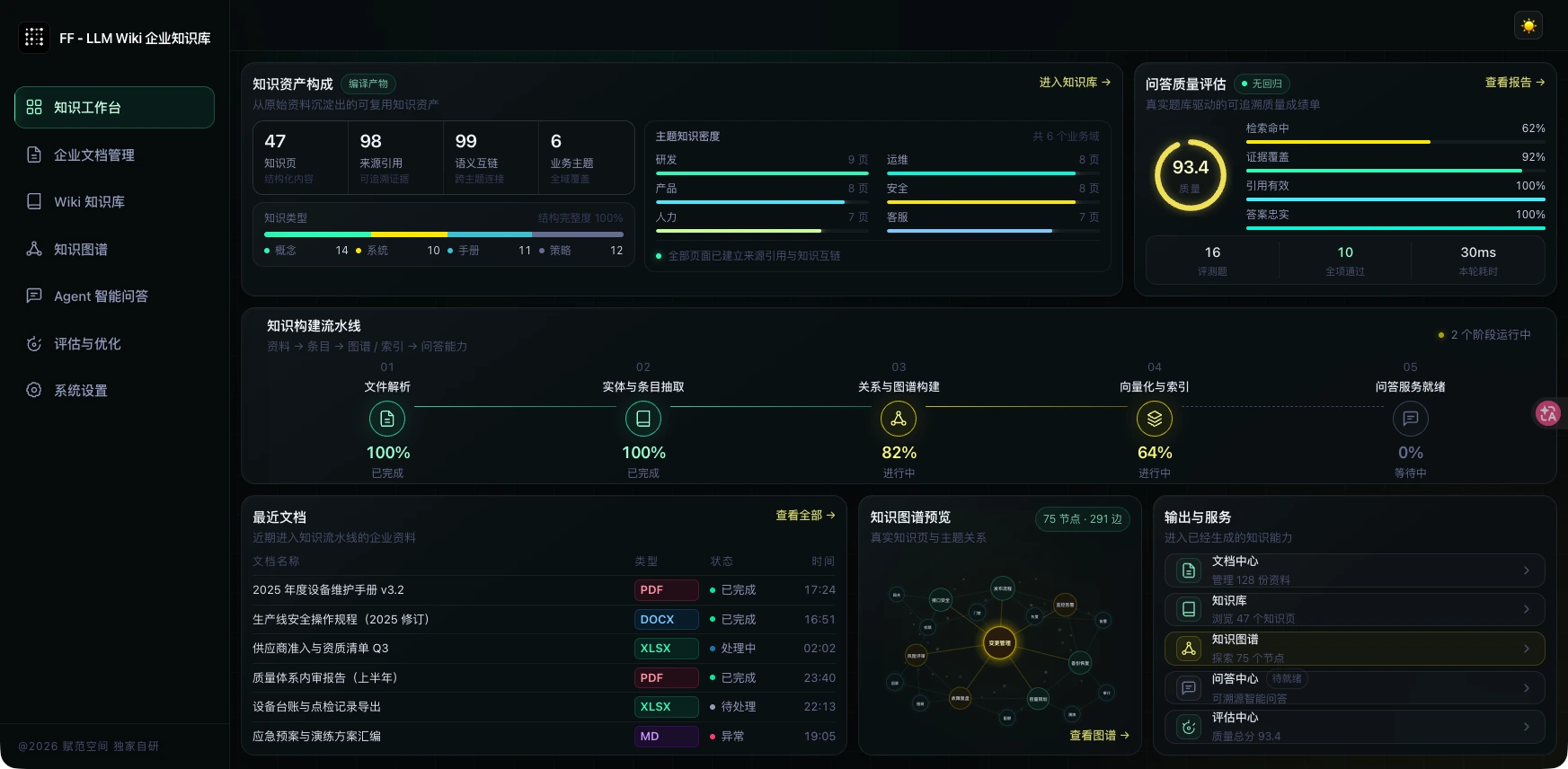
真实运行界面:从文档解析、Wiki 编译和知识图谱构建,到基于检索证据的 Agent 问答与质量评估。
- 完整知识流水线:文档解析 → 实体与条目抽取 → Wiki 与知识图谱构建 → 向量化和索引 → 可追溯问答。
- 来源可以核查:问答只使用当前检索命中的证据片段,并保留来源引用;模型不可用时会明确降级到本地检索结果。
- 本地数据隔离:文档、Wiki、图谱和 SQLite 数据写入 DSH Home 下的应用专属目录,不混入当前项目工作区。
- 密钥由用户掌控:应用不会携带赋范团队的 API Key。知识编译、浏览和本地检索无需模型密钥;使用 DeepSeek 生成式 RAG 前,需要用户在 Harness 凭证中心配置自己的
DEEPSEEK_API_KEY。 - 入口按需显示:应用中心始终可访问;FF–LLM Wiki 的左侧快捷入口默认关闭,用户可通过“显示在侧边栏”随时开启或隐藏。
使用路径: 打开应用中心 → 选择 FF–LLM Wiki → 点击“打开应用” → 导入或管理企业资料 → 构建 Wiki 与知识图谱 → 在智能问答中核查带来源的答案。
命名说明: “赋范官方”表示由赋范桌面端开发团队内置和维护,不代表 DeepSeek Harness 官方。
内置皮肤与自由换肤
进入 设置 → 背景 即可切换内置皮肤;选择自定义图片时,应用会在本机完成 1920×1080 WebP 裁切与界面配色,不上传原图。
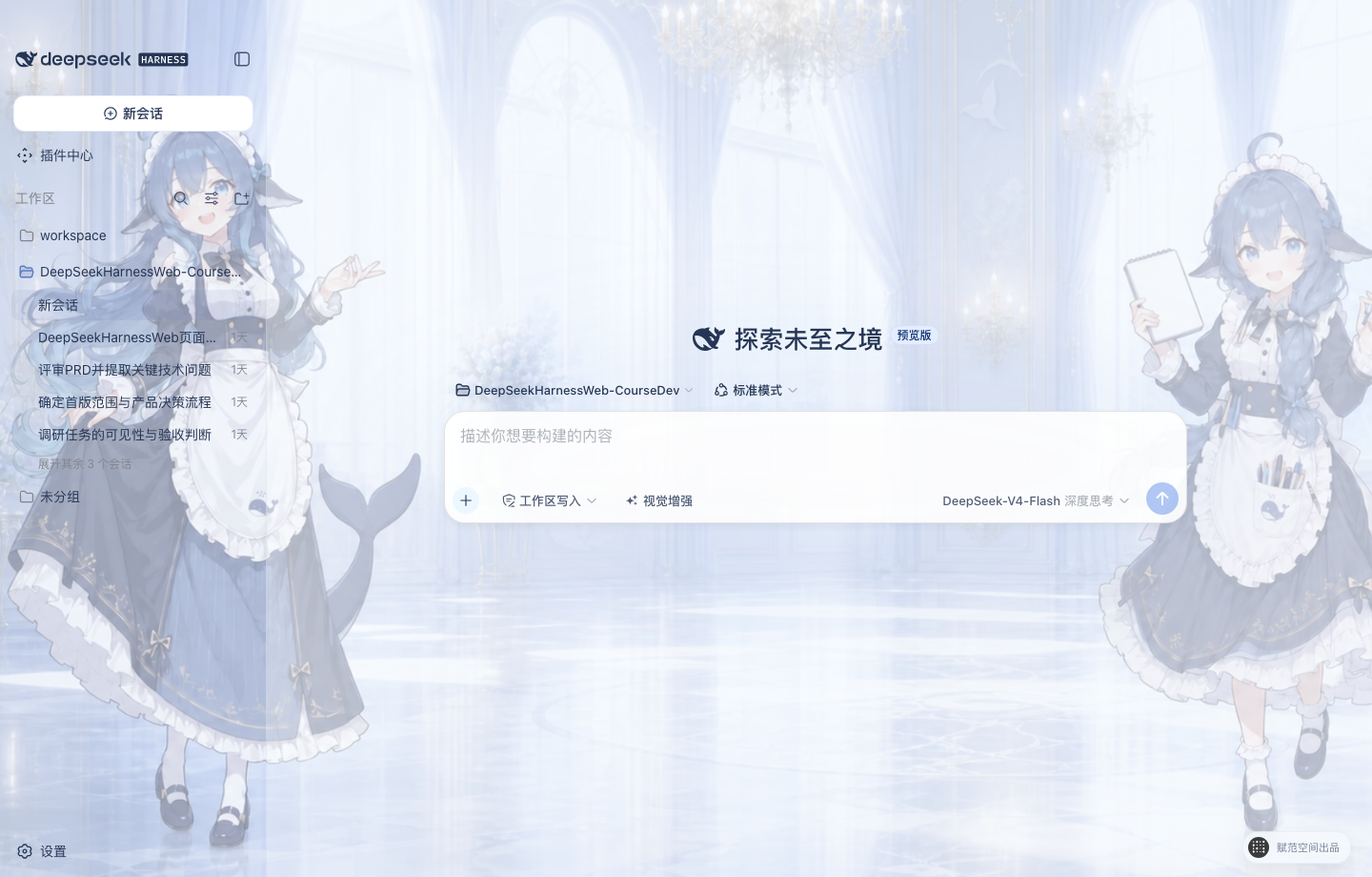 | 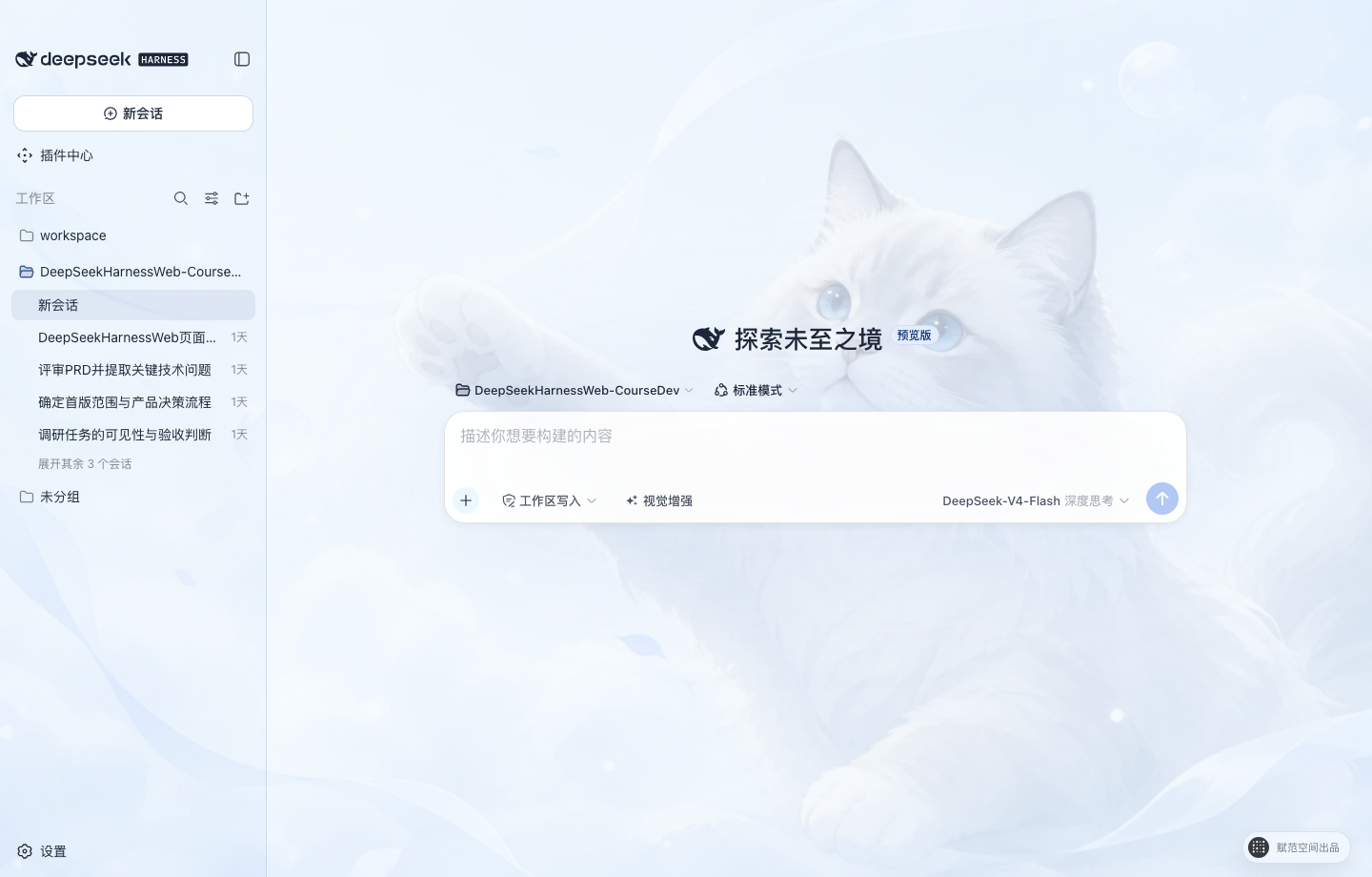 |
| 大肥鱼拟人 · 默认 蓝白鲸灵助手与明亮宫殿,中央留白适配对话区。 | 云端猫咪 保留原有柔和蓝白猫咪主题,清爽、安静、低干扰。 |
中文权限与 DeepSeek 模型控制
- 权限选择:输入区使用
只读、工作区写入和完全访问三档中文权限,作用于当前会话;通用设置只决定后续新会话的默认权限,启用完全访问前必须确认风险。 - 模型与思考模式:模型和 API Key 仍在设置页统一管理;输入区可查看当前 DeepSeek 模型,并选择
关闭思考、低强度思考、深度思考或最大思考。
视觉增强:让 DeepSeek 看懂图片
开启视觉增强后,Host 会按当前确切模型的能力自动选择一条路径:模型声明支持图片时直接发送原图;否则使用已完成配置与验证的百炼或 OpenRouter 兼容视觉,把可追溯观察交给 Agent。两条路径互斥,同一张图片只处理一次。
- 随手可用:输入框左侧提供“视觉增强”快捷开关,悬浮即可查看用途和当前状态。
- 自动选路:按钮显示
原生或兼容 · 提供方;原生视觉不需要额外 Key,兼容视觉则要求对应提供方已验证。 - 明确关闭:关闭开关后,图片不进入模型可见上下文;附件历史仍保留在界面中。
- 覆盖开发场景:可理解产品截图、报错界面、设计稿、数据图表、照片和图片文字,也可以按路径读取当前工作区图片。
下载桌面端
GitHub Releases 已提供经过真实 Electron 验收的 macOS Apple Silicon 预览 ZIP 和 Windows x64 预览安装程序,运行桌面端无需另行安装 Node.js 或 pnpm。当前均为开发预览资产;正式版本仍将提供完成平台签名的 macOS
.dmg和 Windows x64.exe。
下载 macOS arm64 预览版 · 下载 Windows x64 安装程序
macOS arm64
下载并解压预览 ZIP 后,建议先把 DeepSeek Harness.app 拖入“应用程序”目录。由于当前预览包尚未经过 Apple 公证,首次打开前需要在“终端”执行:
xattr -dr com.apple.quarantine "/Applications/DeepSeek Harness.app"
open "/Applications/DeepSeek Harness.app"
如果应用没有放在“应用程序”目录,请把命令中的路径替换为实际路径。该命令只应用于从本仓库 GitHub Releases 下载并核验过 SHA-256 的预览包;不要用于来源不明的应用。首次成功打开后,可以像普通应用一样从 Finder 或程序坞启动。
Windows x64
下载 DeepSeek-Harness-Desktop-Windows-x64-0.1.0-rc.14-Setup.exe 后直接运行安装程序。Release 的公开下载区只保留 macOS ZIP 和 Windows 安装程序;校验文件、blockmap 与平台验收记录保留在对应 GitHub Actions 构建中,避免普通用户误下载开发文件。
开发预览版使用独立 Pre-release 标签,不触发正式安装器发布。正式流程只接受与 Desktop 版本完全一致的 desktop-v* 标签;macOS 与 Windows 安装包分别完成平台签名验证后,GitHub 才会同时公开安装文件和 SHA256SUMS。
快速开始
获取源码
使用 Git 克隆仓库:
git clone https://github.com/fufankeji/deepseek-harness-studio.git
cd deepseek-harness-studio
也可以在 GitHub 仓库页面选择 Code → Download ZIP,下载并解压源码后进入项目目录。
环境要求
- Node.js
^22.19.0 || >=24.0.0 - pnpm
11.7.0
外部服务准备
下载源码、安装依赖和启动桌面开发环境不需要预先填写 API 密钥。需要在应用中实际调用模型时,再在设置中配置所选模型服务与凭证;凭证不要提交到 Git。
安装与启动
安装工作区依赖:
pnpm install
构建所需模块并启动桌面开发环境:
pnpm run dev:desktop
开发启动器会在相关源码或构建输入变化时重新构建;需要强制完整重建时运行:
pnpm run dev:desktop:rebuild
目录结构
deepseek-harness-studio/
├── apps/
│   ├── desktop/       # Electron 主进程、preload、Host 生命周期与桌面构建脚本
│   ├── web/           # DeepSeek Harness Web 界面入口与桌面端组合
│   └── cli/           # dsh CLI、运行配置与 Agent Preset
├── packages/          # Agent、模型、工具、会话、插件和客户端能力包
├── native/            # 原生沙箱辅助模块
├── python/            # Python SDK 与相关运行时
├── examples/          # 可运行示例与配置
├── scripts/           # 构建、检查、生成和发布脚本
├── website/           # 项目文档站源码
├── vendor/            # 固定版本的 Cordis 基础源码
└── assets/            # README 使用的项目图片
常用开发命令
| 命令 | 用途 |
|---|---|
pnpm run dev:desktop | 构建必要模块并启动 Electron 桌面应用 |
pnpm run dev:desktop:rebuild | 强制完整重建后启动桌面应用 |
pnpm run build | 构建 Host、客户端、Web 与桌面端 |
pnpm run package:desktop | 为当前平台生成未封装桌面应用 |
pnpm run typecheck | 运行 TypeScript 类型检查 |
pnpm run test | 运行 Vitest 单元测试 |
建议阅读顺序
apps/desktop/src/main.ts:桌面应用入口、窗口、托盘和本地 Host 组合。apps/desktop/src/host-supervisor.ts:dsh web的启动、就绪检测与退出管理。apps/desktop/src/preload.ts:Renderer 可访问的固定桌面接口。apps/web/:桌面窗口加载的 Web 工作区。apps/cli/与packages/:CLI 组合以及各项 Harness 能力实现。
与 DeepSeek Harness 的关系
本项目基于 deepseek-ai/deepseek-harness 的 Harness 核心、Cordis 插件体系和 Web 界面继续进行桌面端开发。本仓库维护 Electron 桌面入口、本地 Host 管理、桌面交互与配套开发脚本。
许可证
本项目使用 MIT License。第三方组件的许可证信息见 THIRD_PARTY_NOTICES.md。
Read the usage guide →
Install steps, key points, FAQ and compatibility for this plugin — auto-derived from indexed fields.
Listing badge

[](https://deepseek-plugin.org/plugins/fufankeji/deepseek-harness-studio/packages/examples/plugin-center-fixture)Paste this markdown into your GitHub README to link back to this listing. The badge only states the listing — not a security endorsement.