Have DSH automatically launch the official Codex sub-agent in delegated sessions: hand off a plain text task to Codex via the app-server protocol and return the final answer according to strict success criteria.
ⓘ This plugin is a sub-package of the fufankeji/deepseek-harness-studio monorepo — stars and activity count the whole repository.

- Language
- TypeScript
- License
- MIT
- Branch
- main
Install
$ dsh plugin --profile web add github:fufankeji/deepseek-harness-studio#path:packages/subagent/subagent-codexRun the command above in your terminal to install this plugin via the dsh CLI. You can switch Profile in the top-right corner. New to dsh? Read the beginner tutorial
Install via your agent
Install the DeepSeek Harness plugin fufankeji/deepseek-harness-studio/packages/subagent/subagent-codex for me: review the repository at https://github.com/fufankeji/deepseek-harness-studio first, then run the install command and verify the plugin loads successfully.
Paste this instruction to the DSH Web GUI assistant — it will install and verify for you.
One-Line Positioning
subagent-codex enables DSH sessions to temporarily spawn an independent Codex subprocess for pure text tasks when needed: each time spawning a fresh app-server, no human approval required, and delivering the final answer or failure diagnosis back to the upstream; it doesn't modify your Codex account or settings, just bridges the official app-server protocol to DSH's subagent service.
Core Capabilities
- Spawns the official Codex
app-server --stdiosubprocess within the delegated Session's working directory, with the process managed by dsh-subprocess's process tree (src/run.ts:236-249 / src/run.ts:185-217) - One-shot text tasks: accepts only non-empty plain text blocks; Codex must return an agentMessage with
phase: "final_answer"; when no explicit final phase exists, falls back to the last message withphase: null; empty responses are treated as errors (README.md:11 / src/run.ts:162-177) - Unattended approval: command/file approval flows through Codex's
thread/startconfiguration; none of the threepermissionModevalues trigger DSH interaction; unknown server requests fail directly and close (src/wire.ts:25-36, 86-94 / README.md:13) - Failure with diagnostics: composes a failure summary from lifecycle stages (initialize / thread-start / turn-start / turn / process / teardown), Codex error classification, HTTP status codes, subprocess exit codes/signals, and writes to
SubagentResult.diagnostic(src/run.ts:84-114 / src/run.ts:358-365) - Does not inherit parent session: explicitly sets
inheritsParentContext: false; parent session's conversation, roles, tool filtering, and depth strategy are not passed to child Codex (src/index.ts:62 / README.md:21) - Install/uninstall via Profile Bundle: installation adds a dormant provider to the host; uninstallation removes it along with its private runtime on next startup (README.md:44 / cordis.patch.yml:1-5)
Technical Implementation
- Language: TypeScript (ESM, published artifacts
lib/index.jsandlib/types/*.d.ts, see package.json:13-27). - Key Dependencies:
@openai/[email protected](official SDK, includes six platform sub-packages carrying app-server 2.1.220 JavaScript wrapper and nativecodexbinary),@deepseek-ai/dsh-subagent(shared task seam and result settlement),@deepseek-ai/dsh-subprocess(responsible for real CLI process tree hosting),@deepseek-ai/dsh-timeout(MAX_TIMER_DELAY_MSupper bound validation) (package.json:49-53 / src/run.ts:9-29 / src/index.ts:11). - Architecture Pattern: Function plugin + Profile Bundle—
src/index.tsnamed exportsname/inject/Config/apply;apply(ctx, config)registers aCodexProvidertoctx.subagents, injected into dsh-base above viacordis.patch.yml. At runtime, resolves@openai/codex/package.json'sbin.codexviacreateRequire, spawning the wrapper using the current Node executable; JSON-RPC framing layer is provided bydsh-sdk-protocol, withwire.tshandling product methods, current thread/turn association, unattended approval responses, and final answer selection (src/index.ts:30-32, 113-135 / cordis.patch.yml:1-5 / src/run.ts:43-52, 132-134 / src/wire.ts:9-14). - Entry Files:
src/index.ts(Cordis registration entry),src/run.ts(one-shot task lifecycle and run spec),src/wire.ts(Codex app-server 0.147.0 protocol adapter).
Use Cases
Delegate independent tasks where you "don't want to lift a finger, just let Codex handle it" to a subagent. A common approach is for the DSH main conversation model to trigger subagent_codex from its tool whitelist as needed—for example, generating long documents in one go, batch modifying files, or having Codex pull a status summary and bring it back to the main conversation. This package is not suitable for scenarios requiring continuous dialogue, watching intermediate steps, or requiring Codex to prompt for interactive confirmations throughout—these needs inherently conflict with the "one-shot, unattended, final answer only" positioning.
Prerequisites and Compatibility
| Dependency | Minimum Version | Description |
|---|---|---|
| DSH (launcher) | 0.1.0-rc.8 | This package and other packages in the same repository share the same version (package.json:4), injected as a Profile Bundle on top of dsh-base (cordis.patch.yml:1-5). |
| Node.js | ^22.19.0 || >=24.0.0 | Repository root engines.node constraint; subagent-codex doesn't declare its own independent range (repository root package.json:8-10). |
| Platform | Cross-platform (macOS / Windows / Linux) | Actual executable app-server comes from @openai/[email protected]'s six platform sub-packages auto-selected by system/CPU; omitting optional dependencies, unsupported systems, or missing payload files will allow provider registration to succeed but fail at the first delegation at the app-server launch boundary (README.md:97-101). |
| Codex app-server | 0.147.0 (bundled with @openai/codex) | Locked by 0.147.0, doesn't depend on host codex; this package also doesn't check PATH, do platform selection, or fall back to host binary (README.md:42 / src/run.ts:43-52). |
| Native Modules | codex / codex-code-mode-host / rg / zsh (included in darwin-arm64 platform package) | Carried by Codex platform packages after installation; DSH doesn't introduce new native modules; payload for other platforms may differ (README.md:97). |
disposeGraceMs Upper Bound | ≤ MAX_TIMER_DELAY_MS (2,147,483,647) | Validated at apply() startup; must be a positive finite value not exceeding repository's shared dsh-timeout upper bound (src/index.ts:120-129 / packages/util/timeout/src/index.ts:25). |
Installation
dsh plugin --profile web add github:fufankeji/deepseek-harness-studio/packages/subagent/subagent-codex
Configuration Options
| Option | Type | Description | Default |
|---|---|---|---|
providerName | String (non-empty) | Registration name on ctx.subagents, also referenced by the provider field in dsh-tool-subagent tool rows; must be unique when multiple instances are attached to the same Profile (src/index.ts:38, 51 / README.md:27). | codex |
env | Object (Record<string, string>) | Explicitly passed environment variables to the Codex app-server subprocess, layered on top of the subset of parent environment after credentials are cleared by the sharing mechanism; must explicitly declare OPENAI_API_KEY here to have the subprocess receive it (src/index.ts:43, 52 / src/run.ts:241 / README.md:42). | {} |
permissionMode | Enum: never / approve-for-me / dangerously-bypass-approvals-and-sandbox | Selects the Codex native non-interactive permission and sandbox mode for this provider instance; never means no approval requests are sent, approve-for-me uses Codex's automatic review, dangerously-bypass-approvals-and-sandbox disables both approval and sandbox (src/run.ts:55-68 / README.md:32-36). | never |
disposeGraceMs | Number (milliseconds, positive finite) | Wait duration between termination tiers for the shared process tree owner; the entire process tree must exit before cleanup is considered complete (src/index.ts:47, 55, 120-129 / src/run.ts:240). | 3000 |
FAQ
Q: What's the difference from directly connecting to the Codex API? Is this an easier integration?
A: It's different. This package plays the "subagent provider" role for dsh, handling one-shot requests from dsh-tool-subagent—each time spawning a fresh Codex app-server process that runs to completion; it doesn't choose models for Codex, doesn't persist Codex sessions, and doesn't replicate Codex settings. The default deepseek entry in dsh-base is the main conversation model, and this provider is completely independent at the process level (README.md:42, 135).
Q: Does env only need to contain OPENAI_API_KEY? How do I pass other variables?
A: Not limited to just the key, but please put the key here. Any environment variables in the parent process identified as credentials are stripped by dsh-subprocess before being passed to the subprocess. Non-credential variables like HOME and CODEX_HOME are naturally inherited; they can also be explicitly overridden in env. DSH doesn't create accounts, doesn't log into Codex, and doesn't modify settings files; login state and valid keys must be ensured by the Codex side itself (README.md:42 / src/run.ts:241).
Q: After installation, how does the model know about the subagent_codex tool?
A: It doesn't—it's up to your Agent Preset. Full Preset has the corresponding tool row set to disabled: true by default; you need to duplicate the Preset and remove this field. When starting a new Session based on the duplicate, the model will see that static tool name. Each dsh-tool-subagent row needs an independent toolName exposed to the model, so when multiple providers are attached under the same Profile, each tool also needs a unique name (README.md:52).
Q: How do Codex's configuration files in the subprocess take effect?
A: They use relative paths from native Codex configuration—this package neither specifies CODEX_HOME nor copies/filters settings files. So it searches for configuration and login state in the parent session's working directory following Codex's own project/user three-layer hierarchy. This means you can place a .codex/settings.json in your project to affect this provider, and uninstalling this package won't touch these files (README.md:42).
Q: How do I tell from failures whether it's a Codex error or the subprocess didn't start?
A: Look at the stage segment in SubagentResult.diagnostic: initialize / thread-start are mostly startup issues (e.g., platform package not found, payload missing), turn-start / turn are Codex protocol layer errors, process means CLI exited but didn't produce results normally, teardown is subprocess exit failure during cleanup. Co-occurring exit code / signal lines are the actual process layer exit reasons; HTTP status codes only appear in diagnostics when Codex provides them. Raw product layer or Host errors always remain in the Error's cause chain and don't directly enter this diagnostic (src/run.ts:84-114, 358-365 / src/wire.ts).
Q: How do I choose among the three permissionMode values?
A: Use the default never if you don't want any approval dialogs—Codex will directly reject operations without pre-authorization. If you want Codex to modify files but still not ask humans, change permissionMode to approve-for-me—Codex will then use automatic review instead of DSH popups. dangerously-bypass-approvals-and-sandbox disables both native approval and sandbox, letting Codex run wild and do anything in any path—use this only in controlled/sandboxed environments. None of the three modes create interaction channels on the DSH side; all approvals flow through Codex's own settings (README.md:34-40 / src/wire.ts:25-36).
Q: Can I have one tool instance support both foreground and background execution?
A: Yes, but you need two tool rows. When dsh-tool-subagent's backgroundMode is one-shot, omitting run_in_background or passing false runs in foreground (synchronous blocking); passing true immediately returns a Job id owned by the parent Agent, which can be followed up with dsh-tool-jobs' job_output / job_kill. This requires your Profile to have the local job service installed (@deepseek-ai/dsh-jobs-local / dsh-tool-jobs) (README.md:52).
Q: Does uninstalling this package leave any side effects?
A: No persistent side effects. After uninstall, the next Profile startup deregisters this provider; this package has no independent disk writes or account creation; login state, Codex settings files, and cache remain independently on the Codex side (README.md:44 / README.md:144).
Difficulty Level
Advanced — requires understanding DSH's Profile Bundle model, cordis patch injection order, the seam between dsh-tool-subagent and jobs, and the ability to configure Codex's settings and keys to get the subprocess running; if you're looking for "plug and play," the entire chain may feel somewhat lengthy.
Known Issues and Limitations
- Each run creates a new app-server, Codex thread, and turn: no continuation, resume, pooling, progress streaming, or product session persistence (README.md:135)
- Instance selection is static: Profile rows fix provider name and tool binding; models cannot select providers at call time; each exposed tool must have a unique
toolName(README.md:136) - Host Codex settings are always authoritative: this package doesn't provide a "filtered or isolated from host environment" production mode; project and user layer settings can modify models, providers, MCP, hooks, skills, etc. (README.md:42, 137)
- Authentication and account state managed by native Codex side: this package doesn't create accounts, log in, or modify settings; configuration or authentication failures are reported with lifecycle stage +
unknownfallback (README.md:137) - Must have Codex platform payload at delegation time: optional dependencies skipped, platform unsupported, platform payload missing or corrupted will fail at first
initialize; no "host CLI fallback" path exists (README.md:138 / src/run.ts:243-248) - Compatibility locked to 0.147.0 protocol baseline: upgrading Codex requires regenerating upstream schema evidence and re-running handshake / answer selection / approval / cancellation / real product testing (README.md:139)
- No human approval path exists: unattended approval requests are known to be rejected; unknown server requests cause failure with default rejection; none of the three
permissionModevalues create DSH interaction channels or per-call allow strategies (README.md:140 / src/wire.ts:38-51) - Assistant payload only contains final text: reasoning, process explanations, intermediate messages, tool calls, usage, process stderr, and workspace diffs don't enter parent session; failures carry an independent safety diagnosis when needed (README.md:141)
- Optional sharing capabilities not supported: shared subagent service rejects this provider's output schema, sub-roles, tool filtering, and harness depth enforcement (README.md:142)
- No time-based timeout or side-effect rollback: only caller-initiated abort stops it; any state written/modified/called to external interfaces by the subprocess before stopping is not automatically reverted (README.md:143)

DeepSeek Harness Studio









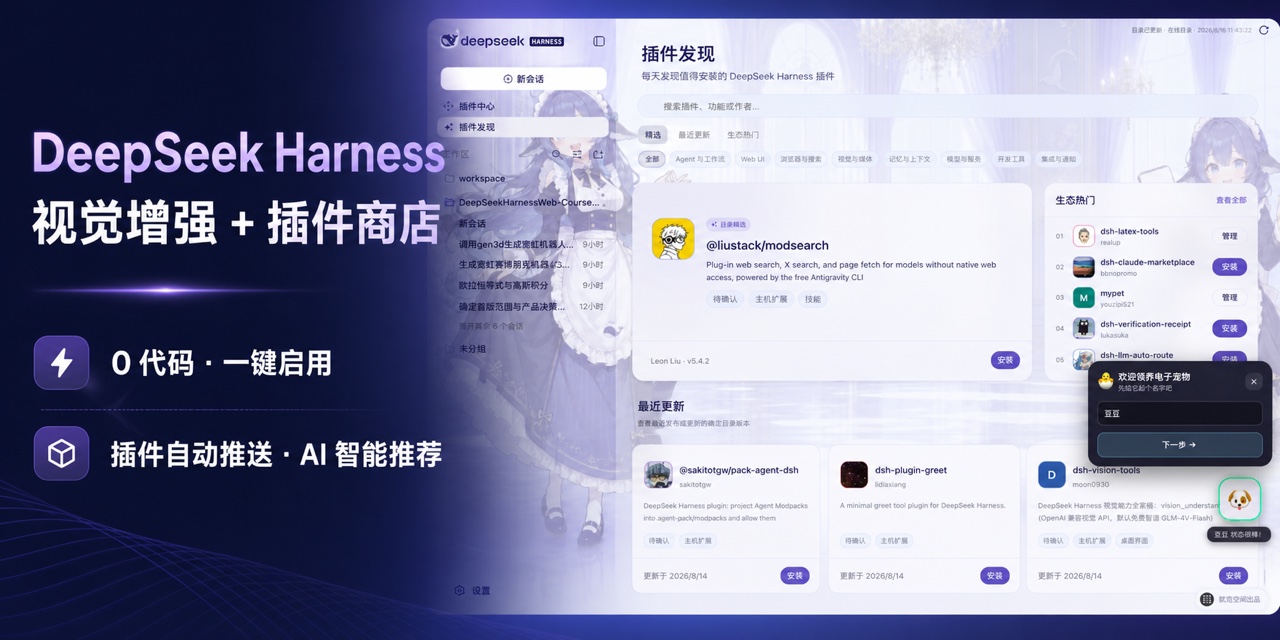
赋范空间出品 · DeepSeek Harness 的零代码桌面增强
视觉增强 + 插件市场 + Preset 广场 · 0 代码一键部署和使用
自动发现并推送生态新插件,AI 智能推荐值得安装的能力;无需命令行即可完成搜索、校验、安装、启停与卸载。
下载 macOS arm64 开发预览版 · 下载 Windows x64 开发预览版
点击快速查看功能演示
https://github.com/user-attachments/assets/0717f7c7-a872-4d2b-acc2-3a1c4874c732
先看功能:当前能力与近期路线图
状态说明:✅ 已支持;🗓️ 规划中。桌面开发工作区、公开插件中心、Preset 广场、应用中心和中文 DeepSeek 控制已经可用;规划能力会在真实功能可运行后更新状态。
| 能力 | 状态 | 可以做什么 |
|---|---|---|
| 插件发现与热门推荐 | ✅ | 自动读取公开目录,按精选、最近更新、生态热门和使用场景呈现值得关注的插件,并支持按名称、功能或作者搜索。 |
| 公开插件中心 | ✅ | 查看确定版本、能力、权限、兼容性与风险,一键在线安装,并集中管理插件的启用、停用、更新和卸载。 |
| Preset 广场与内置工作流 | ✅ | 浏览赋范官方与社区 Agent Preset,查看能力组成后完成一键安装,并从“已安装”直接用于新会话;当前内置七套真实场景工作流。 |
| 应用中心与内置 AI 应用 | ✅ | 从独立一级入口启动拥有专属界面、数据和运行流程的完整 AI 应用;首个内置应用 FF–LLM Wiki 提供企业文档、Wiki、知识图谱、溯源问答与质量评估。 |
| 桌面开发工作区 | ✅ | 在本地打开项目、管理会话与工作区,调用 Harness 的模型、工具、Skills 和插件能力,并直接修改完整源码。 |
| 视觉增强 | ✅ | 一个开关自动选择原生图片输入,或已验证的百炼/OpenRouter 兼容视觉,并显示当前实际路径。 |
| 中文 DeepSeek 控制 | ✅ | 使用中文权限选项和适配 DeepSeek 的思考模式,在输入区直接完成会话级选择。 |
| 内置皮肤与自由换肤 | ✅ | 默认使用“大肥鱼拟人”皮肤,可切换“官方原版”或“云端猫咪”,也可选择本地图片并自动适配界面配色。 |
| 独立 MCP、Skills 与工具管理 | 🗓️ | 后续提供不依赖 Bundle 包装的 MCP Server、Skills 与工具发现和连接管理,按项目自由组合 Agent 能力。 |
| 自定义 Agent 与多 Agent 协作 | 🗓️ | 在现有 Preset 安装和使用能力之上,自定义 Agent 与子 Agent,把编码、测试、调研和审查任务交给不同角色协同完成。 |
| 任务规划、后台运行与会话恢复 | 🗓️ | 管理计划和待办,让长任务在后台继续运行,并随时查看进度或接续历史会话。 |
| 项目规则、Hooks 与长期记忆 | 🗓️ | 集中管理项目指令、自动化 Hooks 和可持续复用的上下文,让 Agent 按仓库规则稳定工作。 |
| Git、Worktree 与代码审查 | 🗓️ | 在隔离工作区并行开发,查看 Diff、提交和审查结果,减少多人或多任务互相干扰。 |
| 浏览器与桌面自动化 | 🗓️ | 让 Agent 操作网页和本地应用,并通过真实交互结果验证任务是否完成。 |
| 手机远程与消息通道 | 🗓️ | 从移动端查看和接续任务,并通过常用消息渠道接收通知或触发 Agent。 |
项目简介
DeepSeek Harness Studio 使用 Electron 承载 DeepSeek Harness 的 Web 工作区,并由桌面主进程启动和管理本地 dsh web 服务。这个仓库提供完整源码开发环境,使用者可以从 GitHub 克隆或下载代码,在本地安装依赖、编辑源码、启动桌面应用并继续开发。
桌面安装包只通过本仓库的 GitHub Releases 发布,不使用第三方下载站。目前已经提供经过真实 Electron 验收的 macOS arm64 预览 ZIP 和 Windows x64 预览安装程序;需要继续开发时,仍可获取完整源码并在本地启动。
核心功能
- Electron 桌面端:提供应用窗口、系统托盘、单实例运行、外部链接处理和安全的 preload 通信接口。
- 本地 Harness Host:桌面主进程启动
dsh web,等待本地服务就绪,并在应用退出时关闭 Host 进程。 - Web 工作区:保留 DeepSeek Harness 的会话、工作区、模型、工具、Skills 和插件运行能力。
- 插件发现与推荐:自动读取在线目录,通过精选、最近更新、生态热门、场景分类和搜索,帮助用户快速找到值得尝试的插件。
- Agent 智能找插件:用一句自然语言描述需求,Agent 自动检索公开
dsh-plugin目录、筛选相关候选并说明推荐理由。 - 公开插件中心:通过短包名、完整 npm 包名或明确 GitHub 仓库定位已经发布的 DSH Bundle,在安装前校验确定版本、产物完整性、Bundle 声明和本机兼容性;聚合 Bundle 可以复用当前 Desktop Host 实际打包的 DSH 模块,真正缺失的第三方依赖仍会被阻断。
- Preset 广场:从独立一级页面浏览赋范官方与社区 Agent Preset,查看 Skill、工具和环境要求后安全安装,并从已安装列表直接用于新会话。
- 应用中心:集中启动由赋范桌面端内置维护的完整 AI 应用;应用拥有独立界面、数据目录和运行流程,并可按需显示在左侧导航。
- 对话区视觉增强:保留一个开关;确切模型声明支持图片时发送原图,否则使用已验证的百炼或 OpenRouter 兼容视觉,同一张图片只进入一条链路。
- 桌面外观设置:内置“官方原版”“大肥鱼拟人”和“云端猫咪”三套外观,也支持本地背景图片、主体焦点和界面玻璃层调节。
- 完整开发源码:仓库同时包含桌面应用、Web 界面、CLI、功能包、原生辅助模块、Python SDK、示例和构建脚本。
DeepSeek Harness rc.8 兼容能力
Studio 0.1.0-rc.14 整合 DeepSeek Harness 0.1.0-rc.8 的核心与 Web 能力,同时保留赋范的插件中心、插件发现、Preset 广场、应用中心、主题皮肤和桌面恢复链路。Studio 版本号与 Harness 上游版本号分别管理。
- 模型与视觉:支持 DeepSeek
low推理强度、确切模型的原生图片能力声明,以及原生视觉与兼容视觉的单开关自动路由。 - 附件与引用:接入可持久化图片附件、
@文件/会话引用,以及可携带图片的/goal与/plan输入。 - 插件与设置:接入插件动态设置卡片,并沿用插件中心的安装、配置、启停和卸载链路。
- 任务与运行时:接入子 Agent Job、并发 Web Search、历史分叉性能改进和 Windows 持久 PowerShell PTY。
- 桌面兼容:Desktop Host 使用
--no-open避免额外打开浏览器,并继续使用原生目录选择、插件事务恢复和现有用户数据目录。
插件生态:先发现值得装的,再完成安装与管理
插件发现:不知道装什么,就从这里开始
不知道插件去哪里找、哪些最近刚更新、哪些正在受到生态关注?从左侧进入 插件发现,应用会自动读取在线目录,把分散的插件整理成可以直接浏览和行动的推荐页面。
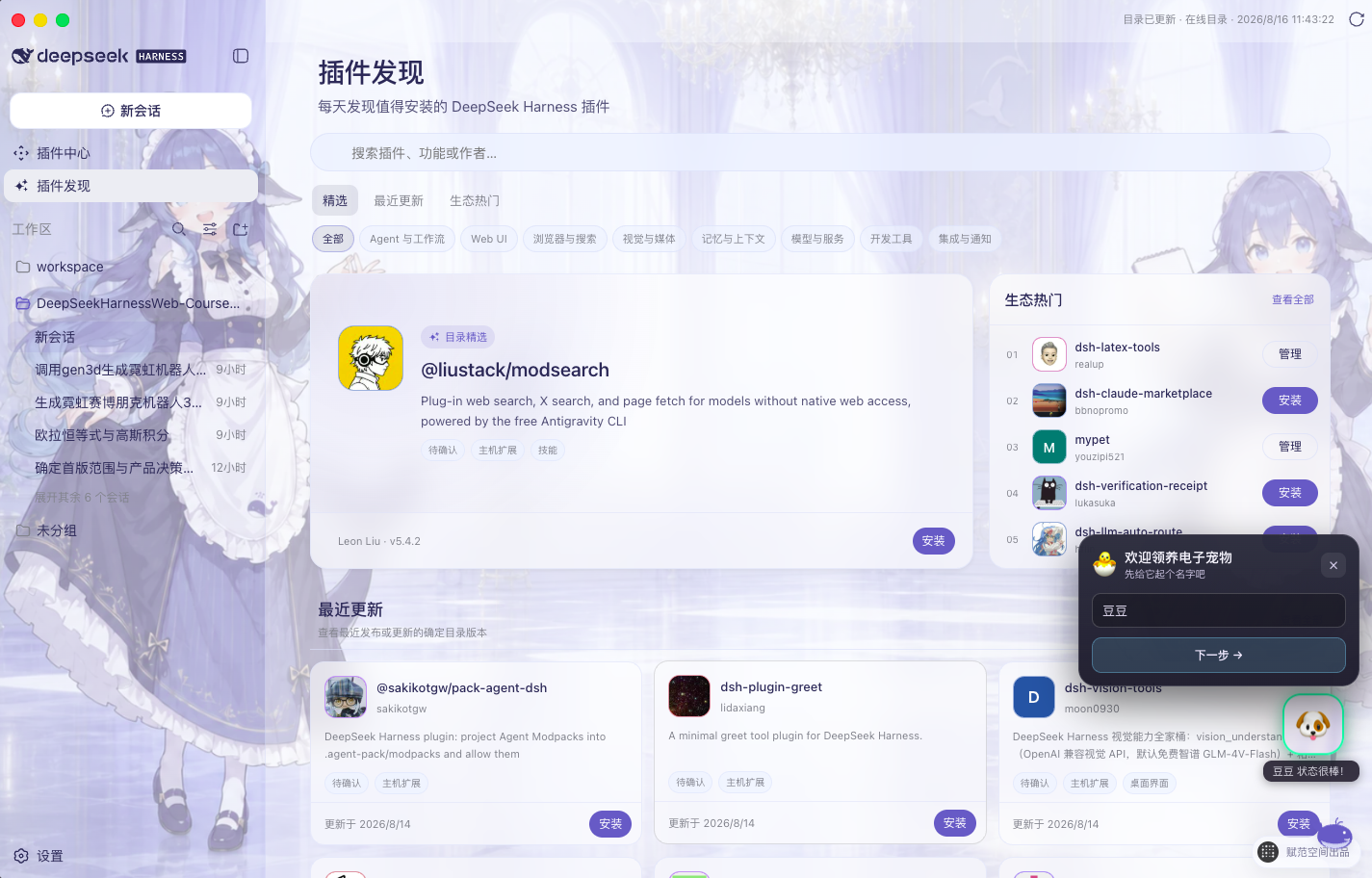
真实 Desktop 界面:目录精选、最近更新、生态热门、场景分类、搜索以及安装与管理入口。
- 每天都有新发现:打开页面即可看到目录精选、最近更新和生态热门,不必逐个仓库搜索。
- 按场景快速筛选:覆盖 Agent 与工作流、Web UI、浏览器与搜索、视觉与媒体、记忆与上下文、模型与服务、开发工具、集成与通知。
- 直接搜索答案:按插件名称、功能关键词或作者检索,并查看头像、简介、版本和更新时间。
- 发现后立即使用:未安装插件可直接进入安全安装流程;已安装插件可一键转到插件中心继续管理。
不知道准确包名?让 Agent 先替你筛选
只知道“想要一个桌面宠物”这类需求时,不必先猜 npm 包名。在 插件发现 中输入自然语言描述,应用会把它作为 /find-plugins 请求交给当前 Agent;Agent 加载内置技能、只读查询公开 dsh-plugin 目录,并把最相关的候选、版本、作者、更新时间和匹配理由返回当前对话。
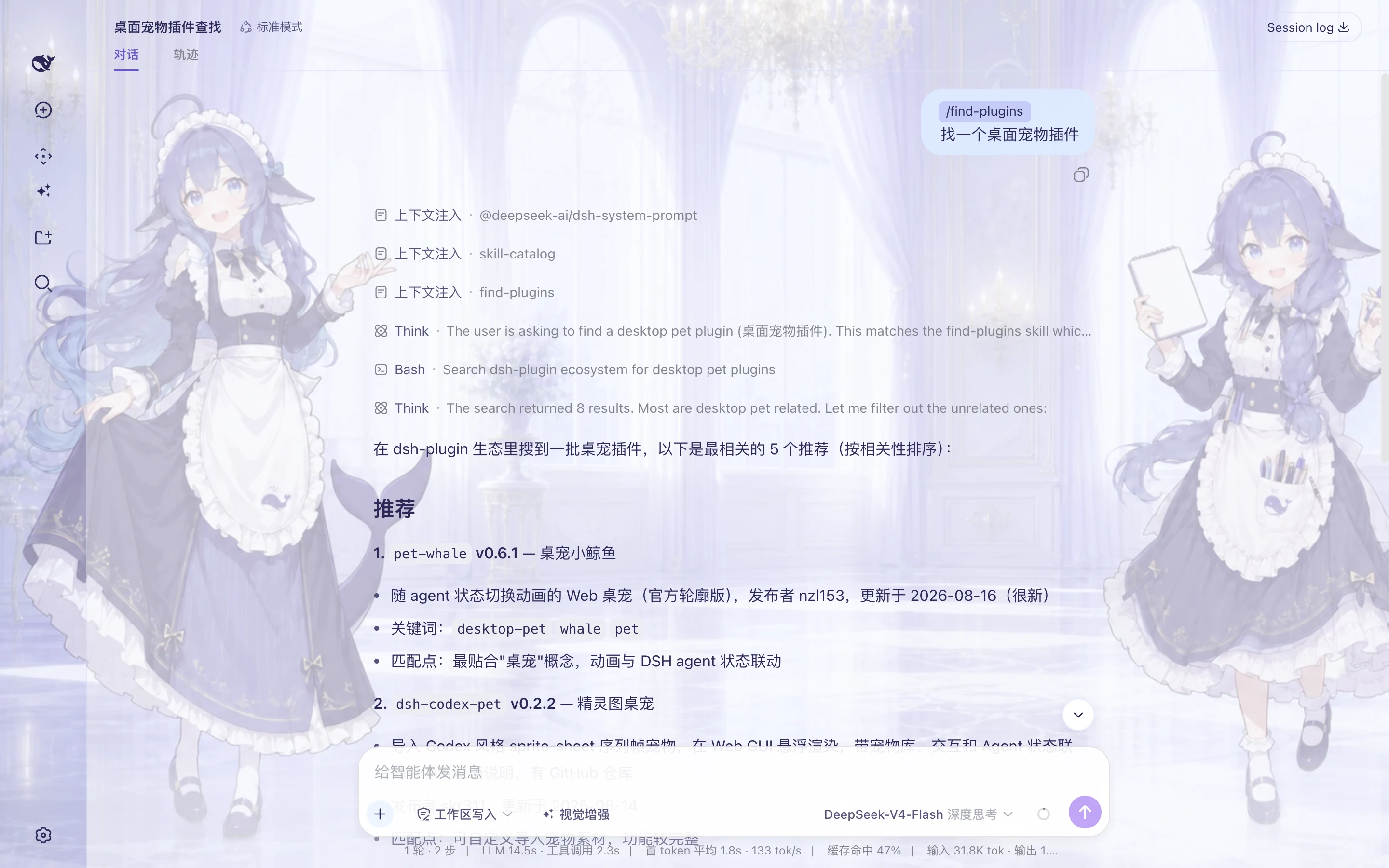
真实 Desktop 验收:对话发出“找一个桌面宠物插件”,Agent 加载 find-plugins、执行公开目录搜索,并从 8 个结果中列出 5 个相关候选。
- 不要求记住关键词:直接说明目标、使用场景或希望解决的问题。
- 推荐依据可核对:结果包含精确包名、版本、发布者、更新时间和逐项匹配理由。
- 搜索与安装分开确认:推荐结果只代表公开目录元数据;选定包名后仍通过 插件中心 完成兼容性检查和确认安装。
插件中心:在线安装、启停与移除
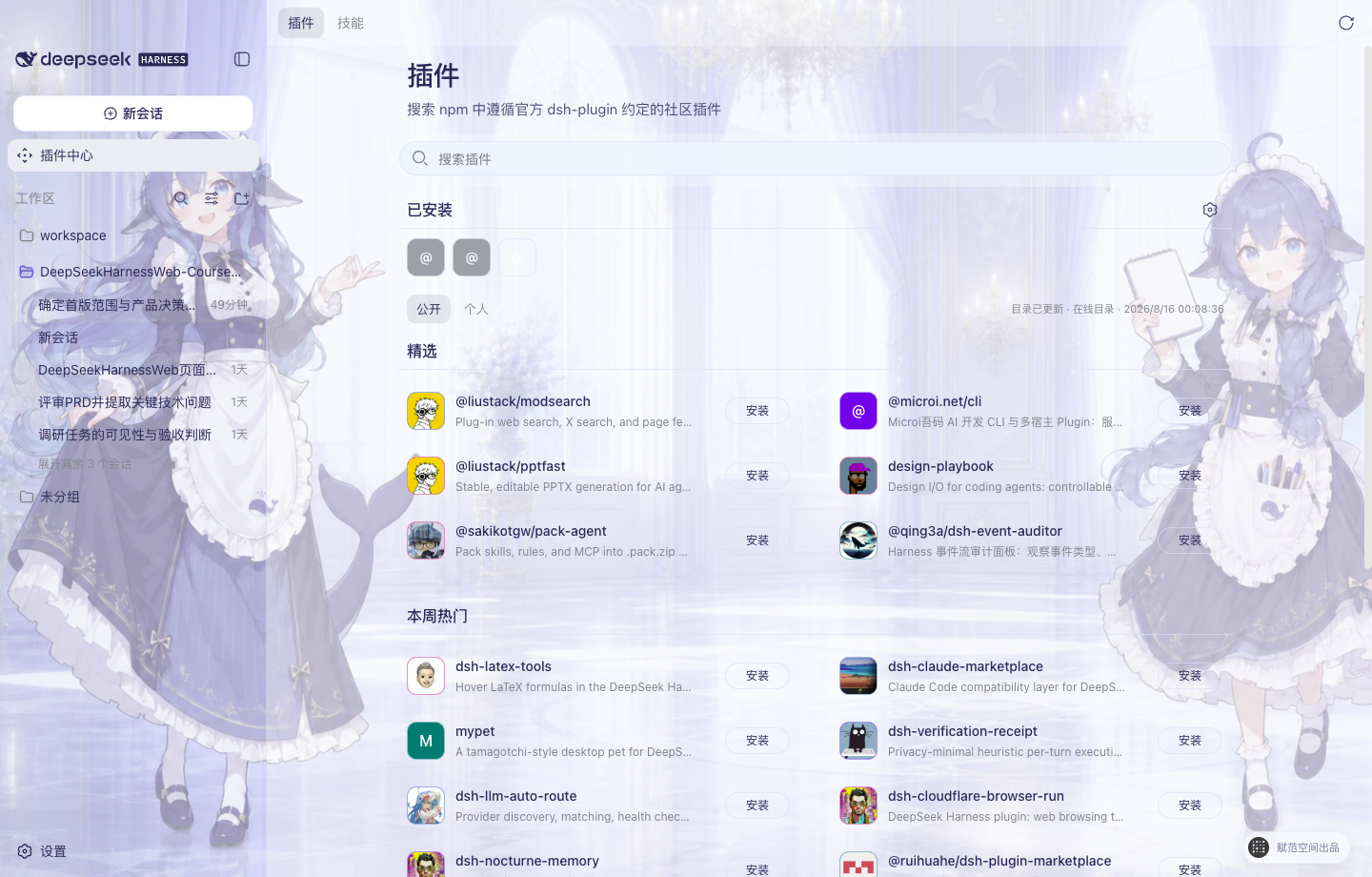
真实 Desktop 界面:插件头像、公开目录、已安装区域、“安装”按钮与三点管理入口。
选定插件后进入 插件中心,可以用短包名、完整 npm 包名或明确 GitHub 仓库查找发布到 npm 公共 Registry 的插件与 Skill Pack。dsh-plugin 只是发现信号;GitHub 也只用于映射已发布 npm 包,Studio 不会直接安装仓库源码。确定版本仍须通过 Bundle、完整性和运行兼容校验。
- 在线发现:搜索公开插件,查看版本、能力、权限、兼容性和风险说明。
- 一键安装:下载确定版本并校验包身份、完整性和 Bundle 声明;确认后自动安装并重启 Harness Host 验证运行状态。
- 已安装管理:集中查看系统、公开目录和本地来源,通过三点菜单启用、停用、更新或卸载插件。
- 安全移除:卸载默认保留配置与插件数据;需要清理数据时,再由用户单独确认。
Preset 广场已上线:一键安装完整工作方式
插件通常解决“让 Agent 多一个工具”,Skill 解决“教 Agent 按什么方法做”,而 Agent Preset 解决的是更完整的问题:把角色、工作规则、Skills、Plugin/MCP 与 Harness 标准工具组合成一套可以反复使用的工作方式。用户不需要逐项理解和手工配置,安装一个 Preset 后,就能直接用对应角色创建新会话。
| 能力层 | 它是什么 | 主要解决什么 |
|---|---|---|
| Skill | 可复用的方法、步骤与约束 | 告诉 Agent 一类任务应该“怎么做” |
| Plugin / MCP | 可执行工具或外部服务连接 | 让 Agent 能真实读写系统、调用服务并完成动作 |
| Agent Preset | 角色、Skill、工具与运行规则的组合 | 把零散能力装配成一套开箱即用的数字员工或工作流 |
当前源码已经提供与“插件中心”“插件发现”平级的 Preset 广场,并完成发现、详情、安全安装、已安装管理、用于新会话、删除与重新安装的桌面端闭环。
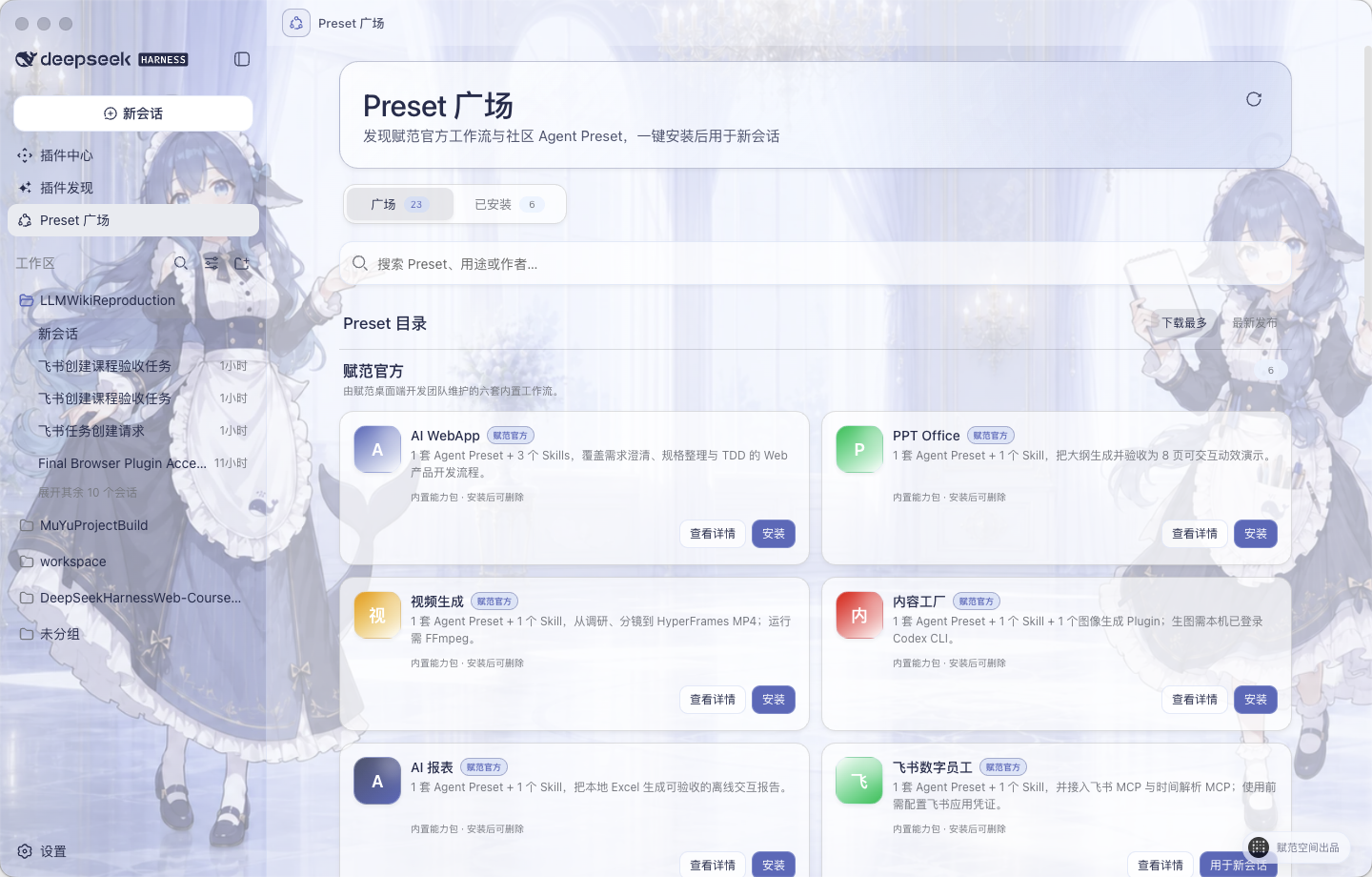
真实 Desktop 界面:Preset 广场、赋范官方内置目录、搜索与排序,以及安装、查看详情和用于新会话入口。
使用路径: 发现 Preset → 查看能力组成与前置条件 → 一键安装 → 在“已安装”中选择“用于新会话” → 按工作流完成任务 → 随时删除或重新安装。
- 从左侧导航进入 Preset 广场,可搜索用途、名称或作者,并按下载量或更新时间排序。
- 打开详情查看它包含的角色、Skill、工具、外部依赖和来源说明。
- 点击安装后,Desktop 会校验来源、大小、摘要和归档路径,再写入本地用户 Preset 目录。
- 安装完成后无需重启 Host;在 已安装 中点击“用于新会话”,即可带着对应 Preset 开始任务。
- 用户 Preset 可删除并重新安装;系统 Preset 继续受保护。安装或删除后仍停留在当前页面,不打断浏览过程。
安装、删除和用于新会话涉及本机文件与 Host,只在 Desktop 中执行;浏览器开发模式用于快速查看和验收界面,不会修改本机 Preset。
赋范官方内置 Preset:七套真实场景工作流
内置内容不是“插件合集”,而是七套围绕真实交付结果组织的 Agent Preset + Skills + 工具集成。合计包含 7 套 Agent Preset、9 个 Skills、1 个图像生成 Plugin;飞书数字员工另外接入飞书 MCP 与时间解析 MCP,PPT Office 使用内置动效运行适配器。
命名说明: “赋范官方”表示由赋范桌面端开发团队内置和维护,不代表 DeepSeek Harness 官方。它们安装后仍是普通用户 Preset,可以删除并重新安装。
| 分类 | 内置 Preset | 能力组成 | 直接交付 |
|---|---|---|---|
| 产品与应用开发 | AI WebApp | 1 Preset + 3 Skills | 从需求澄清、规格整理到 TDD 验收的可运行 Web 产品 |
| 办公与演示 | PPT Office | 1 Preset + 1 Skill + 动效运行适配器 | 8 页、四主题、可交互的单文件 HTML 演示文稿 |
| 视觉与媒体 | 视频生成 | 1 Preset + 1 Skill | 从一句话调研、分镜到渲染完成的 16:9 MP4 |
| 内容生产 | 内容工厂 | 1 Preset + 1 Skill + 1 图像生成 Plugin | 从长文分析到 1–10 张风格一致的图文卡片 |
| 数据分析 | AI 报表 | 1 Preset + 1 Skill | 从本地 Excel 生成可核验的离线交互报告 |
| 企业协同 | 飞书数字员工 | 1 Preset + 1 Skill + 飞书 MCP + 时间解析 MCP | 从自然语言指令到真实飞书任务与双端回执 |
| 知识库研发 | LLM Wiki Producer | 1 Preset + 1 Skill | 使用「LLM Wiki 全栈工程师」按阶段开发、验证并交付企业知识库项目 |
下方六个案例统一使用
16:10预览图,避免横幅和长图破坏版面;点击任意图片可查看完整原图。
产品与演示:把想法变成可交付成果
 |  |
|
01 · AI WebApp 解决什么:需求讨论结束后,仍不知道如何稳定落成一个可运行、可测试的 Web 产品。 功能逻辑:需求澄清 → 规格整理 → TDD 纵向开发 → 类型检查、构建与浏览器验收。 能力组成: grill-me、to-spec、tdd 3 个 Skills + 专属产品开发 Preset。示例结果:可启动、可拖拽、可更新数据的“创作指挥舱”WebApp。 |
02 · PPT Office 解决什么:只有主题和内容大纲时,快速形成结构完整、视觉统一、可离线播放的演示成果。 功能逻辑:保存原始内容 → 组织 8 页叙事大纲 → 选择主题并生成 → 确定性检查页数、动画与离线性。 能力组成:1 个动效演示 Skill + 专属导演 Preset + 内置动效运行适配器。 示例结果:四套主题、逐页语义动画的单文件 HTML;当前明确不生成 .pptx。
|
内容与媒体:把一句话或一篇长文变成成品
 |  |
|
03 · 视频生成 解决什么:只有一句产品想法时,仍能建立从事实调研到正式成片的完整生产链。 功能逻辑:四维 Web 检索 → 研究与简报 → 设计规范、分镜和视频源码 → HyperFrames 检查 → FFmpeg 渲染与媒体验收。 能力组成:1 个产品发布片 Skill + 专属视频导演 Preset。 示例结果:可编辑视频工程、联系表和 16:9 MP4;运行环境需要 FFmpeg 与 ffprobe。 |
04 · 内容工厂 解决什么:把一篇长文稳定拆解成风格统一、可以连续发布的系列视觉内容。 功能逻辑:分析受众与观点 → 确认风格、布局和配色 → 编写系列大纲与逐图提示 → 生成 1–10 张图片 → 校验尺寸、页数与一致性。 能力组成:1 个图文 Skill + 专属内容视觉 Preset + Codex ImageGen Bridge Plugin。 示例结果:9 张连续图文卡片;真实生图前需要本机 Codex CLI 已登录并具备 ImageGen 能力。 |
数据与企业协同:从本地数据到真实业务动作
 |  |
|
05 · AI 报表 解决什么:把本地 Excel 从“原始表格”转成结构清晰、可追溯、可直接交付的数据叙事。 功能逻辑:只读核对工作簿与数据基线 → 清洗聚合 → 选择图表叙事 → 内联 ECharts 生成 → 桌面与移动双端验收。 能力组成:1 个 Excel 报表 Skill + 专属数据分析 Preset。 示例结果:不依赖 CDN 的单文件交互 HTML,原始 Excel 保持只读,报告只嵌入聚合数据。 |
06 · 飞书数字员工 解决什么:让对话不止返回文字,而是把一句自然语言真正变成企业协作系统中的任务。 功能逻辑:Harness Desktop 或飞书接收指令 → Skill 判断动作 → 时间 MCP 解析“明天下午 6 点” → 飞书官方 MCP 创建任务 → Harness 与飞书双端返回回执。 能力组成:1 个飞书 Skill + 专属数字员工 Preset + 飞书 MCP + 时间解析 MCP。 示例结果:真实飞书任务、负责人和截止时间均可查看;首次使用需要配置飞书应用凭据与默认负责人。 |
以上图片均来自六套工作流的真实案例成果。Desktop 随安装包交付的是运行所需的精简 Preset、Skills 与工具适配,不会把案例源码、输入数据、截图或生成成品塞进用户环境。
应用中心已上线:从能力扩展进入完整 AI 应用
插件为 Harness 增加工具或界面能力,Preset 把角色、Skills 与工具组合成一套工作方式,而 应用 面向更完整的产品场景:它拥有独立界面、专属数据和自己的运行流程。应用中心因此与插件中心、插件发现和 Preset 广场平级,用户不需要在插件列表中辨认技术包,直接从一个稳定入口发现并启动完整产品。
| 形态 | 主要作用 | 典型使用方式 |
|---|---|---|
| Plugin / MCP | 增加可调用工具、服务连接或局部界面能力 | 安装后由 Agent 或 Harness 功能触发 |
| Agent Preset | 组合角色、Skills、工具与工作规则 | 用 Preset 创建新会话并按既定流程完成任务 |
| AI 应用 | 提供专属界面、数据和端到端业务流程 | 从应用中心直接打开并持续管理自己的业务数据 |
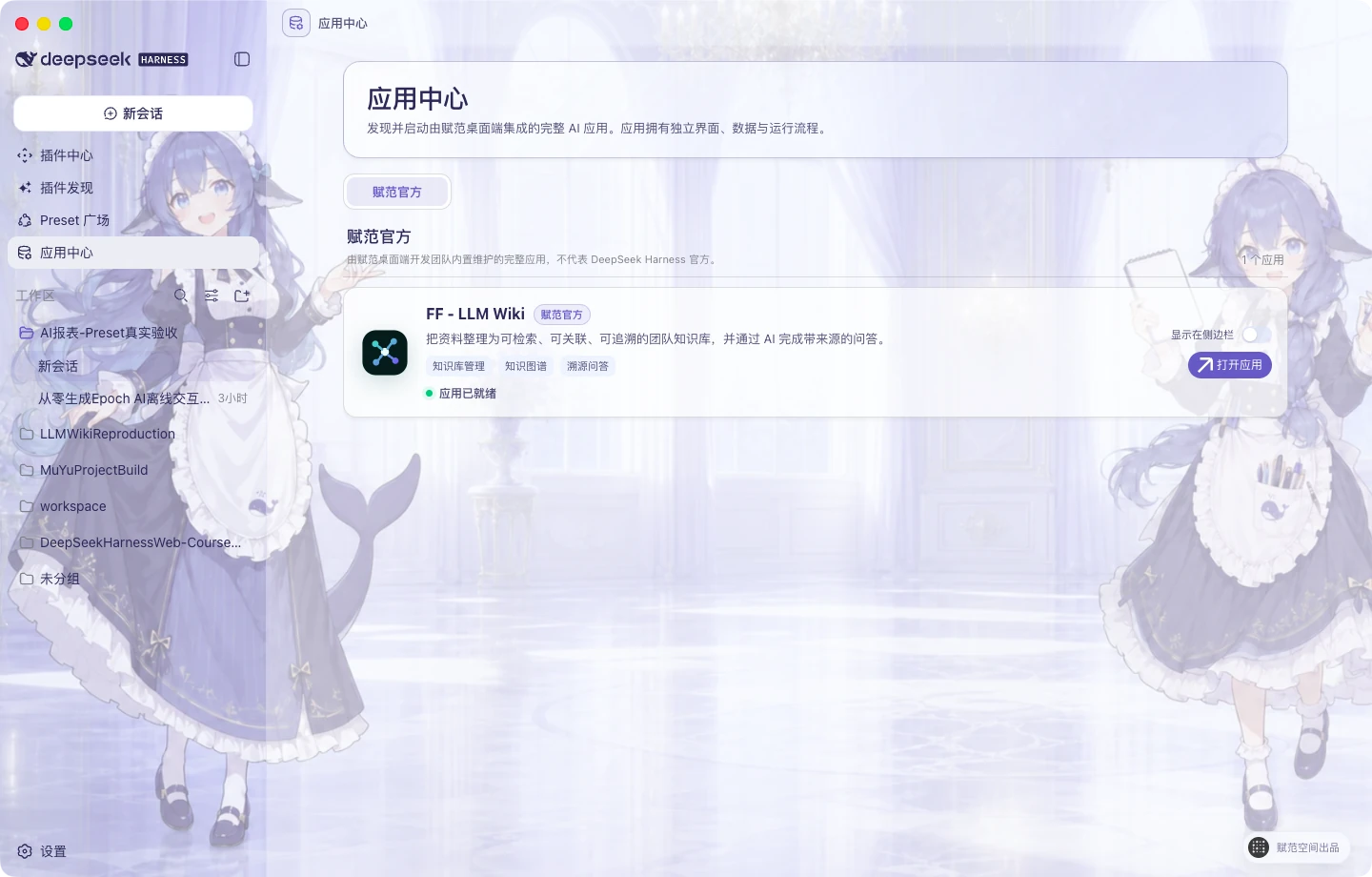
真实 Desktop 界面:应用中心作为一级入口展示赋范官方应用;可直接打开应用,也可选择是否把快捷入口显示在左侧导航。
首个内置应用:FF–LLM Wiki 企业知识库
FF–LLM Wiki 面向企业文档分散、知识关系难整理、问答结果无法追溯的问题,把原始资料逐步转换为可检索、可关联、可核查的知识资产。它不是嵌在对话页中的演示卡片,而是一套由 Desktop 管理本地运行环境、在系统浏览器中打开的完整应用。
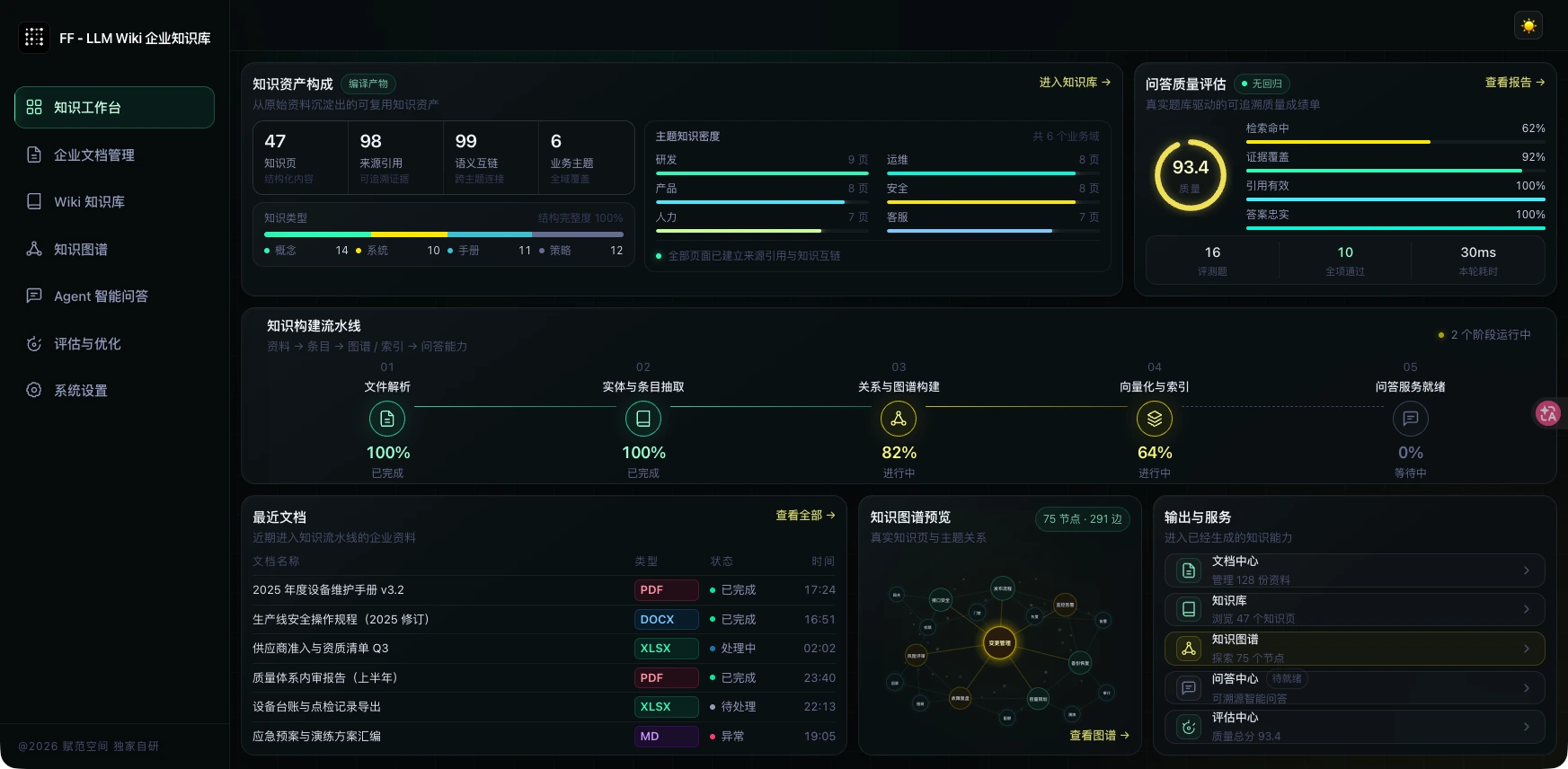
真实运行界面:从文档解析、Wiki 编译和知识图谱构建,到基于检索证据的 Agent 问答与质量评估。
- 完整知识流水线:文档解析 → 实体与条目抽取 → Wiki 与知识图谱构建 → 向量化和索引 → 可追溯问答。
- 来源可以核查:问答只使用当前检索命中的证据片段,并保留来源引用;模型不可用时会明确降级到本地检索结果。
- 本地数据隔离:文档、Wiki、图谱和 SQLite 数据写入 DSH Home 下的应用专属目录,不混入当前项目工作区。
- 密钥由用户掌控:应用不会携带赋范团队的 API Key。知识编译、浏览和本地检索无需模型密钥;使用 DeepSeek 生成式 RAG 前,需要用户在 Harness 凭证中心配置自己的
DEEPSEEK_API_KEY。 - 入口按需显示:应用中心始终可访问;FF–LLM Wiki 的左侧快捷入口默认关闭,用户可通过“显示在侧边栏”随时开启或隐藏。
使用路径: 打开应用中心 → 选择 FF–LLM Wiki → 点击“打开应用” → 导入或管理企业资料 → 构建 Wiki 与知识图谱 → 在智能问答中核查带来源的答案。
命名说明: “赋范官方”表示由赋范桌面端开发团队内置和维护,不代表 DeepSeek Harness 官方。
内置皮肤与自由换肤
进入 设置 → 背景 即可切换内置皮肤;选择自定义图片时,应用会在本机完成 1920×1080 WebP 裁切与界面配色,不上传原图。
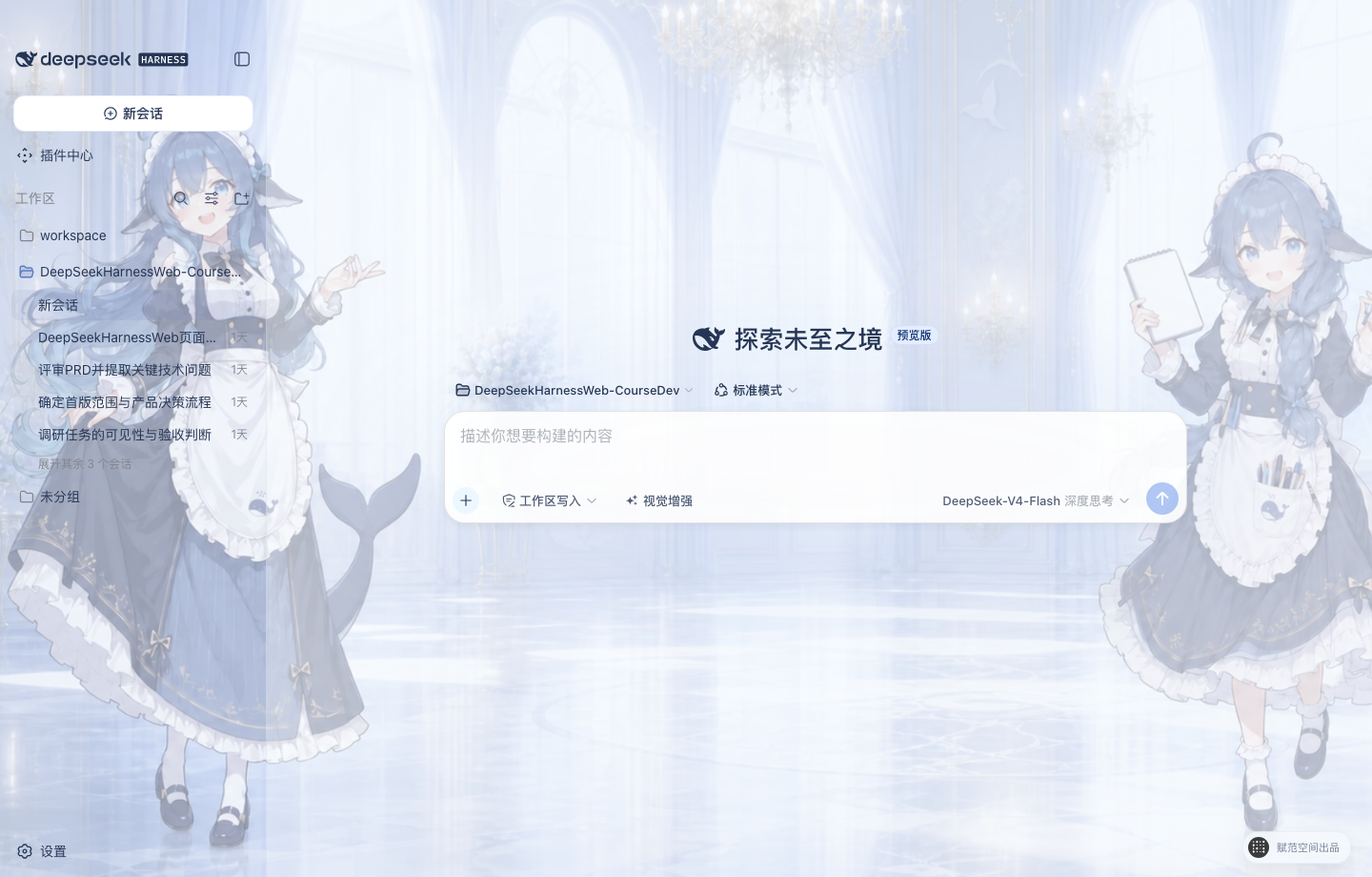 | 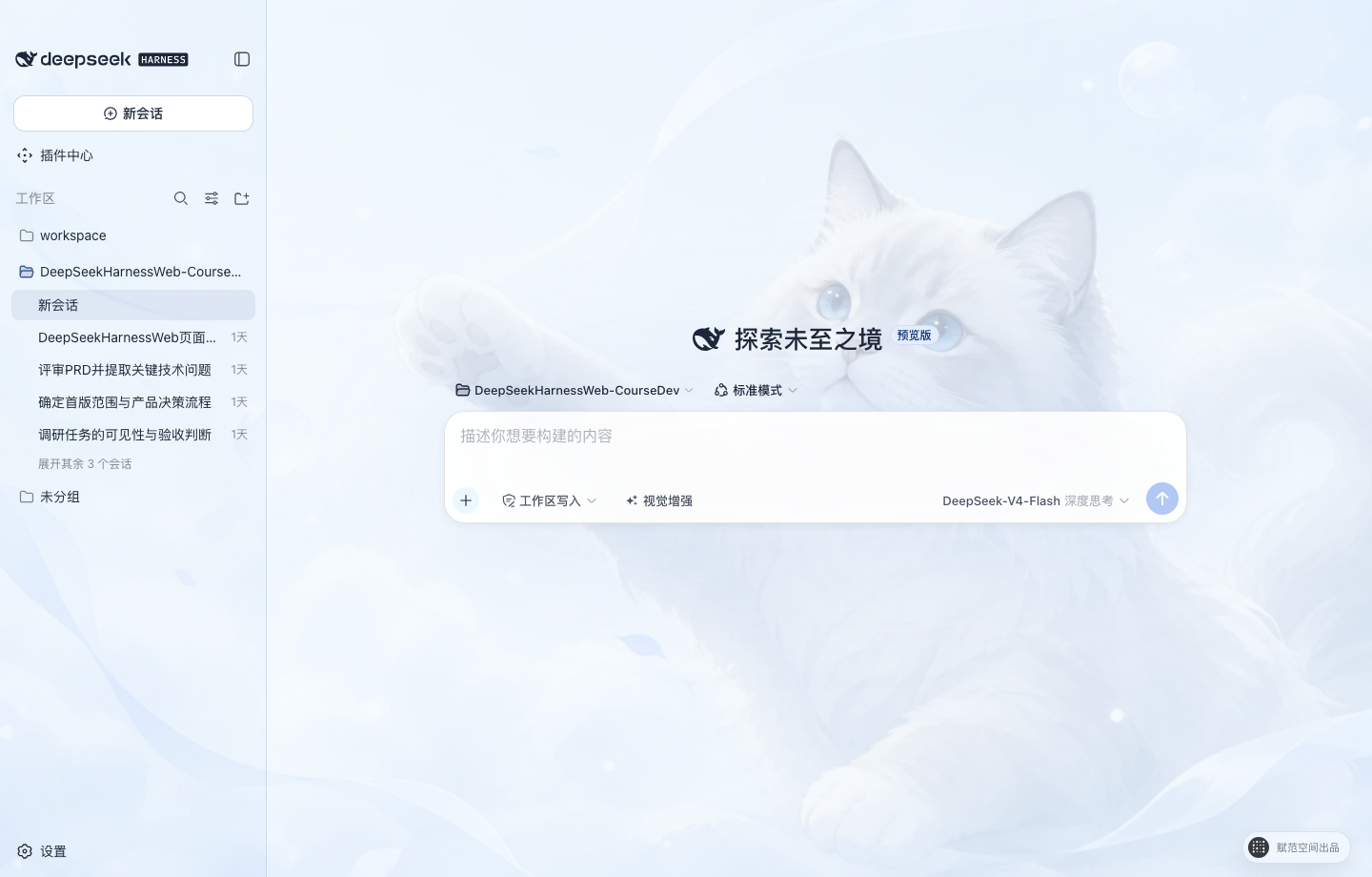 |
| 大肥鱼拟人 · 默认 蓝白鲸灵助手与明亮宫殿,中央留白适配对话区。 | 云端猫咪 保留原有柔和蓝白猫咪主题,清爽、安静、低干扰。 |
中文权限与 DeepSeek 模型控制
- 权限选择:输入区使用
只读、工作区写入和完全访问三档中文权限,作用于当前会话;通用设置只决定后续新会话的默认权限,启用完全访问前必须确认风险。 - 模型与思考模式:模型和 API Key 仍在设置页统一管理;输入区可查看当前 DeepSeek 模型,并选择
关闭思考、低强度思考、深度思考或最大思考。
视觉增强:让 DeepSeek 看懂图片
开启视觉增强后,Host 会按当前确切模型的能力自动选择一条路径:模型声明支持图片时直接发送原图;否则使用已完成配置与验证的百炼或 OpenRouter 兼容视觉,把可追溯观察交给 Agent。两条路径互斥,同一张图片只处理一次。
- 随手可用:输入框左侧提供“视觉增强”快捷开关,悬浮即可查看用途和当前状态。
- 自动选路:按钮显示
原生或兼容 · 提供方;原生视觉不需要额外 Key,兼容视觉则要求对应提供方已验证。 - 明确关闭:关闭开关后,图片不进入模型可见上下文;附件历史仍保留在界面中。
- 覆盖开发场景:可理解产品截图、报错界面、设计稿、数据图表、照片和图片文字,也可以按路径读取当前工作区图片。
下载桌面端
GitHub Releases 已提供经过真实 Electron 验收的 macOS Apple Silicon 预览 ZIP 和 Windows x64 预览安装程序,运行桌面端无需另行安装 Node.js 或 pnpm。当前均为开发预览资产;正式版本仍将提供完成平台签名的 macOS
.dmg和 Windows x64.exe。
下载 macOS arm64 预览版 · 下载 Windows x64 安装程序
macOS arm64
下载并解压预览 ZIP 后,建议先把 DeepSeek Harness.app 拖入“应用程序”目录。由于当前预览包尚未经过 Apple 公证,首次打开前需要在“终端”执行:
xattr -dr com.apple.quarantine "/Applications/DeepSeek Harness.app"
open "/Applications/DeepSeek Harness.app"
如果应用没有放在“应用程序”目录,请把命令中的路径替换为实际路径。该命令只应用于从本仓库 GitHub Releases 下载并核验过 SHA-256 的预览包;不要用于来源不明的应用。首次成功打开后,可以像普通应用一样从 Finder 或程序坞启动。
Windows x64
下载 DeepSeek-Harness-Desktop-Windows-x64-0.1.0-rc.14-Setup.exe 后直接运行安装程序。Release 的公开下载区只保留 macOS ZIP 和 Windows 安装程序;校验文件、blockmap 与平台验收记录保留在对应 GitHub Actions 构建中,避免普通用户误下载开发文件。
开发预览版使用独立 Pre-release 标签,不触发正式安装器发布。正式流程只接受与 Desktop 版本完全一致的 desktop-v* 标签;macOS 与 Windows 安装包分别完成平台签名验证后,GitHub 才会同时公开安装文件和 SHA256SUMS。
快速开始
获取源码
使用 Git 克隆仓库:
git clone https://github.com/fufankeji/deepseek-harness-studio.git
cd deepseek-harness-studio
也可以在 GitHub 仓库页面选择 Code → Download ZIP,下载并解压源码后进入项目目录。
环境要求
- Node.js
^22.19.0 || >=24.0.0 - pnpm
11.7.0
外部服务准备
下载源码、安装依赖和启动桌面开发环境不需要预先填写 API 密钥。需要在应用中实际调用模型时,再在设置中配置所选模型服务与凭证;凭证不要提交到 Git。
安装与启动
安装工作区依赖:
pnpm install
构建所需模块并启动桌面开发环境:
pnpm run dev:desktop
开发启动器会在相关源码或构建输入变化时重新构建;需要强制完整重建时运行:
pnpm run dev:desktop:rebuild
目录结构
deepseek-harness-studio/
├── apps/
│   ├── desktop/       # Electron 主进程、preload、Host 生命周期与桌面构建脚本
│   ├── web/           # DeepSeek Harness Web 界面入口与桌面端组合
│   └── cli/           # dsh CLI、运行配置与 Agent Preset
├── packages/          # Agent、模型、工具、会话、插件和客户端能力包
├── native/            # 原生沙箱辅助模块
├── python/            # Python SDK 与相关运行时
├── examples/          # 可运行示例与配置
├── scripts/           # 构建、检查、生成和发布脚本
├── website/           # 项目文档站源码
├── vendor/            # 固定版本的 Cordis 基础源码
└── assets/            # README 使用的项目图片
常用开发命令
| 命令 | 用途 |
|---|---|
pnpm run dev:desktop | 构建必要模块并启动 Electron 桌面应用 |
pnpm run dev:desktop:rebuild | 强制完整重建后启动桌面应用 |
pnpm run build | 构建 Host、客户端、Web 与桌面端 |
pnpm run package:desktop | 为当前平台生成未封装桌面应用 |
pnpm run typecheck | 运行 TypeScript 类型检查 |
pnpm run test | 运行 Vitest 单元测试 |
建议阅读顺序
apps/desktop/src/main.ts:桌面应用入口、窗口、托盘和本地 Host 组合。apps/desktop/src/host-supervisor.ts:dsh web的启动、就绪检测与退出管理。apps/desktop/src/preload.ts:Renderer 可访问的固定桌面接口。apps/web/:桌面窗口加载的 Web 工作区。apps/cli/与packages/:CLI 组合以及各项 Harness 能力实现。
与 DeepSeek Harness 的关系
本项目基于 deepseek-ai/deepseek-harness 的 Harness 核心、Cordis 插件体系和 Web 界面继续进行桌面端开发。本仓库维护 Electron 桌面入口、本地 Host 管理、桌面交互与配套开发脚本。
许可证
本项目使用 MIT License。第三方组件的许可证信息见 THIRD_PARTY_NOTICES.md。
Read the usage guide →
Install steps, key points, FAQ and compatibility for this plugin — auto-derived from indexed fields.
Listing badge

[](https://deepseek-plugin.org/plugins/fufankeji/deepseek-harness-studio/packages/subagent/subagent-codex)Paste this markdown into your GitHub README to link back to this listing. The badge only states the listing — not a security endorsement.