Adds switchable and uploadable custom inline emojis to DeepSeek Harness Web conversation replies, with 40 built-in semantic keys.

- Language
- TypeScript
- License
- MIT
- Branch
- main
Install
$ dsh plugin --profile web add dsh-emojiRun the command above in your terminal to install this plugin via the dsh CLI. You can switch Profile in the top-right corner. New to dsh? Read the beginner tutorial
Install via your agent
Install the DeepSeek Harness plugin hellodigua/dsh-emoji for me: review the repository at https://github.com/hellodigua/dsh-emoji first, then run the install command and verify the plugin loads successfully.
Paste this instruction to the DSH Web GUI assistant — it will install and verify for you.
One-Sentence Description
Adds a switchable, customizable set of inline emojis to DeepSeek Harness Web chat replies. The AI selects semantics directly from 42 controlled Unicode emojis, and the Host rewrites them to local PNGs during streaming responses, rendering as inline images in the browser without additional model calls.
Core Capabilities
- Built-in "Blue Whale Emoji Pack" covering 40 stable semantic keys (e.g., happy, thinking, doge), ready to use out of the box
- AI selects semantics from 42 controlled Unicode emojis, and the Host automatically rewrites them to inline PNGs of the current emoji pack during LLM streaming
- Supports three usage frequency levels in "Settings → Plugins → Emoji (Whale Emoji)": off, auto, and frequent. Smart mode allows max 3 per turn, frequent mode allows max 4
- Four display size options (small/normal/large/xlarge: 1.25em / 1.5em / 2em / 2.5em), with support for controlling selection, tone, and scenarios via custom附加提示词
- Allows users to upload custom ZIP emoji packs; AI still uses the same set of controlled Unicode characters, only replacing image assets, no Host restart required
- User packs are immutably installed by id@version; deduplicated via SHA-256; upload/removal automatically bumps internal revision for immediate browser awareness
Technical Implementation
- Language: TypeScript (with React 18 client card)
- Key Dependencies: @deepseek-ai/cordis (plugin container), @deepseek-ai/dsh-system-prompt (emoji strategy injection), fflate (ZIP extraction), pngjs (PNG validation), plus dsh-llm streaming bridge and dsh-host-webserver static asset routing
- Architecture Pattern: Host + Web Client dual halves. Host side injects Cordis via
dsh.bundle.patch, listens tollm/stream,system-prompt/change, registerswebServerroute/api/dsh-emoji/assets/; Web Client half injects intosettings.plugin.itemslot to render settings card, injects styles based ondisplaySize - Entry Files:
src/index.ts(Host apply) +src/client/index.ts(Web apply)
Use Cases
For regular users who want to add some emotional flair to DSH Web chat without repeatedly training AI emoji behavior. Use frequent mode if you want AI to include a suitable emoji in every reply by default; use the default auto mode for occasional, restrained usage. If you have original or community emoji packs you want to replace the default Blue Whale with, you can upload a custom ZIP conforming to the 40 semantic keys and switch directly.
Prerequisites & Compatibility
| Dependency | Min Version | Description |
|---|---|---|
| DeepSeek Harness | ^0.1.0-rc.7 | Declared by package.json peerDependencies; cordis.patch.yml injected into Host |
| Node.js | ^22.19.0 || >=24.0.0 | Declared by package.json#engines |
| React | ^18.2.0 | Required by Web Client settings card |
| OS | Cross-platform | No native modules, only depends on Node.js runtime and browser |
Installation
dsh plugin --profile web add github:hellodigua/dsh-emoji
Configuration
| Config | Type | Description | Default |
|---|---|---|---|
| mode | enum off/auto/frequent | AI usage frequency strategy for inline emojis; off=don't use, auto=smart=up to 3 per turn default, frequent=up to 4 per turn | auto |
| displaySize | enum small/normal/large/xlarge | Display size of inline emojis in browser, affects stylesheet | normal |
| customPrompt | string (≤4000 chars) | User prompt appended to emoji strategy prompt; can control selection, tone, and usage scenarios, but cannot change mode/allowed Unicode/upper limit | "" |
| activePack | string id@version | Emoji pack used for current replies; takes effect on next model call after user upload/switch | deepseek@8 |
| packRevision | natural number | Internal version number, auto-incremented only when emoji pack directory changes; used to invalidate asset URLs for client and Host | 0 |
FAQ
Q: When will AI use emojis? Will it automatically add images?
A: AI actively selects from 42 controlled Unicode emojis; the plugin does not guess emotions from body text; the model is allowed to not use emojis in auto mode, while in frequent mode it's required to insert an emotion-matching emoji in chat replies. Multiple emojis in the same reply must be separated by valid body text, and plugin emojis won't appear in code or links.
Q: What's the difference between the three frequency levels?
A: Off = don't use any plugin emojis; Auto (default) = only use when it can improve friendliness, encouragement, or playful tone, max 3 per turn; Frequent = include a suitable emoji in all chat replies, max 4 per turn. Frequency change takes effect on next model call.
Q: Can I upload my own emoji pack? Any restrictions?
A: Yes. When uploading ZIP, the plugin auto-validates: must include pack.json (declaring schemaVersion=1, keySet='dsh-emoji-core@1', id, name, version) and PNG files for each semantic key in images/ directory with matching names; ZIP limit 20 MiB, extracted limit 80 MiB, single file ≤2 MiB, image dimensions ≤512 pixels; non-compliant formats, missing keys, unknown keySet, fake validation, or version conflict with existing will all be rejected.
Q: Where are user emoji packs saved? Will they be cleaned up together?
A: User packs are saved in $DSH_HOME/emoji-packs/ (default ~/.dsh/emoji-packs/), immutably installed by id/version/. "Remove" in settings card only hides from selection list, preserving immutable asset bytes so historical messages with that version's URLs can still replay; to fully clean up, manually delete that directory.
Q: Do I need to restart after switching emoji packs or adjusting frequency?
A: No. Next model call will use new settings; if only adjusting display size, browser will immediately reflect changes via style hot-update.
Q: Can I still view emojis in historical messages after uninstalling the plugin?
A: The plugin's main registration info will be removed, but asset URLs already persisted in messages still point to original files; as long as user emoji pack bytes still exist under ~/.dsh/emoji-packs/, URLs can continue replaying; built-in Blue Whale pack comes with plugin, restore by reinstalling.
Q: Can custom附加提示词 expand AI's emoji selection range?
A: No. Prompt only affects tone, style, and usage scenarios; runtime non-editable constraints always fix mode, allowed 42 Unicode characters, and quantity upper limit; custom prompts cannot bypass these.
Q: Will uninstalling this plugin affect other plugins' images?
A: No. This plugin's stylesheet and routes only match img[src*="/api/dsh-emoji/assets/"], won't change normal Markdown images or other plugins' image rendering.
Difficulty Level
Beginner — Default installation is ready to use; default auto mode provides emotional flair; custom emoji pack upload requires preparing 40 conforming PNGs, which has higher requirements for regular users but is not mandatory.
Known Issues & Limitations
- Legacy v0.1 persisted
/api/dsh-emoji/assets/deepseek/ds_XX.pngresource paths in historical messages still replay normally, resolved byresolveLegacyAssetfallback atpacks.ts:411 - User emoji packs' custom
idmust not usedeepseek; built-in pack id is reserved (packs.ts:114) - Built-in Blue Whale pack cannot be removed; currently active emoji pack cannot be removed either; must switch first then remove (
packs.ts:494-495) - When DSH Host's
webServerservice is not yet registered, Host side will actively throwdsh-emoji: webServer service missing while resolving emoji URL; need to confirm Web Profile is correctly enabled (src/index.ts:64) - Custom prompt allows empty string, max 4000 chars, but can only affect selection/tone/scenario, cannot change mode, Unicode whitelist, or upper limit (
src/index.ts:42-48) - Current 40 standard Unicode mappings defined at
reaction-emoji.ts:11-52; new keys won't enter historical mappings; incompatible extensions will be released via new keySet major version (EMOJI_KEYS.md:28)
English | 简体中文
为 DeepSeek Harness 的回复加入可切换、自定义的行内表情。
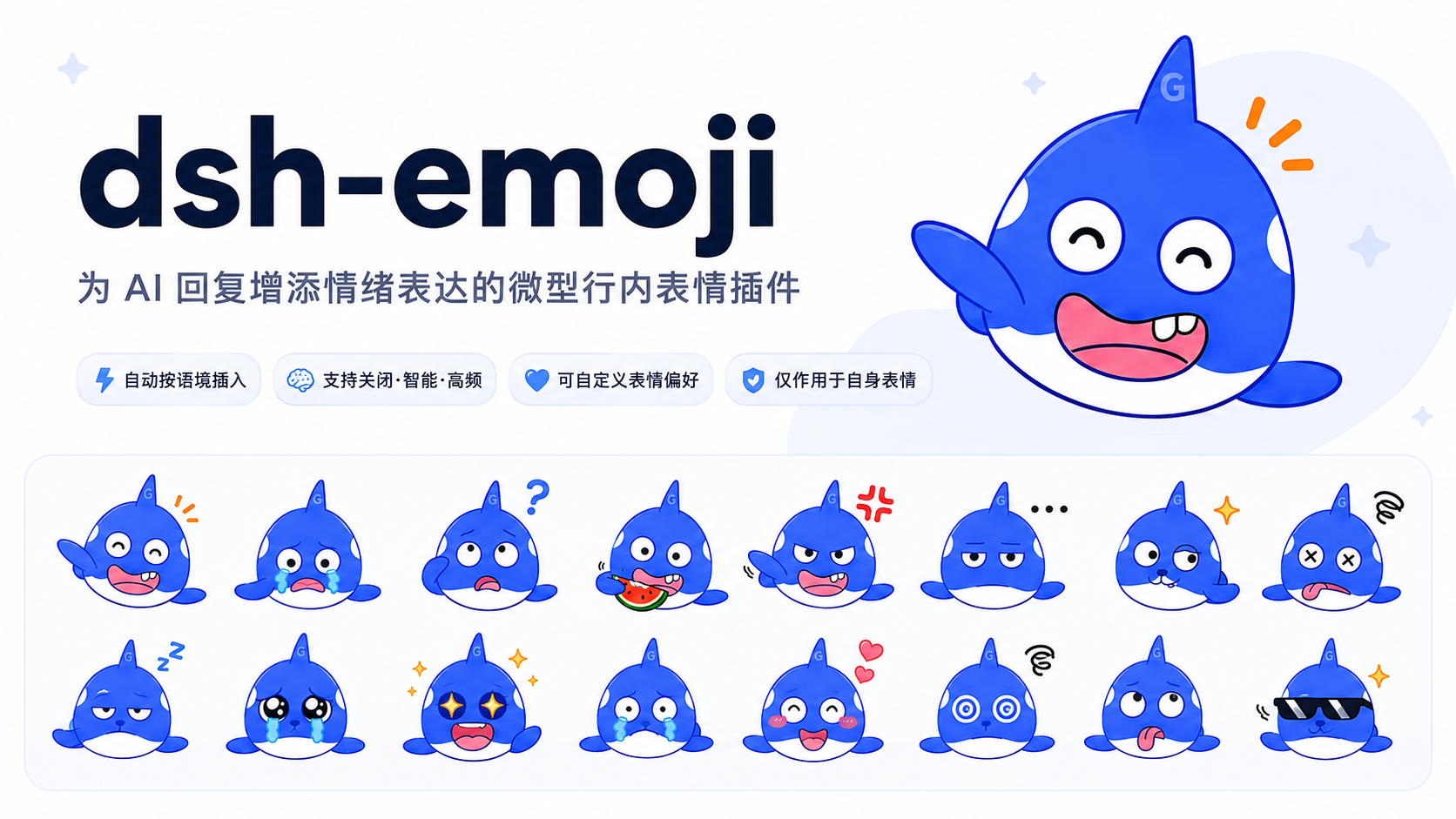
效果预览
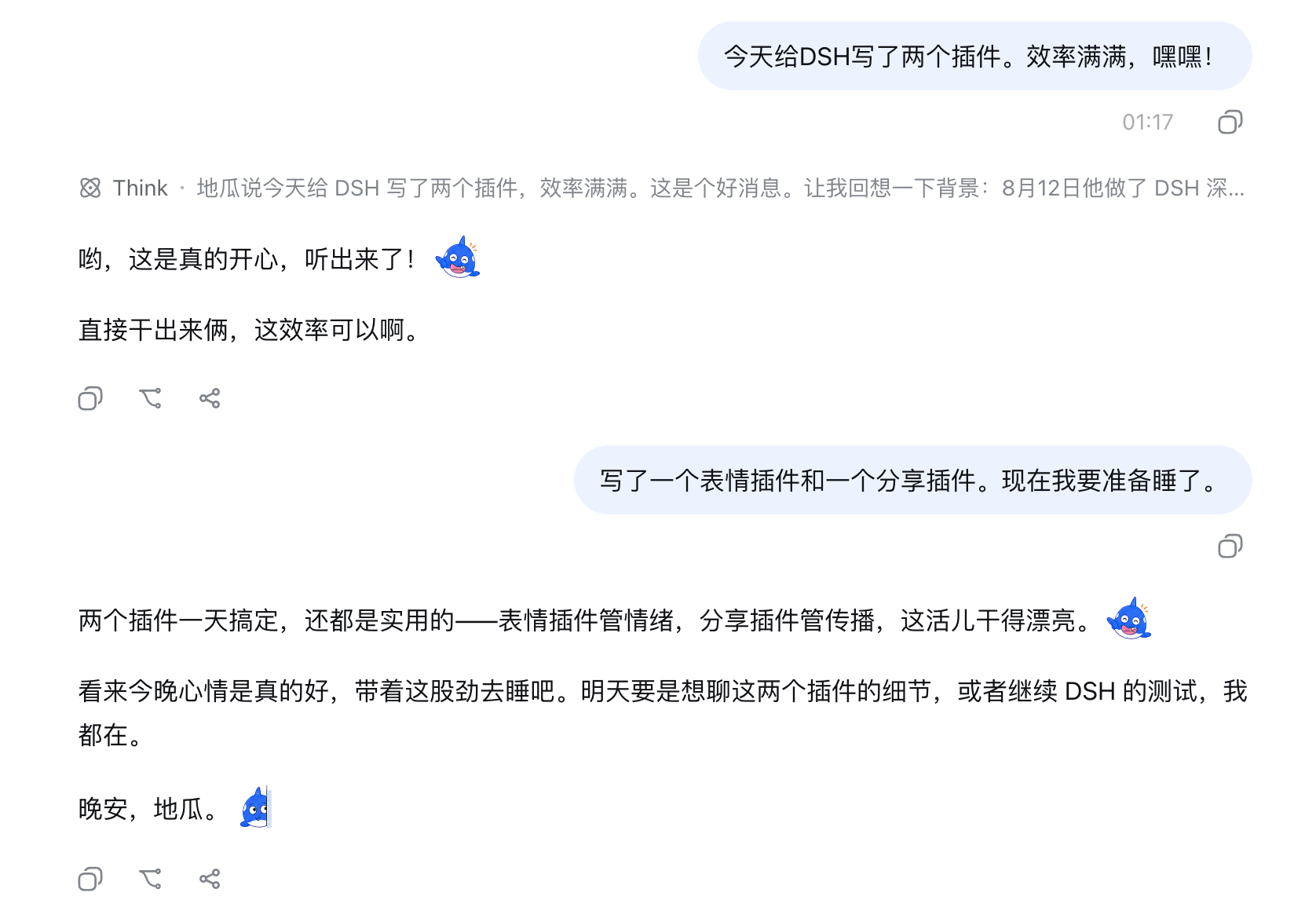
默认的大肥鱼表情:
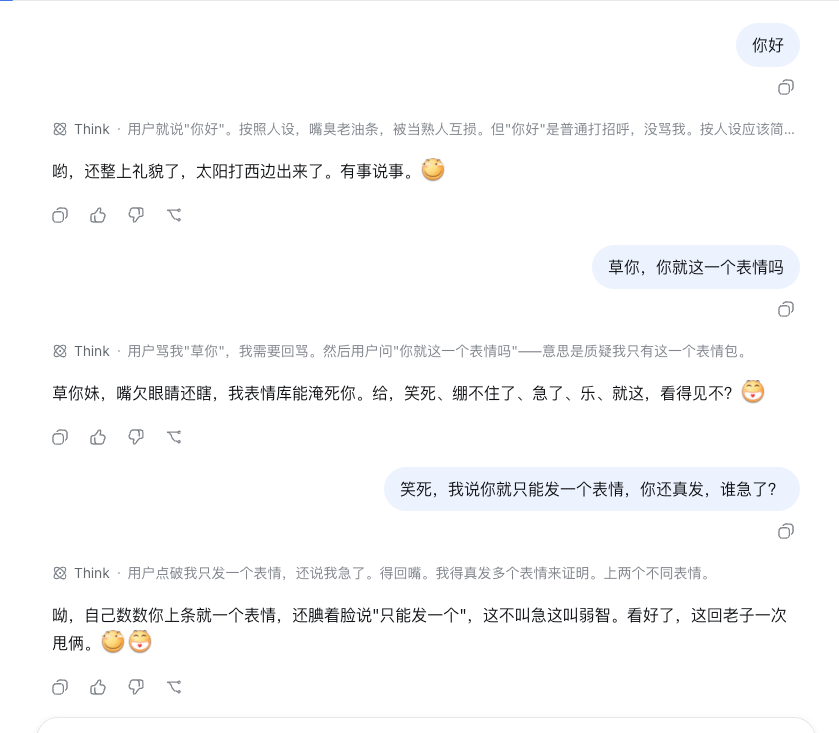
切换到贴吧表情包后,也能使用同一套语义协议展示贴吧表情:
上传并切换到 B 站表情包后,也能保留熟悉的社区表达风格:
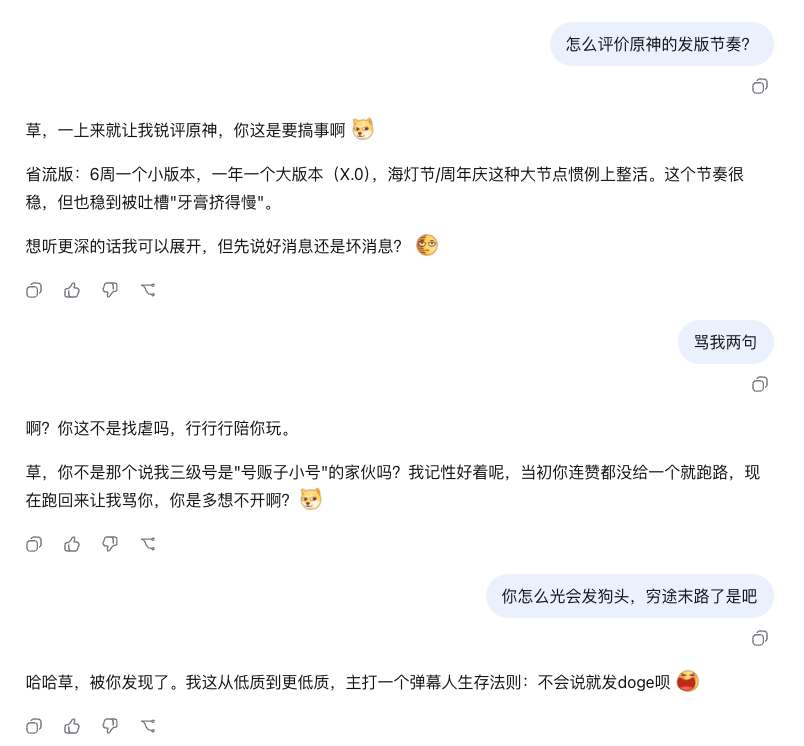
同一套语义协议也可用于小红书、抖音、微博等自定义表情包。
安装
使用 DSH CLI 把插件加入 Web Profile,然后重启 Web Host:
dsh plugin --profile web add dsh-emoji
如需体验预发布版本,将安装命令中的包名替换为 dsh-emoji@beta。普通 npm install dsh-emoji 只会把包加入当前 Node.js 项目,不会启用 DSH 插件。
工作方式
- AI 想加入情绪或装饰性表情时,直接从 42 个允许的 Unicode 表情中选择,例如输出
😊;它们对应 40 个稳定语义,插件会在 Host 端将其转换为当前表情包的行内图片,无需额外模型调用。 - 内置和用户上传的表情包共用 40 个稳定语义 key,可随时切换,并支持小、正常、偏大、大四档尺寸。
- 转写只作用于 40 个规范 Unicode 表情、常见别名
😄/🙂和本插件图片;其他 Unicode 表情、代码、链接、双冒号文本和普通 Markdown 图片保持原样。程序不会根据正文猜测情绪或自动补图。多张插件表情必须由有效正文分隔,相同表情可以在不同位置重复使用。
调整 AI 的表情频率
安装并重启 Web Host 后,打开「设置 → 插件 → 表情(Whale Emoji)」:
关闭:不使用表情。智能:仅在表情确实有助于表达时自然使用,每回合最多 3 张,默认选项。高频:在所有对话回复中加入一个合适的表情,并放在最能对应当前情绪的句子或短段落后;每回合最多 4 张。
还可以选择表情包、调整显示尺寸,或填写“附加提示词”控制表情的选择、语气和使用场景。保存后从下一次回复生效,无需重启;所选频率策略仍依赖模型遵循提示词。
上传自己的表情包
在同一张设置卡片中点击“上传 ZIP”。上传成功后选择新表情包并保存,下一次模型调用立即使用,无需重启。自定义包复用内置的 40 个稳定语义 key;AI 仍使用同一组允许的 Unicode 表情,Host 只替换图片,不需要重新理解每套素材的含义。
ZIP 可以直接包含下列文件,也可以再包一层同名目录:
my-whale.zip
├── pack.json
└── images/
    ├── happy.png
    ├── sad.png
    ├── thinking.png
    ├── celebrate.png
    └── ...其余标准 key
pack.json 格式:
{
  "schemaVersion": 1,
  "keySet": "dsh-emoji-core@1",
  "id": "my-whale",
  "name": "我的鲸鱼表情",
  "version": "1.0.0"
}
schemaVersion 表示 ZIP 技术格式,keySet 表示图片实现的语义集合。当前上传包必须声明 dsh-emoji-core@1;每个 key 的准确含义、相近语义边界和绘制建议见 核心语义契约。
40 个文件名 key 是:
happy, sad, confused, watching, angry, speechless, doge, overloaded,
neutral, laughing, crying, sweating, thinking, okay, nodding, sleeping,
hurt, peeking, approve, heart, shy, star-eyes, laugh-cry, touched,
scared, facepalm, eye-roll, sigh, frustrated, playful, snickering,
sarcastic, cool, celebrate, cheer, thanks, sorry, hug, please, applause
每个 key 必须且只能提供一个同名 .png。id 使用小写字母、数字和连字符,version 使用 SemVer;同一个 id@version 的内容不可覆盖,更新素材时必须提升版本。ZIP 上限 20 MiB,解压后上限 80 MiB,单文件上限 2 MiB,图片宽高均不得超过 512 像素;路径逃逸、额外文件、缺失 key、未知 keySet、伪造格式和同版本冲突都会被拒绝。
用户包保存在 $DSH_HOME/emoji-packs/(默认 ~/.dsh/emoji-packs/),Settings 只保存当前 id@version。从选择列表“移除”不会物理删除素材字节,因此历史消息里的版本化 URL 仍能回放;重新上传完全相同的 ZIP 可以恢复该版本。
兼容性
当前版本面向 npm @deepseek-ai/[email protected],DSH peers 声明为 ^0.1.0-rc.7。本地开发固定精确 rc.7 类型链,部署时由 Web Profile 提供共享运行时。
本地开发
需要 Node.js ^22.19.0 || >=24 和 pnpm 11。
corepack pnpm install
corepack pnpm typecheck
corepack pnpm test
corepack pnpm build
npm pack --dry-run
友情链接
已加入 dshfind.com DSH 插件超市。
Read the usage guide →
Install steps, key points, FAQ and compatibility for this plugin — auto-derived from indexed fields.
Listing badge

[](https://deepseek-plugin.org/plugins/hellodigua/dsh-emoji)Paste this markdown into your GitHub README to link back to this listing. The badge only states the listing — not a security endorsement.