Exports single-round or multi-round Q&A from DSH Web conversations as PNG images or Markdown. Supports multiple selection, adjustable width and font size, and Chinese/English.

- Language
- JavaScript
- License
- MIT
- Branch
- main
Install
$ dsh plugin --profile web add dsh-shareRun the command above in your terminal to install this plugin via the dsh CLI. You can switch Profile in the top-right corner. New to dsh? Read the beginner tutorial
Install via your agent
Install the DeepSeek Harness plugin hellodigua/dsh-share for me: review the repository at https://github.com/hellodigua/dsh-share first, then run the install command and verify the plugin loads successfully.
Paste this instruction to the DSH Web GUI assistant — it will install and verify for you.
One-Sentence Pitch
Adds sharing capability to DeepSeek Harness Web conversations: export single or multi-turn Q&A as PNG images or Markdown, with multi-select interaction consistent with DeepSeek's official site; width, font size, and whether to hide thinking process can all be adjusted in the popup.
Core Features
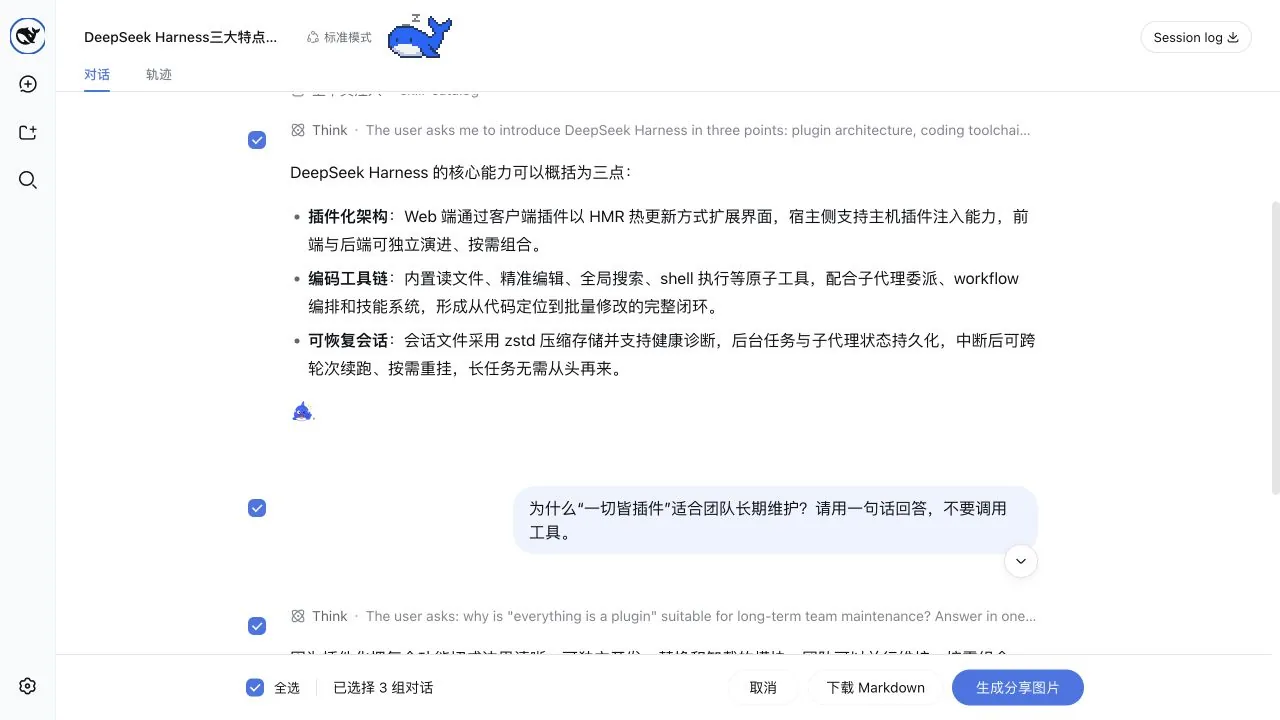
- A share button is added below each Q&A pair and in the top-right of the conversation header, pre-selecting the current Q&A or all currently loaded Q&A by default to enter selection mode
- Supports non-contiguous multi-selection: linked checkboxes on both sides of questions and answers, or click the entire group to quickly check or uncheck
- Checkboxes stick to the top when scrolling through long content, only releasing when scrolling out of that Q&A range
- One-click copy image to clipboard, or download PNG/Markdown files with filenames like
dsh-share-20260819-153012.png - Exported images retain Markdown, code blocks, tables, images, and tool call summaries; "hide process" can be turned off separately to keep only questions and final answers
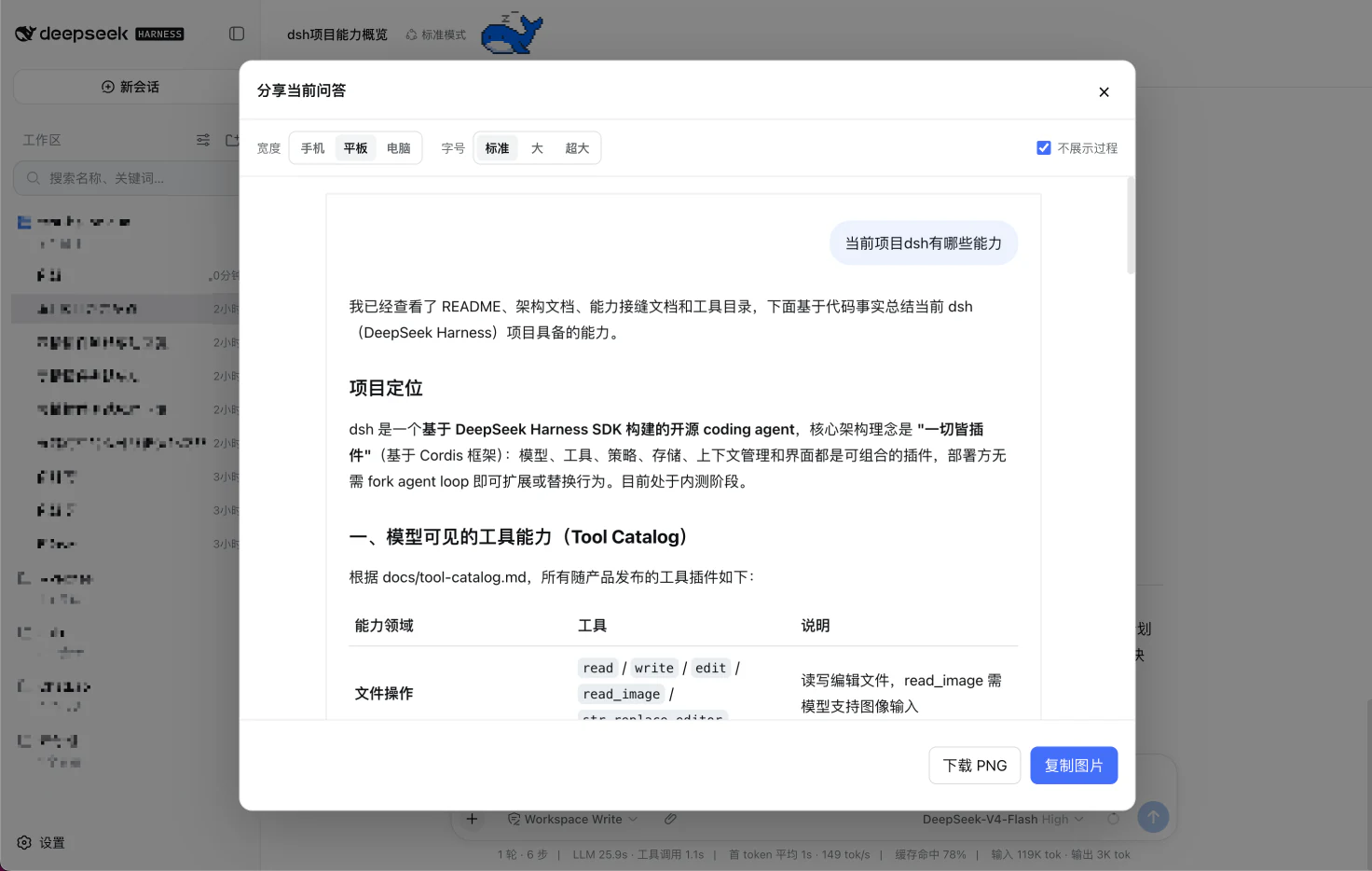
- Preview popup supports width adjustment (phone 375 / tablet 768 / desktop 1024) and font size (normal 16 / large 18 / xlarge 20), with scroll preview for long images
Technical Implementation
- Language: TypeScript (with React 18 client components)
- Key Dependencies:
@deepseek-ai/dsh-client-runtime(slots/locale),@deepseek-ai/dsh-client-ui-primitives(IconShareOutline16, Tooltip),html-to-image(DOM → PNG Blob),turndown+turndown-plugin-gfm(DOM → GFM Markdown) - Architecture Pattern: Pure Web client plugin. Host-side
src/index.tsis an emptyapply(), only declaringnamefor DSH to discover the client bundle; client-sideapply()uses DSH's officialslots.injectto mount two React components toconversation.chat.assistant-actionsandconversation.session.header.utilitiesslots, and injects aShareRuntimeinstance into each component instance via theinjectfield ofslots.register - Entry Files:
src/index.ts(Host placeholder) +src/client/index.ts(Web client apply & export API)
Use Cases
Ordinary users who want to organize valuable conversations from DSH Web to share with colleagues, paste into articles, or archive for backup. Multi-turn Q&A no longer requires manually stitching screenshots—just a few clicks to get a clean image or group of images; users who want an editable text version can also download Markdown with one click.
Prerequisites & Compatibility
| Dependency | Minimum Version | Description |
|---|---|---|
| DeepSeek Harness | ^0.1.0-rc.6 | Declared by dsh.client.inject and peerDependencies in package.json; cordis.patch.yml only declares plugin insertion points |
| Node.js | ^22.19.0 || >=24.0.0 | Declared by package.json#engines, only effective during local build/bundling |
| React | ^18.2.0 | Required by Web client components |
| Browser | Supports <dialog> and dialog.showModal | Preview popup uses native <dialog> element; image copying depends on ClipboardItem API (falls back to PNG download when unsupported) |
| OS | Cross-platform | Only depends on browser, no native modules introduced |
Installation
dsh plugin --profile web add github:hellodigua/dsh-share
Configuration Options
| Config | Type | Description | Default |
|---|---|---|---|
| width | enum phone / tablet / desktop | Canvas width for exported images: phone 375, tablet 768, desktop 1024 (pixels) | tablet |
| fontSize | enum normal / large / xlarge | Body font size for exported images: normal 16, large 18, xlarge 20 (pixels) | normal |
| hideProcess | boolean | Whether to hide thinking, tool calls, and intermediate steps in exported images, keeping only questions and final answers | false |
The above settings are stored in the current browser's
localStorage(keys:dsh-share.width/dsh-share.font-size/dsh-share.hide-process), persisting across sessions; in private mode or when browser disableslocalStorage, it falls back to defaults while sharing functionality remains unaffected.
FAQ
Q: Where can I find the sharing入口 after installation?
A: Two entry points appear: each Q&A's action area gains a circular share button that enters selection mode with only the current Q&A pre-selected; the top-right of the conversation header gains a share button that enters selection mode with all currently loaded Q&A pre-selected. Both entry points open the same multi-select bottom bar and won't affect DSH's official button bar.
Q: Can I hide thinking process, tool calls, and intermediate steps in exported images?
A: Yes. There's a "hide process" toggle in the preview popup; when enabled, each answer only keeps the final last answer step, and tool calls and intermediate steps are removed from both PNG and Markdown; user messages are unaffected by this toggle. Settings are written to localStorage and automatically restored next time.
Q: What if copying image to clipboard fails?
A: The "copy image" button depends on the browser's ClipboardItem and navigator.clipboard.write. When browser doesn't support it, permission is denied, or it's not a secure context, the status bar shows "Current browser doesn't support copying images, please download PNG" or "Copy failed, please download PNG". In this case, use the "download image" button to get the PNG with filename like dsh-share-YYYYMMDD-HHMMSS.png.
Q: Will the plugin read or modify DSH's official button bar or conversation DOM?
A: No. Sharing entry points are only mounted to DSH's official conversation.chat.assistant-actions and conversation.session.header.utilities slots; multi-select mode adds checkboxes via stable data-* attributes (data-chat-flow-kind, data-turn-tail, data-conversation-scroll, etc.), does not rely on CSS Module-generated class names, and doesn't scan or modify button bar DOM.
Q: Can I select old Q&A that hasn't been rendered yet, outside the top of the page?
A: No. Multi-select mode can only select between rounds that are already rendered and fully loaded on the current conversation page. To get earlier content, first scroll up to let DSH load those rounds into the DOM, then enter selection mode to check them.
Q: Where are configurations (width, font size, hide process) stored?
A: In the current browser's localStorage, with keys dsh-share.width, dsh-share.font-size, and dsh-share.hide-process. In private/incognito mode or when browser disables localStorage, settings only take effect for the current session, but sharing functionality itself still works normally.
Q: Will uninstalling the plugin affect already exported PNG or Markdown?
A: No. Exported files are already on the user's local machine; uninstalling the plugin only affects whether the share buttons appear on DSH Web. Simply uninstall via dsh plugin --profile web remove—exported images and Markdown files won't be affected.
Q: Which platforms does the plugin support? Does it need local native modules?
A: It only runs as a DSH Web client plugin in the browser, without depending on any native modules; as long as the DSH Web Profile works normally and the browser supports <dialog> and dialog.showModal, it can be used on Windows / macOS / Linux desktop.
Learning Curve
Beginner — After installation, the share button is visible; entering multi-select mode pre-selects current Q&A by default; clicking "generate image" gets the PNG; adjusting width, font size, and "hide process" are all in the popup, no documentation reading required.
Known Issues & Limitations
- Copying image to clipboard depends on the browser granting Clipboard API permission; when permission is denied or browser doesn't support it, corresponding prompts are shown, but PNG download still works (
src/client/preview-dialog.ts:401-418) - Unreadable remote resources (cross-origin images, etc.) are skipped with transparent GIF placeholders and won't cause entire image generation to fail (
src/client/preview-dialog.ts:13-14,src/client/preview-dialog.ts:19-27) - Multi-select mode can only select Q&A that are already rendered and completed on the current conversation page; for earlier content, scroll up to load first (
README.md:81) - After DSH adjusts official conversation structure (e.g., modifying stable attributes like
data-chat-flow-kind), this plugin's multi-select logic needs synchronous adaptation (README.md:75) - Preview popup image generation doesn't support mid-process cancellation; when continuously switching width, font size, or process toggle, only the last settings are rendered (
src/client/runtime.ts:570-617)
简体中文 | English
DSH 对话分享插件,分享单轮或多轮对话,可导出为图片或 Markdown。
和 DeepSeek 网页端一致的多选交互,操作体验完全一致。
生成图片前可调整宽度、字号和过程显示,完成后可下载或复制图片。
功能
- 从右上角进入问答选择模式,默认全选
- 每轮的分享按钮也会进入选择模式,并只预选当前问答
- 问题和回答两侧都有联动勾选框,也可直接点击内容整组选择,支持不连续选择
- 勾选框会在长内容滚动时吸附在页面上,到当前问题或回答末尾再移出
- 可复制图片、下载 PNG 或 Markdown
- 保留 Markdown、代码块、表格、图片和工具调用摘要
- 可调整图片宽度和字号,长图支持滚动预览
- 可勾选“不展示过程”,只保留提问和最终回答
性能测试:日常聊天仅保留分享按钮等轻量开销;选择处理和图片生成只在使用分享功能时启动,并针对多轮对话做了优化。
快速安装
使用 DSH CLI 把插件加入 Web Profile,然后重启 dsh web:
dsh plugin --profile web add dsh-share
其他安装方式
安装指定的 GitHub 版本:
dsh plugin --profile web add github:hellodigua/dsh-share#vX.Y.Z
安装本地源码:
dsh plugin --profile web add /absolute/path/to/dsh-share
修改源码后,先运行 corepack pnpm build,再使用 dsh plugin --profile web add --force /absolute/path/to/dsh-share 刷新插件。
开发
项目不依赖本机 DSH checkout 即可安装依赖、运行测试和构建:
corepack pnpm install --frozen-lockfile
corepack pnpm typecheck
corepack pnpm test
corepack pnpm build
也可以用一条命令执行完整检查:
corepack pnpm verify
lib/ 是 DSH 直接加载的交付物,需要和源码一起提交。修改 src/ 后,请重新构建并确认 lib/ 已同步更新。
发布前使用 corepack pnpm release:check 校验 npm 包边界,GitHub → npm 的自动化约定见 RELEASING.md。
兼容性
兼容 @deepseek-ai/dsh ^0.1.0-rc.6。分享入口使用官方 conversation.chat.assistant-actions 和 conversation.session.header.utilities 插槽,不扫描或修改按钮栏 DOM。多选模式通过 data-chat-flow-kind 等稳定的 data-* 属性添加选择框,不依赖 CSS Module 生成的类名;DSH 调整对话结构后可能需要同步适配。
已知限制
- 复制图片需要浏览器授予剪贴板权限,权限不足时仍可下载图片。
- 无法读取的远程资源会以透明占位跳过。
- 只能选择页面已经加载的完整问答;需要更早内容时,请先向上滚动加载。
License
项目使用 MIT 许可证。浏览器 bundle 内联依赖的许可证见 THIRD_PARTY_LICENSES.md。
友情链接
已加入 dshfind.com DSH 插件超市。
Read the usage guide →
Install steps, key points, FAQ and compatibility for this plugin — auto-derived from indexed fields.
Listing badge

[](https://deepseek-plugin.org/plugins/hellodigua/dsh-share)Paste this markdown into your GitHub README to link back to this listing. The badge only states the listing — not a security endorsement.