Adds a "Penetration Mode" to DeepSeek Harness: records targets, exploration paths, vulnerabilities, and assets within authorized scope, displaying the full graph in real-time on the web with a zoomable view.

- Language
- JavaScript
- Branch
- master
Install
$ dsh plugin --profile web add github:howmp/dsh-pentestRun the command above in your terminal to install this plugin via the dsh CLI. You can switch Profile in the top-right corner. New to dsh? Read the beginner tutorial
Install via your agent
Install the DeepSeek Harness plugin howmp/dsh-pentest for me: review the repository at https://github.com/howmp/dsh-pentest first, then run the install command and verify the plugin loads successfully.
Paste this instruction to the DSH Web GUI assistant — it will install and verify for you.
One-Line Positioning
Switch DeepSeek Harness into "Penetration Mode": the decision agent advances along the exploration chain goal → intent → fact → finding, sub-agents write discoveries back to persistent storage, and the Web end presents real-time scalable exploration graphs, vulnerability cards, asset relationship graphs, and the final Markdown report.
Core Capabilities
- Record penetration targets, authorization declarations, and the purpose of each engagement within authorized scope, serving as root nodes of the entire graph
- Advance along the "goal → intent → fact → derived intent → finding" chain, with all nodes and edges persisted, sub-agents write discoveries back in real-time via dedicated tools
- Record assets (root domain, subdomains, IP, services, applications, endpoints) and support parent-child ownership relationships, forming an asset graph
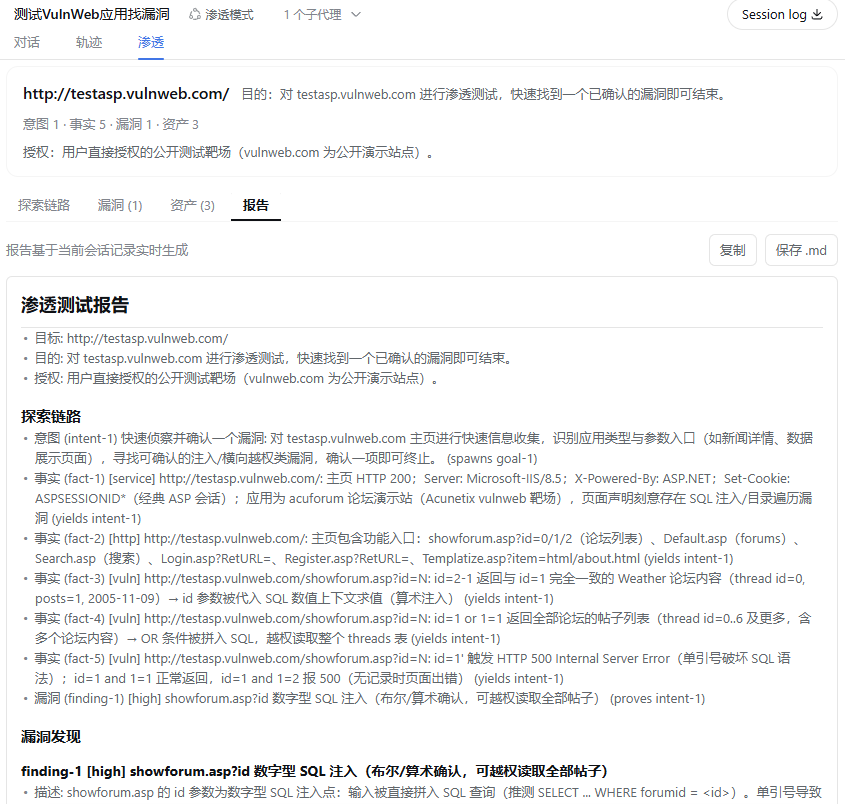
- The "Penetration" tab on Web end presents target summary, exploration chain, vulnerabilities, assets, and final report in real-time
- Vulnerability records require reproducible steps (ordered list of commands/requests/actions), which can be linked to affected assets
- One-click generation of Markdown reports with authorization declarations, exploration chain, vulnerability details with reproducible steps, and asset list, supporting copy and download
Technical Implementation
- Language: TypeScript (host-side ESM) + React + CSS Modules (Web side), bundled as single package
@howmp/dsh-pentest - Key Dependencies: zod (persistent record validation), @xyflow/react (exploration graph and asset graph rendering), @deepseek-ai/schemastery (sqlite backend table structure), React 18 (Web runtime)
- Architecture Pattern: Cordis patch layer bundle—
cordis.patch.ymlsimultaneously inserts Web UI entry (ui-pentest), sqlite backend entry (storage-sqlite, path$DSH_HOME/storages/pentest-sessions.db) and storage-domain route override (onlypentestdomain goes to sqlite, other domains maintain host default json), and mounts apentest-preset-rootto auto-register "Penetration Mode" preset; host side injectspentest:protocolsystem prompt segment and registers eightpentest_*tools, client side dynamically mounts "Penetration" tab based on current session's agent preset - Entry Files:
src/index.ts(host placeholder),src/dsh-pentest/src/index.ts(real plugin apply),src/dsh-client-ui-pentest/src/client/index.ts(browser-side session-aware tab registration)
Use Cases
When security engineers run authorized penetration tests within DSH, they want the main agent to systematically advance reconnaissance, gather facts, confirm vulnerabilities, and record each step for easy review and reporting, without manually organizing logs or switching between multiple tools.
Prerequisites and Compatibility
| Dependency | Minimum Version | Description |
|---|---|---|
| DeepSeek Harness | 0.1.0-rc.6 | Bundle built on this version; peerDependencies all pinned to 0.1.0-rc.6 |
| Node.js | >=22.5 | SQLite backend uses Node's built-in node:sqlite, requires host runtime ≥ 22.5 |
| Platform | macOS / Windows / Linux | Host itself is cross-platform; preset disables bash on Windows, disables pwsh on macOS/Linux |
| Native Module | node:sqlite | Built into Node, no extra installation needed, but requires host Node version to meet minimum above |
| React | ^18.2.0 | Runtime requirement for Web bundle |
Installation
dsh plugin --profile web add github:howmp/dsh-pentest
Configuration
This plugin requires no additional configuration. After installation, DSH automatically registers the "Penetration Mode" preset and mounts the sqlite backend, storage-domain routing, and Web tab all at once; select "Penetration Mode" when creating a new session to use it.
FAQ
Q: Who is really responsible for writing discoveries to persistent storage? Main agent or sub-agent?
A: The main agent (decision agent) maintains the entire graph through five write tools: pentest_add_goal, pentest_add_intent, pentest_add_fact, pentest_add_finding, pentest_add_asset; execution/exploration sub-agents can only call pentest_submit, the service looks up the parent session from the parent-child session relationship and writes to it, the main agent does not transcribe again.
Q: Where are penetration records stored? Will other feature data be affected?
A: All go through the bundle's built-in sqlite backend, file located at $DSH_HOME/storages/pentest-sessions.db; storage-domain routing only switches pentest domain to sqlite, other storage domains keep host's default json backend, chat/skills data not affected.
Q: Can vulnerabilities be submitted without reproducible steps?
A: No. Both pentest_add_finding and pentest_submit require at least one reproducibleSteps, less than one will be rejected by schema at the persistence layer; this is to avoid recording "unconfirmed guesses" as vulnerabilities.
Q: Can I continue running the same penetration record across sessions?
A: No. The record's physical key is sessionId:id, and every call to pentest_add_goal within the same session clears the entire graph and resets the id counter; to preserve results, first export using pentest_state / pentest_graph / pentest_report.
Q: Will the plugin itself intercept "unauthorized targets" for me?
A: No. The authorization field of pentest_add_goal is declarative information written into the goal, appears in the final report for traceability, but the plugin itself does not do access control; real scan/exploitation interception depends on deployment-side sandboxing, approval, or network isolation.
Q: When does the "Penetration" tab appear on Web? Will regular sessions see it too?
A: No. The tab only registers when the current session (or ancestors in its session list) uses the pentest agent preset; regular sessions won't see this tab even with the bundle installed.
Q: Can I use it on Windows? How are shell tools handled?
A: Yes. The bundle itself is cross-platform, but the preset disables bash tools and enables pwsh tools, so Windows users directly use PowerShell; the sqlite backend also works because host Node >= 22.5 includes node:sqlite.
Q: If I want to completely uninstall this plugin, what about the records?
A: Just uninstall the plugin with dsh plugin --profile web remove howmp/dsh-pentest; the sqlite database file $DSH_HOME/storages/pentest-sessions.db won't be automatically deleted, need manual cleanup.
Difficulty Level
Advanced — requires familiarity with DSH's agent presets, sub-agent delegation, and the "proposal → decision → execution" workflow; select authorized target and purpose before first enable, subsequent sub-agent delegation templates are built into the preset making the threshold relatively low, but truly running it still requires understanding DSH's session and storage concepts.
Known Issues and Limitations
- Each session can only keep the latest 200 nodes / 200 edges / 200 assets, after exceeding the oldest will be evicted along with dangling edges; what Web sees is just the window view, full records should be read from persistence layer via
pentest_state/pentest_report(source:src/dsh-pentest/src/projection.ts:88-90,README.md:78-79) pentest_add_goalis a privileged operation within a session, any agent with the tool calling it once will clear the entire graph and reset the id counter; accidentally calling it during execution is equivalent to deleting all penetration data for this session (source:src/dsh-pentest/src/store.ts:241-256,docs/goal-reset.md:1-9)- Does not support continuing the same record across sessions or projects—records are isolated by session, starting a new engagement can only create new goal (source:
src/dsh-pentest/README.md:115-118,README.md:77) - Plugin does not do authorization gatekeeping:
authorizationis only written as audit field into goal and final report, sandbox/approval remains the deployment side's responsibility (source:src/dsh-pentest/src/spec.ts:42-46,README.md:74-76) - Sub-agent write-back currently has no mechanism to verify whether the main agent "fully transcribed" the discoveries, depends on decision agent's conscientiousness (source:
src/dsh-pentest/README.md:121) - Exploration graph and asset graph on Web use static layered layout, only supports pan and zoom, nodes are not draggable (source:
README.md:80,src/dsh-client-ui-pentest/README.md:55-56) - SQLite backend relies solely on storage-domain's single-domain serialization guarantee when multiple agents simultaneously write to the same session, concurrent multi-agent writes to the same session won't be additionally queued (source:
src/dsh-pentest/README.md:122-123) - Persistence backend depends on Node's built-in
node:sqlite, therefore host Node must be >= 22.5; sqlite entry on older Node versions will fail when opening database (source:packages/dsh-storage-sqlite/lib/index.js:3,docs/storage.md:4) - Web "Penetration" tab is read-only view, pausing, resetting, continuing engagement still needs to go back to main agent's
pentest_*tools or future command surface (source:src/dsh-client-ui-pentest/README.md:50-52)
面向 DeepSeek Harness(dsh)的渗透测试模式: 在授权范围内记录目标、探索线索、验证结果、资产与漏洞,并在 Web 中以探索链路、漏洞和资产视图展示。
本目录是自包含 bundle 包(@howmp/dsh-pentest):宿主插件、Web 界面和 sqlite 后端通过包内 exports
一同分发。Release 资产可直接由 dsh plugin add 安装。
安装
从 Release URL 安装
dsh plugin --profile web add https://github.com/howmp/dsh-pentest/releases/latest/download/dsh-pentest.tar.gz
或下载后从本地文件安装
dsh plugin --profile web add file:C:\path\to\dsh-pentest.tar.gz
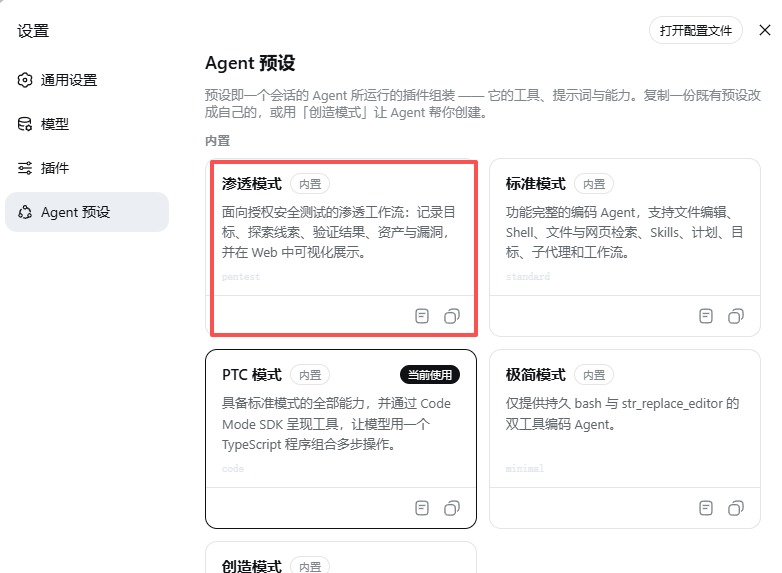
重启 dsh 后,在新会话中选择自动注册的「渗透模式」。
界面预览
模式选择
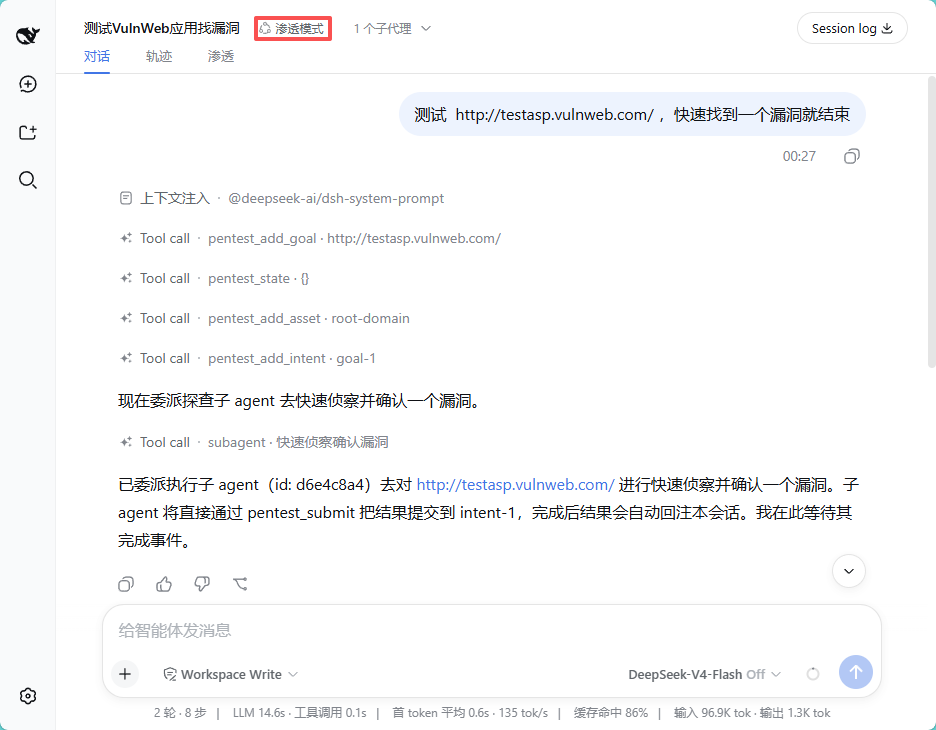
对话与执行
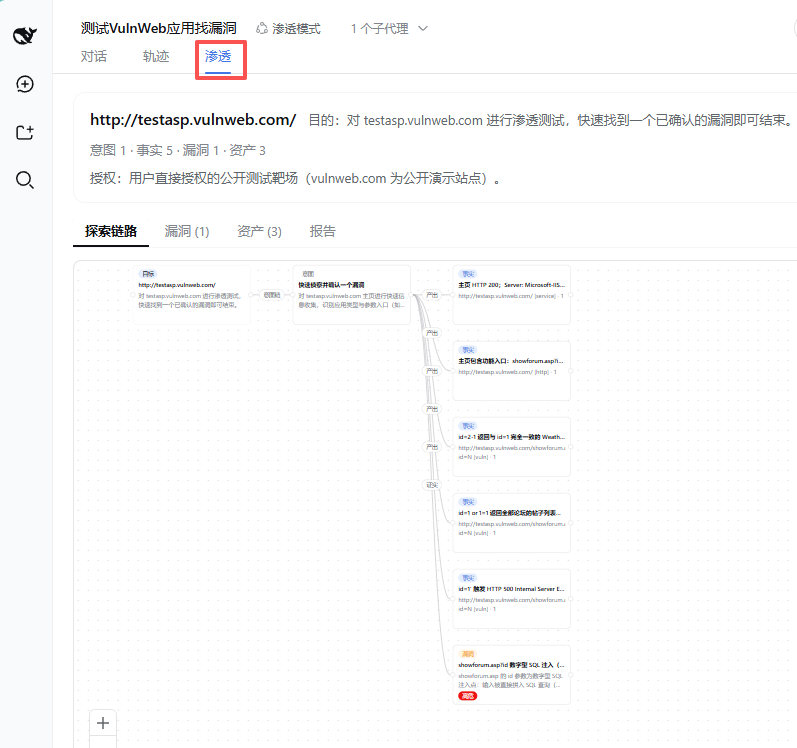
探索链路
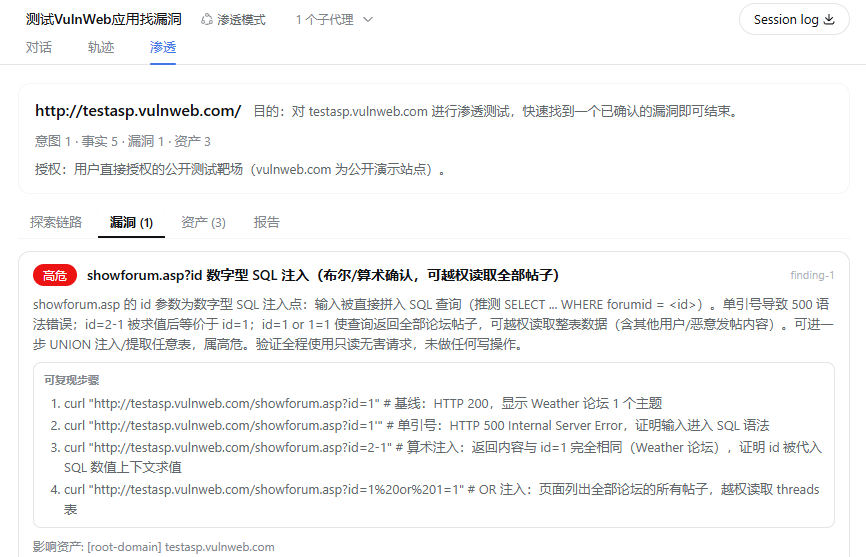
漏洞视图
资产视图
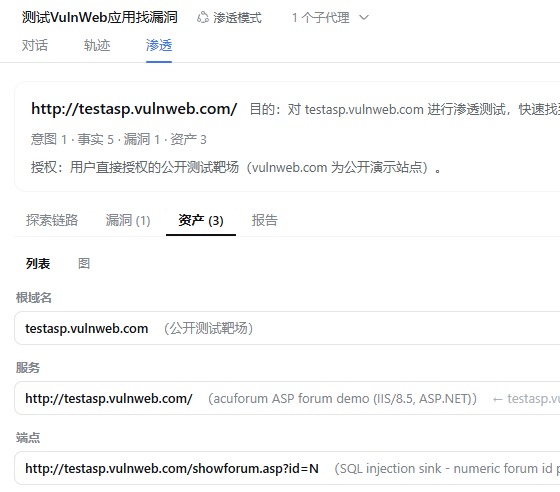
测试报告
架构速览
- 领域模型(
src/dsh-pentest/src/spec.ts):storage domainpentest(version 2)——goals/intents/facts/findings/assets/edges六张表。边即链路词汇:spawns(goal→intent)、yields(intent→fact)、derived_from(fact→intent)、proves(intent→finding),资产关系用parent(asset→asset)。finding 必填reproducibleSteps(至少一条)。 - 确定性 id(
store.ts):节点/边 id 为<kind>-<n>(按会话计数,goal 重置后归零)——工具返回 id 供模型 跨调用引用,会话投影从日志纯重放同一张图。 - 工具(
tools.ts):pentest_submit(子 agent 直写指定父 intent)/pentest_add_goal(重置整图)/pentest_add_intent(恰好一个锚点)/pentest_add_fact/pentest_add_finding(步骤必填,可关联影响资产)/pentest_add_asset(可选 parentId, 空字符串视为根资产)/pentest_state/pentest_graph/pentest_report。 - 会话投影(
projection.ts):折叠已日志化的pentest_*调用为{ goal, nodes, assets, edges, counts }, 镜像 store 的引用拒绝;上限各 200。 - Web 标签页(
src/dsh-client-ui-pentest):按会话注册(当前会话或列表祖先链含pentest预设即显示, 非渗透会话隐藏);四个子标签——探索链路(@xyflow/react 图,边带关系胶囊:意图链/产出/推导自/证实)、 漏洞(严重度/描述/可复现步骤/影响资产)、资产(列表/图两种模式)、报告(Markdown 渲染、复制与保存)。 - 协议(
instructions.ts):系统提示词段pentest:protocol(order 50),沿链路推进、子 agent 通过pentest_submit直写父 intent、资产先父后子、与用户交互一律中文。
已知边界
- 数据库:渗透记录写入
$DSH_HOME/storages/pentest-sessions.db(sqlite,经 bundle 补丁路由)。 宿主其它域的存储不受影响(仍为宿主默认 json 后端)。 - 授权:只测试有授权的目标。
pentest_add_goal的authorization参数可填写授权说明(授权对象 / 书面许可引用),会写入状态与最终报告留痕;它只是审计事实,不是门禁——扫描/利用动作仍受部署沙箱与 审批约束。 - 记录按单会话作用域,无跨会话/项目续跑;重新开始一次 engagement 需新的
pentest_add_goal。 - Web 图为窗口视图:会话投影各保留最新 200 个节点/资产/边(超出后最旧被逐出,悬挂边同步清理)。
UI 计数与图反映的是该窗口;完整记录以
pentest_state/pentest_report(读存储层)为准。 - 图布局为静态分层(可平移缩放,节点不可拖拽)。
- 运行时要求:sqlite 后端使用 Node.js
node:sqlite,宿主运行时需 Node.js >= 22.5。
目录结构
dsh-pentest/                   # 项目根 = bundle 包 @howmp/dsh-pentest(自带 zod/schemastery 运行时依赖,其余宿主提供)
├── package.json               # bundle manifest:dsh.bundle.patch + dsh.client + exports 子路径
├── cordis.patch.yml           # 补丁层:UI、sqlite 后端与 storage-domain 路由
├── lib/                       # 构建产物(npm pack 的内容)
│   ├── index.js               #   包入口:空 apply
│   ├── pentest.js             #   宿主渗透插件:8 个 pentest_* 工具 + 协议注入 + 会话投影
│   ├── preset-root.js          #   注册包内只读「渗透模式」预设目录(兼容 DSH rc.6)
│   ├── storage-sqlite.js      #   渗透记录专用的 sqlite 后端(node:sqlite)
│   ├── ui-pentest.js          #   Web 插件宿主半:空 apply
│   ├── ui-pentest.client.js   #   Web 插件浏览器半:渗透视图标签页(3 个子标签,@xyflow/react 内联)
│   └── invariant.js           #   探索图不变量伴生(与官方各包同构,生产环境不加载)
├── src/                       # 源码快照(继续开发/重新构建用)
│   ├── index.ts / invariant.ts
│   ├── dsh-pentest/               # host 包源码:src/ + tests/ + tsconfig + tsdown + README
│   └── dsh-client-ui-pentest/     # client 包源码:src/client/(视图/图布局/注册)+ tests/
├── tests/bundle.spec.ts       # bundle 补丁层测试
├── packages/                  # 三个构建好的子包(仅作构建源保留;bundle 不再依赖它们)
│   ├── dsh-pentest/               # host 插件源码构建产物
│   ├── dsh-client-ui-pentest/     # Web 界面插件源码构建产物
│   └── dsh-storage-sqlite/        # sqlite 后端构建产物(来自 dsh 仓库,无独立源码)
├── preset/pentest/            # 「渗透模式」agent 预设(由 bundle 自动注册)
├── images/                    # README 界面预览截图
└── README.md
参考项目
Read the usage guide →
Install steps, key points, FAQ and compatibility for this plugin — auto-derived from indexed fields.
Listing badge

[](https://deepseek-plugin.org/plugins/howmp/dsh-pentest)Paste this markdown into your GitHub README to link back to this listing. The badge only states the listing — not a security endorsement.