Official DeepSeek Harness interactive terminal UI plugin: streaming markdown, slash commands, conversation tabs, LSP diagnostic badges, cost tracking, and 16+

- Language
- TypeScript
- License
- Apache-2.0
- Branch
- main
Install
$ dsh plugin --profile web add @huiliyi37/dsh-tianshu-tuiRun the command above in your terminal to install this plugin via the dsh CLI. You can switch Profile in the top-right corner. New to dsh? Read the beginner tutorial
Install via your agent
Install the DeepSeek Harness plugin huiliyi37/dsh-tianshu-tui for me: review the repository at https://github.com/huiliyi37/dsh-tianshu-tui first, then run the install command and verify the plugin loads successfully.
Paste this instruction to the DSH Web GUI assistant — it will install and verify for you.
One-line Positioning
dsh-tianshu-tui is an interactive terminal UI plugin for the DeepSeek Harness official host, purely for presentation-layer rendering of session event streams. It presents the same agent/session/model service in the terminal through streaming markdown, slash commands, session tabs, LSP badges, cost tracking, and multiple themes.
Core Capabilities
- Provides streaming markdown rendering in terminal, reasoning chain folding with in-place expansion (
Ctrl+O), parallel tool call folding into groups, turn-end summary lines (turn N · readX editY · duration) - Offers 30+ slash commands and session workflows:
/session/fork/branch/rewind/export/clear/compact/steer/model/effort/theme/density/status/config/skills/tasks/goal/subagents/workflow/btw/remember/memory/doctor/mcp/lsp/helpand more - Multi-session tab bar (
Ctrl+Xcycle,Alt+1~Alt+9jump), command palette (Ctrl+P), keymap overlay (Ctrl+.), history search (Ctrl+F),@-path Tab completion, optional vim keybindings, external editor (Ctrl+E) - End-to-end image support: clipboard paste (
Ctrl+V) → terminal graphics protocol inline rendering (kitty/iTerm2) → attachment service delivery → main model vision capability declaration; when main model lacks vision, automatically converts images to descriptions via independent vision model (vision bridge) - Real-time panels: status, config, skills, tasks, delegation tree, workflow, memory; panels fallback to ⚠ warnings when host services are missing, not silent blank
- Auto-restart on update: compares with npm
lateston startup, auto-restarts after disk write if session is empty; 16 built-in themes +~/.dsh-tui/themes/*.jsoncustom themes
Technical Implementation
- Language: TypeScript
- Key Dependencies: chalk / diff / get-east-asian-width / string-width (all pure JS packages at runtime, no native modules)
- Architecture Pattern: Cordis bundle patch —
cordis.patch.ymlinserts into host with stable idtui-runneron top ofdsh-base;apply(ctx, config)injects three required services (sessions/agents/agentDefaultModel) and constructsTuiApp, optional services (goals/subagents/memory/skills/workflow etc.) are probed via reflect.get, missing services cause panel degradation instead of blocking assembly - Entry File:
src/index.ts(also re-exports rendering core 30+ submodules:engine/*,ui/app.ts,commands/registry.ts,theme-palettes.ts,prefs.ts, etc.)
Use Cases
Developers who prefer keyboard interaction with AI agents in the terminal, need streaming markdown and structured tool cards, but don't want to leave the shell; especially those using DeepSeek models for long-running tasks, needing /rewind rollback, /fork branch exploration, /export archive transcription, or remote operations in VPS/CI environments.
Prerequisites & Compatibility
| Dependency | Minimum Version | Description |
|---|---|---|
| DeepSeek Harness | 0.1.0-rc.7 | Constrained by peerDependencies; plugin doesn't modify host core, only mounted as bundle patch |
| Node.js | ^22.19 || >=24 | Declared by engines.node |
| Platform | macOS / Windows / Linux | Cross-platform; Windows from 0.1.2-rc.10 has Ctrl+C dedup and terminal recovery fallback for PowerShell/conhost |
| Native Modules | None | Runtime dependencies are all pure JS packages (chalk, diff, get-east-asian-width, string-width) |
| pnpm | Any | dsh plugin command forwards to pnpm; peer missing warnings on first install can be ignored |
Installation
dsh plugin --profile web add github:huiliyi37/dsh-tianshu-tui
Configuration Options
| Config | Type | Description | Default |
|---|---|---|---|
theme | string | Theme name (auto / built-in / custom:<name>), priority: assembly > ~/.dsh-tui/prefs.json > auto | auto |
vimEnabled | boolean | Enable vim keybindings | false |
editorKey | string | External editor trigger key; ctrl+o reserved for reasoning expansion | ctrl_e |
workflowHistoryLimit | positive integer | /workflow panel settled run cache limit (drop-oldest when exceeded) | 50 |
lsp.enabled | boolean | LSP diagnostics pull switch (lazy-start language service by extension when agent touches files) | true |
lsp.timeoutMs | number | Single diagnostics pull timeout (ms) | 2000 |
vision.supportsVision | boolean | Whether main control model natively supports vision (when not passed, auto-refreshed by llm catalog) | Auto-detect |
vision.bridgeEnabled | boolean | Whether independent vision bridge model is configured (converts to text description via bridge when main model lacks vision) | Auto-detect by host visionBridge service existence |
autoRestartOnUpdate | boolean | Auto-restart after startup self-update disk write | true |
prefsPath | string or null | Local prefs file path; null explicitly disables (no read/write ~/.dsh-tui/prefs.json) | ~/.dsh-tui/prefs.json |
inputHistoryPath | string or null | Input history file path; null explicitly disables | ~/.dsh-tui/input-history.json |
Env var DEEPSEEK_API_KEY | string | API key (welcome page/status line tiers by credentials) | Not set |
Env var DSH_TUI_SKIP_UPDATE | string | 1 to skip npm update check on startup | Not set |
Env var EDITOR / VISUAL | string | Ctrl+E external editor command (supports .cmd/.bat on Windows) | Not set |
FAQ
Q: What's the relationship between this plugin and the official web client? Will they conflict?
A: No conflict. This plugin attaches to dsh-base as a Cordis bundle patch, sharing the same Agent, model, session, and tool services with the official dsh-web-app; under the same profile, both share true source of session/events, can be installed simultaneously.
Q: Will uninstalling the plugin lose existing sessions? Will it modify the harness core?
A: No. This plugin doesn't modify DeepSeek Harness core code; TUI's own preferences and input history are stored in ~/.dsh-tui/, which can be manually deleted after uninstall.
Q: Startup shows ERR_FS_EISDIR / Path is a directory .../@deepseek-ai/dsh - what to do?
A: This is a conflict between old installation fallback in ~/.dsh/profiles/node_modules and the official CLI. Reinstall with a clean DSH_HOME directory (see README and docs/getting-started.md).
Q: Pasted an image but model says it can't see it?
A: When main model lacks vision, you need to install the vision bridge plugin dsh-vision-bridge (provides visionBridge service) or explicitly inject vision config in the assembly; if neither exists, images won't be sent and a warning will display - this is intentional "fail loud" design.
Q: Why are LSP diagnostics only shown on TUI screen, model can't see them?
A: The LSP bridge in this plugin is a presentation-layer local bridge; diagnostics only go to tool card badges and /lsp panel, not registered to model tool surface; if you need model-accessible tools like lsp_goto_definition, install community plugin omdsh-dev/dsh-lsp.
Q: How to skip npm update check on startup?
A: Set env var DSH_TUI_SKIP_UPDATE=1 to skip; copies installed via github: or link: won't be rewritten to npm packages.
Q: After update, must exit and manually restart?
A: Starting from 0.1.2-rc.10, when session is empty, auto-restart after startup self-update disk write; when session is non-empty or autoRestartOnUpdate is off, it only prompts, you can manually input /restart.
Q: Can it run on Windows? Anything to note?
A: Yes. Ctrl+C interrupt generates both 0x03 byte and SIGINT signal; from 0.1.2-rc.10, SIGINT dual registration and deduplication prevents "input box disappearing", with terminal recovery fallback for PowerShell/conhost console on exit.
Learning Curve
Intermediate — terminal interaction + slash command system requires adaptation, but common operations (enter to chat, Ctrl+C interrupt, Ctrl+N new session, Ctrl+Q quit) are ready out of the box; to leverage deep capabilities like /fork /rewind /lsp /cost, you need to read through the interaction manual.
Known Issues & Limitations
- Image follow-up questions need companion plugin
@deepseek-ai/dsh-vision-ask(separate package in same repo); TUI itself doesn't haveask_imagetool and image registry, once sent without it, images cannot be re-queried - LSP bridge is presentation-layer local bridge: diagnostics go to screen only, not to model tool surface; server init defaults to 2s timeout then silently no diagnostics, next file touch pulls again; large repo tsserver stays resident (lazy-start mitigates, no idle GC); session switch doesn't restart server, rootUri uses first session cwd
app.tsmonolith is ~4032 lines, suspended state machine has been controllerized (question/approval), rendering composition and key arbitration still in app.ts, C4 split (pure function panel segments) ongoing- Projection layer partially wired: turn-summary (
turn N · readX editY · durationsummary line) and summary-state (/statussession summary segment) wired; activity-status/activity-store intentionally left unwired - Vision bridge one-shot submission path: without
vision-askinstalled, same-angle repeated descriptions call vision model again, no per-image cache - Startup auto-update requires network; in offline/restricted network, set
DSH_TUI_SKIP_UPDATE=1, but lose "auto-restart after update" capability




中文 | English
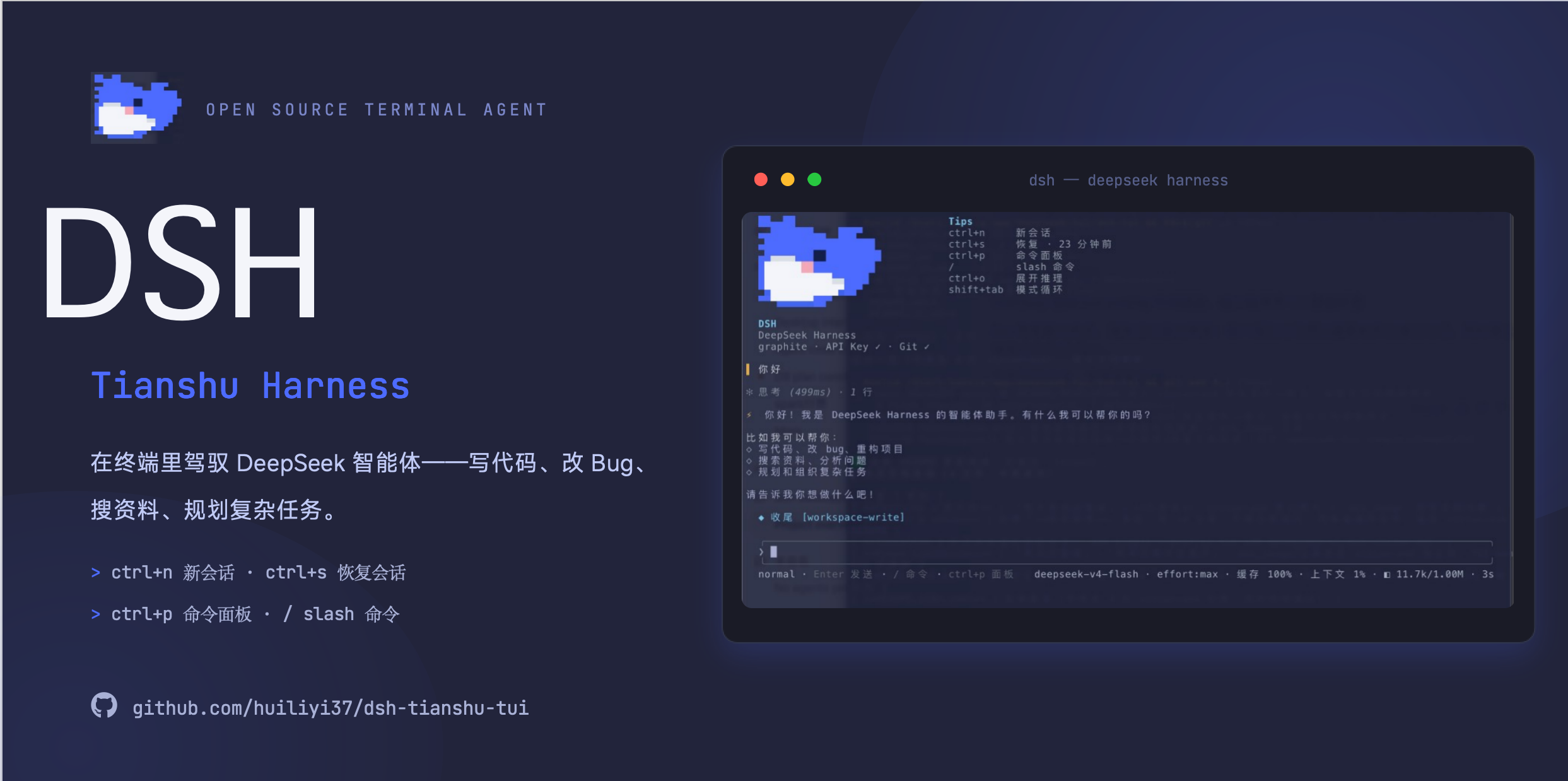
dsh-tianshu-tui(@huiliyi37/dsh-tianshu-tui)是官方 DeepSeek Harness 上的交互式终端 UI 插件。渲染核心为自研的 ANSI 极简引擎(由作者自己的开源项目 天枢 Tianshu-Tui 演进而来,Apache-2.0;逐文件来源见 SOURCE-MAP.md),渲染轻量不打断,使用体验流畅。UI 是纯展示层:所有 agent 状态都来自会话事件流。在此之上做了 harness 工程层的个性化改造,如图像与视觉桥接、代码智能检索、记忆与跨会话召回等。
[!WARNING] 生态边界(Ecosystem boundary):本插件属于官方 DeepSeek Harness(
@deepseek-ai/*生态)——peerDependencies 与代码 import 均指向@deepseek-ai/*。不要把它装配进 oh-my-tianshu(@huiliyi37生态,CLI 为@huiliyi37/dsh-tianshu)的 tui profile。oh-my-tianshu 的官方 TUI 是@huiliyi37/dsh-tui:两者同源(共享 109/117 个 TUI 源文件)但生态不同,混装会让插件在运行时靠~/.dsh/profiles/node_modules中指向官方 dsh 的旧符号链接兜底解析@deepseek-ai/*,形成跨生态脆弱耦合。
文档
| 文档 | 说明 |
|---|---|
| 快速开始 | 安装、启动与常见问题 |
| 交互手册 | 快捷键与命令全表 |
| 配置 | 装配选项、环境变量与运行时配置 |
| 架构 | 分层、数据流与设计决策 |
| 主题 | 16 个内置主题与自定义 |
| 插件生态 | 伴生插件与扩展点 |
| VS Code | 在 VS Code 中使用 |
| ADAPTER.md | TUI ↔ harness 边界契约 |
| 贡献指南 | PR 规范与验证矩阵 |
| 开发说明 | 结构、构建与发布 |
安装
本包不是独立程序。须先有官方 CLI @deepseek-ai/dsh(0.1.0-rc.8)。只 npm i 本包跑不起来。
1. 准备环境
不要直接敲 dsh。 若 PATH 上已有旧的 dsh(例如 ~/.local/bin/dsh,dsh --version 不是 0.1.0-rc.8),会走到本地 staging,出现 ERR_FS_EISDIR / Path is a directory .../@deepseek-ai/dsh。请始终用下面的 npx 命令。
2. 把本插件装进 tui profile
npx -y @deepseek-ai/[email protected] plugin --profile tui add @huiliyi37/dsh-tianshu-tui
pnpm 可能提示 peer missing,可忽略:peer 由官方 dsh 宿主提供,不必另装。
从 npm 安装后,每次启动会对照 npm latest:有新版本就写入 profile,提示重启后生效。不想联网检查时设 DSH_TUI_SKIP_UPDATE=1。github: / link: 安装不会改写成 npm 包。
也可以从 Git 装:npx -y @deepseek-ai/[email protected] plugin --profile tui add github:huiliyi37/dsh-tianshu-tui(仓库已包含 lib/index.js,不必再打包)。
3. 启动
npx -y @deepseek-ai/[email protected] --profile tui
看到欢迎页品牌 dsh-tianshu-tui 即成功。Ctrl+Q 或 /exit 退出。
已全局安装官方 CLI 且 dsh --version 为 0.1.0-rc.8 时,把上面的 npx -y @deepseek-ai/dsh 换成 dsh 即可。
若 npx 仍报 ERR_FS_EISDIR,是 ~/.dsh/profiles/node_modules 里旧的安装 fallback 与官方 CLI 冲突。换干净目录再启动:
DSH_HOME=/tmp/dsh-tianshu npx -y @deepseek-ai/[email protected] plugin --profile tui add @huiliyi37/dsh-tianshu-tui
DSH_HOME=/tmp/dsh-tianshu npx -y @deepseek-ai/[email protected] --profile tui
不要在 DeepSeek Harness 工作区根目录对本包跑 tsdown:会把未发布的 @deepseek-ai/dsh-root 写进 bundle,加载必失败。
与其他发行版共存
本插件运行在官方 DeepSeek Harness(@deepseek-ai/dsh)之上,数据 home 为 ~/.dsh。
独立集成发行 oh-my-tianshu(原 tianshu-public,@huiliyi37/dsh-tianshu,自带 tianshu
CLI 的完整 harness)是另一条独立发行线,使用独立的 $DSH_HOME(默认值独立化落地后为
~/.dsh-tianshu)——两套系统 home 隔离,可同时安装、互不干扰(会话 / profile /
settings 各自独立)。共存时 tianshu 侧设 export DSH_HOME=~/.dsh-tianshu 即可。
命名备忘(防止混淆):
| 名字 | 是什么 |
|---|---|
dsh-tianshu-tui(本插件) | 官方 dsh 的 TUI 插件(本仓库) |
oh-my-tianshu / @huiliyi37/oh-my-tianshu(原 tianshu-public) | 独立集成发行,自带 CLI(命令 oh-my-tianshu) |
Tianshu-Tui(上游) | 本插件渲染核心的 Apache-2.0 来源(天枢) |
2026-08-16 已改名:原
@huiliyi37/dsh-tianshu(命令tianshu)统一为@huiliyi37/oh-my-tianshu(命令oh-my-tianshu),与仓库名一致;旧包已 deprecate,请迁移安装。
需要图片再询问能力时,再装配同仓伴生包 vision-ask/;需要 LSP 模型工具面(模型可调 lsp_goto_definition / lsp_find_references / lsp_diagnostics)时装配社区插件 omdsh-dev/dsh-lsp(npx -y @deepseek-ai/[email protected] plugin --profile tui add github:omdsh-dev/dsh-lsp)——装配后 TUI 展示桥自动消费其 lsp 服务(与模型工具面共享同一 LSP server 集,不双份 spawn)。TUI 桥的诊断源探测顺序:社区插件服务(getDiagnostics 形状)→ 官方 ctx.lsp seam(deepseek-harness 的 dsh-lsp,经 query(getDiagnostics) 适配)→ 内置桥降级。
更新说明
当前 npm latest:@huiliyi37/[email protected](GitHub Release)。
0.1.2-rc.12(2026-08-20)
输入体验大版本:长文本性能 + 交互语义修复 + 界面语言统一(天枢同源优化三波)。
- 输入框长文本性能 — 折行逐字符量宽走缓存(10 万字符草稿每次按键 ~1.3s → ~10ms);粘贴可编辑阈值抬至 100 行/10000 字(此前 10 行即收成标记);输入视窗 16 行上限(超出折叠「… 上/下 N 行」);
Home/End/Ctrl+U/K以逻辑行为范围、PageUp/Down翻页、↑↓按软折行移动;换行模式下粘贴并入草稿不提交 - Ctrl+C 连按退出无死角 — 窗口内第二次恒退出(有草稿时第一次清空、
Ctrl+Z可恢复);打断中第二次直接退出不用等落定;vimnormal 下 Esc 空操作不再误弹 rewind;Kitty 键盘协议 CSI u 完整解码(Ctrl+C=CSI 99;5u、release 事件去重) - 活区卡片语言统一 — 工具卡/委派树/后台任务一套符号:进行中
⠋、成功›、失败✗、正文⎿;终态行后退(muted);正在跑的子代理和 build 终于长得像同类对象 - 会话 tab 栏退场 — 常驻 tab 栏与 Ctrl+X/Alt+数字切换移除(多会话走
/session与Ctrl+S),界面少占一行 - 更新提示可操作化 — 自更新失败给出三行引导(重启重试/手动更新命令/关闭提示);成功提示写明
/restart用法
0.1.2-rc.11(2026-08-20)
生态对齐 rc.8 + 个性化持久化 + Windows 修复大版本。
- 官方生态对齐
^0.1.0-rc.8— 逐项核验 rc.6→rc.8 消费面:事件全为加法(assistant/message新增interrupted、新增team/*事件);图片单图本地预算 10MB→3.5MB 对齐宿主新准入默认(避免原样放行的图被附件存储拒绝);rc.8 官方 bash 提速(宿主侧工具调用 ~7s→0.3s)自动受益。安装需宿主0.1.0-rc.8(npx -y @deepseek-ai/[email protected]) - 本地偏好持久化(
~/.dsh-tui/prefs.json) —/theme、/density、/subagents/workflow面板显隐、/glancemetrics 段开关全部重启保留;/theme auto可回退自动档;/theme export [name]当前主题一键导出为自定义模板;主题选择器列出custom:主题 - 输入历史持久化 —
~/.dsh-tui/input-history.json上限 1000 条,Ctrl+P/N 跨重启可用(内容为输入原文,删文件即清空) - 输入框多行导航修复 — 含 emoji/组合字符的长文本 ↑↓ 跨行不再拆簇错位(grapheme 列保持)
- Windows 修复 — LSP 诊断启动修复(
.cmd派发)、12 处子进程补windowsHide(不再闪控制台窗口)、剪贴板读图测试注入 - 自更新可靠性(#43) — 官方 npm 源超时自动回退
registry.npmmirror.com镜像;新增DSH_TUI_UPDATE_REGISTRY自定义源链;更新检查 1 小时磁盘缓存免每启联网 - 技能展示面(#39) —
/菜单、Tab 菜单与 Ctrl+P 面板可见 userInvocable 技能(🧭),转录技能调用渲染为 chip - 会话短标签修复(#37/#38) — tab 栏/欢迎页/委派树等处不再显示
[session-]空壳 - 主题切换即时重放(#40) — 切主题后滚动区历史按新配色即时重绘;生态边界警告(#33)置顶 README
0.1.2-rc.10(2026-08-16)
更新一步到位 + Windows 平台兼容 + 命令输入容错。
- 更新后自动重启(#34) — 启动自更新落盘后自动重启生效(会话未开始工作时;已工作时只提示不打断);
/restart命令手动重启同一进程(更新后不用再/exit+ 手动重跑) - 自更新按锁文件选包管理器 — pnpm/npm/yarn 管理的 profile 各自走对应安装器,不再硬编码 pnpm(npm/yarn 用户不再混入 pnpm 锁文件)
/help修复(#36) — 此前一直报cannot get property "tui" without inject,现经命令工厂注入正常列出全部命令- Tab 命令菜单(#31 跟进) — 空输入框按 Tab 弹出全部命令菜单,选命令回车直接执行(
/model/theme/session直接进选择器),省去输入命令名一步(参考 Claude Code) - Windows/PowerShell 兼容 — Ctrl+C 打断不再触发「输入框消失」(0x03 字节与 SIGINT 双触发去重 + SIGINT 双注册 + 退出时终端兜底恢复)
/开头文件路径容错 —/src/main.ts、~/xxx、Windows 盘符C:\...等路径不再被误判为 slash 命令报「未知命令」- 打断恢复加固 — abort 时强制释放全屏 overlay(命令面板/搜索等),主屏输入框下一帧必然恢复;补「打断后输入框可见」回归测试
已装 0.1.x-rc.6 的用户下次启动会自动写入 profile。看到「插件已更新到 …,请重启 dsh 后生效」后重启即可(新版本会自动重启或输入 /restart)。
0.1.2-rc.9(2026-08-16)
交互体验大补强:Esc 打断与双击回退、会话 tab 栏、成本汇总、主题实时预览。
- Esc 双语义(对齐 Claude Code) — 在途输出时单次
Esc打断(与 Ctrl+C 同路径,80ms 防误触);空闲时Esc+Esc(1s 窗口)打开 rewind 回退面板 - rewind 时间线界面 — 消息列表升级:类型标记(❯ 用户/✦ 助手)+ 相对时间 + turn 分隔线 + 滚动窗口跟随选中(可滚到更早消息)
- 会话 tab 栏 — 多会话时输入轨上方常驻显示短 id 列表(当前 ● 高亮,窄宽折叠
+N);Ctrl+X循环切换、Alt+1~Alt+9直接跳转 /cost会话成本汇总 — usage 按模型分桶累计,输出每模型明细(输入/缓存读/写/输出/推理)+ 合计 $ 估算- 主题选择器实时预览 —
/theme选择器 ↑↓ 移动即切换主题,Enter 落定、Esc 还原 - 工程:
libbundle 随版本重建跟仓
已装 0.1.x-rc.6 的用户下次启动会自动写入 profile。看到「插件已更新到 …,请重启 dsh 后生效」后重启即可。
0.1.2-rc.8(2026-08-16)
交互式选择器、Claude Code 对标补强、workflow 观察面、审计修复。
- 交互式选择器(#31) —
/theme/model/session无参数回车即打开选择器:↑/↓(j/k)选择、PageUp/PageDown 翻页、Enter 确认、Esc 关闭,当前值 ● 高亮;模型列表来自 llm 目录,有参数用法不变 - 成本与上下文水位 — footer 新增 $ 成本估算(flash/pro 内置定价表,未知模型不猜价);上下文占用 ≥95% 前缀 ⚠
- git 未提交提示 — footer 显示
●N(未提交文件数,回合边界刷新) /help命令 — 注册表驱动的全部命令清单(/help <cmd>单条详情)- 工具卡手动展开 — 空输入 Enter 切换最后一张进行中工具卡,展开显示参数 JSON
- workflow 面板观察面 — 运行时长改真实差值(此前误显时间戳)、meta 补全(run 名/描述/阶段数)、
workflow/log叙述行进展开视图 - 审计修复(#30) —
dsh.runtime: "host"声明 + 4 处 subprocess 固定 argv 化(execSync → execFileSync) - 工程:
libbundle 随版本重建跟仓
已装 0.1.x-rc.6 的用户下次启动会自动写入 profile。看到「插件已更新到 …,请重启 dsh 后生效」后重启即可。
0.1.2-rc.7(2026-08-15)
功能核查大修:视觉桥可探测、服务缺失不再静默、投影层接线出轮次摘要;平台降级全部可见化。
- 主模型不识图且未注入 vision 配置时,按宿主
visionBridge服务存在性自动探测识图桥(桥插件契约见装配节) - 缺 goal/subagent 插件时整个 TUI 不再静默不启动(goals/subagents 改为可选服务)
/tasks/subagents/workflow/status/config/skills面板与 plan 模式在 backing 服务缺失时回显 ⚠ 警告,不再空白无提示/clear真清屏(此前只清内部缓冲);Ctrl+.键位表补全到 20 条并修窄宽破版- 投影层接线:回合结束落
turn N · 读X 改Y · 耗时摘要行;/status新增会话汇总段(宿主投影服务缺失时仍有数据) - 平台降级可见化:剪贴板读图工具链缺失、外部编辑器启动失败、OSC52 终端不支持、自更新失败均有明确提示
- 修复:切会话/退出时挂起的审批与提问正确结算;fiber 重挂载不再抛 DUPLICATE_PROVIDER(组合测试拦截)
- 工程:构建两段化(tsc → tsdown,杜绝旧产物重打包)、typecheck 门禁、CI、vision-ask 对齐 rc.6 类型面
已装 0.1.x-rc.6 的用户下次启动会自动写入 profile。看到「插件已更新到 …,请重启 dsh 后生效」后重启即可。
0.1.2-rc.6(2026-08-14)
退出时恢复终端光标并把 TTY 还给 shell;新增 /exit。
Ctrl+Q//exit退出后恢复硬件光标,经宿主退出把终端还给 shell(#22)- 无 launcher 宿主服务时 TUI 不再静默卡死
- 全屏 overlay 不再被流式输出盖住;Esc/Ctrl+C 关闭命令面板时不误提交
- 空闲空输入需连按两次 Ctrl+C 才退出;等待回复提示不再在回合结束后误显示
已装 0.1.1-rc.6 的用户下次启动会自动写入 profile。看到「插件已更新到 …,请重启 dsh 后生效」后重启即可。
0.1.1-rc.6(2026-08-14)
启动时对照 npm latest,把 profile 里的本包升到新版本,提示重启后生效。
从 0.1.0-rc.8 升级: 那一版还没有自更新,需要手动加一次才会带上新逻辑:
npx -y @deepseek-ai/[email protected] plugin --profile tui add @huiliyi37/dsh-tianshu-tui
npx -y @deepseek-ai/[email protected] --profile tui
之后再发新版本,启动时会自动写入 profile。看到「插件已更新到 …,请重启 dsh 后生效」后重启即可。不想联网检查时设 DSH_TUI_SKIP_UPDATE=1。github: / link: 安装不会改写成 npm 包。
本版本还包含此前已上 main 的显示层对齐:
- 创建会话写入
meta.cwd,Web UI 能列出 TUI 会话 - 欢迎页 / 状态行按 credentials 分层判断 API key
/model后 footer glance 与视觉能力跟实际模型走Ctrl+S可恢复磁盘上的会话
第一版本基线见 docs/BASELINE-v0.1.0-rc.8.md。
亮点
- 终端内的完整会话工作区 — 实时渲染、只增滚动转录、启动时会话恢复、
/fork探索分支、/rewind回退(会话截断 + 可选文件回退)、/export导出 Markdown 转录、中轮转向(/steer/Ctrl+T)。 - 图片端到端 — 剪贴板粘贴(
Ctrl+V/ 终端菜单粘贴)、以终端图形协议内联渲染(kitty / iTerm2)、经 harness 附件服务投递、让具备视觉能力的模型真正看见——主模型不识图时自动经独立视觉模型把图片转成描述(视觉桥)。 - 完整输入面 — grok 风格 slash 下拉菜单(模糊前缀匹配、MRU 排序、ghost 预览)、
@-路径 Tab 补全与@mention展开、bracketed paste、可选 vim 键位、外部编辑器(Ctrl+E)、历史搜索(Ctrl+F)——Ctrl+.随时调出完整键位表。 - 终端内交互面 — 结构化提问面板(数字键选择、plan-review 反馈模式)、带内联
diff预览的挂起审批卡片、模式循环(Shift+Tab:normal → plan → always-approve)、命令面板,以及 status / config / skills / tasks / 委派树 / workflow 实时面板。 - 推理过程可视化 — think 通道以实时头行流动、在滚动区折叠为紧凑行(
✻ 思考 (3.2s) · 12 行)、Ctrl+O原位展开(对标竞品:默认折叠)。 - 个性化 harness 集成 —
/doctor终端诊断、/memory项目记忆浏览器、/btw后台 agent 侧问、/model+/effort热切换(当前会话立即生效)。 - 构造上可审计 — TUI 自身不注册任何 prompt、工具或上下文面;用户输入成为普通日志消息,所有渲染状态都派生自会话事件。
- 与 harness 协同演化 — 在 2026-08-09 基线快照之上与 harness 侧能力同步开发(250+ 提交):图片/视觉链路、DeepSeek Spark 模型工程、会话持久化与文件快照、记忆、验证门与失败路由、代码智能、git 工具。见下一节。
与 harness 协同演化的能力(2026-08-09 基线以来)
终端 UI 从 天枢 Tianshu-Tui 演进而来(Apache-2.0;逐文件来源见 SOURCE-MAP.md)。本 bundle 随后在 DeepSeek Harness 基线快照 snapshots/20260809T140917Z 之上与 harness 侧工作同步开发——2026-08-10 至 2026-08-13 共 250+ 提交。下列能力位于宿主 harness(独立包,不随本 bundle 分发);TUI 是它们的主要交互面:
- 图片链路与视觉桥 —
imageContentBlock 加入 merge-extensible 内容词汇,dsh-llm-deepseek把用户图片 block 序列化为 OpenAI 风格image_urlcontent parts——用户图片端到端可达 wire(剪贴板 → 输入行 → 会话 → 模型请求)。模型经supportsVision声明识图能力(LlmModelInfo+ llm-deepseek catalog)。dsh-vision-bridge覆盖 text-only 主控:agent/pre-step时经独立视觉模型描述图片附件(visionAutoBridge在未指定 provider/model 时自动选首个识图模型;备用模型 fallback + data URL 校验;prompt 按 UI/报错关键词在通用结构与 OCR 级精确转写间自动选择),描述作为 plugin-source user message 注入——Model-visible ⟺ logged;桥失败降级为可见提示,绝不整轮 failed。 - DeepSeek Spark 别名 — 官方 API 没有
spark模型,本宿主也不注册deepseek-sparkprovider。/model spark-flash/spark-pro映射到已注册的deepseek-official路由,wire 模型分别为deepseek-v4-flash/deepseek-v4-pro。 - 会话持久化与文件快照 —
Session.truncate回卷事件日志并重置派生状态;持久化后端新增deleteFrom与 truncate 协调器,回滚跨重载存活;dsh-fs-snapshot移植 FileHistory(trackEdit / rewindToBoundary),在写入工具执行前快照。TUI 入口:/rewind(会话截断 + 可选文件回退)。 - 记忆 —
dsh-memory(MemoryService + Markdown 文件后端、非 git 兜底)与tool-memory(memory_save/memory_search+ 记忆摘要注入)提供跨会话召回。TUI 入口:/memory、/remember。 - 验证门与失败路由 —
dsh-evidence-gate强制执行 RED-first 验证:义务状态机、编辑/验证计数、TDD 门(enforce模式)、探针建议 + 冷却、L2 终审门,原生接入str_replace_editor与 headless-agent 装配。dsh-agent-router依据回合历史预测步骤失败并路由工作——含验证子代理调度与按 profile 工具限制——带真实回合 e2e 覆盖。 - 代码智能与检索 —
dsh-semantic-index(BM25 + salience/RRF/向量融合、增量更新)以semantic_search工具暴露;dsh-meridian代码索引(node:sqlite schema、TypeScript/Python/Go 三语言 tree-sitter 解析器、graph/impact/flow 查询、行为信号、后台回填)以repo_graph与<codebase-index>摘要暴露;dsh-pheromone文件级信息素 + 原子 JSON 持久化,经file_info与 read 工具focus语义上屏。 - Git 服务与工具 —
dsh-git服务接缝(GitLocal CLI provider,服务类即插件)+dsh-tool-git面向模型的单一 git 工具(operation 判别:status / diff / log / commit),装配进 base bundle。
功能
会话管理
| 能力 | 说明 |
|---|---|
/session new|list|switch | 新建、列出、切换会话;恢复时经同一渲染桥重放完整转录 |
| 恢复面板 | 启动时把可恢复会话列表写入滚动区 |
/fork [directive] · /branch | 分叉当前会话(历史复制到新子会话),可选带起始指令 |
/rewind | 回退到指定消息——会话截断和/或文件回退到边界前快照 |
/export | 把当前会话转录导出为 Markdown 文件 |
/clear | 清空当前会话滚动区视图 |
输入面
- Slash 命令菜单 — 输入
/打开下拉菜单:模糊前缀匹配、↑↓/PageUp/PageDown选择、Tab接受、Enter提交、MRU 排序、参数占位 ghost 与输入行 ghost 预览。 - 剪贴板与图片粘贴 —
Ctrl+V读取剪贴板图片(回退到文本);终端菜单粘贴检测图片;看起来像图片的粘贴路径按附件加载;Alt+W/ vim yank 经 OSC52 把选区复制到系统剪贴板。 - 图片提交 — 附件图片显示
📎 N images标记,提交时在用户气泡下方以内联图形渲染,并经附件服务到达模型;气泡携带识图提示(已转发 / 经视觉模型桥接 / 未发送)。超大图发送前自适应压缩:长边 1568px 封顶(PNG 保留透明),逐级 JPEG 0.82 → 0.55 → 1024px + 0.55 直到低于 provider 上限,全程只缩不放。 - 编辑 — vim 键位(可选)、外部编辑器(
Ctrl+E)、Tab 文件补全、@mention展开、输入历史、多行输入、bracketed paste(多行/长文本粘贴整段进输入行,不逐行提交);输入行绘制为完整圆角框体。 - 图片再询问 — 同仓伴生插件
@deepseek-ai/dsh-vision-ask登记已发送图片,并经ask_image回答模型的定向问题(见 vision-ask)。
渲染与投影
- 对话流 — markdown 渲染、工具族着色 + 逐工具计时、并行工具调用折叠为组。
- 工具卡实时结算 — 已结算的工具结果按 harness presenter 意图渲染为滚动区卡片:
diff结果渲染结构化红/绿文件差异(与审批预览共用)、terminal结果带命令标题 + cwd + 退出/信号徽标、其余折叠为文本卡片。 - 推理通道 — 思考中实时 shimmer 头行、段末折叠滚动行、
Ctrl+O在 live 区展开全文。 - 流利度折叠 — 重复的例行工具流量在 quiet 策略下折叠;compact 模式(
/density)只保留头行。 - 轮次状态 — braille spinner + 阶段文本状态行、workflow 运行汇总、委派树、任务窗格、config/skills 面板作为 live-region 面板;turn 结束(非中断)且有工具调用时落 dim 摘要行(
turn N · 读X 改Y · 耗时)。 - Subagent 运行 — 每个运行一条 live spinner 行;终态以
✓/✗/◌条目落入滚动区。 - 窗口 chrome — 欢迎页(品牌头、友好会话短 id、环境检查行)、顶部栏(cwd + git 分支 + 模型)、底部三行区:输入行(底边线随模式着色)→ footer(模式徽标 + 快捷键提示)→ metrics 行(模型 / token 用量 / 缓存命中率)。
- 主题 — 内置调色板 +
custom:<name>;自动终端检测与 16 色降级。
交互面板
- 结构化提问 — 数字键选择、
Esc取消、重叠保护;plan-review 反馈模式(f进入、Enter提交 Keep planning + 自定义反馈)。 - 审批卡片 —
y/N/Ctrl+C结算挂起审批;工具可 diff 时内联差异预览;diff 不可见时盲批提示;非当前会话请求委托给下一个监听者。 - 模式循环 —
Shift+Tab循环 normal → plan → always-approve;plan 状态驱动 footer 徽标,always-approve 为会话级本地态(切换/退出时复位)。 - 实时面板 —
/status(goal/todos/plan 投影快照;subagent 域见/subagents)、/config(settings / permission / credentials)、/skills浏览、/tasks窗格、/subagents委派树、/workflow运行。面板依赖的宿主服务未装配时回显⚠警告(不静默空白)。 - 命令面板(
Ctrl+P)/ 键位表(Ctrl+.)/ 历史搜索(Ctrl+F)overlay。
模型与视觉
/model— 查看并切换模型(默认 + 当前会话热切);spark-flash/spark-pro别名映射到deepseek-official+ 官方 wire iddeepseek-v4-flash/deepseek-v4-pro。/model <provider/model|alias> [off|high|max]同一条命令内设置推理等级。/effort— 设置推理等级(off/high/max;auto回模型默认),当前会话热切。- 视觉桥 — 识图能力按模型声明(
supportsVision,经 llm catalog 自动刷新)并驱动气泡提示;主模型不识图时,自动选定的视觉模型在提交前生成图片描述(一次性路径;见已知限制)。桥可用性来源:装配方传入vision.bridgeEnabled,或宿主视觉桥插件 providevisionBridge服务(TUI 提交图片前按服务存在性自动探测);两者皆无则图片不发送并警告。 - 视觉副驾 — 装配同仓伴生插件
@deepseek-ai/dsh-vision-ask后,每张已发送图片被登记为短 id(img_1…),模型可经ask_image反复询问——定向问题、换角度、不限次数;同图同角度重复提问命中 per-image 描述缓存。细节与配置见 vision-ask README。 /mcp— 列出已连接 MCP server 与工具数;tools <name>查看某 server 的工具清单。
命令
| 命令 | 作用 |
|---|---|
/session new|list|switch | 会话管理 |
/fork [directive] · /branch | 分叉当前会话,可选带起始指令 |
/rewind | 两阶段回滚(消息列表 → 粒度) |
/export [path] | 导出转录为 Markdown |
/clear | 清空滚动区视图 |
/compact | 压缩会话上下文 |
/steer <text> | 中轮转向(不中断地纠正方向) |
/model [target] [effort] | 查看/切换模型(别名:spark-flash、spark-pro) |
/effort off|high|max|auto | 设置推理等级(热切) |
/theme [name] | 切换主题 |
/density | 切换紧凑工具卡渲染 |
/lsp | 切换 LSP 诊断面板(agent 触碰文件时自动拉取该文件诊断;诊断徽标上工具卡) |
lsp_goto_definition · lsp_find_references · lsp_diagnostics | LSP 模型工具面(伴生插件 lsp/ 注册;定义跳转 / 引用查找 / 文件诊断) |
/status | 切换状态面板(goal/todos/plan 投影 + 会话汇总段) |
/config | 切换设置面板(settings / permission / credentials) |
/skills | 切换技能浏览面板 |
/tasks | 任务窗格(后台任务) |
/goal | 目标管理(创建 / 暂停 / 恢复 / 完成 / 阻塞) |
/subagents | 委派树面板 |
/workflow | workflow 运行面板 |
/btw <question> | 向后台 agent 侧问 |
/remember <text> | 保存一条记忆 |
/memory | 记忆浏览器(列表 / 过滤 / 删除 / 预览) |
/doctor | 终端诊断 + 修复指引 |
/mcp [tools <name>] | 列出 MCP server;查看某 server 的工具 |
快捷键
| 按键 | 作用 |
|---|---|
Ctrl+N | 新会话 |
Ctrl+S | 恢复最近会话 |
Ctrl+Q | 退出(同 /exit) |
Ctrl+P | 命令面板 |
Ctrl+. | 键位表 overlay |
Ctrl+F | 历史搜索(n/N 下一个,p/P 上一个) |
Ctrl+O | 展开/收起最近推理块 |
Ctrl+E | 用 $EDITOR 打开输入行(可经 editorKey 配置) |
Ctrl+T | 中轮转向 |
Ctrl+C | 打断在途回合(空闲时空输入双击退出) |
Ctrl+V | 粘贴剪贴板图片(无图时回退剪贴板文本) |
Alt+W | 把选区复制到系统剪贴板(OSC52) |
Shift+Tab | 模式循环:normal → plan → always-approve |
Tab | @-路径补全;接受 slash 菜单选中项 |
↑/↓ | 输入历史(slash 菜单打开时为选择) |
PageUp/PageDown | slash 菜单翻页 |
Esc | 关闭菜单/overlay;取消挂起提问 |
a | 审批卡:本会话放行(always-approve + 结算当前请求) |
装配
bundle patch 在 dsh-base 之上插入 tui-runner 插件:
- id: tui-runner
  name: '@huiliyi37/dsh-tianshu-tui'
TuiRunnerConfig(均可选):stdin/stdout(流注入,缺省走进程流)、initialSessionId、editorKey(缺省 ctrl_e;ctrl+o 保留给推理展开)、vimEnabled(缺省 false)、vision(supportsVision / bridgeEnabled / bridgeSource;未传入时 supportsVision 经 llm catalog 自动刷新、bridgeEnabled 按宿主 visionBridge 服务存在性自动探测——视觉桥插件装配时应 provide 该服务)、workflowHistoryLimit(缺省 50)、lsp(enabled / timeoutMs;缺省启用、单次拉取超时 2000ms——本地语言服务桥:agent 触碰文件时按扩展名懒启动 LSP server(typescript 经 npx 默认可用,pyright/gopls/rust-analyzer/clangd/jdtls 按 PATH 探测)拉取诊断,展示于工具卡徽标与 /lsp 面板;诊断只进 TUI 本地展示缓存,不写会话事件、不注册任何模型面)。
服务依赖:sessions/agents/agentDefaultModel 必需(必选 inject);goals/subagents/memory/compact/tasks/skills/sessionProjections/workflowEngine/planMode 可选——未装配时相关命令与面板 fails loud 报不可用,绝不静默吞,也不阻塞 TUI 启动。
验证
npm test
Model Experience
无——TUI 渲染已记录的会话事件并转发普通用户输入;不注册任何 prompt、工具或上下文面。
KV Cache 影响
无直接影响;经 TUI 提交的用户输入成为普通日志消息,其请求影响归属 session 与 loop 包。
已知限制与待办
- 图片再询问需伴生插件 —
ask_image工具与会话图片注册表位于@deepseek-ai/dsh-vision-ask(同仓独立包);TUI bundle 本体不携带它们。未装配插件时,已发送图片无法再次询问,同角度重复描述会再次调用视觉模型;视觉桥仍覆盖一次性提交时描述路径。 - LSP 为展示层本地桥 — 诊断只上屏(工具卡徽标 +
/lsp面板),不提供给模型工具面(如天枢 edit-diff 的 diagnostics-narrowing);模型侧接入属 harness 侧未来工作。server 初始化慢于超时(默认 2s)时静默无诊断,下次触碰文件重拉;大仓库 tsserver 常驻内存(懒启动缓解,无空闲回收);切会话不重启 server(rootUri 沿用首会话 cwd)。 - app.ts 单体(约 3.2k 行) — 挂起状态机已控制器化(question/approval),渲染组合与键仲裁仍在 app.ts;C4 拆分方案(纯函数面板段)持续推进。
- 投影层部分接线 — 四个纯折叠模型中 turn-summary(turn/end 摘要行)与 summary-state(
/status会话汇总段,宿主投影总线缺失时仍有数据)已接线;activity-status/activity-store 有意保留未接线(statusline 是自包含投影,替换无收益;activity-store 暂无消费方)。当前状态记录于 docs/projection-layer.md。
许可与来源
Apache-2.0。终端渲染引擎从 天枢 Tianshu-Tui 演进而来(Apache-2.0);逐文件来源与修改声明见 SOURCE-MAP.md 与 NOTICE。
友情链接
| 项目 | 简介 |
|---|---|
| dsh-web-ui | DSH Web UI 插件与皮肤合集 |
| dshfind | DeepSeek Harness 中文学习与分享社区 |
| deepseek-harness-ux | 长任务不刷屏:关键进度清晰可见,完成后自动折叠 |
| dsh-TUI | Claude Code 风格全屏交互终端插件 |
| DSH-better-sidebar | 侧边栏完整工作台:第三方 Tab、文件/终端/Git/子代理 |
| DSH Desktop | DeepSeek Harness 社区桌面端(Electron,Windows x64 / macOS Apple Silicon 安装包),下载即用、免配置命令行环境。内置本地 Harness 宿主与插件系统,支持 iOS/Android 远程下发任务、跟踪 agent 进度。 |
| dsh-whale-report | 把 session、token、cost、tool call 与风险异常转成可读的 Agent 报告 |
Read the usage guide →
Install steps, key points, FAQ and compatibility for this plugin — auto-derived from indexed fields.
Listing badge

[](https://deepseek-plugin.org/plugins/huiliyi37/dsh-tianshu-tui)Paste this markdown into your GitHub README to link back to this listing. The badge only states the listing — not a security endorsement.