A single DSH runtime packaged into Electron desktop, browser Web, and terminal TUI interfaces. All three share sessions, skins, plugin marketplace, and local workspace, without separate environment installations.

- Language
- TypeScript
- License
- MIT
- Branch
- main
Install
$ dsh plugin --profile web add github:hust-open-atom-club/oh-dshRun the command above in your terminal to install this plugin via the dsh CLI. You can switch Profile in the top-right corner. New to dsh? Read the beginner tutorial
Install via your agent
Install the DeepSeek Harness plugin hust-open-atom-club/oh-dsh for me: review the repository at https://github.com/hust-open-atom-club/oh-dsh first, then run the install command and verify the plugin loads successfully.
Paste this instruction to the DSH Web GUI assistant — it will install and verify for you.
One-Line Pitch
Packages DeepSeek Harness, Node runtime, and local development tools into three installable distributions: Desktop, Web, and TUI. All three share the same DSH runtime, sessions, skins, and plugin marketplace, while each retains independent Profiles and interfaces.
Core Features
- Launch Desktop (Electron), Web (browser shell), or TUI (terminal) with the same
ohdshcommand; the three interfaces share sessions, credentials, skin selections, and plugin cache - All three endpoints use
~/.ohdshas the shared data root for sessions, configurations, skins, plugins, and credentials;OH_DSH_HOMEchanges the directory uniformly without needing separate configuration for each endpoint - Built-in local development workspace: Workspace, PTY terminal, browser panel, file browser, Side chat, and Trajectory are organized into collapsible, dockable, split-view panels
- Provides Git Review: View changes and commit diffs in the workspace, add review comments to code lines, and complete branch, commit, and push operations in the same sidebar
- Shared plugin marketplace: Desktop, Web, and TUI can all search, preview, install, uninstall, and rollback plugins; a unified transaction manager ensures consistent installation flow for both UI and Agent operations
- Cross-endpoint skins
@oh-dsh/skins: Desktop uses CSS themes, Web uses DSH theme tokens, TUI uses/themeto switch palettes; the same skin ID behaves consistently across all three endpoints - Built-in
view_imagevision tool (@oh-dsh/vision): Performs OCR, image understanding, and UI diagnosis on workspace local images, HTTP(S) images, or image data URLs; defaults to Zhipu glm-4.6v-flash, switchable to local Ollama models
Technical Implementation
- Language: TypeScript (strict ESM, TypeScript 6.0+) + Node.js subprocess orchestration
- Key Dependencies:
electron(Desktop wrapper),electron-updater(auto-update),@deepseek-ai/dsh-base+@deepseek-ai/dsh-web-app(pinned DSH runtime),pnpm11 (plugin workspace management) - Architecture Pattern: Cordis plugin patch mechanism (
cordis.patch.yml) stacks eight host/client plugins (@oh-dsh/desktop,@oh-dsh/skins,@oh-dsh/sidebar,@oh-dsh/panel-controls,@oh-dsh/pinned-summary,@oh-dsh/plugin-marketplace,@oh-dsh/vision,@oh-dsh/better-sidebar-runtime) on top of DSH; theohDshSurfaceservice (plugins/shared/surface.ts) lets each plugin adapt to desktop/web/tui form factors - Entry Points:
src/cli.ts(unified CLI launcher),src/main.ts(Electron main process),src/web.ts(Web startup),src/tui.ts(TUI startup),src/plugin.ts(Desktop Host-side plugin)
Use Cases
Developers who want to use DSH with the same configuration across desktop, browser, and terminal, especially those who need an IDE-style workspace beyond CLI/IDE editors (with sidebar, bottom panel, split-view) and native desktop interactions (system menus, shortcuts, auto-update). Suitable as a long-term local primary tool: auto-migrates old data, separates distributions by endpoint to avoid Electron weighing down pure terminal/server environments.
Prerequisites & Compatibility
| Dependency | Minimum Version | Notes |
|---|---|---|
| Node.js | >=24 | Not required separately; distributions include a fixed Node runtime version |
| macOS | 12.0+ (arm64/x64) | Provides DMG and zip with auto-update support; first launch requires unblocking in "Settings → General" |
| Windows | x64 | Provides NSIS installer and portable version; auto-update support |
| Linux | x64 | Provides AppImage and deb; AppImage supports auto-update |
| Native Modules | electron, node-pty, electron-updater | Loaded via Electron on Desktop; non-Desktop endpoints don't depend on these |
| pnpm | 11.20 | Used internally for builds and plugin transactions; included in distributions |
Installation
dsh plugin --profile web add github:hust-open-atom-club/oh-dsh
Configuration Options
| Config | Type | Description | Default |
|---|---|---|---|
OH_DSH_HOME | Environment Variable | Unified data root directory shared by Desktop/Web/TUI | ~/.ohdsh |
DSH_OH_WEB_HOST / --host | String | Listen address after Web startup | 127.0.0.1 (loopback only) |
DSH_OH_WEB_PORT / --port | Integer | Web listen port; 0 for random | 3080 |
DSH_OH_WEB_OPEN / --open / --no-open | Boolean | Whether to auto-open browser after startup | Opens by default in interactive terminal |
--trusted-host | String (repeatable) | Required when Web listens on non-loopback addresses | Empty |
DSH_OH_WEB_HOME / DSH_OH_TUI_HOME / --data | Path | Data root specifically for Web or TUI | Inherits from OH_DSH_HOME |
OH_DSH_SURFACES | Comma-separated List | Limits available interfaces for current distribution (desktop/web/tui) | All three enabled |
DSH_OH_TUI_LANG / --lang | zh or en | TUI initial interface language | Determined by upstream TUI |
DSH_OH_TUI_FULLSCREEN / --fullscreen / --inline | Boolean | Whether TUI uses alternate screen | Fullscreen enabled by default |
DSH_OH_TUI_PRESET / --preset | String | Agent preset used on TUI startup | standard |
DSH_OH_TUI_SESSION_ID / --resume | Session ID | TUI to resume an existing session | New session |
ZHIPUAI_API_KEY / DASHSCOPE_API_KEY | Environment Variable | Cloud key for vision tool (@oh-dsh/vision) | None (defaults to Zhipu) |
oh-dsh-vision in ~/.ohdsh/settings.yaml | YAML | Switch vision backend address, model, timeout, max image bytes, max retries | See docs/usage.md |
FAQ
Q: Do I need to install Node or DSH runtime separately after installing oh-dsh?
A: No. Each distribution includes a fixed version of Node and DSH runtime; just extract and run. It won't require users to pre-install any runtime environment.
Q: Is data shared between Desktop, Web, and TUI?
A: Yes. All three endpoints share ~/.ohdsh by default for sessions, credentials, skins, plugin cache, and plugin state; setting OH_DSH_HOME changes the unified data root.
Q: Can I expose oh-dsh Web to others on my LAN?
A: Yes, but you must explicitly add --trusted-host. Web defaults to listening on 127.0.0.1; using 0.0.0.0 without trusted-host will be rejected by parseLaunchArgs.
Q: Can I install plugins in TUI mode?
A: Installation transactions can be executed on all three endpoints, but only plugins that declare TUI support will actually take effect in TUI. Use /plugins command or Ctrl+M for plugin management in TUI.
Q: Do plugin installation requests by humans and Agents go through the same flow?
A: Yes. Humans and Agents share the same transaction manager with four phases: preview, risk approval, apply, and rollback. Agents cannot bypass approval to directly modify the current Profile.
Q: Can I migrate old Oh-DSH-Desktop data to the new shared directory?
A: On first launch of new Desktop or Web, it automatically migrates sessions, plugins, and skin preferences from the old Oh-DSH-Desktop app data directory or ~/.oh-dsh-web/dsh to ~/.ohdsh; old directories are not modified for rollback. (See src/data-root.ts:262-350)
Q: Will running two oh-dsh processes simultaneously cause conflicts?
A: Data won't be corrupted, but only one process can write to ~/.ohdsh. Write locks are negotiated via tryAcquireRuntimeLock; other processes enter read-only mode to view history and cannot write active sessions; write capability auto-restores after lock release.
Q: How does oh-dsh handle image recognition?
A: All three endpoints share the built-in @oh-dsh/vision plugin, providing the view_image tool for OCR, image understanding, and UI diagnosis on workspace images, HTTP(S) images, or image data URLs; defaults to Zhipu glm-4.6v-flash, configurable in ~/.ohdsh/settings.yaml to switch to local Ollama/LM Studio models.
Q: Are both macOS arm64 and Windows x64 supported?
A: Yes. Distributions cover macOS arm64/x64, Linux x64, and Windows x64; packaging scripts dist:mac, dist:linux, dist:win, dist:web, dist:tui produce different builds.
Q: Where can I find version numbers and release notes?
A: All interfaces display the unified version from repository tags (src/version.ts parses the latest reachable tag); detailed macOS, Windows, Linux, Web packaging steps and signing requirements are in docs/usage.md.
Learning Curve
Beginner — All three endpoints share the same data. Users already familiar with DSH can directly start with ohdsh desktop|web|tui; only scenarios like custom vision backends or exposing Web across origins require modifying settings.yaml or environment variables.
Known Issues & Limitations
- Starting Web on non-loopback addresses requires explicit
--trusted-hostdeclaration on the command line, otherwiseparseLaunchArgsrejects it (src/web.ts:200-208) - TUI can only run in truly interactive terminals: if stdin/stdout is not a TTY,
tui.ts:233-236exits with an error - Desktop may trigger "Cannot verify developer" on first macOS launch due to unsigned code; unblock in "Settings → General" (see
docs/usage.md) - Unsigned Windows installers also trigger SmartScreen; choose "More info → Still run" (see
docs/usage.md:59-61) - Web runtime will be force-killed by
DshRuntimeSupervisorwithSIGTERMif nodsh web: <url>line is printed within 60 seconds (src/runtime.ts:123-127) - Auto-update depends on signed builds; when macOS/Windows signing credentials are missing, CI falls back to ad-hoc/unsigned installers and disables auto-update (see
docs/usage.md:333-347) - In Desktop's isolated preview (
OH_DSH_MARKETPLACE_PREVIEW=1) and read-only view mode (OH_DSH_READ_ONLY=1), the plugin marketplace Host is explicitly disabled (plugins/plugin-marketplace/src/index.ts:46-58) - Data migration from old
Oh-DSH-Desktopand~/.oh-dsh-web/dshis non-destructive; old directories are preserved for rollback, but existing shared entries from the same source are not overwritten (src/data-root.ts:262-350)
简体中文 · English

Oh-DSH
一套 DSH runtime,Desktop、Web 与 TUI 三种开发体验。
把 AI Agent、Workspace、本地工具与插件生态带到你习惯的界面。





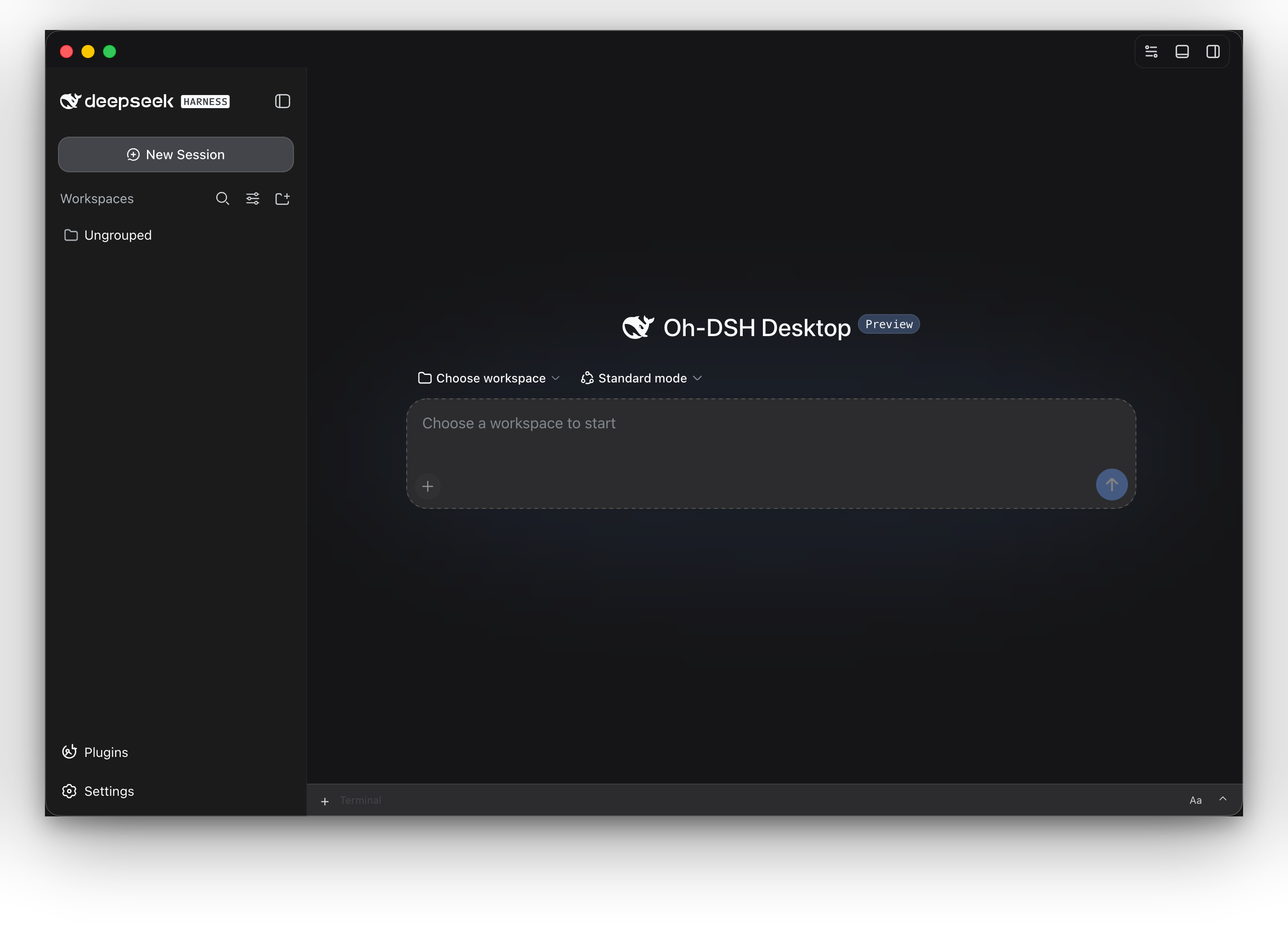
Oh-DSH 将 DeepSeek Harness、Node.js、本地开发工具和内置插件打包为可安装的 Desktop、Web 与 TUI 发行版。模型服务仍可按需运行在云端;Workspace、终端、 Git Review、浏览器、文件、会话与插件状态由本地工作台统一组织。
主要能力
🖥️ 三种交互界面使用同一个 |
🧰 本地开发工作台内置 Workspace、PTY 终端、浏览器、文件浏览、Side chat 与 Trajectory;面板可以折叠、固定、分屏或全屏展开。 |
🔍 Git Review查看工作区改动与 commit diff,在代码行上添加 review comment,并在同一个侧边栏完成分支、提交和推送操作。 |
🧩 插件市场Desktop、Web 与 TUI 都能检索、预览和安装插件,并共享同一套交易与恢复状态。目录会标明插件实际生效的界面:安装可能在所有终端都成功,但某些插件只在 Web 或 Desktop 生效、在 TUI 不生效,界面上会明确区分。 |
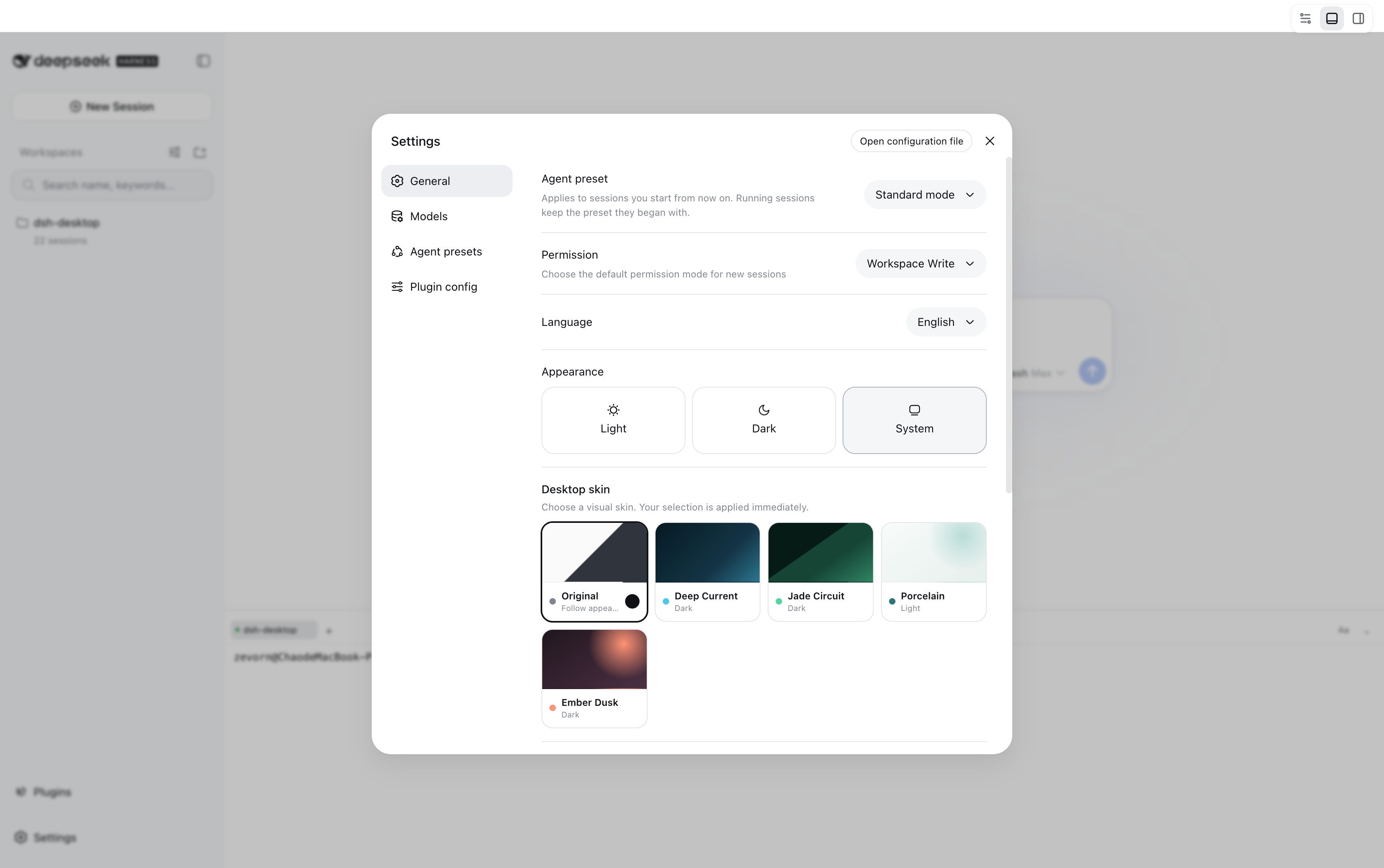
🎨 跨端皮肤
|
📦 可拆分发行按需安装完整版、Web-only 或 TUI-only。每种发行都自带固定版本的 DSH 与 Node runtime,不要求单独安装运行环境。 |
下载与安装
从 GitHub Releases 选择需要的发行形态:
| 发行形态 | 包含内容 | 适合场景 |
|---|---|---|
| 完整版 | Oh-DSH Desktop、Web、TUI、Node runtime 和内置插件 | 本地开发工作台 |
| Web-only | Oh-DSH Web、Node runtime 和内置 Web 插件,不含 Electron | 浏览器、服务器或轻量安装 |
| TUI-only | Oh-DSH TUI、Node runtime 和终端插件,不含 Electron | SSH 与纯终端环境 |
- **macOS:**打开 DMG,将 Oh-DSH Desktop 拖入 Applications。
- **Windows:**运行安装包,或解压便携版后启动。
- **Linux:**直接运行 AppImage,或使用
apt安装 deb。
Web-only 与 TUI-only 包解压后即可运行:
# Web UI,默认监听 http://127.0.0.1:3080
./bin/ohdsh web

# Terminal UI
./bin/ohdsh tui
Windows 使用 bin\ohdsh.cmd web 或 bin\ohdsh.cmd tui。
安装统一命令
macOS 完整版可将应用内的启动器加入 PATH:
sudo ln -sf \
  "/Applications/Oh-DSH Desktop.app/Contents/Resources/bin/ohdsh" \
  /usr/local/bin/ohdsh
Web-only 与 TUI-only 包可直接运行 ./bin/ohdsh,也可以把它加入 PATH。
使用
ohdsh desktop          # 启动 Oh-DSH Desktop
ohdsh gui              # Desktop 的启动别名
ohdsh web              # 启动 Oh-DSH Web
ohdsh web --port 3080  # 指定 Web 端口
ohdsh tui              # 启动 Oh-DSH TUI
三端默认共同使用 ~/.ohdsh 存放缓存、配置、会话、凭据与插件状态。
设置 OH_DSH_HOME 可以统一更换数据目录;运行 ohdsh web --help 或
ohdsh tui --help 可以查看界面专属选项。
内置的 @oh-dsh/vision 为三端提供同一个 view_image 工具,让用户对 Workspace
内的本地图片、HTTP(S) 图片或 image data URL 做 OCR、读图与界面诊断。图片复制、
粘贴、缩略图和提交继续由 DSH 原生 attachment rail 负责;插件在 Host 的最终图片
能力校验处放行 DeepSeek V4,并在固定的 text-only 适配器序列化同一轮请求前,通过
配置的视觉后端描述原生附件。不另加输入栏气泡或引用协议。TUI 通过 Workspace
图片路径或 URL 使用同一能力。
凭据与后端配置见图片识别使用说明;云端/本地 Key 与 Vision
设置也可以在原生“设置 → 插件 → 插件配置 → Vision”卡片中修改。
从源码运行
需要 Node.js、pnpm 和平台构建工具:
git submodule update --init --recursive
pnpm install
pnpm run build:dsh
pnpm run build
pnpm run stage:dsh
export PATH="$PWD/bin:$PATH"

ohdsh desktop
ohdsh web
ohdsh tui
打包完整版使用对应平台的 dist:mac、dist:linux 或 dist:win;只打包
Web 使用 pnpm run dist:web;只打包 TUI 使用 pnpm run dist:tui。
更多界面
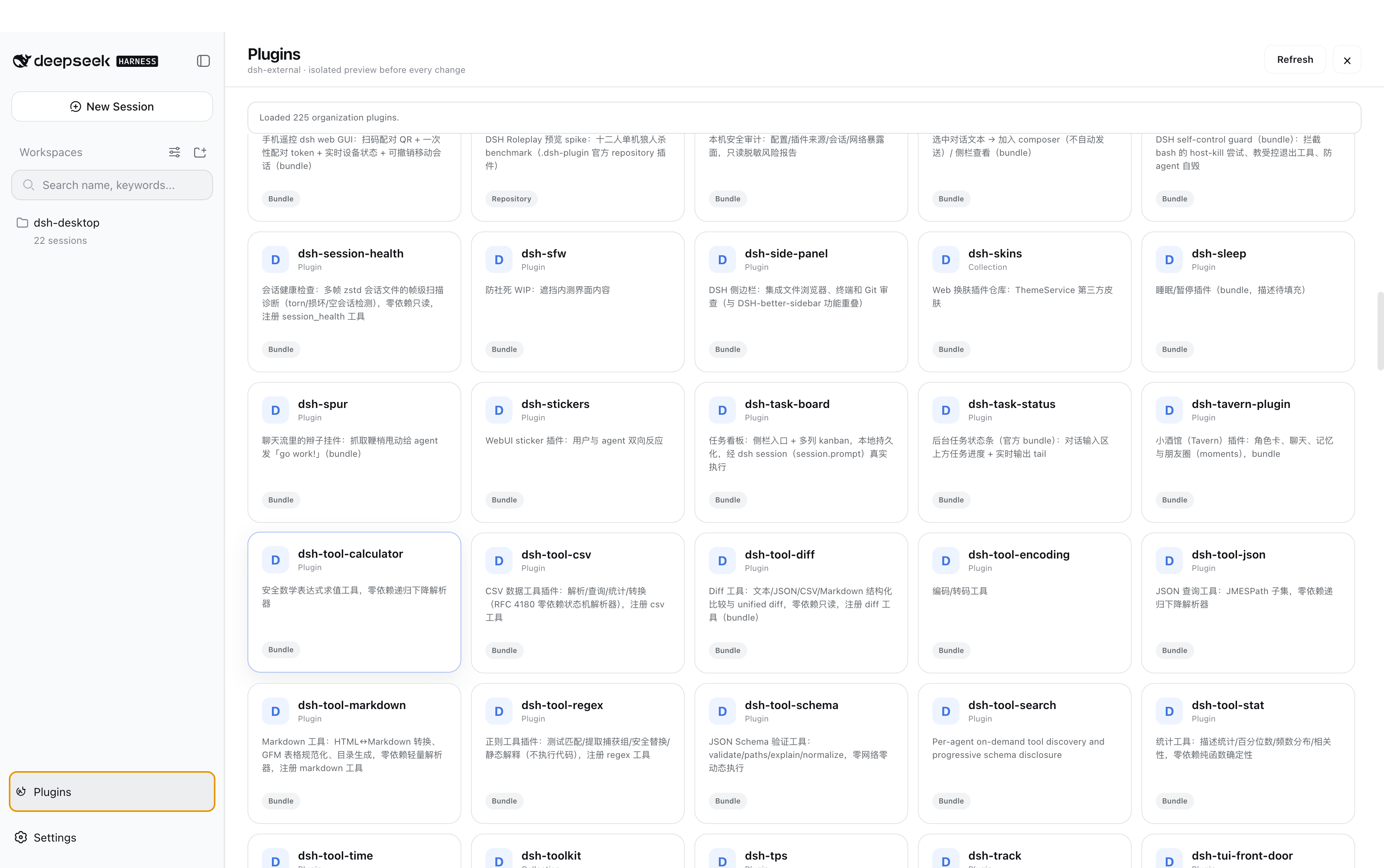
插件市场
Oh-DSH 皮肤
文档
插件推荐
| 推荐项目 | 说明 |
|---|---|
| DeepSeek Harness | DSH runtime、会话与插件加载器 |
| dsh-TUI | Oh-DSH TUI 的直接上游插件,提供终端渲染、交互和命令体系 |
| DSH-better-sidebar | Git Review、文件与 PTY Host 能力 |
| dsh-vision | 跨 Desktop、Web 与 TUI 的 view_image 视觉工具参考实现 |
| dshfind | DSH 插件超市与学习社区,提供插件、生态与 DeepSeek Harness 周边推荐 |
Oh-DSH 保留上游实现与署名,并在其上提供统一启动器、Profile、数据目录、 跨端皮肤、界面适配和发行打包。详细边界见设计文档。
License
Read the usage guide →
Install steps, key points, FAQ and compatibility for this plugin — auto-derived from indexed fields.
Listing badge

[](https://deepseek-plugin.org/plugins/hust-open-atom-club/oh-dsh)Paste this markdown into your GitHub README to link back to this listing. The badge only states the listing — not a security endorsement.