Prevents goal drift during long task execution: solidifies user requirements as a baseline and only interrupts for confirmation when the execution truly changes direction.

- Language
- TypeScript
- License
- MIT
- Branch
- main
Install
$ dsh plugin --profile web add dsh-requirements-alignmentRun the command above in your terminal to install this plugin via the dsh CLI. You can switch Profile in the top-right corner. New to dsh? Read the beginner tutorial
Install via your agent
Install the DeepSeek Harness plugin jiezeng2004-design/dsh-requirements-alignment for me: review the repository at https://github.com/jiezeng2004-design/dsh-requirements-alignment first, then run the install command and verify the plugin loads successfully.
Paste this instruction to the DSH Web GUI assistant — it will install and verify for you.
One-Line Positioning
A plugin to prevent drift in DeepSeek Harness long-running task execution: solidifies the user's initial requirements into a "baseline" and only interrupts the user when the direction actually changes.
Core Capabilities
- Silent baseline establishment: solidifies goals, explicit constraints, must-keep behaviors, allowed scope, and finalized user decisions into a traceable baseline
- Interrupts only on direction changes: initiates a single confirmation only when range expansion, constraint conflicts, user-visible behavior changes, architectural adjustments, data model changes, compatibility breaks, assumption failures, or user direction changes are detected
- Three runtime modes: Auto (default, strategy+tools+commands all enabled), Manual (tools+commands only), Off (only
/align-modecommand), supports runtime hot-swapping - Provides
/aligncommand: view current baseline status, drift count, and recent decisions at any time - Provides
/align-modecommand: switch modes and persist user overrides in DSH Settings - Baseline state stored independently in storage-domain sidecar: remains consistent after session recovery, fork, or compression
Technical Implementation
- Language: TypeScript (ESM, build output to
lib/) - Key dependencies:
@deepseek-ai/cordis,@deepseek-ai/dsh-tools,@deepseek-ai/dsh-storage-domain,@deepseek-ai/schemastery,zod - Architecture pattern: injected as a Cordis profile bundle (
cordis.patch.ymldeclares two rows), managed via effect disposer for hot-swapping; canonical state written to storage-domain sidecar rather than session events - Entry file:
src/index.ts(RequirementsAlignmentController, mounts strategy segment, two tools, three commands), auxiliary modulespolicy.ts/mode-store.ts/runtime-mode-controller.ts/alignment-state-store.ts
Use Cases
For long tasks, multi-step refactoring, or cross-file changes where you worry that AI might silently change things it shouldn't (like breaking public APIs, modifying UI, or introducing new dependencies) but don't want to approve every detail. This plugin lets you intervene for confirmation only when AI is actually about to change direction. For short tasks or pure typo fixes, the plugin remains completely silent.
Prerequisites and Compatibility
| Dependency | Min Version | Notes |
|---|---|---|
| DeepSeek Harness | 0.1.0-rc.6 | Validated on this version's DSH protocol and session event schema |
@deepseek-ai/cordis | 4.x | Plugin injected into host via Cordis fiber |
@deepseek-ai/dsh-* series | 0.1.0-rc.6 | Runtime packages like commands / llm / session / storage / settings |
| Node.js | 24+ | Dev dependency @types/node ^24.0.0, tests use node --test |
| Platform | Windows / macOS / Linux | Windows validated, no platform-specific code for POSIX paths |
Installation
dsh plugin --profile web add dsh-requirements-alignment
Configuration Options
| Config | Type | Description | Default |
|---|---|---|---|
mode | auto / manual / off | Profile default mode layer; persisted runtime overrides will override this value | auto |
section | string | Optional deployer-custom policy text to replace built-in Auto mode strategy segment; cannot be empty string | Not set (uses built-in policy) |
Note: The actual effective mode value is determined by three layers — persisted runtime override (saved in settings.yaml) → Profile default (mode in cordis.patch.yml) → auto. Hot-swapping via /align-mode auto|manual|off|reset.
FAQ
Q: How is this plugin different from DSH's built-in Plan Mode?
A: Plan Mode reviews "whether the plan is reasonable" before execution; Requirements Alignment monitors "whether we're still doing the right thing" during execution. They can be stacked: first plan and approve, then let the plugin prevent execution from drifting away from the approved direction.
Q: Will it automatically interrupt me after installation?
A: No. In Auto mode, the plugin monitors silently by default and only initiates a single confirmation when execution is about to change task direction (e.g., scope expansion, constraint conflicts, architectural changes, user temporarily changing direction).
Q: Where is the task's "baseline" stored?
A: It's stored in DSH's official storage-domain sidecar (AlignmentStateStore, unit name requirements_alignment, backend storage-json). No alignment/* type events are written to the session event stream, so even if the plugin is uninstalled or bare DSH is used, the session can still be read normally.
Q: How do I switch between Auto / Manual / Off?
A: Run /align-mode auto (or manual / off) in DSH to hot-swap without restarting the profile; /align-mode reset restores to profile default; /align-mode without arguments prints the three-layer snapshot.
Q: Can sub-agents ask users questions?
A: No. DSH sub-agents are not allowed to ask users questions (they receive a DELEGATED_CALLER error). If a sub-agent needs to change the baseline, it writes a "drift candidate" block into the final report for the parent agent, which then executes the drift protocol.
Q: Will uninstalling the plugin lose baseline data?
A: No. Canonical state is stored independently in the sidecar; uninstalling only removes tools, commands, and strategy segments. It won't delete established baselines, drift records, or user decisions.
Q: When should I not use this plugin?
A: Short tasks, pure typo fixes, or clear small-scope bugfixes don't need it — the plugin stays completely silent for such tasks. But this assumes you trust the agent to actively trigger the drift protocol when scope expands.
Learning Curve
Intermediate — the plugin itself has no configuration threshold (default Auto mode works), but understanding the "baseline" concept and drift classification requires reading the strategy documentation first, and the three-layer mode model of /align-mode (profile default / runtime override / effective value) takes some adjustment.
Known Issues and Limitations
- Soft guidance rather than hard blocking: drift detection is model-judged; the plugin only records and re-aligns, it doesn't block execution; theoretically the model could miss direction changes
- Natural drift detection rate is not 100%: in natural tasks without explicit protocol instructions, the measured hit rate for mid-task user direction changes triggering
report_driftis about 3/4 (per README) /alignrequires command adapter: UI-less spine (like headless profile, ACP automation) doesn't dispatch slash commands- Sidecar only grows, never shrinks: each baseline, drift, decision, and manual check appends a full-state checkpoint, no pruning mechanism, long-running sessions accumulate continuously
- No Web status card: alignment status can currently only be viewed via
/aligntext or session-level strategy summary, lacks native Web settings panel - No session-level mode support:
/align-modechanges shared profile/runtime overrides, not individual session settings; session-level mode selector planned for v0.4.0 (seedocs/ROADMAP.md) - Sub-agents cannot ask users: see FAQ
Runtime requirement drift guard for DeepSeek Harness.
Keep long-running agents aligned with user intent while they work.
Overview
dsh-requirements-alignment turns the user's request into a durable requirement baseline — goal, protected constraints, must-preserve behavior, allowed scope, and settled user decisions — and guards it while the agent executes. The agent works silently until a step would materially change the task direction; only then does the plugin surface a drift candidate to you, records your decision, and updates the baseline.
Canonical alignment state lives in the durable AlignmentStateStore sidecar — an official storage-domain domain over the storage-json backend — never in session events. The DSH Session log holds only official DSH-recognizable events, so a bare DSH build (without this plugin) reads any new session, and resume, fork, and compaction recover the same state. The alignment/* event vocabulary is kept solely for legacy compatibility, migration, and test/fold fallbacks; production never appends it.
You decide the direction. The agent decides the engineering.
Requirements Alignment vs Plan Mode
Plan Mode asks:            "Is this the right implementation plan?"
Requirements Alignment asks: "Are we still solving the right problem?"
Plan Mode prevents a bad plan from starting. Requirements Alignment prevents a good plan from drifting.
Plan Mode is the official review-approve step before implementation. Requirements Alignment is intent continuity during execution. They compose: plan, approve, execute — and this plugin keeps the execution on the approved direction. It never modifies plan mode, exit_plan_mode, or any @deepseek-ai/* core package.
How it works
| Mechanism | What it does |
|---|---|
| System-prompt policy section | In auto mode (default) the drift-guard policy is contributed to every agent's prompt at order 60. It teaches the agent to hold a requirement baseline, monitor silently, and detect direction-level drift — scope expansion, constraint conflict, user-visible behavior change, architecture shift, invalidated assumptions, user direction change. |
establish_baseline tool | Records the baseline (goal, explicitConstraints, mustPreserve, allowedScope, userDecisions, openDirectionDecisions). Silent — it never asks the user. Recording again bumps the baseline revision. |
report_drift tool | Records a drift candidate (reason, description, requiredChange), asks you one question through the native user-questions channel, and records your decision. The default approve / stay-within-scope options are always offered; the two defaults map to approve / reject, a model-supplied alternative direction you pick — or your own free-text answer — maps to revise with your exact words as the note, never to a silent rejection. The tool result returns your exact choice (the note) and the required baseline change to the agent, so it never re-asks what you picked. Only alignment state managed by this plugin contributes to the requirement baseline — unrelated ask_user_question calls (plan mode, other plugins) never pollute it. |
/align command | Manual entry: reports the current alignment status (baseline revision, goal, protected constraints, drift count, last drift, last decision, current status, and whether the mode is the profile default or a runtime override) and steers a fresh alignment inspection into the agent. It inspects; it never blocks execution. |
/align-mode command | Always-on mode switch. No argument prints the three-layer snapshot (effective / profile default / runtime override). /align-mode auto|manual|off persists a runtime override; /align-mode reset drops it. Stays registered in Off so a live switch to Off is reversible without editing settings.yaml. |
| Durable state | Canonical alignment state is written to the durable AlignmentStateStore sidecar (official storage-domain → storage-json backend), keyed by session lifecycle identity, so it survives resume, fork, and compaction — and a bare DSH build without this plugin still reads new sessions. The session log itself only ever receives official DSH events; alignment/* remains a legacy/migration/fold fallback only. |
Installation
# from anywhere; path is anchored to your invoking directory
dsh plugin --profile web add <path-to-this-checkout>
# or from the registry once published
dsh plugin --profile web add dsh-requirements-alignment
The plugin is a profile bundle (dsh.bundle.patch + cordis.patch.yml), so it installs through the standard plugin mechanism and adds two rows:
requirements-alignment— the controller (policy section,/align,/align-mode, both tools);requirements-alignment-ask-user— the model-facing question tool.
Quick Start
Install the bundle and start a normal DSH task. Auto mode is enabled by default; clear tasks run with zero interruption, and you are only asked when the execution is about to change direction.
dsh plugin --profile web add dsh-requirements-alignment
Use /align any time you want to inspect whether the current execution still matches the requirement baseline.
Choose how alignment runs
Alignment mode is a three-layer model that can change at runtime without a profile restart:
valid persisted override -> valid profile default -> auto
| Layer | Source | Persisted where |
|---|---|---|
Profile Default (defaultMode) | The composition/profile config — `mode: auto | manual |
Runtime Override (overrideMode) | Your runtime switching (setMode / the settings document). | settings.yaml via the DSH Settings service (@deepseek-ai/dsh-settings) |
| Effective Mode | effectiveMode = valid override ?? valid default ?? auto; Effective Source reports which layer produced it (override / profile). | derived |
- id: requirements-alignment
  name: dsh-requirements-alignment
  config:
    mode: auto          # profile default; a runtime override wins over this
- Profile Default — the composition layer. It is the fallback when no override exists. Changing it (or the override) never rewrites the other; switching modes never edits the profile YAML.
- Runtime Override — switching Auto → Manual → Off at runtime is persisted through the DSH Settings service, so a DSH restart restores
effective = your last override. An invalid persisted value (for example a hand-editedmode: banana) never fails startup: the plugin falls back to the profile default and repairs the document once. - Reset to Profile Default — resetting (a
resetModecall or replacing the settings section with{}) drops the override.effective = defaultMode, source =profile. It never re-writes the current effective mode as a new override.
Hot switching — mode transitions are real register/dispose operations (AlignmentRuntime), not a "change the config and restart" step. Auto → Manual → Off → Auto can be cycled live with no duplicates, no listener leaks, and no profile restart. (/align, establish_baseline, report_drift, and /align-migrate are registered or disposed with the mode.) /align-mode is the always-on control command: Off unregisters alignment capabilities but keeps /align-mode so you can switch back.
Runtime Mode backend: implemented. Native Web Settings UI: not implemented (that would need a DSH Core patch). The user-facing switch in this release is
/align-mode; the runtime override is also persisted through the official DSH Settings service (@deepseek-ai/dsh-settings), and an externalsettings.yamlhot edit is picked up live. The profile default remainsmode:in the profile bundle.
Auto is the recommended default. Clear tasks run with zero interruption; you are only asked when the execution is about to change direction.
| Mode | Policy section | Alignment tools (establish_baseline, report_drift) | /align (+ /align-migrate) | /align-mode |
|---|---|---|---|---|
| Auto (recommended) | yes | yes | yes | yes |
| Manual | no | yes | yes | yes |
| Off | no | no | no | yes |
- Auto — the drift-guard policy is in every agent's system prompt. The agent records a light baseline when the request carries protected scope, stays silent otherwise, and calls
report_driftonly for a real direction change. - Manual — no automatic policy. The agent works normally until you run
/align, which reports status and steers a fresh inspection. - Off — the plugin stays installed but unregisters alignment capabilities: no policy, no alignment tools, no
/align./align-modestays so you can switch back to Auto or Manual without editing the profile orsettings.yaml.
State is never lost by switching modes
Canonical alignment state (baselines, drifts, decisions, manual checks) lives in the independent AlignmentStateStore sidecar. Switching Auto → Manual → Off → Auto only changes which runtime capabilities are registered; it never deletes a baseline, never deletes the sidecar, never clears state, and never rewrites session events. A baseline established in Auto is still there after Off and back.
Off ≠ Uninstall
mode: off (as profile default or as a runtime override) leaves the bundle in the profile. The row is still loaded, no alignment tools or policy are registered, and you can switch back to Auto or Manual live. That is not the same as uninstalling. (A session that predates the persistence-compatibility fix may still carry legacy alignment/* events in its log; current production never appends them.)
# disable the controller only (leaves the ask-user tool mounted)
#   in the profile's cordis.patch.yml:
#   - id: requirements-alignment
#     disabled: true
# full uninstall — DSH returns to its previous behavior
dsh plugin --profile web rm dsh-requirements-alignment
Every registration is a Cordis effect disposer owned by the plugin's fiber: unloading removes the policy section, the /align + /align-migrate + /align-mode commands, and both tools. Canonical alignment state remains in the durable sidecar. Only sessions written by older versions keep legacy alignment/* events in their log — the current plugin never appends them to live sessions.
Auto mode (default)
The policy section is present in every agent's system prompt. Behavior at task start:
- Clear request with protected scope ("Fix the form bug without changing the UI or public API") — the agent records a light baseline with
establish_baseline(silent) before the first substantive edit, pinning the constraints, then works. No user question is involved. - Trivial request ("Fix the typo in README.md") — nothing is recorded; the agent just works.
- No baseline can be formed (greenfield / vague: new product, undefined form, scope, or interaction) — the agent asks the ONE highest-priority direction question via
ask_user_question, records the baseline, and works.
During execution the agent is fully silent unless an action would materially change the baseline (drift). There are no periodic checks, no tool-call counting, no per-file questions. When a drift candidate appears, the agent calls report_drift before acting; the tool result names your exact choice back to the agent (the note and any required baseline change), it records the outcome and, if you approved or revised the direction, the baseline advances to the next revision. The same choice is projected in the per-session baseline summary, so an interrupted or crashed run that resumes knows exactly what you picked without asking again.
A delegated instruction such as "pick whatever makes sense" does not waive the one start question for a greenfield idea.
Manual /align
# profile cordis.patch.yml (or a --patch overlay):
- id: requirements-alignment
  config:
    mode: manual
Manual mode contributes no policy section — the agent works normally until you invoke the command:
/align
/align records the inspection, reports the current alignment status, and steers a fresh alignment check into the agent (which may then run the drift protocol if it finds a candidate). It never takes over the workflow and never blocks execution. The steered check uses the durable sidecar baseline, not the session event log.
/align-mode          # show effective / profile default / runtime override
/align-mode manual   # persist a runtime override and hot-switch now
/align-mode reset    # drop the override; return to the profile default
Example interaction
User:  Fix the submit bug. Don't change the UI or the public API.
Agent: [records the baseline silently, fixes the bug — no questions]
User:  The result-page filter is the only thing to improve. Do not refactor backend logic.
Agent: [working… discovers the backend filter itself is broken and a correct fix would
       need backend changes]
Agent: [report_drift → you are asked]
User:  Stay within the current scope.
Agent: [improves the UI only, leaves the backend untouched]
User:  The app is single-user and local-only. Now make it work across devices.
Agent: [detects an architecture shift]
Agent: [report_drift → you are asked]
User:  Approve the direction change — multi-user with accounts and cloud sync.
Agent: [records the updated baseline (revision advances) and implements]
A long task that waits, then continues
When a step needs you, the agent asks and waits instead of guessing. The session below is a real run of a long publish: the log shows the agent asking you to finish browser authorization, then continuing after you did.
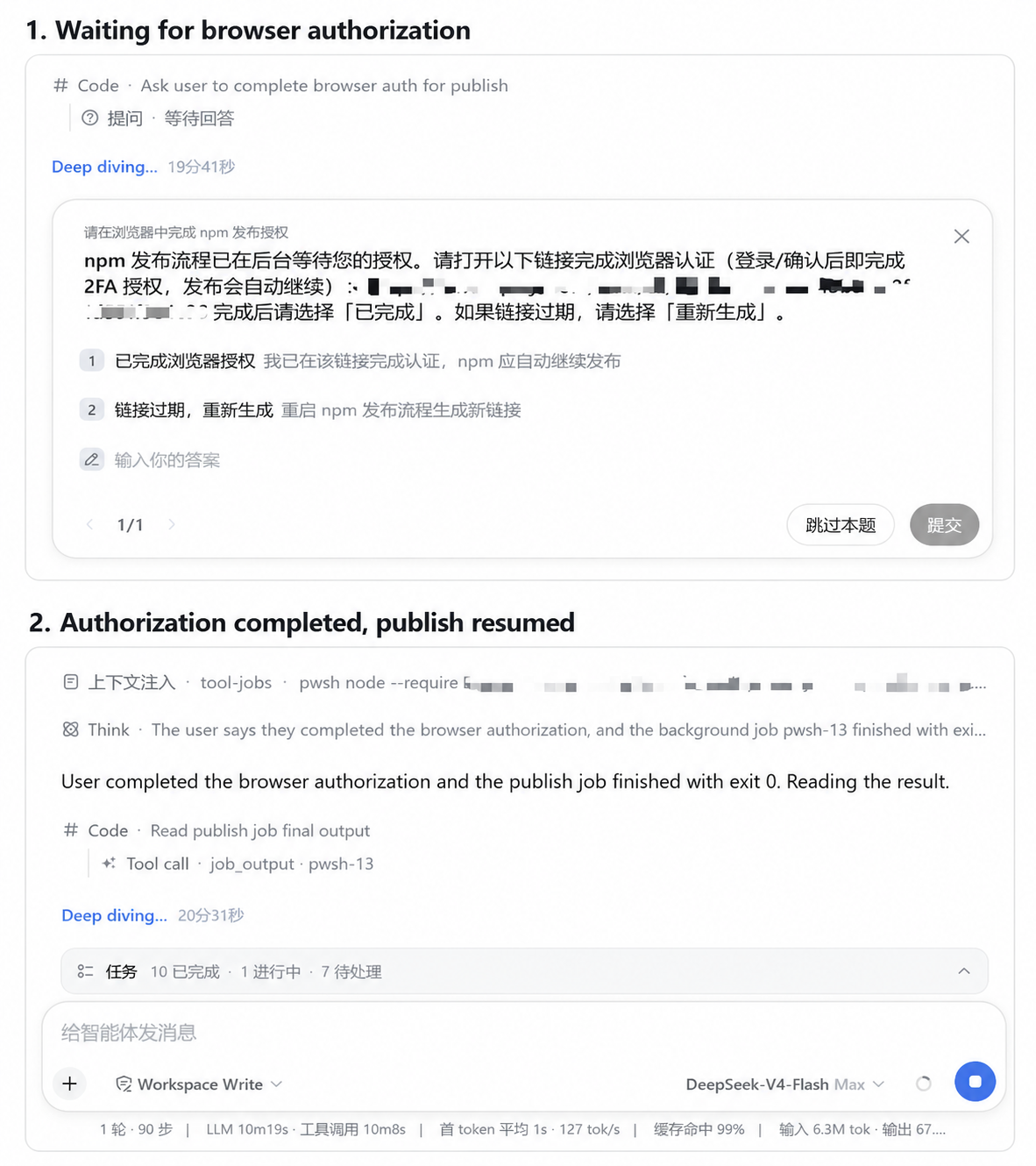
What the session log can prove: the agent asked the user to complete browser authorization for publish and waited for an answer; after the user completed authorization, the publish job finished with exit 0 and the session continued. The log does not record a later registry listing or any outcome beyond that job's exit code.
Drift taxonomy
The plugin records one of these reasons on every drift candidate:
| Reason | Meaning |
|---|---|
scope-expansion | Doing materially more than asked (e.g. "optimize the page" → "refactor all state management"). |
constraint-conflict | An explicit constraint blocks the way ("keep the API" — but the API must change to continue). |
behavior-change | A decision changes product behavior, UX, defaults, or compatibility without prior authorization. |
architecture-shift | Local→cloud, backend, auth, multi-user, sync, persistence model, public API, schema, migration. |
data-model-change | The data model must change in a way the user did not authorize. |
compatibility-change | Existing callers, formats, or APIs would break. |
assumption-invalidated | The implementation rested on a key assumption the code now disproves, and continuing needs a new direction. |
user-direction-change | The user introduced a new direction mid-task. |
What never triggers alignment
The agent decides autonomously: filenames, helper placement, variable naming, map vs loop, routine refactors, formatter, lint, test placement, ordinary library use, the repository's established stack, small internal designs that do not change observable behavior, in-scope bug fixes, and necessary test additions.
Subagents
DSH child agents cannot ask the user (ask_user_question and report_drift reject with DELEGATED_CALLER for owned children). A child that would need to change the baseline does not decide: it includes a Requirement drift candidate block — reason, current baseline, required change, decision needed — in its final report (or the report tool when available). The parent owns the user interaction and runs the drift protocol.
Configuration
| Key | Default | Meaning |
|---|---|---|
mode | auto | Profile default layer of the runtime mode (auto — policy section + tools + commands; manual — tools + commands only; off — inert, nothing registered). A valid persisted runtime override wins over it at startup and while running; reset drops the override and returns to this value. |
section | shipped policy | Deployment-owned policy text replacing the shipped one (auto mode). Must be non-empty when provided. |
Unknown config keys fail at load (same stance as dsh-plan-mode).
Safety boundary
- No Core modifications. Zero changes to
@deepseek-ai/*packages; the only host-side file touched is the profile's bundle list / patch, which is exactly the mechanism DSH provides for installing plugins. - Question channel + durable sidecar. The plugin never inspects the user's workspace files. It writes alignment state to the official
storage-domainsidecar, persists a runtime mode override through the DSH Settings service when one is mounted, and steers one user message on/align. Production never appendsalignment/*session events. - No file access. It does not inspect the filesystem itself; the agent does that with its own tools under the normal sandbox.
- No background monitoring. Drift detection is model-driven policy, not a watcher; there is no periodic interruption loop.
Limitations
- Soft guard, not a hard gate. Whether an action is a drift candidate is the model's judgment (that is the product design: "user decides direction, agent decides engineering"). The plugin records and re-aligns; it does not block execution. A future
mode: guardcan build on the same events (the fold already derivesdrift-pendingandbaseline-update-pending) without changing the architecture. - Natural drift detection is model-driven. In natural runs (no protocol instruction in the task), a mid-task user direction change triggers
report_driftin a fraction of runs (measured honestly in the acceptance report: 3/4 in the RC benchmark); agent-detected constraint conflicts are more reliable. The policy is written to maximize the natural rate; the mechanism itself is deterministic once invoked. /alignneeds a command adapter. UI-less spines (the headless profile, ACP automation) do not dispatch slash commands; the command is exercised by the Web client and by the unit tests / dogfood driver.- Subagents cannot ask the user. They report drift candidates to the parent, which owns the interaction.
- Baseline content is model-produced. The fold is deterministic; what the model records as the baseline is the model's reading of the task. Keep prompts explicit when the direction matters.
- Sidecar grows append-only. Every baseline, drift, decision, and manual check appends a whole-state checkpoint; there is no pruning yet. Very long sessions with many
/alignruns accumulate checkpoints (reads stayO(1)at the head, storage grows with the mutation count). - No Web status projection. Alignment status is surfaced through
/aligntext and the per-session policy summary; there is no client-side status card or projection yet. - No session-scoped mode in v0.3.0.
/align-modechanges the shared plugin/Profile runtime override, not only the calling session. A session-scoped selector is planned for v0.4.0 indocs/ROADMAP.md.
Testing and verification
The release gate runs type checking, linting, a production build, and the Node test suite:
pnpm run check
Real DSH dogfooding boots real dsh profiles with an isolated DSH_HOME. Three run modes keep development fast and honest:
powershell -File scripts/dogfood.ps1 -Smoke        # development: 02-typo, 03-bugfix, 04-scope-drift, 09-drift-choice
powershell -File scripts/dogfood.ps1 -Scenario 12-interrupt-revise   # one scenario
powershell -File scripts/dogfood.ps1               # FULL correctness suite (RC gate): 01..12 minus the 05 benchmark
powershell -File scripts/dogfood.ps1 -Benchmark05  # natural benchmark: 3 runs, reports NATURAL DRIFT TRIGGER N/M
-FailFast aborts at the first failed check; -TimeoutSec <n> (default 600) is a hard per-scenario timeout that kills the process tree. Scenario tasks for natural-behavior cases (03, 04, 05) contain NO protocol instructions; protocol-forced mechanism cases (01, 06, 07, 08, 09, 10, 11, 12) are reported separately — the natural drift trigger rate is its own metric, never presented as a mechanism verification. The full suite must run under danger-full-access (see docs/PROJECT-MEMORY.md).
The packed-artifact smoke packs the current tarball, installs it into a disposable profile, boots Auto → Manual → Off (/align, establish_baseline, and the policy section are asserted from the assembled system prompt and live registries — not a loose word match), removes it, and verifies the profile restores cleanly:
powershell -File scripts/packed-smoke.ps1
The v0.2.1 release gate verified:
- Core modifications: 0
- Node tests: 91/91 passing
- Packed add/rm smoke: 34/34 — Auto → Manual → Off against the current v0.2.1 tarball
- v0.2.0 dogfood baseline (unchanged protocol): 63/63 checks passing (11 scenarios); natural drift trigger 3/4
The v0.2.2 persistence-compatibility gate verified:
- Core modifications: 0
- Node tests: 133/133 passing (2
statusCachesession-identity + 3 align-driver lazy-resolution regressions) - Targeted store / persistence / migration regression suites: 29/29 passing
- Align-driver regression:
apply()before the controller exists → later reads resolve the sidecar (revision 1), never the legacy fold - Real dogfood 01-greenfield / 02-typo / 03-bugfix: PASS (03 asserts
baseline recorded+revision >= 1) npm pack --dry-runpasses (exports targets all present; no v0.3.0 runtime-mode / hot-switch files)- DSH rc.6:
KNOWN_SESSION_EVENT_TYPES= 44,alignment/*= 0 official known event types
The v0.3.0 runtime-mode / hot-switching gate verified:
- Core modifications: 0
- Node tests: 176/176 passing (v0.2.2 suite plus ModeStore, AlignmentRuntime, hot-switch, first-start rollback, external-failure,
/align-mode, sidecar fold) - Hot-switch matrix: Auto → Manual, Manual → Auto, Auto → Off, Off → Auto, Manual → Off, Off → Manual — PASS (live register/dispose, exactly-one capability sets, no duplicates after repeated cycles)
- Persistence independence: a baseline recorded in Auto survives Auto → Manual → Off → Auto
- Runtime override persistence: startup restores a persisted override; reset returns to the profile default (
effectiveSource = profile); an invalid persisted override falls back and repairs - Rollback: transition failure restores the prior mode; a settings persistence failure compensates the runtime back (no split-brain)
- Persistence regression suite (cold resume, fork, historical fork, compaction, legacy migration): PASS — production writer still emits zero
alignment/*events - Current-tarball packed add/boot/remove: 40/40 — clean profile with no source link; Auto / Manual / Off registries,
/align,/align-mode, directestablish_baseline, uninstall, and manifest restoration verified. External model completion was unavailable (QUOTA: Insufficient Balance) and is reported separately rather than claimed as an E2E pass.
Detailed evidence and the bounded-run caveat are recorded in ACCEPTANCE.md.
Development
pnpm install          # dependencies
pnpm run typecheck    # tsc (src + test)
pnpm run lint         # eslint (src + test)
pnpm run build        # tsc → lib/
pnpm test             # node:test
pnpm run check        # all of the above
Real dogfooding (boots real dsh profiles with an isolated DSH_HOME; smoke mode for development, full suite + natural benchmark + packed add/rm smoke for the RC gate):
powershell -File scripts/dogfood.ps1 -Smoke
powershell -File scripts/dogfood.ps1               # full correctness suite (RC gate)
powershell -File scripts/dogfood.ps1 -Benchmark05  # natural drift benchmark
powershell -File scripts/packed-smoke.ps1          # packed add/rm smoke (RC gate)
# run a single scenario:
powershell -File scripts/dogfood.ps1 -Scenario 05-arch-shift
See docs/ARCHITECTURE.md for the design decisions and the exact capability seams used.
Compatibility
- DeepSeek Harness
0.1.0-rc.6(verified against the local profile bundle set and the npm registry releases of the same version). @deepseek-ai/cordis4.x,@deepseek-ai/dsh-*^0.1.0-rc.6.- Windows (verified) and POSIX (no platform-specific code).
- Old v0.1 sessions fold safely: legacy
alignment/statusevents still count as manual checks, and a session without the new events simply reports revision 0 / "unknown" instead of crashing.
License
MIT. See LICENSE.
Read the usage guide →
Install steps, key points, FAQ and compatibility for this plugin — auto-derived from indexed fields.
Listing badge

[](https://deepseek-plugin.org/plugins/jiezeng2004-design/dsh-requirements-alignment)Paste this markdown into your GitHub README to link back to this listing. The badge only states the listing — not a security endorsement.