Provides a Markdown-first visual workflow editor for DeepSeek Harness, with bidirectional sync between canvas and document, and supports computable boolean logic gate evaluation.

- Language
- JavaScript
- License
- MIT
- Branch
- main
Install
$ dsh plugin --profile web add deepseek-flowRun the command above in your terminal to install this plugin via the dsh CLI. You can switch Profile in the top-right corner. New to dsh? Read the beginner tutorial
Install via your agent
Install the DeepSeek Harness plugin kanghelyu/dsh-deepseek-flow for me: review the repository at https://github.com/kanghelyu/dsh-deepseek-flow first, then run the install command and verify the plugin loads successfully.
Paste this instruction to the DSH Web GUI assistant — it will install and verify for you.
One-Line Summary
DeepSeek Flow is a visual workflow editor for the DeepSeek Harness web client that transforms a single WORKFLOW.md and individual STEP.md files into editable flowcharts, with bidirectional sync between canvas and Markdown. The plugin handles editing, saving, and deterministic boolean gate evaluation only—it does not execute Agent steps, which are still completed within the current Session.
Core Features
- Render
WORKFLOW.mdcontrol documents and each step'sSTEP.mdworkspace as editable visual flowcharts - Bidirectional sync between canvas and Markdown—adding, moving, connecting, or deleting nodes or arrows writes back to workflow files
- Provide eight types of logic gates (IF/ELSE, AND, OR, NOT, NAND, NOR, XOR, XNOR) with deterministic boolean evaluation; results don't depend on running Agents
- Create, import, read, and delete workflows through Agent tools:
flow_create/flow_put/flow_list/flow_read/flow_evaluate/flow_finalize_canvas/flow_delete - Isolate workflows by Session; switching Sessions copies as an independent copy of the current Session; support shared templates
- Manual logic validation, single-document AI optimization, and full workflow AI optimization; results and unapplied drafts are persisted to disk; switching views or restarting won't lose data
Technical Implementation
- Language: JavaScript (ES Module, TypeScript style), client uses React 18 + native SVG canvas
- Key Dependencies:
@deepseek-ai/dsh-typert-protocol,@deepseek-ai/dsh-tools(peer),zod; dev dependencies include@deepseek-ai/cordisand several internal@deepseek-ai/dsh-*packages - Architecture Pattern: Host/Client separation; Host registers Remote services
dflow/*and Cordis tools inapply(ctx, config), Client injectsconversation.viewslot to render the editor; package includesSKILL.mdfor runtime reactive Skill registration - Entry Points: Host entry
lib/index.js, Client entrysrc/client/entry.js(build output islib/client.js), dispatcher entrycordis.patch.yml
Use Cases
Use this plugin when users want to organize multi-step tasks (e.g., "Find papers → Read papers → Generate summary → Define terms") as visual flowcharts and have the Agent execute them node by node within the Harness Session. It's also suitable for scenarios where existing Markdown workflow structures need to be structured, branch conditions or finite retries added, and the Agent maintains bidirectional synchronization between canvas and documents.
Prerequisites & Compatibility
| Dependency | Min Version | Description |
|---|---|---|
| DSH | 0.1.0-rc.6 | All dsh-* packages in peerDependencies and devDependencies are ^0.1.0-rc.6 |
@deepseek-ai/dsh-typert-protocol | ^0.1.0-rc.6 | Runtime dependency for Remote services |
@deepseek-ai/dsh-tools | ^0.1.0-rc.6 | Peer dependency for Agent tool registration |
| Platform | Cross-platform | Plugin itself is OS-agnostic; DSH Web profile runs on macOS/Windows/Linux |
| Native Modules | None | No native dependencies declared; only uses Node built-ins like node:fs/promises, node:os, node:crypto |
Installation
dsh plugin --profile web add github:kanghelyu/dsh-deepseek-flow
Configuration Options
This plugin exposes the following fields through injection configuration in cordis.patch.yml; descriptions are in plain language:
| Config | Type | Description | Default |
|---|---|---|---|
dataDir | String | Plugin data directory for workflow files, UI state, AI Assist results, and trash | Defaults to $DSH_HOME/deepseek-flow when unset, or ~/.dsh/deepseek-flow if DSH_HOME is not set |
assistantProvider | String | Model provider identifier for AI Assistant; empty follows Session | Unset (follows Session) |
assistantModel | String | Model used by AI Assistant; empty follows Session | Unset (follows Session) |
assistantTimeoutMs | Number (ms) | Assistant sub-agent timeout, valid range 10000–600000; truncates if > 600000 | 600000 (10 minutes) |
assistResultTtlMs | Number (ms) | AI Assistant result retention duration; permanent until explicitly discarded if not set | Unset (permanent retention) |
FAQ
Q: Is this plugin a workflow runner?
A: No. DeepSeek Flow only handles editing, saving, and deterministic boolean gate evaluation; Agent steps and full workflow execution are still completed by the Agent within the current Harness Session.
Q: What to do if DeepSeek Flow tab doesn't appear after installation?
A: First confirm the plugin is mounted with dsh web --dump-config | grep deepseek-flow. If already mounted but dropdown is empty, fully stop and restart dsh web (refreshing the browser alone is insufficient because the Typert routing table is snapshot at process startup).
Q: Why can't AI full workflow optimization write in?
A: Usually the original text changed during Agent execution, or the Agent didn't return all required documents. The optimizer compares against the original revision and refuses to overwrite if changes are detected; have the Agent regenerate based on the latest files.
Q: Can deleted workflows be recovered?
A: Yes. The plugin's managed workspace is moved to ~/.dsh/deepseek-flow/trash/<date>/ directory; copy the entire workspace directory back to workspaces/ to recover documents; the flow definition itself can be re-imported via flow_put using exported JSON.
Q: Why must condition boxes use truthy/falsy/nonEmpty instead of natural language?
A: Logic gates only perform deterministic boolean operations and don't understand semantics. For semantic judgments, add an Agent step upstream of the condition box that outputs JSON boolean true or false, then connect to a condition box with predicate: "truthy".
Q: What are finite feedback edges? When to use them?
A: Feedback edges are fallback arrows with maxIterations (positive integer 1–1000) and non-empty exitCondition, used to express finite retries; they don't participate in single boolean gate evaluation and don't auto-execute steps. Regular execution arrows must be acyclic; retries require feedback edges.
Q: Studio keeps showing "Apply Changes" after directly editing files?
A: Wait a few seconds for Studio to automatically press the hidden finalize action via file source fallback, or have the Agent call flow_finalize_canvas (passing workflow id and current revision) to explicitly trigger deterministic finalization, bypassing main Session re-review.
Getting Started Difficulty
Beginner — After installation, just have the Agent say "build a workflow" in natural language to generate the first flowchart; regular users can use it without reading the README; advanced configuration (finite feedback edges, cross-Session switching, AI optimization) requires consulting documentation.
Known Issues & Limitations
- Modifying Host code or adding new Remote methods requires a full restart of
dsh web; refreshing the browser or hard refresh won't make new/api/dflow/*endpoints effective (CHANGELOG.md:5-45, README.md:230) - Version 0.3.21 had a critical issue where duplicate
@deepseek-ai/dsh-tools副本 caused all DSH tool calls to fail; current version fixes this by moving it to peerDependencies and bridgingTOOL_RUNTIME_SCHEDULERat runtime (CHANGELOG.md:78-82, lib/index.js:967-978) - Orphaned flows in old
harness-flowdata directory are automatically migrated as shared templates on first startup (excludingstarter-flowexample); migration is one-time and doesn't rewrite (lib/index.js:1054-1073) applyChangesonly accepts loops with explicit finite feedback edges; cyclic regular execution arrows are rejected by validation; IF/ELSE outgoing lines must each have only one, NOT allows only one (lib/flow-validation.js:78-85, lib/graph-analysis.js:76-96)flow_finalize_canvasexpires if not consumed by Studio within 30 minutes of queuing; needs re-calling (lib/index.js:44, lib/index.js:914-923)- Plugin doesn't handle workflow execution, API Key / credential management, scheduled tasks, webhooks, or execution history; this is a product boundary, see README.zh-CN.md Feature Boundary chapter for details
DeepSeek Flow
See the workflow. Keep Markdown portable. Review only real canvas edits.
A visual, Markdown-first workflow editor built for the DeepSeek Harness Web UI.
🌐 Official website — deepseekflow.kanghelyu.org




English · 简体中文
DeepSeek Flow turns a WORKFLOW.md and its step-level STEP.md files into an editable diagram inside DeepSeek Harness. The bundled Skill lets the current Session create and maintain workflows through tools, while the diagram and Markdown remain synchronized and portable.
It is intentionally an editor—not a workflow runtime. DeepSeek Flow helps you design, inspect, and improve a workflow; execution remains in the current Session.
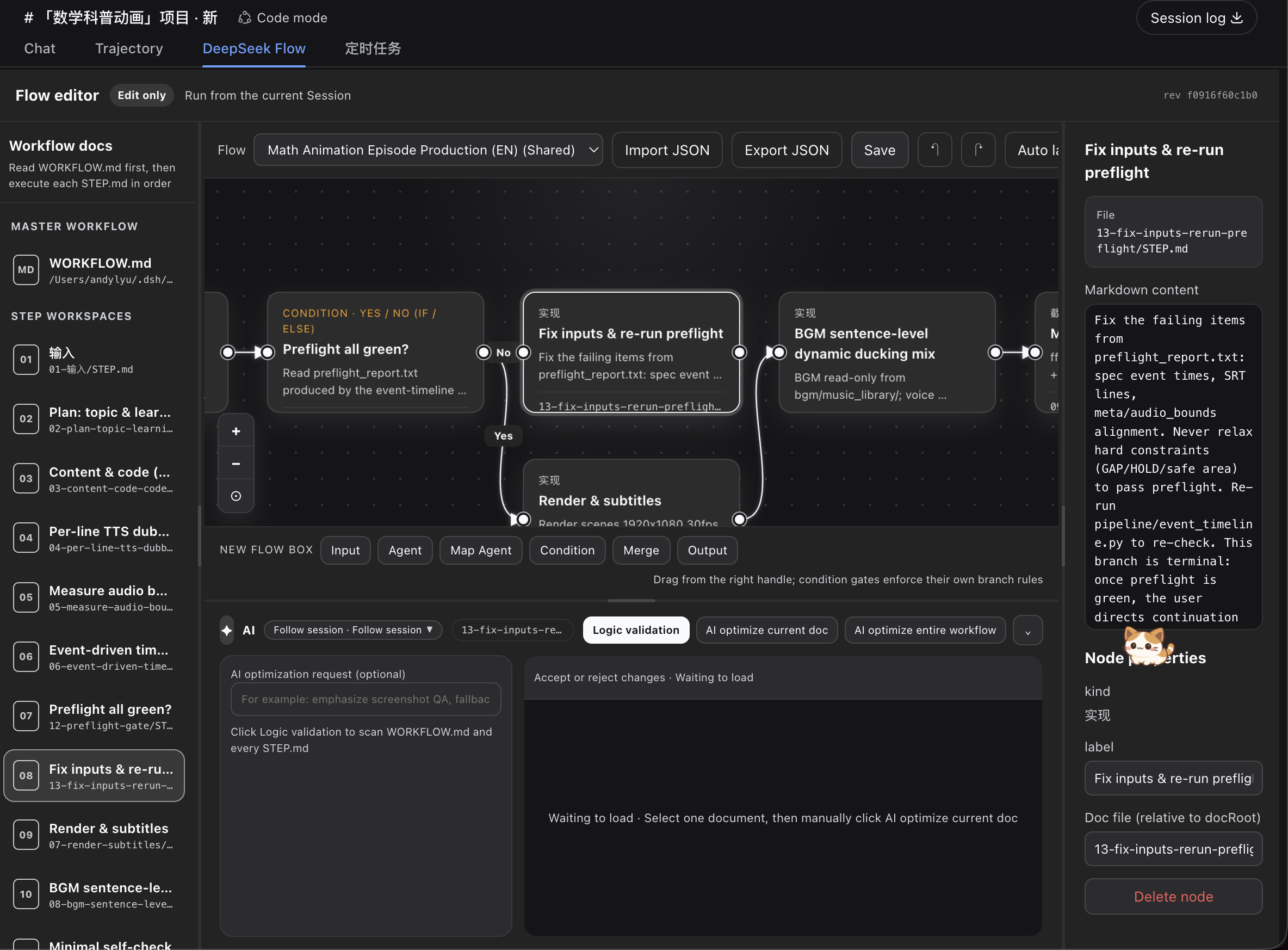
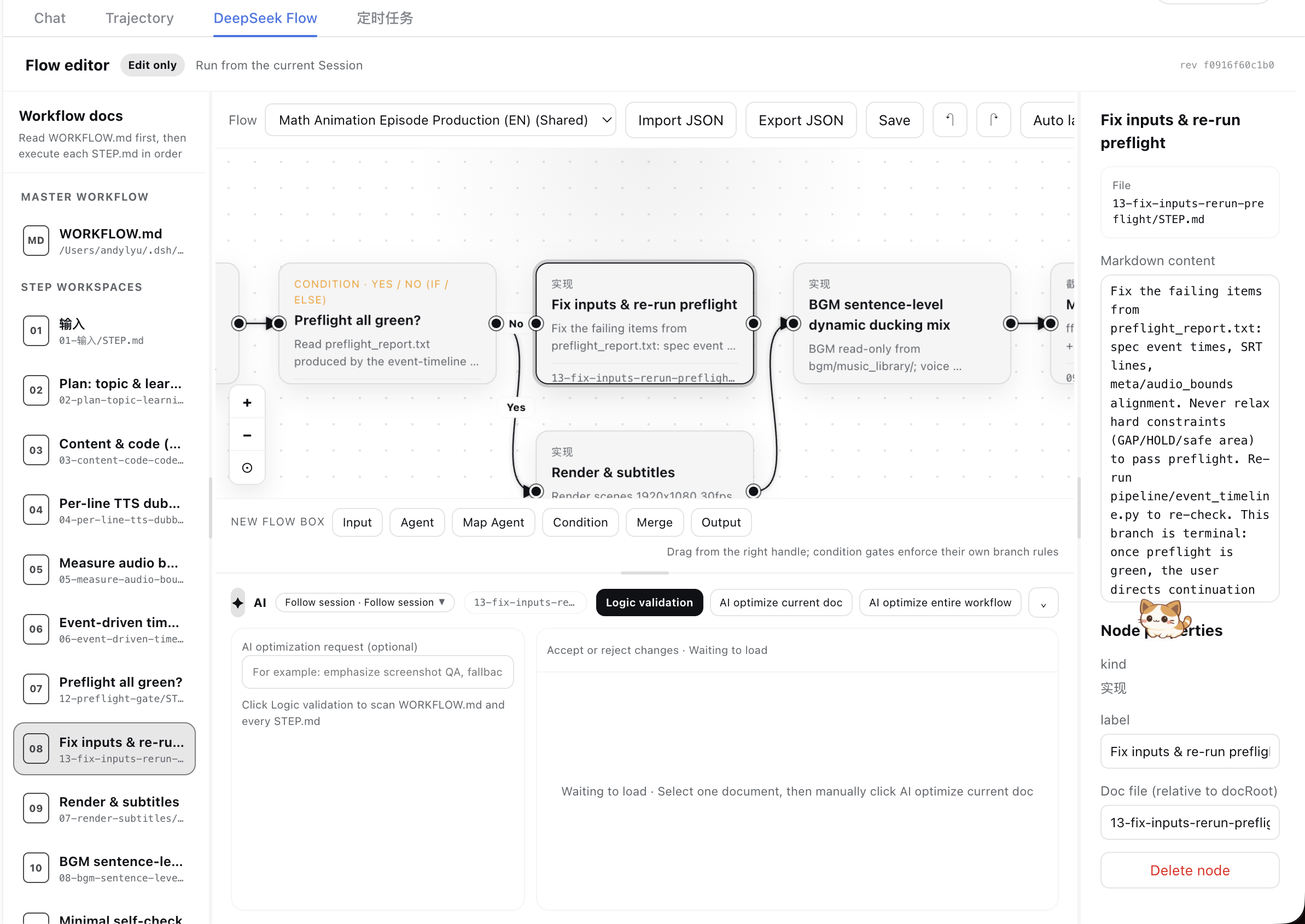
What it gives you
- Markdown as the source of truth — one master
WORKFLOW.md, plus oneSTEP.mdworkspace for each step. - A real visual editor — create, move, connect, reconnect, label, and delete nodes and arrows.
- Two-way synchronization — edits made on the canvas and in the Markdown editor are written back to the workflow files.
- Source-aware topology transactions — human canvas edits receive a full current-Session review; topology produced by direct Session file edits can use an invisible deterministic finalize path instead of being sent back to the same Session.
- Executable gate semantics — the exported contract includes formulas, operands, predicates, and deterministic Boolean results without running Agent steps.
- Per-session isolation — each Harness session keeps its own workflows, with optional shared templates; the canvas toolbar can delete the current workflow or shared template behind a guarded confirm (managed workspaces move to a trash area and can be recovered).
- Comfortable large-flow navigation — collapsible and resizable side panels, pan and zoom, fit-to-view, animated node focus, and independent scrolling regions; node drags commit once on pointer release and background sync polls lightweight revisions, so large graphs stay smooth.
- Native theme support — the interface follows Harness light and dark themes and the active WebUI language.
- Manual AI assistance — run logic validation, optimize one document with review, or optimize the complete workflow.
- Background AI jobs — switching documents, views, or sessions does not interrupt accepted jobs; document proposals are restored when you return.
- Persistent results and drafts — logic-validation findings, AI proposals, and unapplied canvas drafts are persisted to disk: view switches, session switches, and
dsh webrestarts lose nothing; they are cleared only by an explicit discard or a successful commit. Markdown edits inside the 650 ms autosave window are flushed immediately when you leave the view. - I/O and memory safeguards — unchanged documents are never rewritten (autosaves no longer grind the SSD), assist history and drafts live in separate files, result polling uses single-key queries with failure and duration caps, every background poll is cancellable with no leaks, and subagents get a 10-minute default timeout.
- A bundled Agent Skill — installs with the plugin, documents every workflow tool, and includes executable IF/ELSE and Boolean-gate examples.
Quick start
Install from GitHub into the Web profile:
dsh plugin --profile web add "github:kanghelyu/dsh-deepseek-flow#main"
Restart dsh web, open a session, and select the DeepSeek Flow tab.
To confirm that the plugin is mounted:
dsh web --dump-config | grep deepseek-flow
Your first workflow
- In a Session, ask the Agent to build a workflow or import a workflow. The bundled
deepseek-flowSkill guides it toflow_createorflow_put. - Open DeepSeek Flow. The plugin scaffolds a master document, step documents, and their visual layout.
- Ask the Session Agent to change the workflow files, or select a document and edit its Markdown directly.
- Direct Session/file-driven topology updates are finalized without another main-Session review. The Agent should call
flow_finalize_canvas; if it forgets, Studio falls back to detecting that no canvas edit event occurred and presses the same invisible finalize action automatically. - When you add, remove, rename, or connect boxes on the canvas, click Apply changes. DeepSeek Flow validates the graph, asks the current Session Agent to review it, validates again, and atomically saves a new revision.
- Return to the Session when you want the Agent to execute the workflow.
A typical workflow directory looks like this:
my-workflow/
├── WORKFLOW.md
├── 01-input/
│   └── STEP.md
├── 02-research/
│   └── STEP.md
├── 03-quality-check/
│   └── STEP.md
└── 04-output/
    └── STEP.md
Agent tools
| Tool | Purpose |
|---|---|
flow_create | Create a documented linear or branched workflow and save it in the current Session. |
flow_list / flow_read | Discover workflows and read the master document, step documents, revision, graph, and logic contract. Both also return the session's activeFlowId, plus a one-shot activeFlowNotice after the user switches the active workflow in Studio — the agent should then run the switched workflow and ignore earlier instructions about other workflows; without a notice, keep the conversation seamless. |
flow_put | Import or atomically update a complete flow definition. A successful call is already persisted. |
flow_evaluate | Evaluate Boolean gates from upstream values without running Agent steps. |
flow_finalize_canvas | After direct file edits, queue Studio's invisible deterministic finalize action and skip a redundant main-Session review. |
flow_delete | Delete a Session flow or shared template; managed workspaces are moved to trash. |
The Skill is registered reactively when the Harness skills service becomes available. Its SKILL.md contains real Markdown after frontmatter, so filesystem and runtime providers never return an empty instruction body.
Active workflow & cross-session switching
The Studio toolbar's workflow dropdown lists every historical workflow, grouped by origin: current session first, other sessions next, shared templates last. Switching to another session's workflow imports an independent copy of its document workspace into the current session — external custom docRoots are referenced, never copied. Shared templates are also copied into the current session's own managed workspace on switch, so edits never pollute the shared original.
Each session persists an activeFlowId (the workflow last used in Studio) inside sessions/<id>.json. Reopening Studio auto-selects it, and because both the pointer and the history listing (dflow/allFlows) are read straight from disk, the dropdown stays fully populated after a dsh web restart or a machine reboot. A brand-new session starts with an empty canvas and a hint to pick a past workflow from the dropdown, import JSON, or ask the agent to create one.
When the user switches workflows mid-conversation, the next flow_list/flow_read returns an activeFlowNotice instructing the agent to run the switched workflow instead of any earlier instruction. The notice fires exactly once; if the active workflow did not change, nothing is said and the conversation continues uninterrupted.
flow_create accepts an optional language parameter ("en" or "zh"). The Agent should pass the user's current language so default names (New Flow / 新工作流), default step labels, and default node labels are generated in the right language. The user can still override the name explicitly.
Logic gates
Condition boxes support eight gate types: IF/ELSE, AND, OR, NOT, NAND, NOR, XOR, and XNOR. Gate metadata controls connection labels, outgoing limits, and the Boolean contract exported to the current Session.
| Gate | Connection behavior | Boolean result |
|---|---|---|
| IF / ELSE | One Yes and one No branch at most. | Selects exactly the branch matching the condition result. |
| AND / NAND | Multiple distinct targets; labels are automatic. | Evaluates all known operands, with NAND negating AND. |
| OR / NOR | Multiple distinct targets; labels are automatic. | Evaluates all known operands, with NOR negating OR. |
| XOR / XNOR | Multiple distinct targets; labels are automatic. | Evaluates parity, with XNOR negating XOR. |
| NOT | Exactly one automatically labeled outgoing arrow. | Negates its single input. |
Duplicate targets, duplicate Yes/No branches, excess IF/ELSE or NOT arrows, invalid aggregate input arity, unmarked cycles, and unknown box kinds are rejected with actionable validation messages. A retry loop is allowed only as an explicit feedback edge with a finite maxIterations and a non-empty exitCondition; feedback edges do not participate in one-pass Boolean evaluation or automatic Agent execution. Legacy true/false branches are normalized to IF/ELSE.
The flow_evaluate tool can deterministically evaluate gate state and activated targets from upstream step results. It does not run Agent steps or perform workflow side effects.
Gate predicates are deliberately small and deterministic: truthy, falsy, and nonEmpty. Do not put a natural-language rule such as "the user confirmed" in predicate. Add an upstream Agent step that outputs JSON Boolean true or false, then connect it to a condition with predicate: "truthy".
{
  "id": "confirmed",
  "kind": "condition",
  "data": { "label": "Confirmed?", "gateType": "ifElse", "predicate": "truthy" }
}
Reviewed topology transactions
Adding or deleting boxes, gates, arrows, inputs, or outputs in Studio creates a local topology draft. Persisting that user-authored draft is an explicit transaction:
Local validation → current Session Agent review → second validation → atomic revision save
- The reviewer is the live current Session Agent, not a detached background session.
- Markdown is immutable review context: topology review cannot silently rewrite document content.
- Stale or incomplete revisions are rejected so concurrent writers cannot lose state.
- Moving a box changes layout only and auto-saves without opening a topology transaction.
- While a topology draft is pending, logic validation and whole-workflow optimization stay disabled; single-document editing and optimization remain available.
- Deleted managed workflows and generated step directories move to trash; external custom document roots are never moved automatically.
Direct Session file edits use a separate trusted path:
Session edits files → optional flow_finalize_canvas signal → deterministic validation → atomic save
The finalize control exists in Studio but is hidden and cannot be clicked through the normal UI. Studio records every user topology edit handler. If a topology difference appears without any such canvas event, it is treated as external/file-driven and the hidden action is pressed automatically. If deterministic validation fails, the draft is preserved and the normal Apply changes path remains available. This fallback means correctness does not depend solely on the Agent remembering the tool call.
AI document assistant
Every AI action is started manually. DeepSeek Flow never runs validation or optimization behind your back.
| Action | Scope | What happens before files change |
|---|---|---|
| Logic validation | All workflow documents and arrow relationships | The Agent returns clickable errors and warnings; no file is changed. |
| Optimize current document | The selected WORKFLOW.md or STEP.md only | A complete proposal appears in the preview. You must Accept or Reject it. |
| Optimize entire workflow | WORKFLOW.md and every STEP.md | A warning is shown first. After confirmation, the Agent rewrites and saves the complete set directly. There is no per-document review or built-in undo. |
For whole-workflow optimization, commit or back up important Markdown files first. If a document changes while an optimization is running, DeepSeek Flow refuses to overwrite the newer content.
The assistant uses an isolated Agent job and does not run the workflow. Model and reasoning-effort controls are available in the assistant menu.
Topology review is the exception: it deliberately uses the live current Session Agent because that Session owns the workflow context. Document validation and optimization continue to use isolated one-shot Agent jobs.
Design boundaries
DeepSeek Flow deliberately does not provide:
- a workflow execution button or runtime;
- API-key, provider, or credential management;
- triggers, schedules, webhooks, or execution history;
- a replacement for normal Session interaction.
That boundary keeps the plugin focused: edit and validate in DeepSeek Flow, execute in the Session.
Local development
Clone the repository and link it into your Web profile:
git clone https://github.com/kanghelyu/dsh-deepseek-flow.git
cd dsh-deepseek-flow
dsh plugin --profile web add "link:$PWD"
Useful checks:
npm test
npm run build
npm run smoke
If an older local Harness installation is missing linked dependencies, stop dsh web before running:
bash scripts/ensure-deps.sh
After changing client code, rebuild and hard-refresh the browser. Host changes require restarting dsh web.
Repository layout
deepseek-flow/
├── lib/                 Host code, topology transactions, gate semantics, and client bundle
├── src/client/          WebUI client source
├── skills/              Bundled DeepSeek Flow Agent Skill
├── scripts/             Build, dependency, screenshot, and smoke checks
├── test/                Contract and regression tests
├── examples/            Example Markdown workflow
└── docs/images/         README screenshots
Quality safeguards include automated contract and behavior tests covering graph conversion, bounded feedback loops, revision locking, document lifecycle, topology review, hidden finalization, Boolean semantics, connection validation, Agent jobs, JSON tool-argument normalization, and the generated client bundle. See Code quality notes and QA report for more detail.
Troubleshooting
- The tab does not appear: verify the plugin with
dsh web --dump-config, then restart the Web profile. - The UI looks stale: rebuild with
npm run build, restart when Host code changed, and hard-refresh the browser. - New
/api/dflow/*endpoints return 404 and the history dropdown stays empty: the Typert route table is snapshotted when thedsh webprocess starts. After a Host upgrade that adds remote methods (e.g.allFlows,activate), you must fully restart the Web profile — kill the process and start it again, not just a browser hard-refresh. Verify withcurl -X POST http://127.0.0.1:3080/api/dflow/allFlows -H 'Content-Type: application/json' -d '{"args":{}}'(expect200). - AI actions report no provider: select a working model in the Session or in the assistant menu.
- Whole-workflow optimization is rejected: one or more documents changed while the Agent was working, or the Agent did not return every required document. Retry from the latest files.
- Apply changes is rejected: for a retry, add a feedback edge with a finite
maxIterationsand non-emptyexitCondition; otherwise fix the reported ordinary cycle, missing input, branch limit, or stale revision, then submit the complete topology again. - Apply changes appears after a Session file edit: wait briefly for Studio's file-origin fallback, or ask the Agent to call
flow_finalize_canvaswith the workflow id and current revision. - The Skill tool returns an empty body: update the plugin and restart
dsh web; current releases bundle a validskills/deepseek-flow/SKILL.mdand register it after theskillsservice is ready. - Recovering a deleted workflow: managed workspaces are kept under
deepseek-flow/trash/<date>/; copy the directory back intoworkspaces/to restore the documents, then re-import the flow JSON withflow_put.
Uninstall
dsh plugin --profile web remove deepseek-flow
License
MIT. Community project; not affiliated with DeepSeek.
Read the usage guide →
Install steps, key points, FAQ and compatibility for this plugin — auto-derived from indexed fields.
Listing badge

[](https://deepseek-plugin.org/plugins/kanghelyu/dsh-deepseek-flow)Paste this markdown into your GitHub README to link back to this listing. The badge only states the listing — not a security endorsement.