Adds a Live2D-style desktop pet to DeepSeek Harness Web: displays expressions and speech bubbles based on task status, context usage, and active session changes. Supports drag-to-zoom and action group configuration.

- Language
- JavaScript
- License
- MIT
- Branch
- main
Install
$ dsh plugin --profile web add deepseek-petRun the command above in your terminal to install this plugin via the dsh CLI. You can switch Profile in the top-right corner. New to dsh? Read the beginner tutorial
Install via your agent
Install the DeepSeek Harness plugin keleus/deepseek-pet for me: review the repository at https://github.com/keleus/deepseek-pet first, then run the install command and verify the plugin loads successfully.
Paste this instruction to the DSH Web GUI assistant — it will install and verify for you.
One-line Positioning
Injects a Live2D-style desktop pet character into the DeepSeek Harness Web: it automatically switches expressions and speech bubbles based on current tasks, tool calls, context usage, concurrent sessions, and idle time; supports drag-to-move, scaling, and "action image" customization.
Core Features
- Renders a complete character image in the bottom-right corner of the webpage (not split into parts to avoid expression misalignment), switching to corresponding expressions for scenarios like thinking, answering, coding, web search, sub-agent, completion, and failure
- A speech bubble above the character cycles through status short phrases, with the latest response/thinking output displayed in a single-line typewriter effect; the bubble auto-hides after 10 seconds of inactivity
- Displays the focused session (with highlighted border) and up to 7 concurrent executing sessions below the character; automatically stacks and collapses beyond 3 sessions, shows "+N sessions" when exceeding 7
- When context reaches 62%, switches to "还可以再吃一点" (eating series); at 82%, switches to "上下文吃饱了"; switches to blindfolded "看不见" state when image input is detected
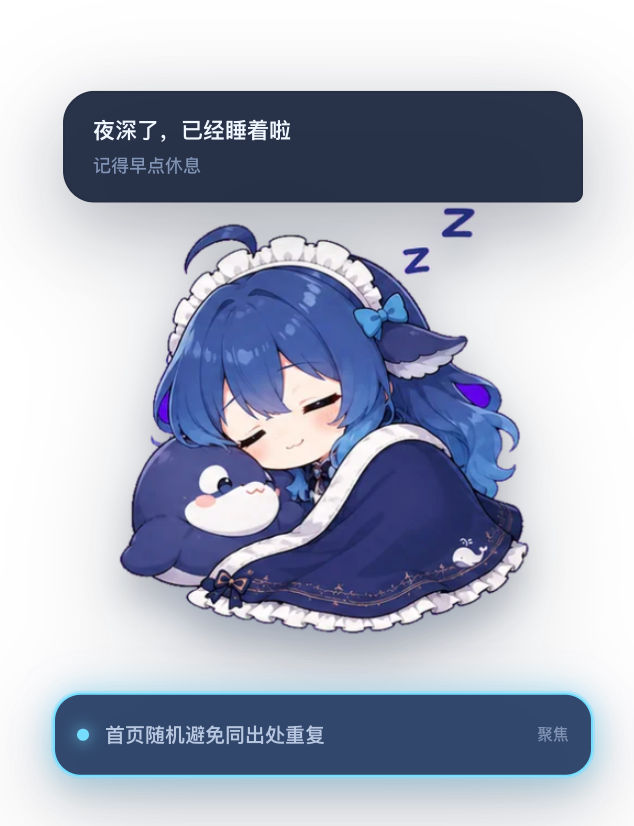
- Shows morning/afternoon/evening/night greetings based on local time; idle 10 minutes shows "肚子饿了", 30 minutes "抱着枕头犯困", 1 hour "已经睡着了"
- Drag to reposition, hover + scroll to scale (65%-140%), single-click triggers status phrase, double-click or "−" button minimizes to static icon in bottom-right corner; position and size are automatically remembered
- Settings panel adds "Pet Settings" page: can switch between "Default" and "Page Always-on-Top" display modes, can enable/disable specific images by action group via checkboxes, at least one image per group must be retained
- Respects
prefers-reduced-motionand narrow screen breakpoints (≤760px), all animations can be significantly reduced under system preferences
Technical Implementation
- Language: JavaScript / JSX (React 18)
- Key Dependencies: React 18 (peerDependency, injected by host), esbuild 0.25.8 (build-time only); runtime only depends on host-provided cordis / dsh-client-runtime / dsh-client-ui-layout / dsh-client-ui-slots
- Architecture Pattern: Dual-half cordis bundle:
src/host/index.jsis an empty host half (apply()has no side effects), all visible behavior is in the browser half ofsrc/client/index.jsx: registers the pet component viactx.slots.inject('shell.overlay', …)(order=90) + registers settings page viactx.slots.inject('settings.section', …); subscribes toslotsandsessionstwo runtime capabilities - Entry Files: Client entry
src/client/index.jsx, core componentsrc/client/DeepSeekPet.jsx, settings pagesrc/client/DeepSeekPetSettings.jsx; build outputlib/index.js(host half) +lib/client.js(client half, ~1.5 MB, with all base64 WebP images embedded) - Asset Pipeline:
scripts/build_assets.py(Python 3 + Pillow processes source images → transparent WebP) +scripts/embed-assets.mjs(converts WebP to base64 and writes back tosrc/client/assets.generated.js, then esbuild bundles intolib/client.js); no network resources required
Use Cases
- Users running long model tasks (multi-turn reasoning, long code generation, batch tool calls) who want companion feedback instead of staring at progress bars;
- Users managing multiple concurrent sessions (>3) who need to visually see which is running, which is waiting for interaction, which is focused;
- Desktop users focused on accessibility experience who need
prefers-reduced-motionautomatic animation degradation.
Prerequisites & Compatibility
| Dependency | Minimum Version | Notes |
|---|---|---|
| DSH Host | Not declared in dsh.engines | All peerDependencies are *, actually dsh.client.inject strongly requires injection of @deepseek-ai/dsh-client-runtime and @deepseek-ai/dsh-client-ui-layout |
| Node.js | >=22.19 | package.json engines.node; users don't need Node at runtime, only when building from source |
| Platform | Web browser only | dsh.client.platform: "web"; host half is empty shell, doesn't participate in backend logic |
| Native Modules | None | Pure React 18 + embedded WebP, no native dependencies like node-pty / sqlite |
| React | ^18.2.0 | peerDependency, injected by DSH Web host |
| Python 3 + Pillow | (build only) | After modifying source images, need to re-run npm run assets; published versions already have embedded images |
Installation
dsh plugin --profile web add github:keleus/deepseek-pet
Configuration Options
| Config | Type | Description | Default |
|---|---|---|---|
| Display Mode | Dropdown (Default / Page Always-on-Top) | Controls pet layering: default follows app interface; page-always-on-top fixes to viewport bottom-right and floats above all content including popups | Default |
| Action Images · Idle | Multi-select (Default Idle / Relaxed / Happy / Proud) | Rotation pool for idle state by accumulated duration, at least one per group | All selected |
| Action Images · Thinking | Multi-select (Deep Thinking / Desk Work / Calm Thinking / Slightly Confused / Stressed Thinking / Eating Earnestly / Lifting Bowl) | Used when there's lots of analysis, reasoning, or questioning | All selected |
| Action Images · Executing Tools | Multi-select (Desk Coding / Checking Content / Serious Verification / Eating Earnestly / Lifting Bowl) | Alternates with rice-eating actions when writing code, reading files, searching, running tools | All selected |
| Action Images · Responding | Multi-select (Typing Response / Organizing Answer / Verifying Answer) | Used when organizing and outputting responses | All selected |
| Action Images · Task Success | Multi-select (Happy Completion / Satisfied Finish / Desk Completion) | Briefly displayed after successful session | Happy Completion + Satisfied Finish |
| Action Images · Waiting | Multi-select (Patient Waiting / Continuing Wait / Thinking While Waiting / Angry Wait / Sleepy Wait) | Changes with wait duration when waiting for confirmation or response | All selected |
| Action Images · Error & Apology | Multi-select (Shocked / Apologizing / Sad / Desk Facepalm) | Used when tools fail, tasks fail, or corrections received | All selected |
| Action Images · Eating | Multi-select (Lifting Bowl / Eating Earnestly) | Used when context grows needing "energy supplement" | All selected |
The pet's position, scaling, last activity time and other runtime states are automatically written to browser localStorage, no manual configuration needed; all "configuration options" above are modified through DSH settings panel's "Pet Settings" page.
FAQ
Q: Does the pet affect page performance?
A: Very little impact. All 28 expression images + 3 frame images are embedded as base64 WebP directly in lib/client.js (~1.5 MB), no external network requests after loading; runtime only renders the currently active image (others have opacity:0), DOM always exists but overhead is negligible. You can see a long string of <img> in browser DevTools but actual rendering is very light.
Q: Can I replace it with a completely different character?
A: Not directly. The plugin's 28 complete character images (not split) and state mappings are hardcoded in src/client/assets/, src/client/pet-state.js, src/client/pet-presentation.js, there's no "skin change" or "load external pet.json" entry in the source code; to customize the character you need to fork the repo, replace source images, and build/install locally.
Q: Why does the pet say "can't see" when I send images?
A: Not a bug. DeepSeek model doesn't support visual input, so when the plugin detects image attachment in recent human input, it actively switches the pet to blindfolded expression and shows "图片暂时看不见" as a visual cue for the user. See src/client/pet-state.js:81-91 for the source.
Q: Does "page-always-on-top" in settings open a new window?
A: No. Both display modes are pure in-page rendering: default renders in DSH's shell interface layer, page-always-on-top uses React createPortal to mount the pet to document.body and positions it in the viewport bottom-right with position:fixed. Neither mode calls window.open, all browsers behave consistently. See src/client/DeepSeekPet.jsx:482-486 + src/client/styles.js:29.
Q: Will the pet get confused with multiple concurrent sessions?
A: No. Focused sessions are marked with highlighted bars, executing sessions are listed below; when exceeding 3 concurrent executing sessions, it enters "busy crazy" state and alternates between "working" and "rice-eating" image groups; when exceeding 7, the session list shows "+N sessions" summary at the bottom.
Q: How to disable specific expression images (like avoiding "crying face")?
A: Open DSH settings panel → "Pet Settings" → scroll to "Action Images" section, uncheck in the corresponding action group; each group must retain at least one image; click "Restore defaults" to reset all action groups' image pools.
Q: Will my preferences remain after uninstalling the plugin?
A: localStorage preferences (position, scaling, last activity, display mode, enabled action images) are not cleared when the plugin is uninstalled and will reload immediately after reinstall; however, since these keys are prefixed with deepseek-pet:, if no deepseek-pet related code runs afterward, they become orphaned keys that don't affect other functionality.
Difficulty Level
Beginner — Install and use immediately, settings panel only has display mode + action image checkboxes as visible options; all runtime states (position/size/scrolling text) are enabled out of the box, no documentation reading required.
Known Issues & Limitations
- When detecting image input, it forcibly shows "图片暂时看不见" blindfolded state (DeepSeek model doesn't support visual input, not a plugin bug)
- runningSessions bottom panel only renders the first 7 concurrent executing sessions, excess shown as "+N sessions" summary; auto-stacks when exceeding 3 but doesn't affect total count
- Custom character images require forking the repo and replacing source images in
src/client/assets/then building locally, no runtime "load external pet.json" or skin switching entry - Rebuilding requires Python 3 + Pillow (
npm run assets), not a pure npm workflow; published versions have embedded images, regular users don't need this step - All image resources are embedded as base64 WebP in
lib/client.js, single file ~1.5 MB, initial load slightly slower than average plugins but no external image requests after loading
DeepSeek Pet 是一个嵌入 DeepSeek Harness 网页的交互式桌宠插件。它会跟随当前任务、 工具调用、上下文占用和活跃会话自动切换 DeepSeek 表情,并通过呼吸、弹跳、倾斜、 视差和淡入动画呈现 Live2D 风格效果。
角色使用完整表情图切换,不拆分头部、手脚或五官图层,避免部件错位和表情突变。
功能
- 角色上方用与 Pet 等宽的气泡轮播状态短句,并以单行横向打字机效果跟随最新输出;无任务活动时 10 秒后自动隐藏;
- 角色下方用横条显示聚焦会话并以亮边标记,正在执行的会话向下排列,超过三个时自动层叠收起;
- 多个会话并行执行时进入“忙疯了”状态;
- 根据分析、回答、编码、网络搜索、子 Agent、完成和失败等场景切换表情;回答阶段轮换敲电脑、思考和认真核对等工作形象,思考阶段轮换不同状态标签;
- 工具等待批准时,可直接在气泡中允许或拒绝;
- 用户问题支持选项、自定义输入、提交和拒绝;
- reasoning 中疑问较多时显示困惑或压力表情;
- 用户指出回答有误时显示道歉表情;
- 上下文达到 62% 时提示“还可以再吃一点”,达到 82% 时显示“吃饱了”;
- 图片输入时显示蒙眼状态;
- 无任务 10 分钟显示饿了,30 分钟抱枕犯困,1 小时后睡觉;
- 待机、思考、回复、成功、等待、错误和干饭等动作按累计时间稳定轮换,不会因重渲染随机跳图;
- 设置页可按动作组启用或停用具体图片,每组至少保留一张;思考和执行工具时会在工作与白米饭动作间稳定交替;
- 根据本地时间显示早上、中午、下午和晚上的问候,23 点后犯困,凌晨进入睡觉状态;
- 鼠标移入角色时,在角色脚下显示“−”最小化按钮;
- 支持拖动角色、单击互动、双击折叠;鼠标悬停角色时可用滚轮缩放,并记住位置和尺寸;
- 支持窄屏布局和
prefers-reduced-motion; - 设置面板新增「桌宠设置」页(界面样式与页面设计系统一致),可配置动作图片,并提供两种展示模式:
- 默认:保持当前展示方式不变;
- 页面置顶:桌宠固定在视口右下角,悬浮在当前网页所有内容(包括弹窗)之上。
安装
安装需要 Node.js 和 pnpm。如果已经全局安装 dsh,运行:
dsh plugin --profile web add github:keleus/deepseek-pet
没有全局 dsh 命令时,无需额外安装 CLI,直接通过 npx 执行:
npx @deepseek-ai/dsh plugin --profile web add github:keleus/deepseek-pet
两种命令效果相同,都会从 GitHub 拉取插件并安装到 Web profile。
安装完成后启动或重新启动网页。全局 CLI:
dsh web
npx:
npx @deepseek-ai/dsh web
如果网页已经打开,请刷新页面。
拉取源码后安装
git clone https://github.com/keleus/deepseek-pet.git
cd deepseek-pet
npm install
npm run build
dsh plugin --profile web add .
如果没有全局 CLI,将最后一条命令替换为:
npx @deepseek-ai/dsh plugin --profile web add .
本地安装会链接当前目录,修改代码并重新构建后即可继续调试。
更新
重新执行安装命令即可拉取并安装远端最新版本:
dsh plugin --profile web add github:keleus/deepseek-pet
或者:
npx @deepseek-ai/dsh plugin --profile web add github:keleus/deepseek-pet
随后重新启动网页进程并刷新页面。
卸载
dsh plugin --profile web remove deepseek-pet
没有全局 CLI 时:
npx @deepseek-ai/dsh plugin --profile web remove deepseek-pet
使用
- 拖动角色:调整显示位置;
- 鼠标停在角色上滚动滚轮:在 65%~140% 范围内调整 Pet 尺寸;
- 单击角色:触发与当前状态相符的短句反馈;
- 双击角色或点击“−”按钮:最小化为右下角静止图标;
- 点击活跃会话:将该会话切换为聚焦会话;
- 出现批准或提问卡片时:可直接选择、输入、允许或拒绝。
开发
环境要求:Node.js 22.19 或更高版本,以及 Python 3 和 Pillow。
npm install
npm run build
npm run assets:从源图生成透明 WebP 表情并嵌入客户端代码;npm run build:生成lib/index.js和lib/client.js。
主要目录:
src/host/         插件 Host 入口
src/client/       网页入口、组件、状态逻辑和动画样式
public/assets/    表情源素材
scripts/          素材处理和构建脚本
lib/              可安装的构建产物
许可证
Read the usage guide →
Install steps, key points, FAQ and compatibility for this plugin — auto-derived from indexed fields.
Listing badge

[](https://deepseek-plugin.org/plugins/keleus/deepseek-pet)Paste this markdown into your GitHub README to link back to this listing. The badge only states the listing — not a security endorsement.