Timeline maze visualization for DSH agent execution traces: main paths, failed explorations, and blind retries are clearly displayed. Supports log upload for single/double session comparison and real-time session tracking. No configuration required.

- Language
- HTML
- License
- MIT
- Branch
- main
Install
$ dsh plugin --profile web add dsh-mazeRun the command above in your terminal to install this plugin via the dsh CLI. You can switch Profile in the top-right corner. New to dsh? Read the beginner tutorial
Install via your agent
Install the DeepSeek Harness plugin lamost423/dsh-trace-compare for me: review the repository at https://github.com/lamost423/dsh-maze first, then run the install command and verify the plugin loads successfully.
Paste this instruction to the DSH Web GUI assistant — it will install and verify for you.
One-Line Description
Visualize DSH agent's real execution traces as a timeline maze: the main path it pushes forward, failed or missed branches, and rollback points all fall on the same timeline, making it visually clear "why it ended up with this result."
Core Features
- Upload 1 session log to draw a single run's maze timeline (supports .jsonl and .jsonl.zstd, browser-side decompression)
- Upload 2 session logs for same-axis comparison: auto-align response nodes by round, manual anchoring available, branch differences counted by round
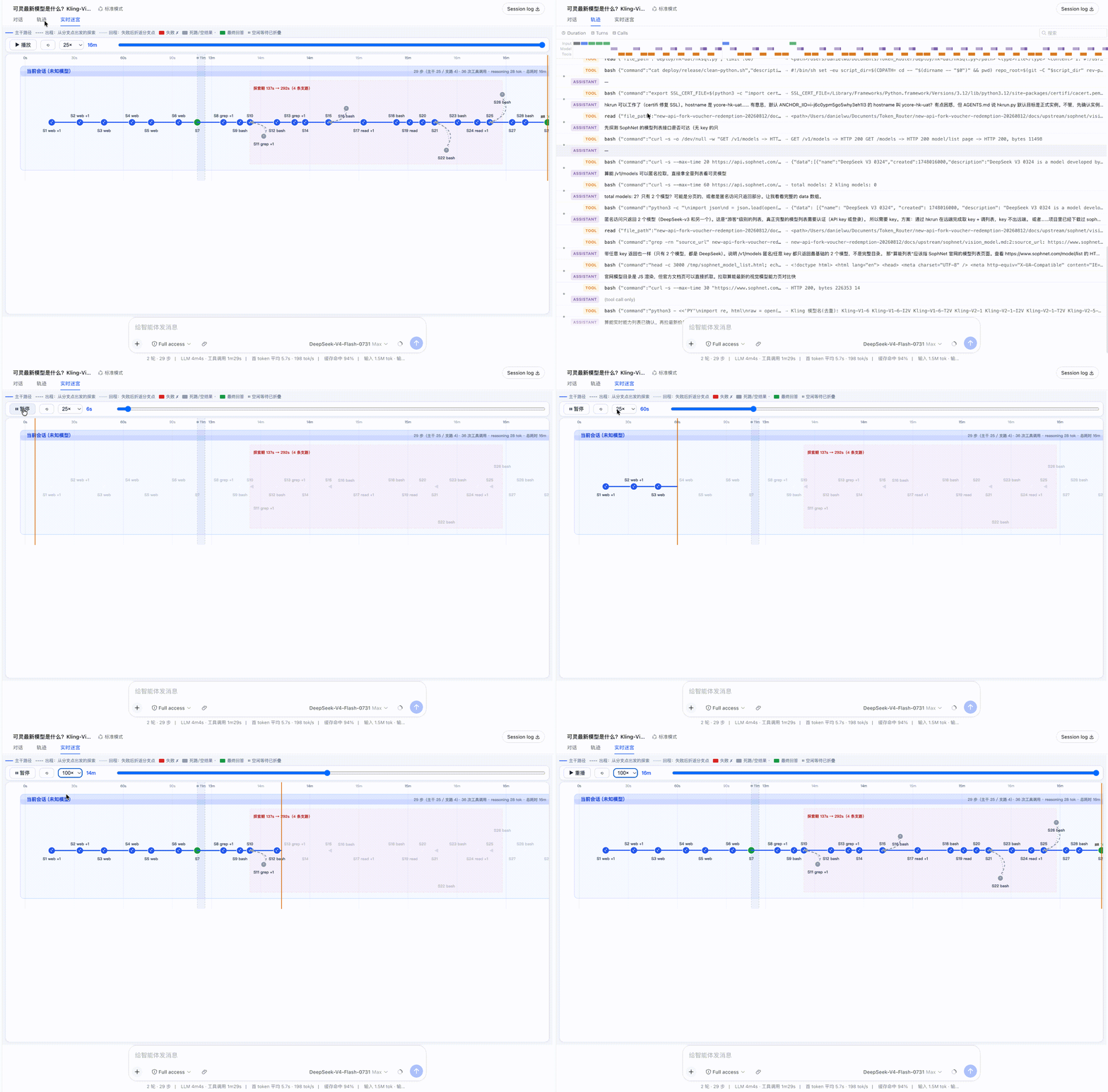
- Real-time maze tab grows with current session execution; once tool results are finalized, branches immediately appear
- Every step has failure/miss/blind retry judgment basis (error flags → strong failure features → weak failure features → four-layer rules by tool category + behavioral retry clusters)
- Node length = actual step time consumption (parallel tool calls displayed as waterfall rows), hover preview, click to open detail panel, scroll to zoom, drag to pan
- One-click export current view as SVG or 2x PNG (light background), input box supports "show only failures/retry" + filter by tool + full-text search
Technical Implementation
- Language: TypeScript + embedded JS (maze page runs in self-contained HTML)
- Key Dependencies: @deepseek-ai/cordis, @deepseek-ai/dsh-client-runtime, @deepseek-ai/dsh-client-ui-slots, fzstd
- Architecture: Cordis client plugin, injects via slots: sidebar.footer.action (entry button) + shell.overlay (upload comparison overlay) + conversation.view (real-time maze tab); visualization page renders in sandbox iframe (srcDoc), host only syncs theme and language via postMessage
- Entry Files: src/client/index.ts (plugin assembly), src/client/maze-upload.html (self-contained visualization page, built with tsdown injecting fzstd UMD)
Use Cases
Debugging why a DSH agent produces a certain result—reviewing the main path and branches of an entire run; when the same task runs with different models/parameters, overlay two logs to compare which step diverged; monitoring the real-time tab while running, seeing which step the current model hesitates at, which step fails, and whether it's repeating the same thing.
Prerequisites and Compatibility
| Dependency | Minimum Version | Notes |
|---|---|---|
| DSH | 0.1.0-rc.6+ | Fully validated on rc.6, acceptance tested on rc.8, peer range covers rc.6 to current rc line |
| Node | ^22.19.0 or >=24.0.0 | engines declaration |
| Platform | Cross-platform | Pure frontend plugin, no native module dependencies |
| Native Modules | None | zstd uses JS soft decompression in browser (fzstd) or native DecompressionStream |
Installation
dsh plugin --profile web add github:lamost423/dsh-trace-compare
Configuration
This plugin requires no additional configuration.
FAQ
Q: Do I need to do any configuration after installation?
A: No. After installing and restarting dsh web, a "Trace Compare" entry automatically appears at the bottom of the sidebar, and each conversation view gains a "Real-time Maze" tab—ready to use immediately.
Q: Will uploaded session log content be sent to the server?
A: No. The entire parsing, judgment, and visualization run in the iframe srcDoc sandbox, completed on the browser side; log content never reaches the host or any external service.
Q: What session log formats are supported?
A: Supports plain text .jsonl, and .jsonl.zstd from the ~/.dsh/sessions/ directory. zstd is decompressed directly in the browser (native DecompressionStream preferred, otherwise uses built-in fzstd soft decompression). Format is identified by content, filename is arbitrary (e.g., macOS copy "session.jsonl 2" can be selected directly).
Q: Can the real-time maze tab view earlier historical steps?
A: No. The real-time tab only draws events currently loaded in the conversation window; steps outside the window are discarded and marked "另有 N 步更早历史未加载" (N more earlier steps not loaded). To view complete history, download the log and use "Trace Compare" to upload.
Q: What theme is the exported image?
A: Fixed light background, regardless of whether the current page is light or dark—specifically designed for sharing scenarios.
Q: Will sub-agent tasks appear in the maze?
A: They will on hosts with the ability to load sub-session history in the background (SessionFace.open). The official 0.1.0-rc.6 to rc.8 lacks this capability; the plugin automatically silently hides them without error, other functions are unaffected.
Q: What method is used to determine if a tool call succeeded or failed?
A: Pure rules, no LLM—four-layer judgment: error flags → strong failure features (beginning and ending windows) → weak failure features (first 300 characters only) → classification by tool. Paired with behavioral blind retry cluster detection (similar parameters + cluster contains failure). Thresholds are all in src/client/verdict.js under VERDICT_RULES.
Q: How to uninstall?
A: Remove via dsh's standard plugin command, then restart dsh web.
Learning Curve
Beginner — install and use immediately, no configuration; upload or switch to the real-time tab to see results immediately.
Known Issues and Limitations
- Sub-agent branches depend on host's
SessionFace.opencapability, official rc.6–rc.8 lacks this, plugin automatically silently degrades to not display sub-agents (CHANGELOG.md:5-15 / src/client/subagent-lanes.ts:84-102) - Real-time tab only draws events currently loaded in conversation window; steps outside window are discarded and marked "⏮ 另有 N 步更早历史未加载" (README.md:43-46)
- When uploading 2 session logs, maximum 2 supported; more than 2 are rejected by the page (maze-upload.html:275)
- Exported SVG/PNG has fixed light background, unrelated to current page theme (README.md:35)
- "Round alignment line" in dual-session comparison only connects rounds that exist on both sides; rounds unique to one side are displayed as "—" in branch inventory (README.md:32-34)
中文 | English





DeepSeek Harness 的执行轨迹可视化插件:把智能体真实的探索过程画出来——它坚持推进的主干、失败或扑空的支路、以及折返点,全部落在同一根时间轴上。
两个入口,一套视觉语言:
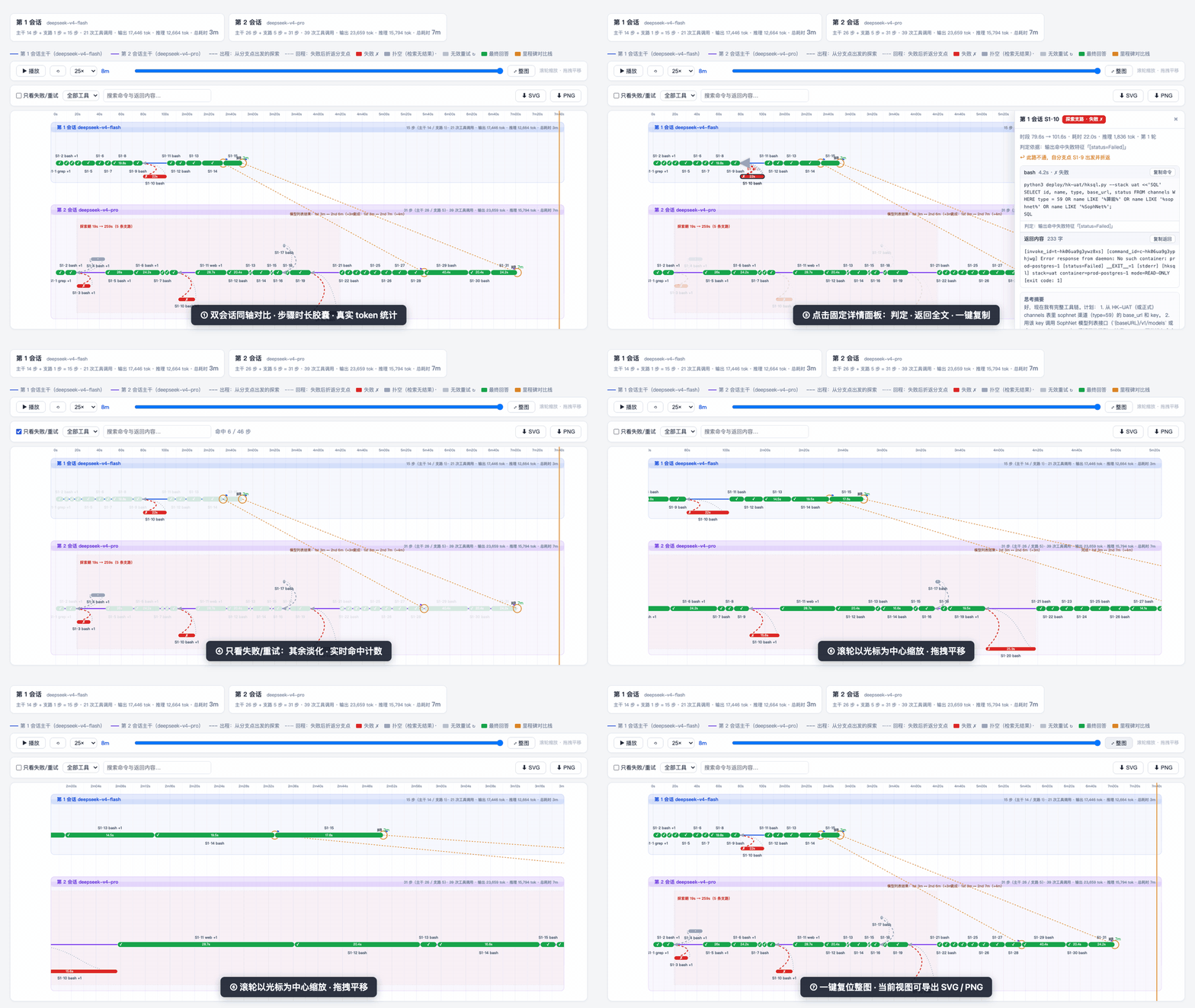
- Trace 对比(侧边栏入口):上传 1 个 session log 看单次运行的迷宫,或上传 2 个做同轴对比(比如同一任务 flash 与 pro 的跑法差异)——按轮次自动对齐两边的回答节点,可手动钉锚点,并按轮次盘点两边的支路差额。
- 实时迷宫(会话内页签):同一张迷宫图随当前会话执行实时生长;某一步的工具结果一旦落定,支路立刻显现。
迷宫画的是什么
- 实线:主干路径——工具调用成功推进的步骤和回答节点。
- 时长胶囊条:每个步骤画成从开始到结束的圆角条,判定色填充——3 分钟的 bash 和 0.2 秒的 read 一眼可辨;条够宽时耗时直接写在条内。
- 并行工具分行(v0.3.2 起):一步内 ≥2 次工具调用时,每次调用画成胶囊条下方的细小条(瀑布惯例),按各自真实起止摆位、按各自判定上色——一眼看出并行发的几个调用里哪个拖了时间、哪个失败;悬停单条看该次调用的命令/返回/判定依据,泳道高度随最大并行数自适应。支路节点保持「+N」标签(其空间为固定泳道格,详情面板已列全)。
- 虚线弧:探索支路——工具失败(红 ✗)、检索扑空(灰 ·)或盲目重试(灰 ↻)的步骤,以及折返回分支点的回程线。
- 子代理支路(v0.4.0 起,实时页签):模型派生的 dsh 子代理会话画成主干上分出的聚合支路节点——挂靠在派生它的那一步、与父会话共享时间轴,节点子条是子代理全部已判定的工具调用,运行中的子代理实时生长并标注「仍在运行」;悬停/详情面板显示「子代理支路」身份与派生汇回关系,点击跳回主对话中的派生位置。只认真正的任务子代理(
origin: 'subagent'),手动分支和 side-chat 侧聊不入图。依赖宿主「后台加载子会话历史」的能力,官方 rc 线暂缺该能力时自动静默隐藏。 - 悬停任意节点或弧线快速预览;点击在右侧打开固定详情面板——完整命令与返回内容(各带复制按钮,返回内容保留前 5000 字)、耗时、判定、思考摘要,Esc 或 × 关闭。
- 缩放导航:滚轮以光标为中心横向缩放,拖拽平移,双击空白处或「⤢ 整图」按钮复位;轴刻度随缩放窗口自动加密(最细到 1 秒)。
- 跳转对话(仅实时页签):详情面板里点「在对话中定位此步骤」,宿主切回对话页并滚动高亮对应的工具行。行太老、超出对话已加载窗口时退化为只切页签。
- 搜索与过滤:工具行提供「只看失败/重试」开关、按工具类型过滤、命令与返回内容全文搜索(含 5000 字面板全文);不命中的节点与支路淡化到 15% 透明度,实时显示命中步数。实时模式下过滤状态在重建后自动还原。
- 轮次对齐线(双会话对比,v0.3.0 起):每一轮的回答节点自动互连一条对比线,标注两边本轮各自的耗时(该轮起点 → 回答完成;轮与轮之间等用户输入的空闲不计入,v0.5.1 起)、耗时差和该轮支路数差(如「第 3 轮耗时:1st 4m ↔ 2nd 6m(Δ2m)· 支路 4↔0」)。只连两边都有的轮次——旧版从特定任务总结的「模型列表结果」正则里程碑已退役。
- 手动锚点(双会话对比):「🔗 加锚点」后在两条泳道各点一个节点,钉一条带时差标注的对比线;点线删除,Esc 取消选点。适合钉住两边语义等价但轮次错位的时刻。
- 支路盘点(双会话对比):「📋 支路盘点」打开按轮次的差额表——每轮两边各自的支路步数、墙钟耗时、类别构成(✗ 失败 / ↻ 无效重试 / · 扑空)和差额结论(如「第 2 会话多耗 48.4s」);点一行缩放到该轮并只保留该轮支路,其余淡化。一边有这轮另一边没有显示「—」,缺席本身就是信号。
- 导出:一键导出当前视图(含缩放窗口与过滤淡化状态)为 SVG 或 2x PNG,样式已内联、拿去即用;无论页面当前是浅色还是暗色,导出固定浅色底(分享场景)。
- 界面双语(v0.5.0 起):整页 UI(上传区、图例、泳道统计、对齐线、支路盘点、悬停卡、详情面板、错误提示)中英双语,嵌入宿主时实时跟随 dsh 的语言设置切换,独立打开按浏览器语言兜底;判定依据是结构化键值、按当前语言渲染,切语言不用重新上传。
- 主题跟随(v0.3.1 起):页面随宿主 dsh 的明暗主题自动切换(宿主组件监听
body[data-ds-dark-theme]并 postMessage 进 iframe);独立打开时按系统偏好。 - 紧凑页头(v0.3.1 起):出数据后说明文字隐藏、上传区收成细条、泳道统计卡隐藏(同信息已画在泳道带内)、图例压成一行——迷宫拿走绝大部分视口。
- 播放功能最高 300× 回放整次运行。
时间轴的诚实规则:
- 空闲折叠:超过 60 秒没有任何步骤/工具活动的区间(比如两轮对话之间你在思考)压缩成一条带
⏸标注的细缝,标明省略了多久;活动段内的刻度仍显示真实墙钟时间。 - 步骤标识带轮次(
S15·47),多轮会话的支路不会挂错节点。 - 步骤时长、工具耗时、总耗时都保持墙钟真值,只有轴被压缩。
- 实时页签只画对话已加载的事件窗口(v0.2.3 起诚实标注):窗口边缘残留的更早轮次步骤会被丢弃并标注「⏮ 另有 N 步更早历史未加载」,不再钳到 0 秒堆在左边缘、虚高统计;要看全会话用「Session log 下载 → 上传对比」。
- token 是真值(v0.2.2 起):推理/输出 token 读自 session log 里
assistant/message的usage(此前的「reasoning N tok」数的是流式段数,不是 token)。日志没有 usage 时标签诚实回退为「推理 N 段(日志未报 token 用量)」——中转站日志常缺推理 token 字段,与原厂日志并排时单位不同,标签自带原因(v0.5.1 起)。
判定的诚实规则(v0.2.1 起):
- 不按输出长度判定。单工具判定三层:错误标志(isError)→ 失败特征 → 按工具分类(写入类无错误即成功;检索类空结果才算扑空;bash 及未知工具有输出即成功)。
- 失败特征只扫开头与末尾窗口(v0.2.3 起):真实报错要么从开头开始说、要么是追加在末尾的 stderr 段;而 git log / 读文件 / 转储日志时引用的报错字样悬在长文本中部——判定刻意不看那里,避免把「病历」当「发病」(实测案例:提交信息里写 "upstream returns HTTP 400" 被误判为该命令失败)。两条渲染链路统一在未截断的全文上判定。
- 盲目重试是行为学判定:时间序上连续的「同工具 + 参数相似」调用簇、且簇内至少一次失败,才标为无效重试——借鉴 AgentLens 对 SWE-agent 轨迹「浪费」的确定性检测。
- 每个判定都带依据文本,悬停 tooltip 和详情面板可见(如「同一操作连续重试 4 次(其中 1 次失败),判为盲目重试」)。
- 全部阈值与分类在
src/client/verdict.js的VERDICT_RULES常量里,可按项目语料调整;页面与实时两条渲染链路共用这一份实现(构建期注入)。
支持的 session log 格式
按文件内容识别格式,文件名任意(macOS 复制出的「session.jsonl 2」也能直接选):
- 纯文本
.jsonl(session 格式 v0 事件流) ~/.dsh/sessions/下原样的.jsonl.zstd——浏览器端直接解压(原生DecompressionStream('zstd')可用时优先,否则用内置的 fzstd)
安装
兼容性:已对官方 0.1.0-rc.6(构建 + 全量测试)与 rc.8(插槽/类型核对 + 实机验收)验证;peer 范围覆盖 rc.6 到当前 rc 线,且随官方每个新 rc 版本跟进复验。
npm install --global @deepseek-ai/[email protected]
dsh plugin --profile web add dsh-trace-compare
dsh web
想钉住特定版本?每个 Release 也附 tgz:dsh plugin --profile web add https://github.com/lamost423/dsh-trace-compare/releases/download/v0.5.2/dsh-trace-compare-0.5.2.tgz
从源码安装:
git clone https://github.com/lamost423/dsh-trace-compare.git
cd dsh-trace-compare
corepack enable
pnpm install
pnpm build
dsh plugin --profile web add .
dsh web
重启 dsh web 后,侧边栏底部出现「Trace 对比」入口,每个会话视图多一个「实时迷宫」页签。
近期迭代
当前的支路判定逻辑(v0.2.1 引入,v0.2.3 收敛)
一步进主干还是支路,由这一步最坏的工具判定决定:成功/回答留在主干,失败(红 ✗)、扑空(灰 ·)、无效重试(灰 ↻)整步进支路。单个工具调用按四层判:
- 错误标志:工具结果带 isError → 失败;
- 强失败特征:
[status=Failed]、__EXIT__=非零、[stderr]后跟 Error / Traceback 这类包装器硬标记 → 失败。只扫输出开头 300 与末尾 1000 字符——真失败要么开头就报、要么是追加在末尾的 stderr 段,长文本中部引用的报错(git log 提交信息、源码字符串)不算; - 弱失败特征:Traceback、command not found、Permission denied、No such file、HTTP 4xx/5xx、行首 Error: → 失败,只扫开头 300 字符;
- 按工具分类:写入类(write / edit / todo_write)无错误即成功,不看输出长短;检索类(grep / read / web_search)开头命中空结果特征才算扑空;bash 及未知工具空输出才算扑空。
在此之上叠一层行为学检测:时间序上连续的「同工具 + 参数相似度 ≥0.6」调用簇、且簇内至少一次失败,非失败成员改判无效重试(借鉴 AgentLens 对 SWE-agent 轨迹浪费的确定性检测;不加失败约束会把「连续编辑同一文件」冤枉进去)。刻意不用输出长度、不调用 LLM;每个判定都带依据文本,悬停与详情面板可见。全部阈值在 src/client/verdict.js 的 VERDICT_RULES,可按语料调整;上传页与实时页签共用这一份实现。以上规则由四个真实会话(共 871 步)校准,依据与误报案例见下面各版本说明。
v0.5.1 · 对比可读性三连修(2026-08-21)
短会话被时间轴 460 秒的固定下限压扁在左侧、对齐标注挤成一团——下限退役,加载即贴合内容跨度。轮次对齐线的耗时口径从「会话开始算起的累计墙钟」改为「本轮耗时」(该轮起点 → 回答完成):两轮之间等用户输入的空闲不再污染两次运行的速度对比。无 usage 真值时的推理量标签改为自解释的「推理 N 段(日志未报 token 用量)」。Release
v0.5.0 · 界面双语:中英跟随宿主语言(2026-08-20)
此前页面文案硬编码中文,英文用户只能对着猜。现在整页 UI 走 zh/en 双字典:嵌入宿主时由宿主组件经 postMessage 推送 dsh 的语言设置并实时跟随(照主题跟随的通道模式),独立打开时按浏览器语言兜底。判定依据从成品文案改为语言无关的结构化键值 {k, p}(verdict.js 只产键值,展示端集中渲染),切语言即时生效、已加载的会话数据无需重新解析。仓库 README 同步调换为中文默认、英文在 README.en.md。Release
v0.4.0 · 子代理执行折入实时迷宫(2026-08-20)
模型调 subagent 工具派生的任务,此前在迷宫里只是一根不透明的长条;现在每个 dsh 子代理会话折成主干上分出的聚合支路节点——挂靠在派生它的那一步、共享父会话时间轴,节点子条是子代理全部已判定的工具调用(参数/返回/判定齐全),运行中的实时生长,点击跳回派生位置。入图有纪律:仅 origin: 'subagent' 且非临时会话(手动「在新对话分支」与 side-chat 不算),已结束且活动完全早于可见窗口的陈旧子代理按父会话 preWindow 同口径丢弃。子代理身份贯穿节点标签、悬停卡与详情面板("⤴ 由主干 SN 派生的子代理任务,完成后结果汇回主干"),不再套用失败探索的「此路不通」文案,内部步号不再暴露。依赖宿主 SessionFace.open(后台加载子会话历史)——官方 rc.6–rc.8 暂无此能力,插件自动静默降级、其余功能不受影响。Release

v0.3.3 · 修复:实时模式新步骤开始时全图消失(2026-08-19)
实时页签每当新步骤开始(模型推理中、还没发出第一个工具调用),整张迷宫会瞬间变透明,等工具调用出现才恢复。根因是 tier1 时代的老 bug:非回答节点的标签代码无保护地取 tools[0].name,而 in-flight 步在纯推理阶段 tools 为空——TypeError 把 build() 拦腰打断,所有元素停在初始透明度 0。零工具节点跳过工具标签即修复;用合成推送序列(推理期 → 工具出现 → 结算)实测全程可见。Release
v0.3.2 · 并行工具调用分行(2026-08-19)
此前一步内多次工具调用折叠成「bash +1」标签,各调用的起止/耗时/判定全被吃掉。现在每次调用画成步骤胶囊条下方的细小条(瀑布惯例):按真实起止摆位、判定色填充、悬停看单次调用详情(命令/返回/依据);泳道高度按该泳道最大并行数自适应(computeLayout 的 parH 区),下方支路弧线自动让位。实测语料:16 轮长会话有 36 个并行步、最大并行 5。Release

v0.3.1 · 主题跟随 + 紧凑页头(2026-08-19)
页面调色板收敛为 CSS 变量单真相源(SVG 属性色经 readPalette 同源取值),随宿主 dsh 明暗主题自动切换:宿主组件监听 body[data-ds-dark-theme](rc.6 的 ThemePresenter 机制)postMessage 进沙箱 iframe,独立打开按系统偏好兜底;导出 SVG/PNG 固定浅色底,暗色下导出前临时切浅色重建、导完切回。同版收紧页头布局:出数据后说明隐藏、上传区收成 31px 细条、泳道统计卡隐藏、图例压成一行,迷宫可视区多出约 250px。顺手把「无效重试」灰从 #b6c0d2 提到 #8892a6,浅色下一眼可辨。Release

v0.3.0 · 对比语义升级:轮次对齐 + 手动锚点 + 支路盘点(2026-08-19)
双会话对比从「一条正则里程碑」升级成一套按轮次的对比语义:每轮回答节点自动互连对齐线(标注时差与该轮支路数差);「🔗 加锚点」手动钉任意两节点的对比线;「📋 支路盘点」按轮次列两边支路的步数/墙钟耗时/类别构成与差额,点行缩放该轮并高亮该轮支路。语料特定的「模型列表结果」正则里程碑(MODEL_LIKE/mlist)随之退役——判定 v2 清理长度阈值后的最后一个硬编码启发式。「探索期」红色背景带一并退役:它取首末支路的最小最大跨度,16 轮长会话上罩住 99% 的时间轴而支路真实耗时只占 1%,是虚假信号。Release

v0.2.3 · 实时窗口诚实化 + 判定防引用误报(2026-08-19)
实时页签只画对话已加载的事件窗口——窗口边缘漏进来的更早轮次步骤此前被钳到 0 秒堆在左边缘,一份 18 小时、533 步的会话被画成「3 轮 · 39 步 · 71.4s」。现在陈旧步被丢弃并标注「⏮ 另有 N 步更早历史未加载」。同时修掉判定的「引用误报」:git log 提交信息里写的 "upstream returns HTTP 400"、源码里的 "not found in" 不再被当成命令自己失败——失败特征只扫输出开头与末尾窗口,且两条渲染链路统一在未截断全文上判定。Release

v0.2.2 · token 真值、搜索过滤、导出(2026-08-19)
「reasoning N tok」此前数的是流式段数——本版从 session log 的 assistant/message 读真实 usage,步级与泳道级都显示真 token(无 usage 时诚实回退「N 段推理」)。新增过滤工具行(只看失败/重试、按工具过滤、全文搜索,未命中淡化到 15%)与当前视图的 SVG / 2x PNG 导出。Release

v0.2.1 · 判定可解释:告别长度阈值(2026-08-19)
「结果 <60 字符 = 死路」退役,换成上面的分层判定 + 行为学重试检测。动机:校准发现长度阈值冤枉了 338 次调用中的 56 次(todo_write 的 57 字符成功确认全军覆没),反而漏掉藏在长输出里的真失败。判定逻辑同时收敛为单一真相源 src/client/verdict.js(上传页构建期注入、实时链路直接引入),镜像漂移永久消除。Release
开发
pnpm install
pnpm check   # 类型检查 + vitest + 构建
上传/可视化页面是一份自包含的 HTML(src/client/maze-upload.html),运行在沙箱化的 <iframe srcDoc> 里;解析与渲染全部在浏览器端完成,上传的日志内容不会到达宿主。
许可
MIT。见 NOTICE——本项目包含源自 DeepSeek Harness 的衍生代码。
Read the usage guide →
Install steps, key points, FAQ and compatibility for this plugin — auto-derived from indexed fields.
Listing badge

[](https://deepseek-plugin.org/plugins/lamost423/dsh-trace-compare)Paste this markdown into your GitHub README to link back to this listing. The badge only states the listing — not a security endorsement.