Adds LM Studio/Ollama local models, Codex sub-agents, file/terminal/web workspace, and keyboard shortcuts with desktop theme synchronization to DeepSeek Harness.

- Language
- TypeScript
- License
- Apache-2.0
- Branch
- main
Install
$ dsh plugin --profile web add github:lencx/Minke#path:packages/harness-overlayRun the command above in your terminal to install this plugin via the dsh CLI. You can switch Profile in the top-right corner. New to dsh? Read the beginner tutorial
Install via your agent
Install the DeepSeek Harness plugin lencx/Minke/packages/harness-overlay for me: review the repository at https://github.com/lencx/Minke first, then run the install command and verify the plugin loads successfully.
Paste this instruction to the DSH Web GUI assistant — it will install and verify for you.
One-Line Positioning
Minke's product customization layer, injected into the DeepSeek Harness runtime, adding to Harness: local model bridging (LM Studio, Ollama), executable one-off sub-task Codex sub-agents, file/terminal/web sidebar workspaces, configurable hotkeys, and desktop capabilities such as theme and locale synchronization.
Core Capabilities
- Through pluggable lifecycle, discovers and manages LM Studio and Ollama local model services; instances started by the user are not reconfigured by the plugin
- Hosts OpenAI-compatible loopback endpoints (
openAICompatible), allowing users to manually connect any self-deployed compatible service - Registers Codex CLI sub-agents (
provider: codex), delegating self-contained tasks tocodex app-server --stdio - Provides Files, Terminal, and Web三类可分屏的工作区标签页 (right/bottom containers, tabs can be dragged and configured)
- Provides desktop hotkey system (8 actions by default, can be rebound and persisted to desktop)
- Synchronizes locale (zh/en) and theme switching with host Harness, making native desktop windows follow the theme
- After installation, intercepts developer onboarding hints, bypassing "developer beta" prompts from the user view
Technical Implementation
- Language: TypeScript + React 19 (JSX on client side, no rendering logic on host side)
- Key Dependencies:
@deepseek-ai/cordis(plugin framework),@deepseek-ai/schemastery(config schema and defaults),@deepseek-ai/dsh-llm-pi-ai(LLM adapter layer, mounted after local services are ready),@deepseek-ai/dsh-subprocess(CLI parsing and subprocess spawn),xterm+codemirror+shiki(terminal/file/web tab rendering) - Architecture Pattern: Through
cordis.patch.ymlwith host for 4 combined slots:minke-overlay(product layer),model-runtime(local service lifecycle),subagent-codex(Codex delegation),tool-subagent-codex(Harness tool wrapper); host-sidesrc/index.tsis placeholder only, browser-side implementation insrc/client/*, local service processes cleaned via Cordis effect on disposal - Entry Files:
packages/harness-overlay/src/model-runtime/index.ts(host-side main),packages/harness-overlay/src/client/index.tsx(client-side bootstrap)
Use Cases
People who use DeepSeek Harness daily for coding/writing, want LM Studio or Ollama already running, want to open several file tabs directly in the same window, and switch between terminals and web pages. Also suitable for those who want to integrate Codex CLI one-off tasks into the main Harness conversation without leaving the current session to switch terminals.
Prerequisites & Compatibility
| Dependency | Minimum Version | Description |
|---|---|---|
| Node | >=24 | Determined by host Minke desktop runtime; build scripts and Electron Forge also require this baseline |
| Platform | macOS / Windows / Linux | Cross-platform desktop, macOS multi-titlebar/translucent surface adaptation; Win/Linux use platform default styles |
| Native Modules | None | Overlay package doesn't directly declare native dependencies; runtime provided by host Electron |
| DSH Version | Not Declared | Overlay doesn't write peerDependencies in package.json, controlled by host Minke desktop |
Installation
dsh plugin --profile web add github:lencx/Minke/packages/harness-overlay
Configuration Options
| Config | Type | Description | Default |
|---|---|---|---|
lmStudio.enabled | Boolean | Whether to enable LM Studio row (only affects UI visibility, not service availability) | false |
lmStudio.lifecycle | Enum | external=discover only / ensure-running=pull up if missing / managed=reclaim instances started by this plugin on uninstall | external |
lmStudio.command | String | Explicit lms executable path (overrides auto-discovery) | "" |
lmStudio.baseURL | String | Explicit loopback Base URL; port 0 will be rejected | "" (auto-use http://127.0.0.1:1234/v1) |
lmStudio.apiKeyEnv | String (credential-ref) | Auth environment variable name for LM Studio | LM_API_TOKEN |
lmStudio.defaultContextWindow | Integer | Default context window for LM Studio models | 32768 |
lmStudio.defaultMaxTokens | Integer | Default max_tokens for LM Studio models | 8192 |
ollama.enabled | Boolean | Whether to enable Ollama row | false |
ollama.lifecycle | Enum | external / ensure-running (managed not supported) | external |
ollama.command | String | Explicit ollama executable path | "" |
ollama.baseURL | String | Explicit loopback Base URL; port 0 will be rejected | "" (auto-use http://127.0.0.1:11434/v1) |
ollama.defaultContextWindow | Integer | Default context window for Ollama models | 32768 |
ollama.defaultMaxTokens | Integer | Default max_tokens for Ollama models | 8192 |
openAICompatible[] | Array | Manually connected OpenAI-compatible loopback endpoints, including id / displayName / baseURL / apiKeyEnv | [] |
| Hotkeys | action → binding | Persisted via IPC; max 128 entries, rule Mod(+Ctrl/Meta/Alt)?(+Shift)?+Key (see shortcut-contract.ts) | palette.open=Mod+K、settings.open=Mod+,、session.new=Mod+N、session.back=Mod+[、session.forward=Mod+]、sidebar.toggle=Mod+S、tabs.toggle=Mod+P、tabs.bottom.toggle=Mod+B |
Env Variable MINKE_LM_STUDIO_ENABLED | 0/1 | When set together with MINKE_LM_STUDIO_COMMAND, changes lifecycle to ensure-running | Not set |
Env Variable MINKE_OLLAMA_ENABLED | 0/1 | When set together with MINKE_OLLAMA_COMMAND, changes lifecycle to ensure-running | Not set |
Env Variable LM_STUDIO_BASE_URL | URL | Override LM Studio Base URL | Not set |
Env Variable OLLAMA_BASE_URL | URL | Override Ollama Base URL | Not set |
FAQ
Q: Is this only tied to the desktop version, or can it also be installed separately as a DSH plugin?
A: Both work. The Minke desktop app already has this overlay layer composed internally; the code installed by users via dsh plugin ... add is the same code that gets injected into the Harness runtime. The source-of-truth behavior is the same contract (cordis.patch.yml).
Q: I configured a local model but don't see my model in the list. What should I do?
A: Model discovery uses the OpenAI-compatible /v1/models endpoint; LM Studio additionally merges v1 loaded-instance metadata. For LM Studio, first confirm lms server status --json can get the port; if the service is started externally and the current context window doesn't match the configuration, the overlay won't reload it for the user and will prompt to manually reload in the LM Studio client.
Q: What happens after Ollama starts?
A: When the overlay spawns the ollama serve process that follows the host Minke process lifecycle, it will be terminated when this plugin is disposed (different from LM Studio's one-shot CLI behavior; LM Studio's CLI doesn't stop the shared service).
Q: Is the Codex sub-agent the same as "Codex IDE login"?
A: No. The overlay just hands tasks to the codex app-server that's already in PATH via stdio; account login, model selection, and sandbox/workspace settings are handled by Codex CLI itself—the overlay doesn't hold these states.
Q: What data on my computer will the desktop version change?
A: Desktop preferences are stored in ~/.minke; browser session data stays local; DSH's own session and model settings are still managed by Harness's default path. This overlay doesn't write to settings.yaml.
Q: Where do I switch between Chinese and English after installation?
A: It's synchronized with host Harness's locale/change, no need to switch separately in this overlay; native desktop window title bar, menus, etc. will follow the same locale snapshot.
Q: How do I verify my LM Studio service pairing is successful?
A: Find the LM Studio row on the Models page, confirm there's no "CLI not found" hint (meaning lms was auto-discovered), and the model list is not empty; if started externally and the current loaded instance context doesn't match the configured value, you'll get error codes like LM_STUDIO_CONTEXT_TOO_SMALL / LM_STUDIO_CONTEXT_PREPARATION_FAILED.
Difficulty Level
Advanced — requires understanding of local model service ports/context windows, executable file discovery, and DSH's multi-fiber/plugin injection model. Regular users can use it well through the GUI path only, but troubleshooting requires understanding these concepts.
Known Issues & Limitations
- LM Studio's
lmsis a one-shot CLI; even with lifecycle set tomanaged, it leaves an independent shared service process after starting. The overlay only cleans up in the subset where it "confirmed this instance was started" (see README lines 35-43 for details) - When LM Studio instance is started externally, the overlay won't reload it for the user—it will error and require the user to reload in the LM Studio client (error codes like
LM_STUDIO_CONTEXT_PREPARATION_FAILED) - When loopback Base URL is explicitly passed, port 0 is rejected (must be a reachable port)
- DSH version isn't declared as a peer in
package.json, the available range is determined by host Minke desktop runtime; behavior when overlay is installed separately depends on the host's version contract - Minke is still in active iteration—features, packaging, and local data schema may change (see repository root
README.mdlines 24-25) - Current pre-release builds on macOS don't have Apple notarization, need
xattr -dr com.apple.quarantineto remove (this is a host Minke desktop packaging issue, not in overlay scope)

Minke
A native desktop workspace for DeepSeek Harness
English · 简体中文




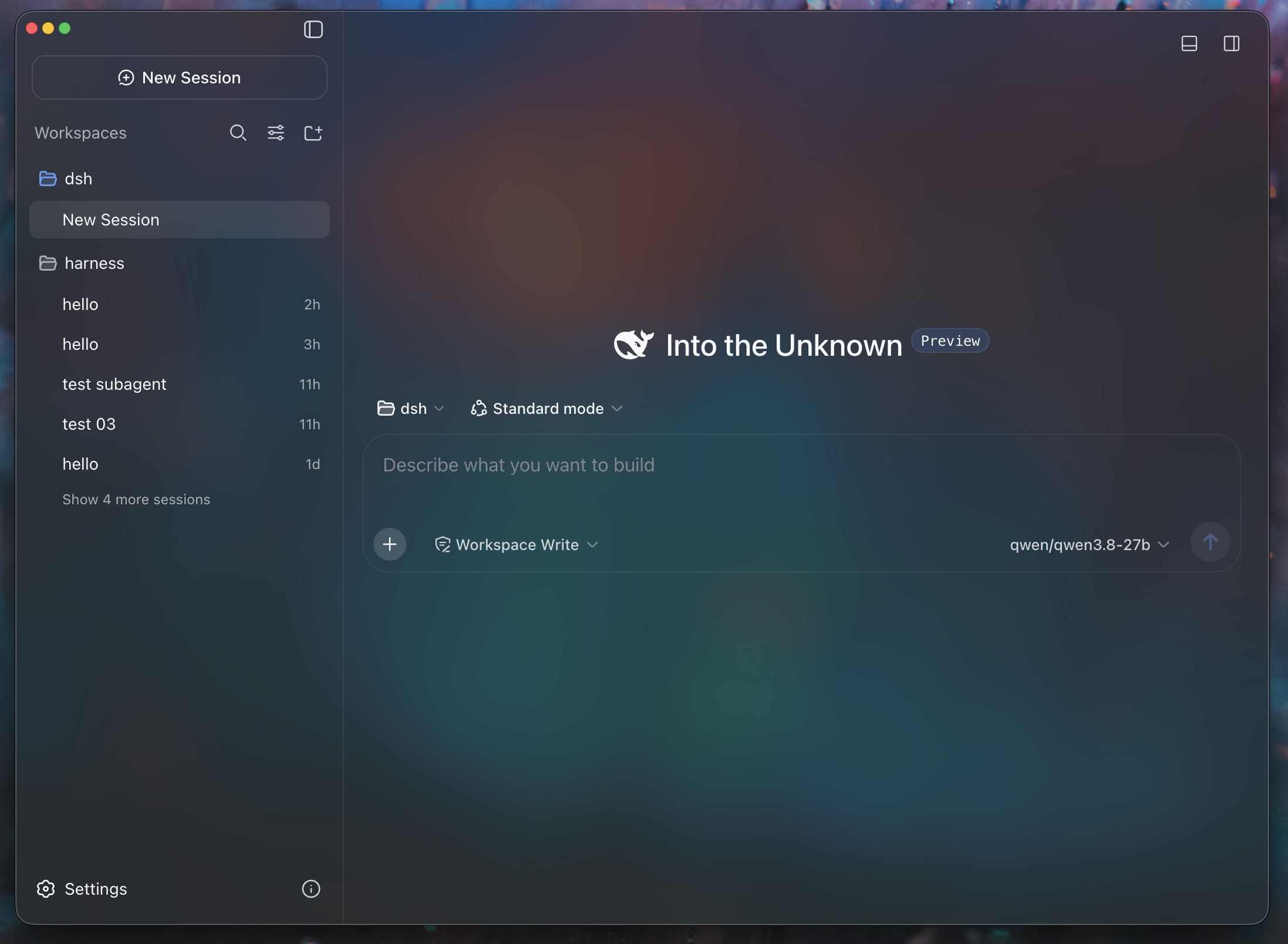
Minke brings DeepSeek Harness to the desktop as a focused, local-first workspace for agentic work. Conversations, project files, terminals, web tools, and native desktop actions stay within reach—without fragmenting your workflow across multiple apps.
[!IMPORTANT] Minke is under active development. Features, packaging, and the local data schema may change as the project evolves. Minke is an independent community project, not an official DeepSeek product.
Highlights
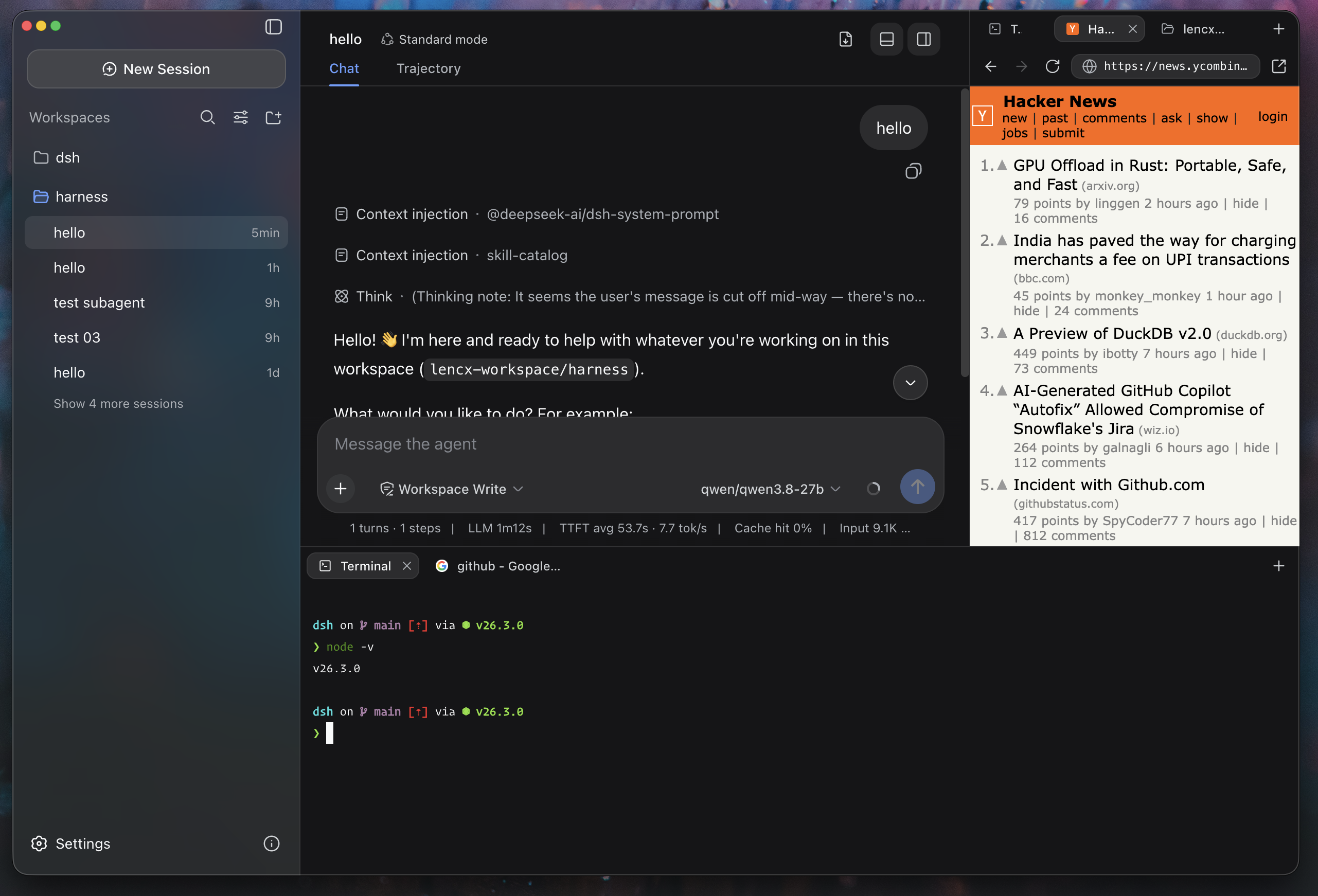
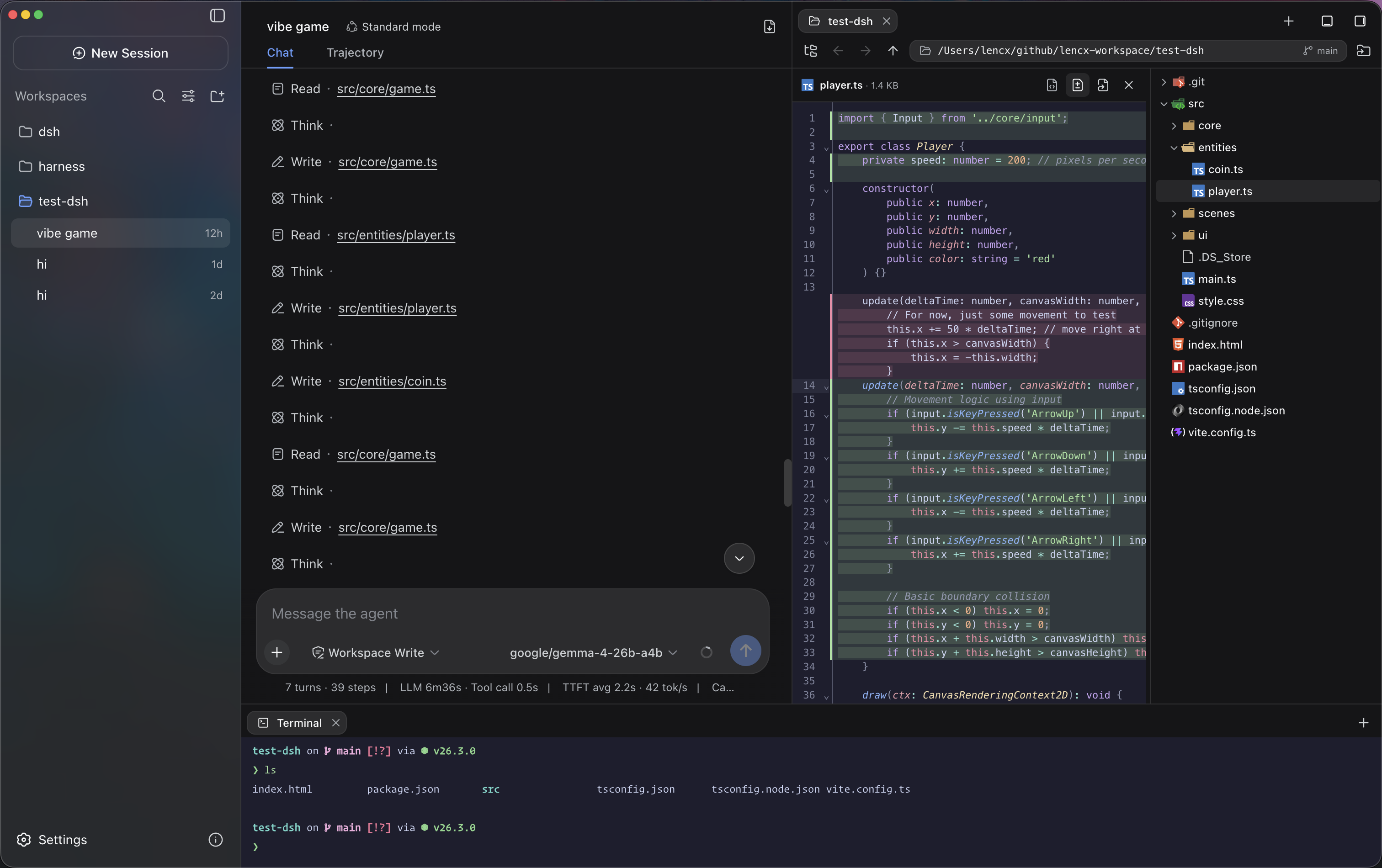
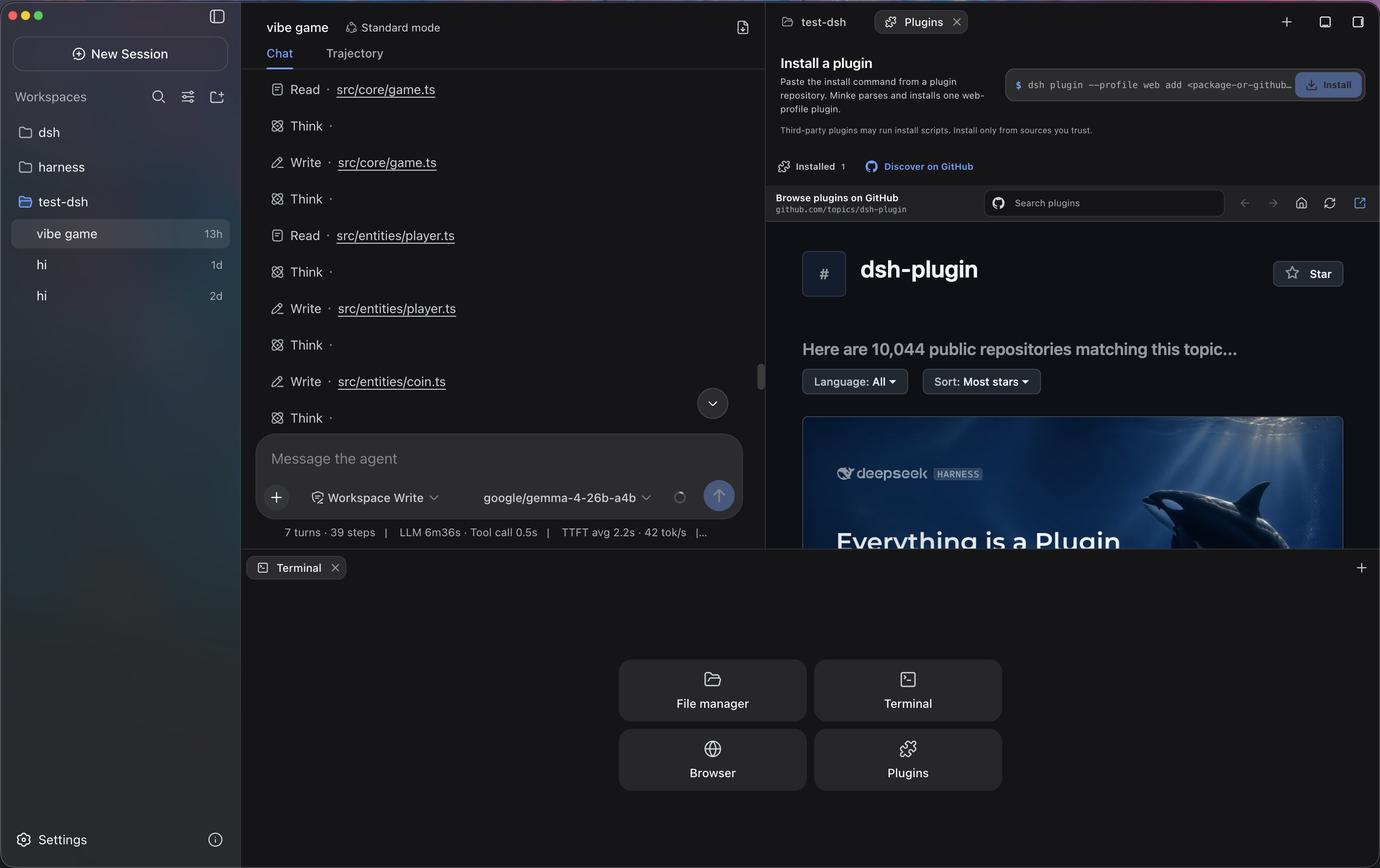
- More than a chat window — Independent right and bottom Tabs keep Files, Terminal, Browser, Plugins, and Session details beside the active conversation. The Plugins workspace supports GitHub discovery, installation, status checks, repair, and removal. Files supports navigation, syntax-highlighted previews, editing, and diffs, while Terminal connects to a real PTY on the Minke host.
- A real remote workspace, not screen sharing — Minke Host projects supported desktop capabilities into a responsive Web UI. From a phone or tablet you can continue conversations, start agent tasks, work with project files, and use the host terminal without streaming pixels from the Electron window.
- Installable as a PWA — Open Minke through a secure HTTPS address and install it to the home screen for a standalone, app-like experience. The PWA provides branded launch surfaces and early connection feedback, while deliberately avoiding caches of authenticated workspace traffic.
- Private remote access — Minke can expose its responsive workspace through an application-managed remote route. The currently validated path is Tailscale Serve over HTTPS; Tailscale Direct IP and Cloudflare Access integrations remain experimental until they complete release testing.
- Local model integrations — Minke can discover and connect to LM Studio, Ollama, and other loopback OpenAI-compatible services. Optional lifecycle management can start supported local runtimes when needed without taking ownership of services that were already running.
- Fast keyboard-driven control — The global Command Palette (
Mod+K), configurable shortcuts, native menus, Session history navigation, log export, synchronized themes, and English and Chinese UI keep common actions close at hand. - Safe, recoverable data migration — Choose where Minke stores its data, then preview and merge existing Sessions, plugins, and settings. Minke deduplicates identical files, preserves conflicts and source directories, and switches only after the restart-time migration succeeds; starting with a clean data home remains an option.
- Local-first and cross-platform — Application state and browser session data stay on your machine under the Minke data boundary. Automated releases target macOS, Windows, and Linux, including a portable AppImage.
 |  |
 |  |
Mobile access with Tailscale
Minke remote access is a responsive Web client backed by Minke Host—not a video stream or touch-controlled projection of the Electron window. From a phone you can continue conversations, start agent tasks, manage project files, and use a terminal that runs on the Minke computer.
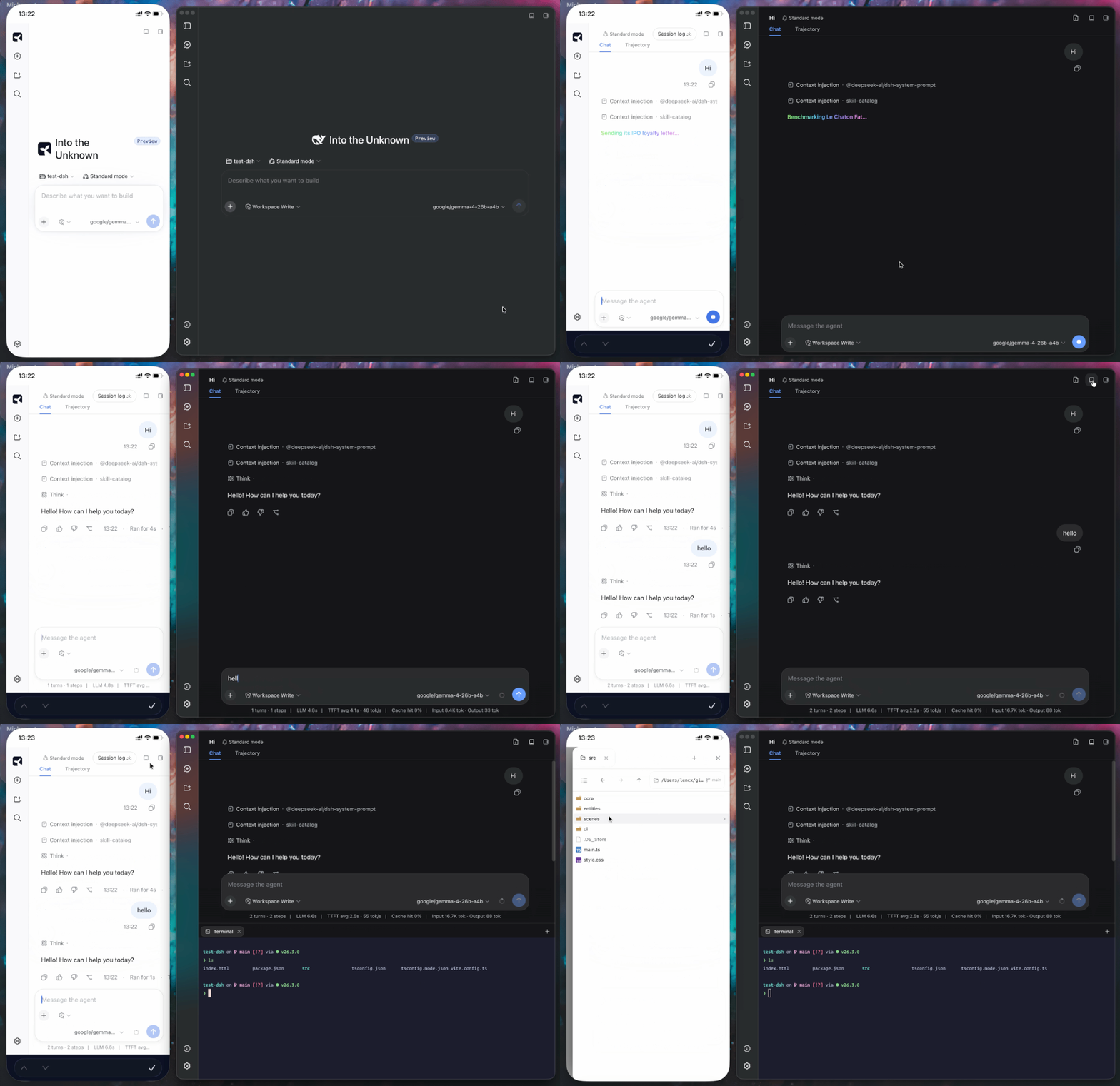
[!NOTE] The only remote route currently tested end to end is Tailscale Serve over HTTPS. Tailscale Direct IP and Cloudflare Access are available as advanced integrations, but have not yet completed release validation and should be treated as experimental.
Minke can expose its Web UI privately through Tailscale Serve. It keeps Harness on the local loopback address, does not bind it to the LAN, and does not enable the public Tailscale Funnel.
- Install Tailscale on the Minke computer and the phone, sign both into the same tailnet, and confirm the computer is connected.
- In Minke, open Settings → Remote access, enable Access through Tailscale, then choose Restart Minke when prompted.
- Return to Remote access, then copy or open the displayed
https://…ts.netaddress on the phone.
Install as a PWA
Open the Tailscale HTTPS address, choose Install Minke in the sidebar, and accept the browser install prompt. On iPhone or iPad, use Share → Add to Home Screen. The installed app launches in standalone mode; when connectivity is poor it shows connection or offline feedback instead of silently presenting cached workspace content.
Minke owns a foreground Serve session and stops it when the app exits. The remote page can start agent tasks and use local tools already authorized in Minke, so grant tailnet access only to people you trust.
Installation
Download Minke only from the official GitHub Releases page. The links below always point to the latest stable release.
| Platform | Architecture | Package |
|---|---|---|
| macOS | Apple Silicon (arm64) | Download .dmg |
| macOS | Intel (x64) | Download .dmg |
| Windows | x64 | Download .exe |
| Linux | Debian / Ubuntu (x64) | Download .deb |
| Linux | Fedora / RHEL (x64) | Download .rpm |
| Linux | Any distro (portable) | Download .AppImage |
Release checksums are available in SHA256SUMS.
macOS
-
Download the
.dmgfile and open it. -
Drag
Minke.appinto the Applications folder. -
Current pre-release builds are not notarized. Open Terminal and remove the quarantine attribute from the installed app:
xattr -dr com.apple.quarantine "/Applications/Minke.app" -
Open Minke from the Applications folder.
[!CAUTION] Removing the quarantine attribute bypasses a macOS security check. Run this command only for
Minke.appdownloaded from the official Releases page, and never replace the path with a broad directory. You can also try Apple's Open Anyway flow under System Settings → Privacy & Security.
Windows
- Download the Windows x64
.exeinstaller. - Run the installer and follow the on-screen instructions.
- Windows may show a reputation-based warning for a new pre-release build. Continue only after confirming that the installer came from the official Minke Releases page.
Linux
Download the package for your distribution, then open it with your graphical package manager or install it from a terminal.
Debian / Ubuntu:
sudo apt install "/path/to/minke-package.deb"
Fedora / RHEL:
sudo dnf install "/path/to/minke-package.rpm"
Replace the example path with the downloaded package path.
Build from source
Build Minke on the same operating system and CPU architecture as the package you need. The build produces distributables for the current host under out/make; this project does not support cross-platform packaging from a single host.
Prerequisites:
- Git with submodule support. The
vendor/deepseek-harnesssubmodule must be checked out. - Node.js 24 or newer.
- pnpm 11.7.0, with the repository dependencies installed before running the scripts.
- macOS: an Apple Silicon or Intel Mac with Xcode Command Line Tools. The
.dmgtarget can only be built on macOS. - Windows: a Windows x64 host. Visual Studio 2022 Build Tools with the Desktop development with C++ workload may be needed if a native dependency must be compiled locally.
- Linux: a Linux x64 host with a native build toolchain,
fakeroot,dpkg, and eitherrpmorrpm-build.
On a fresh checkout, first install the repository dependencies, then prepare the Harness runtime:
pnpm run harness:stage
This command installs and builds the pinned DeepSeek Harness source, then stages the reusable desktop runtime under runtime/host. Run it after a fresh checkout, or whenever the pinned Harness source or runtime contract changes.
Start Minke in development mode with:
pnpm start
pnpm start refreshes the Minke integration in the prepared runtime and launches the development app.
Create the distributable package for the current platform with:
pnpm make
pnpm make performs a full runtime stage again before writing the platform package to out/make.
中国用户
如在使用中遇到问题,或希望进一步交流 Minke,可关注公众号「浮之静」,发送 dsh 获取进群码。也欢迎大家贡献 PR 或分享给更多朋友,您的每一次 Star 都是对开源项目的巨大支持,感恩。

Read the usage guide →
Install steps, key points, FAQ and compatibility for this plugin — auto-derived from indexed fields.
Listing badge

[](https://deepseek-plugin.org/plugins/lencx/Minke/packages/harness-overlay)Paste this markdown into your GitHub README to link back to this listing. The badge only states the listing — not a security endorsement.