Add a recall button next to DSH user messages to roll back both project files and conversation history to their state before that message was sent, using shadow git repository snapshots with official sessions.fork.

- Language
- JavaScript
- License
- MIT
- Branch
- main
Install
$ dsh plugin --profile web add dsh-recall-pluginRun the command above in your terminal to install this plugin via the dsh CLI. You can switch Profile in the top-right corner. New to dsh? Read the beginner tutorial
Install via your agent
Install the DeepSeek Harness plugin limbo947/dsh-recall-plugin for me: review the repository at https://github.com/limbo947/dsh-recall-plugin first, then run the install command and verify the plugin loads successfully.
Paste this instruction to the DSH Web GUI assistant — it will install and verify for you.
One-Line Description
Add a "↶ Recall" button next to user message bubbles in DSH. One click rolls back workspace files and conversation history to before that message was sent; uses an independent shadow repository for file snapshots and official sessions.fork for session branching.
Core Features
- One-click rollback of entire interaction: When recalling, restore project files, switch conversation to before that message, open new session, archive original session for easy retrieval
- Dual-track file and conversation sync: First show file list confirmation (modify/restore/delete), only proceed after confirmation, won't blindly overwrite
- Shadow git repository storage: Snapshots stored in independent git repository under home (
~/.dsh/dsh-recall-snapshots/<workspace path SHA256>/), won't pollute project's own git, won't touch staging area or uncommitted changes - Auto disk maintenance: Run
git gcin background when 50 snapshots accumulate or every 24 hours; automatically clean up all snapshots of a session when session logs are completely deleted - Visual exclude configuration: Edit
exclude.txtin settings (gitignore syntax), takes effect immediately for next snapshot/rollback; files over 100MB automatically skipped - Tree snapshot management: Settings page displays workspace → session → snapshot three-level tree for viewing and deletion, leaves show corresponding message content summary
Technical Implementation
- Language: Pure JavaScript (ESM, zero build steps)
- Key Dependencies:
@deepseek-ai/cordis(plugin framework),@deepseek-ai/dsh-shell(PowerShell/bash executor),@deepseek-ai/dsh-session-query(cold log reading),@deepseek-ai/dsh-sandbox-policy(session cwd parsing) - Architecture Pattern: Dual bundle persistent mount: Host half injected via
cordis.patch.ymlinsert line, registers/api/recall/*HTTP API for frontend calls; Client half injected viadsh.clientbundle, registersconversation.chat.noderender slot (priority -1, negative decrement retry to -3) to render user message bubbles - Entry Files:
lib/index.js(Host main entry, 791 lines assembling domain modules) /lib/client.js(Client main entry, UI injection 927 lines) /lib/snapshots.js(snapshot domain: captureSnapshot / diffFor / rollbackFor / resolveCutSeq)
Use Cases
When AI modifies many files and you realize the direction is wrong, you want to return to the state "before this message" and continue—traditional approach is manual git stash or discard changes, but you still need to preserve conversation context to continue. This plugin makes "recall to a certain message" a single click operation, with files and conversation both returning to that moment. Suitable for long iteration with DSH, frequent changes, and frequent rollback scenarios.
Prerequisites & Compatibility
| Dependency | Min Version | Description |
|---|---|---|
| DSH | >= 0.1.0-rc.8 | peerDependencies: cordis ^4.0.1, dsh-session/shell/sandbox-policy/session-query/host-webserver/client-web-react all ^0.1.0-rc.8 |
| Node.js | >= 20 | engines.node declared |
| git | any executable version | When not detected, recall button won't appear, page top shows gitMissing, DSH itself unaffected |
| Windows | PowerShell 5.1 / 7 | Script templates use [Text.Encoding]::UTF8 and SHA256::Create() compatible with PS 5.1 |
| Linux / macOS | bash 3.2+ | POSIX and pwsh templates with same export name, single selection in store.js by platform |
| React | ^18.2.0 | Client half's peerDependency |
Installation
dsh plugin --profile web add github:limbo947/dsh-recall-plugin
After installation, need to restart DSH process (dsh web foreground restart or pm2 restart <your-dsh-process-name>), then hard refresh browser page (Ctrl+Shift+R)—hover over any user message sent after plugin enablement, "↶" appears next to copy button to confirm it's active.
Configuration Options
| Config | Type | Description | Default |
|---|---|---|---|
gcSnaps | integer | Number of snapshots to accumulate before triggering git gc | 50 |
gcHours | integer | Hours since last gc to trigger (whichever comes first) | 24 |
maxFileBytes | integer (bytes) | Files exceeding this size won't be snapshotted or rolled back | 104857600 (100MB) |
baseExcludes | string array | Base exclude list (gitignore syntax), applies to all projects | ['.git', 'node_modules/', '.dsh-recall-snapshots/'] |
DSH_RECALL_GC_SNAPS (env var) | integer | Same as gcSnaps, but takes priority over config above | — |
DSH_RECALL_GC_HOURS (env var) | integer | Same as gcHours, but takes priority over config above | — |
Write configuration in profile's cordis.patch.yml and restate the entire line by id: recall to override defaults; for the most common use case "add one exclude", directly edit exclude.txt or settings page, no restart needed.
FAQ
Q: What if the recall button doesn't appear?
A: 90% chance DSH process wasn't restarted, or git CLI not in PATH. After restart, hard refresh the page (Ctrl+Shift+R). Messages sent before plugin enablement also have no snapshots, button won't appear on those.
Q: Will recall pollute project's own git repository?
A: No. Snapshots stored in independent shadow git repository under home (~/.dsh/dsh-recall-snapshots/<SHA256>/git/), won't touch your project's .git, staging area, or uncommitted changes; .git, node_modules already excluded by default.
Q: Where is data stored when home is not writable?
A: Falls back to project .dsh-recall-snapshots/, page top shows one-time fallback notice. Once home becomes available again, data automatically migrates back to home before next snapshot and cleans up project directory.
Q: How to exclude a directory from snapshots?
A: Settings → Plugins → Recall Settings visually edit exclude.txt (gitignore syntax, one per line), takes effect immediately for next snapshot/rollback; or directly edit dsh-recall-snapshots/exclude.txt under home. When rolling back to an earlier snapshot, files not yet excluded at that time will still be restored (that's the semantics of rollback).
Q: Are snapshots kept after session deletion?
A: Archiving doesn't count as deletion—original session snapshots archived by recall feature are kept retrievable; only when session logs truly disappear from disk will next maintenance automatically clean up all snapshots of that session. Judgment is conservative: cold sessions won't be accidentally cleared.
Q: Can I recover if I recall wrongly?
A: Yes. Before rollback, a safety snapshot tag snap-pre-rollback-<timestamp> is automatically created (not in index list, but visible with git tag -l), restore from that tag—this is the fallback for "recall is the only irreversible operation".
Q: Will snapshot data be deleted after uninstall?
A: No. dsh plugin --profile web remove only removes dependencies and mount layer, snapshot data remains in home under dsh-recall-snapshots/; to completely clear, manually delete that directory.
Learning Curve
Beginner — install and restart to use, no mandatory config; advanced usage (custom excludes, manual gc, batch delete snapshots) all visually completed in settings page.
Known Issues & Limitations
- Only snapshot messages sent after enablement: Historical messages before plugin enablement have no snapshots, naturally don't show recall button (README.md:44)
- First message only rolls back files: First user message in session can't rollback conversation because
sessions.forkneeds earlier turn boundary (README.md:45) - macOS not yet tested on real machine: Scripts written for bash 3.2 compatibility, but currently only full流程 tested on Windows real machine and WSL2 Ubuntu (bash 5.3 + git 2.53) (README.md:46)
- Nested git repositories not snapshotted: Sub-repos with
.gitin workspace subdirectories (gitlinks) don't participate in snapshot and rollback (scripts.pwsh.js:36-39) - Filename with newline/TAB parsing abnormal: Diff list parsing split by TAB, extreme cases with these characters in filename will be misparsed (scripts.pwsh.js:191-194)
- Recall requires git CLI: Without git installed, recall button doesn't appear, page top shows one-time hint, DSH itself unaffected (README.md:52)
- Fork doesn't inherit original title increment: Already fixed—multiple recalls of new session won't become "xxx 2/3/4" (CHANGELOG.md:84-85, lib v1.2.2)
撤回一条消息,项目文件也一起回去。
简体中文 | English





在任意一条你发过的消息下方,点「↶ 撤回」,工作区文件和对话历史一起回到那条消息发出之前的状态。
界面预览
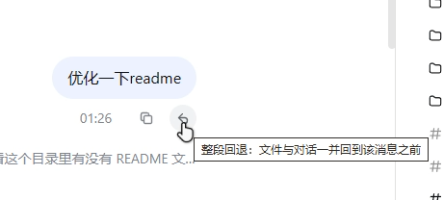
- 撤回按钮位置
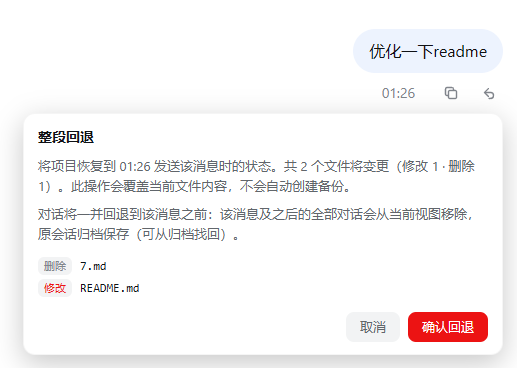
| 确认面板 · 变更文件清单 | 确认面板 · 变更文件清单 |
|---|---|
 | 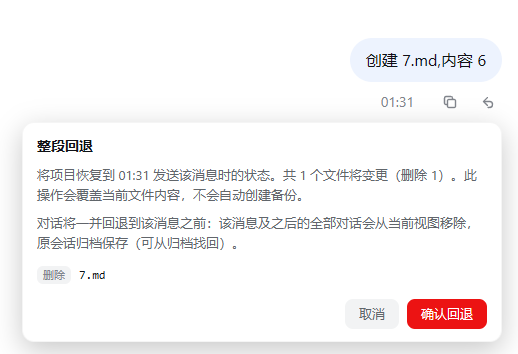 |
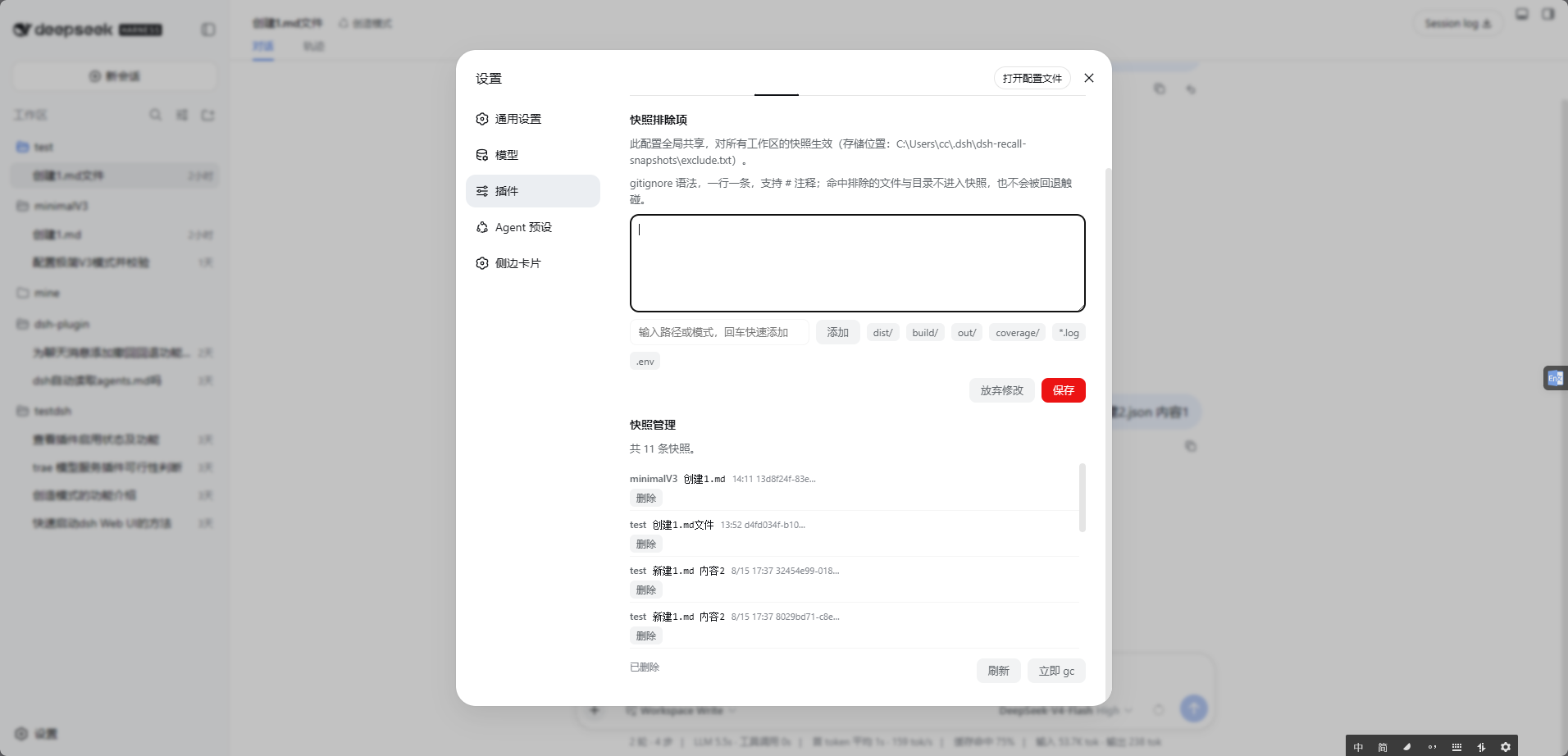
- 设置页 · 排除项快速编辑(设置 → 插件 → 撤回设置)
功能亮点
- 文件 + 对话,整段回退:撤回的不只是聊天记录,agent 改过的文件也一并回到原样。
- 不碰你项目自己的 git:快照存在独立的影子 git 仓库里,你的分支、暂存区、未提交改动统统不受影响;
.git、node_modules自动排除。 - 项目目录保持干净:快照始终存在
$DSH_HOME下,不会往项目里塞任何东西;与会话的沙箱权限无关(workspace-write / read-only 会话照常快照与回退),仅当 home 本身不可写(如指到只读盘)才降级到项目内.dsh-recall-snapshots(降级时页面会提示),home 恢复后自动迁走、清理干净。 - 可以反复后悔:只要会话还在(含归档),快照全量保留、不修剪。撤回一次后还能再撤到更早;撤回时被覆盖的文件也一直找得回来。会话被彻底删除后,其快照随之清理(见下)。
- 先看清单再动手:点撤回先弹出将变更的文件清单(修改 / 恢复 / 删除),确认后才执行,不会稀里糊涂覆盖。
- 磁盘友好:快照走 git delta 压缩,是增量不是整目录拷贝;超过 100MB 的大文件自动跳过。
- 自动瘦身:定期
git gc把 loose 对象压 pack(无损,快照一个不丢);会话删除后其快照自动清理;构建产物可经exclude.txt全局排除(见下)。 - 树形快照管理:设置页「快照管理」按 工作区 → 会话 → 快照 三级树形展示,支持展开/折叠;每级右侧都有删除按钮,可一次清掉整个工作区或某个会话的全部快照,叶子显示该快照对应的消息内容摘要,方便定位“这条消息当时改了什么”。
已知限制
- 快照在消息发送时创建,插件启用前的历史消息没有快照,不显示撤回按钮。
- 会话第一条用户消息无法回退对话(仅文件回退),因为 fork 需要更早的 turn 边界。
- 支持 Windows(PowerShell 5.1/7 + git CLI)与 Linux/macOS(bash + git CLI)。Windows 真机验证充分;Linux 已在 WSL2(Ubuntu 26.04,bash 5.3 + git 2.53)实测全流程(含中文路径、home 降级、会话清理、gc);macOS 侧脚本按 bash 3.2 兼容编写,尚未真机实测。
- 工作区内嵌套的其他 git 仓库(子目录自带
.git)不进快照,其内容不参与回退。 - 文件名含换行/TAB 的极端情形不在 diff 清单的解析能力内(概率可忽略)。
安装
前置:git CLI(未装时撤回按钮不出现,页面顶部会提示安装 git,不影响 DSH 运行);Windows 上 PowerShell 5.1 / 7 均可,Linux/macOS 需 bash + git;DSH 0.1.0-rc.x(依赖版本见 peerDependencies)。
- DSH 官方插件命令:安装并自动挂载进 web profile
dsh plugin --profile web add dsh-recall-plugin
- 也可从 git 直接安装(纯 JS 无构建,免 prepare/allowBuilds):
dsh plugin --profile web add github:limbo947/dsh-recall-plugin
- 重启 DSH 进程(按你的启动方式,任选其一)
dsh web                      # 前台直接启动
pm2 restart <你的dsh进程名>   # 若用 pm2 托管
验证:重启后硬刷新页面(Ctrl+Shift+R),悬停任意一条插件启用后发送的用户消息——复制按钮旁出现「↶」即生效。没有按钮?九成是没重启 DSH 进程,或 git CLI 不在 PATH 里。
卸载:dsh plugin --profile web remove dsh-recall-plugin(同时移除依赖与挂载层),快照数据保留在 home 下 dsh-recall-snapshots/,想彻底清除手动删掉该目录即可。
使用
- 鼠标悬停任意插件启用后发送的用户消息,复制按钮左侧出现「↶ 撤回」。
- 点击 → 确认面板展示将变更的文件清单(修改 / 恢复 / 删除)。
- 点「确认回退」→ 文件恢复到该消息发送前的状态;视图切到新会话(该消息及之后的对话移除),原会话归档、随时可找回。
快照维护与清理
快照全量保留的前提是「会话还有找回的可能」,在此之上插件自动控制磁盘占用,无需手动管理:
-
定期 gc:每 50 条快照或距上次 gc 24 小时(先到先触发),后台执行
git gc把 loose 对象压成 pack。无损操作——所有快照照常可回退。节流凭据写在影子仓库内的gc.stamp,重启 DSH 不会重置周期。两个阈值可用环境变量覆盖(一般用不着):DSH_RECALL_GC_SNAPS、DSH_RECALL_GC_HOURS。 -
会话删除联动清理:会话被彻底删除(会话日志从磁盘消失)后,下一次维护会自动删除该会话的全部快照并释放空间。归档不算删除——撤回功能自己归档的原会话日志仍在,快照保留、随时可从归档找回。判断很保守:会话只是冷着(不内存里)不会误清;无法核实日志状态时宁可不清。
-
用户自定义排除:打开「设置 → 插件 → 撤回设置」即可可视化编辑快照排除项——输入路径或模式回车即加、常用模式(
dist/、*.log、.env等)一键追加、保存后下一次快照/回退立即生效,无需重启。也可以直接编辑 home 下dsh-recall-snapshots/exclude.txt(即$DSH_HOME/dsh-recall-snapshots/exclude.txt,未设置时为~/.dsh/dsh-recall-snapshots/exclude.txt;UTF-8),一行一条 gitignore 风格 pattern(#开头为注释),两种方式编辑的是同一份配置,例如:# 构建产物不进快照 dist/ build/ *.log对所有项目生效(home 不可写而降级到项目内存储时,该工作区有独立的排除配置,设置页会分卡片列出)。新增排除只影响之后的快照;回退到更早的快照时,当时尚未排除的文件仍会被恢复(回到当时的状态,这正是回退语义)。想彻底清掉已进快照的目录,可手动删除 home 下
dsh-recall-snapshots/里对应项目的哈希目录。设置页标签依赖 DSH 自带设置页(0.1.0-rc.x 均含);极旧版本看不到该标签时,直接编辑文件等效。 -
树形快照管理:打开「设置 → 插件 → 撤回设置 → 快照管理」可看到树形列表——第一级工作区(文件夹名)、第二级会话(会话标题)、第三级快照(时间 + 消息内容摘要,悬停看完整内容)。工作区和会话节点可展开/折叠;每一级右侧都有删除按钮,删除前会二次确认。删除工作区 = 清掉该工作区全部快照;删除会话 = 清掉该工作区内该会话的全部快照;删除叶子 = 只删那一条快照。
工作原理
每条用户消息发送时(agent 动文件之前),工作区被快照进一个独立的影子 git 仓库;撤回时用 git archive 恢复文件、通过 DSH 官方 sessions.fork 机制把会话切到该消息之前。二进制安全,全程不触碰项目自身的 git 状态。
-
快照存储:home 下
dsh-recall-snapshots/<SHA256(项目绝对路径)>/,内含影子 git 仓库(git/,tag 名为snap-<消息ID>)与索引文件index.json(消息 ID → 快照时间 / 会话)。Windows 上脚本走 PowerShell,Linux/macOS 走 bash(按ctx.shell平台层挂载的执行器自动分叉)。 -
想直接翻历史快照:
git --git-dir="<store>\git\.git" tag -l
git --git-dir="<store>\git\.git" ls-tree -r --name-only snap-<消息ID>
本地开发(无需发布)
# 把包目录放进 web profile 的 node_modules,并登记到 bundles
$pkg = '<你的仓库克隆路径>\dsh-recall-plugin'
$profile = "$env:USERPROFILE\.dsh\profiles\web"
Copy-Item -Recurse -Force $pkg "$profile\node_modules\dsh-recall-plugin"
# 手动编辑 $profile\package.json:
#   dependencies 加 "dsh-recall-plugin": "1.0.0"
#   dsh.profile.bundles 加 "dsh-recall-plugin"
# 然后重启 DSH 并硬刷新页面
License
MIT
Read the usage guide →
Install steps, key points, FAQ and compatibility for this plugin — auto-derived from indexed fields.
Listing badge

[](https://deepseek-plugin.org/plugins/limbo947/dsh-recall-plugin)Paste this markdown into your GitHub README to link back to this listing. The badge only states the listing — not a security endorsement.