Provides undo/rollback system for DSH: automatic snapshots of configuration and plugin code; one-click undo via WebUI, chat interface, and offline tool; safe mode and GUI fallback when DSH fails to start.

- Language
- JavaScript
- License
- MIT
- Branch
- master
Install
$ dsh plugin --profile web add github:lire1131/dsh-undo-pluginRun the command above in your terminal to install this plugin via the dsh CLI. You can switch Profile in the top-right corner. New to dsh? Read the beginner tutorial
Install via your agent
Install the DeepSeek Harness plugin lire1131/dsh-undo-plugin for me: review the repository at https://github.com/lire1131/dsh-undo-plugin first, then run the install command and verify the plugin loads successfully.
Paste this instruction to the DSH Web GUI assistant — it will install and verify for you.
One-Line Description
DSH's undo/rollback system that automatically archives configuration or plugin code changes, allowing one-click restoration after overwrite — covering three typical incidents: "accidentally modified a config", "plugin code broken", and "DSH won't start".
Core Features
- Auto-archive config and plugin code: Debounced automatic snapshot generation after monitored config files or plugin code changes, no manual operation needed
- Three-entry one-click undo/redo/rollback: WebUI header button, global shortcuts (Ctrl+Alt+Z / Ctrl+Alt+Y), tell AI to "undo last step", CLI/offline tool all available
- Plugin code can also be rolled back: Even incidents like breaking plugin source code (e.g., a plugin throwing
yield* is not async iterable) can be restored with one click, no reinstallation needed - Key redaction and local restore:
.env/.credentials.yamlin snapshots automatically have values replaced with placeholders, real values stored in local vault; exported ZIP won't leak keys; complete restore during local rollback - One-click safe mode: When DSH won't start, disable all user plugins except the undo plugin, guaranteed to start; switchable via panel or CLI
- Crash attribution: Last abnormal exit shows "last normal snapshot" id and one-click rollback button directly in WebUI/GUI banner, no guessing needed
- Cross-machine migration: Snapshots can be exported/imported as ZIP; auto pre-check missing plugins before restore with clear "may not start" warnings
- Offline rescue tool: PowerShell CLI + GUI window in plugin directory, usable even when DSH is completely down
Technical Implementation
- Language: JavaScript (ESM, Node 20+) + client-side React (bundled into client.js) + offline PowerShell
- Key Dependencies:
@deepseek-ai/dsh-tools(providesdefineTool, multi-anchor resolution viacreateRequire),node:fs(snapshots and watching),node:child_process(pnpm dependency sync, PowerShell file picker, ZIP export),react/react/jsx-runtime(WebUI header button + panel) - Architecture Pattern: Cordis dual-sided plugin — host side registers 8
defineTooland/api/undo/*REST routes and starts fs.watch debounced archiving; client side injects session header button slot, settings slot, and global keyboard events; offline PowerShell tools sharelib/spec.jsonand snapshot repository with Node - Entry Files:
lib/index.js(host apply / tool registration / REST),lib/client.js(React components and slot injection),cordis.patch.yml(plugin mount declaration)
Use Cases
- User changed plugin code or config and worries about breaking it — default auto-archive on, undo is just one sentence
- After installing/updating/uninstalling a plugin, DSH throws errors or behaves abnormally — rollback to pre-change state using snapshot, no need to manually find config files to rollback
- A plugin caused DSH to not start at all — use GUI/CLI tool to enter safe mode to guarantee startup, then decide to restore or debug
Prerequisites and Compatibility
| Dependency | Minimum Version | Notes |
|---|---|---|
| DSH | No explicit lower bound (package.json engines.dsh: >=0.0.1) | Runtime needs @deepseek-ai/dsh-tools to be resolvable |
| Node.js | >=20.0.0 | Both host and client rely on ESM, Node built-in modules, and PowerShell 5.1/7 |
| Platform | Windows / macOS / Linux | Core snapshot logic is cross-platform; offline CLI/GUI tools and one-click desktop shortcuts mainly target Windows (runPnative uses cmd.exe, .ps1/.bat tools) |
| Native Modules | None | Only depends on Node built-in modules and pnpm (for dependency sync) |
Installation
dsh plugin --profile web add github:lire1131/dsh-undo-plugin
Configuration Options
| Config | Type | Description | Default |
|---|---|---|---|
| Auto-save toggle | Boolean | When off, plugin changes no longer trigger auto-snapshot; manual save and undo still available | On |
| Debounce window | Milliseconds | How long to wait after change before writing snapshot once; too small causes frequent archiving, too large loses granularity | 1500 |
| Auto snapshot retention count | Integer | Maximum number of auto-archived snapshots to keep; auto-cleanup when exceeded | 20 |
| Undo snapshot retention count | Integer | How many "current state" snapshots (pre-restore) to keep | 10 |
| Auto cleanup | Boolean | Whether to auto-delete old auto/undo snapshots when exceeding limit; when off, keep all | On |
| Manual snapshot directory | Path | Where manually saved snapshots are stored; separate from default path for external drives | $DSH_HOME/undo-snapshots/manual |
| Auto snapshot directory | Path | Where auto-archives and undo snapshots are stored | $DSH_HOME/undo-snapshots/auto |
| Sensitive mode | redacted / plaintext | In redacted (default), .env / .credentials.yaml values are replaced with placeholders in snapshots; plaintext mode matches old version behavior | redacted |
| Plugin directory whitelist | List | If empty, auto-discover junctions under node_modules; if explicitly filled, only snapshot specified directories | Empty |
Configuration can be modified in WebUI settings page under "Snapshots" section, or directly edit $DSH_HOME/undo/settings.json; also supports programmatic injection via config block in cordis.patch.yml.
FAQ
Q: Don't see header button after installing plugin?
A: Need to restart DSH after installation to enter steady state. Installs to web profile by default, please confirm the command includes dsh plugin --profile web add .... On multi-profile machines, if using other profiles, need to change --profile to the corresponding name, otherwise the plugin will write to the web profile's snapshot repository.
Q: Will undo lose current changes?
A: No. Before each undo/rollback, the current state is first saved as an "undo snapshot" (pre-restore), so even if undo was wrong, you can use redo to restore; only after redo is consumed by new real changes will it be auto-cleaned.
Q: Will snapshots contain keys? Is exporting ZIP safe?
A: Default sensitive mode is "redacted": .env / .credentials.yaml values are replaced with placeholders in snapshots, real values stored in local vault (only restored during local rollback). Exported ZIP in redaction mode contains no real keys; if switched to "plaintext" mode or exporting old snapshots, exported files will contain real values with prominent warnings.
Q: Can it still be used when DSH won't start at all?
A: Yes. The installation directory's tools\ has offline CLI (dsh-undo-savepoint.ps1) and GUI window (dsh-undo-savepoint-gui.ps1), usable even when DSH process is not running. In the most extreme case, you can first enable "safe mode" to keep only the undo plugin, then restart DSH and it will definitely start.
Q: What to do for cross-machine migration of snapshots?
A: Click "Export" in snapshot panel on machine A to get ZIP; first install all plugins used by A on machine B, then import ZIP. Cross-machine pre-check is done during restore, missing plugins will be clearly warned, unmounted plugin directories won't be written.
Q: Does undo involving plugin code changes require restart?
A: Yes. When undo/rollback involves cordis.patch.yml, profile/package.json or plugin code, the report will show "effective after DSH restart" prompt; pure .env or config value changes generally don't need restart.
Q: Will auto-snapshots pile up infinitely?
A: No. Settings allow configuring auto snapshot retention count (default 20) and undo snapshot retention count (default 10), auto-cleanup when exceeding limit; manually saved snapshots are never auto-cleared.
Q: Should I include #master in the install command?
A: The current install command is dsh plugin --profile web add github:lire1131/dsh-undo-plugin, DSH will fetch the default branch. If you want to lock version, explicitly add #master or a tag.
Difficulty Level
Beginner — install and use immediately, default config covers common scenarios; only enter settings page or offline tools when DSH won't start or you want to fine-tune retention counts.
Known Issues and Limitations
- Single snapshot reference volume limit 5MB; when exceeded, plugin code tree only records list with
truncatedmarker, no data loss (manual snapshot/export can still backup) —lib/index.js:170 / lib/index.js:392-394 - When undo/rollback involves
package.json/pnpm-lock.yaml, default only reportsnode_modulesout of sync, won't auto-runpnpm install; need to explicitly passsync_deps: true(use-SyncDepsin CLI), and dependency sync failure won't rollback already restored config files —lib/index.js:932-959 / CHANGELOG.md:33 - Offline CLI/GUI tools mainly target Windows PowerShell 5.1/7; macOS/Linux host part available, but one-click desktop shortcuts and GUI windows need manual adaptation to use local terminal —
.github/workflows/ci.yml:7-9 / CHANGELOG.md:45 - During cross-machine restore, if target snapshot references plugins not installed on the target machine, MODULE_NOT_FOUND startup error will occur; plugin does pre-check warnings but won't auto-skip missing mounts —
docs/migration.md:23-49 / lib/index.js:560-589 - On Windows,
fs.watchasynchronously throws EPERM when watched directory is deleted/renamed; plugin has error handler mounted to avoid crashing process, but that watcher will be silently removed —lib/index.js:2093-2101 - DSH service API calls wrap each item in try/catch degradation (rc8 compatibility cap): single service failure won't interrupt apply, but corresponding capability will be missing —
lib/index.js:1700-1714


DSH 崩溃急救插件:配置与插件代码一键回滚、快照密钥脱敏、一键安全模式,DSH 起不来时也能用(离线 CLI/GUI)。
还在为 DSH 崩溃而苦恼?还在担心小改动会带来大灾难?这款工具能帮到你!
为 DeepSeek Harness (DSH) 打造的撤销/回退系统:装插件、换皮肤、改设置,自动保存即存档;手动保存随时存档;一键撤销/恢复/回退到任意版本,DSH 启动不了时还有局外工具(GUI 窗口 + 命令行)兜底。
预览
| v0.3.5 会话头部:撤销/恢复/快照按钮全部图标化 + 自动快照状态徽章(点击徽章打开快照面板) |
|---|
 |
| WebUI 快照管理面板(差异/回退/删除/清理/导出/导入/安全模式) | WebUI 设置「快照」独立栏目(敏感模式/插件白名单/目录选择) |
|---|---|
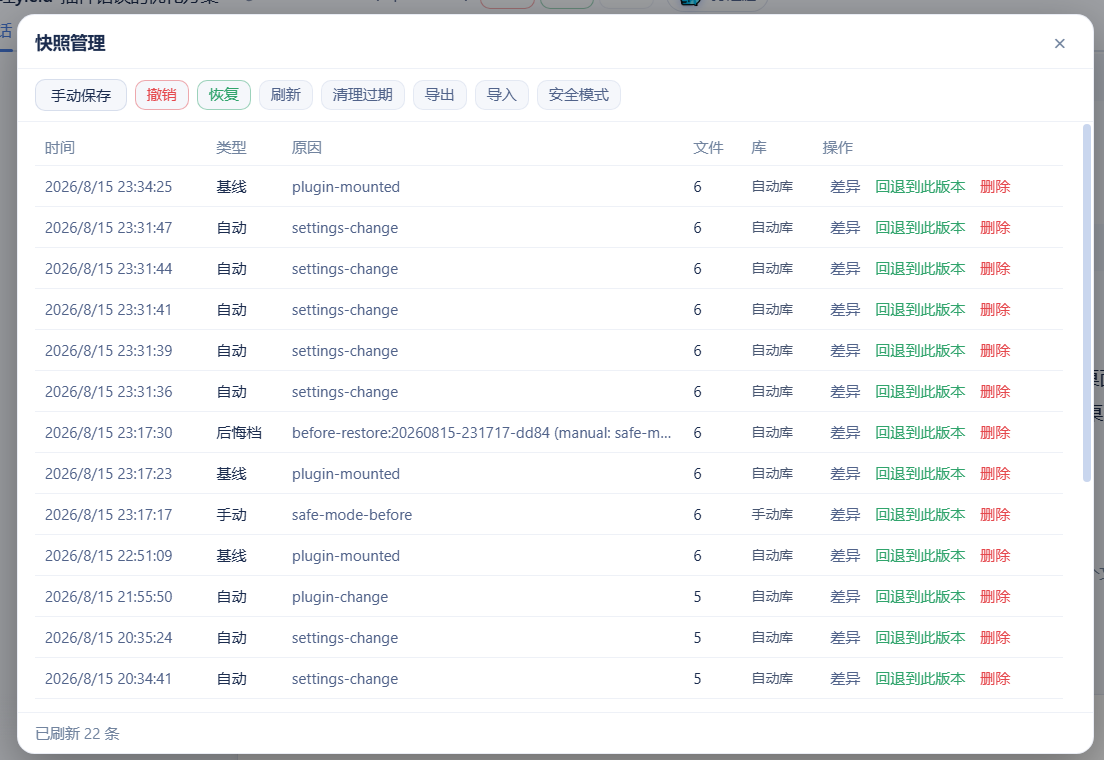 | 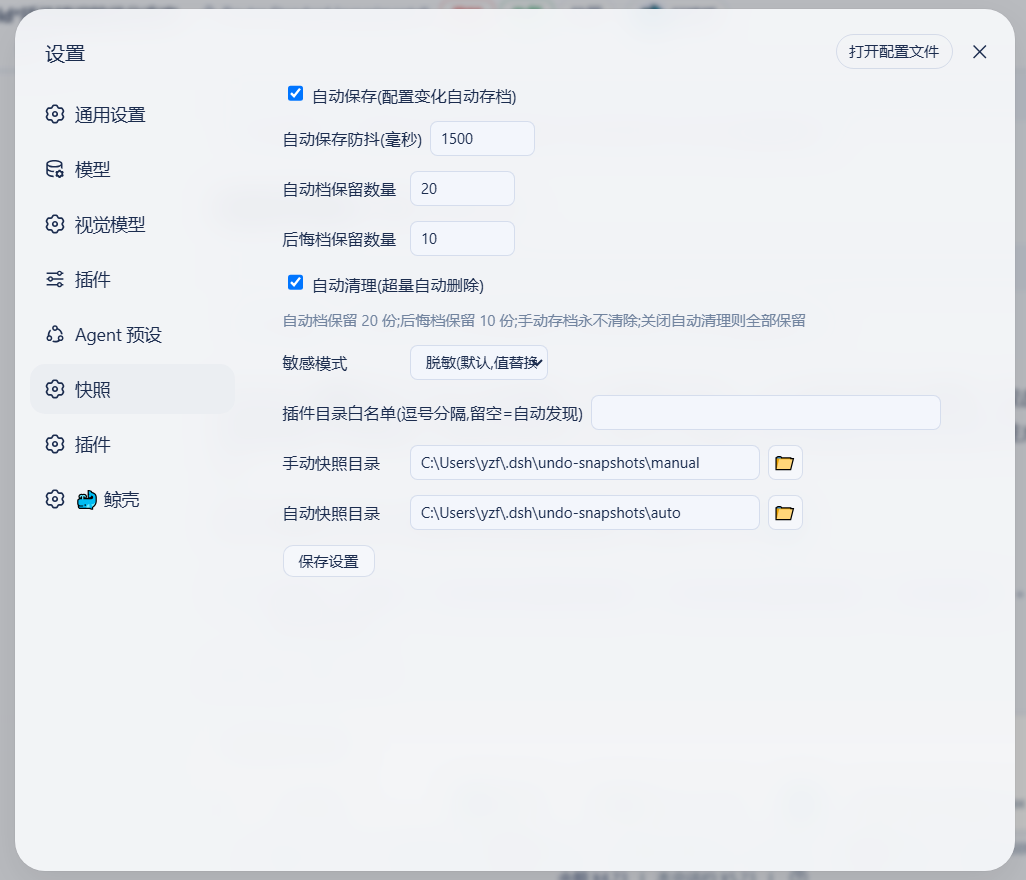 |
| 局外程序窗口(两行工具栏 + 安全模式按钮,DSH 挂了也能用) | 局外设置对话框(敏感模式/浏览选目录) |
|---|---|
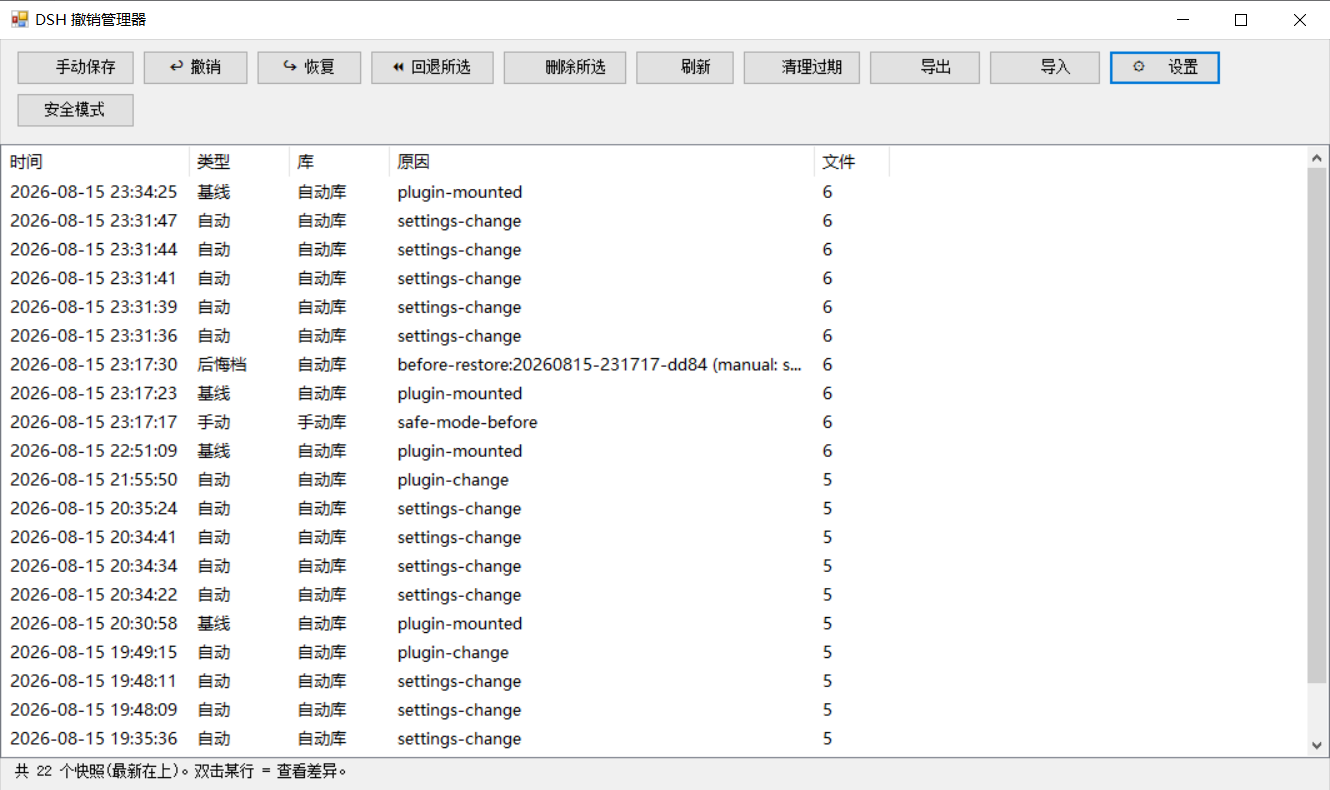 | 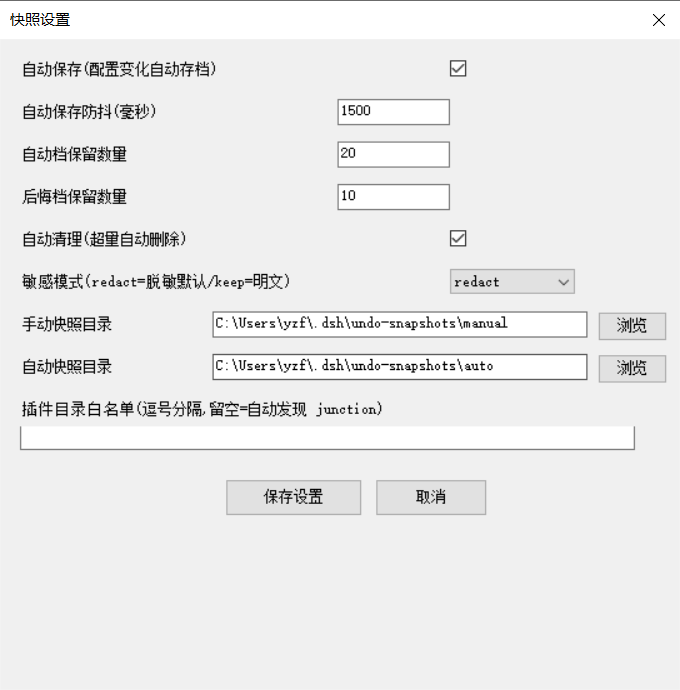 |
| 安全模式确认(进入/退出) | 安全模式状态提示 |
|---|---|
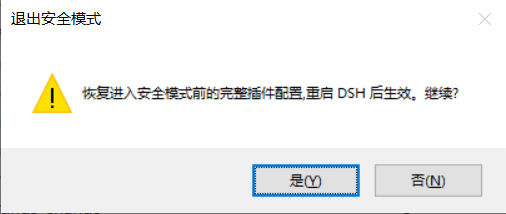 |  |
功能一览
| 能力 | 说明 |
|---|---|
| 配置 + 插件代码一键回滚 | 快照覆盖配置与用户插件代码树,改坏任何一处都能撤销(含 yield* 类纯代码事故);支持 undo / redo / 回退任意版本,WebUI / 对话 / 离线 CLI 三入口 |
| 密钥脱敏 + 本机 vault | .env / 凭据进快照自动脱敏(结构保留),导出 ZIP 零泄露;真实值存本机 vault,本机回滚完整还原 |
| 一键安全模式 | DSH 完全起不来时,禁用除撤销系统外所有插件保证能启动,自动快照+备份配置,一键退出(v0.3.7 起:profile/home 双级 patch 一并备份恢复;patch 缺失自动写空备份 [],不再出现"备份悬空退不出";家目录被重建/换机时残留状态自动降级不激活) |
| 崩溃归因 | 上次异常退出时直接给出「最后正常快照」id + 一键回退按钮,不用自己猜回退到哪 |
| 跨机迁移安全 | 恢复前自动预检缺失插件并明确提示;快照可一键导出/导入 ZIP 迁移(见 docs/migration.md) |
| 局外急救(DSH 挂了也能用) | 离线 CLI + GUI 窗口 + 一键桌面快捷方式:撤销/回退/安全模式/崩溃横幅/回滚日志一应俱全 |
基础能力(键盘快捷键、对话指令、自动清理、双模式保存、可配置参数等)详见下文与 更新日志。
崩溃急救速查(按场景选工具)
| 场景 | 操作 |
|---|---|
| 配置/插件被改坏 | 对话/WebUI/CLI:undo 或 restore -Id <id> |
| 插件代码被改坏 | 同上(快照含插件代码树,一键还原) |
| 上次异常退出,不知回退到哪 | WebUI 横幅 / GUI 横幅 显示 last-good 快照,一键回退 |
| DSH 完全起不来 | 桌面「DSH撤销管理器」→ 安全模式按钮(或 CLI safe-mode -Label on)→ 重启 DSH 保证能启动 |
| 恢复后可能缺插件(跨机) | 恢复报告预检提示;先装插件或安全模式 |
| 配置"突然变了" | CLI recent / 对话 undo_recent 查回滚日志 |
| 撤销涉及插件/挂载 | 报告提示"重启 DSH 后生效" |
快照内容与存储
快照对象是 DSH 的启动关键配置:cordis.patch.yml、package.json、cordis.yml、pnpm-workspace.yaml、pnpm-lock.yaml(profile 下)+ cordis.patch.yml、settings.yaml、.env、.credentials.yaml($DSH_HOME 下,默认 ~/.dsh)。
恢复涉及 package.json / pnpm-lock.yaml 时,默认只报告 node_modules 可能不同步;需要真正重建依赖时加 -SyncDeps(离线 CLI)、sync_deps: true(对话工具)或 syncDeps: true(REST),插件会执行 pnpm install --frozen-lockfile(无 lockfile 时普通 pnpm install)。安装失败不影响已经还原的配置文件。
| 库 | 默认路径(可在设置中修改) | 内容 |
|---|---|---|
| 手动库 | <快照根>\manual\ | 手动保存的快照(永不自动清理) |
| 自动库 | <快照根>\auto\ | 自动快照、启动基线、撤销后悔档(自动档保留最近 20 份) |
| 旧库(兼容) | <快照根>\ 根 | 旧版扁平布局,读取兼容,启动时自动迁移到新库 |
⚠️ 快照含
.env等配置副本,可能含密钥——不要外传。
v0.3.7 体积约束:单个快照引用体积 ≤5MB(manifest 记录
totalBytes,undo_list展示)。插件代码树超限时只记清单 + 标记[truncated]告警,不丢任何数据,可手动快照/导出兜底;无外部插件时快照仅配置文件(KB 级)。
多 profile 支持(v0.3.3)
插件从启动参数自动识别当前 profile(dsh --profile mine / --profile=mine;dsh web 回退为 web),并按当前 profile 工作:
- 配置目录:默认
$DSH_HOME/profiles/<当前 profile>(DSH_HOME 默认 ~/.dsh;此前硬编码web——非 web profile 下快照读错、监听错、恢复写错位置); - 快照仓库:默认
<快照根>/<当前 profile>/{auto,manual}(按 profile 隔离);作用域目录不存在而旧版平铺目录存在时自动回退平铺,旧快照不会"隐身"; - 归属标识:快照 manifest 记录
profile字段,undo_list显示当前 profile。
离线 CLI/GUI 看不到启动参数,通过环境变量 DSH_UNDO_PROFILE 或 settings 里的 profileName 指定(默认 web)。
显式配置优先级不变:profileDir / manualDir / autoDir / profileName(config 或 settings)始终生效。
自定义家目录支持(v0.3.5,issue #6)
DSH 数据家目录的解析与官方启动器(@deepseek-ai/dsh-home-paths)完全一致:DSH_HOME 环境变量优先(空白视为未设置,支持 ~ / ~/ / ~\ 前缀),否则回退 <用户家目录>\.dsh。设置文件($DSH_HOME\undo\settings.json)、默认快照根($DSH_HOME\undo-snapshots)、profile 目录($DSH_HOME\profiles\<profile>)、home 根、插件发现路径全部基于它——第三方客户端(自定义 DSH_HOME)不再出现"设置写到 ~/.dsh、DSH 实际用 $DSH_HOME"的两套家分裂,重启后自定义目录稳定保留。
显式覆盖仍然保留:DSH_UNDO_SETTINGS / DSH_UNDO_ROOT / DSH_UNDO_EXPORT(环境变量)与 config 里的 homeDir / profileDir / manualDir / autoDir 优先级最高。
仓库标签 (Topics)
方便在 GitHub 搜索与 Explore 中被发现,仓库已设置以下 topics:
deepseek-harness · dsh · dsh-plugin · undo · rollback · snapshot · crash-recovery · backup · windows · powershell
安装
前置:已安装 DSH(@deepseek-ai/dsh)与 Node.js(≥20)。
方式 A(GitHub 直装) — 安装 master 最新提交:
dsh plugin --profile web add github:lire1131/dsh-undo-savepoint#master
安装完成后重启 DSH 即生效(快照目录、参数等均可在设置中修改)。
方式 B(本地源码/免发布) — clone 到本地目录并手工挂载:
- 把仓库放到本地插件目录(无中文路径更稳妥),例如
D:\dsh\plugins\dsh-undo-savepoint:
git clone https://github.com/lire1131/dsh-undo-savepoint.git D:\dsh\plugins\dsh-undo-savepoint
- 建立 junction,让 DSH 的模块解析器通过包名
dsh-undo-savepoint找到本地源码(host 插件与 WebUI client 插件都靠它):
mklink /J "<你的DSH安装>\node_modules\dsh-undo-savepoint" "D:\dsh\plugins\dsh-undo-savepoint"
说明:DSH 从它自己的
node_modules向上解析包名。默认安装位置是C:\Users\<用户名>\node_modules(npm 安装在用户目录时);若用 npx 缓存运行,则对 npx 缓存目录下的node_modules建 junction。执行npm root -g/ 检查 DSH 启动报错路径即可确认。
- 挂载到 profile 补丁层:编辑
<DSH_HOME>\profiles\web\cordis.patch.yml,追加:
- insert:
    - id: dsh-undo-savepoint
      name: dsh-undo-savepoint
- 生效:保存即热加载(host 部分);刷新页面出现头部按钮与设置项;重启 DSH 后一切进入稳态(旧版扁平快照会自动迁移)。
依赖说明:host 插件通过
createRequire('<DSH安装根>/package.json')加载@deepseek-ai/dsh-tools。若 DSH 安装在其他位置,设置环境变量DSH_ROOT=<DSH安装根>即可,无需额外安装依赖。
局外工具在哪(装完找不到?)
局外撤销工具(GUI 窗口 + 命令行)不装到桌面,而是随插件装在安装目录里:
| 安装方式 | 工具位置 |
|---|---|
方式 A:dsh plugin add | $DSH_HOME\profiles\web\node_modules\dsh-undo-savepoint\tools\(DSH_HOME 默认 %USERPROFILE%.dsh) |
| 方式 B:clone + junction | 你 clone 的目录 ...\dsh-undo-savepoint\tools\ |
一键创建桌面快捷方式(推荐,以后从桌面直接打开):
双击 tools\make-desktop-shortcut.bat(它会自动定位插件目录),桌面出现「DSH撤销管理器」图标;
或者把下面整段复制到 PowerShell 窗口回车(无需先找文件,自动定位):
$dshHome = if ($env:DSH_HOME) { $env:DSH_HOME } else { "$env:USERPROFILE\.dsh" }
$d = @("$dshHome\profiles\web\node_modules\dsh-undo-savepoint", "$dshHome\profiles\node_modules\dsh-undo-savepoint", "$env:USERPROFILE\node_modules\dsh-undo-savepoint") | Where-Object { Test-Path (Join-Path $_ 'tools\dsh-undo-savepoint-gui.bat') } | Select-Object -First 1
if ($d) {
  $w = New-Object -ComObject WScript.Shell
  $s = $w.CreateShortcut((Join-Path ([Environment]::GetFolderPath('Desktop')) 'DSH撤销管理器.lnk'))
  $s.TargetPath = Join-Path $d 'tools\dsh-undo-savepoint-gui.bat'
  $s.WorkingDirectory = Join-Path $d 'tools'
  $s.Save()
  Write-Host "已创建桌面快捷方式:$($s.FullName)"
} else { Write-Host '未找到插件目录,请先安装:dsh plugin --profile web add github:lire1131/dsh-undo-savepoint#master' }
只想打开工具目录看一眼:
$dshHome = if ($env:DSH_HOME) { $env:DSH_HOME } else { "$env:USERPROFILE\.dsh" }
explorer "$dshHome\profiles\web\node_modules\dsh-undo-savepoint\tools"
之后双击桌面「DSH撤销管理器」即可打开局外工具(DSH 崩溃、启动不了时也能用)。
使用
- 撤销:头部「撤销」按钮 /
Ctrl+Alt+Z/ 对 AI 说"撤销上一步"。 - 恢复:「恢复」按钮 /
Ctrl+Alt+Y(仅当撤销后没有新操作)。 - 手动保存:面板里「手动保存」/ 对 AI 说"保存快照" / CLI
snapshot。 - 回退到指定版本:面板里点快照行「回退到此版本」;或对 AI 说"回退到
";或 CLI restore -Id <id>。 - 删除快照:面板里点「删除」;或 CLI
remove -Id <id>。 - 自定义快捷键:设置 → 通用 → 撤销/恢复快捷键(点击输入框后按组合键,Backspace 清除)。
- 保存参数:设置 → 通用 → 快照设置(自动保存开关、防抖、保留数、两个目录,目录旁 📁 按钮可打开系统目录选择器)。
局外工具(DSH 挂了也能用)
界面语言:程序窗口按系统 UI 语言自动显示中文/英文;可用环境变量
DSH_UNDO_LANG=zh|en强制指定。
进入仓库目录后:
# 程序窗口(推荐):双击 tools\dsh-undo-savepoint-gui.bat,或:
powershell -NoProfile -ExecutionPolicy Bypass -File "tools\dsh-undo-savepoint-gui.ps1"

# 命令行
powershell -NoProfile -ExecutionPolicy Bypass -File "tools\dsh-undo-savepoint.ps1" list
powershell -NoProfile -ExecutionPolicy Bypass -File "tools\dsh-undo-savepoint.ps1" snapshot -Label "原因"
powershell -NoProfile -ExecutionPolicy Bypass -File "tools\dsh-undo-savepoint.ps1" undo
powershell -NoProfile -ExecutionPolicy Bypass -File "tools\dsh-undo-savepoint.ps1" undo -SyncDeps
powershell -NoProfile -ExecutionPolicy Bypass -File "tools\dsh-undo-savepoint.ps1" redo
powershell -NoProfile -ExecutionPolicy Bypass -File "tools\dsh-undo-savepoint.ps1" restore -Id <id> -Force
powershell -NoProfile -ExecutionPolicy Bypass -File "tools\dsh-undo-savepoint.ps1" restore -Id <id> -Force -SyncDeps
powershell -NoProfile -ExecutionPolicy Bypass -File "tools\dsh-undo-savepoint.ps1" remove -Id <id>
powershell -NoProfile -ExecutionPolicy Bypass -File "tools\dsh-undo-savepoint.ps1" prune -KeepAuto 20

# 安全装插件(自动前后存档,失败自动回退)
powershell -NoProfile -ExecutionPolicy Bypass -File "tools\dsh-plugin.ps1" add <包名>
常见事故场景:DSH 启动报 duplicate loader entry id 之类错误 → 打开「DSH 撤销管理器」选中出问题前的快照 → 回退 → 重启 DSH。不用重装、不丢会话。
REST API(WebUI 的后端)
| 端点 | 说明 |
|---|---|
GET /api/undo/status | {canUndo, canRedo, total} |
GET /api/undo/list | 快照列表(含 location: manual/auto/legacy) |
GET/POST /api/undo/settings | 读/写保存参数(自动保存、防抖、保留数、目录),POST 即时生效 |
POST /api/undo/undo | 撤销上一步;可选 body {syncDeps: true} 按还原后的 lockfile 重建 node_modules |
POST /api/undo/redo | 恢复;可选 body {syncDeps: true} |
POST /api/undo/restore | body {id, syncDeps?} 回退到指定版本 |
POST /api/undo/remove | body {id} 删除快照 |
POST /api/undo/snapshot | body {reason} 手动保存 |
POST /api/undo/pick-dir | 弹出系统目录选择器,返回选中路径 |
设计要点
- 撤销语义:自动快照在变更之后生成,所以"恢复最新存档"是空操作;真实撤销 = 回退到与当前状态内容不同的最新快照;全部相同则明确提示"没有可撤销的变化"。
- 撤销不会撤销掉自己:恢复
cordis.patch.yml后自动检查并重新写入 dsh-undo-savepoint 挂载条。 - 自动存档不误伤撤销:watcher 记录恢复操作写入的内容哈希,恢复动作自己的文件变化不会被自动存档(否则会挡住 redo);真实变更照常存档。
- 格式互通:Node 插件与 PowerShell 工具共用快照仓库与 manifest 格式;Windows PowerShell 5.1 与 PowerShell 7 均兼容。
开发
- 依赖解析:host 插件通过
createRequire(<DSH安装根>/package.json)加载@deepseek-ai/dsh-tools(环境变量DSH_ROOT可覆盖),无需在仓库内安装依赖。 - 测试(不需要 DSH 运行,在仓库目录执行):
node tools\smoke-test.mjs     :: 114 项逻辑测试(快照/撤销/重做/存储分流/无变化提示)
node tools\e2e-watch.mjs      :: 10 项真实时序回归(自动存档/撤销不误伤/重做)
Read the usage guide →
Install steps, key points, FAQ and compatibility for this plugin — auto-derived from indexed fields.
Listing badge

[](https://deepseek-plugin.org/plugins/lire1131/dsh-undo-plugin)Paste this markdown into your GitHub README to link back to this listing. The badge only states the listing — not a security endorsement.