Adds web search, X search, and single-page scraping to text models lacking network capability in dsh. Registers x_search and read_page tools, overriding web_search to provide models with structured, source-attributed evidence.

- Language
- TypeScript
- License
- MIT
- Branch
- main
Install
$ dsh plugin --profile web add @liustack/modsearchRun the command above in your terminal to install this plugin via the dsh CLI. You can switch Profile in the top-right corner. New to dsh? Read the beginner tutorial
Install via your agent
Install the DeepSeek Harness plugin liustack/modsearch for me: review the repository at https://github.com/liustack/modsearch first, then run the install command and verify the plugin loads successfully.
Paste this instruction to the DSH Web GUI assistant — it will install and verify for you.
One-Line Pitch
modsearch is DeepSeek Harness (dsh)'s web search plugin, adding web search, X (Twitter) search, and page fetch capabilities to text models that originally have no internet access, allowing the model to obtain structured evidence with source links directly in conversations instead of relying only on training data.
Core Capabilities
- In the dsh host, takes over the search backend of dsh's native
web_search; the tool name and schema seen by the model remain unchanged, citation cards are preserved, while the backend is switched to modsearch's engine chain - Registers two additional tools that dsh doesn't have: X (Twitter) search via
x_searchand focused page reading viaread_page, which automatically appear in the model's tool list - Runs multiple data sources simultaneously (
--source web,x): web and X execute concurrently, results returned separately, each withsource,requestedSource,engine,status - Page fetching (
-u) requires no configuration: built-in local engine uses HTTP direct pull, with SSRF protection and per-hop IP pinning; DNS rebinding cannot bypass it - Engines are organized by role with priority (antigravity-cli → tavily/exa/firecrawl; X uses grok-cli; fetch falls back to local); quota exhaustion automatically triggers failover;
cooldownis enabled by default, temporarily moving quota-exhausted engines to the end of the chain
Technical Implementation
- Language: TypeScript (Node.js ESM) + pure JS dsh plugin side (
dsh/index.js, uses only Node built-in modules, no bundling) - Key dependencies:
commander(CLI subcommand routing),undici(HTTP client and Agent pool for local fetcher),@biomejs/biome/vite/vitest/typescript(devDependencies only) - Architecture pattern: Dual-form package — the same npm package is both a CLI (
bin: modsearch→dist/main.js, also exposesmodsearch <args>externally) and a dsh cordis plugin. Thepackage.jsondsh.bundle.patchpoints tocordis.patch.yml, which injects@liustack/modsearchinto the host dsh's cordis layer and points the websearchProviderto this plugin; the plugin sidedsh/index.jsexportsapply(ctx, config), spawns the same package'sdist/main.jsto invoke CLI, no PATH lookup, plugin and engine versions are tightly bound - Entry files: CLI entry
src/main.ts; DSH plugin entrydsh/index.js; schema generated by CLI callers is insrc/schema.tsanddsh/search-schema.json/dsh/fetch-schema.json(synchronized by unit tests)
Use Cases
When using dsh daily to converse with DeepSeek/GLM and other text models, need to look up latest news, want to see reactions on X about a certain topic, or have a URL you want to read specific content from — after installing this plugin, you don't need to remember any commands, just chat normally or paste a URL. Also suitable for developers doing keyword research, needing citations with clickable source links, or wanting the model to read a complete blog post or API documentation page.
Prerequisites and Compatibility
| Dependency | Minimum Version | Description |
|---|---|---|
| Node.js | >= 22.13 | engines.node in package.json; src/doctor.ts also lists 22.13.0 as the minimum threshold |
| dsh | No specific version declared | Injected into host cordis layer via dsh.bundle.patch (cordis.patch.yml); host must expose ctx.web.registerSearchProvider and ctx.tools.register; package.json declares no peerDependencies |
| Platform | macOS / Windows / Linux | package.json doesn't restrict os/cpu; Antigravity CLI / Grok Build binaries are invoked as subprocesses, target platform follows respective official installers |
| Native modules | None | No node-gyp dependencies introduced; HTTP fetching uses undici's built-in Agent, process communication uses Node's built-in node:child_process |
| External accounts | At least one for web search | Default Antigravity CLI (no key required, browser login once); can alternatively configure any of Tavily/Exa/Firecrawl with free keys; X search requires Grok Build + SuperGrok or X Premium subscription |
Installation
dsh plugin --profile web add github:liustack/modsearch
Configuration Options
Config file is at ~/.modsearch/config.json (written as 0600, keys automatically masked when rendered via modsearch config show). Priority: CLI arguments > environment variables > config file > built-in defaults. File is optional; it runs without it but cannot fix engines or customize endpoints.
| Config | Type | Description | Default |
|---|---|---|---|
engine | string | Preferred engine for web search; empty string means auto-select based on machine conditions. Valid values: antigravity-cli, tavily, exa, firecrawl; aliases agy/antigravity/grok/http/direct will be normalized to canonical names | empty (auto) |
cooldown | on / off | Quota cooldown failover switch; when enabled, moves quota-exhausted engines to end of chain and writes state file; when disabled, completely skips reading/writing state | on |
allowPrivateNetwork | boolean | Whether to allow local fetcher to reach reserved and internal network address ranges (for VPN scenarios); Firecrawl fetching is always unaffected by this switch | false |
engines.<name>.apiKey | string | API key for that engine, <name> ∈ tavily/exa/firecrawl; same-named environment variables (TAVILY_API_KEY/EXA_API_KEY/FIRECRAWL_API_KEY) override file values | none |
engines.<name>.baseURL | string | Point that engine to a compatible third-party gateway/self-hosted endpoint; must be a full http(s) URL, empty string cancels override; <name> ∈ tavily/exa/firecrawl, corresponding env vars TAVILY_BASE_URL/EXA_BASE_URL/FIRECRAWL_BASE_URL | each engine's official endpoint |
engines.<name>.bin | string | Executable path for that engine; <name> ∈ antigravity-cli (default agy) / grok-cli (default grok) | each engine's default |
engines.<name>.model | string | Model name used by that engine; currently applies to antigravity-cli, default gemini-3.6-flash-low | each engine's default |
TAVILY_API_KEY / EXA_API_KEY / FIRECRAWL_API_KEY | environment variables | Environment variable form of same-named apiKey, higher priority than config file | none |
MODSEARCH_DSH_CLI | environment variables | CLI path override used by dsh plugin side when running tests (see src/dshPlugin.test.ts) | none |
Subcommands: modsearch config init creates skeleton, modsearch config set <key> <value> writes values, modsearch config show renders effective config (source tags + key masking), modsearch doctor [--json] health check, modsearch state clear clears all cooldown state.
FAQ
Q: Can modsearch be used directly after installation, or do I need to configure an API key?
A: Page fetching (-u) works with zero configuration because the built-in local engine is always available; web search (-q) requires at least one search engine. It defaults to Antigravity CLI, which requires no key and only needs one browser login; the three backup engines (Tavily/Exa/Firecrawl) all have free tiers without requiring a card. When nothing is configured, error messages will list all available activation methods.
Q: What changes will appear in dsh after installation?
A: The native web_search tool still uses the same name, the model sees the native schema and citation cards, but the backend is replaced with modsearch's engine chain; additionally, two tools that dsh doesn't have are added: x_search for searching X and read_page for focused page reading, appearing directly in the model's available tool list without manual triggering.
Q: Which account's quota is deducted during search? Which engine processes it?
A: When not forced with -e, all ready engines form a failover chain by role priority. The results[i].engine in results indicates the actual responder, attempts lists the attempt order, and warnings write reasons when an engine fails, gets demoted, or gets cooled down — never silently deducting from another account.
Q: Why does the same X query sometimes return non-X content?
A: When Grok Build is not installed, not logged in, or fails this round, the router automatically falls back to the web search engine to answer, marking source as web, requestedSource as x, status as degraded, and writing the fallback reason in warnings; it won't pretend to be real X results. When --source web,x requires both simultaneously and X is unreachable, a separate empty entry with status: "unavailable" is returned, explicit but as a placeholder.
Q: How do I know what's actually configured on my machine and what's wrong?
A: Run modsearch doctor, which performs purely local checks, doesn't consume quota or send network requests. It reports Node version, readiness status and reasons for each engine, config source and permissions, private network switch, cooldown state, and provides a copy-pasteable fix command for each unready engine; add --json for machine-readable output for script processing.
Q: What if Antigravity CLI says quota is exhausted?
A: Quota cooldown failover is enabled by default: this round moves antigravity-cli to the end of the chain, next time it directly uses other engines first. Wait for weekly reset (error message will state Resets in …) or add a keyed engine (any one of Tavily/Exa/Firecrawl) to recover. modsearch state clear can immediately clear all cooldown.
Q: How is it handled when VPN maps target address to an internal IP?
A: Private/reserved address ranges are rejected by default (SSRF protection). You can allow once with --allow-private-network, or set globally with modsearch config set allowPrivateNetwork true; Firecrawl fetching always rejects private/reserved addresses even with the switch on, preventing internal hostnames from being sent to third-party clouds.
Q: What remains after uninstallation?
A: Just uninstall this plugin. What stays on the machine is only ~/.modsearch/config.json (your explicitly configured keys and endpoints) and ~/.modsearch/state.json (cooldown state); no hooks are left, nor does it modify the host's own configuration.
Learning Curve
Introductory — one dsh installation command plus one default engine (Antigravity CLI requires no key, browser login once) lets you use all three capabilities; reading the config manual is only needed for "advanced configuration" (customizing third-party endpoints, switching engines, disabling cooldown).
Known Issues and Limitations
- Local fetcher doesn't execute JavaScript; pages rendered by pure JS frameworks come back very thin; the returned
uncertaintyfield explicitly states this, results should be paraphrased accordingly rather than saying the page is empty - Quota is shared by role bucket: Antigravity CLI's free tier is weekly quota, shared with Antigravity desktop App and SDK; concurrent sub-agents can exhaust it quickly
- Firecrawl fetching always rejects private/reserved addresses even with
allowPrivateNetworkenabled (prevents internal hostnames from being sent to third-party cloud) - Explicit
-e/--engineis hard forced: uses only this one engine, doesn't go to fallback or local fallback, fails with error if unable, won't secretly switch to another engine to deduct from another account - Old config files with
provider/providersandsearch/fetch/socialthree-role structure are automatically migrated to newengine+enginesform, no manual file editing needed - For schema-enforced subprocess engines (Antigravity CLI, etc.), output is strictly constrained via
--json-schema; HTTP engines (Tavily/Exa/Firecrawl) are guaranteed structure by their servers, but CLI forcibly stripssource/requestedSource/engine/model/status/warnings/attempts/durationSecondsfrom engine-returned fields to prevent forgery

ModSearch
Give the web to any model without it: search, X, and any page.
🥇 The most powerful web search plugin for DeepSeek Harness (dsh) 🥇
Engines: Antigravity CLI (free, default) · Tavily · Exa · Firecrawl · Grok (X) · local, with automatic failover
简体中文 · Troubleshooting · Configuration · Output contract · Security · ModLens (vision)





Models like DeepSeek-V4-Flash have no web access, or a weak one. ModSearch is a plug-in that greatly strengthens the model's web search, X search, and single-page fetch.
Talk to us
Something broken, or something missing? Open an issue. For everything else, come find me on X: @liustack. What you built with it, which harness you are on, what should come next. New releases land there first, and a proper community space is on the way.
Features
- 🥇 The most powerful web search plugin for DeepSeek Harness (dsh): one command,
npx -y @deepseek-ai/dsh plugin --profile web add @liustack/[email protected], and dsh's built-inweb_searchruns on the modsearch engine chain with no API key, keeping its native citation cards. Two tools dsh does not have land beside it:x_searchfor X (Twitter) andread_pagefor focused single-page reading. Updating is the same command again. The version is named rather than@latestbecause pnpm 11 holds back releases published in the last 24 hours and resolves the tag against the older versions that remain. Details in harness setup. - Completely free. The default channel is Antigravity CLI, no API key needed. All three fallback channels (Tavily, Exa, Firecrawl) offer monthly free tiers with no card required.
- Automatic failover. When a channel fails or exhausts its quota, the next one takes over.
- Searches X (Twitter). With Grok Build installed, ModSearch queries the corpus that web indexes cannot reach.
- Install once, use everywhere. Works in Claude Code, Codex, Pi, and OpenCode.
Supported engines
Any one of these makes search work. Configure with one command each, keys are stored in ~/.modsearch/config.json (0600, masked when shown):
| Engine | Does | Free tier | Turn it on |
|---|---|---|---|
| Antigravity CLI | web search + page fetch | free, browser sign-in | install agy and sign in |
| Tavily | web search | 1,000 credits/month, no card | modsearch config set tavily.apiKey <key> |
| Exa | web search | $10/month recurring credit (~1,400 searches), no card | modsearch config set exa.apiKey <key> |
| Firecrawl | web search + page fetch | 1,000 credits/month, search even works keyless | modsearch config set firecrawl.apiKey <key> |
| Grok Build | X (Twitter) search | rides SuperGrok or X Premium | install grok and sign in |
| local | page fetch | built in, nothing to install | nothing |
Keys can also come from the environment (TAVILY_API_KEY, EXA_API_KEY, FIRECRAWL_API_KEY). Multiple engines configured means automatic failover, best first. Using a Tavily-, Exa-, or Firecrawl-compatible third-party or self-hosted endpoint? Point the engine at it: modsearch config set tavily.baseURL <url>. Every knob, engine by engine, is in the configuration guide.
Installation
Step 1, set up a search engine (the only part that needs your hands). The default engine, Antigravity CLI, requires a browser sign-in that only you can complete:
curl -fsSL https://antigravity.google/cli/install.sh | bash
agy                                                           # sign in, then exit
Prefer not to install it? Register a free key with Tavily, Exa, or Firecrawl instead (Tavily 1,000 credits a month, Exa about 1,400 searches a month, Firecrawl 1,000 credits a month, no card required by any of them).
Step 2, hand the rest to your AI. Send it this line, along with the key if you chose one:
Install and configure the modsearch skill following https://github.com/liustack/modsearch/blob/main/INSTALL.md, then run the health check and tell me the result.
Usage
Once installed, just chat. Ask anything that needs checking, or paste a URL, and the skill triggers on its own: it picks an engine, runs the search or fetch, and the answer comes back with sources.
See it work
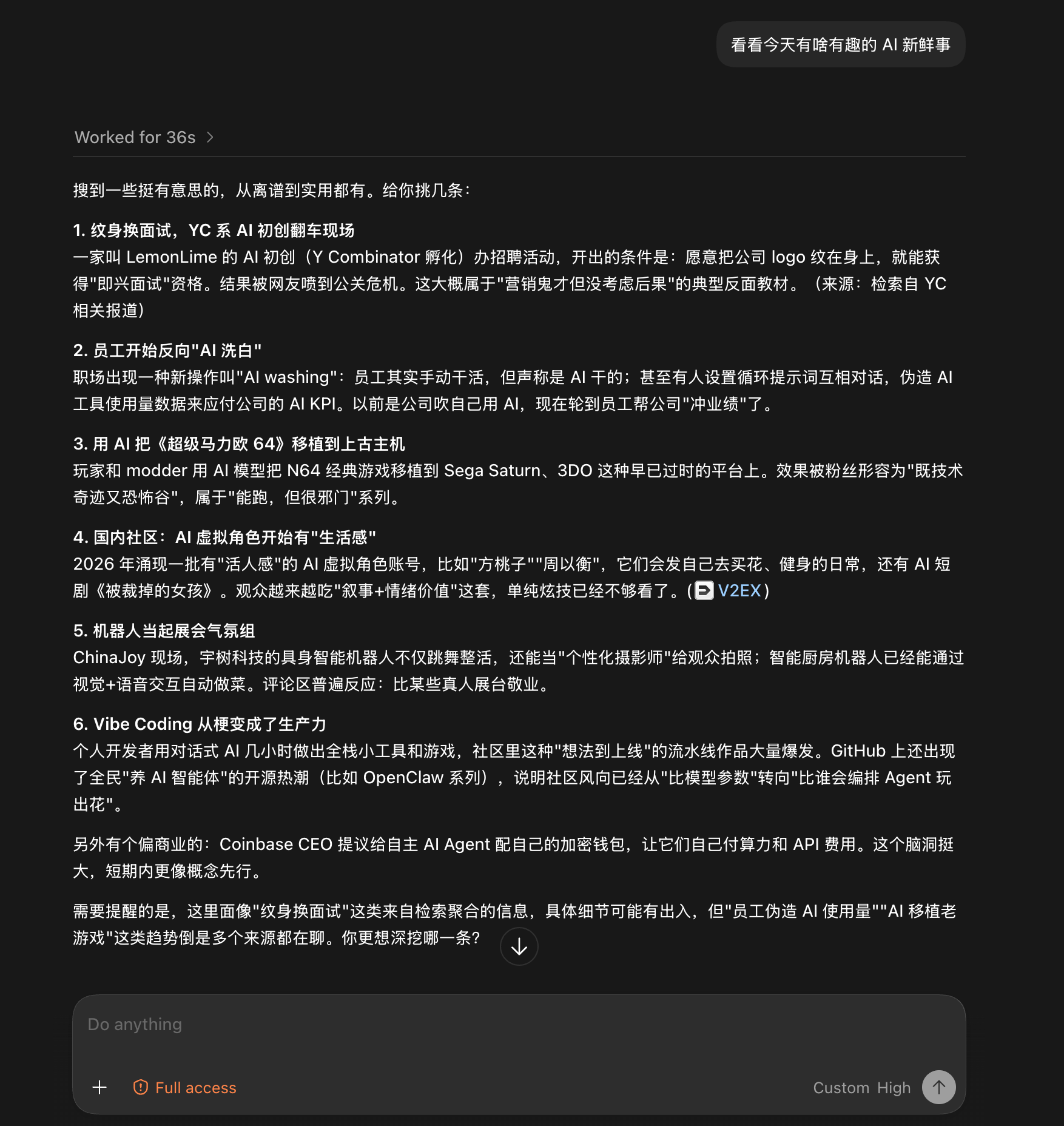
Both screenshots are unedited runs from the Codex desktop app, driving a DeepSeek-V4-Flash that has no web access of its own.
Give it a blog link and ask what the post says. Twenty-five seconds later: a structured summary of the whole post, with no browser involved.

Give it no target at all, just "anything interesting in AI today?". Thirty-six seconds later: six sourced stories, with a closing note on which details came from aggregation and deserve a second look. The note comes from the uncertainty field.
Documentation
| Doc | Read it when |
|---|---|
| INSTALL.md | Installing the skill step by step (written for an agent) |
| CLI manual | The CLI the skill drives: flags, config, doctor |
| Troubleshooting | A command failed and the message needs decoding |
| Configuration | Setting a key, switching engines, fixing config |
| Output contract | Parsing the JSON or building on it |
| Harness setup | Wiring it into Codex, Claude Code, OpenCode, or Pi |
| Security | SSRF guards, DNS-rebinding protection, untrusted input |
| CHANGELOG | Finding what changed in a version |
Contributing
ModSearch does not accept pull requests. The project is maintained by a single author who reviews every line, which is a deliberate choice for reliability. Two effective ways to contribute:
- Open an issue. Bugs, suggestions, confusing errors, unclear docs. Issues are read and shape what gets built next.
- Fork it. Under MIT your copy is fully yours to modify and publish.
Shameless plug
This project runs on LIUSTACK Skills: shaping before you build, coding while you build, dig when it breaks, snapshot when you hand off. Lighter than Superpowers, and stronger.
npx -y skills add liustack/liustack -g
⭐ If it helps, star ModSearch and liustack. Stars are how the next developer finds them.
Star History
Disclaimer
ModSearch is MIT-licensed, so use is not restricted. The author gives no warranty and no endorsement for any particular use, commercial or otherwise. The upstream engines it drives (Antigravity CLI, Tavily, Exa, Firecrawl, Grok Build) each carry their own terms and quotas, and complying with them is the user's responsibility.
License
MIT
Read the usage guide →
Install steps, key points, FAQ and compatibility for this plugin — auto-derived from indexed fields.
Listing badge

[](https://deepseek-plugin.org/plugins/liustack/modsearch)Paste this markdown into your GitHub README to link back to this listing. The badge only states the listing — not a security endorsement.