DSH 内的纯计算科研工作台插件:用阶段化 Chat、Idea、Contract 与 TeX 手稿把研究项目存进同一可恢复项目里。

- 语言
- TypeScript
- License
- MIT
- 分支
- main
安装
$ dsh plugin --profile web add --allow-build=@dsh-scholar/research-plugin github:lzszq/dsh-scholar在终端中运行以上命令,通过 dsh CLI 安装此插件。可在右上角切换 Profile。 第一次用 dsh?看这篇新手教程
对话式安装
帮我安装 DeepSeek Harness 插件 lzszq/dsh-scholar:先查看仓库 https://github.com/lzszq/dsh-scholar 确认安全性,然后执行安装命令并验证插件加载成功。
把这段指令粘贴给 DSH Web GUI 里的助手,由它代你完成安装与验证。
一句话定位
这是一个面向纯计算科研(机器学习、数据科学、生物信息学)的 DSH 工作台插件:把项目对话、研究资料、代码与数据、受控实验、证据和 TeX 手稿放在同一个可恢复的项目里,从新问题开始或继续已经进行到一半的研究。
核心能力
- 阶段化研究 Chat:Chat 支持自由对话、Grill Me 信息收集、文件上传、显式 slash command,并按当前研究阶段展示权威下一步(Init → Brief → Scope → Surveying → Idea → Baseline → Contract → Run → Evidence → Manuscript → Release)
- 治理化决策流:Scope、Idea、Contract、Evidence、Direction 和 Release 决策都有明确权限、revision 绑定和审计记录,gate-only 是默认模式,Agent 不能冒充 Human principal 或伪造 accepted Evidence
- 受控执行环境:Runner Profile 描述本机、本机 Docker 或远程 SSH 环境,含固定容器镜像、声明式 NVIDIA GPU 能力和 known-hosts/credential SecretRef;正式 Job 必须绑定不可变代码/数据快照、固定镜像与显式 Profile
- 一体化工作台区域:项目级 Chat、可编辑文件、session 绑定 Web 终端、运行日志、产物、TeX 源码、编译诊断和 PDF 预览共用同一上下文(Trajectory、Topology、Manuscript、Run Terminal、Workspace 等)
- 可追溯方法论:Protocol revision、Run 分类、综合请求、Assurance、Reviewer finding、Knowledge Pack 激活和 Claim-Evidence 关系会成为持久研究状态;reviewer identity 从 durable child topology 派生,不接受自报字段
- Connector 检索与本地缓存:通过 OpenAlex、Crossref、arXiv 多源检索生成冻结的 Corpus Snapshot,写入连接器响应磁盘缓存;Idea 用 counter-search 做 NoveltyAudit
技术实现
- 语言: TypeScript(ESM),Node 24
- 关键依赖:
@deepseek-ai/cordis(4.x 插件容器)、@deepseek-ai/schemastery(配置 Schema)、@deepseek-ai/dsh-tools+@deepseek-ai/dsh-commands(工具与 slash command 注册),以及插件内部 monorepo 中的@dsh-scholar/research-kernel(SQLite + CAS sidecar)与@dsh-scholar/scholar-connectors(OpenAlex/Crossref/arXiv) - 架构模式: Cordis 4 插件,
apply()异步启动 Kernel sidecar 进程 → 注册 schema 严格 fail-closed 的Config→ awaitsidecar.start()(健康且真实端口已知)→ 注册ctx.research服务、研究工具面(带角色 ACL +tools/pre-execute拦截)、一级 slash command、Skill pack;通过cordis.patch.yml给 DSH profile 增加research-plugin行并写入kernel.host/port/defaultMode默认值 - 入口文件:
src/index.ts导出src/plugin/index.ts的 Cordis 插件;Node 端包主为lib/index.js,客户端注入通过package.json#dsh.client.inject列表;Research Kernel 独立进程入口packages/research-kernel/lib/bin/kernel.js
适用场景
正在做机器学习/数据科学/生物信息学实验的研究者,想在 DSH 里把每次实验变成一个可恢复、可审计、可复现的研究项目:用同一个项目 ID 继续之前未完成的调研、Idea、Baseline 和 Contract,用 Evidence/Claim ledger 替代散落在本地的 result 笔记,把受控实验和 TeX 手稿钉在 Kernel 侧以便清理、重跑或写 Release Bundle。插件不替代你做科学判断、审批、署名或发布决定。
前置依赖与兼容性
| 依赖 | 最低版本 | 说明 |
|---|---|---|
| DSH (deepseek-plugin) | 0.1.0-rc.8 | package.json 中 14 个 @deepseek-ai/dsh-* 与 @deepseek-ai/dsh-client-* peerDependencies 全部为 ^0.1.0-rc.8;cordis >=4.0.0-rc.7 <4.0.1 || >=4.0.1-rc.1 <5;schemastery >=3.18.0 <3.18.1 || >=3.18.1-rc.1 <4 |
| Node.js | >=24.0.0 | devDependencies 用 @types/node ^24;Research Kernel 通过 import type { DatabaseSync } from 'node:sqlite' 使用 node:sqlite(Node 24 起稳定);README 同样写明"本地工作台需要 Linux、Node.js 24、pnpm 11.20.0" |
| pnpm | 11.20.0 | package.json#packageManager |
| Docker Engine | — | 受控实验、TeX 编译、clean-room 复现必需(README 明确写出);Runner Profile 中 local 进程模式仅用于受信开发/冒烟测试 |
| 平台 | Linux | 仓库自动验收跑在 Linux;使用 node:sqlite + 受控 Docker 执行;macOS/Windows 未在 README 文档化的支持范围 |
| 原生模块 | node:sqlite | 由 Research Kernel 进程使用,DSH 插件进程不直接调用 |
安装方式
dsh plugin --profile web add github:lzszq/dsh-scholar
当前
@dsh-scholar/*包未发布到 npm。按 README,需先在 checkout 中pnpm install --frozen-lockfile && pnpm run build,然后把仓库绝对路径加入 DSH 的 web profile(dsh plugin --profile web add /absolute/path/to/dsh-scholar)。
配置项
在 DSH 中打开 设置 → 插件配置 → dsh Scholar(保存后下次重启 DSH 生效)。Schema 严格 fail-closed:未知字段在保存时被拒绝。
| 配置 | 类型 | 说明 | 默认值 |
|---|---|---|---|
kernel.host | 字符串 | Research Kernel 监听 host | 127.0.0.1 |
kernel.port | 整数 0–65535 | Research Kernel 端口;0 表示由 Kernel 绑定一个临时 loopback 端口 | 7412 |
kernel.dataDir | 字符串 | 包含 kernel.db、CAS、runtime identity 与 token 文件的目录 | ~/.dsh/research-kernel |
kernel.token | 字符串(role: secret) | 首次创建 Kernel 时使用的初始 bearer token,会以 0600 权限写入 token 文件;之后以文件为准 | — |
defaultMode | gate-only | full-auto | 项目治理模式;full-auto 仍仅对已登记 FixtureProfile 的 allowlist 内 Gate 自动批准,Release 始终由人决定 | gate-only |
unattended | 布尔 | 无人值守:Human Gate 需要交互时把项目 park 而不是阻塞等待 | false |
models | 字典(角色→模型名) | 研究子 agent 的 per-role 模型路由;为空时由独立工作台偏好(model.json)覆盖 PI 角色,其他角色用 agent 默认 | {} |
subagents.enabled | 布尔 | 启用阶段感知的 DSH subagent 面板;fail-closed 默认关闭 | false |
subagents.provider | spawn | 一次性 DSH subagent provider | spawn |
subagents.maxConcurrency | 1–16 | 单实例最大并发 panel 子 agent 数 | 4 |
subagents.maxFanoutPerAction | 1–16 | 单个阶段 action 接受的最大 perspective 数 | 6 |
subagents.maxDepth | 1 | subagent 委托深度硬上限;阶段面板不再嵌套 | 1 |
subagents.timeoutMs | 1000–3600000 | 单个子 agent 超时(毫秒) | 300000 |
subagents.maxOutputBytes | 1024–1048576 | 每个子 agent 返回结构化输出的最大字节数 | 131072 |
cacheDir | 字符串 | connector 响应缓存目录 | ${dataDir}/connector-cache |
standalone.url | 字符串(HTTPS 或 loopback HTTP) | "在新页面打开"和快捷键指向的独立工作台地址;不允许带凭据、query 或 fragment | http://127.0.0.1:18610/ |
standalone.shortcut | Alt+Shift+S | disabled | 打开独立工作台的全局快捷键;在输入框或 IME 激活时不触发 | Alt+Shift+S |
full-auto 生效后,Settings 还会额外显示 worker 状态、是否需要重启、fixture-only 边界和最近一次 park 原因。
常见问题
Q: 这个插件是给谁用的?
A: 做机器学习、数据科学、生物信息学等纯计算研究的研究者。README 明确写出"产品聚焦机器学习、数据科学、生物信息学等纯计算研究,不适用于临床决策、人体试验、湿实验或其他高风险研究"——这类高风险场景不要用。
Q: 跟 DSH 自带的 Chat / 工具有什么区别?
A: DSH 提供通用模型对话与工具运行时;本插件在 DSH 里注入一组研究专用工具(dsh_scholar、research_project、research_phase、research_status、research_methodology_status、literature_search、paper_resolve、corpus_snapshot、idea_create、idea_compare、novelty_audit、workspace_snapshot、patch_apply、baseline_prepare 等)和一级 slash command(/new、/list、/status、/gates、/jobs、/claims、/survey、/ideas、/reproduce、/contract、/run、/evidence、/write、/review、/release-bundle、/release),并通过 Research Kernel sidecar 在 ~/.dsh/research-kernel 里维护独立的 phase、gate、run、evidence 状态机。
Q: Agent 能自动批准 Gate 或 Release 吗?
A: 不能。gate-only 是默认模式,Agent 不能冒充 Human principal、伪造 accepted Evidence 或绕过研究 Gate。full-auto 只对精确登记的 FixtureProfile 在 allowlist 内(Scope、Idea、Contract、Budget)的 Gate 自动批准,目前唯一的 canonical action executor 是 survey_run;Release、Direction、Intake、Evidence 和未登记动作仍由人处理或以明确原因 park。仅用名称的 /new <name> 始终以 gate-only 创建并通过 Grill Me 收集 Brief,不会静默继承 full-auto。
Q: 在哪里能看到 Chat 之外的工作台?
A: 通过 Alt+Shift+S(可在配置里改成 disabled)打开独立页面,或点击 dsh Scholar 页签里的"在新页面打开"。完整工作台(文件树、PTY、TeX PDF、Evidence、Trajectory、Topology 等)只在 standalone 页面提供;DSH 主区只显示当前阶段、下一步与执行摘要的紧凑视图。同一 ~/.dsh/research-kernel 数据目录被 DSH 与 standalone 共享,所以切换入口不会丢项目。
Q: 数据存在哪里?可以跨设备同步吗?
A: 项目数据落在本机 ~/.dsh/research-kernel 这个权威数据目录,DSH 与 standalone 共用;standalone 浏览器侧只在 ~/.dsh-scholar-standalone/research-ui-standalone 存 token、显示偏好和会话,不保存业务数据。当前仓库没有云同步方案。
Q: 跟哪些 DSH 版本兼容?
A: package.json 在 peerDependencies 声明 8 个 @deepseek-ai/dsh-* 与 @deepseek-ai/dsh-client-* 包均为 ^0.1.0-rc.8,外加 @deepseek-ai/cordis >=4.0.0-rc.7 <4.0.1 || >=4.0.1-rc.1 <5 与 @deepseek-ai/schemastery >=3.18.0 <3.18.1 || >=3.18.1-rc.1 <4,并在 peerDependenciesMeta 把这些都标为 optional。cordis.patch.yml 中给 profile 增加一行 research-plugin 配置(kernel.host=127.0.0.1, port=7412, defaultMode=gate-only)。
Q: 怎么卸载?
A: 运行 dsh plugin --profile web remove @dsh-scholar/research-plugin 把插件从 web profile 移除;如需彻底清理本机项目与浏览器状态,再手动删除 ~/.dsh/research-kernel 和 ~/.dsh-scholar-standalone/。
Q: 跑正式实验一定要 Docker 吗?
A: Runner Profile 有三类:本机进程、本机 Docker、远程 SSH。正式 Job 必须绑定不可变代码/数据快照、固定容器镜像和声明式 NVIDIA GPU 能力;本机进程模式只为受信开发与冒烟测试,不是正式实验路径。SSH 私钥、known-host 与真实 endpoint 只由服务端 SecretRef 管理,不会落到 Job 数据里。准备项或 Capability 不通过时界面会显式显示阻断原因,不会假装 ready。
上手难度
进阶 — 需要理解 phase/gate 状态机、Runner Profile 与受控执行边界,知道怎么用 DSH 模型路由、SecretRef 与 Docker 镜像;不要求写代码,但要会用 Slash command(/new、/survey、/run、/evidence、/write、/release 等)和 /contract <json> 这类带 JSON 参数的指令。
已知问题与限制
- 不在 npm 上发布:README 明确指出
@dsh-scholar/*包尚未发布,必须在本地 checkout 跑pnpm install && pnpm run build后用绝对路径安装,不能直接dsh plugin add github:...。 - 平台限定 Linux:README 写明"本地工作台需要 Linux、Node.js 24、pnpm 11.20.0";macOS/Windows 不在文档化支持范围,使用
node:sqlite+ 受控 Docker 执行意味着跨平台兼容性未声明。 - 正式实验需 Docker Engine:受控实验、TeX 编译与 clean-room 复现都依赖 Docker;缺失 Runner、target 离线、SecretRef 不可用或 Capability 不匹配时任务会阻断。
- 大量浏览器/真实环境项仍需人工验收:
docs/manual-acceptance.md列出多项NOT_RUN_MANUAL_PENDING,包括真实浏览器交互、远程 SSH/GPU、生产 mTLS 终止、具体环境 TeX 渲染、跨主机 Remote Runner、2 GiB+ 大文件上传等场景;自动化验收覆盖构建、Schema、Kernel/Client 行为、治理与安全回归、持久化与重启、DSH 插件契约,以及受控本机 Docker fixture。 - 历史 README 记录的 RC8 浏览器失败(2026-08-20,manual-acceptance §78):未关联 DSH 会话时
dsh Scholar页签未显示"绑定已有项目/新建并关联",而是退化为通用错误;根因被定位为遗留项目持久化行缺execution.runner_profile_id键,导致listProjectsForDshSession整个数组解析失败,单个坏行拖垮未关联页。修复要求"项目持久化数据必须全部满足当前 required-nullable execution shape;legacy-shaped row 必须显式 fail-closed 处理"。 - OCR provider 仅是配置:UI 可配置 OCR Provider 与 MinerU,但 OCR 请求与文件 OCR 状态尚未实现(
docs/USAGE_GUIDE.md§2);"已 OCR"等提示在 OCR worker 落地前不得显示。 - 远程 Runner 的真实环境验收未完成:
docs/execution-runtime.md与manual-acceptance.md都将真实远端 sandbox、mTLS、证书轮换、跨主机网络分区、Remote PTY 列为剩余真实环境项,未验收前不得用于正式科研。
简体中文 | English
DSH Scholar is an AI research workspace for computational research. It keeps project conversations, research materials, code and data, controlled experiment runs, evidence, and TeX manuscripts in one recoverable project. You can start from a new question or continue work that already exists elsewhere.
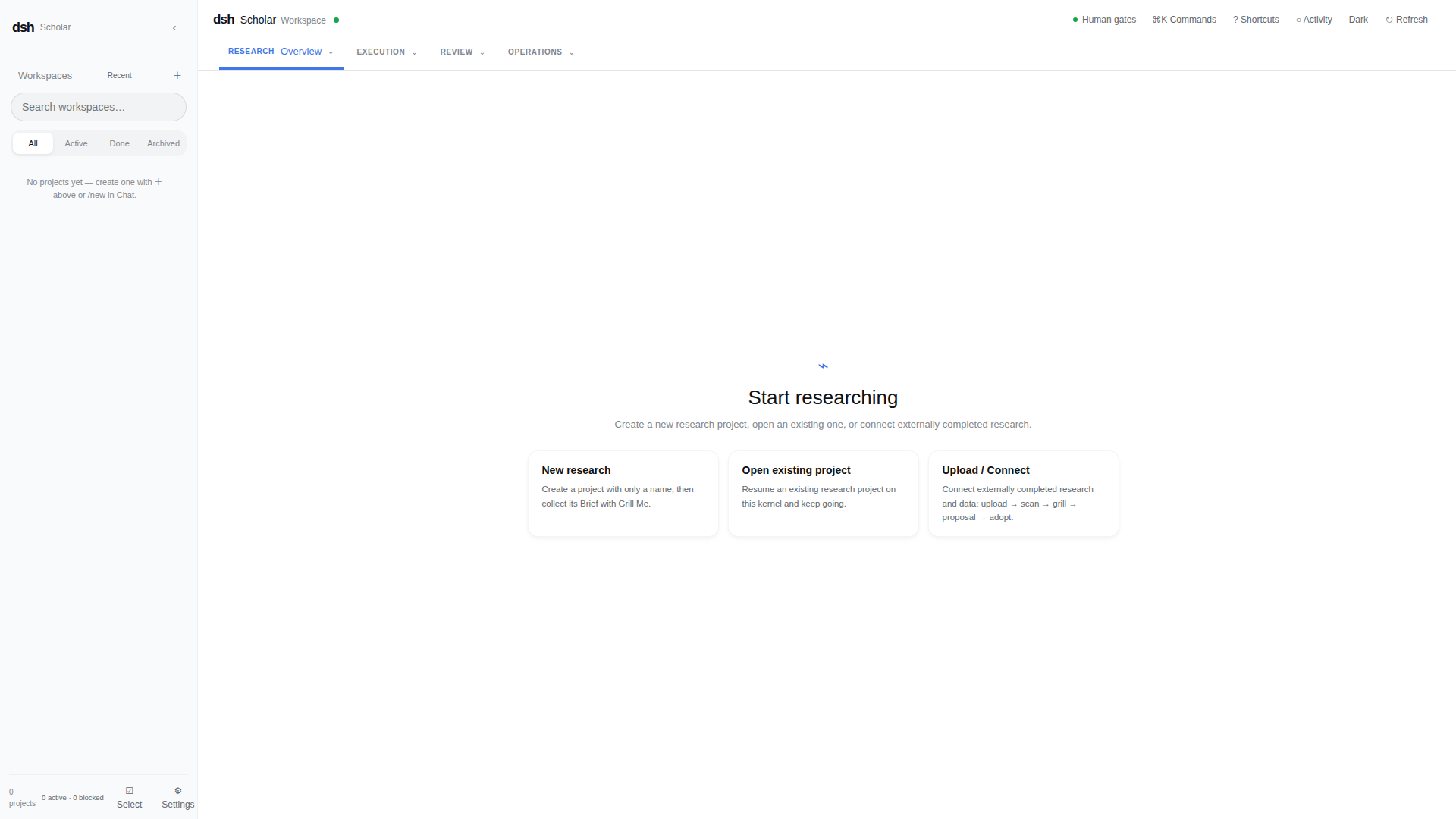
What it provides
- Stage-aware research guidance: Chat supports natural conversation, Grill Me intake, file upload, explicit slash commands, and an authoritative next-step prompt for the current research stage.
- Governed research workflow: Scope, Idea, Contract, Evidence, Direction, and Release decisions remain explicit, revision-bound, and auditable.
- Controlled execution: Runner Profiles describe local, local-Docker, or remote-SSH environments, including pinned container images and declared NVIDIA GPU capability.
- Integrated workspace: project-scoped Chat, editable files, session-bound Web terminals, run logs, artifacts, TeX source, compilation diagnostics, and PDF preview share the same context.
- Traceable methodology: Protocol revisions, run classifications, synthesis requests, assurance results, reviewer findings, knowledge-pack activation, and claim-to-evidence links are recorded as durable research state.
- Visible collaboration: Trajectory and Topology expose subagent parent-child relationships, status, follow-ups, and outputs.
Intended use and boundaries
- DSH Scholar assists researchers; it does not assume responsibility for scientific judgment, approval, authorship, or publication.
gate-onlyis the normal mode. Agents cannot impersonate a Human principal, fabricate accepted Evidence, or bypass a research Gate.full-automeans automatic approval only for the allowlisted Scope, Idea, Contract, and Budget Gates of an exact registered FixtureProfile. Its only canonical action executor is currentlysurvey_run. Release, Direction, Intake, Evidence, and unsupported actions remain Human-controlled or are parked with a typed reason.- A name-only
/new <name>project always starts asgate-onlyand collects its Brief through Grill Me; it does not silently inheritfull-auto. - Formal experiments must bind immutable code and data snapshots, a frozen Protocol where required, and an explicit Runner Profile. Chat text, ordinary stdout, and Interactive Terminal output do not automatically become formal Evidence.
- The product focuses on computational research such as machine learning, data science, and bioinformatics. It is not intended for clinical decisions, human studies, wet-lab work, or other high-risk research.
Quick start
The local workspace requires Linux, Node.js 24, pnpm 11.20.0, and Docker Engine for controlled experiments, TeX compilation, and clean-room reproduction.
1. Install and build
pnpm install --frozen-lockfile
pnpm run build
2. Start the standalone workspace
bash scripts/start-standalone-ui.sh
Open http://127.0.0.1:18610 and paste the token from:
~/.dsh-scholar-standalone/research-ui-standalone/standalone-token
The standalone workspace and DSH use the same Research Kernel at 127.0.0.1:7412 and the same canonical project data directory at ~/.dsh/research-kernel. Upgrading either surface must keep that directory unchanged so existing projects remain accessible. Browser tokens and display preferences live separately in the standalone BFF directory. Use --no-token only on an isolated, supervised, loopback-only development instance.
3. Configure an execution environment
Open Settings → Execution environment and select an explicit Runner Profile:
- local machine for trusted development and smoke checks;
- local Docker with a pinned image, optionally requiring the NVIDIA runtime and GPU capability;
- remote SSH with server-side endpoint, credential, known-hosts, and target-identity SecretRefs.
Formal Jobs do not execute until the selected profile and target pass readiness checks. A missing Runner, offline target, unavailable SecretRef, capability mismatch, or incomplete Contract/Protocol is shown as preparation or a blocker instead of being treated as ready. See the runtime guide for target registration, target-scoped heartbeat credentials, Runner startup, ports, and security constraints.
4. Install the plugin in DSH
Install the current DSH prerelease through its moving next tag, then record the exact installed version:
npm install -g @deepseek-ai/dsh@next
npm ls -g @deepseek-ai/dsh --depth=0
The @dsh-scholar/* packages are not published yet. Build this repository and add its absolute path to DSH's web profile:
cd /absolute/path/to/dsh-scholar
pnpm install --frozen-lockfile
pnpm run build
dsh plugin --profile web add /absolute/path/to/dsh-scholar
dsh plugin --profile web why @dsh-scholar/research-plugin
dsh web
To update Scholar, rebuild this same checkout and add the same absolute path again. To uninstall it:
dsh plugin --profile web remove @dsh-scholar/research-plugin
The plugin adds Scholar tools, slash commands, Skills, settings, and a compact dsh Scholar tab. An unlinked DSH conversation can bind an existing project or create a name-only project. A linked conversation shows only its current stage, next action, and execution summary; use Open in new page or the configured shortcut for the complete workspace.
Plugin configuration
Open Settings → Plugin config → dsh Scholar in DSH. Saved plugin changes take effect after the next DSH restart.
| Setting | Default | Meaning |
|---|---|---|
| Default governance mode | gate-only | Applies only when a fully configured project explicitly qualifies for that mode. Name-only creation remains gate-only. |
| Unattended runs | Off | Does not bypass Human Gates; an interaction requirement parks the project. |
| Standalone URL | http://127.0.0.1:18610/ | Target for Open in new page and the shortcut. Only HTTPS or loopback HTTP is accepted. |
| Open-page shortcut | Alt+Shift+S | Can be disabled and does not fire while typing or using an IME. |
When full-auto is enabled for a valid fixture, Settings also reports worker state, restart-required state, the fixture-only boundary, and the latest park reason. Release remains Human-controlled. The Standalone URL cannot contain credentials, query parameters, or fragments. Copy standalone access token is available only from a loopback DSH instance after an explicit click; the page never displays the token and does not expose Kernel, Runner, Provider, or SSH secrets.
Start or continue research
Choose one of three entry points:
- New research: provide only a project name, then answer the Grill Me questions in Chat to complete the Brief.
- Open an existing project: continue its persisted stage, project conversations, files, tasks, runs, and methodology history.
- Upload / join: add papers, code, data, images, or logs and attach them to an existing stage. Uploaded material first enters isolated Intake and never becomes Evidence automatically.
The usual flow is:
Create or join → Grill Me → Scope → survey → Ideas → Baseline → Contract
→ controlled Runs → classification and synthesis → Evidence and Claims
→ TeX writing and review → private bundle → Human Release Gate
Chat accepts ordinary natural language and top-level slash commands. Explicit commands are deterministic advanced entry points; prose is interpreted against the project's current authoritative NextAction. For example:
/new  /status  /survey  /ideas  /ideas generate 3  /ideas select <idea_id>
/gates  /contract  /run  /evidence  /claims  /write  /review
/release-bundle  /release
/run executes only when its exact snapshots, Protocol, Runner, target, and budget are ready. /release creates or opens a Human Release decision; it does not let an Agent publish automatically.
Reproduced example: MNIST handwritten-digit classification
On 2026-08-20, the repository's isolated reproduction harness ran three baseline and three treatment Jobs in real local Docker. All six Jobs succeeded on their first attempt and all six Run records were signed. The fixture uses a fixed 6,000-train/1,000-test MNIST subset, five CPU training epochs, and preregistered seeds 11, 23, and 47.
| Result | Value |
|---|---|
| Single-convolution baseline | 92.4% mean test accuracy |
| Two-convolution treatment | 96.8% mean test accuracy |
| Paired effect | +4.4 percentage points |
| 95% interval | [1.2, 8.6], n=3 |
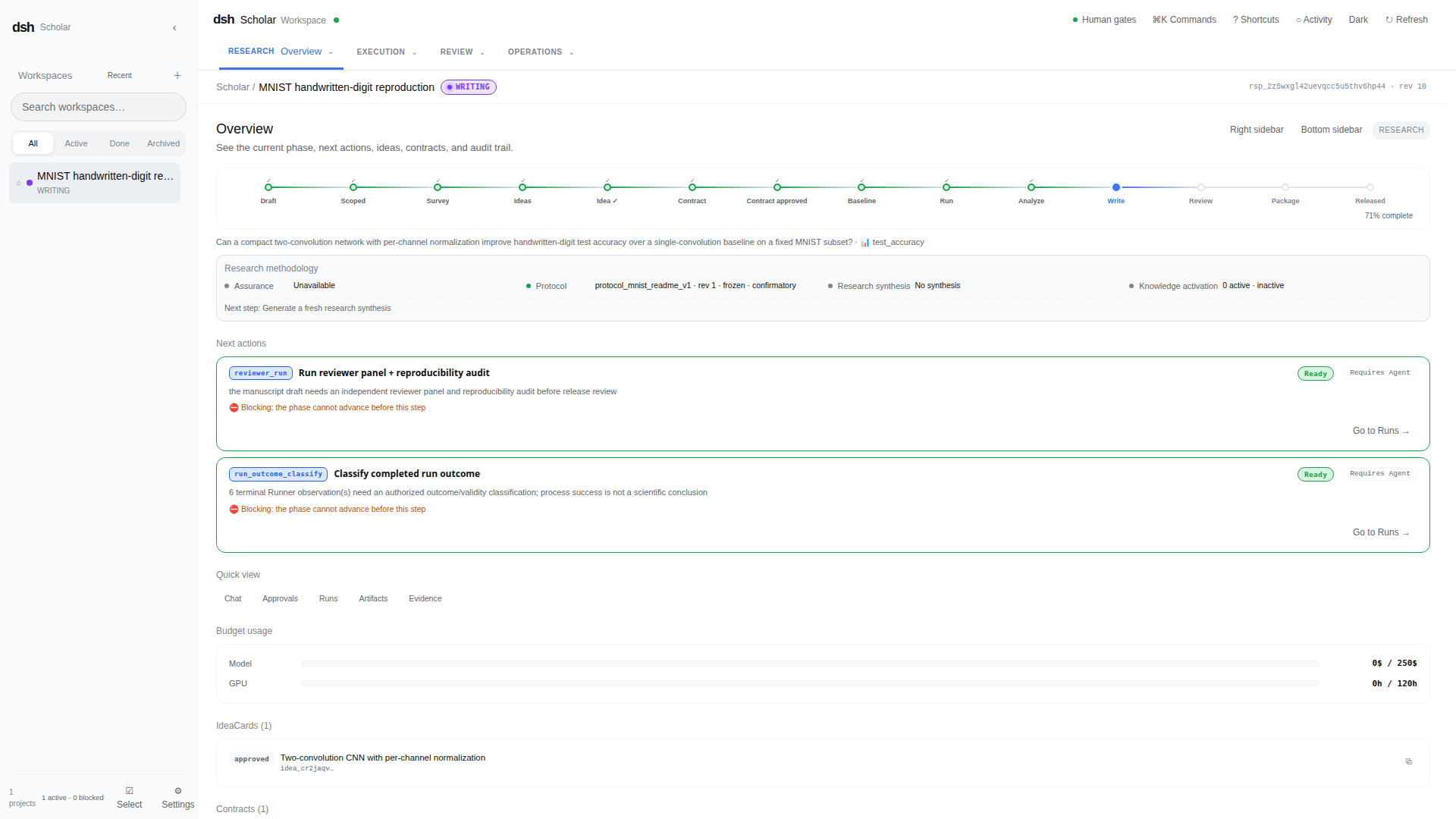
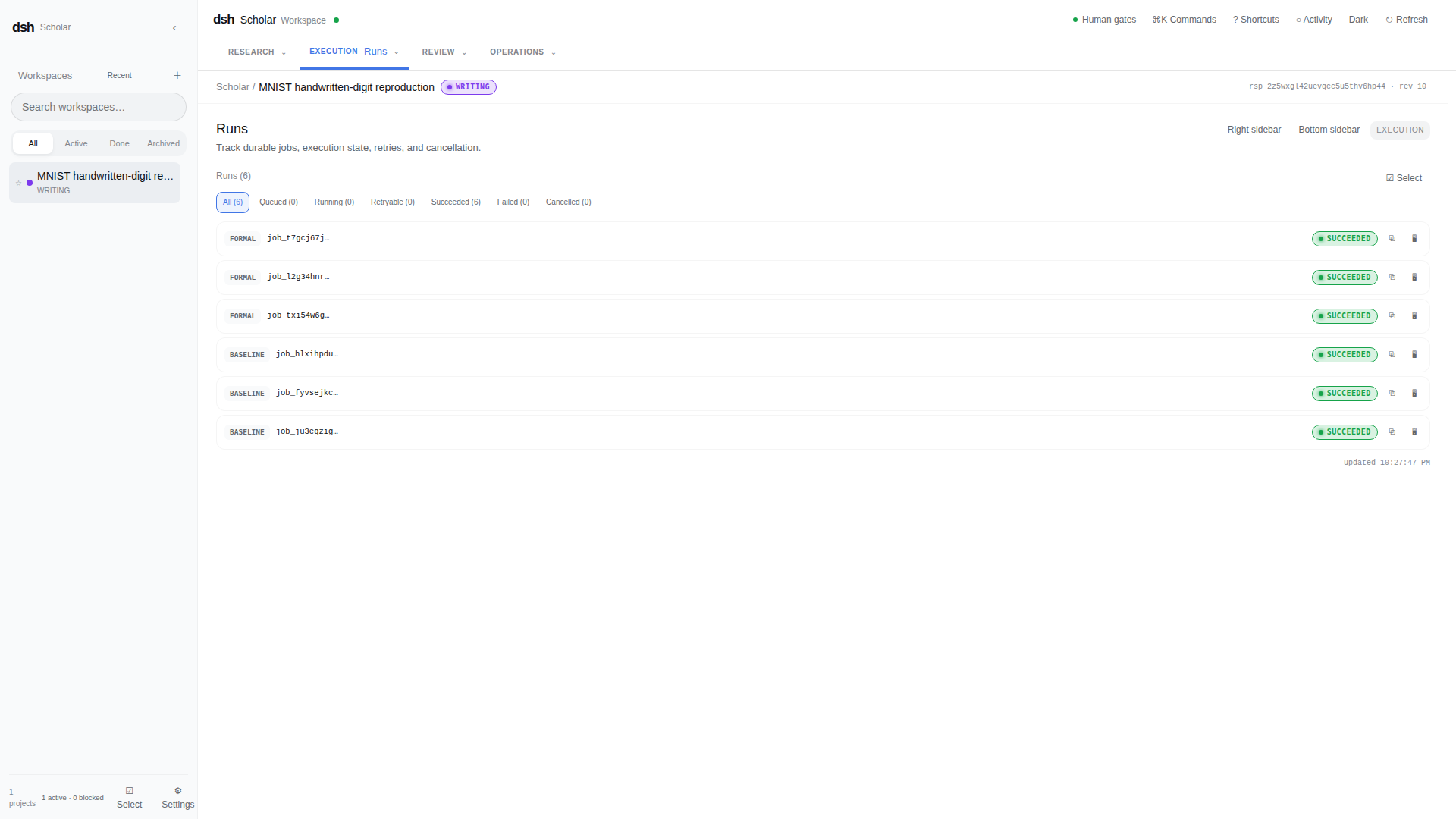
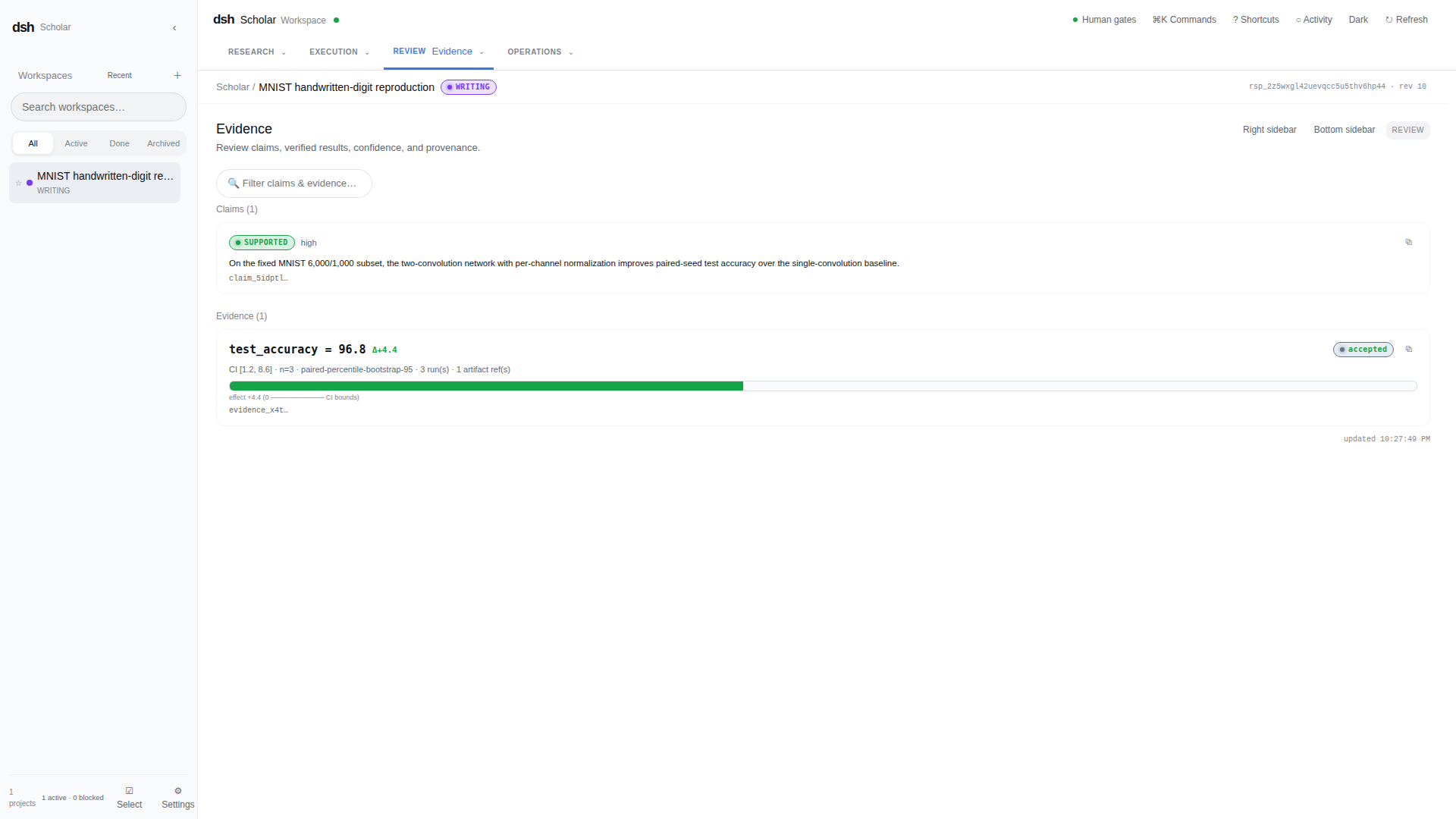
The screenshots show the same project and revision. See the reproduction receipt for exact code/data/image/Protocol pins, per-seed results, signed Job/Run IDs, and the rerun command. This is a deterministic product fixture, not a full-MNIST benchmark or a state-of-the-art claim.
Workspace areas
| Area | Purpose |
|---|---|
| Chat | Natural conversation, Grill questions, uploads, command completion, and stage-aware guidance. |
| Workspace | Browse, search, edit, upload, and manage project files with version/etag conflict protection. |
| Run / Terminal | Inspect formal Job state and read-only logs, or operate a project/session-bound Web PTY. |
| Evidence / Artifacts | Preview and download outputs, and review metrics, provenance, confidence, and claim links. |
| Manuscript | Edit TeX, inspect compilation diagnostics, and preview the latest successful PDF generation. |
| Trajectory / Topology | Inspect research history and enter subagent nodes to review their work and follow-ups. |
| Settings | Configure model and OCR providers, MinerU, budgets, Runner Profiles, targets, Docker images, GPU requirements, and SSH SecretRefs. |
Validation boundary
The repository's automated acceptance covers builds, schemas, Kernel and Client behavior, governance and security regressions, persistence/restart behavior, DSH plugin contracts, and controlled local-Docker fixtures. Real browser/ARIA observation, a clean DSH Host cold start, production model/reviewer providers, remote SSH/GPU execution, production mTLS termination, and environment-specific TeX rendering remain deployment-specific manual acceptance items. Check the current implementation status and manual acceptance checklist before relying on those paths.
Documentation
- Usage guide
- Runtime and deployment guide
- DSH host integration
- Security and research-integrity baseline
- Acceptance specification
License
This project is licensed under the MIT License.
查看使用指南 →
该插件的安装步骤、关键要点、FAQ 与兼容性说明(基于已收录字段派生)。
收录徽章

[](https://deepseek-plugin.org/plugins/lzszq/dsh-scholar)把这段 markdown 粘贴到你的 GitHub README,链接回本插件详情页。徽章只声明已被本站收录,不代表安全认证。