Convert DSH Web to an app-like experience on mobile browsers: sidebar to drawer navigation, file preview to bottom sheet, settings popup to near full-width, while remaining imperceptible on desktop.

- Language
- JavaScript
- License
- MIT
- Branch
- main
Install
$ dsh plugin --profile web add dsh-web-mobileRun the command above in your terminal to install this plugin via the dsh CLI. You can switch Profile in the top-right corner. New to dsh? Read the beginner tutorial
Install via your agent
Install the DeepSeek Harness plugin mexiaosqwq/dsh-web-mobile for me: review the repository at https://github.com/mexiaosqwq/dsh-web-mobile first, then run the install command and verify the plugin loads successfully.
Paste this instruction to the DSH Web GUI assistant — it will install and verify for you.
One-Line Positioning
Rearrange DSH Web on viewports ≤1023px to approximate a native app experience: sidebar becomes a slide-out drawer, file tree and preview become bottom sheets, settings popup becomes near-full-width with toolbar merged into category bar; completely no-op at ≥1024px.
Core Capabilities
- Sidebar to Drawer: New "Open Directory" icon button in conversation header, tap to slide out/in drawer; in stages without conversation header like home/blank page, top-left floating button takes over the toggle
- One-Tap File Browser: New "File Browser" icon button in conversation header, directly expands dsh-web-ui's aionui file explorer into a bottom sheet, no need to open drawer first
- Double Capsule at Drawer Bottom: When drawer opens, two capsule buttons "File Browser" and "Export Conversation Log" appear at bottom; conversation log button auto-disables when there's no current conversation
- Status Bar & Safe Area Adaptation: Write
viewport-fit=cover+theme-color, push all visible surfaces below the notch perenv(safe-area-inset-top); Android system status bar color switches with light/dark theme - Preview Overlay Fullscreen: New fullscreen toggle button on the right side of preview overlay title bar in dsh-web-ui; when pressed, overlay fills viewport (including safe area), press again to restore
- Full Close Interaction Set: Click mask to close when drawer is open, close by pressing Esc (yield when popup opens), click conversation row/task board/search result in drawer to collapse drawer; three-dot menu button on conversation row is explicitly excluded, menu opened by clicking it won't collapse
- Media Query Width Limit: Between 768–1023px (foldable, tablet portrait), popups and overlays become centered with width limited to
min(100vw-32px, 720px), avoiding content cramped in screen corner - Diagnostic Floating Bar: After adding
?mobile-nav-debug=1to URL, floating panel appears at top-right showing real-time viewport, breakpoint match, frame markers, overlay visibility, last 5 JS errors
Technical Implementation
- Language: TypeScript (React 18 + DSH client SDK); client compiled to CommonJS and inlined as
lib/client.jsby custom bundler inscripts/build-client.mjs - Key Dependencies:
@deepseek-ai/cordis(host container),@deepseek-ai/dsh-client-runtime(cordis fiber + ClientContext),@deepseek-ai/dsh-client-ui-slots(slot registration),react ^18.2.0(React components for header / drawer bottom) - Architecture Pattern: Dual-sided plugin. Host side
src/index.ts:7exposes an emptyapply(), only used to registerdsh-mobile-navline in host Loader; real work all on Browser sidesrc/client/index.tsx:27-97: injects a mobile<style data-plugin>, registers three slots (conversation.session.header.actions,sidebar.footer.action, andsettings.general.itemmentioned in README & AGENTS.md, butsrc/client/index.tsx:66-97only registers first two), mounts a group of lifecycle-managed DOM effects - Entry File: Client's
apply(ctx)atsrc/client/index.tsx:27; cordis patch writes one lineinsert: { id: dsh-mobile-nav, name: '@dsh-external/dsh-mobile-nav' }incordis.patch.yml:4-5 - Core Mechanism:
src/client/effects/reconciler-core.tsmaintains a zero-import dirty-key registry, merges MutationObserver bursts per animation frame,src/client/effects/phone-chrome.ts:124-165connects this DOM-free engine to a single whole-tree observer; tasks declare their dirty keys (likedata-aionui-preview-open) so only truly changed attributes wake up related tasks
Use Cases
Users who use DSH Web on mobile browsers (including Android Chrome / iOS Safari) and find the default three-column layout cramped on narrow screens; or developers who need it to remain usable when temporarily narrowing desktop windows without losing desktop experience. One installation improves five scenarios simultaneously: home page, ongoing conversation, settings, file tree, and preview.
Prerequisites & Compatibility
| Dependency | Min Version | Description |
|---|---|---|
| DSH Client SDK | @deepseek-ai/dsh-client-runtime ^0.1.0-rc.6 and series (same version number) | package.json:48-57 declares peerDependencies, covering locale / runtime / ui-primitives / ui-slots / ui-conversation / ui-layout / ui-settings / ui-sidebar / session-log-export |
| Cordis | @deepseek-ai/cordis ^4.0.1 | package.json:47 declares, provided by host |
| React | ^18.2.0 | package.json:52 declares, peer only |
| Node.js | Not declared | package.json doesn't set engines; minimum Node for running pnpm verify and pnpm build indirectly determined by @types/react and TS 6.x |
| Platform | Browser | package.json:39-44 declares dsh.client.platform: "web", no host-side code, no native module dependencies |
| Host Injections | slots / layout / locale / sessionLogDownload | inject = [...] list at src/client/index.tsx:19, missing any one cordis fiber will refuse to load |
| Third-party Compatible Plugins | dsh-web-ui-all 0.1.14、dshmarket 1.2.2、dsh-usage-stats 0.1.2、dsh-genui 0.8.3 | Explicitly listed in README.md:50-55; UI compatibility patches written in src/client/styles/compat.css.ts |
Installation
dsh plugin --profile web add github:mexiaosqwq/dsh-web-mobile
Configuration
| Config | Type | Description | Default |
|---|---|---|---|
?mobile-nav-debug=1 | URL query parameter | Show diagnostic floating bar at top-right (viewport, breakpoint, frame markers, preview/file explorer column visibility, preview/file explorer open state, current phase, last 5 JS errors). For mobile debugging only, doesn't affect functionality | Not passed = not shown |
This plugin has no Schema / config file / environment variable形式的 configuration items (src/ doesn't read process.env, Schema fields, or localStorage keys; only debug panel reads URL query parameters).
FAQ
Q: Do I need to restart DSH after installation?
A: Yes. README.md:63 explicitly states "restart dsh web after installation". Plugin injects dsh-mobile-nav line via cordis.patch.yml at host startup; running dsh web process won't dynamically load it.
Q: Will this plugin affect desktop?
A: No. Source code src/client/styles/misc.css.ts:140-150 sets all [data-mobile-nav=...] controls to display:none !important inside (min-width: 1024px) media query; meanwhile src/client/effects/phone-chrome.ts:23-42's installMobileEffect only installs side effects when matchMedia('(max-width: 1023px)') matches. At >=1024px, no MutationObserver is created, no DOM written, no events registered.
Q: Where is the preview overlay fullscreen button? How to use it?
A: Only appears on title bar right side (approx right: 36px; top: 8px) when dsh-web-ui's preview overlay is open. Tap once, preview fills entire viewport (including status bar safe area); tap again to restore to bottom sheet size. aria-label switches between "Fullscreen Preview" / "Exit Fullscreen".
Q: What to do if clicking "File Browser" button does nothing?
A: Usually not a broken button, but that preview overlay is already open (compat.css.ts:104-115 lets preview cover file explorer). First click collapse button (chevron) on preview overlay title bar, then click "File Browser". AGENTS.md:117 explicitly lists this in "Pitfalls".
Q: What if interface reverts to desktop layout after upgrade?
A: Widen window or use desktop browser (≥1024px) to return to desktop layout; if still desktop layout under mobile viewport, first confirm dsh web process actually restarted, then add ?mobile-nav-debug=1 to check top W viewport width and whether mq≤1023 is true.
Q: How to uninstall?
A: dsh plugin --profile web remove dsh-web-mobile, then restart dsh web. This plugin has no host-side process, no persisted files, no external network requests; uninstallation is complete cleanup.
Getting Started Difficulty
Beginner — no code changes needed, install and restart to take effect; the only switch is the ?mobile-nav-debug=1 URL parameter for debugging, which regular users can completely ignore.
Known Issues & Limitations
- CSS depends on
:has()selector, requires Chromium 105+;:has()rules on legacy WebViews are silently dropped, may cause drawer/overlay anomalies. Source code heavily uses:has()insrc/client/styles/layout.css.ts:1-3andcompat.css.ts - When user system settings enable "Reduce Motion",
@media (prefers-reduced-motion: reduce)will turn off slide-in animations and transform transitions for overlays (compat.css.ts:210-216) - Preview overlay and file explorer have mutual exclusivity: only one can be open at a time; clicking "File Browser" when preview is open seeming to not work is expected behavior.
AGENTS.md:117lists this as priority check for "button seems not to work" - Drawer close-on-click logic uses capture phase events and explicitly excludes conversation row's three-dot menu button (
phone-chrome.ts:415); if third-party plugin's conversation row button selector changes in the future, need to sync update here or drawer will mistakenly collapse - Full-tree reconciler tasks use module-level
installedflag atsrc/client/effects/phone-chrome.ts:48-88to prevent duplicate mounting; hot-reloading plugin in same host environment unloads then rebuilds, causing very brief flicker during the transition
尽可能的使 dsh 适配竖屏等移动端设备



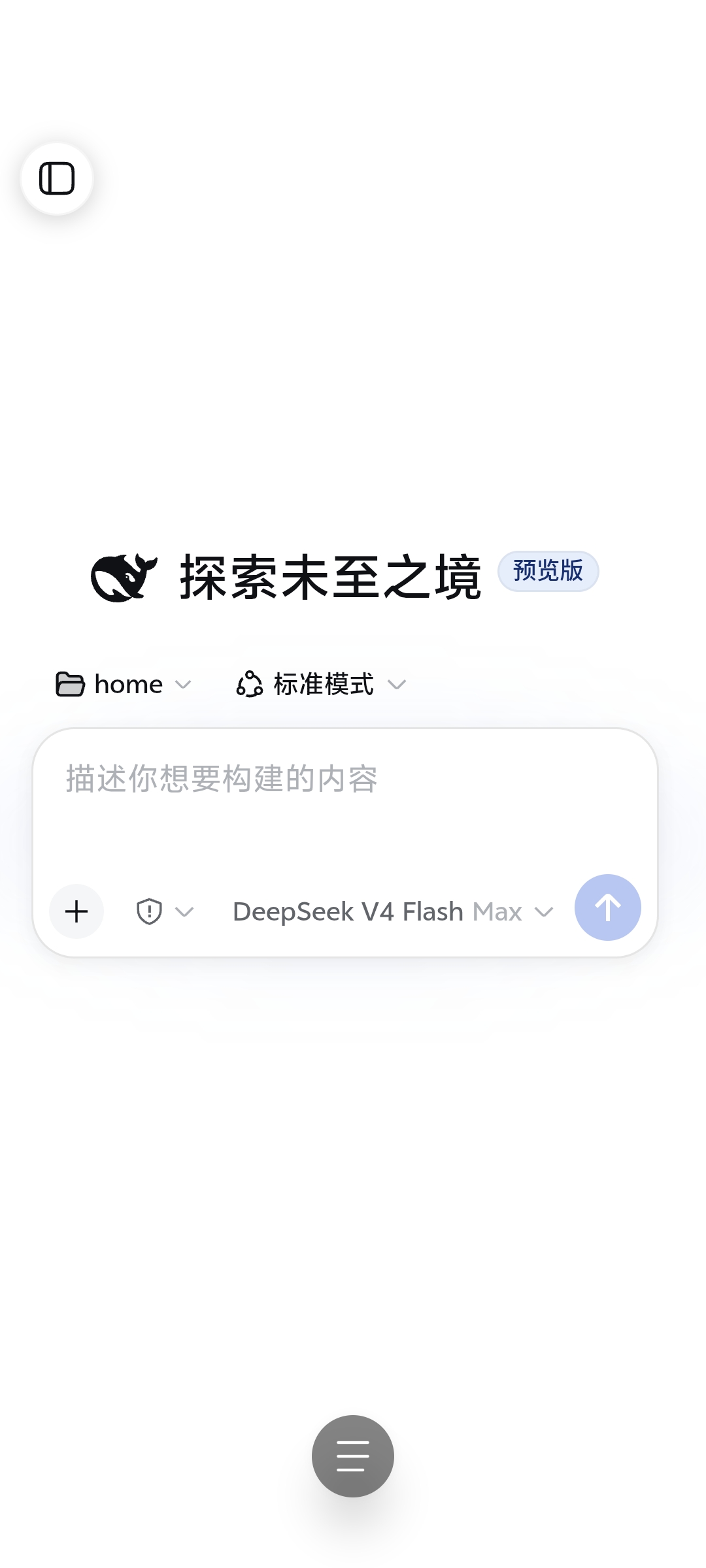
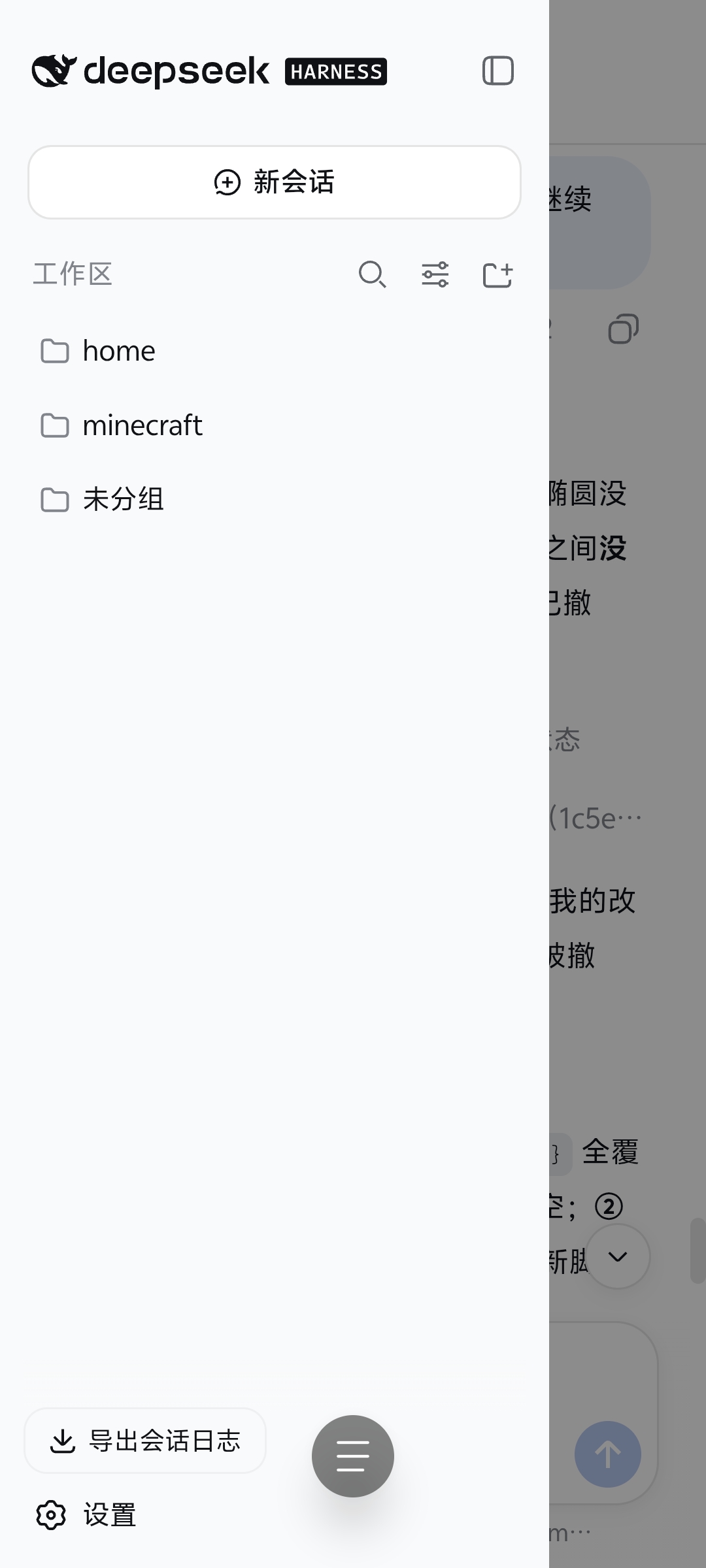
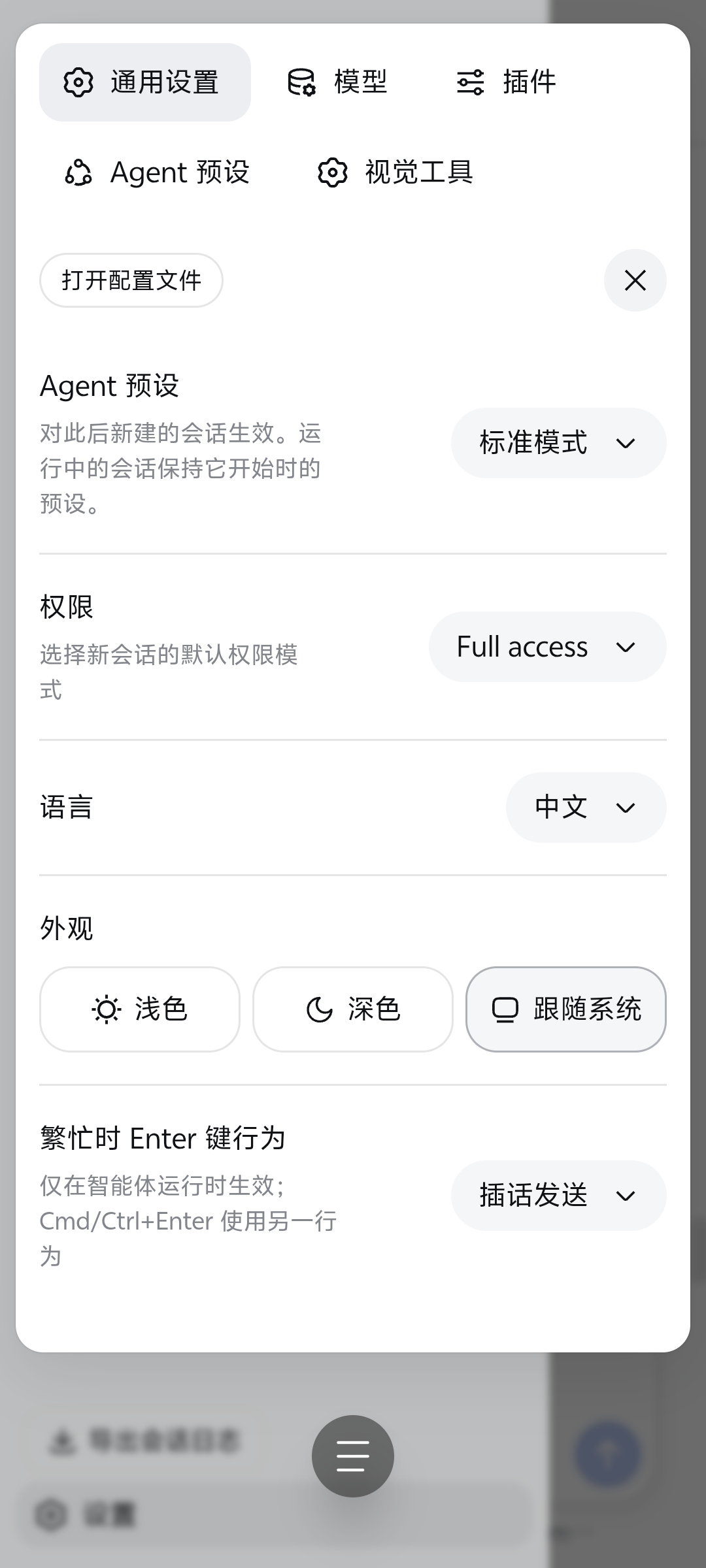
效果
| 会话主页(全宽) | 目录抽屉 | 设置界面 |
|---|---|---|
 |  |  |
特性
- 状态栏适配:保留系统状态栏,
viewport-fit=cover+env(safe-area-inset-top)避让刘海,theme-color跟随深/浅主题,禁用双击缩放; - 会话全宽 + 抽屉导航:网格改
1fr 0 0,侧栏变 overlay 抽屉;点会话行切换并收起抽屉,行内按钮(三点菜单)不收起; - 会话头部重排:目录按钮 / 会话名称 / 模式徽标按移动端排列,Session log 移到抽屉底部;
- 设置界面适配:官方双栏弹窗改近全宽 sheet——分类标签单行横向滚动,顶部工具栏并入标签行,手机上隐藏「打开配置文件」;
- 文件树 / 预览浮层:Explorer 与 Preview 变圆角底部浮层(滑入动画),文件行一步打开预览,浮层可一键全屏并自动还原;
- 统计栏一行滚动:轮数 / 步骤 / 耗时 / TTFT / 缓存 / token 收进单行横向滚动条;
- 输入区适配:权限胶囊与模型名不重叠,模型名完整显示,切换菜单水平居中;
- 会话行操作菜单:长按/右键会话行出现三点按钮(重命名 / Fork / 归档),弹出时抽屉保持打开;
- 平板适配:768–1023px 下弹窗与浮层限宽居中;桌面端(≥1024px)完全 no-op;
- 诊断:访问
?mobile-nav-debug=1显示悬浮诊断条(视口 / 浮层状态 / JS 错误),手机端问题取证用; - 触觉反馈:通用设置新增「点按振动」开关与强度选择(轻 / 中 / 强),仅移动端生效,桌面端自动隐藏。
更新日志
v1.5.0
新增 / 改进
- 触觉反馈:设置新增「点按振动」开关与强度选择(轻 / 中 / 强,本地存储偏好,跨标签同步),点按控件即时振动,桌面端不显示该设置行。
修复
- 抽屉关闭交互回归:移除旧 MobileNavOverlay 组件时误删的背板点击关闭、Escape 关闭、抽屉内导航点击收起、hero/blank 阶段悬浮按钮四项交互全部恢复;
- preview/explorer 互斥对称:打开 explorer 前先清 preview 标记,收起/关闭路径对称,预览浮层不再误开或残留标记;
- dispose 还原完整:设置工具栏、统计条、aionui sheet 标记在退出移动端布局时回到官方位置,桌面端无残留;
- 预览全屏按钮 aria-label 同步真实动作(「全屏预览」/「退出全屏」)。
内部
- reconciler 热路径优化:抽出零依赖 DOM-free 引擎
reconciler-core(node:test 5 例覆盖生命周期 / 脏路由 / 合并 / 错误隔离),MutationObserver 按脏键路由,8 个任务赋 scopes,流式 flush 从 8/8 降至 5/8; - CSS 模块自包含、effect 分层清理;
- CDP 回归门禁
smoke:cdp:覆盖抽屉 / 桌面 no-op / gitgraph 集成。
兼容插件
- dsh-web-ui 全家桶——0.1.14
- dshmarket——1.2.2
- dsh-usage-stats——0.1.2
- dsh-genui——0.8.3
安装
dsh plugin --profile web add github:mexiaosqwq/dsh-web-mobile
仓库自带构建产物,一条命令直接安装,无 allowBuilds 拦截。装完重启 dsh web。
本地开发:dsh plugin --profile web add link:/path/to/dsh-web-mobile
构建
pnpm install
pnpm build
lib/ 与源码同步入库,改动源码后重新构建再提交。
验证
pnpm verify类型检查;dsh --profile web --dump-config应出现插件层;- 移动端(390px):抽屉开合 / 遮罩 / Escape、设置弹窗适配、会话行三点菜单弹出时抽屉保持、文件/预览浮层;
- 桌面端(≥1024px):与未安装时一致;
- 回归门禁:
DSH_PROBE_SESSION_ID=... pnpm smoke:cdp(需先启动目标 profile,连接默认http://127.0.0.1:3080/)。
License
Read the usage guide →
Install steps, key points, FAQ and compatibility for this plugin — auto-derived from indexed fields.
Listing badge

[](https://deepseek-plugin.org/plugins/mexiaosqwq/dsh-web-mobile)Paste this markdown into your GitHub README to link back to this listing. The badge only states the listing — not a security endorsement.