Provides 98 Chinese traditional color themes (49 anchor colors × light/dark variants) for DeepSeek Harness, featuring a settings panel and deep link switching, all passing WCAG AA contrast requirements.

- Language
- JavaScript
- License
- MIT
- Branch
- main
Install
$ dsh plugin --profile web add dsh-theme-pluginRun the command above in your terminal to install this plugin via the dsh CLI. You can switch Profile in the top-right corner. New to dsh? Read the beginner tutorial
Install via your agent
Install the DeepSeek Harness plugin nevertoday/dsh-theme-plugin for me: review the repository at https://github.com/nevertoday/dsh-theme-plugin first, then run the install command and verify the plugin loads successfully.
Paste this instruction to the DSH Web GUI assistant — it will install and verify for you.
One-Line Positioning
Provides a skinning solution for DeepSeek Harness Web with Chinese traditional colors as anchor colors: 49 anchor colors each generate light/dark variants, totaling 98 themes, covering color selection in the settings panel and #theme= deep link switching, as well as theming code block syntax highlighting.
Core Capabilities
- Register 98 themes to the host (49 anchor colors × light/dark), each filled with 98 design tokens (89
--dsw-*+ 9 shiki syntax slots), all passing WCAG AA contrast thresholds - Provide four ways to find themes in "Settings → Traditional Color Theme" panel: browse, filter by status, search by pinyin/color name, view featured only, with WYSIWYG (the color card in each row shows the actual paper, curtain, focus for that theme)
- Support
#theme=<id>deep link jump, e.g.,http://127.0.0.1:3080/#theme=zhuqing-lightopens directly as Bamboo Green·Light - Automatically decide which panel tab to open first based on whether the current page is light or dark, avoiding repeated flickering during switches
- Store user's last selected theme in browser localStorage, auto-restore after refresh; selecting a new theme clears the
theme=parameter in hash to prevent deep link and memory conflicts
Technical Implementation
- Language: TypeScript (ESM)
- Key Dependencies:
@deepseek-ai/cordis(host framework),@deepseek-ai/dsh-client-runtime(client context),@deepseek-ai/dsh-client-ui-theme(theme registration service) — all three are optional peer - Architecture Pattern: Plugin split into "host half" and "client half" two entry points.
src/index.tsdoes one thing: inserts thetheme-zhongguoline into the composition tree viacordis.patch.yml, withapply()intentionally left empty; the real work happens insrc/client/index.tswhich callsctx.theme.register()to register themes, listens totheme/change, writes DOM tokens, and mounts the settings panel in the browser - Entry Files:
src/client/index.ts(browser side, registers and applies themes),src/index.ts(host side, only declares plugin name); build artifactlib/client.jsis the actual package loaded by the browser
Use Cases
Developers/designers who have DSH Web client installed and stare at screens for long periods, wanting to replace the default light/dark blue color scheme to make the interface more aligned with personal aesthetics or work rhythm; especially suitable for users who care about code block readability but also want a cohesive culturally-themed skinning solution rather than random color pairings.
Prerequisites & Compatibility
| Dependency | Minimum Version | Description |
|---|---|---|
| Node.js | >=20 | Declared in package.json#engines.node, [email protected] is the recommended paired version |
| DSH Web Client | 0.1.x (peerDependencies marked *) | Only effective under web profile, requires host to expose theme / slots / locale three client services |
| Platform | Cross-platform | No os / cpu restrictions, runs on browser side |
| Native Modules | None | Does not depend on node-pty / node:sqlite or other native modules |
Installation
dsh plugin --profile web add github:nevertoday/dsh-theme-plugin
Configuration
This plugin requires no additional configuration.
FAQ
Q: How to confirm the plugin is active after installation?
A: After opening DSH Web, check the browser console; seeing registered 98/98 themes (49 light / 49 dark) indicates all 98 themes have been successfully registered.
Q: Where is the theme selection saved, does it sync with the account?
A: The remembered theme is stored in browser's localStorage (key dsh:theme-zhongguo:theme), not written to settings.yaml, so it won't follow when switching devices or browsers.
Q: Do I need additional configuration after installation?
A: No configuration needed. This plugin intentionally exposes no configuration items; DSH 0.1's client startup manifest doesn't carry host plugin configurations yet, so all interactions go through the settings panel or #theme= deep link.
Q: How to switch themes?
A: Two methods: click to select in "Settings → Traditional Color Theme" panel, or directly open a deep link like http://127.0.0.1:3080/#theme=zhuqing-light; after selection, the theme= parameter in hash will be automatically cleared.
Q: How to uninstall?
A: Run dsh plugin --profile web remove dsh-theme-plugin; next time DSH starts, the "Traditional Color Theme" entry in the panel will disappear.
Q: What are the 49 anchor colors?
A: 49 Chinese traditional colors (such as Bamboo Green, Vermilion, Ultramarine, Gamboge, Crimson Purple, etc.), each anchor color derives light/dark theme variants, totaling 98 themes, of which 12 are marked as "Featured" and placed at the top of the panel.
Q: Do themes affect code block syntax highlighting?
A: Yes. Each theme fills 9 shiki --shiki-token-* slots; the five color slots retain programmer-familiar hue intuition, while comments and punctuation are downgraded to ink color rather than colorful, ensuring readability.
Difficulty Level
Beginner — install and use, no configuration changes needed; to locally modify colors or regenerate themes, understanding of OKLab color space and pnpm workspace is required.
Known Issues & Limitations
- Browser-side bundle is large: main build ~640 KB + 934 KB sourcemap, esbuild fallback slightly larger; CI budgets 680 KB / 1020 KB to cap both (README.md:179)
- Local development must use pnpm ≥ 9 and keep the repo's
.npmrc(auto-install-peers=false), otherwise it will try to pull an unpublished@deepseek-ai/*peer dependency from npm and fail to install (README.md:177) - Local link installation (
dsh plugin add -w .) requirespnpm buildafter code changes to take effect, because the host readslib/client.jsfrom the working copy (README.md:172-176) - No TODO/FIXME/HACK markers found in source; no host-side cordis configuration schema declared (
src/index.ts:5-17), DSH 0.1 client startup manifest doesn't carry host plugin configurations yet, so there's nowhere to configure
Chinese traditional colors as a DeepSeek Harness theme pack. 49 anchor colors × light/dark = 98 themes, each writing the full token vocabulary (98 tokens: 89 --dsw-* plus 9 --shiki-token-* syntax slots) and clearing WCAG AA on all 3136 contrast assertions. Twelve of the anchors are marked as a curated shortlist.
📖 中文文档
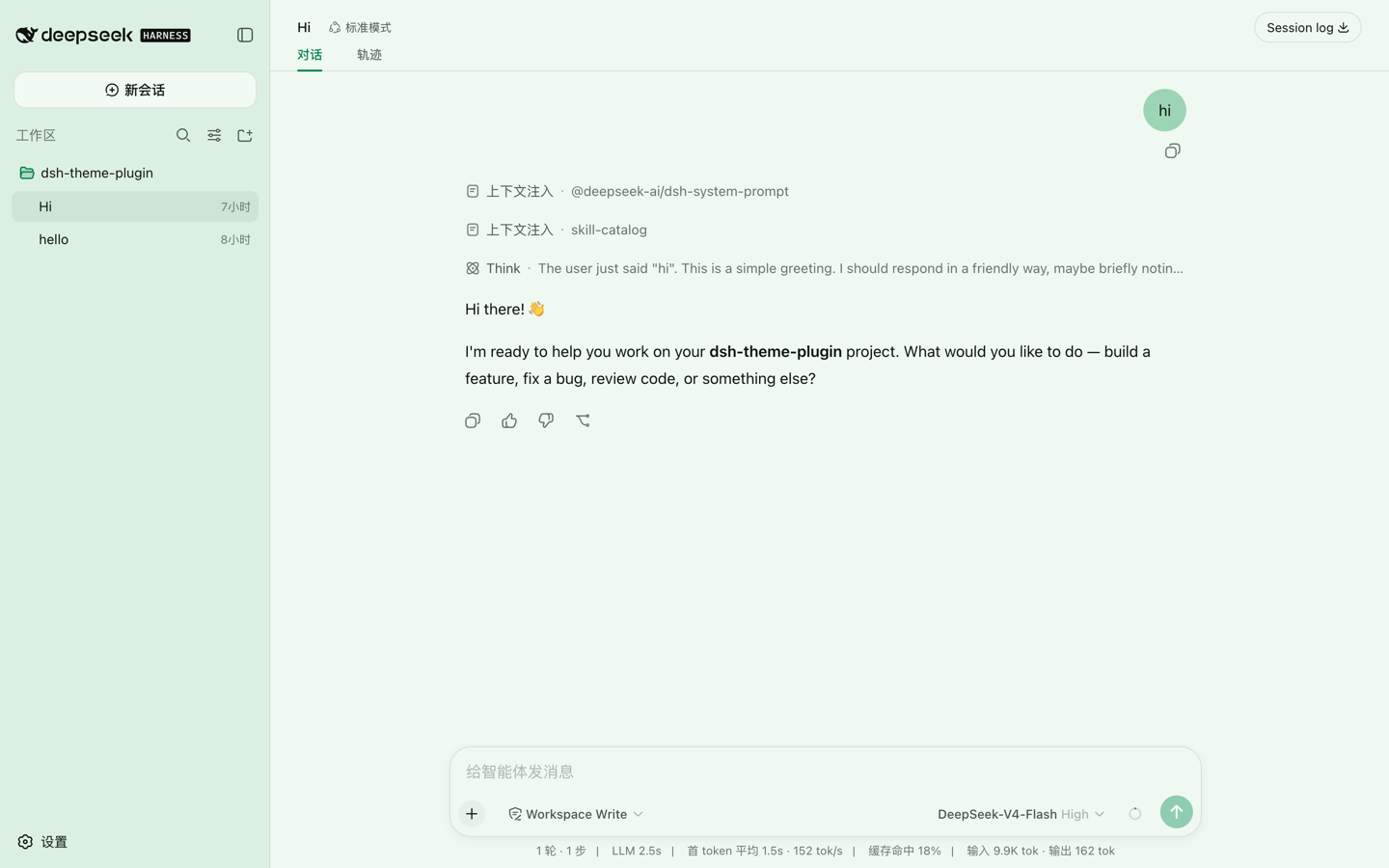
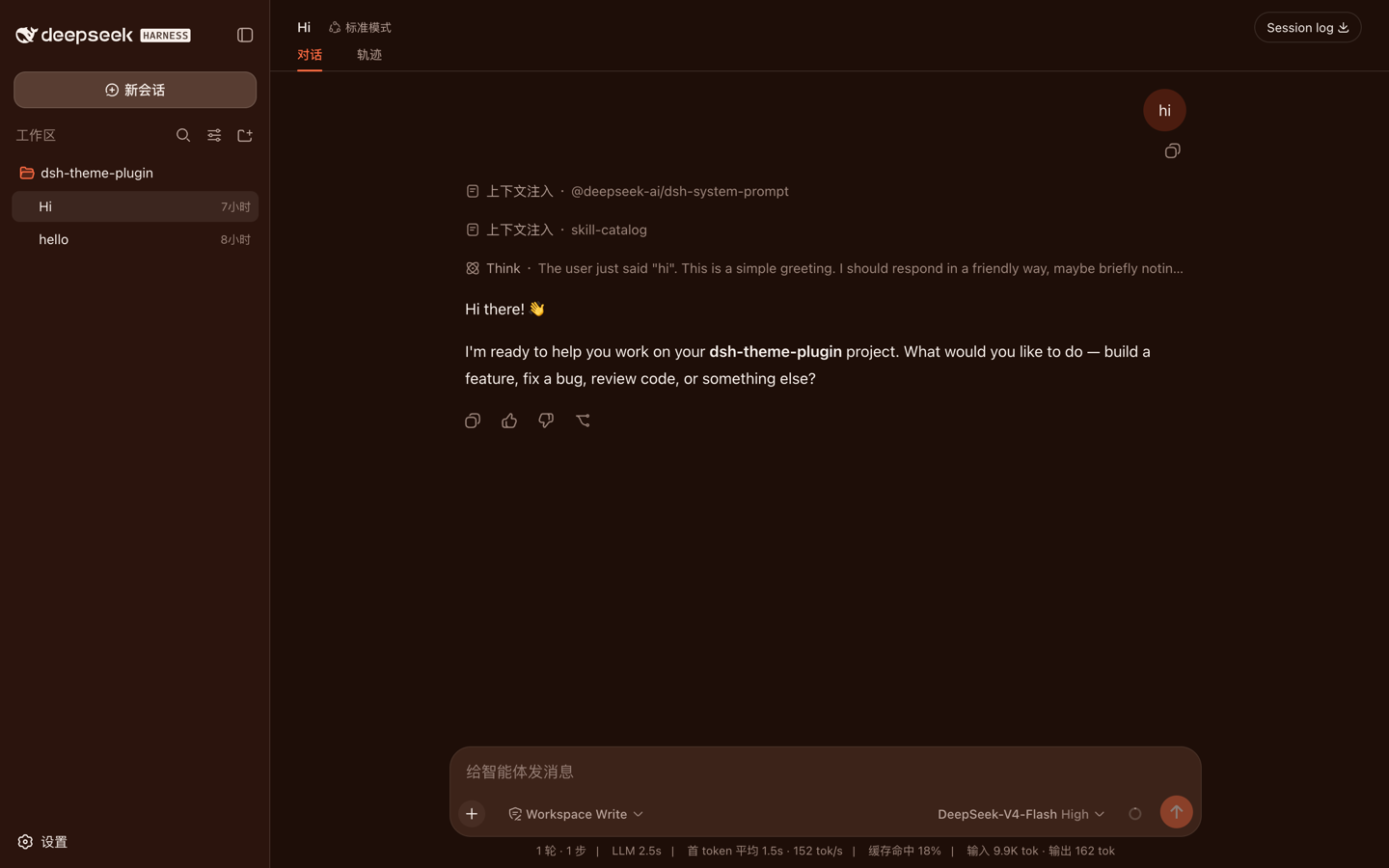
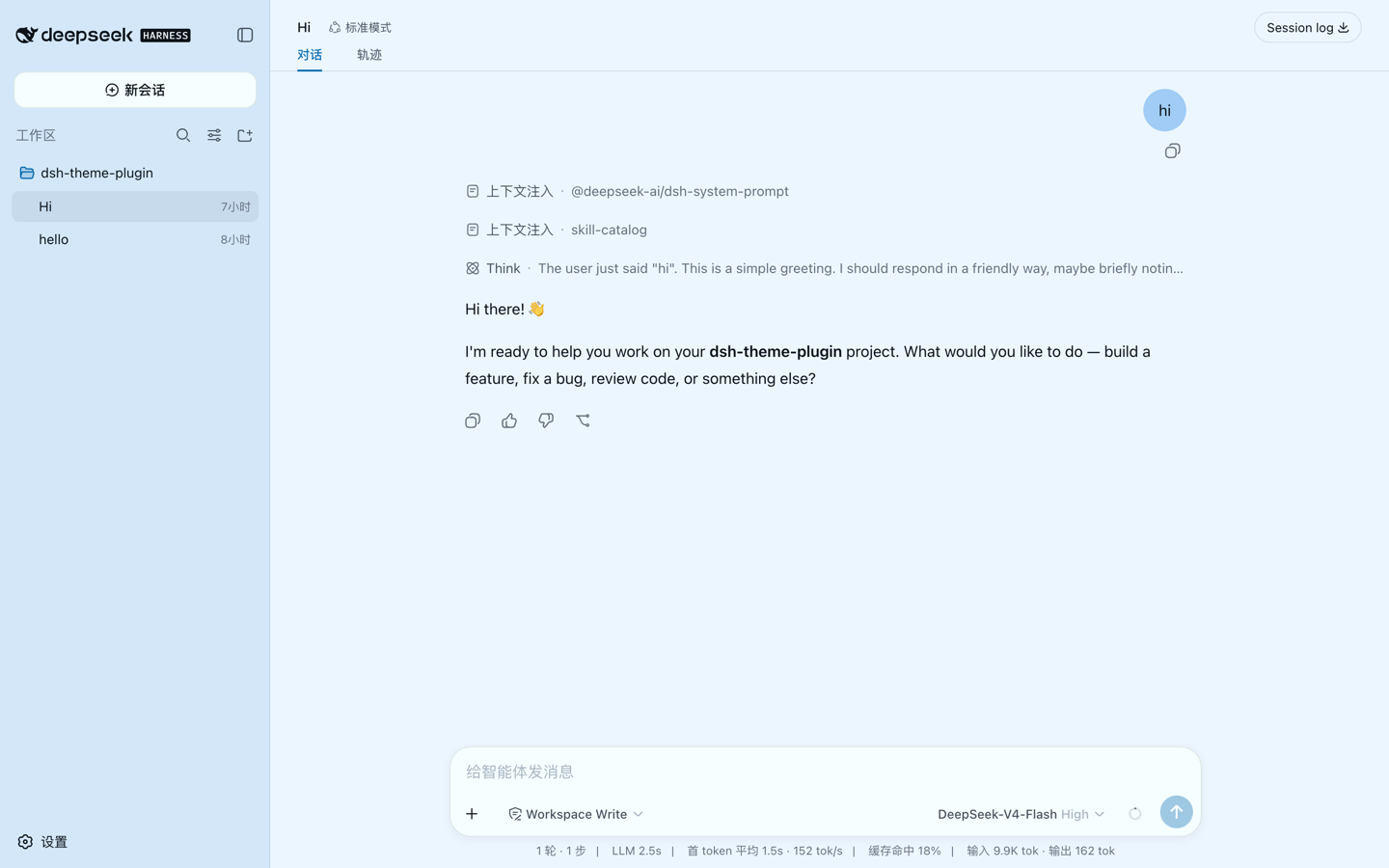
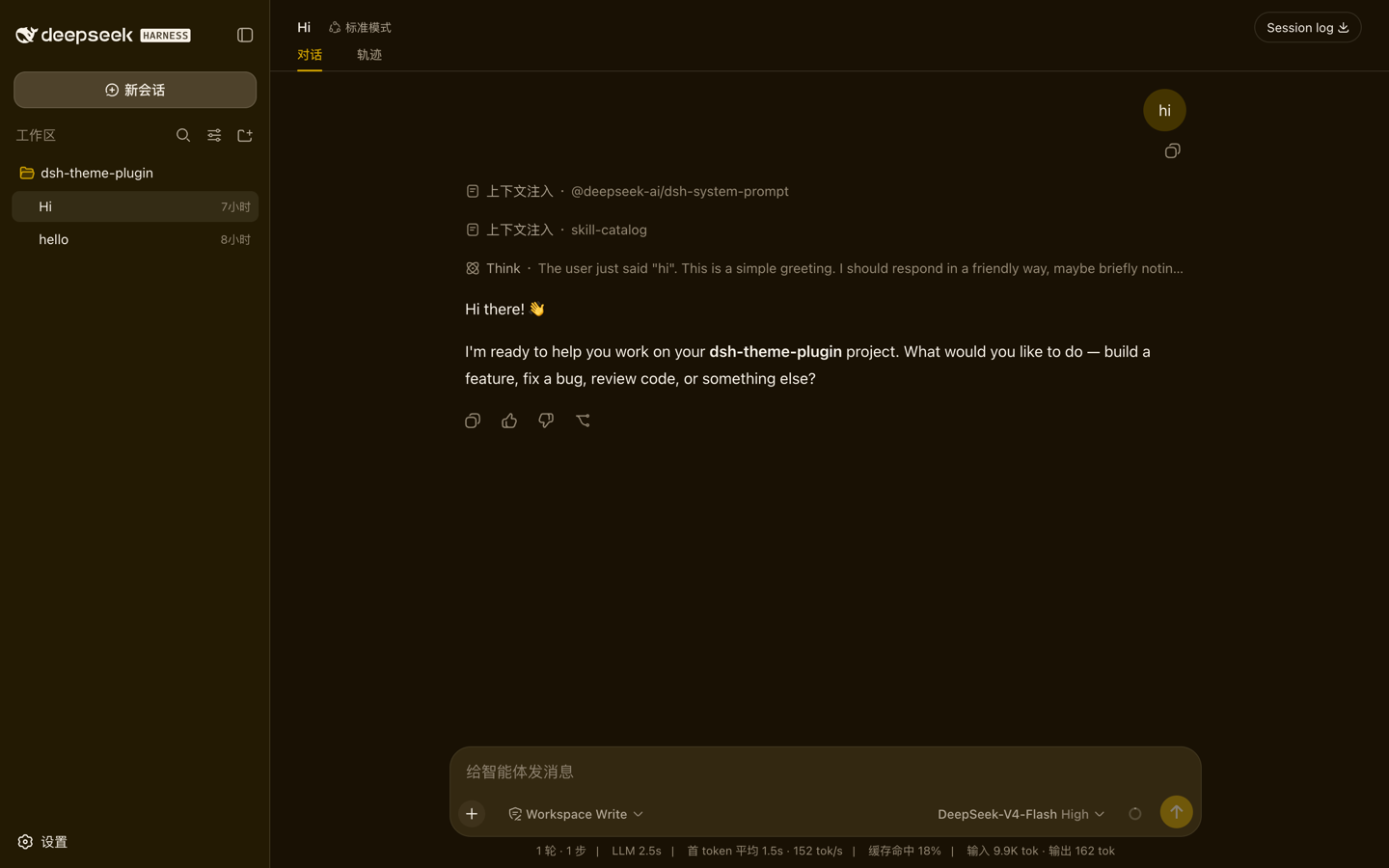
竹青 · light(素绢) | 朱红 · dark(熟宣)
群青 · light(雪青) | 藤黄 · dark(赭纸)
One anchor per paper family, same conversation in each. The most saturated patch on screen is always the color you picked.
Install
npx -y @deepseek-ai/dsh plugin --profile web add dsh-theme-plugin@latest
npx -y @deepseek-ai/dsh --profile web          # boot → open http://127.0.0.1:3080/
This pulls the prebuilt bundle from npm — no clone, no build step. The web profile is created on first boot under ~/.dsh/profiles/web.
- Verify — the browser console logs
registered 98/98 themes (49 light / 49 dark), anddsh --profile web --dump-configshows atheme-zhongguorow. - Update — run the same
addcommand again. - Uninstall —
dsh plugin --profile web remove dsh-theme-plugin
Usage
Open Settings → Traditional Colors and pick a theme; it applies immediately. Themes also have deep links:
http://127.0.0.1:3080/#theme=zhuqing-light      # 竹青 light
http://127.0.0.1:3080/#theme=qunqing-dark       # 群青 dark
Changing the hash switches themes live. A deep link wins over your remembered pick. The remembered pick lives in localStorage, not in settings.yaml, so it does not follow you across devices.
Four ways to find a theme
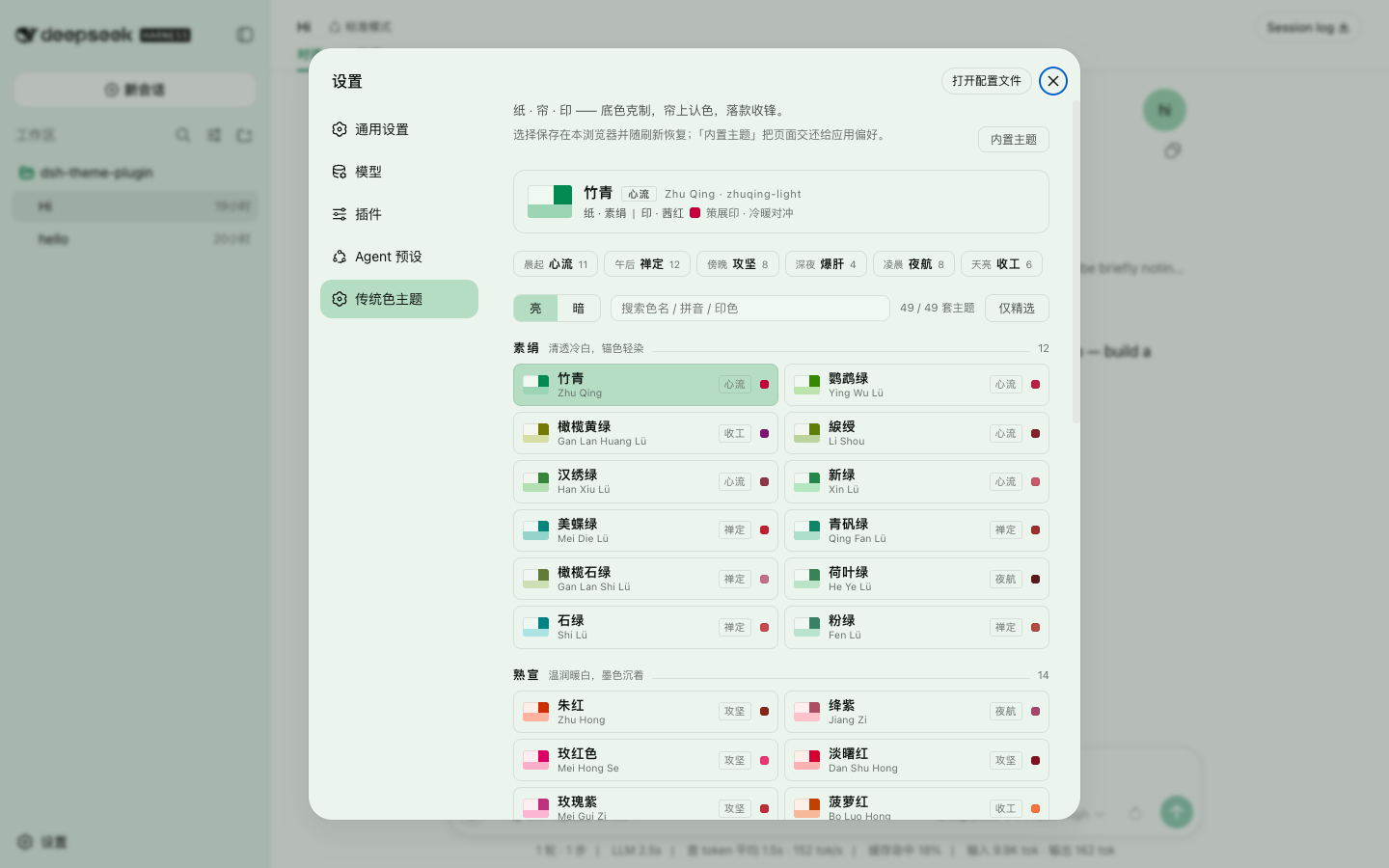 | 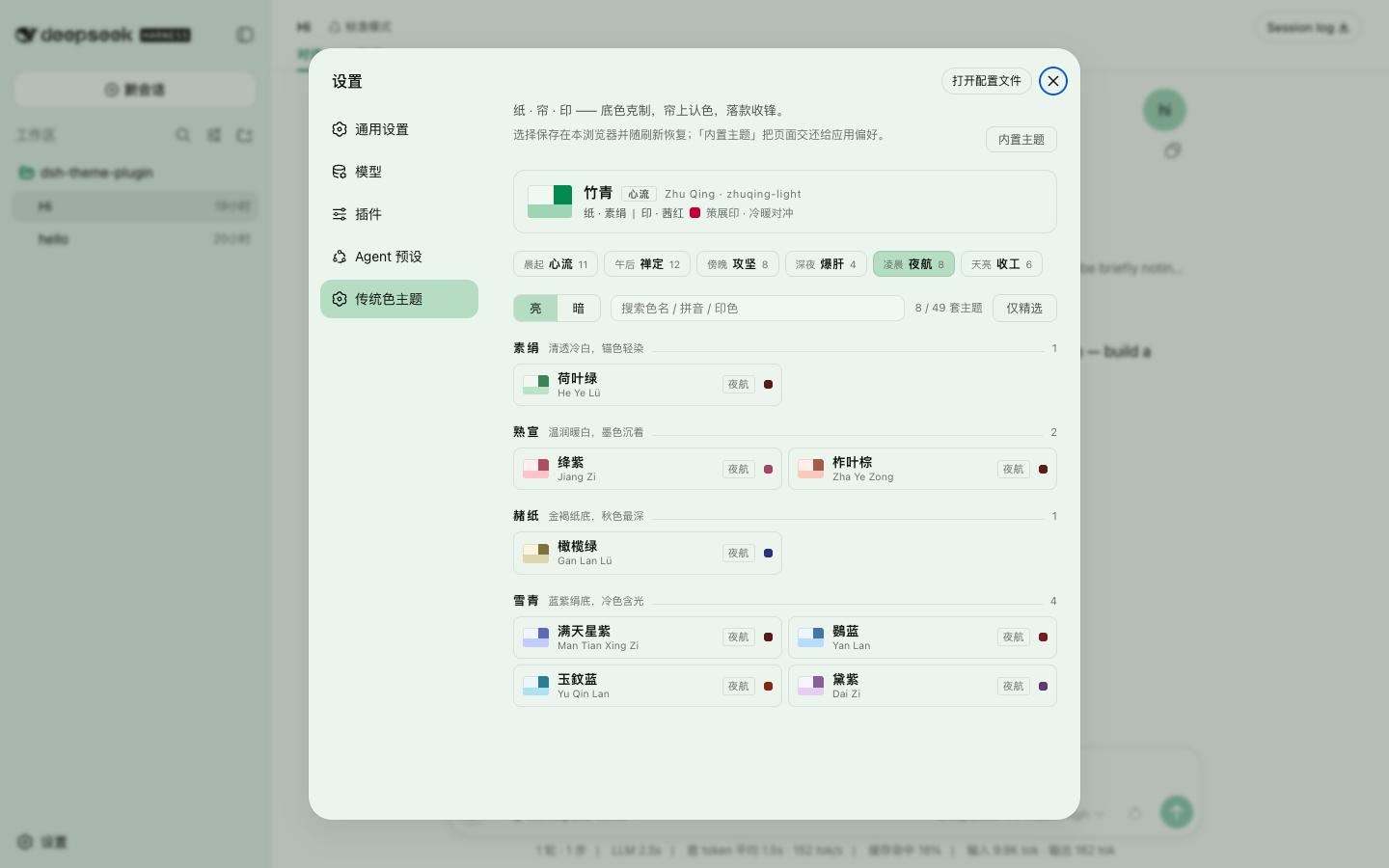 |
| Browse — opens on all 49 anchors of the current branch, grouped by paper family. Each row's chip is the theme's real paper, veil and focus, so the list previews itself. | By working mood — six chips read left to right as one day: 晨起 morning → 天亮 dawn. Pick 凌晨 夜航 and you get the eight dark-and-quiet themes, whatever their color. |
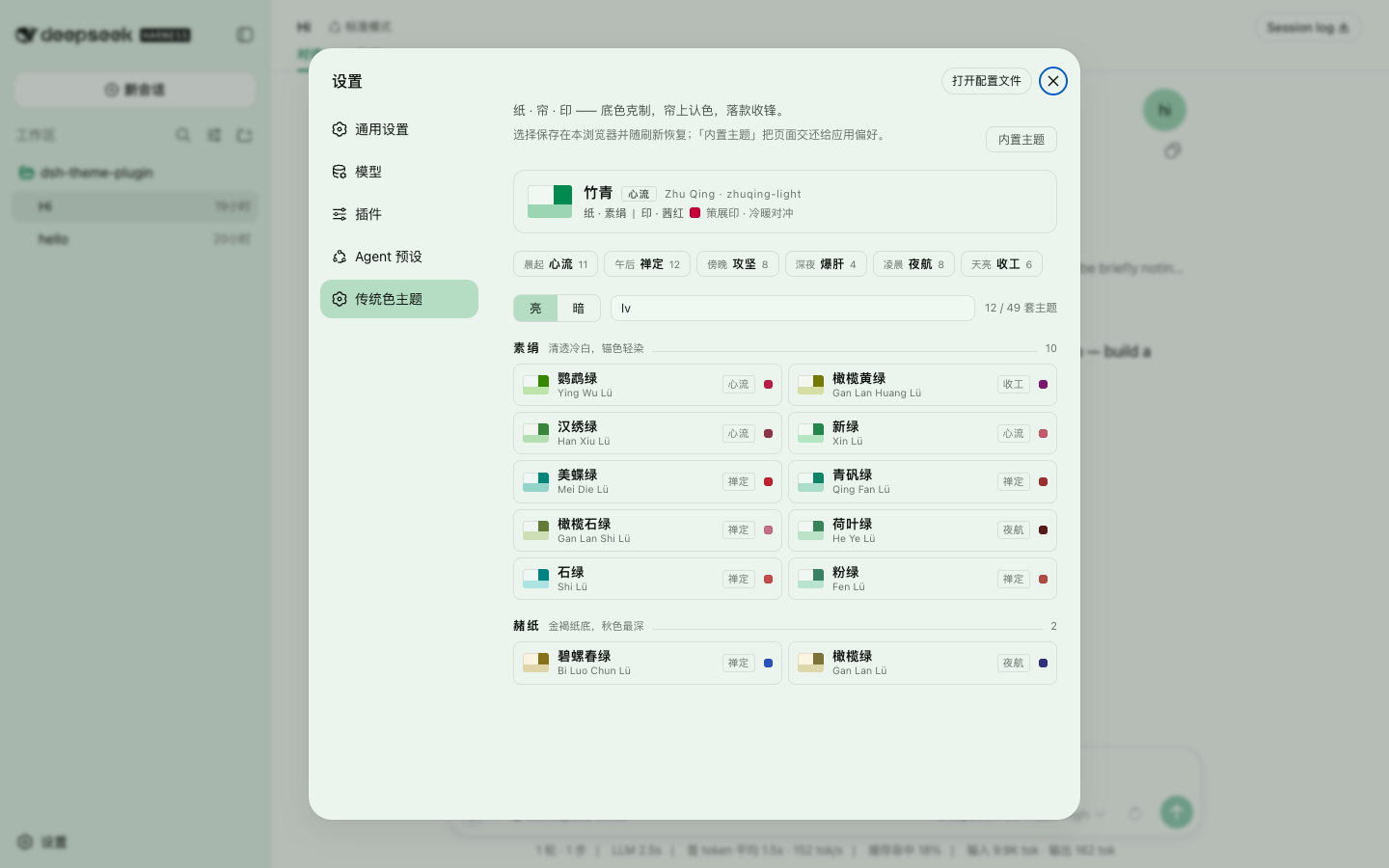 | 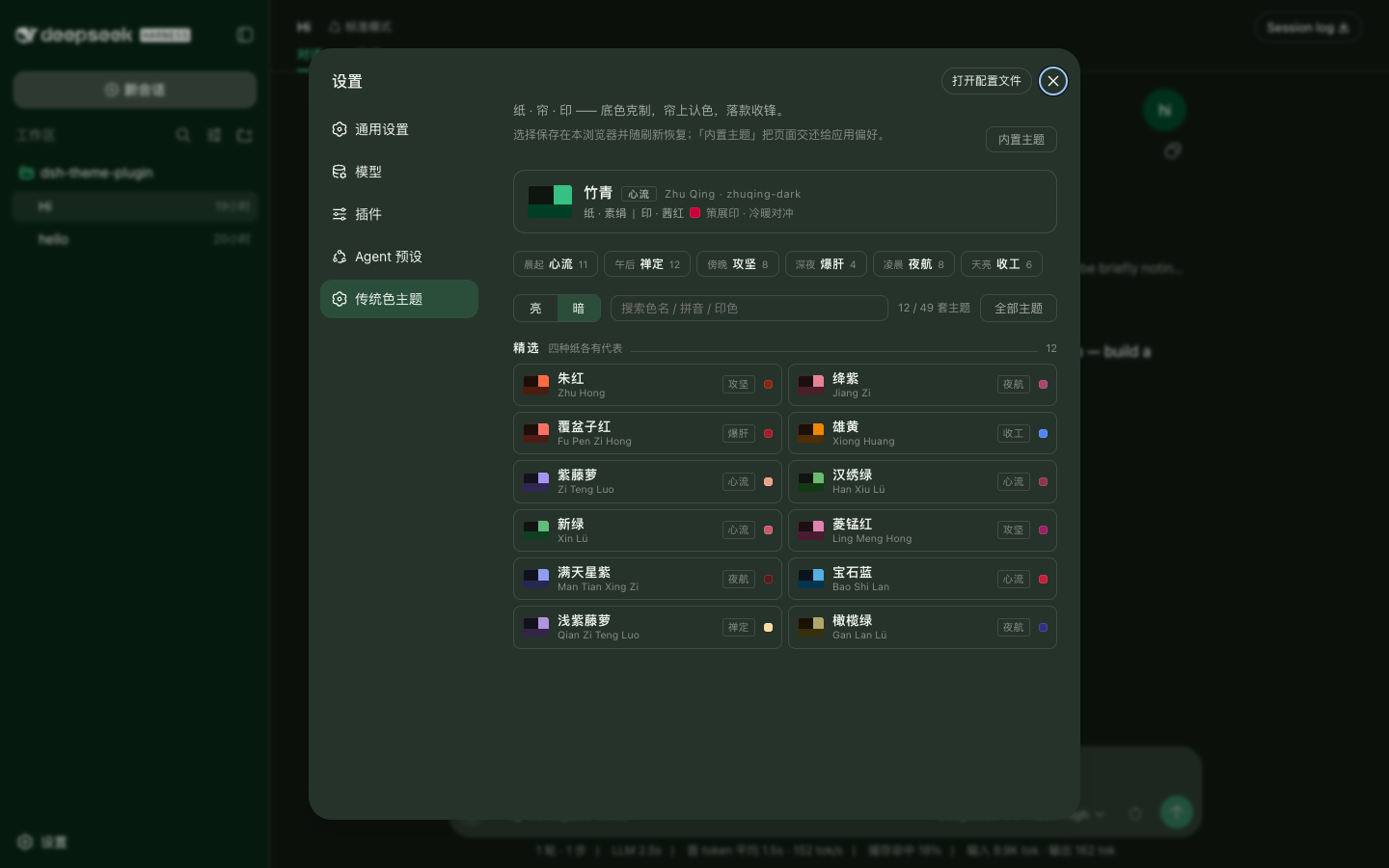 |
Search — matches the Chinese name, its pinyin, the seal's name and the mood. Typing lv finds all twelve greens without switching keyboards. | Curated only — twelve edited picks covering all four papers and all six moods. Use it when 49 is too many; the panel is themed by the pack, so the dark branch looks like this. |
The panel references nothing but --dsw-* tokens, which is why it changes color with your pick and doubles as a preview of whatever you are about to choose.
Design: 纸 · 帘 · 印
Chinese painting does not start with color. It prepares the paper, washes over it, and signs last. These themes are built in that order, and the three characters name three layers.
纸 Paper — about 60% of the screen. The ground is not "the traditional color, lightened"; it is a different material. Four families — 素绢 raw silk, 熟宣 sized xuan, 雪青 violet-tinted silk, 赭纸 ochre paper — carry deliberately separated chroma (OKLab ≈ 0.010 / 0.019 / 0.015 / 0.024 respectively), so the four papers are told apart by eye and not only in the data. Light grounds sit at L ≈ 0.963–0.971: off-white rather than white, which is what leaves room for a raised surface above them.
帘 Veil — about 25%. The sidebar and message bubbles are the anchor color itself, undiluted by paper, held inside a band of 1.25–1.55 contrast against the paper so the wash can neither disappear nor harden into a slab. You recognize which traditional color you are in by the bubbles, not by the background.
印 Seal — the focus is the anchor itself. The primary button and the send button are the anchor pressed darker. This reverses the pack's original law, under which the primary button was filled by a curated relative of the anchor sitting a median 109° away in hue — so choosing 竹青 handed you a crimson call-to-action. That relative is still chosen, still recorded per theme as sealName / sealRel / sealWhy, and now appears only as the active-nav accent: a signature rather than a focus. The picker shows the reasoning ("茜红 · 策展印 · 冷暖对冲").
Ink — text, rules and secondary surfaces run down one ink ramp, the paper color pushed darker. Every nb-XX step of the base stylesheet becomes a tinted neutral of the same lightness, and hover offsets, elevation steps, borders and interaction alphas are copied verbatim: hue changes, relations do not. The ramp's two endpoints are the deliberate exception — those are set here rather than inherited, because the base stylesheet's are the extremes. Light and dark now share one shape: body 16.7–17.5, secondary 7.4–8.0, tertiary 4.6–5.5.
Syntax — the code block is where a programmer's eyes actually live, so the highlighter is themed too. The harness highlights through shiki's css-variables theme (nine --shiki-token-* slots), and every theme fills them: the five chromatic slots (keyword / string / constant / function / parameter) keep the hue conventions programmers already know, but each color is a real named color picked from the 742-color roster; when the anchor's hue falls within a slot's window, the anchor itself plays that slot — in 竹青 the strings are 竹青, in 群青 the constants are 群青. Comments and punctuation are ink, not color: the tertiary and secondary ink steps re-gated against the code-block ground. All nine slots clear 4.5 on that ground, and the five chromatic slots are asserted pairwise ≥ 15° apart in hue.
Gates — AA is a floor, and elegance lives at the ceiling, so most rules are two-sided. pnpm check re-derives every claim above from the emitted tokens: 3136 contrast rows, plus invariants for veil chroma, the single focus (both focus tokens must be the anchor's own hue and the most saturated patches on screen), syntax-slot hue separation, the anchor-on-stage rule, elevation direction, and full token coverage. It trusts nothing the generator says about itself.
Six tiers — 49 color names are not a usable set of options for someone who does not already know traditional colors, so every theme also carries a "how do I want to work today" tier. It is derived: the only inputs are the anchor's OKLab lightness, chroma and hue.
L < 0.50 ─┬─ C < 0.13 → 夜航 Night   (dark and quiet)
          └─ C ≥ 0.13 → 爆肝 Crunch  (dark and fierce)
C < 0.115 ──────────→ 禅定 Zen       (pale and quiet)
warm (h<120 or h≥315) ─┬─ L < 0.71 → 攻坚 Push  (warm and fierce)
                       └─ L ≥ 0.71 → 收工 Ship  (warm and bright)
cool ───────────────→ 心流 Flow      (cool and saturated)
The picker orders them as a programmer's day: Flow at dawn → Zen in the afternoon → Push in the evening → Crunch at midnight → Night in the small hours → Ship at daybreak → Flow again. Anchors land 心流 11 · 禅定 12 · 攻坚 8 · 爆肝 4 · 夜航 8 · 收工 6.
An earlier design gave each of five moods one representative theme, which left most rows in the picker with an empty tag — it read as missing data rather than restraint. As a partition the vocabulary stays at six words while every theme belongs to exactly one tier, so the tag has no holes and doubles as a filter. Six is this data's natural granularity: a seventh cut anywhere carves out a 1–3 theme sliver, at which point the label names a few themes rather than classifying them. The tier names are an editorial claim, but that is six claims rather than 49; pnpm check pins all four cuts with seven sentinels (群青→Flow, 碧螺春绿→Zen, 朱红→Push, 覆盆子红→Crunch, 满天星紫→Night, 黛紫→Night, 雄黄→Ship), so breaking the tree trips the gate while renaming a tier does not.
Curation — twelve of the 49 anchors carry a curated flag, reachable through Curated only. Both light and dark variants must contain no generator degradation. The list is derived in three passes: editorial seeds → one per tier (every tier must survive the narrowing, or its chip would have nothing to offer) → farthest-point sampling in OKLab up to twelve. Every top-up picks the anchor farthest from what is already chosen, so covering all six tiers costs nothing in spread.
Anchors per paper family: 素绢 12 · 熟宣 14 · 雪青 17 · 赭纸 6. Within one mode, the two closest themes still differ by ΔE 0.018 across the four signature dimensions (ground, brand, bubble, focus) against a 0.015 floor.
Theme roster
49 anchors × light/dark = 98 themes — click to expand
⭐ marks the twelve curated anchors the picker shows first. Display names are <name>·亮 / <name>·暗, e.g. 竹青·暗. Paper families: 素绢 raw silk, 熟宣 sized xuan paper, 雪青 violet-tinted silk, 赭纸 ochre paper. The seal column is the curated relative described above — a signature mark, not the button color.
| Color | 中文 | Anchor | Paper | Seal | Theme ids (light / dark) |
|---|---|---|---|---|---|
| Zhu Qing | 竹青 | #00A86B | 素绢 | 茜红 | zhuqing-light / zhuqing-dark |
| Zhu Hong | 朱红 ⭐ | #ED5126 | 熟宣 | 赭石 | zhuhong-light / zhuhong-dark |
| Qun Qing | 群青 | #1772B4 | 雪青 | 枫叶红 | qunqing-light / qunqing-dark |
| Teng Huang | 藤黄 | #FFD111 | 赭纸 | 瑶碧 | tenghuang-light / tenghuang-dark |
| Jiang Zi | 绛紫 ⭐ | #8E354A | 熟宣 | 洋葱紫 | jiangzi-light / jiangzi-dark |
| Zi Yun | 紫云 | #A020F0 | 雪青 | 蜻蜓红 | ziyun-light / ziyun-dark |
| Mei Hong Se | 玫红色 | #FF007F | 熟宣 | 品红 | meihongse-light / meihongse-dark |
| Dan Shu Hong | 淡曙红 | #EE2746 | 熟宣 | 殷红 | danshuhong-light / danshuhong-dark |
| Gan Qing | 绀青 | #4F84FF | 雪青 | 落霞 | ganqing-light / ganqing-dark |
| Mei Gui Zi | 玫瑰紫 | #BA2F7B | 熟宣 | 高粱红 | meiguizi-light / meiguizi-dark |
| Ying Wu Lü | 鹦鹉绿 | #5BAE23 | 素绢 | 猩红 | yingwulv-light / yingwulv-dark |
| Bo Luo Hong | 菠萝红 | #FC7930 | 熟宣 | 芙蓉红 | boluohong-light / boluohong-dark |
| Fu Pen Zi Hong | 覆盆子红 ⭐ | #AC1F18 | 熟宣 | 苋菜红 | fupenzihong-light / fupenzihong-dark |
| Cang Bi | 苍碧 | #2A52BE | 雪青 | 猩红 | cangbi-light / cangbi-dark |
| Xiong Huang | 雄黄 ⭐ | #FF9900 | 赭纸 | 绀青 | xionghuang-light / xionghuang-dark |
| Hu Po Huang | 琥珀黄 | #FEBA07 | 赭纸 | 绀青 | hupohuang-light / hupohuang-dark |
| Wei Zi | 魏紫 | #7E1671 | 雪青 | 魏紫·深 | weizi-light / weizi-dark |
| Gan Lan Huang Lü | 橄榄黄绿 | #BEC936 | 素绢 | 魏紫 | ganlanhuanglv-light / ganlanhuanglv-dark |
| Huo Zhuan Hong | 火砖红 | #CD6227 | 熟宣 | 淡可可棕 | huozhuanhong-light / huozhuanhong-dark |
| Xiang Ye Hong | 香叶红 | #F07C82 | 熟宣 | 鹅冠红 | xiangyehong-light / xiangyehong-dark |
| Yan Ying Zi | 烟萦紫 | #8A4B9C | 雪青 | 烟萦紫·深 | yanyingzi-light / yanyingzi-dark |
| Mei Ge | 韎韐 | #A5441B | 熟宣 | 蟹蝥红 | meige-light / meige-dark |
| Li Shou | 綟绶 | #6B8E23 | 素绢 | 暗紫苑红 | lishou-light / lishou-dark |
| Zi Teng Luo | 紫藤萝 ⭐ | #9B8AE8 | 雪青 | 淡罂粟红 | zitengluo-light / zitengluo-dark |
| Han Xiu Lü | 汉绣绿 ⭐ | #2E7D32 | 素绢 | 绛紫 | hanxiulv-light / hanxiulv-dark |
| An Zi Yuan Hong | 暗紫苑红 | #82202B | 熟宣 | 殷红 | anziyuanhong-light / anziyuanhong-dark |
| Xin Lü | 新绿 ⭐ | #6CC788 | 素绢 | 茜裙 | xinlv-light / xinlv-dark |
| Ling Meng Hong | 菱锰红 ⭐ | #D276A3 | 熟宣 | 苋菜紫 | lingmenghong-light / lingmenghong-dark |
| Man Tian Xing Zi | 满天星紫 ⭐ | #2E317C | 雪青 | 栗紫 | mantianxingzi-light / mantianxingzi-dark |
| Kong Que Lan | 孔雀蓝 | #0EB0C9 | 雪青 | 胭脂红 | kongquelan-light / kongquelan-dark |
| Bao Shi Lan | 宝石蓝 ⭐ | #2486B9 | 雪青 | 朱墙 | baoshilan-light / baoshilan-dark |
| Mei Die Lü | 美蝶绿 | #12AA9C | 素绢 | 枫叶红 | meidielv-light / meidielv-dark |
| Bian Dou Zi | 扁豆紫 | #A35C8F | 雪青 | 扁豆紫·深 | biandouzi-light / biandouzi-dark |
| Qian Zi Teng Luo | 浅紫藤萝 ⭐ | #D1B3FF | 雪青 | 杏子 | qianzitengluo-light / qianzitengluo-dark |
| Qing Fan Lü | 青矾绿 | #2C9678 | 素绢 | 汉绣红 | qingfanlv-light / qingfanlv-dark |
| Bi Luo Chun Lü | 碧螺春绿 | #867018 | 赭纸 | 苍碧 | biluochunlv-light / biluochunlv-dark |
| Gan Lan Shi Lü | 橄榄石绿 | #B2CF87 | 素绢 | 酢酱草红 | ganlanshilv-light / ganlanshilv-dark |
| Fen Tuan Hua Hong | 粉团花红 | #EC9BAD | 熟宣 | 锦葵红 | fentuanhuahong-light / fentuanhuahong-dark |
| He Ye Lü | 荷叶绿 | #1A6840 | 素绢 | 栗紫 | heyelv-light / heyelv-dark |
| Shi Lü | 石绿 | #57C3C2 | 素绢 | 银红 | shilv-light / shilv-dark |
| Zha Ye Zong | 柞叶棕 | #692A1B | 熟宣 | 栗棕 | zhayezong-light / zhayezong-dark |
| Chang Chun Hua Lan | 长春花蓝 | #7EC0EE | 雪青 | 香叶红 | changchunhualan-light / changchunhualan-dark |
| Shan Geng Zi | 山梗紫 | #61649F | 雪青 | 满江红 | shangengzi-light / shangengzi-dark |
| Yan Lan | 鷃蓝 | #144A74 | 雪青 | 枣红 | yanlan-light / yanlan-dark |
| Fen Lü | 粉绿 | #83CBAC | 素绢 | 梅红 | fenlv-light / fenlv-dark |
| Yu Qin Lan | 玉鈫蓝 | #126E82 | 雪青 | 赭石 | yuqinlan-light / yuqinlan-dark |
| Pi Bian | 皮弁 | #8B5D33 | 赭纸 | 石青 | pibian-light / pibian-dark |
| Gan Lan Lü | 橄榄绿 ⭐ | #5E5314 | 赭纸 | 满天星紫 | ganlanlv-light / ganlanlv-dark |
| Dai Zi | 黛紫 | #5D3A6F | 雪青 | 黛紫·深 | daizi-light / daizi-dark |
The roster is whatever the generator emits; it is not maintained by hand.
Development
Requirements: Node.js 20+ and pnpm 10.15 (declared through packageManager). Tests use tsx, so the same command works on Node 20 and newer.
git clone https://github.com/nevertoday/dsh-theme-plugin
cd dsh-theme-plugin
pnpm install && pnpm build          # builds lib/client.js, the browser bundle
dsh plugin --profile web add -w .   # register this directory
dsh --profile web
-wis required because the profile directory is a pnpm workspace root.addlinks the directory and appends the package todsh.profile.bundles; the loader then readslib/client.jsfrom your working copy, sopnpm buildis what makes changes visible.- The repo ships an
.npmrcwithauto-install-peers=false. Without it pnpm ≥ 9 cannot install: it tries to fetch the optional@deepseek-ai/*peers, and one of them depends on a package that was never published. pnpm buildneedstsdown;node scripts/build-esbuild.mjsis the fallback.- Committing
lib/is optional. The primary build is currently about 640 KB plus a 934 KB sourcemap (the esbuild fallback is a little larger); both builders are held below 680 KB / 1020 KB release budgets.
DSH 0.1's client boot manifest does not carry host plugin config, so this package intentionally exposes no cordis.yml config block. User choices enter through the picker or #theme= and persist in the browser.
Gates — pnpm check (3136 contrast rows plus invariants) and pnpm test (60 tests, including a load-time lock on lib/client.js). Neither needs a running harness.
Regenerating the themes — pnpm generate reads the color data and OKLab math from the 中国传统色 repository. Point it there:
ZH_COLORS_REPO=/path/to/zhongguo-traditional-colors pnpm generate
It also looks one directory up and at a sibling checkout, so a conventional layout needs no environment variable. The two executable inputs are pinned by SHA-256 to upstream revision 3f5fc62; review and update those fingerprints before accepting an upstream change. The generator is deterministic — no clock, no randomness — so an unchanged input must reproduce byte-identical output.
License
MIT — see LICENSE.
Read the usage guide →
Install steps, key points, FAQ and compatibility for this plugin — auto-derived from indexed fields.
Listing badge

[](https://deepseek-plugin.org/plugins/nevertoday/dsh-theme-plugin)Paste this markdown into your GitHub README to link back to this listing. The badge only states the listing — not a security endorsement.