Apply "Your Name." theme to DSH Web: comet blue frosted glass effect, dynamic wallpaper, logo replacement, dark navy input cards. One-command install with complete uninstall restoration.

- Language
- JavaScript
- License
- MIT
- Branch
- main
Install
$ dsh plugin --profile web add dsh-kimino-themeRun the command above in your terminal to install this plugin via the dsh CLI. You can switch Profile in the top-right corner. New to dsh? Read the beginner tutorial
Install via your agent
Install the DeepSeek Harness plugin niiang/dsh-kimino-theme for me: review the repository at https://github.com/niiang/dsh-kimino-theme first, then run the install command and verify the plugin loads successfully.
Paste this instruction to the DSH Web GUI assistant — it will install and verify for you.
One-Line Pitch
Transform the DSH Web GUI into a cinematic interface inspired by Makoto Shinkai's "Your Name.": wallpaper backdrop, frosted glass morphing, comet blue theme color, movie Logo replacing default branding; one-command install, uninstall completely restores.
Core Capabilities
- Expose wallpaper and Logo static resources: mount three routes on the DSH web server —
/kimino-bg/current.jpg,/kimino-bg/logo-blue.svg,/kimino-bg/logo-letter.svg, providing assets to the browser half - Overall visual transformation: override approximately 60 DSH design tokens (background layers, borders, buttons, interaction states, scrollbars, status colors, etc.), unified into dark glass + comet blue (
#93C5FD) color scheme - Replace default branding: display the movie Logo centered as the homepage title, use movie Logo in expanded sidebar state, switch to letter mark in collapsed state
- Redraw input card: navy blue glass capsule shape + themed placeholder text (Chinese「黄昏之时,我在这里等你。」、English「黄昏の時、私はここにいるよ。」)
- Localized fixes: 40px gradient mask fade at bottom of message list, fix "scroll to bottom" button not appearing in some sessions, normalize scrollbar behavior between input card and chat area
- Global unified scrollbar: thin blue-purple glass scrollbar in Chromium kernel, shared visual between light/dark modes
Technical Implementation
- Language: JavaScript (ESM,
"type": "module") - Key dependencies: DSH host
webServer(register static resource routes), DSH clienttheme(overrideTokensinject design tokens), nativenode:fs/promises+node:path(read assets); browser side registers viawindow.__ModuleLoader__ - Architecture pattern: Standard DSH dual-half bundle: host half (
bundle/host.js) injectswebServerto register 3 asset routes; browser half (bundle/client.js) exports as./clientloaded by client module system; both halves register side effects viactx.effect, disable/uninstall completely restores - Entry files:
bundle/host.js(mainfield, host half) +bundle/client.js(exports['./client']field, browser half);package.json#dsh.bundle.patchpoints tocordis.patch.yml, plugin linekimino-theme
Use Cases
Ordinary users who like the visual style of "Your Name.", want the DSH chat interface to feel more personal, and don't want to modify DSH source code but just want a skin change. One command installs to get wallpaper + frosted glass + theme color + Logo replacement effects; if you don't like it, one command uninstalls to completely restore.
Prerequisites & Compatibility
| Dependency | Minimum Version | Notes |
|---|---|---|
| DSH | Not declared | Must be able to run dsh web to start Web GUI; this plugin doesn't declare version constraints in engines |
| Node.js | Not declared | Host half only uses three built-in modules: node:fs/promises, node:path, node:url, no version requirements declared |
| Platform | Cross-platform | No platform restrictions declared; recommended for Microsoft Edge or Google Chrome, some visuals (scrollbars, gradient masks) may be reduced in Firefox |
| Native modules | None | Only uses Node.js built-in modules, no C++ native extensions |
Installation
dsh plugin --profile web add github:niiang/dsh-kimino-theme
Configuration
No additional configuration required. After installation, restart dsh web to take effect; upon uninstall, all visual changes (tokens, stylesheets, scroll listeners, routes) will automatically unregister through the fiber effect chain, returning the page to DSH default theme.
FAQ
Q: Do I need to restart dsh web after installation?
A: Yes. After installing the plugin, you must restart dsh web to load the host half (wallpaper/Logo routes) and browser half (token overrides + stylesheet). The browser side also needs Ctrl+F5 to force refresh and skip cache.
Q: What if the page shows no changes after restart?
A: First confirm the install command includes --profile web (installed to the correct profile); then Ctrl+F5 for a forced refresh; if still not working, check dsh web startup logs for [kimino-theme] host half active (3/3 asset routes registered). If missing or fewer than 3 routes, the installation didn't take effect.
Q: Can it be used alongside other skin/theme plugins?
A: Not recommended. Token overrides are additive, but visually they will override each other (glass background, scrollbars, button colors will all clash). Using one theme plugin at a time yields the best visual results.
Q: What if styles break after a major DSH version upgrade?
A: Some selectors depend on DSH frontend build-time hash class names (such as .Md3f7G_*, .wSkVaW_*, .hHd-Xa_*, .FjxK0a_*, .pXSMma_*, .uV2eYG_*). These hashes may change after major version upgrades. Affected selectors need to be updated to match new class names—report in the issue section with a screenshot.
Q: Can it be used in Firefox?
A: Frosted glass, scrollbars, and gradient masks are tuned for Chromium kernel (Edge / Chrome). Some display effects are incompatible in Firefox (scrollbars, gradient masks may be reduced), so switching to Edge or Chrome is recommended.
Q: Can I replace the wallpaper and Logo with my own?
A: Yes. Clone the repo locally and install via link:, then replace the wallpaper in assets/current.jpg and replace the two SVGs under assets/logo/. Routes have 1-hour caching set (Cache-Control: public, max-age=3600), so force refresh the browser after replacing assets.
Q: Does it add significant time to DSH startup?
A: The plugin host half registers 3 static asset routes during DSH startup (wallpaper/Logo), while the browser half registers approximately 60 token overrides + one stylesheet + several scroll event listeners. Upon uninstall/disable, all side effects (routes, styles, attributes, listeners) are cleaned up through fiber effect unregistration, fully restoring the page.
Q: How do I completely uninstall?
A: Run dsh plugin --profile web remove dsh-kimino-theme and restart dsh web. All theme side effects (routes, token overrides, stylesheet, scroll event listeners) will be cleaned up, returning the page to DSH defaults.
Difficulty Level
Beginner — single command install with no configuration required; restart to see results; style exceptions can be Troubleshot via the README FAQ.
Known Issues & Limitations
- Some selectors depend on DSH frontend build-time hash class names (
Md3f7G_*/wSkVaW_*/hHd-Xa_*/FjxK0a_*/pXSMma_*/uV2eYG_*), which may change after major DSH upgrades and need to be updated accordingly - Frosted glass, scrollbars, and gradient masks are tuned for Chromium kernel (Edge / Chrome); Firefox has partial incompatibility (scrollbars, gradient masks may be reduced)
- Theme forces dark glass visual, no separate light mode adaptation (light/dark modes share the same set of tokens and styles)
- Wallpaper and Logo routes cache for 1 hour (
Cache-Control: public, max-age=3600); force refresh the browser after replacing assets - Theme token overrides and component styles are concentrated in
bundle/client.js, which contains a large number of CSS selectors (sourced from DSH built-in components' internal class names), with deep coupling to DSH itself; styles need adaptation after DSH upgrades
中文 | English




《你的名字。》(Kimi no Na wa) 主题,为 DeepSeek Harness (DSH) Web GUI 而作
彗星蓝玻璃拟态 · 电影壁纸 · Logo 替换 · 输入卡重绘 · 统一滚动条 · 一条命令安装
是什么
dsh-kimino-theme 把 DSH Web GUI 变成新海诚《你的名字。》的模样:一张电影壁纸垫底,全部界面表面换成半透明毛玻璃,交互色统一为彗星蓝(#93C5FD),侧边栏品牌与首页标题替换为电影 Logo,输入卡重绘为藏蓝玻璃胶囊,占位文案换成「黄昏之时,我在这里等你。」。
它是一个标准的 dsh 插件包:一条 dsh plugin 命令装进 profile,随 DSH 启动常驻,不修改任何 DSH 源码;卸载后页面完全还原。
| 维度 | 原生 dsh web | dsh-kimino-theme |
|---|---|---|
| 背景 | 纯色 / 纯色渐变 | 电影壁纸 + 全局模糊遮罩 |
| 界面表面 | 不透明分层 | 半透明毛玻璃(backdrop-filter) |
| 品牌标识 | DSH 默认 | 电影 Logo(展开态 + 折叠态) |
| 输入卡 | 默认样式 | 藏蓝玻璃卡片,占位文案主题化 |
| 滚动条 | 默认 | 全局蓝紫玻璃细滚动条 |
| 消息列底部 | 直切 | 40px 渐变淡出蒙版 |
| 安装 | — | dsh plugin --profile web add ... 一条命令 |
| 还原 | — | 卸载即完全还原 |
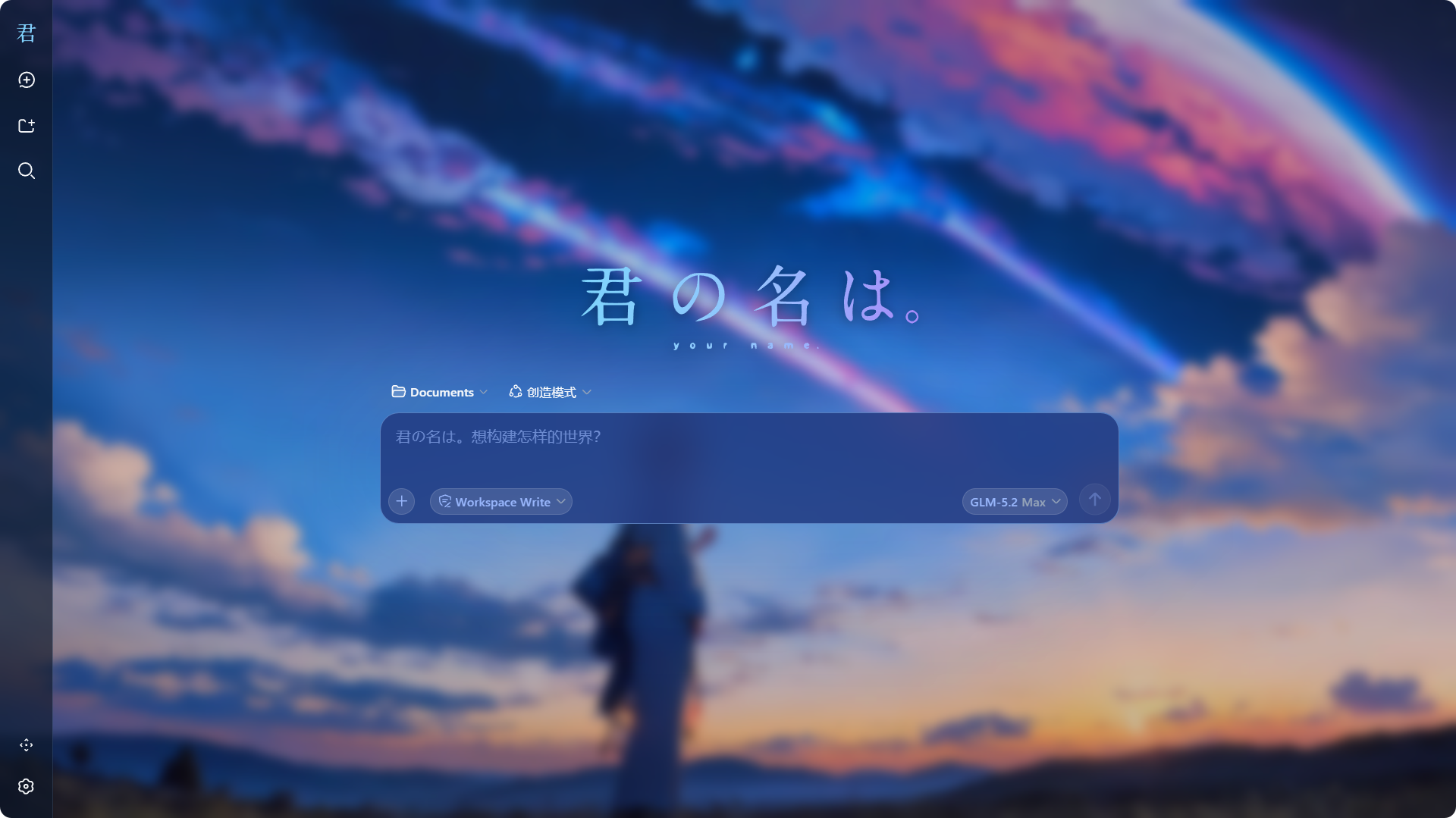
主题细节
彗星蓝玻璃拟态
主题通过官方 theme.overrideTokens API 叠加一层约 60 项的 design token 覆盖:背景层全部半透明化(露出壁纸)、边框换成低饱和蓝描边、交互态(悬停/激活/选中)统一为彗星蓝系、状态色(错误/成功/警告)微调至与深色玻璃协调。亮色与暗色模式共用同一套视觉——壁纸底上的玻璃拟态本身不区分明暗。完整 token 清单见 docs/theme-tokens.md。
壁纸与 Logo
- 壁纸由插件宿主半区以
/kimino-bg/current.jpg路由提供(包内assets/current.jpg),叠加一层轻微的深色渐变保证文字可读性; - 侧边栏展开态显示横向电影 Logo,折叠态显示字母标记(两个 SVG,同样由插件路由提供);
- 首页(hero)标题替换为居中大尺寸 Logo。
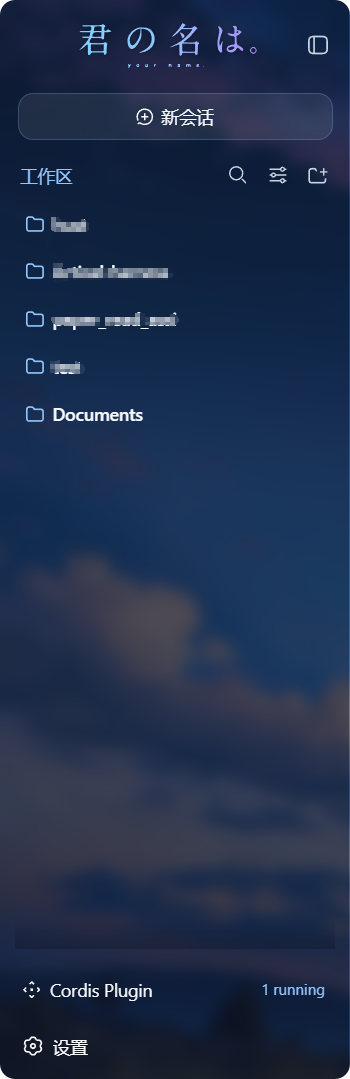
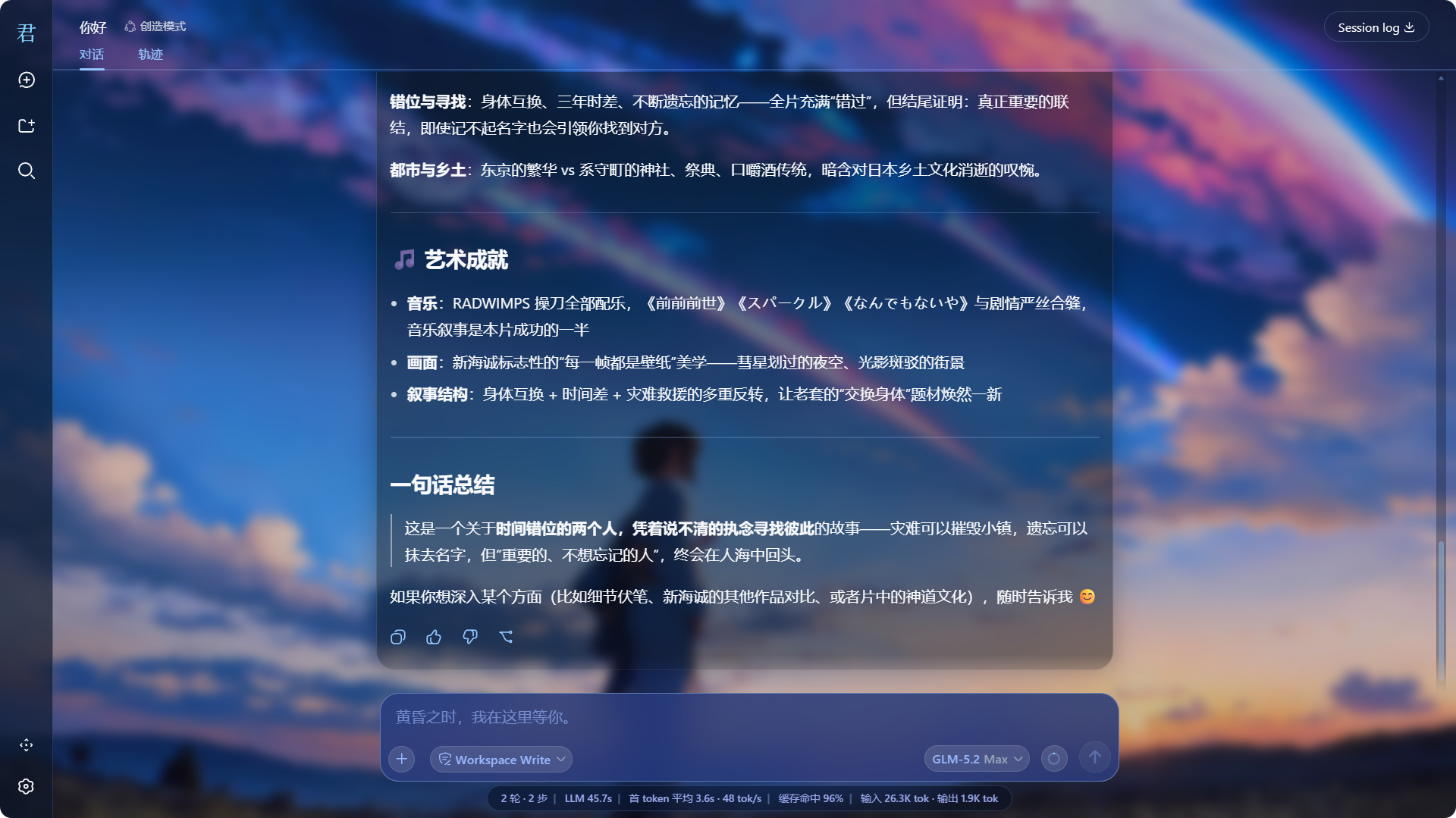
输入卡与占位文案
输入卡重绘为藏蓝玻璃胶囊,占位文案按界面语言自动替换:
| 界面语言 | 输入框 | 新会话描述 |
|---|---|---|
| 中文 | 黄昏之时,我在这里等你。 | 君の名は。想构建怎样的世界? |
| 英文 | 黄昏の時、私はここにいるよ。 | 君の名は。どんな世界を構築する? |
消息滚动与渐变蒙版
消息列底部 40px 平滑淡出,输入框零裁切;修复了「回到底部」按钮不出现的问题。
统一滚动条
全局滚动条统一为蓝紫玻璃风格,适配主流浏览器。
快速开始
浏览器建议:主题大量使用 backdrop-filter 毛玻璃、滚动条定制与 CSS 蒙版,推荐使用 Microsoft Edge 或 Google Chrome;Firefox 下部分显示效果不兼容(滚动条、渐变蒙版等可能打折)。
系统要求
- 已安装 DeepSeek Harness,
dsh web可正常启动; - 机器上有 pnpm(
dsh plugin内部使用;Node.js 自带的 corepack 可提供)。
安装
dsh plugin --profile web add github:niiang/dsh-kimino-theme
dsh web   # 重启 DSH 生效
壁纸出现、侧边栏 Logo 变化,即安装成功。安装后随 DSH 启动常驻,无需每次重装。
更新
dsh plugin --profile web update dsh-kimino-theme
dsh web   # 重启生效
暂时关闭(不卸载)
编辑 ~/.dsh/profiles/web/package.json,删掉 dsh.profile.bundles 数组中的 "dsh-kimino-theme" 一行,重启 dsh web 即关闭;加回该行再重启即恢复。长期不用请直接卸载。
卸载
dsh plugin --profile web remove dsh-kimino-theme
dsh web   # 重启后页面完全还原
自定义
需本地克隆并改用 link: 安装:
git clone https://github.com/niiang/dsh-kimino-theme <你的目录>
dsh plugin --profile web add link:<你的目录的绝对路径>
dsh web
换壁纸
替换克隆目录中的 assets/current.jpg(保持文件名不变),浏览器强刷(Ctrl+F5)即可。
换 Logo
替换 assets/logo/ 下的两个 SVG,强刷生效。
调色
颜色集中在 bundle/client.js:token 覆盖与组件样式两处,改完重启 dsh web 并强刷。速查表见 docs/theme-tokens.md。
架构
主题是一个标准的 dsh 插件包(bundle):package.json 声明 dsh.bundle 与 dsh.client,dsh plugin add 装进 profile 并挂上插件行——不修改 DSH 源码。
bundle/host.js       # 插件宿主半区(Node):3 个资产路由 /kimino-bg/*(路径相对包内解析,装哪都能用)
bundle/client.js     # 插件浏览器半区:token 覆盖 + 组件样式 + DOM 补丁
cordis.patch.yml     # 插件行清单:dsh plugin add 挂载的入口
assets/              # 壁纸与 Logo
plugin/              # 会话内动态注入用的同源闭包源码(高级用法,一般无需关心)
所有副作用(token 层、样式标签、事件监听、DOM 属性、路由)都注册在插件 fiber 上,禁用/卸载即完全还原。
常见问题
装完重启了,页面没变化?
A: 确认命令里带 --profile web(装进了正确的 profile);浏览器 Ctrl+F5 强刷一次;仍不行时看 dsh web 启动日志有没有 [kimino-theme] host half active 与安装时的警告信息。
安装时警告 declares no dsh.bundle?
A: 说明装到的版本不含静态安装声明(v65 之前的旧 tag)。确认仓库地址为 github:niiang/dsh-kimino-theme(不带 #版本号 时默认装最新 main),按「安装」小节的命令重装。
背景图 / Logo 404?
A: 静态安装的资产路径相对包内解析,正常不会发生。多为 profile 的 node_modules 被手动清理或链接损坏所致:重新执行一次安装命令即可修复。
DSH 升级后样式错乱 / 某些部分没生效?
A: 主题依赖少量构建期哈希类名(如 .Md3f7G_*、.wSkVaW_*、.hHd-Xa_*,涉及消息滚动、侧边栏品牌、输入卡高亮),DSH 前端升级后哈希可能变化。token 层与大多数样式(基于稳定 data 属性)不受影响;受影响的选择器需对照新版类名更新。欢迎提 issue 附截图。
亮色模式下文字看不清?
A: 主题按「壁纸上的深色玻璃」设计,亮/暗模式共用同一套视觉。若在亮色模式下觉得整体偏暗,属预期行为;可自行调亮 token 中的玻璃底色(见「自定义 - 调色」)。
和其他皮肤/主题插件能共存吗?
A: token 层是叠加式的,但视觉上会互相覆盖。建议同一时间只启用一个主题类插件。
已知限制
- 主题的毛玻璃、滚动条与渐变蒙版按 Chromium 内核(Edge / Chrome)打磨,Firefox 下部分显示效果不兼容,推荐使用 Edge 或 Chrome。
- 消息滚动重构、侧边栏 Logo 替换、输入卡高亮等处的选择器依赖 DSH 前端构建期哈希类名,DSH 大版本升级后可能需要跟随更新(见常见问题)。
- 主题强制深色玻璃视觉,亮色模式不做单独适配(见常见问题)。
- 壁纸与 Logo 路由缓存 1 小时,替换素材后需强刷浏览器。
许可证与素材版权
代码以 MIT 授权。
assets/ 中的壁纸与 Logo 素材源自电影《你的名字。》(君の名は。, Kimi no Na wa, 2016)的宣传物料,版权归 CoMix Wave Films、东宝等原权利方所有。本仓库仅作个人桌面美化之用,不主张任何素材版权,也不从中获利;如权利方提出异议,将立即移除相关素材。
参与贡献
- 提交信息遵循 Conventional Commits(如
feat(client): 修复 xxx),代码、文档与提交信息不使用 emoji; - 用户可见的变更请在 PR 中附截图或验证证据;
- 改动主题 token 时同步更新 docs/theme-tokens.md。
Read the usage guide →
Install steps, key points, FAQ and compatibility for this plugin — auto-derived from indexed fields.
Listing badge

[](https://deepseek-plugin.org/plugins/niiang/dsh-kimino-theme)Paste this markdown into your GitHub README to link back to this listing. The badge only states the listing — not a security endorsement.