Create and manage sandboxed JavaScript tools with a Monaco editor and model-driven tool lifecycle.

- Language
- TypeScript
- License
- MIT
- Branch
- main
Install
$ dsh plugin --profile web add github:omdsh-dev/dsh-custom-toolRun the command above in your terminal to install this plugin via the dsh CLI. You can switch Profile in the top-right corner. New to dsh? Read the beginner tutorial
Install via your agent
Install the DeepSeek Harness plugin omdsh-dev/dsh-custom-tool for me: review the repository at https://github.com/omdsh-dev/dsh-custom-tool first, then run the install command and verify the plugin loads successfully.
Paste this instruction to the DSH Web GUI assistant — it will install and verify for you.
一句话定位
让用户和模型共同拥有一份可生长的 JavaScript 工具集:设置页用 Monaco + TypeScript 智能提示手写工具,模型也能在对话里调用 custom_tool_create 热注册新工具;每个工具每次执行都在独立 worker 线程的受限沙箱里运行。
核心能力
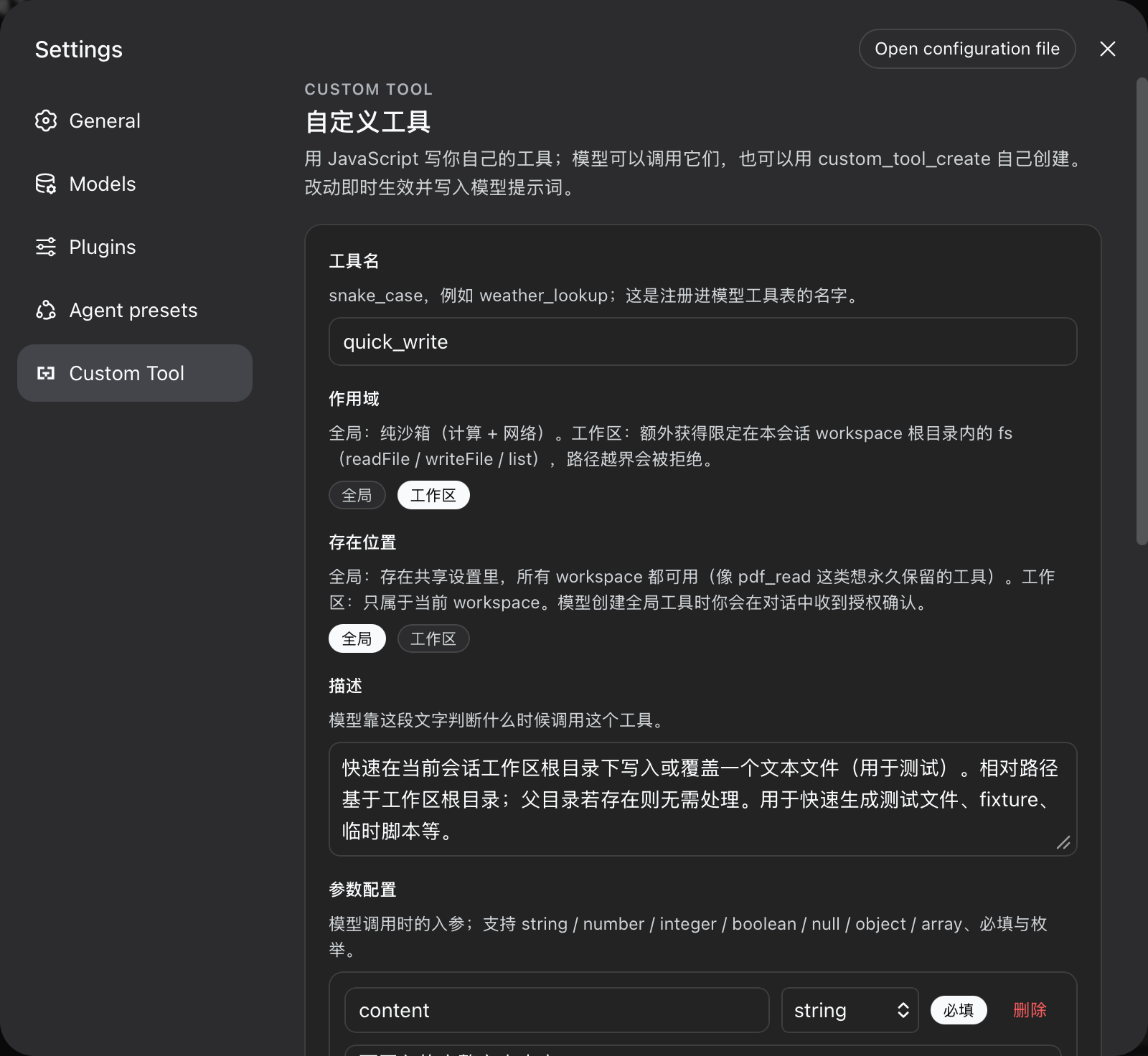
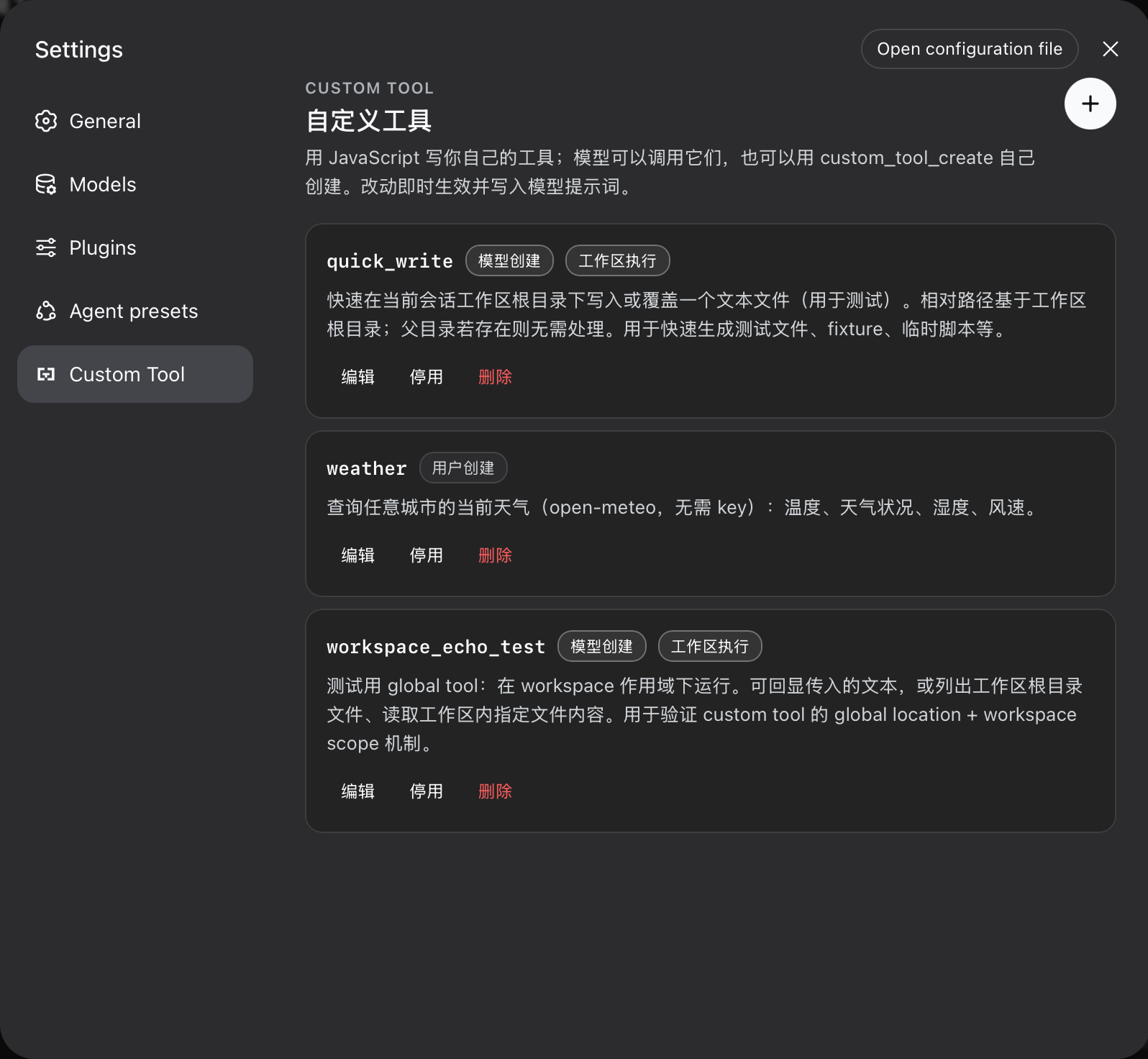
- 在设置里多了一个 "Custom Tool" 入口,可以列表浏览、新建、编辑、启停和删除工具;模型创建的工具与工作区专属工具带专属徽章
- 内置 Monaco 编辑器(VS Code 同款引擎),参数按 JSON Schema 自动生成
args类型,编辑器与 TypeScript worker 内联进单文件 bundle - 工具代码每次执行开一个 worker 线程,在
node:vm沙箱里按白名单跑,同时用 Node Permission Model 限制fetch与文件读写范围 - 支持两种执行作用域(
global默认只能调网络;workspace额外获得限定在工作区根目录内的readFile/writeFile/list文件能力)和两种存储位置(global共享设置;workspace写到<DSH_HOME>/workspace-tools/<hash>.json) - 提供三个模型可调用的管理工具:
custom_tool_create(按名 upsert)、custom_tool_remove、custom_tools_list,三者走与设置界面完全一致的校验门 - 全局工具创建时强制走 harness 审批 GUI:拒绝或不可用即失败关闭;模型无权删除用户创建的工具(
source: user)
技术实现
- 语言: TypeScript(ESM);同一 package 内同时打包 host half 与 client half,client half 由 DSH web 服务器作为
/plugins/dsh-custom-tool/client.js单文件下发 - 关键依赖:
@deepseek-ai/cordis(Cordis 容器 + 插件装载);@deepseek-ai/dsh-settings(注册custom-tools命名空间 + live scope);@deepseek-ai/dsh-tools(defineTool+ JSON Schema 校验);@deepseek-ai/dsh-system-prompt(注入自定义工具章节到系统提示);monaco-editor(编辑器的 dev 依赖) - 架构模式: 双半宿主插件。host half 注入
settings/tools/systemPrompt三个服务:注册custom-tools命名空间与校验门(applies: 'live'),把 enabled 工具热同步进ctx.tools,并把custom_tool_create等三个管理工具挂在ctx.tools;worker 半开node:vm沙箱,配合 Node Permission Model flags 在父进程executor.ts里按allowNetwork/workspaceRoot拼接--allow-net/--allow-fs-read/--allow-fs-write;client half 注入settingsScope/slots/locale,把 React 组件CustomToolSection通过slots.inject('settings.section', ...)挂到设置面板 - 入口文件: 宿主
src/index.ts(apply+Config),客户端src/client/index.ts(apply+inject);挂载声明在cordis.patch.yml与package.json#dsh.bundle.patch/package.json#dsh.client.inject
适用场景
当你希望让 DSH agent 处理一种反复出现的小任务——例如"按 city 查天气"、"读 PDF 转 Markdown"、"对账时把银行 CSV 转成统一格式"——又不想为此发版新插件时,可以打开 Custom Tool 设置写一个 JS 函数并保存。下次对话里模型就会自动看到它、调用它、还能继续补一个;常见的小型数据源或工作流封装都可以这样随用随加,不再被"等插件发布"卡住。
前置依赖与兼容性
| 依赖 | 最低版本 | 说明 |
|---|---|---|
| DeepSeek Harness (DSH) | >=0.0.1(dsh.plugin.json 声明,过于宽松,实际需配合 WEB_SETTINGS_NAMESPACES 含 'custom-tools') | dsh.plugin.json:6-8;宿主侧白名单要求见 README.md:72 |
| Node.js | ^22.19 或 >=24(任一即可) | package.json:57-58 engines 字段 |
| 平台 | macOS / Windows / Linux | 仅使用 node:worker_threads / node:vm / node:fs/promises / node:fs,无原生模块 |
| 原生模块 | 无 | package.json:60-99 的 peerDependencies 全部 optional: true,无 native binding |
安装方式
dsh plugin --profile web add github:omdsh-dev/dsh-custom-tool
配置项
| 配置 | 类型 | 说明 | 默认值 |
|---|---|---|---|
timeoutMs | number | 单次工具调用的墙钟上限,超时即终止 worker | 30000(毫秒) |
memoryLimitMb | number | 单次调用的 worker 老年代堆上限 | 128(MB) |
maxResultChars | number | 渲染给模型看的结果文本字符预算 | 16000 |
maxCodeBytes | number | 单个工具代码体的 UTF-8 字节预算 | 65536 |
maxTools | number | 全部已存工具(含启用/禁用)总数上限 | 100 |
allowNetwork | boolean | 工具代码里能否调用 fetch;设为 false 后沙箱内 fetch 永远 reject | true |
dshHome | string | 工作区工具存储根目录;空字符串则回退到 $DSH_HOME 或 ~/.dsh | "" |
所有字段写在 ~/.dsh/profiles/<profile>/cordis.patch.yml 里 dsh-custom-tool 条目的 config 下;以上默认值即 src/settings.ts:34-42 的 schemastery 定义。
常见问题
Q: 我要怎么写一个自定义工具?
A: 打开设置里的 Custom Tool 页,点 + 新建;填名字(snake_case)、描述、参数 JSON Schema、代码四样保存即可。代码字段是 async (args, env) => value 的函数体,args 会按你写的 schema 自动获得 TS 类型,env 是 { tool, scope };可用全局包括 fetch / console / TextEncoder / URL / setTimeout 等。返回值必须是 JSON(README.md:76-90)。
Q: 模型可以自己造工具吗?需要我同意吗?
A: 模型可以调用 custom_tool_create 自己造:默认 location: "workspace" 仅本工作区可用,完全自治;只要选 location: "global"(跨工作区生效),插件就通过 harness 的审批服务发起 GUI 弹窗请求用户授权,拒绝或不可用则整个调用直接失败(fail-closed),模型拿不到这个工具。模型只能删除自己创建的(source: model),你写的工具它删不掉,会被引导让你在 UI 里删(src/model-tools.ts:39-61 / README.md:53-56)。
Q: 工具代码跑在哪里?安全吗?
A: 每次调用都开一个新的 worker 线程,代码在 node:vm 沙箱里按白名单执行,并配合 Node Permission Model 加 --permission / --allow-net / --allow-fs-read / --allow-fs-write 限制。worker 不继承任何环境变量(env: {}),require / import / process 一律被禁用;超时、内存超限或 abort 信号都会强制 terminate。源码注释明确说明"工作区作用域是可信代码边界,不对抗恶意宿主"(src/executor.ts:20-32 / src/executor-worker.ts:32-50 / README.md:13)。
Q: 工具代码能访问网络吗?
A: 默认能。宿主侧 allowNetwork: true 时,工具里可直接 await fetch(...);把它改成 false 后,沙箱里的 fetch 会被替换成永远 reject 的占位函数,工具里尝试发网络请求会立即失败(src/executor-worker.ts:118-131)。
Q: 工具能读写文件吗?
A: 只有 scope: "workspace" 的工具有 fs 全局,且只能读写当前会话工作区的根目录。相对路径从根解析,绝对路径必须留在根内,越界会被显式拒绝("fs: path escapes the workspace root")。需要说明的是:隔离是词法级 resolve + 前缀检查,工作区内的符号链接仍可指向外部——源码已写明这是 trusted-code 边界,不是 anti-malware 沙箱(src/executor-worker.ts:61-95 / README.md:35-40)。
Q: 工具名有规则吗?会和其他插件冲突吗?
A: 名字必须匹配 /^[a-z][a-z0-9_]{0,63}$/,且不能是 custom_tool_create / custom_tool_remove / custom_tools_list 这三个本插件保留名。和其他已注册插件同名时,宿主侧 ctx.tools.register 会抛错并被 CustomToolRegistry.reconcile 捕获,错误信息会出现在 custom_tools_list 返回值里该工具的 error 字段中(src/shared/names.ts:2-5 / src/registry.ts:118-122 / README.md:119)。
Q: 工具存放在哪?每个项目独立吗?
A: location: "global" 写在 DSH 共享设置命名空间里,所有 workspace 都能用;location: "workspace" 写到 <DSH_HOME>/workspace-tools/<hash>.json,<hash> 是工作区根路径(realpath)sha256 的前 16 位,文件原子重命名写入,损坏时会抛 "corrupt workspace tool store"。工作区工具只有匹配该 workspace 的 agent 会话能见到(src/workspace-store.ts:25-79 / README.md:44-49)。
Q: 安装后 Custom Tool 页能打开但保存被拒怎么办?
A: 这是 DSH 宿主侧的 WEB_SETTINGS_NAMESPACES 白名单没把 'custom-tools' 加进去导致的:界面渲染正常,但保存会被 API 代理静默拒绝(settings-not-exposed)。需要把 'custom-tools' 加到 packages/host/apiproxy/src/api-proxy.ts 的允许列表里——上游 harness commit d6ea05b5 已经加,详见 README.md:72。
上手难度
入门 — 一条 dsh plugin add 命令 + 重启 dsh web 即可使用;进阶在于设计合理的作用域(global / workspace)、存储位置(global / workspace)与参数 schema,并管理全局工具的审批授权。
已知问题与限制
- 工具名与其他插件同名时,注册会在
ctx.tools.register处抛错,被CustomToolRegistry.reconcile捕获并写入failuresmap;用户侧能在custom_tools_list的error字段看到,但 UI 上没有专属提示(src/registry.ts:118-122 / README.md:119) - 工作区路径隔离是词法级的:若工作区里有符号链接指向外部目录,工具代码可以通过符号链接逃逸根目录;源码注释明确"workspace 作用域是可信代码,不是对抗恶意宿主的沙箱"(src/executor-worker.ts:55-56 / README.md:40)
- 设置 UI 目前没有"试运行"按钮:工具要么靠模型调用、要么写 headless 测试,README.md:121 已列入后续工作
- 自定义工具名不能与本插件保留名
custom_tool_create/custom_tool_remove/custom_tools_list重复,写入校验会拒绝(src/shared/names.ts:5) env是宿主提供的引用对象,不是 JSON 数据:把env/env.scope/args整体当返回值会让JSON.stringify抛错,模型提示词已显式提醒(src/prompt.ts:11-13)WEB_SETTINGS_NAMESPACES必须显式包含'custom-tools',否则保存静默失败;这是宿主侧要求,DSH commitd6ea05b5已加(README.md:72)
Custom tools for the DeepSeek Harness: users author their own JavaScript tools in the settings UI with a Monaco (VS Code) editor and TypeScript intellisense, and the model grows and prunes the same toolset itself through custom_tool_create / custom_tool_remove / custom_tools_list. Every tool is durable, hot-registered, and written into the model prompt on the next step.
Problems it solves
- Users cannot extend their agent: before this plugin, adding a capability meant shipping a harness package. Now a tool is a form in the settings UI — name, description, parameters, code — saved live and callable by the model immediately.
- The model cannot grow itself:
custom_tool_createlets the model persist tools mid-session (hot-registered, visible on its next step), with the same validation gate the UI uses — the model cannot persist anything the settings UI would refuse. - User-authored code runs in a restricted worker: every call executes in a fresh worker thread inside a
node:vmrealm with an explicit allowlist, Node Permission Model, and hard budgets. The worker receives no inherited environment variables, filesystem access outside its configured scope, or child-process capability.
Features
- Settings UI (
Custom Toolsection, own nav glyph): list, create, edit, enable/disable, delete. Model-created and workspace-scoped tools are badged. Every string follows the harness locale (Chinese / English) and switches with the language preference. - Monaco editor: VS Code engine + TypeScript language service;
argstyped from the parameter schema,env/sandbox globals declared, completions and diagnostics live. Editor and TS workers are bundled inline — the client bundle is a single file. - Durable store: tools live in the
custom-toolssettings namespace (schema defaults, composition base, user document — the ordinary settings layering). Edits apply live; restart restores them. - Live registration: enabled tools register into
ctx.toolsthe moment the settings write commits; disabled/removed tools unregister immediately. The harness assembles tool schemas into the system prompt automatically. - Model self-service:
custom_tool_create(upsert by name),custom_tools_list, andcustom_tool_removeshare the UI's validation gate and the ownership rules below.
Tool scopes and permission boundaries
Every tool declares one of two execution scopes. The boundary is the core security contract of this plugin:
global (default) | workspace | |
|---|---|---|
| Purpose | pure computation, external data, workflows | recurring file tasks inside the session workspace |
fetch (network) | per allowNetwork config | per allowNetwork config |
console, timers, TextEncoder, URL, … | yes | yes |
fs capability | no | readFile / writeFile / list, confined to the session workspace root |
require / import / process | never | never |
Confinement rules for the workspace scope
- The root is the session workspace directory (the initiating agent's
cwd), resolved at call time. - Relative paths resolve from the root; absolute paths must stay inside it; any path that escapes the root is rejected with an explicit error.
- Outside a session (no initiator context) a workspace tool fails with
no workspace rootrather than running without a boundary. - Confinement is lexical (
resolve+ prefix check). A symlink inside the workspace can still point out of it — workspace scope is trusted code, not a sandbox against a malicious host. The liveness budgets below apply to both scopes.
Storage locations
Every tool also declares where it EXISTS:
location: 'global'— stored in the shared settings namespace; available in every workspace until removed.location: 'workspace'— stored in a per-workspace file under<dsh home>/workspace-tools/, keyed by the canonical workspace root; visible only to sessions of that workspace (registered into each matching agent's own tool scope).
The two dimensions combine freely: a global-location tool with workspace scope (a durable file task the user keeps everywhere, like a PDF reader) runs its fs on whichever workspace calls it.
Ownership and authorization rules for the model
- The model may create, list, and remove model-created tools (
source: model). - Creating a global-location tool requires the user's explicit approval:
custom_tool_createraises a harness approval request (GUI prompt); a declined or unavailable answer fails the creation closed. Workspace-location tools are autonomous. - The model may not remove user-created tools (
source: user);custom_tool_removerefuses them and the system-prompt guidance says to ask the user to delete them in the settings UI. - The settings UI manages everything: both sources, both scopes, both locations, enable/disable, delete.
Execution budgets (both scopes)
- One worker thread per call; the worker is terminated on timeout, abort, or completion.
- Wall-clock deadline (
timeoutMs), heap cap (memoryLimitMb), result text bound (maxResultChars), code size bound (maxCodeBytes), stored-tool cap (maxTools).
Install
dsh plugin --profile web add https://github.com/omdsh-dev/dsh-custom-tool/archive/refs/tags/v0.1.2.tar.gz
dsh web   # restart the server to pick the plugin up
The package declares dsh.bundle.patch (mounts the host plugin) and dsh.client (serves the browser half at /plugins/dsh-custom-tool/client.js). lib/ is committed, so the GitHub tarball installs without a build step.
Harness requirement: the settings namespace is exposed to web configuration clients through the WEB_SETTINGS_NAMESPACES allowlist in packages/host/apiproxy/src/api-proxy.ts; the string 'custom-tools' must be present there (the upstream harness commit d6ea05b5 adds it). Without it the UI renders but saves are silently refused (settings-not-exposed).
Tool code contract
The code field is the body of an async function async (args, env) => value:
// args is typed from the parameter JSON Schema you declared.
const url = `https://api.example.com/weather?city=${encodeURIComponent(args.city)}`
const response = await fetch(url)
if (!response.ok) throw new Error(`upstream returned ${response.status}`)
return await response.json()
- Return a JSON value (string, number, boolean, null, array, or plain object);
undefinedor a non-JSON value fails the call. - Parameters: object-rooted JSON Schema in the harness subset —
type,properties,required,items,enum,const,oneOf,additionalProperties,description,title,default,examples. - Globals:
fetch(blocked whenallowNetwork: false),console,TextEncoder/TextDecoder,URL/URLSearchParams,atob/btoa,structuredClone,AbortController,setTimeout/setInterval+ clears.envis{ tool, scope }. Workspace scope addsfs.
Configuration
All tunables are cordis.yml config fields of the dsh-custom-tool entry:
| Field | Default | Meaning |
|---|---|---|
timeoutMs | 30000 | wall-clock budget per call |
memoryLimitMb | 128 | worker old-generation heap cap per call |
maxResultChars | 16000 | rendered result text budget |
maxCodeBytes | 65536 | UTF-8 byte budget per tool body |
maxTools | 100 | stored-tool cap |
allowNetwork | true | whether tool bodies may call fetch or use network APIs |
Development
pnpm install        # links the sibling dsh checkout for types and tests
pnpm run build      # worker bundles -> inline sources -> declarations -> bundles
pnpm run test       # builds workers first (pretest), then vitest
pnpm run typecheck
pnpm run lint
pnpm run check      # typecheck + lint + test + build
Node-env tests alias @deepseek-ai/dsh-client-runtime/client to source and monaco-editor to a mock (see vitest.config.ts).
Known Limitations and Deferred Work
- Custom tool names cannot shadow tools owned by other packages; a collision surfaces as a per-tool registration failure in
custom_tools_list. - Workspace confinement is lexical, not symlink-proof (see the scope table).
- No per-tool test-run button in the UI yet; tools are exercised through model calls or a headless run.
Read the usage guide →
Install steps, key points, FAQ and compatibility for this plugin — auto-derived from indexed fields.
Listing badge

[](https://deepseek-plugin.org/plugins/omdsh-dev/dsh-custom-tool)Paste this markdown into your GitHub README to link back to this listing. The badge only states the listing — not a security endorsement.