Connects DeepSeek Harness to 9 databases including MySQL, PostgreSQL, SQLite, and ClickHouse. Provides data schema presets and SQL tools for conversational data analysis and visualization reporting.

- Language
- JavaScript
- License
- MIT
- Branch
- main
Install
$ dsh plugin --profile web add @yejiming/dsh-data-agentRun the command above in your terminal to install this plugin via the dsh CLI. You can switch Profile in the top-right corner. New to dsh? Read the beginner tutorial
Install via your agent
Install the DeepSeek Harness plugin omdsh-dev/dsh-data-agent for me: review the repository at https://github.com/omdsh-dev/dsh-data-agent first, then run the install command and verify the plugin loads successfully.
Paste this instruction to the DSH Web GUI assistant — it will install and verify for you.
One-Line Positioning
Enable DeepSeek Harness to directly connect to common databases, allowing natural language queries to complete SQL writing, execution, result analysis and visual report generation, while supporting both Web UI and dsh-tui terminal as entry points.
Core Capabilities
- Complete data analysis through dialogue: ask questions in natural language, the tool will examine table structure, generate and execute SQL, and continue querying based on real results
- Auto-generate visual reports: a single tool call produces 1-6 read-only datasets and 1-8 chart views (metrics/line/bar/pie/scatter/table), saved as offline HTML
- Shared connection service: Web workspace, dsh-tui forms, and agent tools share the same connection storage, with connections isolated between sessions
- 9 mainstream databases: MySQL, PostgreSQL, SQLite, Oracle, Hive, Impala, ClickHouse, Apache Doris, SQL Server
- Secure credential handling: TUI passwords always hidden, temporary passwords never in argv or logs, SQL Server input rejects GO and variable substitution
- Three SQL tool types: sql-query for structured read-only, sql-write for single write/management, sql-cmd for raw client output
Technical Implementation
- Language: TypeScript + React (client UI)
- Key Dependencies: @clickhouse/client, @deepseek-ai/cordis, @deepseek-ai/dsh-tools, schemastery
- Architecture Pattern: Cordis dual-line plugin (data-agent + data-agent-routes) injected into host via cordis.patch.yml; browser side registered to DSH client slots like conversation.input.right via lib/client.js
- Entry Files: src/index.ts (server-side), src/routes.ts (Web routes), src/client/index.ts (browser)
Applicable Scenarios
Business/data analysts need to query MySQL, PostgreSQL, ClickHouse and other business databases without writing code, letting AI automatically complete the full chain from data retrieval, aggregation to visual report generation. Developers can also use it in dsh-tui for temporary data exploration and generating shareable offline analysis reports. Production databases should be used with read-only accounts to avoid accidental data changes.
Prerequisites and Compatibility
| Dependency | Minimum Version | Description |
|---|---|---|
| DSH | 0.1.0-rc.7+ | Determined by peerDependencies @deepseek-ai/dsh-* ^0.1.0-rc.7 |
| Platform | macOS / Windows / Linux | src/client-discovery.ts supports client auto-discovery on darwin, linux, win32 |
| Node.js | Not declared | package.json does not declare engines |
| Native Modules | None | Only depends on @clickhouse/client 1.23.x HTTP client, other databases use CLI subprocesses |
Installation
dsh plugin --profile web add github:omdsh-dev/dsh-data-agent
Configuration Options
| Config | Type | Description | Default |
|---|---|---|---|
| presetId | string | Preset directory name installed to DSH_HOME/.agent-presets/ | data-agent |
| installPreset | boolean | Whether to auto-install "data mode" preset on startup | true |
| connectTimeoutMs | number (≥1000) | Timeout for single /connect connection test (ms) | 10000 |
| introspectMaxTables | number (≥1) | Maximum table count returned by /connect and /status | 500 |
| queryTimeoutMs | number (≥1000) | Timeout for single database tool query (ms) | 30000 |
| maxResultChars | number (≥1024) | Upper limit for single query stdout/stderr capture (characters) | 20000 |
| maxRows | number (≥1) | Maximum rows returned by sql-query and other read tools | 100 |
| maxQueryChars | number (≥1024) | Maximum length of single SQL text | 65536 |
| readonly | boolean | Default read-only mode (reject write/management statements) | false |
| persistConnections | boolean | Whether to persist non-sensitive connection info to DSH storage domain | true |
| clients | object | Override CLI client paths and extra parameters by database type (searchPaths/command/args) | Platform default |
| connections | object | Pre-set default connections by session ID (key '*' as wildcard default), passwords not allowed | Empty object |
FAQ
Q: Which databases can be connected?
A: Supports MySQL, PostgreSQL, SQLite, Oracle, Hive, Impala, ClickHouse, Apache Doris, SQL Server - 9 types covering business databases, data warehouses, local SQLite files and more.
Q: How are database passwords handled?
A: Web temporary passwords only exist in process memory; TUI form input only shows *, and reopening the form won't restore them. Persistence uses DSH credential references, MySQL/Doris pass via MYSQL_PWD environment variable, SQL Server uses SQLCMDPASSWORD, ClickHouse uses official HTTP client auth fields.
Q: Do I need to install database CLI clients?
A: Yes. Except ClickHouse (uses built-in official HTTP client) and SQLite (usually built into system), other databases require command-line clients. When not in PATH, absolute paths can be specified via profile's clients.searchPaths or command. MySQL/Doris automatically adds --default-character-set=utf8mb4 to avoid Chinese garbling from Windows code pages.
Q: Installation failed or shows failed to mount?
A: Usually the current profile hasn't installed the plugin or is still using old presets. First confirm target profile has executed install command and fully restarted DSH; unmodified old presets will be auto-migrated, manually edited ones need deletion of two configuration blocks pointing to @yejiming/dsh-data-agent/tool and /command.
Q: Where are analysis report HTML files stored?
A: Each successful render-analysis call generates an offline Dashboard at analysis-reports/{title}.html in session working directory, with inlined data and SVG rendering code, viewable offline. Web provides both inline preview and "View Analysis" button; dsh-tui only returns file absolute path for you to open in local browser.
Q: Is read-only mode absolutely safe?
A: No. The plugin runs within DSH process (trusted in-process), providing no OS, process or realm sandbox. Recommended combination is database read-only account + form read-only mode, but account permissions are the ultimate boundary.
Q: What limitations exist for Doris and SQL Server current support?
A: Doris currently only browses current/internal catalog, won't fabricate external catalog hierarchy; SQL Server only supports SQL Login, no integrated/Windows/Entra auth, DSI or named instances, and requires Microsoft ODBC sqlcmd 18.x.
Q: Will uninstalling the plugin delete connection info?
A: Default uninstall only removes current profile's runtime effects, won't actively delete saved non-sensitive connection info and data mode preset. For complete cleanup, first backup, then manually delete DSH_HOME/.agent-presets/data-agent and delete data_agent_connections@1 record via target profile's storage management.
Learning Curve
Entry-level — no coding required to connect databases and complete analysis in Web or dsh-tui; master SQL and read-only account best practices for safe usage.
Known Issues and Limitations
- Ecosystem adapter (@dsh-std/adapter-dsh) only publishes declared degraded snapshots, won't re-register commands, tools or UI handlers; native Cordis path remains the only functional implementation
- Apache Doris first version only browses current/internal catalog, doesn't support external catalog hierarchy
- SQL Server first version only supports SQL Login, no integrated/Windows/Entra auth, DSN or named instances
- ClickHouse actual Server/Cloud + TLS combination requires smoke testing on deployment side; README makes no compatibility commitments for all Cloud/TLS configurations
- render-analysis report JSON cap is 512 KiB (src/analysis.ts:33), exceeding requires aggregation or splitting, won't silently truncate data
- Workspace export hard cap is 50000 rows (src/defaults.ts:27), excess rows won't be exported
- Plugin still runs as trusted in-process, no OS, process or realm isolation
中文 | English
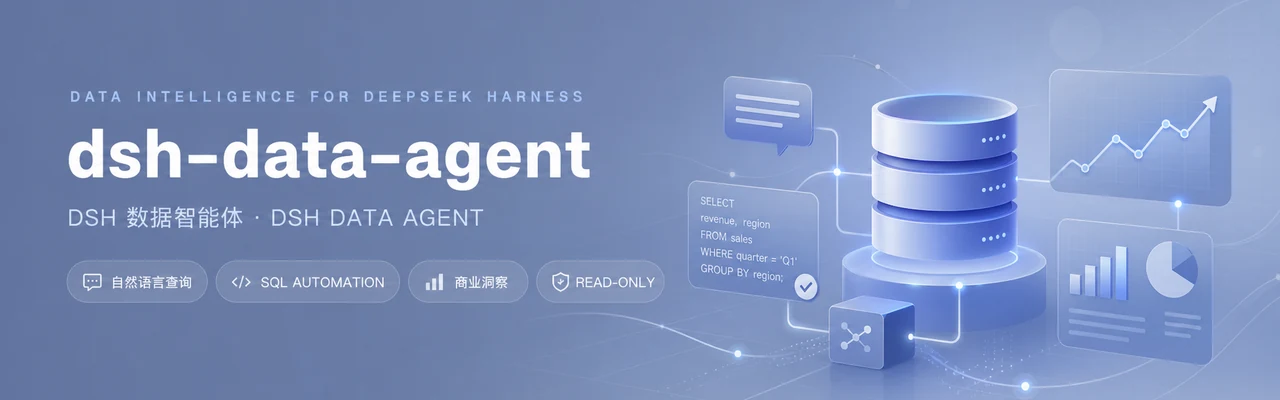


让DeepSeek Harness连接数据库,用对话完成数据分析与商业洞察
自然语言查询 · 自动执行SQL · 连续分析 · Web UI · dsh-tui · 只读保护
项目简介 · 生态规范状态 · 主要功能 · 快速安装 · Web UI · dsh-tui · 安全说明
项目简介
dsh-data-agent是DeepSeek Harness(DSH)的数据分析插件。连接数据库后,直接提出业务问题,DSH会自动查看库表、编写并执行SQL、根据真实结果继续分析,最终给出清晰的数据结论和商业洞察。插件同时支持Web UI与dsh-tui,无需修改DSH源码。
生态规范状态
本包附带一层实验性的 DSH Ecosystem Specification Community v0.15 声明。它不会替代或重复注册现有 Cordis 功能;原生 bundle、preset、命令、工具、路由、Web UI、TUI 表单和连接存储仍是唯一功能实现。
| 项目 | 当前状态 |
|---|---|
| 规范与阶段 | Community v0.15,Draft / Experimental |
| 固定基线 | dsh-ecosystem-spec@ec80a4be5d92bbb971655afd0f097bb5586a1a28;dsh-std@614dfa1ac168db79fcf4577cf0ebb34e2e3b944b |
| Manifest | dsh-plugin.json,manifestVersion: 0.15,包身份 @yejiming/[email protected] |
| 准入结果 | 仓库内 eligible fixture 为 compatible;这不是实际 dsh-TUI Host 的准入结论 |
| 证据等级 | Parsed;fixture negotiation 只记录为 fixture-only,不提升为 Negotiated |
| 已执行环境 | 离线 parser/projector/definition 校验;@dsh-std/[email protected] 一次性本地 fixture 挂载/卸载 |
| Artifact | 发布物身份为包名和版本;tarball SHA-256 只在真实 npm pack 后写入工作树外 sidecar,不嵌入 source manifest |
| 未验证 | 真实 Host Descriptor、真实 Web/Desktop/dsh-tui、真实 TTY、数据库、remote、attach/detach、多 Presentation、Observed、Attested |
主要限制包括:UserInteraction 因固定 Community manifest 无法携带 dsh-std definition 所需 requirement spec 而暂不声明;模型工具、agent preset、Cordis service、HTTP routes、Web slots、持久化域和本地 TTY 仍由原生 DSH 路径拥有。安装 @dsh-std/adapter-dsh 进行发现时,生态 facet 只发布降级快照,不发布第二个 Command、Tool 或 UI handler。
该插件仍是 trusted in-process、非沙箱代码。Manifest permission 是 Host 的准入契约,不提供 OS、进程或 realm 隔离。上述结果不代表 DSH 官方认证、安全批准、无漏洞保证或对所有 Host 的普遍兼容承诺。
主要功能
- 通过对话完成数据分析:直接用自然语言描述目标,DSH会理解问题、拆解分析步骤、查询真实数据并整理结论。你可以继续追问,分析会沿着当前上下文逐步深入。
- 自动寻找商业洞察:不仅返回查询结果,还能帮助比较趋势、定位异常、识别高价值客户或商品,并把数据转化为便于业务决策的说明。
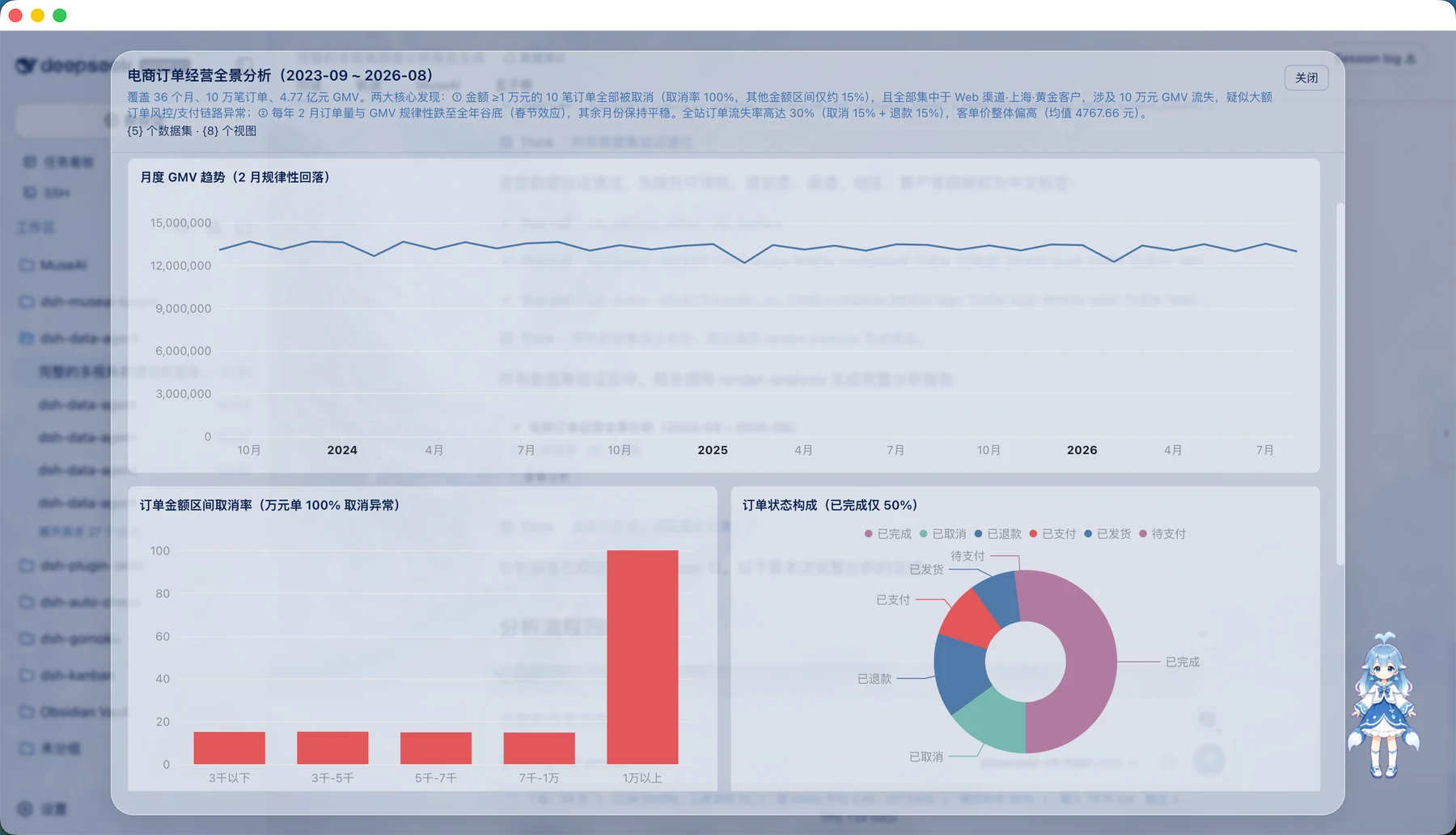
- 跨界面HTML分析报告(render-analysis):Agent可在普通工具调用里自主生成单图或Dashboard式综合分析报告(metric/line/bar/pie/scatter/table视图)。每次成功调用都会在当前工作目录的
analysis-reports/中保存一份离线可打开的HTML;Web同时提供内联预览与“查看分析”Modal,dsh-tui直接返回文件路径。是否画图由Agent按问题判断,schema探查、单标量等查询不会被强制生成图表。 - 共享Web UI与dsh-tui核心路径:喜欢可视化操作时,可以在Web界面连接数据库、浏览库表和查看结果,推荐使用zhu1090093659/dsh-web-ui;习惯键盘工作流时,可以在终端中使用同一“数据模式”,通过
/database完成连接,然后直接开始对话分析,推荐使用ccch1mneyyy/dsh-TUI。两种界面共享数据Agent的数据库服务和工具协议;具体版本与部署仍应分别验证。 - 连接常见业务数据库:支持MySQL、PostgreSQL、SQLite、Oracle、Hive、Impala、ClickHouse、Apache Doris和SQL Server,可用于业务系统、分析库、本地数据文件及数仓场景。
- DSH自动完成分析闭环:DSH会根据当前问题查看表结构、编写SQL、执行查询,并结合报错或返回结果继续调整,而不是只生成一段未经验证的SQL。
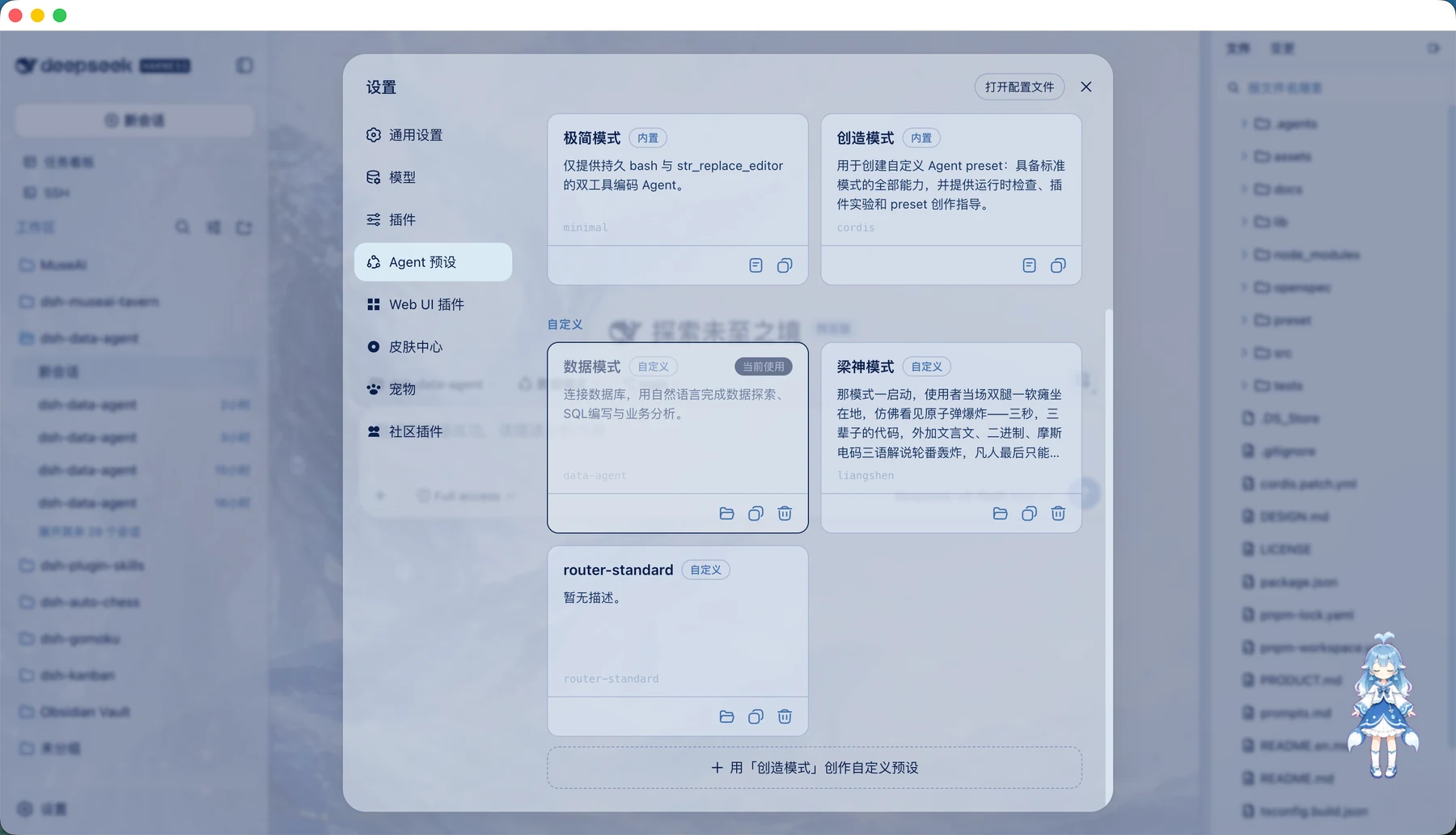
- 专注数据任务的数据模式:会话使用DSH原生
str_replace_editor处理文件,并保留sql-query、sql-write、sql-cmd与render-analysis;Web、Desktop、dsh-tui和headless profile使用同一工具协议。describe_image、ssh_*等宿主或社区插件工具不会进入数据模式。 - 安全地使用真实数据:支持只读模式和数据库只读账号;TUI密码会被隐藏,且不会作为表单草稿恢复。是否允许修改数据由你决定。
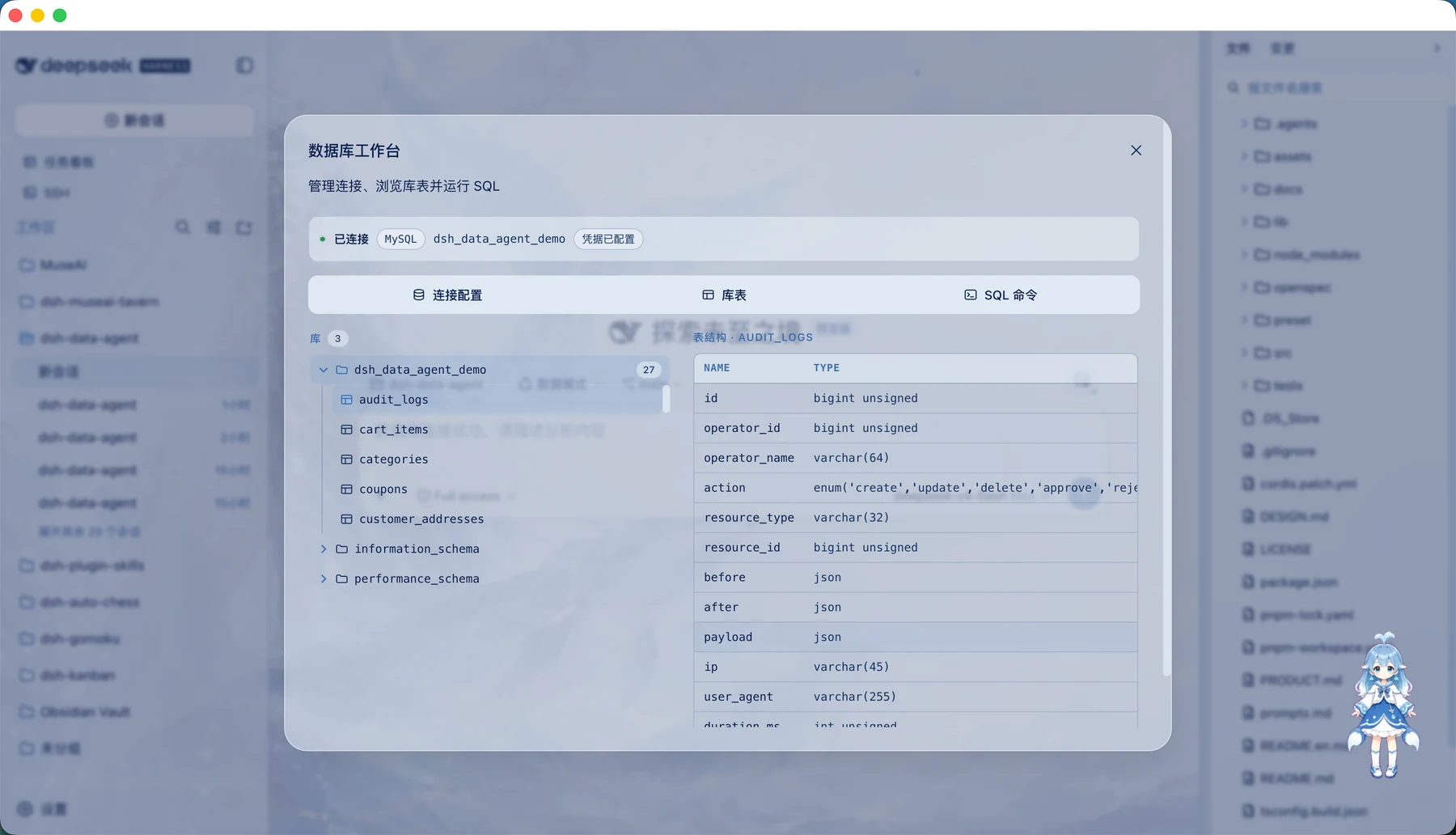
Web UI还提供按需数据库工作台:点击输入框右上角的数据库按钮,即可在同一个Modal中配置连接、浏览库表、查看字段结构或临时运行SQL。MySQL库表浏览会用当前账号逐库验证访问权限,只隐藏明确返回无权访问的库;有权限的系统库与业务库都会正常显示。开始对话前后都不占用输入框上方或左侧的对话空间。
SQL命令页会把读查询结果显示为带固定表头的结构化表格,并按100行分页,宽表可在结果区内横向滚动。当前结果可导出为Excel(.xlsx)、UTF-8 CSV或复制到剪贴板;三种导出都包含已加载的完整结果,单次最多50,000行。写入/管理命令及错误仍显示为文本消息,不会被误解析成表格。
创建会话时选择“数据模式”,DSH就会以数据分析工作流处理后续问题。
快速安装
以下命令将插件安装到Web profile。
方式一:npm安装(推荐)
dsh plugin --profile web add @yejiming/dsh-data-agent
方式二:从GitHub安装
dsh plugin --profile web add github:omdsh-dev/dsh-data-agent
插件会自动安装“数据模式”预设,并在profile启动时预加载该预设的数据库工具与命令;选择预设时不再动态导入插件子路径,无需本地构建。
在Web UI中使用
启动Web UI:
dsh --profile web
然后按下面的步骤操作:
- 新建会话并选择“数据模式”。
- 点击输入框右上角的数据库按钮,在工作台Modal中填写连接信息。
- 连接成功后,直接在对话框中提出分析问题。
- 根据第一轮结果继续追问,让DSH缩小范围、比较维度或总结结论。
例如,输入“分析最近30天订单变化,找出销售额下降最明显的地区和商品,并解释主要原因”,DSH会自行查看相关表、生成并执行查询,再根据真实结果完成分析。
分析报告与HTML文件
数据模式提供render-analysis工具:Agent会先用sql-query探查并核对事实,再自行判断可视化是否有帮助。判断需要画图时,一次工具调用会生成一份版本化分析报告:
- 报告包含 1-6 个只读数据集与 1-8 个视图(metric、line、bar、pie、scatter、table),同一数据集可被多个视图复用,聚合与 Top N 都写在 SQL 中;
- 简单问题生成单个主图(结果行内联预览),复杂问题生成紧凑摘要 + 「查看分析」按钮;
- 「查看分析」在大型 Modal 中展示本次报告的全部视图:紧凑指标带、全宽主图、双列辅助图与明细表,浅色/深色主题与窄屏单列自适应;
- 无论当前使用哪种UI,完整Dashboard都会原子保存到会话工作目录的
analysis-reports/*.html,并在支持的DSH界面进入“产物”栏;文件名默认使用报告标题,也可用语义化outputName指定basename,不追加长UUID;文件内联数据、样式和SVG渲染代码,断网时也能直接打开; - 完整报告快照随会话日志持久化:刷新或历史回放不重新查询数据库,也不产生新的浏览器存储;
- Web仍从同一份报告meta渲染预览;Node侧HTML生成器不加载ECharts或Web client代码。
在dsh-tui中使用
把Data Agent安装到dsh-tui profile即可;render-analysis不要求特定dsh-TUI版本或scene能力:
dsh plugin --profile dsh-tui add @yejiming/dsh-data-agent
启动终端界面:
dsh --profile dsh-tui
在空白会话中切换到数据模式,然后连接数据库:
/preset data-agent
/database connect
连接表单会一次展示所有相关字段。使用Tab或Shift+Tab切换输入项;数据库类型、ClickHouse HTTPS和只读模式按Enter展开选项,使用方向键选择并再次按Enter确认。网络数据库可以二选一填写临时密码或DSH凭据引用,不能同时填写。
连接成功后,回到聊天输入框直接提出业务问题即可。常用的数据库命令还有:
/database status       查看当前连接
/database test         测试当前连接
/database disconnect   断开当前连接
Agent生成分析报告后,工具卡会显示数据集、视图、空数据摘要与HTML绝对路径。TUI不会输出字符Dashboard,也没有/analysis命令;直接在本机浏览器中打开该HTML即可查看六类视图和原始数据。文件来自本次工具调用,/resume不会重新查询数据库。
同一会话再次打开连接表单时,会优先恢复该会话最近填写的数据库类型、地址、端口、用户、数据库、ClickHouse HTTPS和只读模式,并从已连接profile恢复凭据引用。新会话没有自己的配置时,会用最近一次成功连接的非敏感profile作为表单默认值,但仍是未连接状态,必须确认连接后才能查询。临时密码始终隐藏且不会恢复。
推荐的提问方式
为了获得更有价值的分析,可以在问题中补充业务目标、时间范围和关注维度。例如:
分析2026年第二季度各地区的销售额和毛利率变化,找出表现异常的地区,
继续拆解到品类和核心客户,并给出三条可执行的业务建议。
你也可以让DSH保存分析过程或SQL,方便复查和复用:
完成会员复购分析,把最终SQL保存到analysis/repurchase.sql,
并用一段适合周报的文字总结主要发现。
使用前准备
DSH运行查询时需要本机能够访问目标数据库,并安装相应的数据库客户端:
- SQLite通常已随macOS或Linux提供。
- MySQL需要
mysql客户端。 - PostgreSQL需要
psql客户端。 - Oracle、Hive和Impala需要各自的命令行客户端。
- Apache Doris通过MySQL协议连接,默认端口9030,需要支持
utf8mb4的mysql客户端;首版只浏览当前/internal catalog中的数据库和表。 - SQL Server默认端口1433,需要Microsoft ODBC
sqlcmd18.x;首版只支持SQL Login,不支持集成/Windows/Entra认证、DSN或命名实例。 - ClickHouse不需要
clickhouse-client。插件使用随包安装的官方@clickhouse/client1.23.x HTTP适配器:HTTP默认8123;勾选HTTPS后默认8443并正常验证服务器证书。实际ClickHouse Server/Cloud组合仍应通过部署侧冒烟验证,不能据此推断所有Cloud/TLS配置都兼容。
插件会先使用当前profile进程的PATH;找不到时,会继续检查客户端HOME环境变量以及Windows、macOS、Linux的常见安装位置,包括Homebrew、MacPorts、Linuxbrew、Snap、Nix、WinGet Links、Scoop、Chocolatey和Program Files下的版本目录。自动发现使用的补充PATH也会传给实际客户端进程,因此从Finder启动的DSH Desktop通常无需再为Homebrew客户端手工配置路径。
插件调用MySQL或Doris客户端时会内置--default-character-set=utf8mb4,确保Windows代码页不会使库名、表名、字段名或查询结果中的中文在进入DSH前乱码,无需在profile中重复配置该参数。
SQL Server查询使用T-SQL TOP或已有的OFFSET ... FETCH限行,绝不会追加LIMIT。为避免sqlcmd自身脚本能力绕过SQL边界,输入中的GO、!!、冒号命令和$(...)变量替换会在启动客户端前被拒绝。插件不会默认添加-C或其他“信任服务器证书”选项。
如果客户端安装在公司工具链或其他自定义目录,可在当前profile的data-agent配置中补充搜索目录;需要锁定具体版本时则直接填写绝对命令路径,也可通过args添加其他CLI参数。当前profile的PATH始终优先,searchPaths在系统常见目录之前:
- id: data-agent
  config:
    clients:
      mysql:
        searchPaths:
          - /opt/company/mysql/bin
        # command: /opt/company/mysql/bin/mysql
        # args:
        #   - --protocol=tcp
      # Doris也可覆盖mysql客户端位置:
      # doris:
      #   searchPaths: [/opt/company/mysql/bin]
      # SQL Server可覆盖Microsoft ODBC sqlcmd位置:
      # sqlserver:
      #   searchPaths: [/opt/mssql-tools18/bin]
Windows路径可以写成C:\Program Files\MySQL\MySQL Server 9.0\bin。插件不会下载数据库客户端、执行登录shell或扫描整块磁盘;位于非常规目录且未进入PATH时,仍需使用searchPaths或command。
建议先准备一个只读数据库账号,让数据Agent在不修改业务数据的前提下完成探索和分析。
如果出现failed to mount或提示找不到@yejiming/dsh-data-agent,通常是当前profile还没有安装插件,或仍在使用旧版预设。请为Web UI、DSH Desktop或dsh-tui执行对应的安装命令,然后完全退出并重新启动DSH。未修改过的旧版预设会自动迁移;手工编辑过的预设需要删除其中指向@yejiming/dsh-data-agent/tool和@yejiming/dsh-data-agent/command的两行配置块。
安全说明
- 推荐使用数据库只读账号,并在连接表单中开启只读模式。
- Web UI和dsh-tui中的临时密码只用于当前连接;TUI只显示
*,重新打开表单时不会恢复密码。 - 需要跨进程恢复认证时,可以在TUI表单填写DSH credential reference,或通过
--password-ref传入;表单会恢复引用名,但不会读取、显示或持久化解析后的密码。 - MySQL/Doris和SQL Server密码分别只传入
MYSQL_PWD和SQLCMDPASSWORD;ClickHouse密码只进入官方HTTP客户端的认证字段,不进入URL、argv或持久化配置。 - 未开启只读模式时,数据Agent可以按你的要求执行更新或管理语句。连接生产数据库前,请先确认账号权限和数据备份策略。
- 不同会话的数据库连接相互隔离,便于分别处理不同项目、客户或分析环境。
- 插件及其生态适配器都运行在DSH进程内,不是OS、进程或realm沙箱;生态permission只能用于准入协商,不能替代数据库账号权限、网络隔离或运行环境安全策略。
卸载与回滚
dsh plugin --profile web remove @yejiming/dsh-data-agent
dsh plugin --profile desktop remove @yejiming/dsh-data-agent
dsh plugin --profile dsh-tui remove @yejiming/dsh-data-agent
普通卸载只移除当前profile中的插件并释放运行时 effect,不会主动删除已安装的“数据模式”preset或已经保存的非敏感连接信息。若要显式清理preset,请在确认DSH_HOME指向目标profile数据目录后单独执行:
rm -rf "$DSH_HOME/.agent-presets/data-agent"
连接存储的彻底清理是另一个破坏性 purge 操作:请先备份,并通过目标DSH profile的存储管理方式删除data_agent_connections@1记录。移除生态manifest或回滚适配层不需要迁移现有数据;任何先前发布的生态claim都应明确标记为过期或撤销。
本地开发
pnpm install
pnpm build
pnpm test
pnpm conformance
lib/已提交到仓库,因此通过npm或GitHub安装时无需自行构建。
升级规范基线必须显式更新conformance/dsh-ecosystem/baseline.json中的两个revision和固定digest,使用对应的本地checkout离线运行conformance,复核inventory/restriction漂移,并重新执行完整构建与测试。发布证据应运行pnpm conformance:artifact --output-dir <工作树外目录>,从真实npm pack tarball生成外部sidecar;文档和claim不得超过其中最弱的已验证证据等级。
许可
MIT
友情链接
- dshfind.com:面向DeepSeek Harness生态的中文技术社区,提供项目发现、实践分享与开发者交流
- dsh-web-ui:DeepSeek Harness的可扩展Web UI,支持浏览器端交互以及插件与主题扩展
- dsh-cc-tui:面向DeepSeek Harness的键盘优先全屏终端界面,适用于高效的对话式开发工作流
- platonai/Browser4:面向自主智能体、智能信息抽取与大规模Web自动化的AI原生浏览器引擎
Read the usage guide →
Install steps, key points, FAQ and compatibility for this plugin — auto-derived from indexed fields.
Listing badge

[](https://deepseek-plugin.org/plugins/omdsh-dev/dsh-data-agent)Paste this markdown into your GitHub README to link back to this listing. The badge only states the listing — not a security endorsement.