When LLM requests persistently fail (authentication, quota, rate limiting), automatically switch provider/model along the fallback chain, preventing DSH proxy tasks from being interrupted by model issues.

- Language
- TypeScript
- License
- MIT
- Branch
- main
Install
$ dsh plugin --profile web add dsh-llm-fallbacksRun the command above in your terminal to install this plugin via the dsh CLI. You can switch Profile in the top-right corner. New to dsh? Read the beginner tutorial
Install via your agent
Install the DeepSeek Harness plugin omdsh-dev/dsh-llm-fallbacks for me: review the repository at https://github.com/omdsh-dev/dsh-llm-fallbacks first, then run the install command and verify the plugin loads successfully.
Paste this instruction to the DSH Web GUI assistant — it will install and verify for you.
One-Sentence Positioning
When DSH agent's LLM requests repeatedly fail (authentication errors, quota exhausted, 429 rate limits), this plugin automatically switches along the fallback chain to the next available provider/model, allowing the current step to continue directly on the new model, preventing model issues from interrupting the entire task; both web and dsh-tui share the same configuration.
Core Capabilities
- Automatic Fault Degradation: When configured failure codes are detected in the
agent/request-errortap, it walks down the fallback chain resolved by role, picks the next available model not in cooldown, and recovers automatically (no longer using host's default retry) - Time Slot Routing: Switches the "effective all-day chain" based on clock windows of
fallbacks.tz(default Asia/Shanghai); different models for peak/off-peak, after crossing the window the next root request automatically switches chains (not counted as failure switch, not subject to cooldown) - Virtual Auto Model: After plugin is enabled, it injects a line
FallbacksChain / Autointo the host LLM adapter directory; selecting it as the main model uses the entire current effective fallback chain as the root agent's primary model - Three-Stage Role Resolution: On first request of sub-agents, resolve role in order: explicit
agentPreset→ declared rules → optional LLM auto-match; inject the resolved chain head model into the first request - Cooling & Reversion: Models that are switched away or failed are not selected again within
cooldownMs; after expiry, automatically revert to main model based onrevertPolicy; each step also hasmaxSwitchesPerStepsafety valve to prevent infinite chain walking - Zero Config = No-Op: With
enabled: falseand no chains, the plugin is completely no-op, won't intercept or switch anything
Technical Implementation
- Language: TypeScript (host side ESM, client side React + TSX)
- Key Dependencies:
@deepseek-ai/cordis(Cordis 4 plugin framework) /@deepseek-ai/schemastery(settings schema & defaults) /@deepseek-ai/dsh-settings(installSettingsSectionto register settings namespace) /react(client side FallbacksCard & ConversationFallbackSwitch) - Architecture Pattern: Pure mount plugin—inserts a line in profile's bundle stack via
bundle/cordis.patch.yml(must be registered after dsh-base's llm-retry so the plugin'sagent/request-errorlistener takes over after llm-retry's retry budget is exhausted); host sideapply()connects decision logic atagent/request-errorandagent/requesttaps, client side injects settings card into web settings sidebar viadsh.client.inject; config read/write goes through plugin's own/api/fallbacks/get|set|resetRPC channel - Entry Files:
src/index.ts(host side:apply(ctx, config)entry,FallbacksServiceregistration, gateway registration, commands registration) /src/client/index.ts(client side: settings cardFallbacksCard, conversation switch badgeConversationFallbackSwitch)
Applicable Scenarios
Suitable for DSH users using multiple providers simultaneously: single provider's occasional authentication, quota, and rate limit issues are the most common failure causes for long-running tasks; after enabling, agents can silently switch to fallback models when the primary model is temporarily abnormal; the time-based effective chain switching feature is also suitable for placing cheaper models during peak hours and flagship models during off-peak hours. Note that the rootChain tail must be deepseek-official/deepseek-v4-flash or deepseek-official/deepseek-v4-pro as the final fallback; other models are not supported as the chain endpoint.
Prerequisites & Compatibility
| Dependency | Minimum Version | Description |
|---|---|---|
| DSH | ^0.1.1-rc.1 | peerDependencies declared @deepseek-ai/dsh-* series; at runtime provided by dsh host as bundle, local npm registry pulls via autoInstallPeers (README badge DSH-0.1.1--rc.1) |
| Node.js | >= 22 | package.json engines.node; build scripts need pnpm ≥ 10 (only needed for local directory install) |
| Platform | Cross-platform | Pure TypeScript, no OS / CPU restriction fields |
| Native Modules | None | No node-gyp native dependencies, no usage of built-in native APIs like node:sqlite |
Installation
dsh plugin --profile web add github:omdsh-dev/dsh-llm-fallbacks
Configuration Options
All configurations are under DSH shared settings document's fallbacks: namespace; enabling means giving up DSH's built-in fallback:
| Config | Type | Description | Default |
|---|---|---|---|
enabled | Boolean | Master switch. When false, plugin doesn't intercept any requests, behavior identical to not installed | false |
triggerCodes | String Array | Failure codes that trigger fallback decision (AUTH / QUOTA / RATE_LIMIT); requests with codes not in this list pass through unchanged | ['AUTH', 'QUOTA', 'RATE_LIMIT'] |
rootChain | String Array | Main agent's all-day fallback chain; last item must be exactly one of deepseek-official/deepseek-v4-flash or deepseek-official/deepseek-v4-pro (fallback model), preceding items are fallback models in order | [] |
timeSlots | Array | Time slot rows; preset rows (kind: preset) use frozen windows (梁文峰 / 梁文谷 / GLM峰 / GLM谷, fixed UTC+8 not adjustable), custom rows (kind: custom) can set start / end / days; first window matching current time becomes effective chain for next root request | [] |
roles.list | Array | Declared role collection; each item id (unique lowercase alphanumeric hyphen ≤32 chars, inherit is reserved word cannot be used as id) + persona (persona description, free text) + optional chain (dedicated fallback chain) + optional fallback ('inherit-root' / 'none') | [] |
roles.rules | Array | Sub-agent rules: match first sub-agent by provider / model pattern, route it to a role in roles.list or built-in inherit. root never matches rules, goes directly to rootChain | [] |
cooldownMs | Number (ms) | How many ms a failed/switched-away model is not selected again; after expiry handled according to revertPolicy | 300000 (5 minutes) |
revertPolicy | Enum | Reversion strategy after cooldown expiry: 'cooldown-expiry' reverts to main model on expiry, 'never' stays on last fallback for the entire session | 'cooldown-expiry' |
maxSwitchesPerStep | Number | Maximum fallback switch attempts allowed within a single step; after exceeding, stop switching and preserve original error semantics, preventing fallback chain from amplifying latency | 8 |
alwaysModeRetryCap | Number | When provider is retryPolicy.mode: 'always', how many retries before forcing switch away; 0 means disabled | 5 |
presets | Enum | Whether to auto-declare 7 built-in preset roles on apply (task / sonic / scout / designer / librarian / reviewer / security-reviewer) | 'bundled' |
roleAutoMatch | Boolean | Whether to enable third-stage LLM auto-match in sub-agent's three-stage role resolution; when false, only explicit agentPreset + rules two paths remain | true |
tz | String IANA Timezone | Timezone used for time slot matching; locks to Asia/Shanghai when any preset time slot exists | 'Asia/Shanghai' |
FAQ
Q: After installation, agent behavior hasn't changed at all. Is it not taking effect?
A: No, it's in "zero-config no-op" state. Default enabled: false and rootChain is empty array, plugin actively skips intervention on all requests. Need to set enabled: true in Fallbacks settings card or YAML, plus add at least one rootChain with V4 official model as the last item.
Q: When does configuration take effect after modification?
A: Takes effect on save. Host side reads latest config through settings' onChange hook, hot-reloads role id set, maxSwitchesPerStep and all other settings; no need to restart dsh or create new session.
Q: Is it too rigid that rootChain tail must use a specific model?
A: It's intentionally designed: rootChain tail is the final fallback of the entire fallback chain, plugin binds it with virtual Auto row, expecting it to point to an official flagship/flash model that can cover all scenarios. Using other models as tail will only warn, go legacy compatibility path, but web settings card and gateway will reject saving chains with non-official tail.
Q: How do I use the new Auto in the model selector?
A: It's a virtual line registered to host LLM adapter directory (provider is FallbacksChain, model id is Auto), appears immediately when plugin is enabled. After selecting, the root agent's primary model uses the first item in rootChain for current effective window; selecting a real model maintains traditional "primary model + fallback on failure" behavior. Auto appears only when enabled: true, displays regardless of whether chain is configured; when chain is non-compliant, it only refuses to take over, won't hide.
Q: Do sub-agent sessions also need fallback chain configuration?
A: Not mandatory, but recommended: sub-agents not matching any rules default to built-in role, equivalent to directly using rootChain; to give specific sub-agents specific chains, declare a role in roles.list (with chain), then route to it via roles.rules by provider/model pattern. LLM auto-match is enabled by default, after adding roles.list will automatically pick the most suitable role for sub-agents.
Q: How to disable certain failure types from triggering fallback?
A: Remove corresponding failure codes from triggerCodes. Default only has AUTH / QUOTA / RATE_LIMIT three; 5xx class retryable errors are first handled by dsh's built-in llm-retry with fallback budget, only entering this fallback chain after exceeding, no additional declaration needed.
Q: How do dsh-tui terminal users edit configuration?
A: Find the fallbacks section in /settings screen (requires dsh-tui ≥ v0.8.5). Booleans (enabled, roleAutoMatch) render as toggles, enums (presets, revertPolicy) render as selectors, numbers render as number inputs, complex structures (rootChain, timeSlots, roles.list, roles.rules) are JSON text boxes. Invalid drafts (bad JSON, non-compliant chain, bad time slot rows) prevent saving, won't write bad config.
Q: Will upgrading to a new version lose configuration?
A: No, configuration is stored in DSH shared settings document, plugin only reads/writes its own fallbacks namespace, doesn't touch other fields. Note: after upgrading, if your old config doesn't have explicit enabled field, schema parses to false by default, plugin will suddenly become no-op, please proactively add enabled: true.
Difficulty Level
Advanced — requires understanding concepts like fallback chains, cooldown, role matching, and writing a reasonable fallbacks: YAML (or clicking through web card); "install and it works" isn't enough, must configure at least one chain to exit no-op mode.
Known Issues & Limitations
- Sessions upgraded from
<0.2.2may fail to load: old versions persistently wrotefallbacks/switchsession events, new version dsh's session reading module can't recognize (plugin and host parse different module instances), new plugin has stopped writing such events, but historical sessions need to runpnpm repair:fallbacks-switch-logs -- --apply --backup(stop dsh first) to mark old events as ignorable, will keep a.bakbackup rootChaintail must be official V4 model (deepseek-official/deepseek-v4-flashordeepseek-official/deepseek-v4-proone of two), web settings card and gateway reject any other tail nodes on save; to keep non-official tail can only hand-write in YAML, will have one warning on startup, will go legacy compatibility path through fallback chain at runtime- As long as any
kind: presettime slot exists,tzis locked toAsia/Shanghai, preset time windows are hardcoded UTC+8 constants, cannot be adjusted in UI; custom time slot rows are not subject to this restriction - Fallback switching within a single step cannot exceed
maxSwitchesPerStep, after exceeding stops switching and preserves original error semantics; this is intentional safety valve to avoid infinite fallback loop amplifying latency - No
configfield likerootMode: whether root request goes "chain as primary model" or "primary model then chain" is determined by selectingAutoor real model in model selector, callers shouldn't look for such config in YAML roleAutoMatchenabled by default causes plugin to make one extra limited LLM call on sub-agent first request (5s timeout, 32 token cap;src/automatch.ts:52-55) to pick role, network failure/timeout/no declared roles will automatically fall back toinherit, won't throw errorroles.rulesdon't match root agent sessions (PR #62 feedback): root requests can only go throughrootChain; to give root agent specific chain, can only modifyrootChainitself




Automatic provider/model fallback chains for dsh (DeepSeek Harness): when an agent's LLM requests keep failing — retries exhausted, auth errors, quota exceeded, rate limiting (429) — the plugin switches provider/model along the fallback chain for the current role, and the current step/turn continues on the target model: tasks are not interrupted by model problems.
Works in both dsh front ends: the web profile (Settings → Plugins → Fallbacks card) and the dsh-tui terminal profile (/fallbacks session diagnostics, /fallbacks config readback, and the /settings fallbacks section for editing).
Time slots
Time slots rotate the effective root chain by wall-clock windows: each slot row carries its own fallback chain, and the first row whose window contains the current moment replaces the all-day chain for the next root request — the all-day chain stays as the last resort when no slot matches. Peak and valley windows can therefore use different chains while the failure walk (fallback switch) remains untouched.
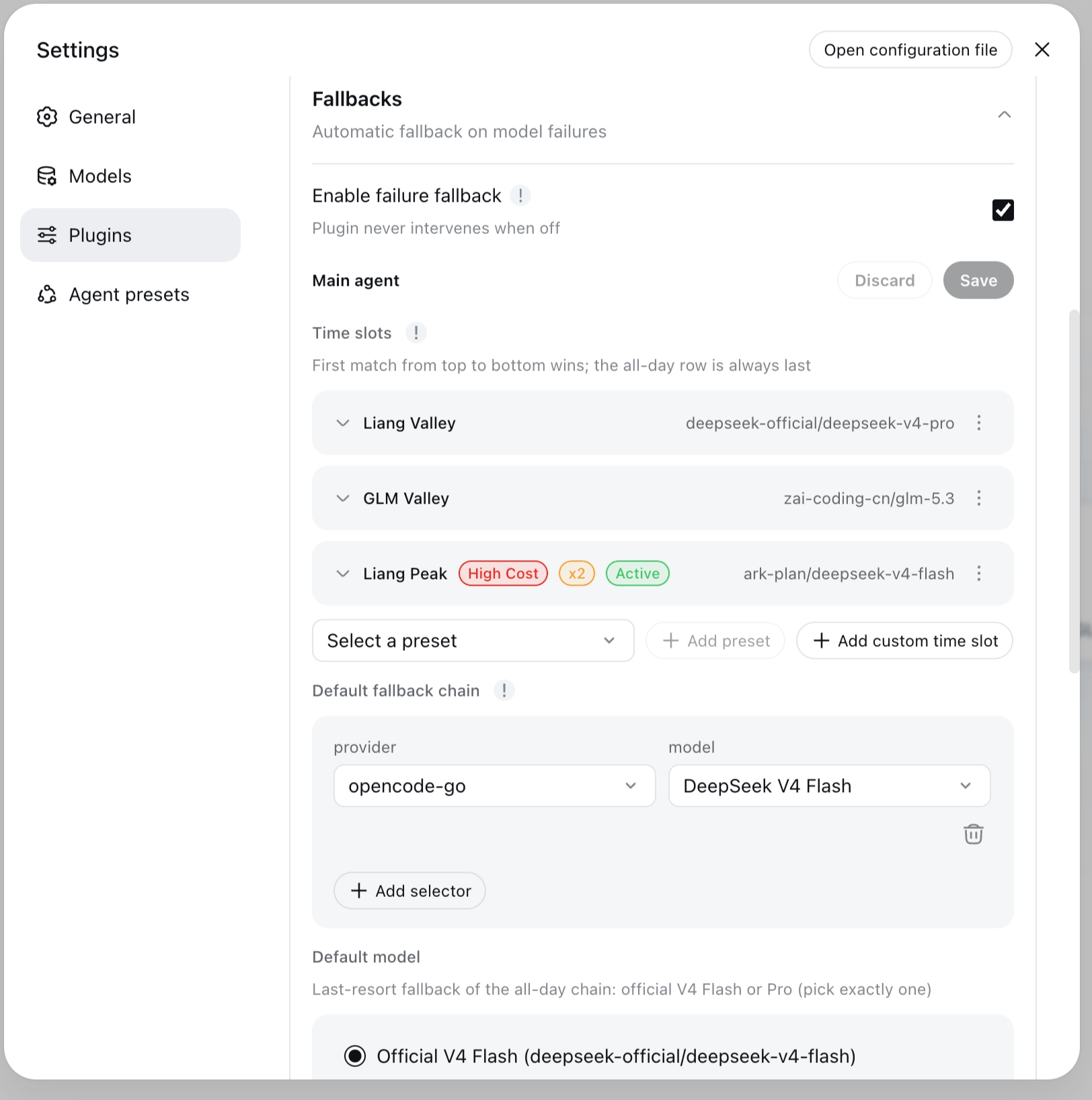
Four frozen UTC+8 presets (windows are code constants; preset rows lock tz to Asia/Shanghai):
| Preset | Window |
|---|---|
liang-peak | 09:00–12:00 and 14:00–18:00, every day |
liang-valley | every other UTC+8 time (complement of Liang Peak) |
glm-peak | Monday–Friday 14:00–18:00 |
glm-valley | every other time (complement of GLM Peak) |
GLM Peak and GLM Valley are offered in the card picker only when zai-coding-cn is configured.
The first extra row whose window contains the current moment (in fallbacks.tz, default Asia/Shanghai) wins; no match → the all-day rootChain, whose tail (Default model) must be exactly one official V4 model — deepseek-official/deepseek-v4-flash XOR deepseek-official/deepseek-v4-pro. Slot rotation is a routing seed, not a failure decision: it applies on the next root request, consumes no cooldown, and is logged as a time-slot switch — failure walks keep fallback switch. Full semantics → Time-slot presets and docs/configuration.md.
Quick start
Install
dsh plugin --profile web add dsh-llm-fallbacks      # web profile (Settings → Fallbacks card)
dsh plugin --profile dsh-tui add dsh-llm-fallbacks  # dsh-tui terminal profile
Same plugin, either front end — the only difference is the --profile flag. Pin a version with @<version>. A registry install fetches the built package (dist/), nothing builds on the target machine. Registry / git / local-directory variants, uninstall, and --dump-config verification → docs/install.md.
Repair existing sessions (versions before 0.2.2)
Versions before 0.2.2 wrote durable fallbacks/switch session events that newer dsh releases refuse to load (issue #52 — the apply()-time event-type registration is ineffective because plugin and host resolve different module instances). If existing sessions fail to open after an upgrade, clone this repository and repair the logs (stop dsh first):
git clone https://github.com/omdsh-dev/dsh-llm-fallbacks.git
cd dsh-llm-fallbacks
pnpm install
pnpm repair:fallbacks-switch-logs -- --dry-run            # preview which sessions would change
pnpm repair:fallbacks-switch-logs -- --apply --backup     # mark legacy events ignorable
The script scans ~/.dsh/sessions by default (override with --root <dir>), marks legacy fallbacks/switch events ignorable: true so the host read path accepts the session again, and keeps a <file>.bak per repaired log. --apply requires --backup and must run with dsh stopped. From 0.2.2 on, the plugin stops writing durable switch events, so no new sessions need repair.
Configuration surfaces
The plugin's settings live in a shared fallbacks: namespace, editable from three surfaces:
| Surface | What it is | Notes |
|---|---|---|
| Web settings card | Settings → Plugins → Fallbacks | Full GUI editor for the fallbacks: namespace; writes the shared settings document |
$DSH_HOME/settings.yaml | fallbacks: section in the dsh settings document | The shared source of truth — the same file the web card writes; readable and editable everywhere, including scripted setups |
TUI /settings | fallbacks section in the dsh-tui settings screen | dsh-tui ≥ v0.8.5; native fields for simple keys, JSON text fields for complex structures (see dsh-tui profile (terminal)) |
Pick the surface that matches your front end: web users get the card, terminal users get /settings, and the YAML file works everywhere. (/fallbacks and /fallbacks config are diagnostics — read-only views, not edit surfaces.)
Minimal configuration
Add a fallbacks: section to the shared settings document ($DSH_HOME/settings.yaml — see Configuration surfaces):
fallbacks:
  enabled: true            # feature switch — defaults to off (plugin is a no-op otherwise)
  rootChain:               # all-day chain: leading entries = fallback walk, last = Default model (official V4)
    - anthropic/claude-3-5-sonnet          # walked first
    - deepseek-official/deepseek-v4-flash  # last resort (Flash or Pro)
  timeSlots:               # optional: rotate the effective root chain by wall-clock windows
    - kind: preset         # frozen UTC+8 window; only the chain is editable
      preset: liang-peak   # 09:00–12:00 and 14:00–18:00, every day
      chain:
        - anthropic/claude-3-5-sonnet
    - kind: custom         # custom window (may wrap midnight)
      name: evening        # optional display name
      start: '22:00'
      end: '02:00'
      days: [1, 5]         # optional; omitted/empty = every day (0=Sunday…6=Saturday)
      chain:
        - openai/gpt-4o
  roles:                   # optional: declare role entities, then reference them from rules
    list:
      - id: reviewer       # unique id; "inherit" is reserved
        persona: Code-review subagents
        chain:
          - openai/gpt-4o-mini
        fallback: inherit-root   # role chain first, then the inherited rootChain
    rules:                 # subagent-only: rules never match root requests
      - role: reviewer     # all subagents → the reviewer role
Build the section up in four steps:
1. Enable the plugin. enabled: true turns the fallback engine on. It defaults to off — with no chains configured the plugin is a complete no-op.
2. Set the all-day rootChain. Leading entries are the fallback chain, walked first when a request fails; the last entry is the Default model.
Conformance: the last entry must be exactly one official V4 model —
deepseek-official/deepseek-v4-flashXORdeepseek-official/deepseek-v4-pro. The settings card and gateway reject any other tail on save; a legacy non-official tail warns at startup and keeps working as a fallback-only walk, but cannot be saved as-is.
3. Add timeSlots (optional). Rows rotate the effective root chain by wall-clock windows. Preset rows use frozen UTC+8 windows (only their chain is editable; while a preset row exists, tz locks to Asia/Shanghai); custom rows take start/end (may wrap midnight) and an optional days list. The first row whose window contains the current moment wins; no match → the all-day rootChain. Rotation is a routing seed — it applies on the next root request and consumes no cooldown (see Time slots).
4. Add roles (optional). Declare role entities in roles.list (id, persona, chain, optional fallback policy), then map subagents to them with roles.rules. Rules never match root requests — with no rule match (or on a root request) the built-in inherit role applies and appends the rootChain.
Full reference (role entities, fallback strategies, rules, selectors, preset roles, time-slot presets) → docs/configuration.md.
Upgrade note (behavior change): an existing
fallbacks:section without an explicitenabledkey resolves tofalseafter upgrading — addenabled: trueto keep the plugin active.
Verify
Save the config and restart the session, then type /fallbacks — the read-only in-session diagnostics (origin, resolved role, chain, recent fallback switches, cooldown status). In a dsh-tui profile, /fallbacks config reads back the composed configuration; see dsh-tui profile (terminal).
Features
- Automatic fallback for root and subagents: any agent switches down the chain to the next available provider/model on model failure — no manual model switching.
- Two-block config:
rootChainfor the root agent; declared role entities (roles.list) referenced byroles.rules(or the built-ininherit). - Chain as root primary from the picker: when
enabledis on, the host model picker (web and TUI alike) shows a virtualFallbacksChain/Autorow — selecting it uses the configured chain as the root primary (a conforming all-day head is required for the override to succeed); selecting a real model keeps fallback-only (see FallbacksChain in the model picker). - Time slots: optional
fallbacks.timeSlotsrows rotate the effective root chain by wall-clock windows in the config-leveltztimezone (defaultAsia/Shanghai) — four frozen UTC+8 presets (liang-peak/liang-valley/glm-peak/glm-valley, windows are code constants, models-only edits) or customstart/end/dayswindows. The first matching row wins; the all-day row is always last. A slot change applies on the next root request and is logged as a time-slot switch — a routing seed, never a failure decision: it consumes no cooldown and does not count againstmaxSwitchesPerStep. Failure walks keep the fallback switch copy (see Time-slot presets). - Dispatch-time role resolution: on a subagent's first request its role is resolved in three stages — explicit (
agentPresetmatches a declared role id) → deterministic rules (unchanged) → LLM auto-match from the declared role taxonomy (fallbacks.roleAutoMatch, defaulttrue). The resolved role's chain-head model is injected into the first request and recorded via an explicitrole → modellog line (no durablefallbacks/switchevent is written — issue #52 stop-write); setroleAutoMatch: falseto disable the LLM auto-match stage (the explicitagentPresetstage still applies — with no explicit role this reproduces the previous rules-only behavior). The settings card always renders an Enable role auto-match switch (defaulttrue) to toggle it — the schema default applies even to legacy configs that never declared the key. - Cooldown and revert: failed / switched-away models are not re-selected during cooldown;
revertPolicy: cooldown-expiryreturns to the primary model automatically. - Visible behavior: every switch is recorded in an info-level log line (from/to/role/reason) — no silent model switching. The plugin deliberately writes no durable
fallbacks/switchsession events (issue #52: the apply()-time event-type registration was proven ineffective, and a session containing the event refused to load after a dsh restart). Sessions written by older plugin versions that contain such events are repaired byscripts/repair-fallbacks-switch-logs.ts, which marks legacy events ignorable so affected sessions load again. - Safety valves:
maxSwitchesPerStepcaps switches per step andalwaysModeRetryCapcaps always-mode retries — chain loops cannot amplify latency. - No-config no-op: with no chains configured the plugin behaves exactly like not being installed (
enabledis off by default — see Minimal configuration).
dsh-tui profile (terminal)
In a dsh-tui profile the plugin has three operator surfaces, with a strict duty split:
/fallbacks— what happened this session: origin, resolved role, effective chain, recent fallback switches, cooldown status. Read-only./fallbacks config— what is configured: composed-config readback (trigger codes, root chain, time slots, timezone, roles, role rules, cooldown, revert policy, safety valves, presets, role auto-match). Read-only apart from the one action command/fallbacks config revert-seed <role-id>, which restores a seeded role's persona to its declared seed default (a web-card action the settings seam cannot express)./settings— the edit surface. The plugin registers a fallbacks section with full parity to the web settings card: booleans (enabled,roleAutoMatch) render as toggles, selects (presets,revertPolicy) as pickers, and numbers (cooldownMs,maxSwitchesPerStep,alwaysModeRetryCap) as numeric inputs; complex structures (rootChain,timeSlots,roles.list,roles.rules) are JSON text fields andtriggerCodesa comma-separated text field. Invalid drafts (bad JSON, non-conforming chains, malformed time-slot rows) block the save — the section never corrupts the config.
Requirements: the /settings fallbacks section needs dsh-tui ≥ v0.8.5 (commit c51661f or later on main; the settings seam shipped in v0.8.0, the groups shape + validation in v0.8.5). On an older dsh-tui the section is absent, and file editing remains the only TUI edit surface.
File editing still works everywhere: the shared $DSH_HOME/settings.yaml (fallbacks: section — the same file the web card writes) for global settings, or the profile patch ~/.dsh/profiles/dsh-tui/cordis.patch.yml (config: overrides on the plugin row) for dsh-tui-specific values. A patch row replaces the targeted row's whole config — restate every field you want to keep (schema defaults fill the rest).
FallbacksChain in the model picker
When enabled: true, the plugin registers a virtual provider, FallbacksChain, with a single catalog row: Auto. The web profile and dsh-tui both see the row: they share the same adapter catalog, so the row needs no settings-page wiring or host patch (it is independent of the /settings fallbacks section, which edits configuration rather than the picker catalog). The row is visible whenever the plugin is enabled — a legacy or empty all-day chain does NOT hide it (the override just refuses to fire).
Selecting FallbacksChain / Auto uses the configured chain as the root primary: root requests route to the effective chain's first exact provider/model at request time, and the fallback engine degrades from that head as usual. Selecting any real catalog model keeps the v0.2.2 fallback-only behavior — the session model is primary and the chain engages only after it fails.
There is no rootMode switch — no config key, YAML field, settings toggle, or gateway flag. The mode is the session's {provider, model} selection itself: FallbacksChain = chain primary; any real model = fallback-only.
Notes:
- Picker label: the row's catalog
name(what the composer trigger shows) is live —Auto: DeepSeek V4 Flash[Liang Peak]/Auto: DeepSeek V4 Flash[all-day](catalog display name, not the model id); the id staysAuto. BareAutoif the all-day tail is not conforming. Refresh by reopening the picker. - Root only: the row is about the root agent. Subagent role resolution and injection are unchanged; a subagent session that inherits the selection still routes through the chain head — the virtual row is a thin delegate, never a second routing engine.
- Conformance gate on the tail: a successful override/delegate requires the all-day chain to be tail-conforming — its last entry must be exactly one official V4 model (
deepseek-official/deepseek-v4-flashordeepseek-official/deepseek-v4-pro, the card's Default model panel); leading entries (Default fallback chain) are walked first. Disabling the plugin hides the row again (slot-row/chain edits never churn registration). - Stale selection: if the row disappears (plugin disabled) while
FallbacksChain / Autois selected, the session keeps showing it as the current model withroutable: false— pick a real model from the catalog to continue (host-native catalog semantics). - Capabilities follow the head: the row's model metadata (context window, modalities, reasoning) mirrors the current effective head; retry attribution follows the permissive default — retries/failures are accounted to the real head pair, not to the
FallbacksChainprovider. Full semantics → docs/configuration.md.
Time-slot presets
Time slots are introduced in the featured overview above; this section is the reference. Time-slot rows rotate the effective root chain by wall-clock windows — useful for peak/valley pricing without confusing wall-clock rotation with failure fallback. The copy split is strict: slot rotation logs and UI say time-slot switch; the failure walk keeps fallback switch; the conversation notice Model downgraded stays on the failure path only.
- Match order: at every root request, the first extra row whose window contains the current moment (in
fallbacks.tz, defaultAsia/Shanghai/ UTC+8) wins — that row's chain replaces the all-day chain. No row matches → the all-dayrootChainis used. The all-day row is always last and required: its last entry must be exactly one official V4 model (Flash XOR Pro; leading Default fallback chain entries are walked first). - Presets (frozen, not user-editable):
liang-peak= 09:00–12:00 and 14:00–18:00 every day;liang-valley= every other UTC+8 time;glm-peak= Monday–Friday 14:00–18:00;glm-valley= every other time. One preset id = one row; the card picker never offers a duplicate. - Custom rows:
start/end(HH:mm, may wrap midnight) + optionaldays(0=Sunday…6=Saturday; omitted/empty = every day) + models. - Next-request apply: a slot boundary crossing never preempts an in-flight step — the new row takes effect on the next root request. Rotation is mount-only: info log + card/
/fallbacksstatus line, no durable switch event. - Settings card: the Main agent section groups Time slots (extra rows — add preset / add custom / remove / reorder by buttons or drag; preset rows show a read-only window summary and edit models only; custom rows carry an editable name; the timezone picker lives here and locks to Asia/Shanghai while any preset row exists, since preset windows are frozen UTC+8 constants), Default fallback chain (walked first when no slot matches) and Default model (the official V4 Flash | Pro last-resort fallback). Rows are collapsible to name + first model. There is no
timeSlots.enabledmaster switch (adding a row is the opt-in) and norootModecontrol.
Preset roles
The plugin ships 7 bundled generic subagent roles out of the box — designer / librarian / reviewer / scout / security-reviewer / sonic / task — declared automatically on apply as seeded roles.list rows ({ id, persona }): idempotent, and never overwriting an operator persona. They appear in the Settings card (seed badge, id immutable) and in the /fallbacks config role summary, ready for roles.rules to reference.
- Switch:
fallbacks.presets—'bundled'(default) declares the preset roles on apply;'none'disables the automatic declaration (already-materialized rows stay). - Full semantics (upgrade behavior, conflict handling, library reuse of
presetRoles) → docs/configuration.md.
Mount-only (no dsh modification)
The plugin installs as a pure mount: bundle insert + client inject + its own gateway channel (/api/fallbacks/get|set|reset) — no dsh patches, no postinstall step, and dsh upgrades never require re-patching. Stale leftover patches from an older patched install are harmless.
Documentation
| Doc | Content |
|---|---|
| docs/install.md | profile install (web + dsh-tui) / registry / git / local variants / uninstall / --dump-config verification |
| docs/configuration.md | full fallbacks namespace reference, selector syntax, example YAML, plugin-config card usage, TUI readback, behavior notes, preset roles |
| docs/consumer-api.md | developer consumption contract: library API + named llm-fallbacks service + role seeds, export inventory, lifecycle, typing |
| docs/release.md | release process: Trusted Publishing setup, Release prep SOP, fragment format, rollback |
| docs/verification.md | verification records (test matrix, bundle layer order, runtime contracts, QA gate script) |
License
Released under the MIT License — see LICENSE. The LICENSE file is authoritative for copyright and license terms.
Read the usage guide →
Install steps, key points, FAQ and compatibility for this plugin — auto-derived from indexed fields.
Listing badge

[](https://deepseek-plugin.org/plugins/omdsh-dev/dsh-llm-fallbacks)Paste this markdown into your GitHub README to link back to this listing. The badge only states the listing — not a security endorsement.