A terminal-native interaction interface for DeepSeek Harness. Connects to agents via ACP protocol and supports client plugin extensions including themes, commands, and slots.

- Language
- Rust
- License
- MIT
- Branch
- main
Install
$ dsh plugin --profile web add github:openma-ai/deepseek-harness-tuiRun the command above in your terminal to install this plugin via the dsh CLI. You can switch Profile in the top-right corner. New to dsh? Read the beginner tutorial
Install via your agent
Install the DeepSeek Harness plugin openma-ai/deepseek-harness-tui for me: review the repository at https://github.com/openma-ai/deepseek-harness-tui first, then run the install command and verify the plugin loads successfully.
Paste this instruction to the DSH Web GUI assistant — it will install and verify for you.
One-line Description
A terminal-native interactive interface ("client" in the terminal) for DeepSeek Harness (DSH), communicating with agents via the ACP protocol to render streaming reasoning, tool calls, Skills, multi-image prompts, and persistent sessions in the terminal. It serves as a terminal surface plugin for the DSH ecosystem, recommended to install into the tui profile and launch with dsh --profile tui.
Core Features
- Real-time agent timeline display: streaming reasoning, responses, tool parameters and results, subagent lifecycle, and per-turn token and cache usage
- Reads agent-declared models, permissions, authentication methods, and available commands via ACP, merging them with built-in commands into a searchable, scrollable
/slash menu - Multi-image prompt: load up to 8 images from files, clipboard, or paste buffer, displayed as editable
[image n]chips inline in the draft when sending - Terminal-friendly Markdown rendering: headings, lists, quotes, code blocks, inline code, emphasis, strikethrough, links, images, with CJK/Latin mixed text preserved
- High-density tool view: long results default to showing only the last 4 lines with click-to-expand, status (in-progress/success/failed) clearly visible
- Long session control: follow-ups can be queued mid-turn, or immediately steer the current turn; persistent JSONL sessions managed via
/new,/resume, and--session-id - Cross-platform input: readline editing, context shortcuts, macOS physical ⌘/⌥, Linux/Windows ctrl key combos for unified feel
- Terminal-native UI: light/dark themes, narrow-width adaptation, mouse selection, native/tmux/OSC 52 clipboard, image preview via kitty graphics protocol, and optional
/liangpixel pet
Technical Implementation
- Language: TypeScript / Node.js (Cordis client tree on npm) + Rust / ratatui (terminal rendering and state machine)
- Key Dependencies:
@deepseek-ai/cordis(Cordis plugin container),@openma/deepseek-harness-acp(ACP client carried at runtime, serving as agent endpoint),agent-client-protocolRust crate (communicates with agent),ratatui+tui-markdown(terminal rendering) - Architecture Pattern: Dual-process Cordis architecture. The Host process mounts the ACP plugin in its own Base Cordis tree, which then spawns an independent TUI Client child process; the two trees communicate solely via ACP protocol over the child process's stdin/stdout. On Unix, fd 3/4 of the Client process carries only the user TTY; on Windows, it uses loopback TCP with a random token. The plugin extends via Cordis services (
tuiTheme,tuiSlots,tuiCommands,tuiOverlay,acpSessionConfig/Plan/Stats); theme and view capabilities negotiate via_dsh/cordis/*and_dsh/cordis/tui/*extension points - Entry Points:
npm/bin/dsh-tui.js(CLI shim),npm/lib/index.js(dsh-tui-shellCordis plugin, responsible for spawning Rust painter and muxing ACP + compositor),src/main.rs(Rust entry)
Use Cases
Users who want to use DeepSeek Harness in the terminal instead of a browser, especially those relying on tmux/ssh, needing quick keyboard/mouse operations, wanting scriptable invocation, or who dislike opening browser windows. It's also great for demos: running --demo alone lets you browse the UI experience without API key configuration; adding --demo-skin lets you switch to the built-in ember color scheme to see theme switching in action.
Prerequisites & Compatibility
| Dependency | Min Version | Description |
|---|---|---|
| Node.js | >= 18 | Cordis client tree on npm and CLI shim require Node 18+ |
| DeepSeek Harness | 0.1.0-rc.6+ | Installation command handles automatically; this plugin declares @deepseek-ai/[email protected] in devDependencies |
ACP Client (dsh-acp) | 0.4.13+ | Carried as runtime dependency, automatically mounted on profile main path; in standalone mode, can specify other ACP server |
| Operating System | macOS arm64/x64, Linux arm64/x64, Windows x64 | Linux x64 changed to static musl linking from 0.2.x, no host glibc version dependency |
| Native Modules | None | Rust binaries precompiled and published with the package to npm/vendor/<platform>-<arch>/, no node-gyp involved |
Installation
dsh plugin --profile web add github:openma-ai/deepseek-harness-tui
Configuration
This plugin requires no additional configuration. Behaviors for /auth, /model, /agent, /effort, /plan, /permission, /theme, /keys, /help, /image, /clip, /liang, /new, /resume, !cmd, etc. are driven directly by the agent's own capabilities, runtime state, or runtime commands.
The following environment variables are for development and troubleshooting only; regular users don't need to care:
| Environment Variable | Purpose |
|---|---|
DSH_TUI_BIN | Override Rust painter path, used when debugging locally with cargo build output |
DSH_TUI_AGENT | Override the default ACP agent command that standalone entry searches for |
DSH_TUI_FORCE_TCP=1 | Force loopback TCP with token on Unix (default is TCP only on Windows) |
DSH_HOME | Override DSH profile and home directory search path |
FAQ
Q: Do I need additional configuration after installation?
A: No. The installation command automatically creates the profile and installs the TUI and ACP dependencies together. You can start using it directly with dsh --profile tui. The DSH_TUI_BIN environment variable is only needed when debugging locally compiled Rust output.
Q: Can I run without DSH Harness installed?
A: Yes. The standalone entry dsh-tui can connect to any ACP-capable agent via --agent dsh-acp or --agent dsh --agent-arg --profile --agent-arg acp. The --demo mode lets you preview the UI without any agent or API key.
Q: Which operating systems are supported?
A: macOS (arm64 / x64), Linux (arm64 / x64), Windows (x64). Linux x64 packages changed to static musl linking from 0.2.x, allowing direct execution on older distros (e.g., Ubuntu 20.04) without glibc compatibility layer.
Q: Can I use ACP agents that don't support DSH private extensions?
A: Yes. When the agent doesn't declare the extension in _meta.dsh.cordis during initialize, the TUI only uses standard ACP (prompt, session, auth, update), and there are no compatibility issues.
Q: The Liang pixel pet next to the input box doesn't display. What should I do?
A: Only terminals supporting the kitty graphics protocol (Ghostty, Kitty, WezTerm, etc.) display the RGBA pixel sprite; other terminals fall back to a half-block character whale, and it's automatically hidden when width is below 60 columns. Main interface functionality is unaffected.
Q: How do I uninstall?
A: Run dsh plugin --profile tui remove @openma/deepseek-harness-tui, which will also remove the TUI bundle and associated ACP/Host rows from the profile.
Q: Getting spawn dsh-acp ENOENT error. What now?
A: The default agent binary wasn't found. You can install the official DSH ACP client (dsh-acp), or explicitly point to another ACP server via --agent, e.g., --agent <other ACP command>.
Q: Package prompts no native binary for ... What should I do?
A: Your platform isn't covered by the current installation version (outside of darwin-arm64/x64, linux-arm64/x64, win32-x64). Make sure you're on the latest version, or run scripts/build-npm.sh locally to build the package yourself.
Learning Curve
Beginner — one installation command gets you started. Advanced users can read docs/plugins.md to write client plugins extending themes, slots, commands, etc.
Known Issues & Limitations
- Conversation timeline slot (
conversation.chat) is not yet open; currently the plugin can only contributechrome.right,conversation.input.dock,conversation.composer.dock. ACPsession/updateremains the sole source of truth for transcript; plugin nodes cannot replace the composer or masquerade as session events - "Fully pluginized" is still the target architecture; form controls, more shell/conversation slots, runtime diagnostics panel, and independent
ViewPresetare still on the migration roadmap. Seedocs/migration.mdfor details - Third-party plugins are strictly limited to semantic APIs like
tuiTheme/tuiSlots/tuiCommands/tuiOverlay/ACP session services; TTY, raw mode, ratatui, kitty escapes, absolute row/column coordinates, and JSON-RPC method tables are not exposed to plugins. Any code that directly reads stdin or ratatui state at runtime will break in new versions - The
/liangpixel pet next to the input box only displays as RGBA pixels on terminals supporting the kitty graphics protocol; other terminals fall back to a half-block character whale; it's directly hidden when terminal width is below 60 columns (README.md:312-314) - If the package prompts
no native binary for ..., it's because that platform isn't in the packaging matrix (darwin-arm64/x64, linux-arm64/x64, win32-x64). You need to self-compile viascripts/build-npm.shlocally, or switch to a package matching your platform

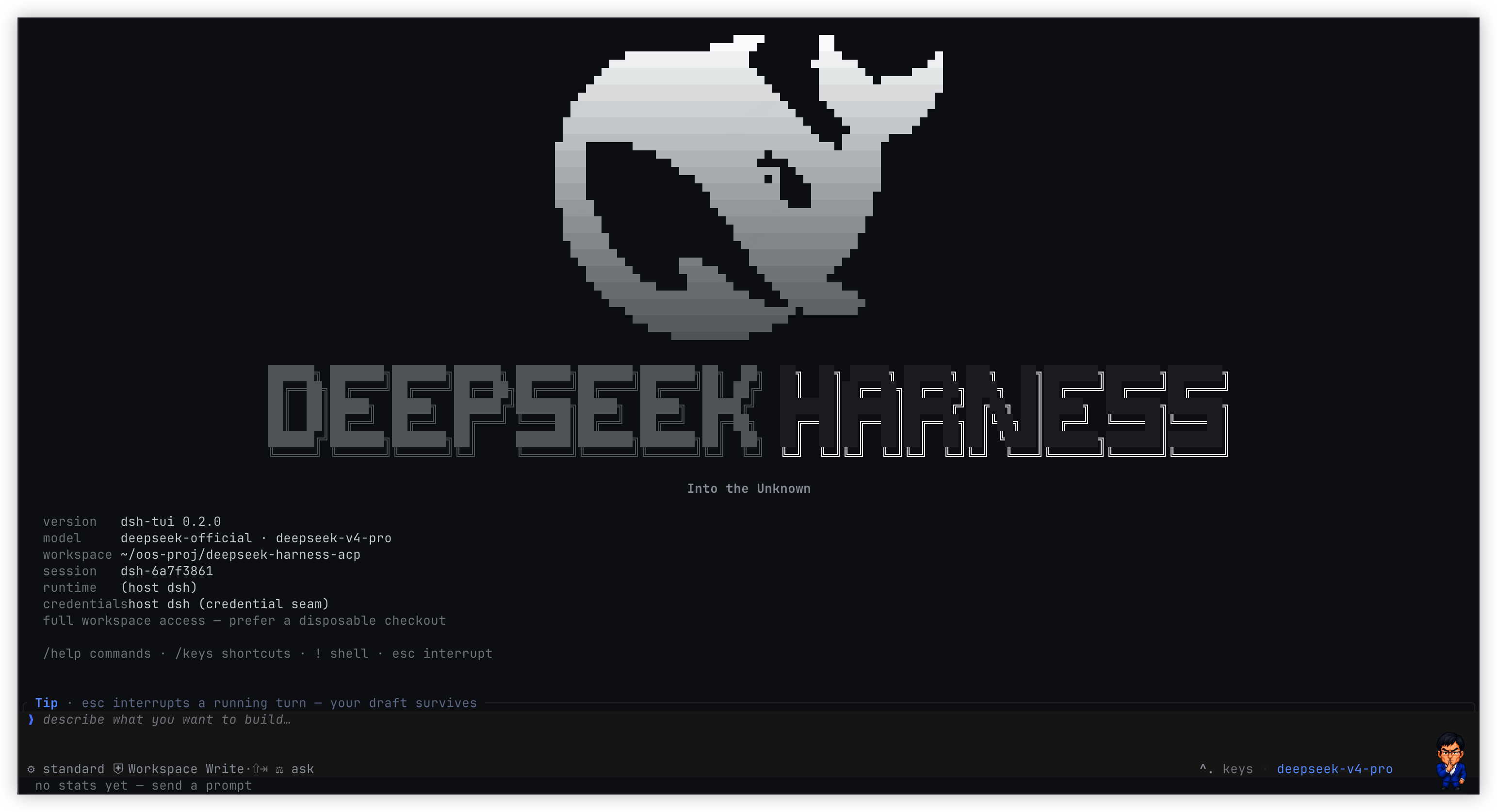
DeepSeek Harness TUI
在终端里运行 DeepSeek Harness:流式推理、工具调用、Skills、多图 prompt 与持久会话。





简洁且强悍的DSH-TUI
- Rust/ratatui 编写的高性能程序界面.
- 100% 基于Deepseek Harness官方AI能力.
dsh-tui 是终端原生 ACP client,也是一套运行在 Cordis client 树上的
可扩展终端。它在 Rust/ratatui 界面里呈现流式推理、工具调用、subagent、token
用量和持久化会话。推荐 profile 路径把 ACP plugin 挂在 dsh Base Host 树上,并
启动独立 TUI Client 进程;standalone 入口也可 spawn 或接入任意 ACP agent。长期目标
不是把功能不断焊进 TUI 本体,而是让主题、视图、命令和交互都由插件组合,最终
让 Creator 能检查、创建、运行、诊断并迭代自己的终端能力。
快速开始
推荐:作为 dsh 的 TUI surface plugin
需要 Node.js 18+。安装官方 DeepSeek Harness,
再把 TUI 直接装进 tui profile:
npm install -g @deepseek-ai/dsh
dsh plugin --profile tui add martty@latest
dsh --profile tui
dsh plugin ... add 是推荐的安装与升级入口:它会自动创建 profile、安装
TUI 及其 ACP 依赖,不需要全局安装 dsh-tui,也不需要另装 pnpm。
旧包名 @openma/deepseek-harness-tui 会继续发布相同版本,已有安装无需立即迁移。
从旧包名迁移
martty 是新的推荐包名。从 0.2.13 开始,martty 和
@openma/deepseek-harness-tui 由同一条 CI 以相同版本、相同产物发布;
旧包名作为兼容别名保留。如需切换,只替换 tui profile 中的包规格:
dsh plugin --profile tui remove @openma/deepseek-harness-tui
dsh plugin --profile tui add martty@latest
迁移不改变 dsh-tui / dsb 命令、tui profile 名或运行方式,也不需要
迁移配置和会话数据。不想立即切换时,继续使用旧包名即可。
这是给 AI agent 阅读的安装说明:docs/agent-setup.md
TUI 把 ACP 声明为自身运行时依赖。若目标 profile 已通过标准 ACP bundle 装过另一 版本,包管理器可以保留两份依赖,但 TUI bundle 会停用该 surface 的旧 transport/provider 行,并只挂载从 TUI 自身依赖图解析出的 ACP plugin;因此受支持的 profile 组合不会同时启动两套 ACP,也不要求用户先手工整理已有 ACP profile。
Standalone:接任意 ACP agent
dsh-tui --agent dsh-acp
dsh-tui --agent dsh --agent-arg --profile --agent-arg acp
本地 checkout(需已 cargo build --release 或 scripts/build-npm.sh,并把二进制放到 npm/vendor/<platform>/,或设置 DSH_TUI_BIN):
DSH_TUI_BIN=$(pwd)/target/release/dsh-tui dsh-tui --agent dsh-acp
第三方能力是 client 树上的普通 Cordis 插件:声明所需 service,在 apply 中
注册贡献,并随 fiber 卸载自动撤销。当前已经开放主题、根级右栏、本地命令、
slider overlay、当前 ACP Session 配置事务和包内 Host/Client RPC;完整契约见
插件 API,完整方向见
完全插件化与自进化。--demo-skin 只挂载 gallery 包
ember,不代表主题逻辑写进了本体。
先看 Demo
Demo 不需要 runtime 或 API key:
npm install --global martty
dsh-tui --demo
dsh-tui 是主命令;dsb 保留为兼容别名。
核心能力
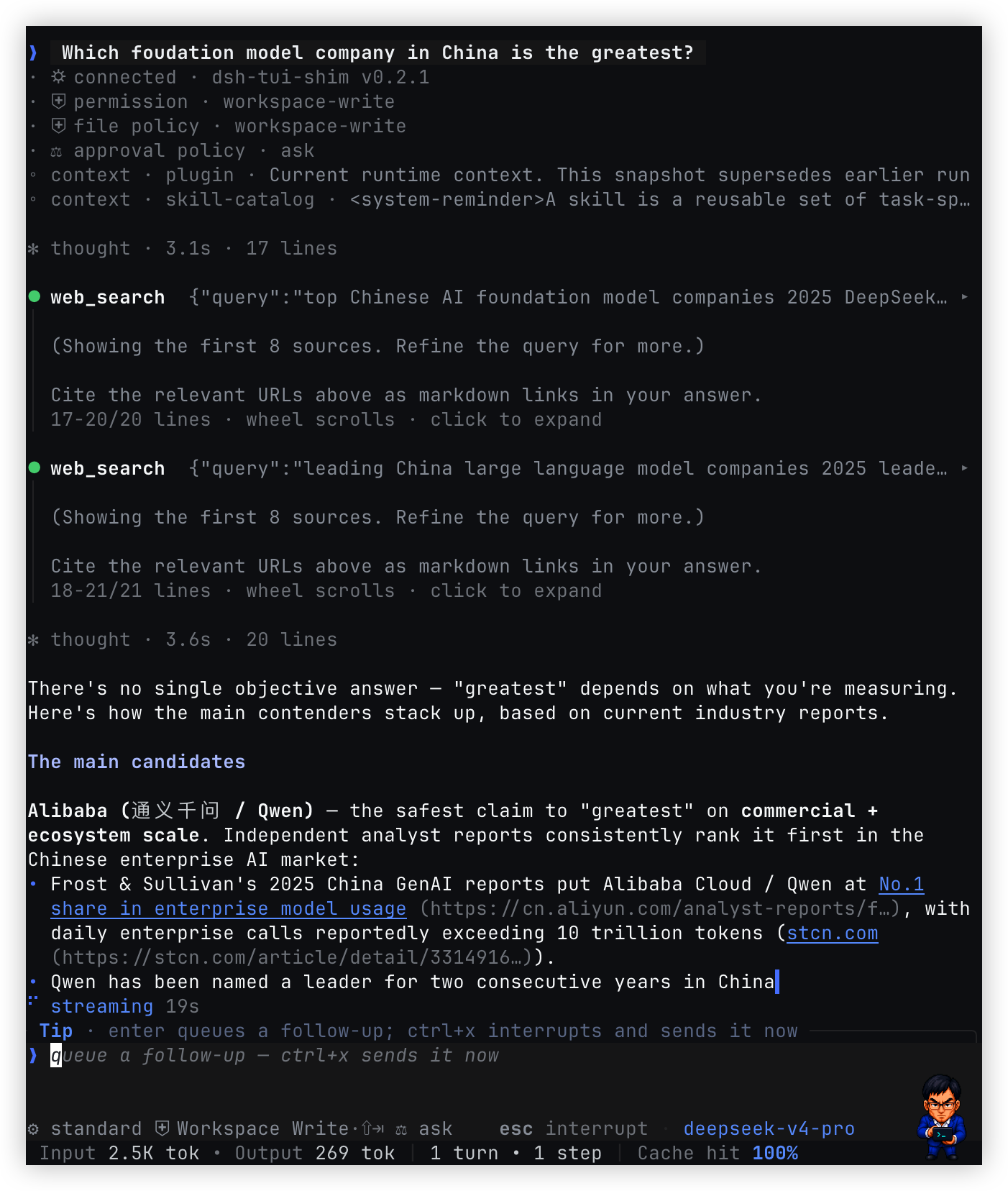
- 完整的 agent 时间线:实时呈现推理、回复、工具参数与结果、plugin 上下文、 subagent 生命周期和 token/cache 指标;最新消息下方持续显示阶段、耗时与队列深度。
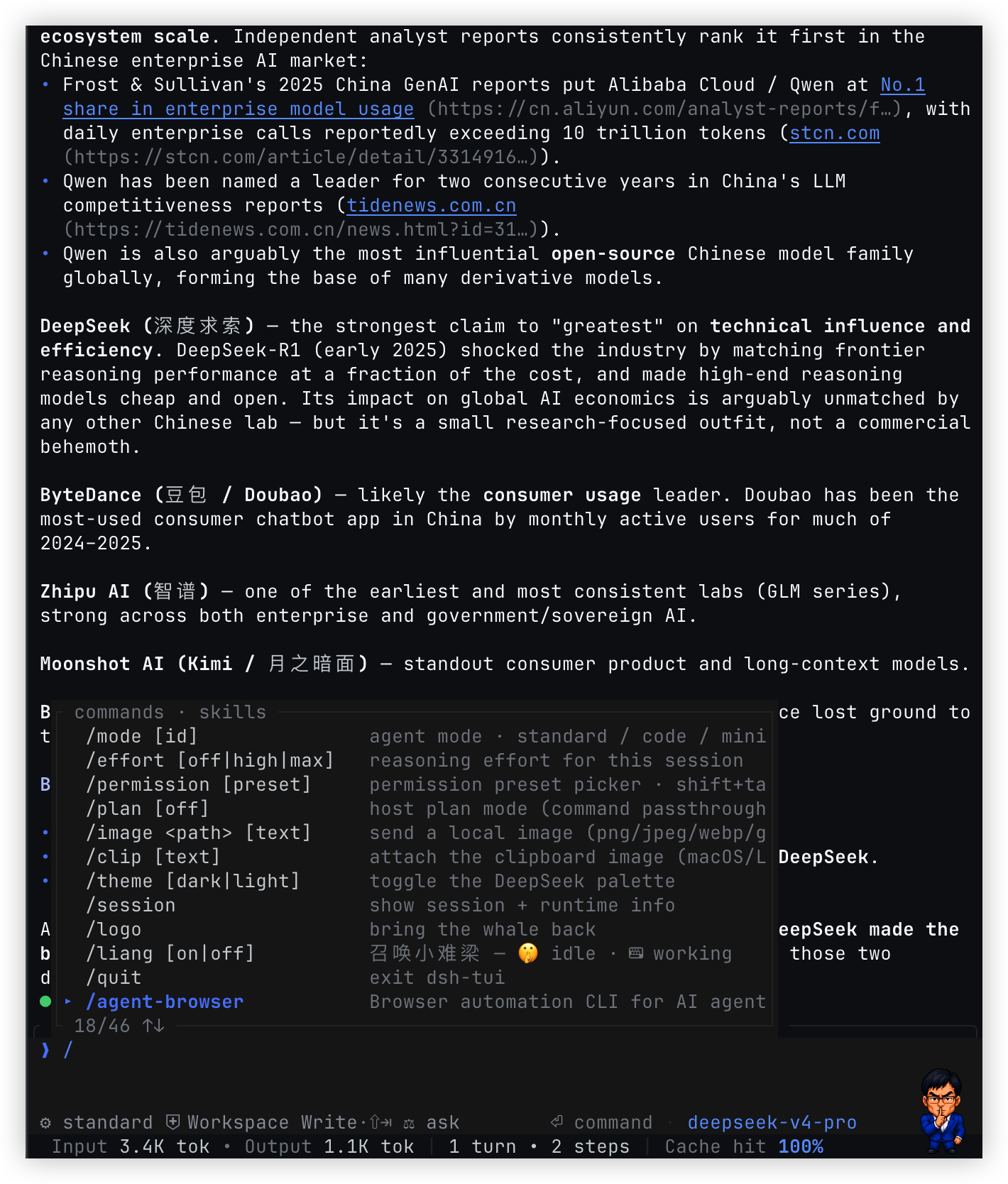
- ACP 能力原生接入:读取 agent 广告的模型、composition、权限、认证方式和 可用命令;skills 与内置命令共享可搜索、可滚动的斜杠菜单。
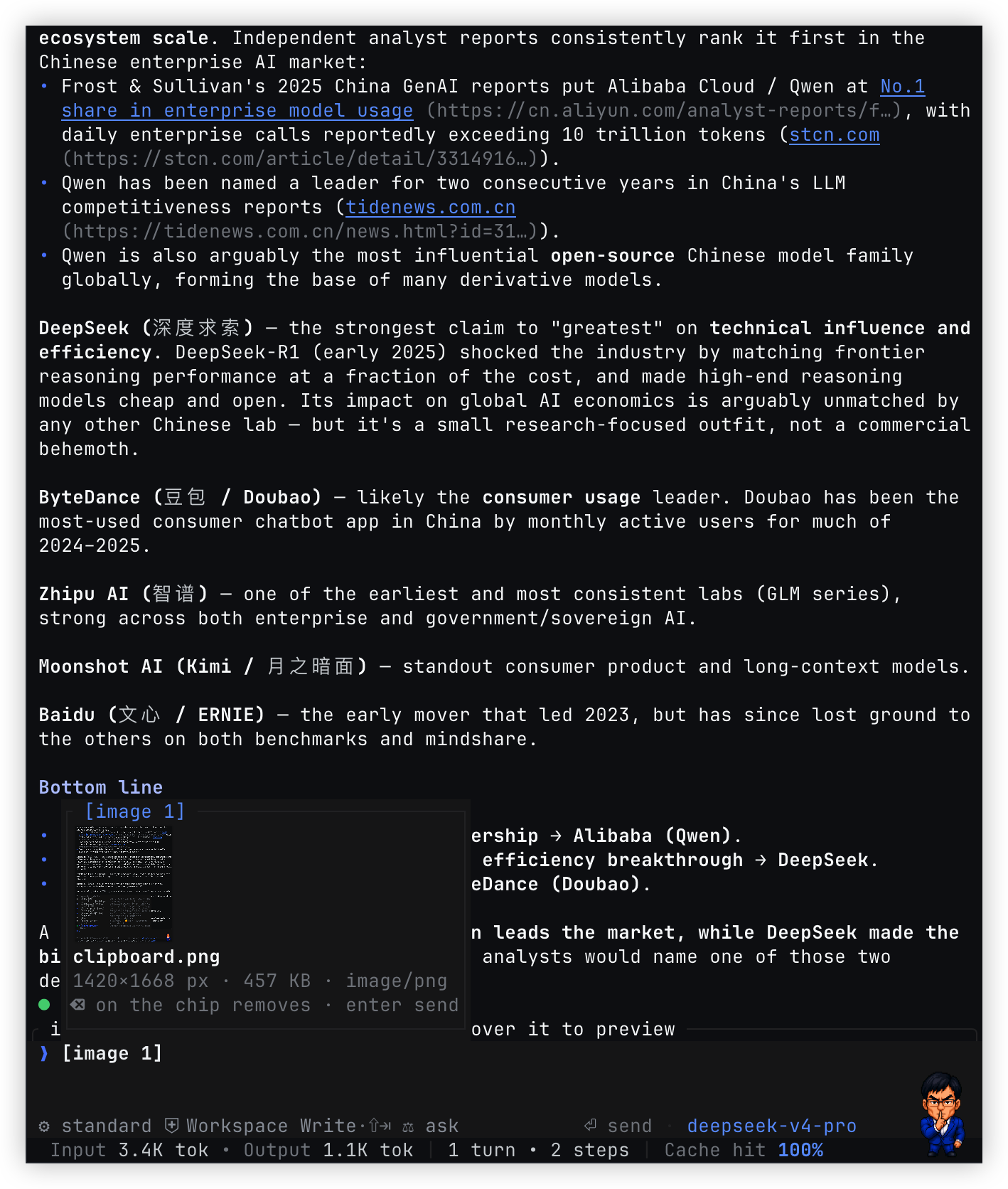
- 多图 prompt:从文件、剪贴板或粘贴操作暂存最多 8 张图片,图片以可编辑的
[image n]chip 内联在草稿中,并支持名称、尺寸、大小和类型预览。 - 终端友好的 Markdown:渲染标题、列表、引用、代码块、行内代码、强调、 删除线、链接和图片标记,同时保留 CJK/Latin 混排与软换行样式。
- 高密度工具视图:工具调用清晰呈现进行中、成功和失败状态;长输出默认保留 末四行,点击后在对话内完整展开,滚轮始终滚动整个对话。
- 适合长对话的控制:回合中可排队 follow-up,或立即 steer 当前回合;持久化 JSONL
会话通过
/new、/resume和--session-id管理,workspace 模式信息也会缓存。 - 跨平台输入体验:readline 编辑、上下文快捷键,以及 macOS 的物理 ⌘/⌥ 修复和 Linux/Windows 的 ctrl 组合键,让常用移动与删除在不同终端保持一致。
- 终端原生界面:深浅主题、窄屏布局、鼠标选择/工具交互、原生/tmux/OSC 52
剪贴板,以及支持 kitty graphics protocol 的图片预览和可选
/liang像素宠物。
完全插件化与自进化
目标是让 TUI 成为一个小内核加一组可组合插件,而不是一个不断积累特判的终端 应用。内核只负责 ACP 会话、TTY 所有权、输入调度、布局约束和语义节点绘制; 产品能力通过 Cordis service、slot 和插件生命周期进入 client 树。
- 一个生命周期: 静态包与 Creator 生成的动态包都走 Cordis Loader、fiber、
inject和 disposer。挂载后立即生效,停止或切换后完整撤销,不另造一套“动态 插件”运行时。 - 一个插件可以贡献多个表面: 同一包可同时注册 theme、slot、command 和 overlay,并让它们共享状态或通过包内 Host/Client RPC 联动。核心不为 Liang、 effort 或某个具体插件增加分支。
- 只开放语义能力: 插件提交
TuiNode和 slider、form 等通用交互语义,由 Rust renderer 适配终端。插件拿不到 TTY、raw mode、Ratatui、kitty 转义或绝对 坐标;替换 renderer 不应改变插件 ABI。 - 动态预览与持久组合分开:
define/run负责即时预览,stop/update/rollback负责运行期生命周期;确认后的 Package 可以持久化。AgentPreset继续只组合 agent 侧能力,未来由独立的ViewPreset组合 client/UI 插件。两者可以一起选择, 但分别存储、分别切换。 - Creator 闭环: Creator 先 inspect 当前 Host/Client 的真实 service、slot、
token 和 schema,再生成
code.host、code.client或两者,运行后观察装载错误和 渲染错误,继续修复、更新、回滚或保存。这才是“自进化”,不是让模型直接操作 终端底层。
当前完成度
现在已经落地的是 ACP client 分层,以及同一条动态 Package 生命周期上的这些原语:
tuiTheme与/theme单选 Plugin 席位;tuiSlots、chrome.right和 schema 校验后的TuiNode;- 生命周期归属的本地 slash command 与原生 slider overlay;
- 从标准 ACP
configOptions投影出的当前 Session 配置目录和事务; - Client inspect/run、Package stop/start/retract,以及包内 Host/Client RPC;
- 只在 Creator preset 中可见、但不依赖 ACP 注入的 TUI 开发 skill。
这些能力同时服务静态插件与动态 code.client,不是为某个 demo 单独开的通道。
仍在迁移的是更多 shell/conversation slot、form 等其他通用输入组件、完整的运行期
诊断和 ViewPreset。因此“完全插件化”仍是目标架构;逐阶段状态以
迁移计划 为准。
与 Web 插件平台对照
| 维度 | Web 当前能力 | TUI 当前基础与目标 |
|---|---|---|
| Client runtime | 成熟的 React Cordis tree | Node Cordis client tree 已落地;Rust 只做语义 renderer,不成为第三棵树 |
| UI 扩展 | 类型化 slot tree,覆盖会话、设置、工具卡等大量页面区域 | 当前开放 chrome.right;目标是用 tuiSlots 覆盖 shell 与 conversation,而不暴露终端坐标 |
| Theme | ThemeRuntime 注册主题、叠加 token、运行时切换并持久化内置偏好 | /theme 作为单选 Plugin 开关,整体加载/替换贡献 palette 与其他能力的 Theme Plugin |
| 交互组件 | 插件可贡献 React component | 已开放受 schema 约束的 TuiNode、本地 command 和 slider overlay;form 等继续按通用终端语义补齐 |
| 动态插件 | code.host + code.client 双半 Package,共用 Loader/fiber,支持 run、stop、update、rollback | inspect/run、主题、右栏、命令、overlay、配置事务与包内 RPC 已走统一 DSH Cordis ACP 扩展;继续补齐诊断与持久组合 |
| 诊断与修复 | Client 装载和 React 渲染失败可回传 Creator,继续生成新版本 | 目标对齐相同闭环:装载、schema、绘制错误可观察且能更新或回滚 |
| Preset | AgentPreset 组合 agent;Client 插件另行持久化 | 保持 AgentPreset 边界,新增独立 ViewPreset 管理终端视图组合 |
Web 今天的插件面更广、实现也更成熟。TUI 要对齐的是 Cordis 的组合方式、生命周期 和 Creator 创造闭环,而不是把 React 或浏览器 DOM 搬进终端。
运行架构
主路径 dsh --profile tui 在 Host 进程的 Base Cordis 树挂 ACP plugin,再启动
独立进程中的 Node Cordis Client 树:tui-theme 提供主题目录,
tui-cordis-client-runner 承接 dsh-tool-cordis 的 Client inspect/run,
acp-client 接 Host 的标准 stdin/stdout,dsh-tui-shell 启动 Rust painter 并做消息分流。
两棵 Cordis 树位于不同进程,只讲 ACP。Standalone dsh-tui 才按参数 spawn/attach
任意 ACP agent。
Rust painter 不是第三棵 Cordis 树,它只占 TTY、处理输入并绘制声明式状态。
两棵 Cordis 树不会同步 plugin id、inject 或 fiber。标准 ACP 继续承载会话、
prompt、认证、配置与 session/update;自进化所需的 Client 能力发现、动态 Package
运行和包内 RPC 则使用协商后的 ACP 扩展。目标扩展统一放在 _dsh/cordis/*
命名空间,并通过 initialize 的 _meta.dsh.cordis 声明能力;不支持该扩展的 ACP
agent 仍可作为普通 agent 使用。
Creator 的教学能力是 TUI 包内部导出的独立 Host overlay;ACP 是 TUI 的运行时
依赖。用户只需安装 TUI;bundle 把 ACP plugin 和 Creator overlay 挂到 Base Host tree,
runner 只启动 TUI Client 进程。Creator 会在上游 cordis preset 的 standing scope 上增加
tui-plugin-development skill;不复制 preset、不改上游文件,也不靠 ACP
发现或注入 skill。Web 和 TUI 因此使用同一个 Creator preset。
ACP 与 Creator overlay 都不会挂进 Client tree;完整 Harness 只在 Host 进程启动一次。
Host↔TUI Client 的 ACP 使用 Client 子进程的标准 stdin/stdout。Client 进程的 fd 3/4 只继承用户 TTY 并映射为 Rust 的 stdin/stdout;Rust 自己的 fd 3/4 才是 Node↔painter compositor 通道。
Unix 上 Node 与 Rust 使用 fd 3/4,Windows 使用带随机 token 的 loopback TCP。
这条私有 compositor 通道只投影主题和 TuiNode 等语义绘制状态,不是插件 API,
也不承载 agent 业务。Cordis 通用 inspect/run/lifecycle 使用 _dsh/cordis/*;
主题、槽位、命令和 overlay 等 painter 能力使用其子域 _dsh/cordis/tui/*。
这些都是带下划线前缀的 ACP Extension Request/Notification,不进入 prompt 或历史。
常用交互
| 按键 / 命令 | 行为 |
|---|---|
enter | 发送;回合运行时排队 follow-up |
ctrl+x | 不取消当前回合,立即 steer 当前 agent |
esc | 打断当前回合(保留草稿);空闲时清空草稿 |
ctrl+c | 有草稿先清除;空闲连按 2 次、运行中连按 5 次退出;不中断当前回合 |
/ | 打开命令菜单并按前缀过滤;agent 广告的 skills 也在其中,选中后仍以 /name prompt 发送 |
/model · /agent | 选择 agent 广告的模型和 agent preset;option+a 不弹表单,直接轮换 agent |
/auth | ACP 登录(多种方法时弹出选择;否则 Terminal Auth 或 authenticate _meta);会话中途 auth_required 也会打开同一界面;agent 的 /login 仍当 prompt |
/permission · shift+tab | 选择或轮换 agent 广告的权限模式 |
/effort · /plan | 设置推理力度或把 plan 模式传给宿主 |
/image <path> [text] | 发送本地图片(png/jpeg/webp/gif);agent 若声明 promptCapabilities.image 则走 ACP Image 块,否则退回 resource_link |
/clip [text] · ctrl+v | 暂存剪切板图片(可多次,最多 8 张同行);macOS/Linux |
| 图片 chip | 以 [image n] 内联在草稿文字里(无 icon);退格整个删除,hover 或光标停在上面弹出预览(kitty 缩略图 + 尺寸/大小/类型) |
ctrl+o · ctrl+t | 展开输出 · 切换主题 |
pgup/pgdn · ctrl+u/d(空输入) | 滚动;end 回到实时尾部 |
| readline 编辑 | home/ctrl+e 行首尾 · ctrl+k/u 删至尾/首 · ctrl+w 删词 |
| macOS | ⌘←/→ 行首尾 · ⌥←/→ 跳词 · ⌘⌫ 删至行首 · ⌥⌫ 删词(直接读物理键状态,任意终端可用) |
| Linux/Windows | ctrl+←/→ 跳词 · ctrl+⌫ 删词 |
| 点击工具 · 滚轮 | 点击工具展开/折叠输出;滚轮始终滚动整个对话 |
| 鼠标拖选 | 松手复制;双击复制单词;shift+拖选 使用终端原生选择 |
!cmd | 在客户端的会话级本地 shell 中执行命令,不经过 agent;shell 从 workspace 启动,cd、环境变量等状态会在后续 ! 命令中保留,退出 TUI 后结束 |
界面内使用 /help 查看命令,使用 /keys 查看完整快捷键。
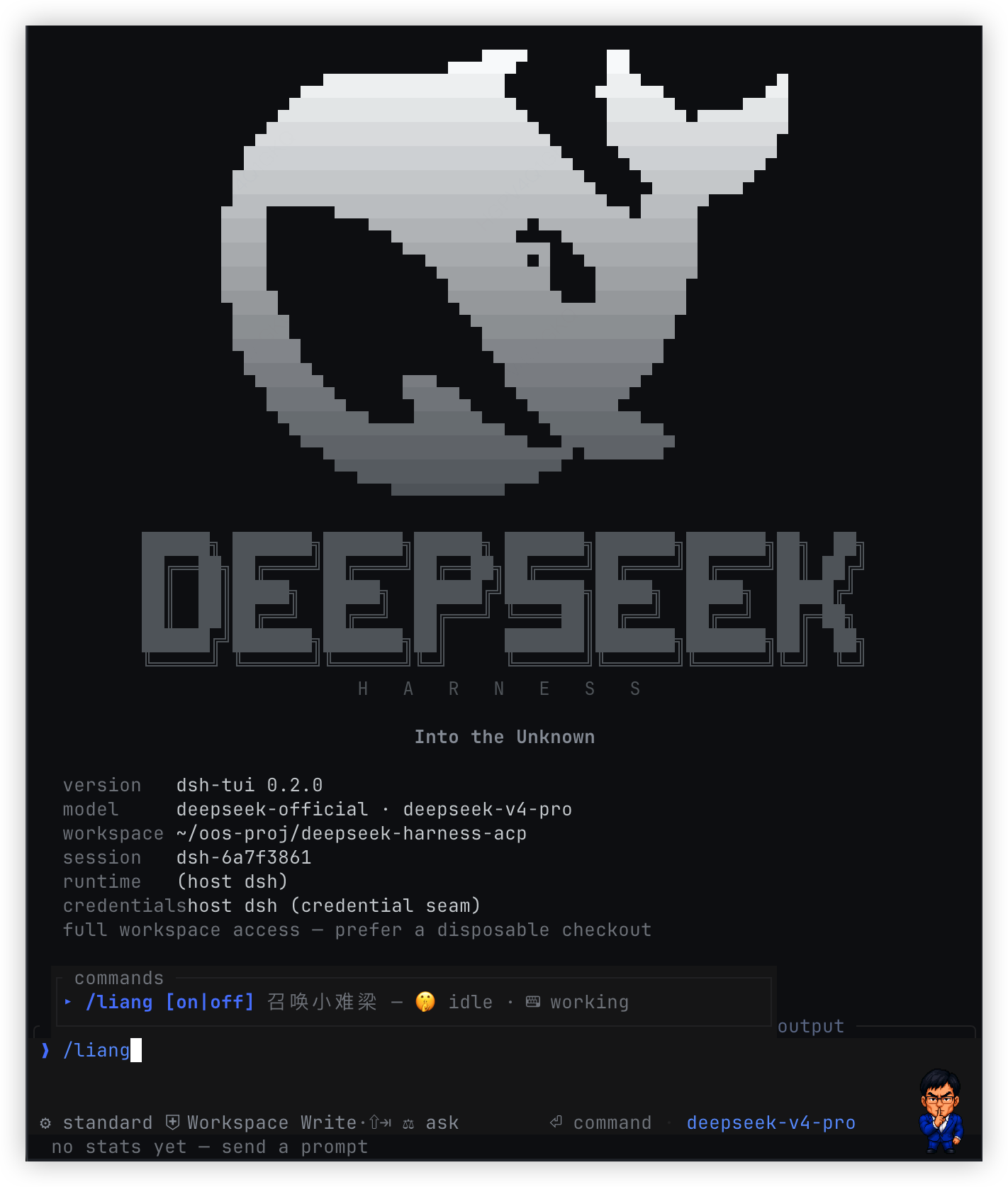
输入框宠物:/liang 🤫
/liang 会在输入框右侧显示小难梁:空闲时安静思考,回合运行时敲小终端。
Ghostty、Kitty 和 WezTerm 等支持 kitty graphics protocol 的终端会显示 RGBA
像素精灵;其他终端退回半块字符鲸鱼。宽度低于 60 列时自动隐藏。
可用 /liang on、/liang off 显式控制。
从源码构建
需要 Rust stable 和 Node.js 18+:
make rust-test
node --test scripts/package-native.test.mjs
bash scripts/build-npm.sh
make rust-build / make rust-test / bash scripts/build-npm.sh 统一经过
scripts/cargo-guard.sh:本仓库 target 超过 20 GiB,或磁盘余量低于
10 GiB 时会先执行 scoped cargo clean。
make rust-cache-status 只读查看,make rust-cache-prune 显式清理;阈值可通过
RUST_CACHE_MAX_GIB / RUST_DISK_MIN_GIB 覆盖。
真实开发 profile 统一用 make tui-test 启动。它先重编
target/debug/dsh-tui,再设置 DSH_TUI_BIN 启动 tui-test,避免 Node HMR
已更新而 Rust painter 仍是旧进程映像。
本地脚本只编译当前平台,并将 tarball 写入 dist/。GitHub Actions 工作流
Package and publish npm 会分别构建以下目录,再汇总为一个 npm 包:
npm/vendor/darwin-arm64/dsh-tui
npm/vendor/darwin-x64/dsh-tui
npm/vendor/linux-x64/dsh-tui
npm/vendor/win32-x64/dsh-tui.exe
推送与 npm/package.json 和 Cargo.toml 版本一致的 tag(例如 v0.1.0)
会通过 npm Trusted Publishing(OIDC)发布到 latest,随后创建带 tarball
的 GitHub Release。版本不一致时 CI 会在发布前失败。
故障排查
no native binary for ...:当前安装包不包含你的平台。确认安装的是 最新版本,并查看上方支持矩阵。spawn dsh-acp ENOENT:安装dsh-acp,或用--agent <cmd>指向其它 ACP server。- 像素宠物不显示:终端可能不支持 kitty graphics protocol;主界面功能 不受影响。
项目结构
src/:TUI 状态机、绘制、协议、runtime 生命周期和会话目录。npm/:Cordis client boot、ACP/compositor mux、CLI shim 与原生二进制。scripts/:本地构建、跨平台打包校验、协议集成测试与资源生成。assets/:截图、主题资源和可选宠物精灵。docs/:分层架构、插件 API、TuiNodeschema、迁移计划与 AI agent 安装说明(索引)。
Agent 通信是 stdio 上的 ACP;Node 与 Rust 之间另有私有 compositor 通道。
实现细节可从 src/acp.rs、npm/lib/boot.js 和
npm/lib/mux.js 开始阅读。插件不要依赖这些传输细节;扩展点见
docs/plugins.md。
License
MIT。本项目与 DeepSeek、xAI 无关联; grok-build 是交互设计参考, DeepSeek Harness 是运行底座。
Read the usage guide →
Install steps, key points, FAQ and compatibility for this plugin — auto-derived from indexed fields.
Listing badge

[](https://deepseek-plugin.org/plugins/openma-ai/deepseek-harness-tui)Paste this markdown into your GitHub README to link back to this listing. The badge only states the listing — not a security endorsement.