Inject TUI terminal plugin development skills into dsh Creator's cordis preset, enabling Creator to route using terminal semantics instead of browser semantics when writing dynamic plugins.
ⓘ This plugin is a sub-package of the openma-ai/deepseek-harness-tui monorepo — stars and activity count the whole repository.

- Language
- Rust
- License
- MIT
- Branch
- main
Install
$ dsh plugin --profile web add github:openma-ai/deepseek-harness-tui#path:npm/creatorRun the command above in your terminal to install this plugin via the dsh CLI. You can switch Profile in the top-right corner. New to dsh? Read the beginner tutorial
Install via your agent
Install the DeepSeek Harness plugin openma-ai/deepseek-harness-tui/npm/creator for me: review the repository at https://github.com/openma-ai/Martty first, then run the install command and verify the plugin loads successfully.
Paste this instruction to the DSH Web GUI assistant — it will install and verify for you.
One-Line Positioning
The Creator teaching sub-bundle bundled within deepseek-harness-tui: When dsh Creator writes dynamic plugins under the cordis preset, automatically attach TUI terminal development skills and routing hints to it, preventing terminal capabilities from being mistakenly written as Web assumptions.
Core Capabilities
- Register the
tui-plugin-developmentteaching skill in dsh Creator'scordispreset, teaching the model to use inspect's narrow capabilities instead of guessing - Append TUI/Cordis dual-skill routing rules to Creator's system prompt: first load the generic
cordis-plugin-development, then load TUI supplementary as needed - Hook into standing scope via profile's built-in
dsh-scopemodule, without copying or modifying upstream Creator composition - Automatic cleanup upon Creator uninstall: skill and systemPrompt sections are reclaimed within the same fiber, without polluting the global directory
- No TTY dependency, no native binaries: runs as a pure JS overlay on the Host side, decoupled from the TUI main process
Technical Implementation
- Language: JavaScript (Node.js, ES modules)
- Key Dependencies:
@deepseek-ai/cordis(peer),@openma/deepseek-harness-acp(parent package transitive dependency), reads profile module viactx.loader.import('@deepseek-ai/dsh-scope') - Architecture Pattern: Cordis Host overlay (
insertline),name = 'tui-creator-overlay',inject = ['agentPresets', 'skills', 'systemPrompt', 'loader'], usesctx.effectinapplyto collect disposer - Entry File:
npm/creator/sub-bundle points tonpm/lib/creator-overlay.js, the latter readsnpm/skills/tui-plugin-development/SKILL.mdas skill content
Use Cases
When Creator generates dynamic Plugins on dsh and wants to retain TUI terminal extension capabilities (themes, native slots, local commands, slider Overlay, current ACP Session configuration), the host automatically adds TUI teaching to Creator via this sub-bundle, enabling the model to correctly choose inspect's narrow capability services instead of applying generic Cordis/Web assumptions; non-TUI paths continue to use the generic cordis-plugin-development.
Prerequisites & Compatibility
| Dependency | Minimum Version | Description |
|---|---|---|
| dsh | 0.1.0-rc.6+ | devDependencies reference this version; requires dsh Creator preset cordis to provide agentPresets/skills/systemPrompt/loader services |
| Node.js | >=18 | Declared in npm/package.json engines.node |
| Platform | Cross-platform | Only runs in dsh Host process; does not depend on TUI main package's Rust native binaries |
| Native Modules | None | Pure JS overlay, does not introduce any native bindings |
Installation
dsh plugin --profile web add github:openma-ai/deepseek-harness-tui/npm/creator
Configuration
| Config | Type | Description | Default |
|---|---|---|---|
| preset | string | Creator preset name to attach TUI teaching to; empty string will be rejected | cordis |
FAQ
Q: Is this creator sub-bundle the same thing as dsh Creator?
A: No. It's a lightweight Host overlay that hangs a layer of TUI teaching skill and routing hints on top of Creator's existing cordis preset's standing scope; it does not copy, fork, or modify Creator's own composition.
Q: Can I use this creator sub-bundle alone without installing the dsh-tui main package?
A: No. It's not a separately published npm package; it's a sub-bundle inside the @openma/deepseek-harness-tui main package. The npm/creator sub-path in the installation command is only used for dsh plugin market's packaging identification.
Q: Can regular users see this skill in the terminal?
A: No. The skill only takes effect internally for the Creator agent and is not directly displayed in the user interaction interface; its purpose is to change Creator's reasoning routing when generating plugins.
Q: Will it affect other Creator presets besides cordis?
A: No. The overlay obtains the cordis standing scope key via agentPresets.standingKeyFor('cordis') and hangs its own fiber on it; only this layer will see the TUI skill; other presets won't see it when browsing the global directory.
Q: Will the skill and routing hints disappear together when uninstalling?
A: Yes. The cleanup function registered via ctx.effect in apply triggers overlay.dispose() when the fiber terminates, revoking both the registered skill and systemPrompt sections.
Q: Do I need additional configuration after installation?
A: Not by default. The optional item is the preset string (default cordis), which is only needed when you want to attach TUI teaching to a different Creator preset.
Getting Started Difficulty
Beginner — Single configuration option (preset is optional), everything else automatically follows dsh Creator preset; takes effect as long as the target dsh profile has the cordis preset enabled.
Known Issues & Limitations
npm/lib/creator-overlay.js:42rejects empty string preset; when not configured, this field is ignored without errornpm/lib/creator-overlay.js:47throws directly if profile does not have@deepseek-ai/dsh-scopemodule attached (profile needs to provide this module)npm/lib/creator-overlay.js:54and:65throw errors when preset scope lacksskills.registerorsystemPrompt.sectionservices; need to confirm dsh Creator version compatibilitynpm/lib/creator-overlay.js:25and:31throw errors when built-inSKILL.mdlacks frontmatter or description; this is a build/packaging exceptionhost/README.md:5-7explicitly states: this sub-bundle is not an independent npm package, nor can it be mounted as an independent Cordis plugin bundle, must be installed with the main package- Not modifying Creator's own composition means upstream Creator preset upgrades require profile restart to see the new version composition (
docs/architecture.md:71-72)

DeepSeek Harness TUI
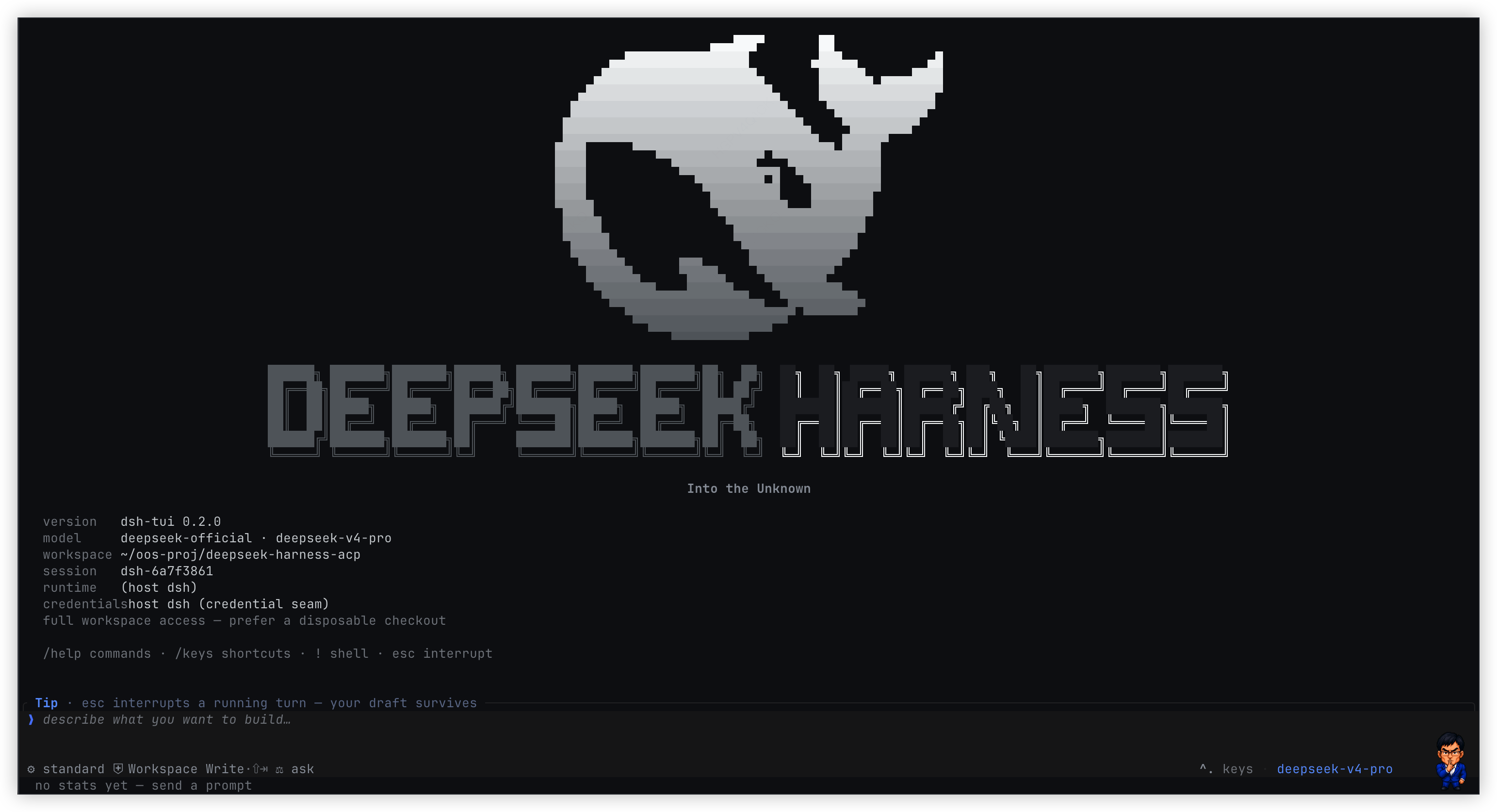
在终端里运行 DeepSeek Harness:流式推理、工具调用、Skills、多图 prompt 与持久会话。





简洁且强悍的DSH-TUI
- Rust/ratatui 编写的高性能程序界面.
- 100% 基于Deepseek Harness官方AI能力.
dsh-tui 是终端原生 ACP client,也是一套运行在 Cordis client 树上的
可扩展终端。它在 Rust/ratatui 界面里呈现流式推理、工具调用、subagent、token
用量和持久化会话。推荐 profile 路径把 ACP plugin 挂在 dsh Base Host 树上,并
启动独立 TUI Client 进程;standalone 入口也可 spawn 或接入任意 ACP agent。长期目标
不是把功能不断焊进 TUI 本体,而是让主题、视图、命令和交互都由插件组合,最终
让 Creator 能检查、创建、运行、诊断并迭代自己的终端能力。
快速开始
推荐:作为 dsh 的 TUI surface plugin
需要 Node.js 18+。安装官方 DeepSeek Harness,
再把 TUI 直接装进 tui profile:
npm install -g @deepseek-ai/dsh
dsh plugin --profile tui add martty@latest
dsh --profile tui
dsh plugin ... add 是推荐的安装与升级入口:它会自动创建 profile、安装
TUI 及其 ACP 依赖,不需要全局安装 dsh-tui,也不需要另装 pnpm。
旧包名 @openma/deepseek-harness-tui 会继续发布相同版本,已有安装无需立即迁移。
从旧包名迁移
martty 是新的推荐包名。从 0.2.13 开始,martty 和
@openma/deepseek-harness-tui 由同一条 CI 以相同版本、相同产物发布;
旧包名作为兼容别名保留。如需切换,只替换 tui profile 中的包规格:
dsh plugin --profile tui remove @openma/deepseek-harness-tui
dsh plugin --profile tui add martty@latest
迁移不改变 dsh-tui / dsb 命令、tui profile 名或运行方式,也不需要
迁移配置和会话数据。不想立即切换时,继续使用旧包名即可。
这是给 AI agent 阅读的安装说明:docs/agent-setup.md
TUI 把 ACP 声明为自身运行时依赖。若目标 profile 已通过标准 ACP bundle 装过另一 版本,包管理器可以保留两份依赖,但 TUI bundle 会停用该 surface 的旧 transport/provider 行,并只挂载从 TUI 自身依赖图解析出的 ACP plugin;因此受支持的 profile 组合不会同时启动两套 ACP,也不要求用户先手工整理已有 ACP profile。
Standalone:接任意 ACP agent
dsh-tui --agent dsh-acp
dsh-tui --agent dsh --agent-arg --profile --agent-arg acp
本地 checkout(需已 cargo build --release 或 scripts/build-npm.sh,并把二进制放到 npm/vendor/<platform>/,或设置 DSH_TUI_BIN):
DSH_TUI_BIN=$(pwd)/target/release/dsh-tui dsh-tui --agent dsh-acp
第三方能力是 client 树上的普通 Cordis 插件:声明所需 service,在 apply 中
注册贡献,并随 fiber 卸载自动撤销。当前已经开放主题、根级右栏、本地命令、
slider overlay、当前 ACP Session 配置事务和包内 Host/Client RPC;完整契约见
插件 API,完整方向见
完全插件化与自进化。--demo-skin 只挂载 gallery 包
ember,不代表主题逻辑写进了本体。
先看 Demo
Demo 不需要 runtime 或 API key:
npm install --global martty
dsh-tui --demo
dsh-tui 是主命令;dsb 保留为兼容别名。
核心能力
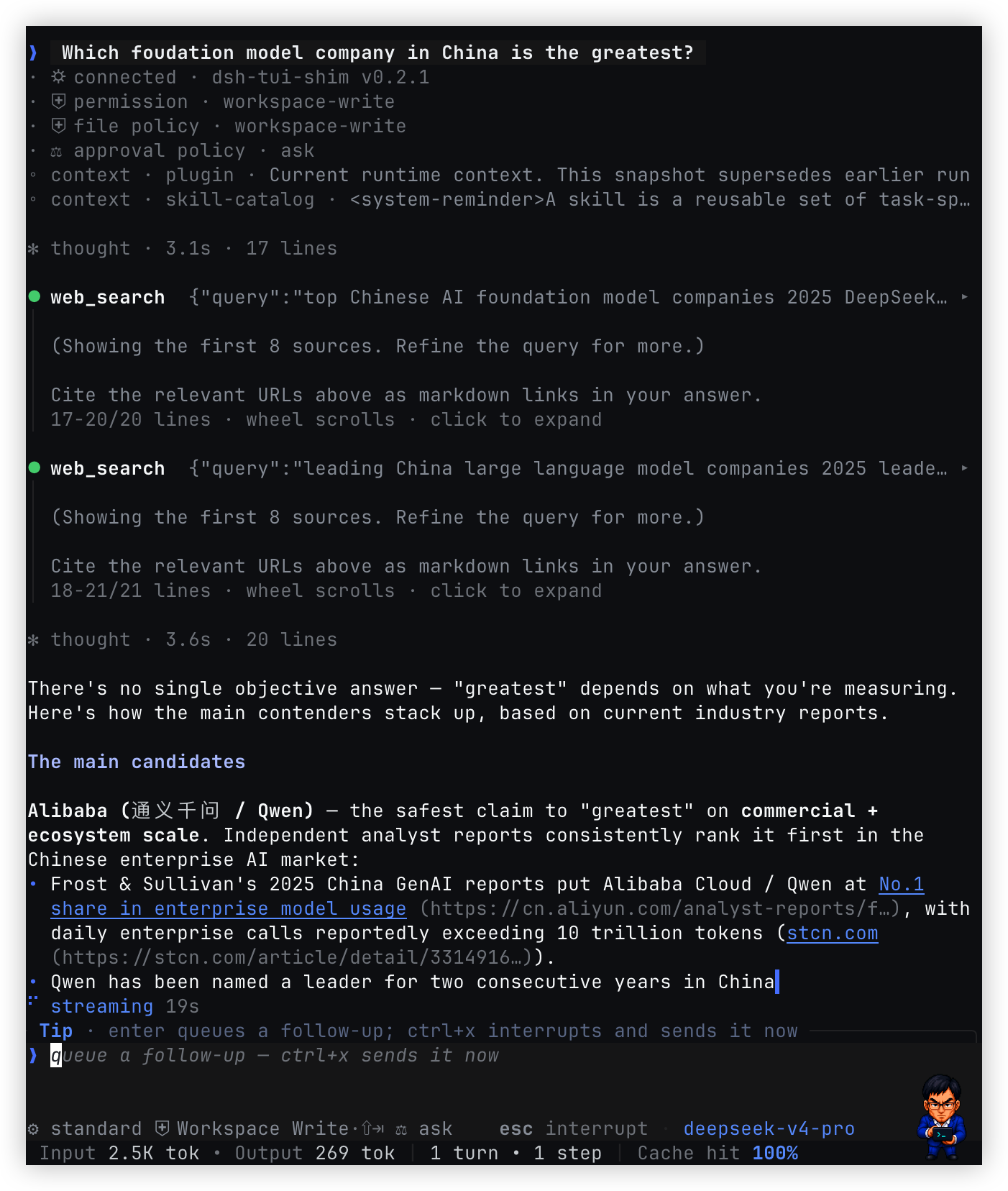
- 完整的 agent 时间线:实时呈现推理、回复、工具参数与结果、plugin 上下文、 subagent 生命周期和 token/cache 指标;最新消息下方持续显示阶段、耗时与队列深度。
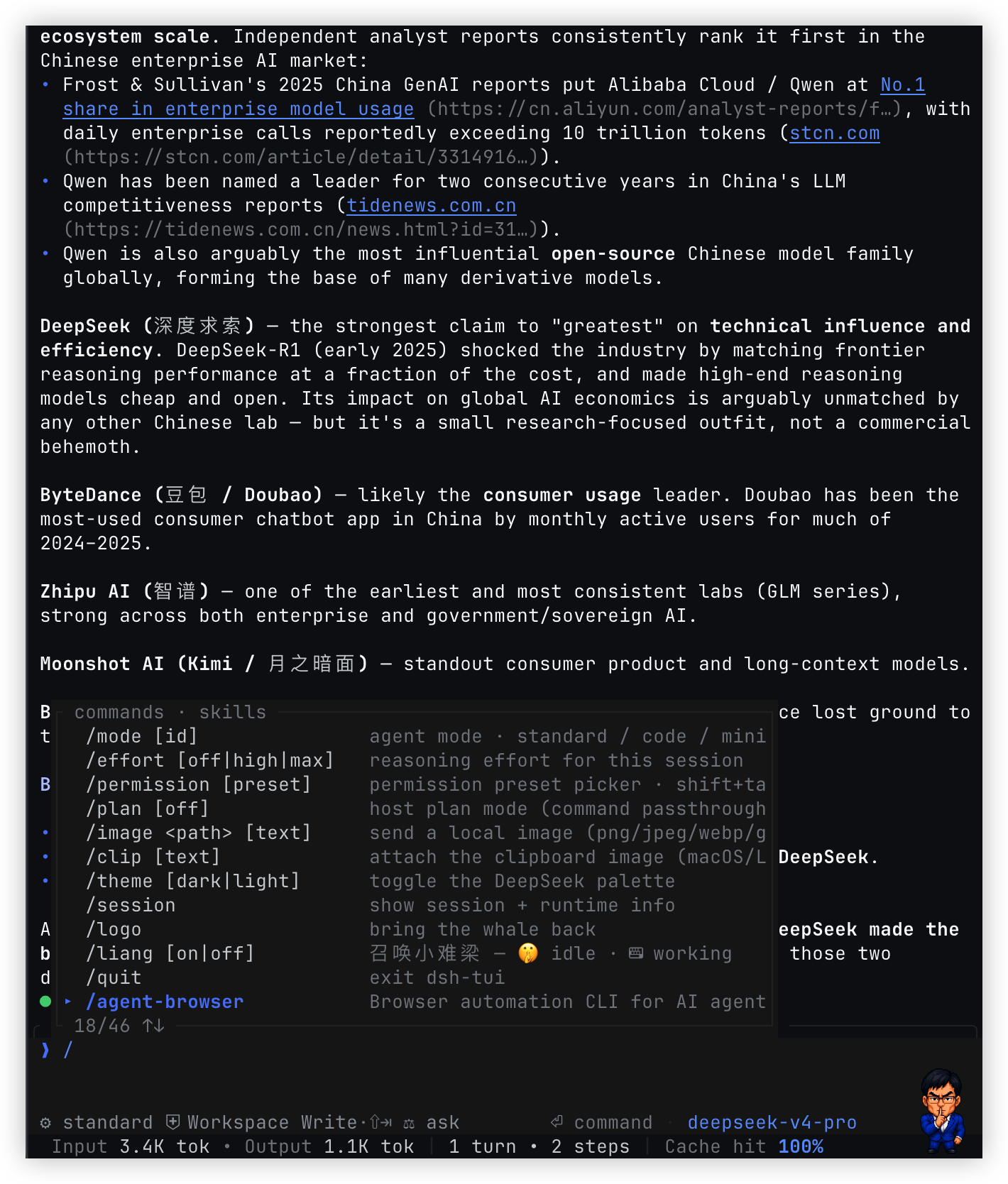
- ACP 能力原生接入:读取 agent 广告的模型、composition、权限、认证方式和 可用命令;skills 与内置命令共享可搜索、可滚动的斜杠菜单。
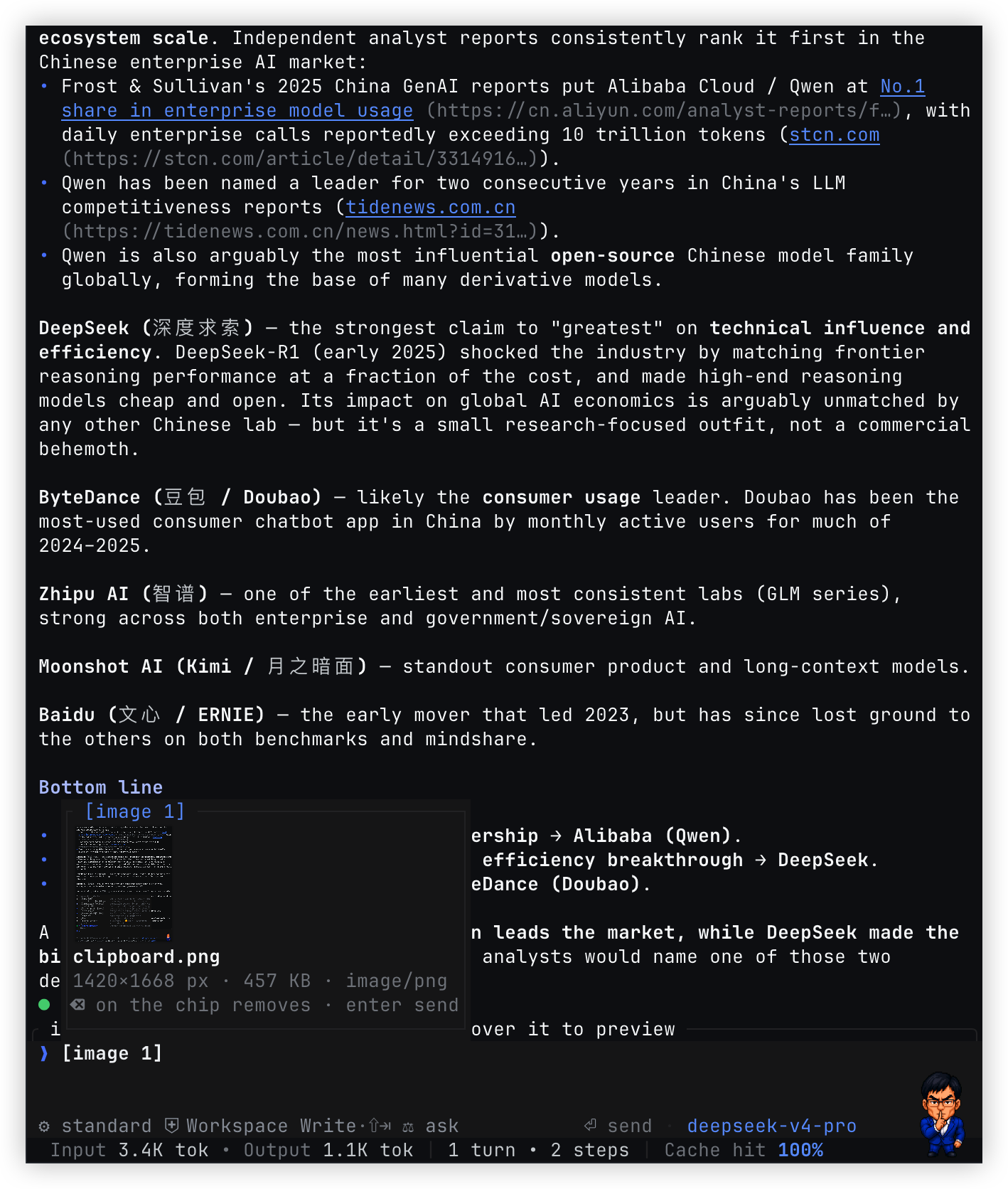
- 多图 prompt:从文件、剪贴板或粘贴操作暂存最多 8 张图片,图片以可编辑的
[image n]chip 内联在草稿中,并支持名称、尺寸、大小和类型预览。 - 终端友好的 Markdown:渲染标题、列表、引用、代码块、行内代码、强调、 删除线、链接和图片标记,同时保留 CJK/Latin 混排与软换行样式。
- 高密度工具视图:工具调用清晰呈现进行中、成功和失败状态;长输出默认保留 末四行,点击后在对话内完整展开,滚轮始终滚动整个对话。
- 适合长对话的控制:回合中可排队 follow-up,或立即 steer 当前回合;持久化 JSONL
会话通过
/new、/resume和--session-id管理,workspace 模式信息也会缓存。 - 跨平台输入体验:readline 编辑、上下文快捷键,以及 macOS 的物理 ⌘/⌥ 修复和 Linux/Windows 的 ctrl 组合键,让常用移动与删除在不同终端保持一致。
- 终端原生界面:深浅主题、窄屏布局、鼠标选择/工具交互、原生/tmux/OSC 52
剪贴板,以及支持 kitty graphics protocol 的图片预览和可选
/liang像素宠物。
完全插件化与自进化
目标是让 TUI 成为一个小内核加一组可组合插件,而不是一个不断积累特判的终端 应用。内核只负责 ACP 会话、TTY 所有权、输入调度、布局约束和语义节点绘制; 产品能力通过 Cordis service、slot 和插件生命周期进入 client 树。
- 一个生命周期: 静态包与 Creator 生成的动态包都走 Cordis Loader、fiber、
inject和 disposer。挂载后立即生效,停止或切换后完整撤销,不另造一套“动态 插件”运行时。 - 一个插件可以贡献多个表面: 同一包可同时注册 theme、slot、command 和 overlay,并让它们共享状态或通过包内 Host/Client RPC 联动。核心不为 Liang、 effort 或某个具体插件增加分支。
- 只开放语义能力: 插件提交
TuiNode和 slider、form 等通用交互语义,由 Rust renderer 适配终端。插件拿不到 TTY、raw mode、Ratatui、kitty 转义或绝对 坐标;替换 renderer 不应改变插件 ABI。 - 动态预览与持久组合分开:
define/run负责即时预览,stop/update/rollback负责运行期生命周期;确认后的 Package 可以持久化。AgentPreset继续只组合 agent 侧能力,未来由独立的ViewPreset组合 client/UI 插件。两者可以一起选择, 但分别存储、分别切换。 - Creator 闭环: Creator 先 inspect 当前 Host/Client 的真实 service、slot、
token 和 schema,再生成
code.host、code.client或两者,运行后观察装载错误和 渲染错误,继续修复、更新、回滚或保存。这才是“自进化”,不是让模型直接操作 终端底层。
当前完成度
现在已经落地的是 ACP client 分层,以及同一条动态 Package 生命周期上的这些原语:
tuiTheme与/theme单选 Plugin 席位;tuiSlots、chrome.right和 schema 校验后的TuiNode;- 生命周期归属的本地 slash command 与原生 slider overlay;
- 从标准 ACP
configOptions投影出的当前 Session 配置目录和事务; - Client inspect/run、Package stop/start/retract,以及包内 Host/Client RPC;
- 只在 Creator preset 中可见、但不依赖 ACP 注入的 TUI 开发 skill。
这些能力同时服务静态插件与动态 code.client,不是为某个 demo 单独开的通道。
仍在迁移的是更多 shell/conversation slot、form 等其他通用输入组件、完整的运行期
诊断和 ViewPreset。因此“完全插件化”仍是目标架构;逐阶段状态以
迁移计划 为准。
与 Web 插件平台对照
| 维度 | Web 当前能力 | TUI 当前基础与目标 |
|---|---|---|
| Client runtime | 成熟的 React Cordis tree | Node Cordis client tree 已落地;Rust 只做语义 renderer,不成为第三棵树 |
| UI 扩展 | 类型化 slot tree,覆盖会话、设置、工具卡等大量页面区域 | 当前开放 chrome.right;目标是用 tuiSlots 覆盖 shell 与 conversation,而不暴露终端坐标 |
| Theme | ThemeRuntime 注册主题、叠加 token、运行时切换并持久化内置偏好 | /theme 作为单选 Plugin 开关,整体加载/替换贡献 palette 与其他能力的 Theme Plugin |
| 交互组件 | 插件可贡献 React component | 已开放受 schema 约束的 TuiNode、本地 command 和 slider overlay;form 等继续按通用终端语义补齐 |
| 动态插件 | code.host + code.client 双半 Package,共用 Loader/fiber,支持 run、stop、update、rollback | inspect/run、主题、右栏、命令、overlay、配置事务与包内 RPC 已走统一 DSH Cordis ACP 扩展;继续补齐诊断与持久组合 |
| 诊断与修复 | Client 装载和 React 渲染失败可回传 Creator,继续生成新版本 | 目标对齐相同闭环:装载、schema、绘制错误可观察且能更新或回滚 |
| Preset | AgentPreset 组合 agent;Client 插件另行持久化 | 保持 AgentPreset 边界,新增独立 ViewPreset 管理终端视图组合 |
Web 今天的插件面更广、实现也更成熟。TUI 要对齐的是 Cordis 的组合方式、生命周期 和 Creator 创造闭环,而不是把 React 或浏览器 DOM 搬进终端。
运行架构
主路径 dsh --profile tui 在 Host 进程的 Base Cordis 树挂 ACP plugin,再启动
独立进程中的 Node Cordis Client 树:tui-theme 提供主题目录,
tui-cordis-client-runner 承接 dsh-tool-cordis 的 Client inspect/run,
acp-client 接 Host 的标准 stdin/stdout,dsh-tui-shell 启动 Rust painter 并做消息分流。
两棵 Cordis 树位于不同进程,只讲 ACP。Standalone dsh-tui 才按参数 spawn/attach
任意 ACP agent。
Rust painter 不是第三棵 Cordis 树,它只占 TTY、处理输入并绘制声明式状态。
两棵 Cordis 树不会同步 plugin id、inject 或 fiber。标准 ACP 继续承载会话、
prompt、认证、配置与 session/update;自进化所需的 Client 能力发现、动态 Package
运行和包内 RPC 则使用协商后的 ACP 扩展。目标扩展统一放在 _dsh/cordis/*
命名空间,并通过 initialize 的 _meta.dsh.cordis 声明能力;不支持该扩展的 ACP
agent 仍可作为普通 agent 使用。
Creator 的教学能力是 TUI 包内部导出的独立 Host overlay;ACP 是 TUI 的运行时
依赖。用户只需安装 TUI;bundle 把 ACP plugin 和 Creator overlay 挂到 Base Host tree,
runner 只启动 TUI Client 进程。Creator 会在上游 cordis preset 的 standing scope 上增加
tui-plugin-development skill;不复制 preset、不改上游文件,也不靠 ACP
发现或注入 skill。Web 和 TUI 因此使用同一个 Creator preset。
ACP 与 Creator overlay 都不会挂进 Client tree;完整 Harness 只在 Host 进程启动一次。
Host↔TUI Client 的 ACP 使用 Client 子进程的标准 stdin/stdout。Client 进程的 fd 3/4 只继承用户 TTY 并映射为 Rust 的 stdin/stdout;Rust 自己的 fd 3/4 才是 Node↔painter compositor 通道。
Unix 上 Node 与 Rust 使用 fd 3/4,Windows 使用带随机 token 的 loopback TCP。
这条私有 compositor 通道只投影主题和 TuiNode 等语义绘制状态,不是插件 API,
也不承载 agent 业务。Cordis 通用 inspect/run/lifecycle 使用 _dsh/cordis/*;
主题、槽位、命令和 overlay 等 painter 能力使用其子域 _dsh/cordis/tui/*。
这些都是带下划线前缀的 ACP Extension Request/Notification,不进入 prompt 或历史。
常用交互
| 按键 / 命令 | 行为 |
|---|---|
enter | 发送;回合运行时排队 follow-up |
ctrl+x | 不取消当前回合,立即 steer 当前 agent |
esc | 打断当前回合(保留草稿);空闲时清空草稿 |
ctrl+c | 有草稿先清除;空闲连按 2 次、运行中连按 5 次退出;不中断当前回合 |
/ | 打开命令菜单并按前缀过滤;agent 广告的 skills 也在其中,选中后仍以 /name prompt 发送 |
/model · /agent | 选择 agent 广告的模型和 agent preset;option+a 不弹表单,直接轮换 agent |
/auth | ACP 登录(多种方法时弹出选择;否则 Terminal Auth 或 authenticate _meta);会话中途 auth_required 也会打开同一界面;agent 的 /login 仍当 prompt |
/permission · shift+tab | 选择或轮换 agent 广告的权限模式 |
/effort · /plan | 设置推理力度或把 plan 模式传给宿主 |
/image <path> [text] | 发送本地图片(png/jpeg/webp/gif);agent 若声明 promptCapabilities.image 则走 ACP Image 块,否则退回 resource_link |
/clip [text] · ctrl+v | 暂存剪切板图片(可多次,最多 8 张同行);macOS/Linux |
| 图片 chip | 以 [image n] 内联在草稿文字里(无 icon);退格整个删除,hover 或光标停在上面弹出预览(kitty 缩略图 + 尺寸/大小/类型) |
ctrl+o · ctrl+t | 展开输出 · 切换主题 |
pgup/pgdn · ctrl+u/d(空输入) | 滚动;end 回到实时尾部 |
| readline 编辑 | home/ctrl+e 行首尾 · ctrl+k/u 删至尾/首 · ctrl+w 删词 |
| macOS | ⌘←/→ 行首尾 · ⌥←/→ 跳词 · ⌘⌫ 删至行首 · ⌥⌫ 删词(直接读物理键状态,任意终端可用) |
| Linux/Windows | ctrl+←/→ 跳词 · ctrl+⌫ 删词 |
| 点击工具 · 滚轮 | 点击工具展开/折叠输出;滚轮始终滚动整个对话 |
| 鼠标拖选 | 松手复制;双击复制单词;shift+拖选 使用终端原生选择 |
!cmd | 在客户端的会话级本地 shell 中执行命令,不经过 agent;shell 从 workspace 启动,cd、环境变量等状态会在后续 ! 命令中保留,退出 TUI 后结束 |
界面内使用 /help 查看命令,使用 /keys 查看完整快捷键。
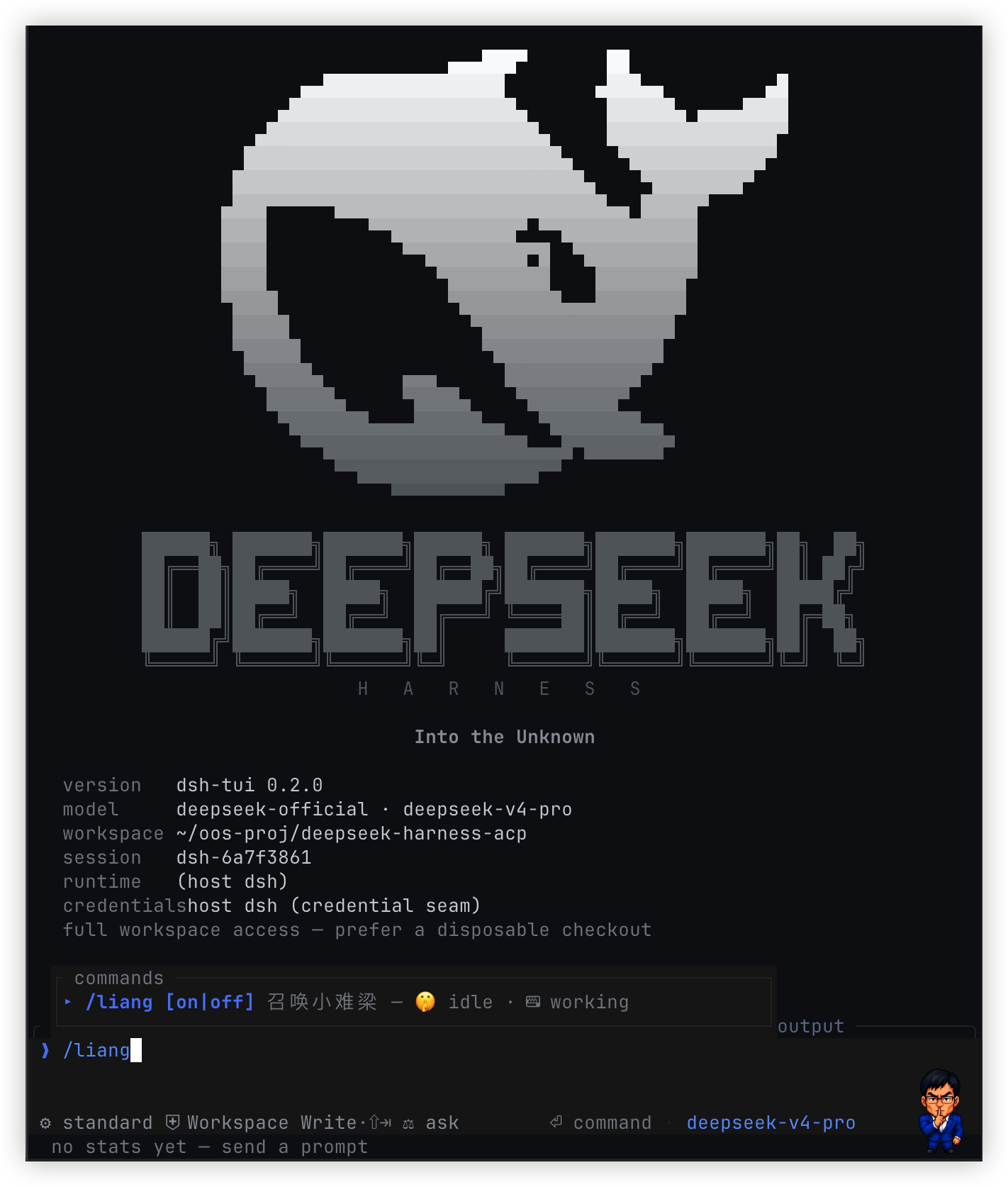
输入框宠物:/liang 🤫
/liang 会在输入框右侧显示小难梁:空闲时安静思考,回合运行时敲小终端。
Ghostty、Kitty 和 WezTerm 等支持 kitty graphics protocol 的终端会显示 RGBA
像素精灵;其他终端退回半块字符鲸鱼。宽度低于 60 列时自动隐藏。
可用 /liang on、/liang off 显式控制。
从源码构建
需要 Rust stable 和 Node.js 18+:
make rust-test
node --test scripts/package-native.test.mjs
bash scripts/build-npm.sh
make rust-build / make rust-test / bash scripts/build-npm.sh 统一经过
scripts/cargo-guard.sh:本仓库 target 超过 20 GiB,或磁盘余量低于
10 GiB 时会先执行 scoped cargo clean。
make rust-cache-status 只读查看,make rust-cache-prune 显式清理;阈值可通过
RUST_CACHE_MAX_GIB / RUST_DISK_MIN_GIB 覆盖。
真实开发 profile 统一用 make tui-test 启动。它先重编
target/debug/dsh-tui,再设置 DSH_TUI_BIN 启动 tui-test,避免 Node HMR
已更新而 Rust painter 仍是旧进程映像。
本地脚本只编译当前平台,并将 tarball 写入 dist/。GitHub Actions 工作流
Package and publish npm 会分别构建以下目录,再汇总为一个 npm 包:
npm/vendor/darwin-arm64/dsh-tui
npm/vendor/darwin-x64/dsh-tui
npm/vendor/linux-x64/dsh-tui
npm/vendor/win32-x64/dsh-tui.exe
推送与 npm/package.json 和 Cargo.toml 版本一致的 tag(例如 v0.1.0)
会通过 npm Trusted Publishing(OIDC)发布到 latest,随后创建带 tarball
的 GitHub Release。版本不一致时 CI 会在发布前失败。
故障排查
no native binary for ...:当前安装包不包含你的平台。确认安装的是 最新版本,并查看上方支持矩阵。spawn dsh-acp ENOENT:安装dsh-acp,或用--agent <cmd>指向其它 ACP server。- 像素宠物不显示:终端可能不支持 kitty graphics protocol;主界面功能 不受影响。
项目结构
src/:TUI 状态机、绘制、协议、runtime 生命周期和会话目录。npm/:Cordis client boot、ACP/compositor mux、CLI shim 与原生二进制。scripts/:本地构建、跨平台打包校验、协议集成测试与资源生成。assets/:截图、主题资源和可选宠物精灵。docs/:分层架构、插件 API、TuiNodeschema、迁移计划与 AI agent 安装说明(索引)。
Agent 通信是 stdio 上的 ACP;Node 与 Rust 之间另有私有 compositor 通道。
实现细节可从 src/acp.rs、npm/lib/boot.js 和
npm/lib/mux.js 开始阅读。插件不要依赖这些传输细节;扩展点见
docs/plugins.md。
License
MIT。本项目与 DeepSeek、xAI 无关联; grok-build 是交互设计参考, DeepSeek Harness 是运行底座。
Read the usage guide →
Install steps, key points, FAQ and compatibility for this plugin — auto-derived from indexed fields.
Listing badge

[](https://deepseek-plugin.org/plugins/openma-ai/deepseek-harness-tui/npm/creator)Paste this markdown into your GitHub README to link back to this listing. The badge only states the listing — not a security endorsement.