Have the DeepSeek Harness Agent write an interactive React mini-app on the fly, and carry the user's selection back to the next round for continued use.

- Language
- TypeScript
- License
- MIT
- Branch
- main
Install
$ dsh plugin --profile web add dsh-plugin-genuiRun the command above in your terminal to install this plugin via the dsh CLI. You can switch Profile in the top-right corner. New to dsh? Read the beginner tutorial
Install via your agent
Install the DeepSeek Harness plugin pengyue-polaron/deepseek-harness-genui for me: review the repository at https://github.com/pengyue-polaron/deepseek-harness-genui first, then run the install command and verify the plugin loads successfully.
Paste this instruction to the DSH Web GUI assistant — it will install and verify for you.
One-Line Pitch
Let the DeepSeek Harness Agent write a React mini-app (simulator, selector, visual control, interactive diagram) on the fly within the current task, and save user selections, form answers, and progress back to the task, so the next round of Agent can directly pick up the results and continue.
Core Capabilities
- Register
genui_create/genui_update/genui_inspect/genui_state_read/genui_rollback: Agent directly produces interactive artifacts from a set of React+TypeScript source code, supporting incremental patches and rollback to any historical version - Provide three built-in visual languages (
material-3,apple-human-interface,shadcn-ui) and customDESIGN.mdimport: the plugin bundles the selected design language into the generated CSS at build time - Sandboxed execution of generated code: Generated React apps run in iframes with Content Security Policy, using HMAC-signed capability tokens to access host APIs; failed updates don't replace the last available version
- Persist task state and authorized permissions: User selections, form drafts, and completed structured results are saved for 7 days; permissions are authorized once per declaration scope and expire after 7 days
- Provide four delivery surfaces: Inline (embedded in conversation), Canvas (right panel), fullscreen, CLI/localhost link; the same task state is shared across all entry points
- Inject tool call discovery budget: Max 2 discoveries and 4 reads per data source, max 6 reads per round; prevents Agent from filling context before generating the UI
Technical Implementation
- Language: TypeScript
- Key Dependencies:
@deepseek-ai/cordis(host injection),@deepseek-ai/dsh-agent/dsh-tools/dsh-system-prompt/dsh-host-webserver(host services),@deepseek-ai/schemastery(config schema),esbuild(generated code bundling),react/react-dom(runtime) - Architecture Pattern: Cordis plugin. Server
applycreatesArtifactRegistry,DesignStore,CapabilityStoreon startup, registers/genuiprefix routes and/.well-known/dsh-genuidiscovery endpoints on the host WebServer, injects two prompt segments into systemPrompt and registers 7 tools; client-sideGenuiToolViewrenders tool calls as card views with progress bars, receipt cards, permission popups, and Canvas drag-drop - Entry Files:
src/index.ts(service side, exportsname/inject/apply) →src/runtime.ts→src/tools.ts; client entrysrc/client/index.tsx
Use Cases
When users提出"挑出几个候选时段 / 调几个参数观察因果 / 追踪一段代码路径 / 做一个可玩的双缝实验"这类需要交互而文字来回很难讲清的任务时,本插件让 Agent 直接生成一段带控件和状态的小应用。普通问答、改写、摘要和简单列表仍只用文字,插件会主动避免"为了显得高级而画蛇添足"。 When tasks involve "seeing a complex relationship" or "making several interdependent choices simultaneously," such as selecting calendar time slots, adjusting parameters to observe causality, tracing code paths, or creating a playable double-slit experiment—this plugin lets the Agent directly generate a small app with controls and state. Regular Q&A, rewriting, summarization, and simple lists still use text only; the plugin actively avoids "adding legs to a snake just to look advanced."
Prerequisites & Compatibility
| Dependency | Minimum Version | Description |
|---|---|---|
| DeepSeek Harness (cordis / dsh-agent / dsh-client-runtime / dsh-client-locale / dsh-client-ui-conversation / dsh-client-ui-slots / dsh-client-ui-tool / dsh-host-webserver / dsh-llm / dsh-mcp-client / dsh-session / dsh-system-prompt / dsh-tools) | ^0.1.0-rc.6 | Host must provide these peer dependencies; this plugin only injects web profile |
| Node.js | ^22.19.0 or >=24.0.0 | package.json#engines hard requirement |
| pnpm | >=11.17.0 | package.json#packageManager declaration; required for local development builds |
| React | ^18.3.1 | peerDependency; runtime injected by host or plugin itself |
| Platform | Cross-platform | No os/cpu restrictions; only depends on Node.js built-in modules (https / fs / dns) |
Installation
dsh plugin --profile web add github:pengyue-polaron/deepseek-harness-genui
Configuration Options
| Configuration | Type | Description | Default |
|---|---|---|---|
| artifactRoot | string | Root directory for generated artifacts and state files, relative to current working directory | .dsh/genui |
| routePrefix | string | URL prefix for plugin mounting on host WebServer, must start with /, contain no //, end without / | /genui |
| maxSourceBytes | integer | Maximum total bytes allowed for single artifact source code (including path and content), range 16384–16777216 | 1048576 (1 MiB) |
The plugin also provides a DESIGN.md default (Auto / Material 3 / Apple Human Interface / shadcn-ui / Custom), switchable in host Settings → Plugins → Plugin Configuration; this doesn't affect the config file above.
FAQ
Q: When should the Agent generate a UI instead of just returning text?
A: When the task involves "seeing a complex relationship" or "making several interdependent choices simultaneously," such as selecting calendar time slots, adjusting parameters to observe causality, tracing code paths. Regular Q&A, rewriting, summarization, and simple lists still only return text; the plugin actively avoids adding unnecessary complexity.
Q: Will the generated app access my MCP credentials or cookies?
A: No. Generated code runs in a CSP-enabled iframe sandbox and can only call tools or HTTPS interfaces explicitly declared during generation. MCP credentials never enter generated code; external requests must be credential-free public HTTPS, and DNS resolution filters private network addresses.
Q: What happens if an app update fails—will the old version be overwritten?
A: No. Each update creates a new version; when compilation fails, that version is only marked as failed and the last ready version is preserved. You can call genui_rollback to switch the current pointer to any historical ready version; failed versions won't be immediately deleted.
Q: How long are task state and authorized permissions retained?
A: Both are 7 days. Task state expires 7 days after the last update; permissions expire 7 days after being granted. After expiration, the Agent cannot read data via genui_state_read and needs to re-save or re-authorize.
Q: Is TUI terminal profile supported?
A: Yes, but not embedded in Canvas. When TUI profile calls genui_create, select the local-link delivery method to get a localhost link; the Agent then reads content saved on the page in the next round via genui_state_read.
Q: How does DESIGN.md work, can I change the default style?
A: Switch the default design in Settings → Plugins → Plugin Configuration: Auto-select, Material 3, Apple Human Interface, shadcn/ui, or import custom DESIGN.md. Generated apps retain their original design; only newly created apps use the new default.
Q: How large can a single app's source code be?
A: Default is 1 MiB, max is 16 MiB. Each app must have src/main.tsx, with allowed imports whitelisted to react, react-dom/client, lucide-react, recharts, date-fns, zustand, framer-motion, and @dsh-genui/sdk; other packages are rejected by the builder.
Q: How do I uninstall this plugin?
A: Run dsh plugin --profile web remove github:pengyue-polaron/deepseek-harness-genui and restart dsh web. Artifact records and state stored under .dsh/genui auto-clean up when their 7-day TTL expires.
Difficulty Level
Advanced — Regular users don't need to write code; they can just describe the task in the prompt and explicitly say "make an interactive UI" to trigger it. To have the Agent refine the UI more appropriately, familiarity with React + TypeScript is helpful, along with the plugin's 7 tools and useArtifactState / callTool / reportResult / requestExternal / watchTool / artifactContext SDK interfaces.
Known Issues & Limitations
- Generated code allows npm packages whitelisted to react, react-dom/client, lucide-react, recharts, date-fns, zustand, framer-motion, and virtual module @dsh-genui/sdk; other dependencies cause builder errors and cannot be used in generated code like lodash, axios, three (src/artifacts/builder.ts:7-17)
- Single artifact source code default cap is 1 MiB, min 16 KiB, max 16 MiB, must contain src/main.tsx; any
.., absolute paths, orindex.htmlare rejected (src/config.ts:18, src/artifacts/paths.ts:13-25, src/artifacts/registry.ts:36-37) - Tool call discovery budget is hardcoded: max 2 discoveries and 4 reads per data source, max 6 reads per round; beyond that, the Agent must continue based on existing evidence and cannot work around it with different queries (src/runtime/discovery-budget.ts:5-7, 71-73)
- External HTTPS requests restricted to no credentials, no hash, no query credentials for public hosts only, DNS filtering 10/127/192.168/172.16-31 private network ranges, response body cap 1 MiB, single timeout 30 seconds (src/runtime/external.ts:13-40, 70-84, 99-106)
- Artifact state and permission grants expire after 7 days; each artifact retains max 20 versions, auto-cleanup of non-current non-latest versions (src/lifecycle.ts:1-3, src/artifacts/registry.ts:311-323)
- Only web profile injects client components (client.runtime / client.locale / client.ui-conversation / client.ui-tool); TUI profile works but won't embed Canvas, can only return localhost links (package.json:121-129, README.md:111)
- Same artifact tool call timeout hard limit is 60 seconds, external HTTPS 30 seconds, oversized request bodies are directly rejected; generated code runs in sandbox iframe, cross-origin management interface gets 403 blocked (src/runtime/server.ts:208-218, 311, 337)
English | 简体中文


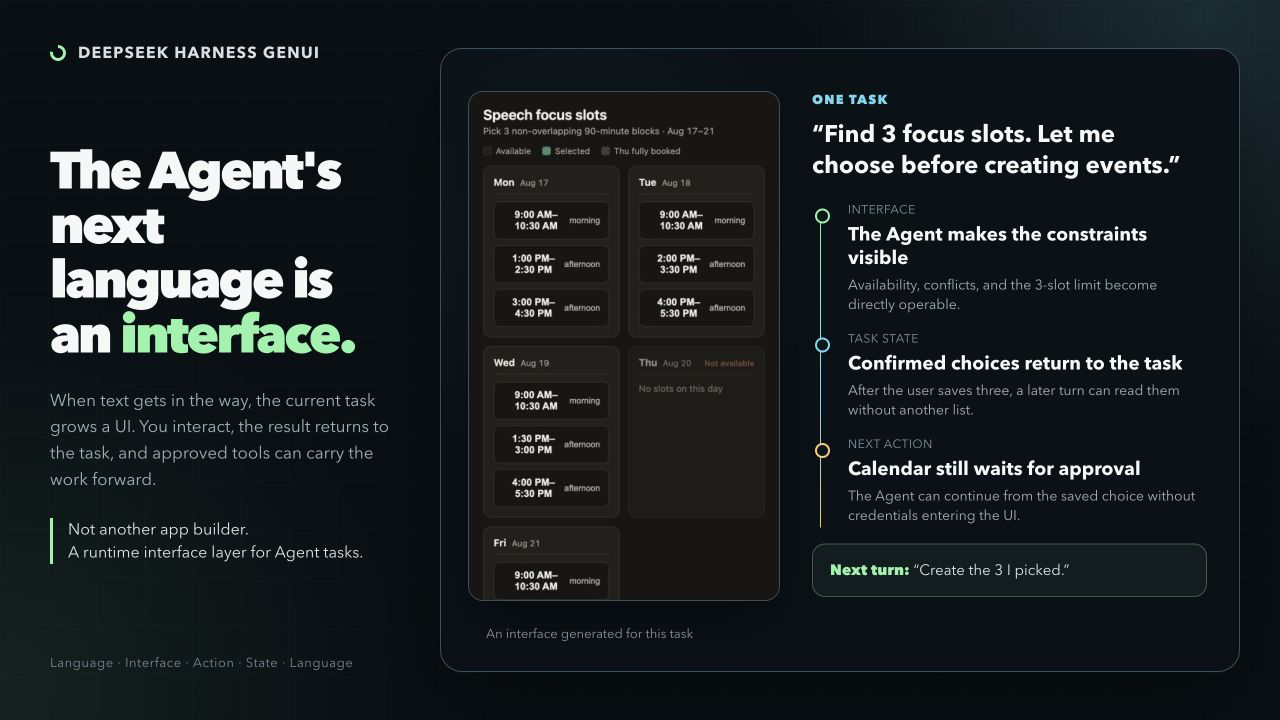
Some tasks are awkward in text. DeepSeek Harness GenUI lets an Agent create a focused interface for the current task: something that explains a difficult relationship or collects a complex user response.
The plugin is code-first. The Coding Agent writes ordinary React + TypeScript, not a component-tree DSL or IR. The interface can save what the user selected, entered, or changed so the next Agent turn can read it and continue the task.
When an Interface Helps
Use an interface when the user needs to see a difficult relationship or make several connected choices. Plain questions, rewriting, summaries, and simple lists stay in prose.
| Pick calendar slots Turn candidate availability into a short list of useful 90-minute writing blocks. The interface saves the three choices to the task. A later calendar action remains separate and asks for approval. | 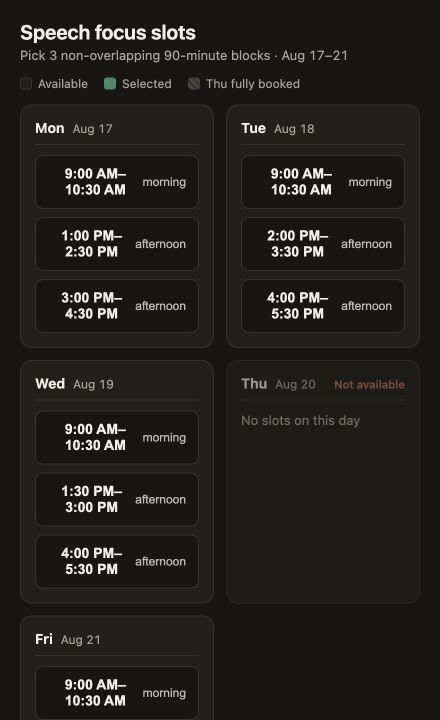 |
| Explore photosynthesis Move light, carbon dioxide, temperature, and stomatal controls to find the limiting step. The diagram changes with the controls, making each variable's effect easier to explore than to describe. | 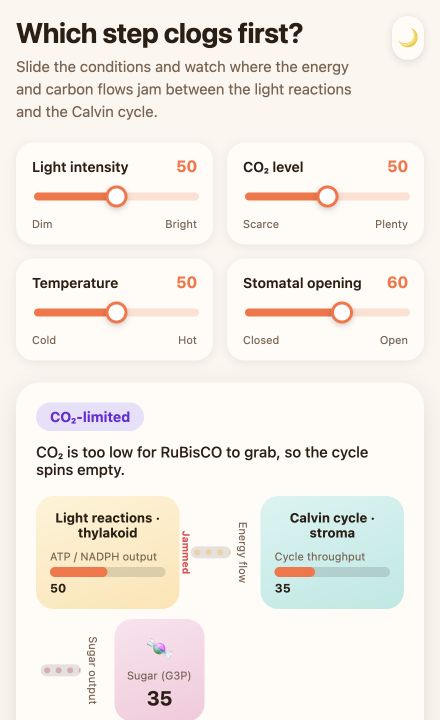 |
| Trace a code path Ask from the CLI for a source-grounded explanation of a real project flow. The result is a local explorer with files, functions, branches, and the path selected by the user. | 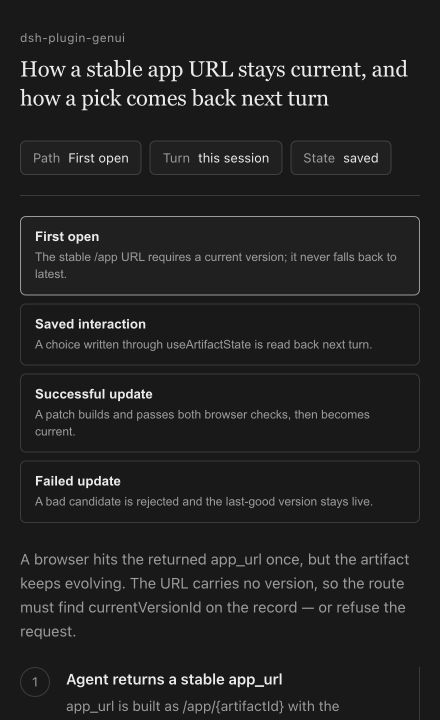 |
Inline & Canvas
The same app can sit inside the answer or open beside the conversation.
| Inline | Canvas |
|---|---|
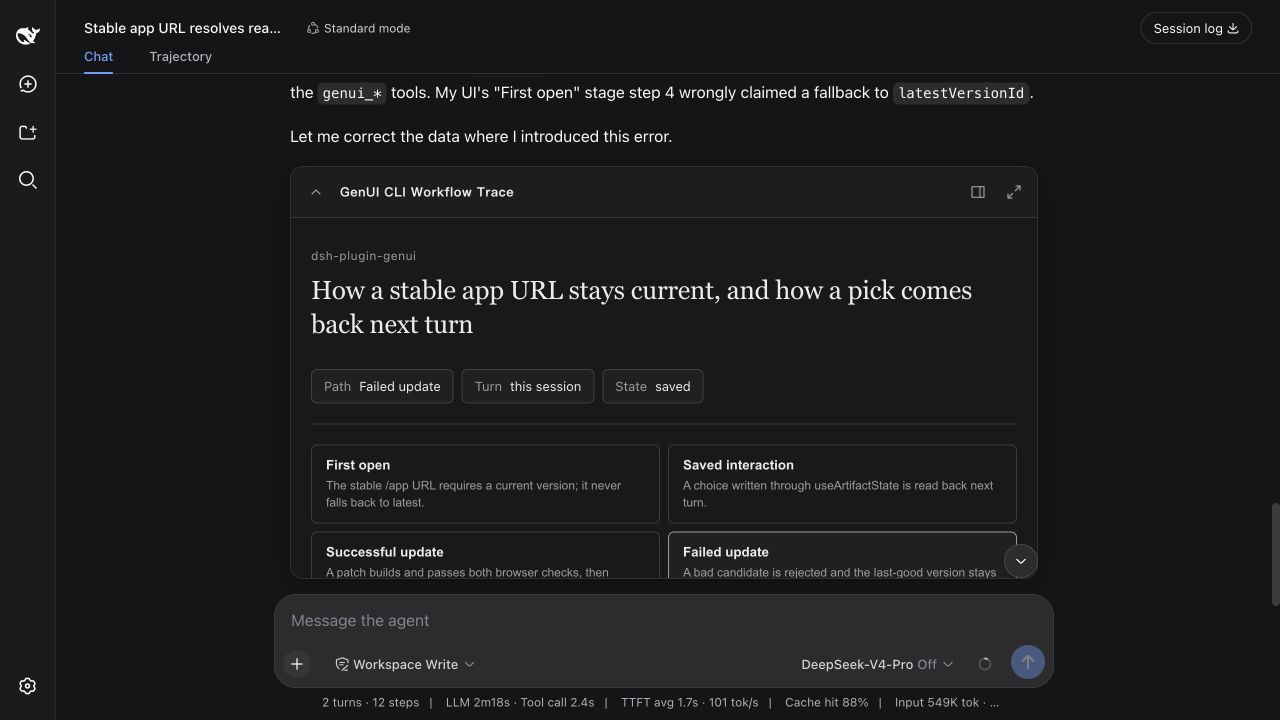 | 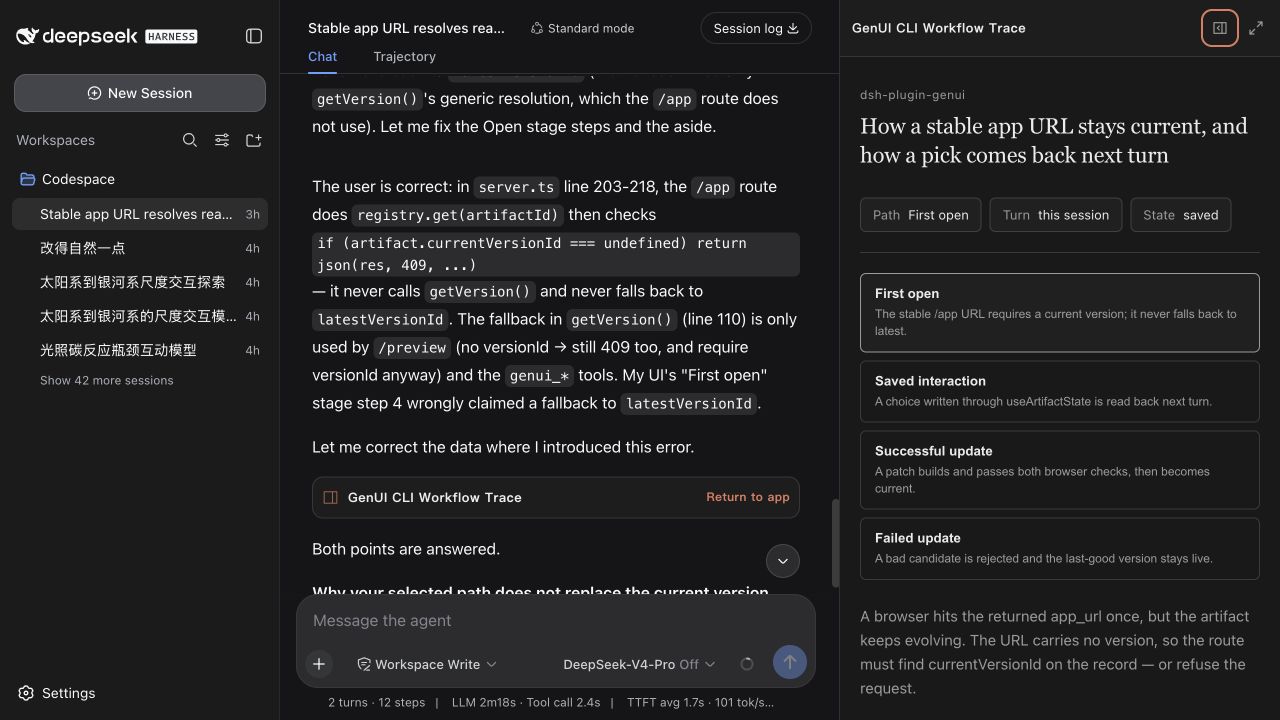 |
| A compact control or focused choice. | More room without covering the conversation. |
Inline, Canvas, fullscreen, and CLI/localhost are different surfaces over the same task state. Selections and inputs saved in one surface remain available to later Agent turns.
CLI Example
The terminal profile returns a localhost app. A follow-up can refer to the path already selected in that app.
❯ Explain how a generated app reaches the permission-gated runtime in this
  repository. Build an interactive code-path explorer and return a localhost URL.

  I mapped src/tools.ts → src/artifacts/builder.ts → src/runtime/server.ts
  → src/artifacts/registry.ts.

  http://127.0.0.1:<port>/genui/app/<task-app>

❯ Where does the path I selected stop?

  It reaches the permission check in src/runtime/server.ts, then stops before
  the connected tool runs because access has not been allowed.
How It Works
- The Agent writes ordinary React + TypeScript and the plugin builds and checks it.
- The interface saves semantic values—selections, form answers, drafts, and progress—to the current task. A follow-up can read those values instead of asking the user to repeat them.
- The app declares only the Harness/MCP/Skill tools or credential-free public HTTPS routes it needs. Before opening a connected app, Harness presents the complete access list for one task-scoped decision; changed capabilities are shown again, and undeclared calls are blocked.
- Later edits update the same app. A failed update never replaces the current working version.
In Web, access can be reviewed or revoked from the app card. MCP credentials never enter generated code.
Why Code-First
Most generative UI systems ask developers to prebuild widgets or maintain a trusted component catalog. This plugin lets the Coding Agent build task-specific React instead. The generated code still runs inside a sandbox, meaningful user state stays with the task, connected actions remain permission-gated, and a failed update never replaces the last working version.
That makes GenUI more expressive than a fixed component catalog, but deliberately narrower than a cross-client UI protocol: it is built for DeepSeek Harness and its task lifecycle.
Task Apps or Component Trees?
Both approaches are useful, but they optimize for different work:
| Choose a component-schema renderer when... | Choose this plugin when... |
|---|---|
| The result is a compact card, table, chart, or form assembled from a known catalog. | The task needs a purpose-built React app whose structure and interactions are not known in advance. |
| Small, predictable model output and portable rendering matter most. | Free-form simulations, spatial tools, connected workflows, or multi-step state matter most. |
| An interaction can be represented as a component event. | The user's selections and edits need to become task state that the next Agent turn can read. |
This project does not replace lightweight dsh-ui component renderers. It covers the code-first, task-specific side of GenUI.
DESIGN.md
Open Settings → Plugins → Plugin configuration to set the default design for new apps. Choose automatic selection or a built-in profile, import a custom DESIGN.md, or export the selected one as a starting point. Once selected, it becomes the default for apps created later, so the style does not need to be repeated in every prompt. Existing apps keep their original design.
DESIGN.md controls the design language, not the page structure. React + TypeScript remains free to implement simulations, graphics, maps, timelines, code graphs, animation, and irregular layouts.
| Design | Visual language |
|---|---|
material-3 | Google Material 3: tonal surfaces, expressive color, clear hierarchy, and touch-friendly controls |
apple-human-interface | Apple Human Interface: calm, precise, content-led, and familiar system-like controls |
shadcn-ui | shadcn/ui: semantic tokens, crisp borders, compact forms, and complete interaction states |
Install
Use Node.js ^22.19.0 || >=24. The plugin supports DeepSeek Harness ^0.1.0-rc.6.
dsh plugin --profile web add dsh-plugin-genui
dsh --profile web
The Web profile supports Inline, Canvas, fullscreen, and localhost links. For a terminal profile, replace web with tui; TUI returns localhost links and does not embed Canvas. Connect MCP servers to the same profile as usual.
The plugin does not download or launch a browser. Every candidate is compiled and checked against the source contracts before it can replace the last working version. The repository CI separately exercises the sandboxed runtime in Chromium; plugin users do not need it.
Try It in Two Minutes
Start a new Web session and paste one of these prompts:
Plan a Saturday route with a museum, a riverside garden, and dinner. Build an
interface where I can change the times and make the garden optional.
Trace how a generated app reaches the permission-gated runtime in this
repository. Build an interactive code-path explorer grounded in the source.
Build an interactive double-slit experiment. Let me change wavelength, slit
spacing, and screen distance and see the interference pattern update.
After changing and saving something in the interface, ask:
What did I just choose in the interface? Continue from the saved result.
The useful proof is not only that an interface appears—it is that the next Agent turn can continue from the interaction.
Safety
Generated code runs in a sandbox. Direct API requests are limited to declared, credential-free public HTTPS routes. Temporary links and grants expire after 7 days; saved task state expires 7 days after its last update. Return to the app card in the task to review or remove access.
The plugin uses DeepSeek Harness + Cordis, React 18 + TypeScript, and esbuild. Repository tests use Playwright and Vitest.
Development
Building from source requires pnpm 11.
Chromium is needed only to run the repository's browser end-to-end tests. It is not installed or launched by the plugin.
pnpm install
pnpm exec playwright install chromium
pnpm run typecheck
pnpm test
pnpm run package:plugin
Acceptance scenarios · Contributing · MIT
Read the usage guide →
Install steps, key points, FAQ and compatibility for this plugin — auto-derived from indexed fields.
Listing badge

[](https://deepseek-plugin.org/plugins/pengyue-polaron/deepseek-harness-genui)Paste this markdown into your GitHub README to link back to this listing. The badge only states the listing — not a security endorsement.